Yes, you can run Neovim on your phone in 2026. There are three realistic paths, and which one wins depends on your phone and how far you push plugins. On Android, Termux installs real local Neovim 0.12.3 with one command and runs offline. On iPhone, the only fully local option is iVim, which is a Vim port, not Neovim, so no Lua config and no LSP. When you want a full modern Neovim, with Mason installing every language server, Treesitter compiling, and your plugins intact, we open a cloud Ubuntu container from a native app, because its x86_64 userland skips the architecture fight that trips up on-device setups. This guide tells you which path wins when, with the exact commands.
tl;dr
Android, local + offline: Termux +
pkg install neovim (0.12.3). iPhone, local:
iVim, though it's Vim, not Neovim. Full modern Neovim with Mason and LSP that just works, on either phone: a cloud Ubuntu container reached from a native app. We ship Cosyra with vim pre-installed and neovim one apt command away; plans start at $20/month,
and eligible new users can start a 7-day free trial in the App Store app.
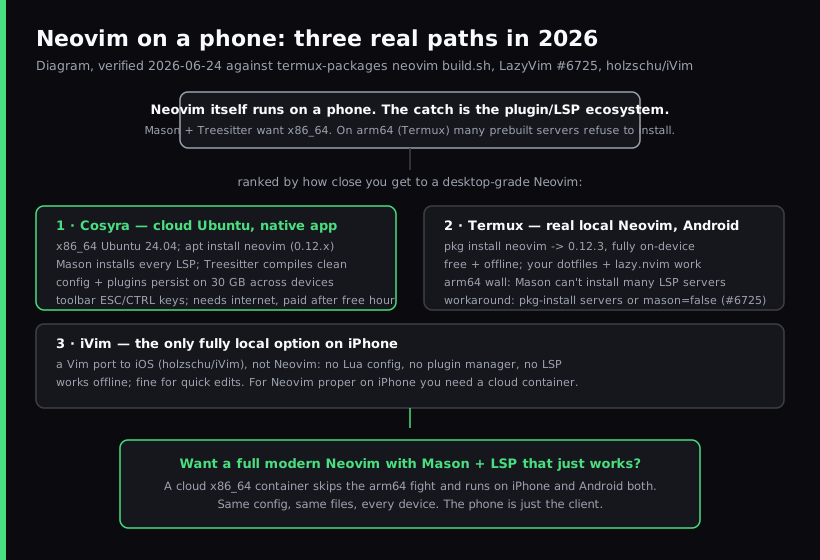
The three realistic paths to run Neovim on a phone
Every "Neovim on my phone" question collapses to one of these three answers. They are not equivalent. The editor binary is the easy part. Neovim runs in all three. What separates them is whether the plugin and language-server ecosystem comes along, and whether you can use it offline.
| Path | Platform | Neovim version | Plugins + LSP | Offline | Cost |
|---|---|---|---|---|---|
| Termux | Android | 0.12.3 (local) | Plugins yes; Mason LSP limited on arm64 | Yes | Free |
| iVim | iOS | n/a (it's Vim, not Neovim) | None (no plugin manager, no LSP) | Yes | Free |
| Cosyra cloud container | iOS, Android, web | 0.12.x (Ubuntu 24.04, x86_64) | Full Mason + LSP + Treesitter | No | From $20/mo |
Our opinion, which a desktop-Neovim blog probably wouldn't lead with: the
Neovim binary running on a phone is not the interesting question; it has run
on Termux for years. The interesting question is whether
:Mason can install the language servers your config expects. Two
of these three paths say "some of them," and one says "all of them." That is the
decision.
Path 1: a cloud Ubuntu container
For a full modern Neovim that behaves exactly like the one on your laptop, the practical answer is a cloud Linux container reached from a native phone app. We built Cosyra for this case: every signup gets an isolated Ubuntu 24.04 workspace on Azure, x86_64, with Git, Node.js, Python, tmux, and vim pre-installed, and Neovim one command away.
# Inside a Cosyra workspace, reached from the iOS/Android app
apt install neovim          # Neovim 0.12.x on Ubuntu 24.04
git clone https://github.com/you/dotfiles ~/.config/nvim
nvim                        # lazy.nvim bootstraps your plugins
# :Mason -> installs language servers the way it does on a laptop
Because the workspace is real x86_64 Ubuntu, the things that fight you on a
phone's arm64 userland just work: :MasonInstall clangd installs,
pyright installs, Treesitter parsers compile against the local toolchain.
Your init.lua runs unchanged. And because the 30 GB of storage is
persistent, your config survives session hibernation and is the same whether you
open it from an iPhone on the couch or an Android phone the next morning. The
modal-editing friction is handled by a terminal toolbar pinned above the keyboard
with dedicated ESC, TAB, CTRL, ALT, and arrow keys, the keys Neovim leans on hardest.
The honest trade-off: no offline mode. The container lives in the cloud, so a flight with no Wi-Fi is dead air, and Termux wins on that one dimension. For everything else (full LSP, persistent config, the same Neovim on every device), the cloud container is the path that needs no apologies. The mobile coding terminal pillar covers how this category sits next to local terminals, and TUI apps on phone goes deeper on running tmux, htop, and other full-screen terminal apps from glass.
Try Neovim from your phone in a few minutes. Plans start at
$20/month, and eligible new users can start a 7-day free trial in the App Store
app. vim is pre-installed and neovim is one apt install away, with
Mason and LSP working on x86_64.
Path 2: Termux on Android
Termux is the honest local answer on Android. It is a free, open-source
terminal emulator with its own apt-style package manager, and it ships real
Neovim. The termux-packages neovim build script we re-read on 2026-06-24 pins TERMUX_PKG_VERSION=0.12.3, so a
clean install gives you Neovim 0.12.3 on-device.
# From a fresh Termux install (F-Droid build recommended)
pkg update && pkg upgrade
pkg install neovim git
nvim --version              # NVIM v0.12.3

# Bring your config; lazy.nvim bootstraps on first launch
git clone https://github.com/you/dotfiles ~/.config/nvim
Your dotfiles and a Lua-based lazy.nvim setup work the same way they
do on a desktop. The wall you hit is language servers. Mason downloads prebuilt
binaries, and many are published for x86_64 only, while Termux runs on arm64.
The canonical report is
LazyVim Discussion #6725: :MasonInstall clangd fails as "unsupported" even when a working
system clangd already exists, and the tracked cause sits in mason.nvim issue #1578 (clangd on aarch64 unsupported). The fix is to stop asking Mason:
# Install servers Termux packages, then skip Mason for them
pkg install clang                 # provides a working clangd
pkg install python-lsp-server     # Python LSP

# In your Lua config, use the system binary instead of Mason:
# { "neovim/nvim-lspconfig", opts = { servers = { clangd = { mason = false } } } }
The other Android caveat is the phantom-process killer: on Android 12+, the OS can reap background processes, which matters for long language-server or build sessions. The Termux README documents it; on Android 14+ you disable it under Developer Options. If you want a full Ubuntu or Debian environment on Android instead of Termux's Bionic-libc world, the Linux container on Android guide covers proot-distro, UserLAnd, and a cloud x86_64 container.
Path 3: iVim on iPhone
On an iPhone there is no native Neovim, and there is not going to be one.
The closest fully local editor is iVim, a Vim port to iOS available on the App Store. It is genuinely useful for
what it is: it opens, edits, and saves files offline with full Vim motions,
imports custom fonts, and adds an extended keyboard row that covers symbols
the system keyboard hides. What it is not is Neovim: no init.lua, no plugin manager, no built-in LSP client, no Treesitter.
So on iPhone the split is clean. If you want Vim motions on a file you have in iCloud, iVim is fine and free. If you want Neovim, meaning your plugins, your language servers, your Treesitter highlighting, the only path that delivers it on iOS is a cloud container where Neovim runs server-side and the phone is the client. There is no third option that runs a real Neovim plugin ecosystem locally on an iPhone today.
When each path actually wins
Decision framework, deliberately blunt:
- "I'm on Android and want Neovim in a subway tunnel with no signal."
Termux.
pkg install neovim. Real local 0.12.3, offline, free. Accept the arm64 language-server ceiling. - "I'm on iPhone and just want Vim motions on a file, offline." iVim. It's Vim, not Neovim, but it's the only fully local option and it does that job.
- "I want my full LSP and Treesitter setup with no architecture workarounds." A cloud Ubuntu container. Mason installs servers like it does on a laptop because it's x86_64. This is the only path where your desktop config runs unchanged.
- "I want the same Neovim on my iPhone and my Android phone." A cloud container. It's the only path that reaches both, with the same config and files on each.
- "I'm pairing Neovim with an AI coding agent from my phone." A cloud container, where Claude Code, Codex CLI, OpenCode, and Antigravity CLI are pre-installed next to your editor. Our Claude Code on phone guide walks through the agent side, and code Python on phone covers the runtime side.
Worked example: clone your config and get LSP running
The test that separates these three paths is a single workflow: clone your dotfiles, open a file, and ask for an LSP rename. Same steps, three very different outcomes.
- Termux: config clones and plugins install.
:Masoninstalls the pure-Lua and pkg-backed servers;:MasonInstall clangdfails on arm64, so you fall back topkg install clangplusmason = false. LSP rename then works. - iVim: there is no config to clone, no plugin manager, no LSP.
You get Vim's built-in rename-by-substitute (
:%s), not an LSP-aware rename. For a quick edit, fine; for project-wide refactors, no. - Cosyra cloud container: config clones, plugins install,
:MasonInstall clangd pyrightboth succeed on x86_64, and the LSP rename behaves exactly as it does on your laptop. This is the same Neovim experience, reached from a phone.
That workflow is the whole guide condensed. If your phone Neovim is for offline edits on Android, Termux is enough. If it's for a full LSP-driven setup, or you're on an iPhone at all, a cloud Ubuntu container is the path that doesn't require apologizing for itself.
FAQ
Can you run Neovim on an iPhone?
Not natively. The closest fully local option is iVim, which is a Vim port to iOS, not Neovim, so there is no Lua config, no plugin manager, and no LSP. Neovim's own install documentation lists no iOS target, and there is no App Store build of Neovim itself. If you specifically want Neovim, your init.lua, lazy.nvim, Treesitter, LSP, on an iPhone, the realistic path is a cloud Ubuntu container reached from a native app, where Neovim runs server-side on x86_64 and the phone is just the client.
What version of Neovim does Termux install?
As of 2026-06-24, the Termux neovim build script pins TERMUX_PKG_VERSION=0.12.3, so a clean pkg install neovim gives you Neovim 0.12.3 on Android arm64. That is current enough for modern config conventions (Lua, lazy.nvim, built-in LSP client). The catch is not the editor version. It is which plugins and language servers you can install on arm64, covered below.
Why does Mason fail to install language servers in Neovim on Termux?
Mason downloads prebuilt language-server binaries, and many of those are published for x86_64 (and sometimes glibc) only, while Termux runs on Android's arm64 Bionic-libc userland. A representative report is LazyVim Discussion #6725, where :MasonInstall clangd fails as unsupported even though a working system clangd already exists from pkg install clang. The tracked root cause is on Mason's side. See mason.nvim issue #1578 (clangd on aarch64 unsupported). The workaround is to install servers with pkg and set mason = false for them so Neovim uses the system binary. On an x86_64 cloud container this whole class of problem disappears. Mason installs servers the way it does on a Linux laptop.
Will my existing Neovim config and plugins work on a phone?
Mostly, yes. Clone your dotfiles into ~/.config/nvim and a Lua-based setup with lazy.nvim bootstraps on first launch the same way it does on a desktop, on both Termux and a cloud container. The parts that fight you on Termux are the ones that ship native binaries: Mason-installed language servers (arm64 gap above) and Treesitter parsers that compile against the local toolchain. On a cloud x86_64 container those compile and install unchanged, which is the main reason we reach for one when we want our full plugin set rather than a trimmed mobile config.
Is a phone keyboard actually usable for a modal editor like Neovim?
The single real objection to Neovim on glass is the ESC key. Modal editing lives or dies on a fast, reliable Escape. Local iOS terminals solve it with extended key rows; iVim documents adding compact buttons that cover keys the system keyboard hides. We solve it in Cosyra with a terminal toolbar pinned above the keyboard that has dedicated ESC, TAB, CTRL, ALT, and arrow keys. Our honest opinion, which a desktop-Neovim blog probably wouldn't share: once ESC and CTRL are one tap away, Neovim on a phone is genuinely good, not a party trick. Most people who say the keyboard kills it are picturing typing a 500-line file on the train, but the real mobile loop is navigating, running an LSP rename, and editing a handful of lines.
Neovim on Termux versus a cloud Ubuntu container: which should I use?
Use Termux if you are on Android, want it free, and need it to work with no signal, a subway tunnel, a flight. You get real local Neovim 0.12.3 and you accept the arm64 ceiling on prebuilt language servers. Use a cloud container if you are on an iPhone (Termux has no iOS build), or you want your full LSP and Treesitter setup to install with zero architecture workarounds, or you want the same config and files on every device. We built Cosyra for the second case; the trade-off we won't hide is that it needs internet.
Recap
Neovim on Android, local and offline → Termux + pkg install neovim
(0.12.3), with a mason = false fallback for arm64 language servers.
Local editing on iPhone → iVim, but it's Vim, not Neovim. Full modern Neovim
with Mason and LSP that just works, on either phone → a cloud Ubuntu container
reached from a native app.
We built Cosyra for the last case. Core is $20/month and Pro is $30/month, with 120 hours of compute and 30 GB of persistent storage. Eligible new users can start a 7-day free trial in the App Store app.