You can run Claude Code skills on your phone today, iPhone or Android, the
same way you run Claude Code itself: from a cloud Linux container reached by
a native terminal app. Skills are folders with a SKILL.md file in
your home directory, so the question is not whether Claude Code can find them
on a phone, it is whether your phone has a real home directory that persists.
With Cosyra for iOS or
Cosyra for Android the answer is yes, and the skill
you wrote on the couch is loaded on the train. Plans start at $20/month.
This guide was written by the Cosyra team. We use Claude Code skills daily inside our own Cosyra containers from both iPhone and Android, and every claim about the skills feature is checked against the official Claude Code skills documentation and the Anthropic Agent Skills launch post, re-verified against the current docs and the npm release channels on 2026-06-30 (Claude Code was on the 2.1.x line, pricing and the skills model unchanged).
The mobile-specific point most posts miss: on a phone, a
personal skill at ~/.claude/skills/ pays off far more
than a project skill. Phone keyboards are slow. The fewer times you have to
retype the same instructions, the more agent-driven coding from a phone actually
feels worth it. We treat ~/.claude/skills/ on a Cosyra container
as our portable agent toolbox.
What are Claude Code skills?
Skills are folders Claude Code loads on demand to extend what it can do.
Each skill is a directory with a SKILL.md file, plus optional scripts,
templates, or reference docs the skill points at. The
SKILL.md has YAML frontmatter (at minimum, a
description) and markdown instructions Claude follows when the
skill loads. The official docs put it this way: "Create a
SKILL.md file with instructions, and Claude adds it to its toolkit.
Claude uses skills when relevant, or you can invoke one directly with /skill-name."
Anthropic launched Agent Skills on 2025-10-16 and published the spec as an
open standard at agentskills.io on 2025-12-18. Custom slash commands you
might have written in .claude/commands/ still work, but skills have
replaced them as the recommended pattern. The difference: a skill is a directory,
so it can carry supporting files; a command is a single markdown file.
Where Claude Code looks for skills
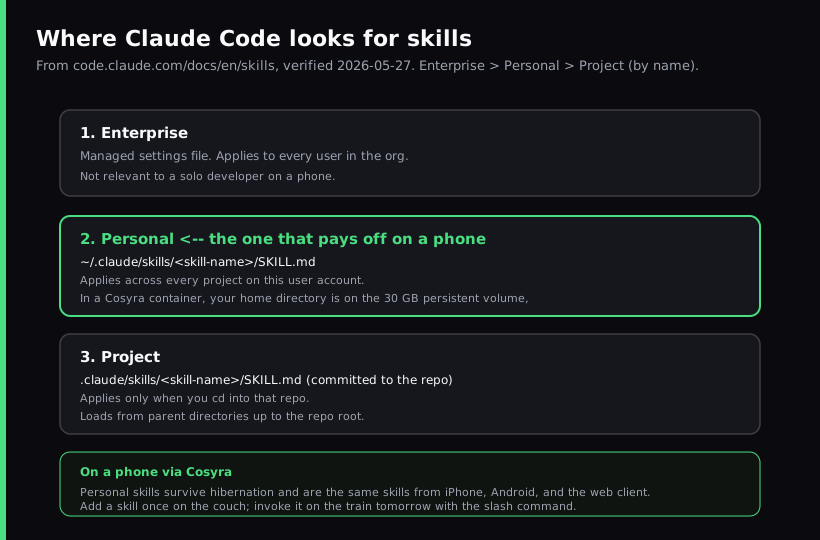
Three locations, with a clear priority order. The same skill name at two levels collapses to the higher level: enterprise overrides personal, personal overrides project.
| Location | Path | Applies to |
|---|---|---|
| Enterprise | Managed settings (see Claude Code settings docs) | All users in your org |
| Personal | ~/.claude/skills/<name>/SKILL.md | All your projects |
| Project | .claude/skills/<name>/SKILL.md | This repo only |
| Plugin | <plugin>/skills/<name>/SKILL.md | Wherever the plugin is enabled |
Project skills also load from .claude/skills/ in every parent directory
up to the repo root, and from nested
.claude/skills/ directories you cd into during the session.
Why skills change the math on a phone
Coding from a phone has a real cost we have learned to respect: every
keystroke is slower, autocomplete fights you more, and copy-pasting a long
prompt from a notes app is the kind of break-the-flow micro-task that kills
a 20-minute coding window on the train. The opinion we hold, which the
desktop-skills crowd would push back on: on a phone, personal skills earn their keep faster than they do on a
laptop. A laptop user can keep a long CLAUDE.md and paste snippets without
thinking. A phone user retyping the same five-line instruction loses the
whole point of agent-driven coding. A /commit-msg shortcut you typed
once on the couch is one slash command on the train tomorrow.
Personal skills live in your home directory. In a Cosyra container the home
directory is on a 30 GB persistent volume, so the skill you write today is
at ~/.claude/skills/commit-msg/SKILL.md tomorrow, after the container
has hibernated and resumed, and the same skill loads when you open the same container
from a different device. That cross-device part is what we mean by "the skill
on the couch loads on the train." It is the same container, so it is the same
~/.claude/skills/.
Setup: write your first skill in a Cosyra container
Five minutes, four commands. The example here is a skill that turns
git diff HEAD into a short, structured commit-message draft, because
that is the friction we feel most often when coding from a phone.
Step 1: Open a Cosyra container
Download from the App Store or Google Play. Sign in with Apple, Google, or email. On first launch we provision a fresh Ubuntu 24.04 container with Claude Code, Codex CLI, OpenCode, and Antigravity CLI already installed, plus Node.js, Python, Git, and tmux.
Welcome to Cosyra.
Ubuntu 24.04.1 LTS (x86_64)
Pre-installed: claude, codex, agy, opencode
$ claude --version
2.1.x
Step 2: Create the personal skills directory
Personal skills live under ~/.claude/skills/. Make a directory
named after the slash command you want. We use commit-msg here.
$ mkdir -p ~/.claude/skills/commit-msg
$ ls ~/.claude/skills
commit-msg
Step 3: Write SKILL.md
Open ~/.claude/skills/commit-msg/SKILL.md in nano or vim. The YAML
description is the field Claude uses to decide whether to load the
skill automatically when you describe a task, so write it as a sentence that names
the trigger.
$ nano ~/.claude/skills/commit-msg/SKILL.md
---
description: Drafts a Conventional Commit message from the current
unstaged and staged diff. Use when the user asks for a commit
message or wants to commit their changes.
---
## Current diff
!`git diff HEAD`
## Output format
Write a Conventional Commit subject line under 60 chars, then a
blank line, then 2-4 bullet points covering the why. Skip the
body if the change is a single-file rename or formatting pass.
The !`git diff HEAD` line uses Claude Code's dynamic context injection:
before Claude reads the skill, the runtime executes the command and inlines the
output. That is the trick that lets a skill feel less like a template and more
like a live tool, and it is the same trick the bundled
/code-review and /debug skills use.
Step 4: Invoke the skill
Run claude in your repo and type /commit-msg. The
directory name becomes the command. You can also describe what you want and
let Claude load the skill from its description.
$ cd ~/projects/some-repo && claude
$ /commit-msg
fix(auth): correct token expiry comparison
- expires_at was compared with a string; coerced to Date
- added regression test in auth.spec.ts
Step 5: Open the same container on another device
Open Cosyra on your iPad or in the web client, point it at the same
container, and the skill is there because ~/.claude/skills/ is on
persistent storage. No sync step. The skill you wrote on iPhone is the skill loaded
on Android.
One detail that matters more on a phone than a laptop: you do not have to
restart Claude Code after editing a skill. The docs call this live change
detection. Edits to a skill already under ~/.claude/skills/ or a
project .claude/skills/ take effect within the current session (verified
2026-06-30 against
the Claude Code skills docs). Only creating a brand-new top-level skills directory needs a restart. So
the loop on a phone is tight: tweak the SKILL.md, save, re-run
the slash command in the same session, no app reload on a flaky train
connection.
Try Cosyra. Eligible new users can start a 7-day free trial
in the App Store app. Claude Code is pre-installed, your
~/.claude/skills/ directory lives on the 30 GB persistent volume,
and the same container is reachable from iPhone, Android, and the web client.
App Store /
Google Play /
Pricing details
Five skills that earn their keep on a phone
These are the ones we actually use from a phone, in the Cosyra container we keep open for personal work. None are clever. All save typing.
-
/commit-msg. Turnsgit diff HEADinto a Conventional Commit. The example above. -
/pr-summary. Pipesgit log main..HEADinto a 4-line PR description. We invoke this before opening a pull request from a phone, because writing a good PR body on a phone keyboard is the part we used to skip. -
/morning-status. Runsgit statusandgit stash listacross our top three repos and prints what we should look at first. Useful as the first command after the container resumes. -
/run-tests. Knows the test command for each of our repos (Vitest here, pytest there) and runs the right one without us having to remember. -
/oncall-checklist. A static checklist for what to verify when a deploy alarm fires. No dynamic input, just a skill we can invoke instead of fishing the checklist out of Notion on a phone.
The pattern: each skill replaces a piece of typing or a piece of memory. None replaces thinking.
Personal vs project skills on a phone
The default we recommend on a phone is personal. The
/commit-msg and /pr-summary kind belong at
~/.claude/skills/ because they apply to every repo you touch. Reserve
project skills for the per-repo rules a teammate should also pick up when they
clone the repo on a laptop: the project's test command, its deploy steps, its
code-review checklist. Those go in
.claude/skills/ and get committed.
A trade-off worth naming: a personal skill on a phone is not visible to
anyone else. If you want the skill to outlive your container or your Cosyra
account, copy the directory into a repo you control and commit it. We keep a
small dotfiles repo with .claude/skills/
in it for exactly this; cloning it into a new container gives us our skills back
in one command.
Honest trade-offs
Where this approach is worse than a laptop, and we will say so:
- Editing markdown on a phone keyboard is slow. We write the description on a laptop when we can and add the body on a phone, or use a Bluetooth keyboard. A 60-line skill on a phone keyboard is painful; a 15-line skill is fine.
- No offline mode. The container lives in the cloud, so no internet
means no skill. Termux on Android can run a local
~/.claude/skills/without that constraint, with all the Termux trade-offs we cover in Cosyra vs Termux. - You pay Anthropic for the tokens. Skills do not change that. They reduce typing, not API spend. Bring your own key.
Next steps
The single takeaway: skills are five-minute files that pay off most when the
keyboard is slowest. Start with /commit-msg, add
/pr-summary when you write your next PR from a phone, and stop there
until you feel the next friction point. If you have not yet got Claude Code running
on the phone in the first place, our
Claude Code on your phone
guide is the prerequisite, and the
AI coding agents on mobile pillar covers the same problem space for Codex CLI, OpenCode, and Antigravity
CLI.
Frequently asked questions
What are Claude Code skills?
Skills are folders Claude Code loads on demand to extend what it can do.
Each skill is a directory with a SKILL.md file that has YAML frontmatter
(at minimum, a description) and markdown instructions. Claude
can load a skill automatically when the description matches your prompt,
or you can invoke it directly with a slash command.
[source: Anthropic, Claude Code docs, Extend Claude with skills]
Where does Claude Code store skills on disk?
Three places, in priority order. Enterprise managed settings override
personal; personal overrides project. Personal skills live at
~/.claude/skills/<skill-name>/SKILL.md and apply across every
project on your user account. Project skills live at
.claude/skills/<skill-name>/SKILL.md inside the repo and
apply only when Claude Code starts in that tree. Plugin skills are namespaced
as plugin-name:skill-name.
[source: Anthropic, Claude Code docs, Where skills live]
Can I write Claude Code skills on my phone?
Yes, if you reach a real Linux shell with persistent storage from the
phone. Skills are plain text files in your home directory, so creating one
is a mkdir and an editor. The friction on a phone is not Claude
Code, which runs fine in a cloud container, it is editing markdown with a touch
keyboard. We write skill descriptions on a laptop when we can; the body of the
skill is short enough to edit on a phone when we cannot.
[source: Cosyra guide, Claude Code on your phone, hands-on setup]
Do skills survive when Claude Code closes on a phone?
Yes, because skills are files in your home directory, not session state.
In a Cosyra container the home directory sits on a 30 GB persistent
volume, so a skill written today is still at
~/.claude/skills/foo/SKILL.md tomorrow, on a different device,
after the container has hibernated and resumed.
[source: Cosyra homepage, 30 GB persistent storage, hibernation behavior]
When did Anthropic launch Claude Code skills?
Anthropic announced Agent Skills on 2025-10-16 in the engineering post "Equipping agents for the real world with Agent Skills," and published the spec as an open standard at agentskills.io on 2025-12-18. Claude Code skills follow that standard with a few Claude-Code-specific extensions (invocation control, subagent execution, dynamic context injection).
[source: Anthropic engineering, Equipping agents for the real world with Agent Skills]
Do I have to restart Claude Code after editing a skill on my phone?
No, not for edits to a skill that already exists. The docs describe live
change detection: Claude Code watches the skill directories and adding,
editing, or removing a skill under ~/.claude/skills/, the
project .claude/skills/, or a .claude/skills/ inside
an --add-dir directory takes effect within the current session
without restarting. The one case that still needs a restart is creating a top-level
skills directory that did not exist when the session started. On a phone this
is one fewer app restart on a slow connection: edit
SKILL.md, save, re-invoke the slash command in the same
session.
[source: Anthropic, Claude Code docs, Live change detection]
Are Claude Code skills the same as custom slash commands?
Yes, custom commands and skills were merged. The docs note that
.claude/commands/deploy.md and
.claude/skills/deploy/SKILL.md both create
/deploy and work the same way; existing
.claude/commands/ files keep working. Skills add a directory for
supporting files and frontmatter to control invocation. If a skill and a command
share the same name, the skill wins.
[source: Anthropic, Claude Code docs, Custom commands merged into skills]
Will my Claude Code skills sync to Claude.ai or Cursor?
Not automatically as of 2026-06-30. Skills follow an open standard at
agentskills.io, so the same SKILL.md is, in principle, portable.
In practice each tool reads skills from its own location, and there is no built-in
sync between Claude Code on your machine and Claude.ai or Cursor. Copying the
directory is a one-line cp.
tl;dr
Claude Code skills are folders with a SKILL.md in
~/.claude/skills/ (personal) or
.claude/skills/ (project). On a phone, personal skills are the
ones that pay off, because they cut typing on a slow keyboard. With Cosyra,
~/.claude/skills/ lives on the 30 GB persistent volume, so a skill
written on the couch is loaded on the train, same container, every device. Start
with /commit-msg; add the next when you feel the next
friction.
App Store / Google Play. Core is $20/month and Pro is $30/month. Eligible new users can start a 7-day free trial in the App Store app. See pricing.
Use Claude Code skills from your phone. Open Cosyra,
mkdir -p ~/.claude/skills/<name>, write
SKILL.md, invoke with the slash command. The skill loads next
time, on every device.
App Store /
Google Play /
Pricing