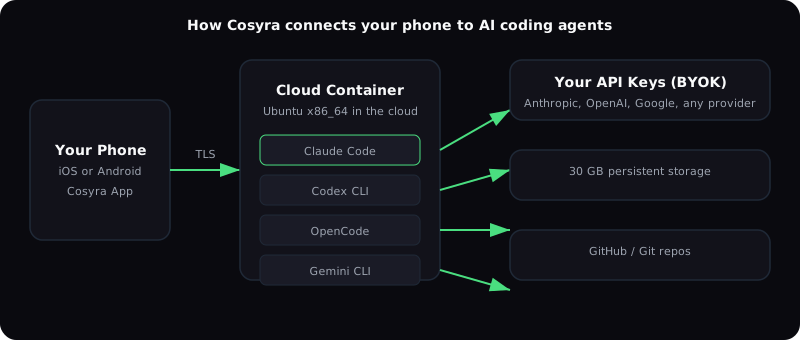
You can run Claude Code, Codex CLI, OpenCode, and Antigravity CLI on your phone right now. Install Cosyra for iOS or Cosyra for Android, add your API keys, and you get a full Ubuntu container with all four agents pre-installed. No SSH setup, no always-on laptop, no browser tabs that time out. We built this because we kept wanting to check on agent work from the couch or approve a Claude Code permission request while walking the dog, and the existing options were either fragile SSH chains or monitor-only dashboards.
This guide covers why phone-based AI coding works, how each agent runs on mobile, three approaches you can take, and step-by-step setup on Cosyra. If you want the broader context first (any terminal, not just AI agents), the mobile coding terminal pillar sets the stage, and if you are weighing which of these agents to run, AI coding agent CLIs compared ranks all eight on license, cost, and mobile reach. Plans start at $20/month.
Quick decision. Pick the agent you came for:
- Claude Code: deep codebase understanding, multi-file refactors, PR review. How to run it ↓
- Codex CLI: quick edits, sandboxed execution, OpenAI models. How to run it ↓
- Antigravity CLI: Google's terminal agent on Gemini models, the successor to Gemini CLI. It signs in with your Google account, with no API key needed. How to run it ↓ Still want Gemini CLI itself? It runs on a paid key: Gemini CLI on your phone.
- OpenCode: open-source, 75+ providers including local models for private code. How to run it ↓ on iPhone
Or run all four in one container in about two minutes. Jump to the setup section ↓.
What do the four mobile AI coding agents actually do?
Claude Code is best for deep codebase understanding and multi-file refactors; Codex CLI is best for quick edits and sandboxed execution; OpenCode is the open-source option that works with 75+ providers including local models; Antigravity CLI is Google's agent on Gemini models, the successor to Gemini CLI. Cosyra pre-installs all four, and you bring your own account or key for each, so you pay Anthropic, OpenAI, or Google directly at their standard rates.
Cosyra pre-installs four AI coding agents. All of them use BYOK (bring your own key), you connect your own Anthropic, OpenAI, or Google API key and pay the provider directly at their standard rates. Cosyra itself charges for compute, not AI tokens.
| Agent | Provider | Best for | API key needed | Docs |
|---|---|---|---|---|
| Claude Code | Anthropic | Deep codebase understanding, multi-file refactors, PR review | Anthropic API key | Official docs |
| Codex CLI | OpenAI | Quick edits, code generation, sandboxed execution | OpenAI API key | GitHub repo |
| OpenCode | Any (75+ providers) | Open-source flexibility, works with any LLM provider | Varies by provider | GitHub repo |
| Antigravity CLI | Gemini models, large codebase navigation, Google ecosystem | Google account sign-in | GitHub repo |
You don't have to pick one. All four are installed in the same container. Start a task with Claude Code, try a different approach with Codex, use OpenCode with a local model for private code. The container state is shared , they all see the same files, same git history, same environment variables.
Why do AI coding agents change the phone equation?
Because you direct the agent in short prompts instead of typing code character by character, and agents do most of the typing for you. Your job shifts to review and approve, which is a reading-heavy, tap-heavy interaction that fits a 6-inch screen. The standard "phone keyboards are too small to code on" objection is fair only when you are the one writing every semicolon. Agents flip that ratio, and the phone becomes viable for real engineering work.
With Claude Code or Codex CLI, you describe what you want in plain language and the agent writes the code, runs the tests, and proposes a diff. Your job is to direct, review, and approve. That interaction model, short prompts in, long outputs out, works on a phone because you're reading more than you're typing.
We think the phone keyboard is fine for agent-driven coding. Most developers who disagree haven't tried it with a properly set up agent that handles the boilerplate. When you're on the train reviewing a PR, or between meetings approving a Codex refactor, the phone is not a compromise. It's the fastest path between "I have five minutes" and "that shipped."
The practical scenarios where this matters:
- Monitoring long-running agent tasks. Claude Code working through a large refactor takes 10-20 minutes. You don't need to stare at a laptop for that. Check in from your phone, approve the permission it's waiting on, and get back to your coffee.
- Quick fixes and reviews. A bug report comes in while you're away from your desk. Open the terminal, point Claude Code at the issue, review the fix, push. Done before you get home.
- Learning and experimentation. You read about a new library on the bus. Spin up a scratch project, ask the agent to scaffold it, poke around. The container persists, pick it up later on any device.
What are the three approaches to AI agents on your phone?
The three approaches are SSH from your phone to a desktop or VPS that runs the agent, installing the agent directly in a local terminal app like Termux, or running the agent in a mobile cloud terminal like Cosyra. Each has a real trade-off: SSH needs an always-on machine, Termux runs the agents via npm but hits a glibc-vs-Bionic libc gap for the native installers plus Android's phantom process killer (we break down that specific tradeoff in our Cosyra vs Termux comparison, and we rank the three honest paths to a real Debian/Ubuntu userland on Android (proot-distro, UserLAnd, and a cloud x86_64 container) in Linux Container on Android: 3 Real Options in 2026), and a cloud terminal costs a subscription but removes both problems.
1. SSH from phone to a desktop or VPS
The classic approach: run the agent on a "real" machine and SSH in from Blink Shell (iOS) or Termux (Android). Add Tailscale for networking and tmux for session persistence.
- Upside: Full control, use your existing dev machine, free if you already have the hardware.
- Downside: Requires an always-on machine. If your MacBook sleeps or your VPS reboots, the session dies. Setup takes 15-30 minutes per machine. You're debugging networking instead of writing code.
This is the approach described in most existing guides, SSH + Tailscale + tmux + Blink. It works if you have a reliable server. We used it ourselves for months before building Cosyra.
2. Browser-based cloud IDEs on mobile
GitHub Codespaces and code-server run VS Code in a mobile browser. You get a full editor, terminal, and extensions.
- Upside: VS Code ecosystem, extensions, GitHub-native integration.
- Downside: Browser UIs on mobile are painful, tiny targets, constant mis-taps, Safari's address bar eating screen space. The GitHub Free personal-account quota is 120 core-hours per month, which is 60 hours of runtime on a 2-core codespace (verified 2026-05-19 in GitHub's billing docs). Orgs and enterprises get no free quota, only pay-as-you-go from $0.18/hr for 2-core. Either way, the browser experience on a phone is optimized for desktop screens, not 6-inch touch displays.
3. Native cloud terminal with agents pre-installed
This is what we built with Cosyra. A native iOS and Android app that connects to a persistent Ubuntu container in the cloud. Claude Code, Codex CLI, OpenCode, and Antigravity CLI are pre-installed. The terminal UI is designed for touch, with larger tap targets, swipe gestures, and a toolbar row for common keys.
- Upside: Zero setup for agents, native mobile experience, container persists across sessions (30 GB storage, session hibernation).
- Downside: Paid service (from $20/month). Requires internet, no offline mode. You're running on our infrastructure, not your own.
How do you set up each AI agent on Cosyra?
You set up each agent in about two minutes: install Cosyra, open the app to
land in the Ubuntu container, paste the corresponding provider API key into
your shell or sign in, and run the agent's command (claude,
codex, opencode, or agy). All four
are already on PATH. You pay the provider directly at their standard token
rates; Cosyra never touches your AI billing.
The setup takes about two minutes per agent. Here's what it looks like.
Step 1: Install and start a container
Download Cosyra from the App Store or Google Play. Create an account (email or Sign in with Apple/Google). The app provisions your Ubuntu container on first launch. In our testing, that took about 15 seconds.
Step 2: Add your API keys
Claude Code and Codex CLI can run on an API key. In the Cosyra terminal, set
the keys as environment variables. They persist across sessions. Antigravity
CLI needs no key: it asks you to sign in with Google the first time you run
agy.
$ # Claude Code (Anthropic)
$ echo 'export ANTHROPIC_API_KEY="sk-ant-..."' >> ~/.bashrc
$ # Codex CLI (OpenAI)
$ echo 'export OPENAI_API_KEY="sk-..."' >> ~/.bashrc
$ source ~/.bashrc
$ # Antigravity CLI (Google): sign in, no key needed
$ agy
For OpenCode, configure your provider in its config file, it supports 75+ LLM providers including local models. See the OpenCode docs for provider setup.
Step 3: Clone a repo and start coding
$ git clone https://github.com/your-org/your-project.git
Cloning into 'your-project'...
Receiving objects: 100% (2847/2847), done.
$ cd your-project
$ claude
Claude Code v2.1.160
Type your prompt, or type "/" for commands.
> Review the open PR #42 and suggest improvements
That's it. The container has git, node, python, tmux, vim, and common dev tools pre-installed. Your files persist on 30 GB of storage. If the app goes to background, session hibernation keeps your work intact.
Step 4: Switch between agents in the same container
All four agents are regular CLI tools. Switch between them like you would on a laptop:
$ # Start with Claude Code for a deep refactor
$ claude
> Refactor the auth module to use JWTs instead of sessions
$ # Try Codex for a quick fix
$ codex 'fix the broken test in auth.test.ts'
$ # Use Antigravity CLI to navigate a large codebase
$ agy
> Where is the rate limiter middleware defined?
What does a real mobile AI coding session look like?
A real session looks like six minutes of phone time: open the app, the
container is already running, cd into the project, run
claude with a short "review the diff between main and this branch"
prompt, read the structured review, approve the PR, and push a small fix. The
agent does the heavy reading; you make the decisions. Below is a PR review we
ran on the 8:40 AM train before standup at 9.
Here's a scenario we run through regularly. It's 8:40 AM, you're on the train to the office, and a teammate tagged you on a PR that needs review before standup at 9.
- Open Cosyra on your phone. Your container is still running from yesterday.
-
cdinto the project.git fetch && git checkout pr-branch. -
Run
claudeand ask: "Review the diff between main and this branch. Focus on security issues and missing tests." - Claude Code reads every changed file, checks the test coverage, and gives you a structured review with specific line references.
- You read the review on your phone, approve the PR with a comment referencing Claude's findings, and push a small fix Claude suggested.
- You walk into standup at 9 having already reviewed and improved the PR. Total phone time: 6 minutes.
The agent did the heavy reading. You made the decisions. That's why the phone works, it's a command interface for an agent that does the actual typing.
What are the best tips for phone-based AI agent work?
The best tips are: let the agent do the typing with short descriptive
prompts, bring an external keyboard only for sessions longer than twenty
minutes, use tmux for split panes, commit and push from inside the
container instead of switching devices, and rely on session hibernation so you
can come back hours later with everything intact. Those five habits cut phone
session friction more than any app setting.
- Use agent-first workflows. Don't try to write code character by character. Describe what you want in a sentence, let the agent generate, review the output. This is faster on a phone than manual editing on a laptop for many tasks.
- External keyboard is optional. For sessions longer than 20 minutes, a Bluetooth keyboard helps. For quick reviews and approvals, the phone keyboard is enough. We've shipped production fixes from the waiting room at the dentist with just a thumb.
- Use tmux inside the container if you want multiple terminal
panes. Cosyra's container includes tmux pre-installed.
tmux new -s workgives you split panes, one for the agent, one for watching test output. - Commit and push from the container. The container has full git support. Connect your GitHub account via the Cosyra app (see Docs) and push directly.
- Session hibernation saves your state. Close the app, come back hours later, and your terminal session, running processes, and files are exactly where you left them. No reconnecting, no tmux reattach.
- Pick the right language runtime for your phone. Agents drive code, but they execute against whatever language your project uses. Our code Python on your phone breakdown covers exactly which pip packages install on a-Shell, iSH, Termux, and a cloud Ubuntu container, including the C-extension cliff that kills numpy and pandas on iOS.
How does mobile agent work on Cosyra compare to other mobile coding options?
Cosyra wins on pre-installed AI agents, native iOS and Android apps, persistent cloud compute that does not depend on your laptop being awake, and zero Android phantom-process-killer risk. SSH plus Blink or Termux is cheaper if you already run a server; Codespaces is deeper on GitHub integration; Termux is free but exposes you to ABI issues and phantom process killer on Android 12+. The table below lays them side by side.
| Feature | Cosyra | SSH + Blink/Termux | Codespaces (mobile browser) | Termux (local) |
|---|---|---|---|---|
| AI agents pre-installed | 4 agents ready | Manual install on server | Manual install | npm install with workarounds (ARM, no glibc) |
| Setup time | ~2 min | 15-30 min per machine | 5-10 min | 10-20 min |
| Requires own server | No | Yes | No (GitHub hosts) | No (runs locally) |
| Native mobile app | iOS + Android | Blink (iOS) / Termux (Android) | Browser only | Android only |
| Persistent storage | 30 GB | Depends on server | 32 GB (free tier) | Device storage |
| Offline capable | No | No (SSH needs network) | No | Yes |
| x86_64 Linux | Yes (Ubuntu) | Depends on server | Yes | No (ARM userland) |
| Price | From $20/mo | Free + server cost | Free 120 hrs/mo | Free |
Each option wins somewhere. Termux is unbeatable on price and offline capability. Codespaces is free and integrates with GitHub. SSH gives you maximum control. Our edge is that the agents work out of the box on a phone: no server maintenance, no browser compromises, no ARM compatibility issues.
Related guides: go deeper on the agent, device, or alternative you came for
Each guide below answers one specific phrasing of "I want to code from my phone." Pick the one closest to what you already have on your home screen.
One guide per agent
- Claude Code on your phone: Anthropic's agent, deep codebase understanding, multi-file refactors. On an iPhone specifically, Claude Code on iPhone walks the three real paths and why iOS has no Termux.
- Codex CLI on your phone: OpenAI's agent, sandboxed execution, fast iterative edits. On Android specifically, Codex CLI on Android covers the four install paths and why the official binary stopped working in Termux after v0.5.0. On an iPhone, Codex CLI on iPhone covers the four paths there, including the official ChatGPT-app remote.
- Antigravity on a phone:
Google's current terminal agent, pre-installed as
agy. Gemini CLI on your phone covers the older CLI: the free OAuth tier ended 2026-06-18, so it now runs on a paid AI Studio or Vertex key. On an iPhone, see Gemini CLI on iPhone; on a tablet, Gemini CLI on iPad. - OpenCode on your phone: open-source agent that pairs with any provider key you already have.
- Kilo CLI on your phone: the
MIT-licensed agent built on OpenCode (so it shares the runtime we already
run in production); a one-command
npm install -g @kilocode/cliadd on top of the four agents above. - Crush on your phone: Charm's source-available terminal agent (FSL-1.1-MIT, 20+ providers); add it to a container in one command since it ships no mobile app, or see how the local binary stacks up against a cloud box in Cosyra vs Crush.
- Qwen Code on your phone: Alibaba's open-weight Gemini CLI fork (Node 22+, BYOK).
- Plandex on your phone: the
MIT-licensed agent with a cumulative diff-review sandbox, and the one
caveat worth reading first. Its
plandex.aiinstaller stopped resolving, so the README's install command fails; the guide covers the working GitHub release path and why its client-server design (a Docker plus PostgreSQL server) makes it the hardest agent here to run from a phone. - Aider on your phone: the
open-source Python pair-programmer with a git-native auto-commit loop.
Covers the aarch64 wheel gotcha that breaks plain
pip installon Termux. - Grok Build on your phone:
xAI's Rust terminal agent (Apache-2.0 harness, closed model) installs from
a curl script with no npm path, so the Node escape hatch that gets other
CLIs onto Termux does not exist here. Covers
grok login --device-code, the headless auth flow the binary itself recommends and the docs leave out. - Grok CLI vs Grok Build:
read this before you install either one. Two unrelated agents put a binary
named
grokin~/.grok/binand overwrite each other. Covers the two commands that tell an existing install apart, and the Linux ARM64 support that is inverted between them. xAI ships anaarch64build, the community CLI does not publish one at all, which decides whether Termux is even a conversation. Release assets probed 2026-07-20. - goose on your phone: the Apache-2.0 Linux Foundation agent whose free iOS app is a remote control, not an on-phone agent; how to run the actual agent in a cloud container instead of on a home server.
- Cline on your phone: the
62.9k-star Apache-2.0 agent with no mobile client of any kind; how to run
its CLI (
npm i -g cline) in a cloud container instead of keeping a laptop open. On a tablet, the gap runs two walls deep: Cline on an iPad covers why neither Cline nor the editors it embeds in ship an iPadOS build. Cosyra vs Cline weighs the editor-embedded agent against a real mobile terminal, feature by feature. - GitHub Copilot CLI on your phone: GitHub's terminal agent is desktop-only, and the Termux install fails
because its
pty.nodenative module has no Android arm64 prebuild; GitHub's mobile feature only remote-controls a session running on a desktop that has to stay awake. For the head-to-head, see Cosyra vs GitHub Copilot CLI. - Amazon Q CLI on your phone: AWS's terminal agent (
q chat) is macOS- and Linux-only with no mobile app, and it authenticates through an AWS Builder ID rather than a provider key you bring. The open-source repo is now in maintenance mode (critical fixes only; successor is the closed-source Kiro CLI), butqstill installs and runs. How to reach it from a phone in a cloud Ubuntu container. For the head-to-head, see Cosyra vs Amazon Q Developer CLI. - Cursor CLI on your phone:
Anysphere's terminal agent is a native binary rather than an npm package,
and bills through a Cursor subscription instead of a provider key you
bring. There is no iOS or Android build. A Cosyra workspace ships it: run
cursor-agent, or the shorteragent, and sign in from the browser. - Auggie CLI on your phone:
Augment Code's terminal agent installs with
npm install -g @augmentcode/auggieon Node 20+, is proprietary, and authenticates throughauggie loginto an Augment account rather than a provider key you bring. There is no mobile build and no free tier (Business is $100/mo); how to reach it from a phone in a cloud Ubuntu container. - Codebuff on your phone:
Codebuff installs with
npm install -g codebuffon Node 16+, is open source under Apache-2.0, and is model-agnostic through OpenRouter with your own key. There is no mobile build, and the published package is a launcher that pulls a 46.2 MB runtime on first use (measured 2026-07-18); how to reach it from a phone in a cloud Ubuntu container. - Pi on your phone: Pi installs with
npm install -g --ignore-scripts @earendil-works/pi-coding-agent. It is MIT-licensed. In a Cosyra workspace the install added 121 packages in 26 seconds on 2026-10-07, and/loginthen connects a model. - Jules on your phone: Google's
async agent runs in a cloud VM and opens a pull request, so you can
trigger and approve from a phone browser or a
julesGitHub label, but it gives you no interactive terminal; how to keep a real shell alongside it. Cosyra vs Jules weighs that async-pull-request model against a live cloud shell. - OpenHands on your phone: OpenHands is the open-source (MIT at its core) autonomous agent that picks up a whole task and runs it unattended in its own sandbox; there is no native app, but you can drive OpenHands Cloud from a phone browser. The guide walks the three real paths, and Cosyra vs OpenHands weighs that hands-off canvas against an interactive terminal you can drive from a phone when the agent stalls.
- Warp Terminal on your phone: the agentic terminal ships Mac, Linux, and Windows builds but no mobile app; how to get the same agent-in-a-shell setup from iOS or Android. For the head-to-head, see Cosyra vs Warp.
- Zed editor on your phone: Zed runs Claude Agent, Codex CLI, and Gemini CLI over ACP at the desk but ships no iOS, iPadOS, or Android build; how to run those same agent CLIs from a phone.
- Windsurf on your phone: Windsurf, renamed Devin Desktop in June 2026, runs Codex, Claude Agent, and OpenCode over ACP at the desk but ships no mobile build; how to run those same agent CLIs from a phone.
- Devin Desktop on your phone: after the 2026-06-02 Windsurf rename, the editor is still desktop-only, so you run its Codex, Claude, and OpenCode agents from a cloud container instead.
- AgentsRoom on your phone: AgentsRoom's iOS and Android apps remote-control agents running on your own always-on desktop across seven providers; how to run the same agent CLIs from a cloud container with no personal machine left awake.
- Kiro on your phone: Kiro, AWS's spec-driven agentic IDE, is built on Anthropic's Claude Agent SDK but ships no iOS, iPadOS, or Android app; how to run the same Claude agent from a phone.
- Continue's cn CLI on your phone: Continue was acquired by Cursor in mid-June 2026 and development on its
main branch stopped (last commit 2026-06-19), but the Apache-2.0
cnterminal agent still installs and runs on your own API keys; how to run it from a phone inside a cloud container while the hosted Continue Hub winds down. Weighing what to switch to? See Continue.dev alternatives in 2026 for Cline, OpenCode, and Aider compared honestly. - Claude Code Skills on your phone: personal SKILL.md files in the persistent home directory, shared across iPhone, Android, and web.
- MCP servers on your phone: adding
Model Context Protocol servers with
claude mcp add, and why a local stdio server survives in a cloud container but gets reaped in Termux. - Factory Droid on your phone:
droidis a desktop-only CLI with no mobile build, so the guide covers installing it in a cloud Ubuntu container instead. We tested that install path on 2026-07-06. - Trae AI on your phone: ByteDance's free iOS and Android app dispatches tasks to your PC or cloud rather than giving you a coding terminal. The guide covers what the app actually runs and how to get a shell.
Picking between agents
- Best way to run AI coding agents on a phone: the decision guide for the three setups, on-device, relay to your own machine, or a hosted cloud box, before you pick an agent.
- Relay apps vs cloud containers: the architecture choice underneath the apps, nine relay apps (Happy Coder, Omnara, AgentsRoom, Moshi, and more) that run the agent on a machine you own, versus a hosted container that runs it for you.
- Claude Code vs Codex CLI on phone: approval defaults, token economics, when each wins.
- Claude Code vs OpenCode on phone: MIT vs custom license, multi-provider vs Anthropic-tuned surface.
- Claude Code vs Gemini CLI on phone: token economics, and what the Antigravity CLI transition on 2026-06-18 changed for Gemini users.
- AI pair programmer on your phone: three working paradigms (remote-control desktop, cloud container, local Termux) compared honestly.
- Vibe coding on your phone: the developer version of that term (agents editing your real repo) vs the no-code app builders.
- Remote control or cloud: the two honest options for driving an agent from a phone, relay to a machine you own (Happy, AgentsRoom, Goose) or a hosted container, and what each costs you in uptime.
- Claude Code on the web: Anthropic's own async cloud runner, monitored from the Claude app. Read this before picking a setup, because it covers the phone-terminal gap it leaves open.
By device
- Claude Code on iPad: Magic Keyboard, Split View, Stage Manager workflows.
- Claude Code on Android: Pixel, Galaxy, foldables, Samsung DeX. Covers the Bionic-vs-glibc ABI gap and Android 12+ phantom process killer.
- Claude Code on a Chromebook: local Linux container (Crostini) vs a browser tab.
- Codex CLI on iPad: the four routes on a tablet, a cloud container with a native iPadOS app, Codex Web, the ChatGPT-app remote, and SSH, compared.
- OpenCode on Android: four real install paths (native Termux aarch64 build, proot-distro, SSH, cloud container) and why plain Termux still breaks.
- Goose on Android: there is no Goose Play Store app as of 2026-07-11, and Block's goose moved to the Linux Foundation; the guide covers running the goose CLI on Android anyway.
- Kiro on iPad: Kiro ships no iPadOS app. The IDE is desktop-only and Kiro Web is a paid agent dashboard, so the guide covers reaching the same Claude agent from a container.
Compared to other tools and cloud IDEs
- Firebase Studio on iPad: Google's hosted cloud IDE in Safari on a tablet.
- Jules on iPad: Google's async agent on a tablet: the responsive web app and a keyboard make trigger and review comfortable, but there is still no terminal and no iPadOS app.
- Firebase Studio on phone: same workspace, phone-sized screen (train, couch, waiting room).
- Gitpod (now Ona) on iPad: hosted IDE with no native app, post-2025 rebrand.
- Cosyra vs Moshi: Moshi drives Claude Code on a Mac or VPS you own from an iOS app with Apple Watch approvals.
- Cosyra vs Cursor: the desktop-first AI IDE with a web/mobile PWA for monitoring cloud agents. For the phone-specific walkthrough of what that PWA can and can't do, see Cursor on your phone. Its terminal agent is a separate product with its own install path, covered in Cursor CLI on your phone.
- Cosyra vs Windsurf: Windsurf, the other VS Code fork, was renamed Devin Desktop on 2026-06-02 and stays desktop-only (macOS/Windows/Linux) with no mobile build. Read this if you ran Windsurf at your desk and want its Codex, Claude, and OpenCode agents from a phone.
- Cosyra vs Catnip: Catnip is an open-source iOS app (W&B / Apache 2.0) that wires Claude Code into a GitHub Codespace. Read this if you already have Codespaces seats and want a phone-shaped UI on top of them.
- Cosyra vs Happy Coder: Happy Coder is an open-source (MIT) iOS/Android app that relays your phone to a Claude Code session running on your own machine, with realtime voice. Read this if you keep a desktop awake and want a polished mobile front end rather than hosted compute.
- Cosyra vs Kiro: Kiro (AWS) is a spec-driven agentic IDE built on Anthropic's Claude Agent SDK. Desktop-only (macOS/Windows/Linux) with a paid browser dashboard for autonomous PRs and no mobile app. Read this if you run Kiro at your desk and want the same Claude lineage from your phone.
- Cosyra vs Aider: Aider is the open-source, model-agnostic CLI pair-programmer with no mobile app; Cosyra is the cloud Ubuntu terminal you run it inside. Read this if you already live in Aider at your desk and want the same git-native loop from a phone.
- VS Code on your phone: vscode.dev opens in the mobile browser but has no terminal and can't run your code; the guide covers what edits there and how to get a real shell instead.
- VS Code on iPad: the same vscode.dev limits in Safari even with a Magic Keyboard, and the cloud-container route around them. For the head-to-head, see Cosyra vs VS Code for the Web.
- Cosyra vs Claude Code on the web: Anthropic's async cloud PR runner is paid, GitHub-only, and monitored from an iOS app. Read this if you want an interactive terminal rather than a task queue.
- Cosyra vs Goose: goose is a free self-hosted agent with an iOS remote control. Read this if you are happy running your own machine and want to know what hosting buys you.
- Cosyra vs Omnara: Omnara remote-controls Claude Code on your machine, free and unlimited. The trade is that something of yours has to stay awake.
- Cosyra vs VibeTunnel: VibeTunnel tunnels your Mac's terminal to a browser, so the Mac must stay awake. Read this if you already own a Mac that never sleeps.
- Cosyra vs Onepilot: Onepilot deploys Claude Code and Codex onto a server you run. Same agents. The question is who owns the server.
- Cosyra vs Antigravity:
Google's terminal agent has no iPhone build and no phone app. Cosyra ships
it as
agy. - Cosyra vs Amp: a proprietary, credit-billed desktop CLI versus a BYOK container with native iOS and Android apps.
- Cosyra vs Factory Droid: a routed-subscription desktop CLI whose mobile story is handoff-only.
- Cosyra vs Trae: ByteDance's desktop AI IDE plus a dispatch-only mobile app, against a real phone terminal.
- Cosyra vs Kilo Code: a free open-source CLI with no mobile app, and what it takes to reach it from a phone.
- Cosyra vs Qwen Code: Alibaba's free Node 22 terminal agent ships no mobile app; the container is what hosts it.
Frequently asked questions
What is the best way to use Claude Code from my phone?
The most direct way is a cloud terminal like Cosyra that runs Claude Code in a persistent Ubuntu container accessible from the iOS or Android app. Alternatives include SSH into a desktop via Tailscale + tmux, or Claude's built-in Remote Control feature for monitoring and approvals only. Each approach has trade-offs , see the three approaches section above.
How do I use Codex CLI remotely from my mobile device?
Codex CLI needs a Linux or macOS environment. On a phone, you either SSH
into a machine running Codex or use a cloud container with Codex
pre-installed. Cosyra includes Codex CLI, add your OpenAI API key and run
codex. Community alternatives like CC Pocket exist but
require self-hosting.
[source: OpenAI Developer Community]
Can you actually code on an iPhone?
Yes, and with AI agents it's more practical than you'd expect. The agent writes code; you review and approve. Short prompts work fine with the iPhone keyboard. For manual code editing, an external keyboard helps. Apps like PlayJs and Swift Playgrounds handle simple projects. For full-stack development with AI agents, you need a cloud terminal.
How do I approve Claude Code permission requests from my phone?
Claude Code's Remote Control shows permission prompts in a mobile browser, but requires a running desktop session. With Cosyra, Claude Code runs directly in your mobile terminal, permissions appear inline and you approve with a tap. No desktop required. Community tools like claude-remote-approver also exist for push-notification approval.
[source: GitHub, claude-code issues]
How can I run a Linux terminal on my Android phone?
Three options: Termux (free, local ARM Linux), Android's built-in Linux Terminal (Debian VM on supported devices), or a cloud terminal like Cosyra (full x86_64 Ubuntu with AI tools). Termux is the most popular for local use. Cosyra is the fastest path if you need AI coding agents and don't want to deal with ARM compatibility.
[source: Termux official installation docs]
Do I need an external keyboard to code on my phone?
Not for agent-driven workflows. When Claude Code or Codex CLI does the typing, you're sending short prompts and approving changes, the phone keyboard handles that fine. For sessions over 20 minutes or manual code editing, a Bluetooth keyboard makes a real difference. We've shipped production fixes from a waiting room with just a thumb keyboard.
tl;dr
AI coding agents (Claude Code, Codex CLI, OpenCode, Antigravity CLI) work well on phones because the agent types and you direct. Cosyra gives you a persistent Ubuntu container with all four pre-installed, install the app, add your API keys, start coding.
App Store / Google Play. Sign up and pick a plan. Eligible new users can start a 7-day free trial in the App Store app.
Get started now. Download Cosyra and run your first AI agent from your phone in two minutes.
 scan to install