Short answer. Moshi is a polished iOS, iPadOS, macOS, watchOS, and Android terminal client that connects to a server you own and keep awake; the AI coding agents run on that server, not in the app. Cosyra is a native iOS and Android app paired with a managed Ubuntu 24.04 container that already has Claude Code, Codex CLI, OpenCode, and Antigravity CLI installed. They are not the same category. Moshi is the best front-end for a server you already run. Cosyra is the shape of the problem where you do not want to run the server at all.
We compared the two after a Moshi link kept showing up in the "best iOS terminal for AI coding agents" results next to our own guides. We read Moshi's site and setup articles, pulled the App Store listing, and lined its architecture up against how we actually run Cosyra from an iPhone on the train. The honest version of this comparison hinges on one question (do you already have a server?), so that is where we start. Moshi is one of several relay apps that keep the compute on a machine you own; if you want the wider landscape before you pick a tool, our relay-vs-cloud pillar maps every remote-control option against the cloud-container approach.
This post was written by the Cosyra team. We compared Cosyra against Moshi based on hands-on use of Cosyra on an iPhone and first-hand reads of getmoshi.app, Moshi's "Mac as a remote endless working agent" setup article (read while it was live on 2026-05-21; Moshi has since removed it, so we now cite the Internet Archive copy), and the App Store listing (id 6757859949). The App Store listing and getmoshi.app/pricing were re-verified 2026-07-20; the setup article was read 2026-05-21. Moshi moved on both price and platform floor since our last check, and this page has been corrected accordingly. Where Moshi has not published a number, we say so rather than guess.
tl;dr
Use Moshi if you already own (and want to manage) a Mac or VPS and want the most polished native mobile client for it (Live Activities, Apple Watch approvals, on-device voice) at $7.99/month, or on its free tier, which covers plain SSH work. Use Cosyra if you want the Ubuntu container and AI coding agents included, on iOS and Android, with no server to keep awake, from $20/month.
App Store · Google Play. Sign up and pick a plan. Eligible new users can start a 7-day free trial in the App Store app.
Why is "Cosyra vs Moshi" really a client-vs-host question?
The single fact that decides this comparison: Moshi is a client, Cosyra is the host. Moshi gives you a terminal on your phone and connects it over SSH or Mosh to a machine you provide. Cosyra is the machine: a per-user Ubuntu 24.04 container running on Azure AKS that we manage. Both put a shell in your pocket, but the compute lives in completely different places, and so does the work of keeping it alive.
This is not us spinning Moshi's design into a weakness. It is Moshi's own
framing. The tagline on getmoshi.app reads
"Every coding agent, in your pocket. Run them all from anywhere." (read 2026-07-20).
"From anywhere" describes where you sit, not where the code runs. Their
guide for running an always-on agent was explicit about it: "Your Mac sits on
your desk running an AI agent in a tmux session," and "Your Mac needs to stay
awake and accessible," with caffeinate and "Prevent automatic sleeping
when the display is off" as the prescribed setup. We read that article first-hand
on 2026-05-21; Moshi has since removed it from the live site, so we link the
2026-07-01 archived copy rather than a dead URL. That is a perfectly good architecture. It is just a
different one from ours.
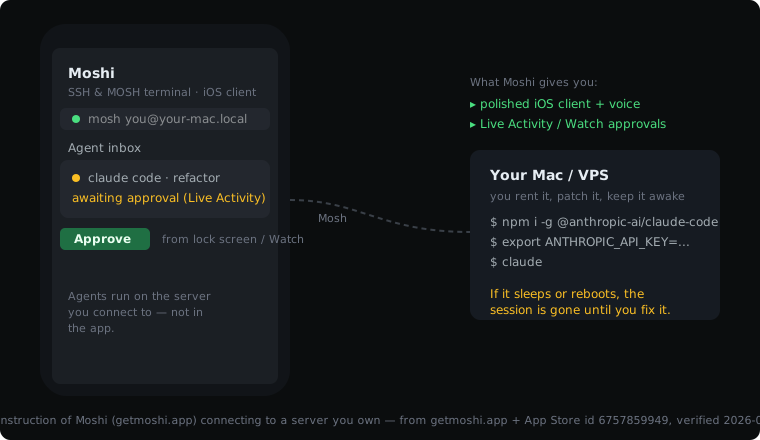
How do Cosyra and Moshi compare feature by feature?
Cosyra ships a hosted Ubuntu 24.04 container with the agents pre-installed from $20/month; Moshi is a $7.99/month client app (with a free tier) that connects to a server you bring and keep running. The table below lines them up on thirteen attributes, with App Store and pricing-page data re-verified 2026-07-20. Read the pricing row as "Moshi's price plus your own server," because that is the real all-in cost.
| Feature | Cosyra | Moshi |
|---|---|---|
| Pricing | $20 / month Core or $30 / month Pro | Pro $7.99 / month, $69.99 / year, or $199 lifetime, plus your own server |
| Free tier | None. 7-day free trial for eligible new users in the App Store app | Free tier with SSH, unlimited sessions, push notifications and dictation, no account, no card (client only; server separate) |
| OS support | iOS, iPadOS, Android, web | iOS / iPadOS 18.0+, macOS 12.0+ (Apple silicon), watchOS 10.0+, visionOS 2.0+, Android (client only) |
| AI agents pre-installed | Claude Code, Codex CLI, OpenCode, Antigravity CLI | None, agents run on your server, you install them yourself |
| Persistent storage | 30 GB cloud, survives device loss | Whatever your own server provides |
| Offline capability | No (cloud container, needs network) | No (still needs your server reachable over the network) |
| Container / sandboxing | Per-user Ubuntu container in the cloud | None, client app; the compute is your server |
| Port forwarding | HTTPS tunnels to container ports | SSH local / remote forwarding to the host you connect to |
| File sync across devices | Same container from any device, state persists | Lives on your server, plus local app config and keys |
| Max session length | Hibernates on idle, resumes on reopen | Mosh keeps the session alive across network switches and app kills, as long as your server stays up |
| BYOK vs hosted | Hosted container; BYOK for Anthropic / OpenAI / Google model keys | Bring your own server and your own keys; you run everything |
| Open-source status | Proprietary, hosted only (no self-host) | Closed-source commercial app, no public repo as of 2026-05-21 |
| Native-iOS control surface | Native iOS / Android text input (SwiftTerm on iOS) | Live Activities, Dynamic Island, Apple Watch approvals, Whisper voice |
Want the side of this comparison with no server to keep awake? We ship a persistent Ubuntu 24.04 container with Claude Code, Codex CLI, OpenCode, and Antigravity CLI pre-installed, on iOS and Android, in about two minutes. Nothing of yours has to stay running.
App Store · Google Play · Pricing. Sign up and pick a plan. Eligible new users can start a 7-day free trial in the App Store app.
What does Moshi actually cost once you add the server?
Moshi's Pro price is the most quoted number in any "Moshi vs" thread, now $7.99/month, up from the $6.99 we recorded on 2026-06-06, and on its own it makes Cosyra's $20 look expensive. The comparison only holds if you ignore the server, which Moshi requires and Cosyra includes. Here is the honest math, with the caveat that your server cost depends entirely on what you already have.
- If you already run a Mac or VPS 24/7: Moshi is genuinely cheaper. $7.99/month (or $199 lifetime) for the client, and your server is a sunk cost you were paying anyway. This is the case Moshi is built for, and it is a good deal.
- If you would have to rent a box for this: a small always-on VPS runs roughly $4–$24/month depending on RAM, and you maintain it: updates, reboots, keeping it awake. Add that to Moshi's price and the gap to Cosyra's flat $20 (container + 120 hours of compute + 30 GB storage + agents installed) narrows or closes, before you count your own time.
- If you use a Mac you leave on: there is no line item, but there is the "is it still awake, did it reboot after the power blip, is my home IP still reachable" tax. We have lost agent sessions to exactly that. A managed container does not have that failure mode.
None of this makes Moshi a bad buy. It makes the headline-price comparison misleading. The fair question is total cost and total upkeep for your situation, and we walk through the broader version of that trade-off in our mobile coding terminal guide.
Where does Moshi beat Cosyra?
Moshi beats Cosyra on native-iOS control polish, server ownership, headline price when you already have a box, and reach onto macOS and Apple Watch. We ship a web-and-app product backed by a cloud container, and on these specific axes Moshi's client-first design wins. We are not going to pretend otherwise.
- Native-iOS control surface for agents. Live Activities and Dynamic Island surface a running agent on your lock screen; Apple Watch lets you approve an action from your wrist; on-device Whisper turns a spoken prompt into terminal input. For driving an agent that is mostly doing the typing, that approval-from-anywhere loop is a genuinely nice surface, and it is more app-native than our terminal view.
- You keep full control of the server. If you run a beefy Mac with Xcode and a Simulator, or a VPS tuned exactly how you like it, Moshi drives your environment (your toolchain, your hardware, your data residency) instead of a managed container. For some people that control is the whole point.
- No hosted-runtime trust required. Your code never touches a third party's container. If your security posture rules out running code on someone else's managed compute, Moshi's bring-your-own-server model fits where a hosted product cannot.
- Cheaper headline price if you already have a server. $7.99/month, or $199 once for lifetime, against Cosyra's $20/month. If the server is already running, that is a real saving.
- A free tier that is actually a terminal. As of 2026-07-20 Moshi's free tier ships SSH, unlimited active sessions, push notifications, agent tracking, biometric protection and on-device dictation, with no account and no card. Pro buys polish and a three-device allowance, not basic access. We do not match that: Cosyra has no free tier, because every session burns compute we pay Azure for, and a client app has no such cost. If you own a server and want to spend nothing on software, Moshi is the honest answer.
- macOS and Apple Watch clients. Moshi runs on iOS, iPadOS, macOS, watchOS, and Android. Cosyra is iOS, Android, and web. If you want a Mac-native client or a Watch app, Moshi has them and we do not.
Where does Cosyra beat Moshi?
Cosyra beats Moshi on having no server to own or keep awake, AI coding agents pre-installed, persistent cloud storage that survives device loss, and a container that follows you across devices. The trade-off for "best mobile client for a server you own" is that you have to own, run, and keep that server alive.
There is no server to keep awake
This is the one that bites in practice. Moshi's own endless-agent guide
tells you to run caffeinate, enable "Prevent automatic sleeping
when the display is off," and "Start up automatically after a power
failure," because the agent only runs while your machine does. With Cosyra
the container is the product. It hibernates on idle and resumes exactly
where you left off when you reopen the app, so there is no "did my Mac go to
sleep on the train" question, because there is no Mac of yours in the loop.
AI coding agents already installed
Every Cosyra container boots with Claude Code, Codex CLI, OpenCode, and
Antigravity CLI on PATH. With Moshi, you SSH into your own box
and install and update each agent yourself:
$ # On your Mac/VPS, reached via Moshi over SSH or Mosh:
$ caffeinate -s & # keep the machine awake
$ sudo apt-get update
$ sudo apt-get install -y nodejs npm git
$ sudo npm install -g @anthropic-ai/claude-code
$ export ANTHROPIC_API_KEY=sk-ant-...
$ tmux new -s agent
$ claude
On Cosyra the same start is shorter, because the install already happened in the image:
$ uname -m
x86_64
$ which claude codex opencode agy
/usr/local/bin/claude
/usr/local/bin/codex
/usr/local/bin/opencode
/usr/local/bin/agy
$ export ANTHROPIC_API_KEY=sk-ant-...
$ claude
We walk through that first session in How to Run Claude Code on Your Phone and the OpenAI-side equivalent in Codex CLI on your phone.
Persistent storage that survives losing the device
Cosyra gives every user 30 GB of cloud storage attached to the container. Drop your phone, buy a new one, log in, and your repo, shell history, and half-finished agent session are still there. With Moshi, persistence is whatever your server provides, which is fine if your server is solid, and a problem if it is a home Mac that just rebooted.
One environment across iPhone, Android, and web
A Cosyra container is the same container whether you reach it from an iPhone, an Android tablet, or a laptop browser. Moshi's reach is broad on the client side (it even has a Watch app), but the environment still lives on the single server you pointed it at, and your local keys and config live on each device. If you also carry a Pixel, we ship a native Google Play app backed by the same container.
An opinion a Moshi fan would disagree with
We think "bring your own server" is the wrong default for mobile agent coding, not a feature. The whole reason to code from a phone on the train is to remove friction, and a server you have to provision, patch, and keep awake adds a standing chore that fails at the worst time, mid-tunnel, when the Mac at home picked that moment to install an update. Moshi fans value the control that chore buys. We think for most people the control is not worth the upkeep, which is exactly the bet Cosyra makes.
Who should pick Moshi instead of Cosyra?
Pick Moshi instead of Cosyra if you already run a server you love, you live deep in the Apple ecosystem and want the Watch and macOS clients, or you have a hard requirement that your code never run on someone else's managed compute. Moshi is the right answer for those profiles, and it is a well-built client.
Try Moshi first if you are one of these
- You already keep a Mac or VPS running 24/7. The server is a sunk cost, the agents are already installed, and you just want the best mobile front-end to it. Moshi's $7.99/month (or $199 lifetime) buys exactly that, with Live Activities and Apple Watch approvals on top.
- You want a Watch or macOS-native client. Approving an agent action from your wrist, or driving the same sessions from a Mac app, is something Moshi ships and Cosyra does not.
- Your code cannot run on managed third-party compute. If policy or preference says the code stays on hardware you control, Moshi's bring-your-own-server model is the honest fit and Cosyra's hosted container is not.
We genuinely like Moshi as a client. If we already ran a tuned home server, we would point it at one. The reason we built Cosyra is that most people who want to code from a phone do not want to run that server in the first place.
How do you try Cosyra if you're coming from Moshi?
You try Cosyra from a Moshi background in about two minutes: install from the App Store or Google Play, open the app, and you land in a fresh Ubuntu 24.04 x86_64 container with Claude Code, Codex CLI, OpenCode, and Antigravity CLI already installed. There is no server to provision, no SSH key to add, no machine to keep awake. Your model API keys port directly.
If you keep SSH hosts for your own boxes, you can still reach them from
inside the Cosyra container with plain ssh, since we ship
openssh-client. The common pattern: Cosyra for the day-to-day
environment, and ssh out to a legacy box for the one thing that only
runs there. The Moshi-style flow (drive an agent on your own Mac) and the Cosyra
flow are not mutually exclusive.
Frequently asked questions
Is Moshi a cloud terminal or an SSH client?
Moshi is an SSH and Mosh terminal client for iOS, iPadOS, macOS, watchOS, and Android. It connects to a server you already own or rent; it does not host compute itself. Moshi's own tagline is "The mobile interface for AI coding agents. Zero desktop install." The "zero install" refers to the client, not the server. The AI coding agents run on your machine, and Moshi is the phone front-end to them. Cosyra is the opposite shape: we host the Ubuntu 24.04 container and ship native apps that render it.
[source: getmoshi.app official site]
How much does Moshi cost versus Cosyra?
Moshi has a genuinely usable free tier (SSH, unlimited active sessions, push notifications, agent tracking, biometric protection, on-device dictation, no account, no card), and Moshi Pro is $7.99/month, $69.99/year, or $199 lifetime, verified on getmoshi.app/pricing on 2026-07-20. Pro raises the price from the $6.99/month and $59.99/year we recorded on 2026-06-06; the App Store still lists the older $6.99 and $59.99 SKUs alongside the new ones, and a $249.00 lifetime SKU against the $199 "limited offer" on Moshi's own pricing page. That price is the client only and does not include a server. Cosyra Pro is $30/month or $300/year and bundles the Ubuntu 24.04 container, 30 GB of persistent storage, and 120 hours of compute per month with the agents pre-installed. Compare Moshi-plus-your-server against Cosyra all-in, not headline price against headline price.
[source: Moshi: SSH & MOSH Terminal on the App Store]
Do the AI coding agents run inside Moshi?
No. Moshi is a terminal client, so Claude Code, Codex, OpenCode, and
Gemini run on the server you connect to, not in the app. Moshi's
"always-on AI agent server" guide tells you to keep your Mac awake with
caffeinate, enable "Prevent automatic sleeping when the
display is off," and notes that "Your Mac needs to stay awake and
accessible." We read that guide first-hand on 2026-05-21; Moshi removed it
from the live site some time before 2026-07-20, so we cite the archived
copy. Cosyra ships the agents pre-installed in the container, so there is
no server-side install step and nothing of yours to keep awake.
Is Moshi open source?
No. Moshi is a closed-source commercial app from FrontierOne Software, with no public source repository as of 2026-05-21. Do not confuse it with the unrelated open-source kyutai-labs/moshi speech model, or with the Mosh protocol it uses for connection resilience. Cosyra is also proprietary and hosted-only, so neither tool wins on open source. If a readable codebase is a hard requirement, a GPL-3.0 client like Blink Shell fits better than either of us.
[source: getmoshi.app official site]
Which AI coding agents does Moshi support?
Moshi lists support for Claude Code, Codex, OpenCode, Gemini, Cursor,
Kimi, and Qwen, but "support" means Moshi gives you a tuned mobile
interface to those agents running on your server. You still install
and run each one yourself. Cosyra pre-installs Claude Code, Codex CLI, OpenCode,
and Antigravity CLI in the container so they are on PATH at first
launch.
[source: getmoshi.app, supported agents]
What does the Mosh protocol give Moshi over plain SSH?
Mosh keeps a session alive across network switches, sleep, and even app kills, using intelligent local echo so typing feels responsive on flaky mobile data. That resilience is real and it is one of Moshi's strengths on a commute. The catch is that resilience covers the connection, not the server. If your own machine sleeps or reboots, the session is gone regardless of Mosh. Cosyra's container hibernates and resumes server-side instead.
tl;dr
Use Moshi if you already own and want to manage a Mac or VPS, live in the Apple ecosystem, and want the most polished native mobile client, Live Activities, Apple Watch approvals, on-device voice, at $7.99/month plus your own server, or free if the base terminal is enough. Use Cosyra if you want the Ubuntu container and AI coding agents (Claude Code, Codex CLI, OpenCode, Antigravity CLI) included, on iOS and Android, with no server to keep awake, from $20/month.
App Store · Google Play · Cosyra vs Blink Shell · Cosyra vs Termius · Mobile coding terminal guide. Sign up and pick a plan. Eligible new users can start a 7-day free trial in the App Store app.
Pre-installed Claude Code, Codex CLI, OpenCode, and Antigravity CLI. We run them in a real x86_64 Ubuntu 24.04 container, reached from a native iOS or Android app. No server of yours to rent, patch, or keep awake.
See pricing. Sign up and pick a plan. Eligible new users can start a 7-day free trial in the App Store app.