You can run Aider on your phone today, iPhone or Android, but not by
installing an app, because Aider ships no mobile build. Aider is an
open-source Python command-line tool that needs a real Linux shell. The
fastest path: install Cosyra for iOS or
Cosyra for Android, open the Ubuntu container,
confirm Python is 3.10 to 3.12, then pip install aider-install and
aider-install. Aider is not one of the agents we pre-install,
so this is the guide where you add the tool yourself. Plans start at
$20/month.
This guide was written by the Cosyra team. We install and run Aider in a Cosyra container from a phone, and we cross-checked every claim about Aider against the official Aider-AI/aider repo and the Aider install docs, verified 2026-06-12.
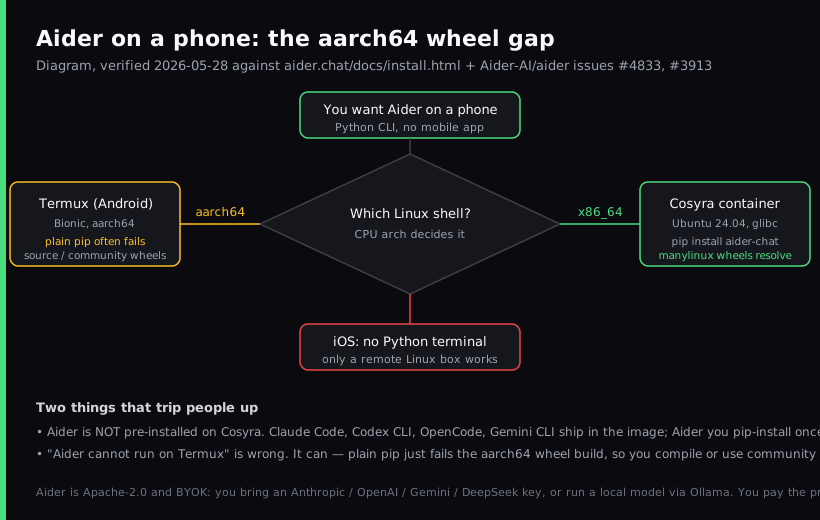
The one thing that trips Android users up: a plain
pip install aider-chat on Termux often fails. Aider pulls native
dependencies (the tree-sitter parser behind its repo map, plus the usual scientific-stack
packages) that do not all ship prebuilt
aarch64 wheels on PyPI, so on Termux's arm64 userland pip falls
back to building them from source and stalls. There is an open request, #4833,
for an official Termux guide and community wheels. On an x86_64 container the
standard wheels just resolve.
What is Aider?
Aider is an open-source terminal AI pair programmer, published as the
aider-chat package on PyPI under Apache-2.0. Its tagline is literally
"AI pair programming in your terminal." The repo sits at roughly 46,100 GitHub
stars as of 2026-06-12, with about 6.8M lifetime PyPI installs per its README
badge, and the latest published release is still 0.86.2. That
version has been current since 2026-02-12 and the last commit to the main
branch landed 2026-05-22, so Aider's earlier near-weekly release cadence has
paused. That is worth knowing if you expect a tool that ships every few
days. It is written in Python, not Rust, Go, or TypeScript, which is exactly
why the install path on a phone hinges on having the right Python and the
right CPU architecture.
The feature that defines Aider, and the reason people keep it around even
when they also run other agents, is its git-native loop. Aider builds a
repo map so the model has structural context across a large codebase,
then it auto-commits each change it makes with a generated commit message. Your
undo button is plain git: diff the last commit, revert it, move
on. It speaks 100+ languages, can take images and web pages as context,
supports voice-to-code, and has a watch mode (--watch-files)
that lets you drive it from comments inside any editor.
The opinion we hold that Aider purists will push back on: if you are on a phone, the aarch64 wheel hunt is not worth it. The "it has to be fully local on Termux" crowd will disagree, and for an Android power user who enjoys pinning versions, that is a fair stance. But we would rather pip-install Aider once on a clean x86_64 box than spend an evening chasing community wheels for tree-sitter. On a phone, the architecture you run on matters more than which agent you pick.
How can you run Aider on a phone?
You can run Aider on a phone three ways, and all three put the actual Python process somewhere with a real shell: a cloud Ubuntu container reached from a native mobile app (Cosyra), Termux on Android with workarounds, or an SSH client into a VPS you own. The deciding factor is CPU architecture, because Aider's native dependencies need wheels that match it. Comparison current as of 2026-06-12.
1. Cosyra: cloud x86_64 container, you add Aider with pip
This is what we built: a native iOS and Android terminal connected to a
persistent Ubuntu 24.04 x86_64 container. Claude Code, Codex CLI, OpenCode,
and Antigravity CLI are already installed; Aider is the one you add. Because
the base is x86_64 with glibc, aider-install pulls the standard manylinux
wheels and there is no compile step.
- Works when: you want an x86_64 shell where Aider's native deps resolve from wheels, dual-platform iOS and Android, and the same container from your phone, tablet, and the web.
- Breaks when: you are offline. The container lives in the cloud, so no internet means no terminal. Full trade-off list in Cosyra vs Termux.
- Cost: Core is $20/month and Pro is $30/month. Eligible new users can start a 7-day free trial in the App Store app. Your model tokens are billed by your provider. See pricing.
2. Termux on Android, with workarounds
Install Termux from F-Droid, pkg install python, then try
pip install aider-chat. On paper this works; in practice the
native dependencies that lack prebuilt aarch64 wheels force a source
build that often fails. The Aider repo has an open request (#4833) for a Termux
install guide plus a community wheel repo, and an open issue (#3913) from someone
whose only computer is an Android tablet and who still cannot complete the install.
People do get there, but with documented fixes and third-party wheels, not a clean
pip install.
- Works when: you are an Android power user, you are willing to pull community wheels or compile, and you want everything local and free.
- Breaks when: a release bumps a native dependency without an aarch64 wheel, or Android 12+'s phantom-process killer terminates a long session. See the Termux-for-iPhone reality check for why Termux is Android-only in the first place.
- Cost: free Termux, free Aider, you pay your model provider. The real cost is time spent on the wheel hunt.
3. SSH from an iOS client into your own VPS
On iPhone or iPad, an SSH client like Blink Shell into a VPS works. Spin up
a box (Hetzner, Scaleway, DigitalOcean), install a compatible Python and
aider-install on it, SSH in inside a tmux session, and run
aider. Most VPS images are x86_64, so the wheels resolve the
same way they do on Cosyra; the difference is you are now the sysadmin.
- Works when: you want a box that is yours and an iOS-native keyboard.
- Breaks when: you do not want to patch, harden, and back up a server. More in SSH from your phone.
- Cost: the SSH client (Blink is $19.99/year) plus the VPS ($5 to $40/month). No Android equivalent for Blink.
How do you set up Aider on iPhone or Android?
You set up Aider on iPhone or Android in about five minutes with Cosyra:
install the app, open the container, confirm Python is in range, install
Aider with aider-install, export your provider key, and run
aider. The Python check is the step that saves you a confusing
failure later.
Step 1: Install Cosyra and open a container
Download from the App Store or Google Play. Sign in with Apple, Google, or email. On first launch we provision a fresh Ubuntu 24.04 x86_64 container with Python, Node.js, Git, and tmux already on it.
Welcome to Cosyra.
Ubuntu 24.04.1 LTS (x86_64)
Pre-installed: claude, codex, agy, opencode
(aider is not pre-installed. We add it below)
Step 2: Check the container's Python version
The current aider-chat release pins Python 3.10 to 3.12. Check what
you have before installing. Ubuntu 24.04 ships Python 3.12, which is in range,
so on a fresh container this check usually just confirms you are good to go.
$ python3 --version
Python 3.12.3
# in range (>=3.10,<3.13), proceed
Step 3: Install Aider with aider-install
The recommended path puts Aider in its own isolated Python environment so it cannot collide with your project's dependencies. On x86_64 the manylinux wheels resolve, so this is a download, not a compile.
$ python3 -m pip install aider-install
$ aider-install
Installing aider in its own environment...
$ aider --version
aider 0.86.2
Step 4: Bring your own provider API key
Aider is BYOK and provider-agnostic, so you export the key for whichever model you use. Put it in your shell config once and it persists in the container's home volume across sessions and devices.
$ echo 'export ANTHROPIC_API_KEY="your-key-here"' >> ~/.bashrc
$ source ~/.bashrc
# OpenAI, Gemini, DeepSeek, or Ollama work too
Step 5: Clone a repo and run aider
Clone your repository, cd into it, and start Aider with the model
you want. It builds a repo map, you describe the change, and it edits files and
commits each one to git.
$ git clone https://github.com/your-org/your-project.git && cd your-project
$ aider --model sonnet
Aider v0.86.2, main model: sonnet, git repo: your-project
> Add a retry with backoff to the fetch in src/api/client.py
Applied edit to src/api/client.py, committed: 'add retry with backoff'
Try Cosyra. Eligible new users can start a 7-day free trial in the App Store app. Claude Code, Codex CLI, OpenCode, and Antigravity CLI come pre-installed; add Aider with one install command. App Store / Google Play / Pricing details
What can you actually do with Aider on your phone?
The honest pitch for Aider on a phone is its git loop in your pocket: every change lands as a clean commit you can read and undo. Three sessions we run from a phone.
Land a small fix on the train and let git track it
You spotted a bug before leaving the office. On the train home, open Cosyra,
cd into the repo, run aider, and describe the fix.
Aider edits the file and commits it with a generated message. When you are
back at a laptop, the change is already a reviewable commit on the branch,
not a half-finished edit you have to reconstruct.
Refactor a module from the couch with a repo map
Saturday morning, phone in hand. Point Aider at a file: "split
src/billing/invoice.py into a calculator module and a formatter module,
keep the public API the same." Aider's repo map gives the model the surrounding
structure so it does not break callers, and each step is its own commit you can
revert if you disagree.
Run a local model in the container for private code
Because Aider supports local models via Ollama and the container is yours, you can keep a sensitive repo entirely inside the box: pull a model with Ollama, point Aider at it, and no code or prompt leaves the container for a third-party API. That is one thing a cloud BYOK setup does genuinely well: you control where the model runs. See the docs for the provider list.
What are the real limits of running Aider on a phone?
Knowing where this setup stops helps you match it to the right job instead of fighting it.
- No offline mode on Cosyra. The container lives in the cloud, so no internet means no Aider. If you code on planes with no wifi, a local Termux install (despite the wheel tax) is the only thing that runs there.
- Not pre-installed on Cosyra. Unlike Claude Code, Codex CLI, OpenCode, and Antigravity CLI, you install Aider yourself. It is one command on x86_64, but it is a command. See the AI coding agents on mobile pillar for the cross-agent picture.
- Python version is a hard ceiling. The current release pins
below 3.13. On a stock 3.12 container you are fine; if you ever land on 3.13,
use the
aider-installor uv path so Aider provisions its own interpreter. - You pay your provider. Aider is free, but the tokens are not (unless you run a local model). Budget for API spend the same way you would on a laptop.
- No Docker-in-Docker guarantee. If your project's tests need
docker, verify before committing to phone-only.
How does Cosyra compare to Termux and Blink+VPS for Aider?
Cosyra wins on a clean x86_64 install and dual-platform use; Termux wins if you are an Android power user who accepts the wheel tax for a fully local, free setup; an SSH client plus a VPS wins on iOS if you want a box you own. None is strictly best. Comparison as of 2026-06-12.
| Feature | Cosyra | Termux + workarounds | Blink + VPS |
|---|---|---|---|
| Aider install | One command on x86_64 | Brittle (no aarch64 wheels, #4833) | You install on the VPS |
| Native deps resolve from wheels | Yes (manylinux x86_64) | Often no; source build | Yes (x86_64 VPS) |
| Platforms | iOS + Android | Android only | iOS only |
| Architecture | x86_64 | arm64 / Bionic | x86_64 (typical VPS) |
| Requires always-on machine | No | No (local only) | Yes (your VPS) |
| Setup time (cold) | ~5 min | 30 min + wheel hunt | 30 to 60 min |
| Price (not counting tokens) | From $20/mo | Free | $19.99/yr + VPS (~$5–40/mo) |
We pulled Cosyra and Aider apart line by line, pricing, the aarch64 wheel gap, BYOK token math, and who each one is actually for, in Cosyra vs Aider. Aider is the agent; Cosyra is the machine you run it on, so the honest answer is often "both," and that post lays out when.
Who should pick each option?
Choose Termux if you are on Android, you want everything local and free, and you do not mind pulling community wheels or compiling to get Aider's native deps in place. Choose an SSH client plus a VPS if you are on iOS, you already run a box, and you want full control of the host. Choose Cosyra if you want a clean x86_64 install on both iOS and Android without maintaining a machine, and you want Claude Code, Codex CLI, OpenCode, and Antigravity CLI sitting next to Aider in the same container.
For the same walkthrough with the agents we pre-install, see
OpenCode on phone (the other open-source
agent),
Qwen Code on phone (also a user-installed
CLI), and
Codex CLI on phone. For
another user-installed agent whose mobile story is widely misunderstood, see
goose on phone, its free iOS app
is a remote control, not an on-phone agent, and
Cline on phone, the 62.9k-star
agent that has no mobile app at all. One more open-source agent worth a
look, with a caveat, is
Continue's cn CLI on phone:
Continue was acquired by Cursor in mid-June 2026 and its main branch stopped
(last commit 2026-06-19), but like Aider the Apache-2.0 cn
binary still installs and runs on your own API keys. If that acquisition is why
you are reading this, we compared the
Continue.dev alternatives worth switching to
and Aider makes that shortlist.
The closest agent to Aider in spirit, plan first, review a cumulative diff,
then apply, is Plandex, and it is the one case where the pip-style
simplicity you just followed does not transfer. Plandex is MIT and its CLI
is a single Go binary, but it is client-server: the CLI needs a Plandex
server running Docker, Docker Compose, and PostgreSQL v14 on port 8099
before it does anything. On top of that, plandex.ai stopped resolving
(SERVFAIL on Google, Cloudflare, and Quad9, checked 2026-07-18), so the README's
curl | bash install returns HTTP 000 and the docs site is gone with
it. We worked out the pinned-GitHub-release path that still works in
Run Plandex from your phone.
Frequently asked questions
Can you run Aider on a phone?
Yes, indirectly. Aider is a Python command-line tool with no native iOS or
Android app, so you run it on a real Linux shell and drive that shell from
your phone. The least-friction path is a cloud Ubuntu container reached
from a native app: confirm Python 3.10 to 3.12, then install Aider with
the
aider-install path. On x86_64 the wheels resolve and there is no
build step.
[source: aider.chat, install docs, terminal CLI + Python versions]
Does Aider install on Termux on Android?
It can, but not with a plain pip install. Several of Aider's
native dependencies do not ship prebuilt aarch64 wheels on PyPI,
so on Termux's arm64 userland pip tries to build them from source and frequently
fails. There is an open request (#4833) for an official Termux guide and community
wheels, and an open issue (#3913) from a user who cannot install it on an Android
tablet. An x86_64 cloud container sidesteps the wheel hunt.
[source: GitHub, Aider-AI/aider issue #3913, cannot install aider-chat on Termux]
Is Aider free?
The tool itself is free and Apache-2.0 licensed. There is no paid tier or subscription on Aider. You pay your model provider directly, because Aider is BYOK and does not host or proxy any models. Your only spend is API tokens, or nothing if you run a local model via Ollama.
[source: GitHub, Aider-AI/aider, Apache-2.0 license + repo metadata]
Which models and providers does Aider support?
Aider is provider-agnostic. Its docs list Anthropic, OpenAI, Google Gemini, DeepSeek, GROQ, OpenRouter, Azure, Cohere, xAI, GitHub Copilot, Vertex AI, and Amazon Bedrock, plus any OpenAI-compatible endpoint and local models through Ollama. The docs note it works best with frontier code models like Gemini 2.5 Pro, Claude 3.7 Sonnet, DeepSeek R1 and V3, and OpenAI's o3, o4-mini, and GPT-4.1.
[source: aider.chat, connecting to LLMs, BYOK + provider list]
What Python version does Aider need?
The current PyPI release of aider-chat pins Python 3.10 or newer
and below 3.13. The aider-install and uv paths can provision a
compatible interpreter (they support 3.8 to 3.13), which is the cleanest way
to avoid version friction. Ubuntu 24.04 ships Python 3.12, so a fresh Cosyra
container is already in range.
[source: aider.chat, install docs, supported Python versions]
Is Aider the same as Claude Code or Codex CLI?
No. Aider is an independent open-source project (originally by Paul
Gauthier, now under the Aider-AI org) that brokers many providers, while
Claude Code is Anthropic's agent and Codex CLI is OpenAI's. Aider's
signature is its git-native loop: it auto-commits each AI change with a
generated message, so your undo button is plain git.
[source: GitHub, Aider-AI/aider, project ownership + git integration]
tl;dr
Aider is an open-source (Apache-2.0) AI pair-programming CLI for the
terminal, BYOK and provider-agnostic, known for auto-committing each
change to git. It has no mobile build, so on a phone you run it on a Linux
shell. Use Cosyra if you want a clean x86_64 install on iOS and Android
without maintaining a box. Install the app, confirm Python 3.12, then
pip install aider-install and aider-install. Use
Termux if you are an Android power user who accepts the aarch64 wheel
hunt. Either way, bring your own provider key.
App Store / Google Play. Sign up and pick a plan. Eligible new users can start a 7-day free trial in the App Store app.
Run Aider from your phone. Install Cosyra, confirm Python,
install Aider with aider-install, run aider.