You can run Continue's cn CLI on your phone today, iPhone or Android,
but not by installing an app, because Continue ships no mobile build. The wrinkle
is timing: Continue was acquired by Cursor and its last main-branch commit is
dated 2026-06-19, so development has stopped. The Apache-2.0 code and the cn binary still install and run. The fastest phone path: install Cosyra for iOS or
Cosyra for Android, open the Ubuntu container,
then npm i -g @continuedev/cli and point cn at your
own API key. Plans start at $20/month.
This guide was written by the Cosyra team. We installed and ran
@continuedev/cli ourselves on 2026-07-11, and we cross-checked every
claim against Continue's
official cn CLI README
and
continue.dev, verified the same day.
Read this before you build a workflow on Continue: the homepage
now reads "Continue has been acquired by Cursor," with the note "we hope our
open-source codebase continues to serve as a foundation for others." Third-party
reporting puts the announcement in mid-June 2026; the banner itself carries
no date. Development on the main branch stops at the 2026-06-19 commit. The
open-source cn binary keeps working with your own key, but do not
architect around the hosted Continue Hub, which is winding down.
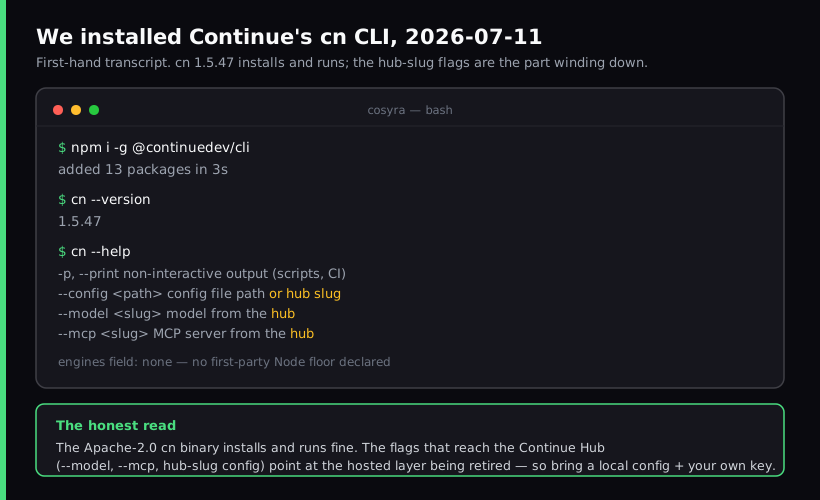
cn install, run 2026-07-11. The binary works; the
hub-slug flags are the part being retired.
What is Continue's cn CLI?
Continue is an open-source AI coding agent published under Apache-2.0. Most
people met it as a VS Code and JetBrains extension, but it also ships a
terminal agent: the cn CLI, distributed on npm as
@continuedev/cli. The same agent logic runs in the editor and
in the shell, so behavior is familiar whether you are in VS Code or a
terminal.
We ran cn --help on 2026-07-11. Running cn with no flags
starts an interactive terminal chat where you reference files with
@ and approve tool calls; cn -p "your prompt" runs headless
for scripts, CI, and git hooks, which is the mode the README calls out for "Scripts
and automation, CI/CD pipelines." The model is BYOK: you bring your own provider
and key rather than a single hosted router.
The opinion we hold that a Continue booster would push back on: right now
the most important fact about Continue is not a feature, it is the
acquisition. We would not start a new long-term project on it today, because
the team that shipped it has moved to Cursor and the main branch stopped
moving on 2026-06-19. The honest reason it is still worth running from a
phone is narrow and real. The Apache-2.0 cn binary is BYOK, so it
keeps working on your own key after the hosted platform is gone. That is different
from "Continue is thriving." It is not, as of 2026-07-11.
How can you run cn on a phone?
You can run cn on a phone three ways, and all three put the actual
Node process somewhere with a real shell: a cloud Ubuntu container reached from
a native mobile app (Cosyra), Termux on Android, or an SSH client into a VPS you
own. Comparison current as of 2026-07-11.
1. Cosyra: cloud Ubuntu container, you add cn with npm
This is what we built: a native iOS and Android terminal connected to a
persistent Ubuntu 24.04 container. Claude Code, Codex CLI, OpenCode, and
Antigravity CLI are already installed; Continue is the one you add. On a
clean container it is a single npm i -g @continuedev/cli and you
are running.
- Works when: you want an x86_64 shell that does not fight Node-native builds, dual-platform iOS and Android, and the same container from your phone, tablet, and the web.
- Breaks when: you are offline. The container lives in the cloud, so no internet means no terminal. Full trade-off list in Cosyra vs Termux.
- Cost: Core is $20/month and Pro is $30/month. Eligible new users can start a 7-day free trial in the App Store app. Model tokens are billed by your provider. See pricing.
2. Termux on Android (untested for cn)
Install Termux from F-Droid, pkg install nodejs, then
npm i -g @continuedev/cli. On paper this could work. We have
not run cn under Termux as of 2026-07-11, so we will not tell you
it works or that it fails. Termux runs on Android's Bionic libc and an arm64 userland,
which is where Node CLIs with native or pty dependencies tend to break, and we
have watched other Node agents fall over there. If you try it, test on a throwaway
session first; do not trust a blog that promises a clean Termux install without
showing the run.
- Works when: you are an Android power user who accepts install debugging and keeps everything local and free.
- Breaks when: a native dependency does not build on arm64, or Android 12+'s phantom-process killer terminates a long session. See the Termux-for-iPhone reality check for why Termux is Android-only in the first place.
- Cost: free Termux, free CLI, you pay your model provider.
3. SSH from an iOS client into your own VPS
On iPhone or iPad, an SSH client like Blink Shell into a VPS works. Spin up
a box (Hetzner, Scaleway, DigitalOcean), install Node and
npm i -g @continuedev/cli on it, SSH in inside a tmux session, and
run cn. A local config with your own key is the simplest path
here, since a hub round-trip over SSH is awkward and the hub is going away
regardless.
- Works when: you want a box that is yours and an iOS-native keyboard.
- Breaks when: you do not want to be a sysadmin. Patching, hardening, and backups are on you. More in SSH from your phone.
- Cost: the SSH client (Blink is $19.99/year) plus the VPS ($5 to $40/month). No Android equivalent for Blink.
How do you set up cn on iPhone or Android?
You set up cn on iPhone or Android in about five minutes with Cosyra:
install the app, open the container, install the CLI with npm, point it at a local
config with your own key, and run cn. The config step is the
one that keeps you off the winding-down hub.
Step 1: Install Cosyra and open a container
Download from the App Store or Google Play. Sign in with Apple, Google, or email. On first launch we provision a fresh Ubuntu 24.04 container with Node.js, Python, Git, and tmux already on it.
Welcome to Cosyra.
Ubuntu 24.04.1 LTS (x86_64)
Pre-installed: claude, codex, agy, opencode
(continue's cn is not pre-installed, we add it below)
Step 2: Install the cn CLI with npm
Continue is not one of the four agents we ship in the image, so you add it
yourself. The command is straight from Continue's CLI README. When we ran it
on 2026-07-11 it added 13 packages in about 3 seconds, and
cn --version printed 1.5.47.
$ npm i -g @continuedev/cli
added 13 packages in 3s
$ cn --version
1.5.47
Step 3: Point cn at a local config, not the hub
Here is the part specific to a product being absorbed. cn --model
and cn --mcp take Continue Hub slugs, and the hub is the hosted layer
winding down. Skip the hub: write a local config under
~/.continue with your own provider and API key, so
cn reads its model from a file you control rather than a hosted catalog
that may not be there next quarter.
$ mkdir -p ~/.continue
$ echo 'export ANTHROPIC_API_KEY="your-key-here"' >> ~/.bashrc
$ source ~/.bashrc
# add a local model entry to ~/.continue/config, then run cn --config ~/.continue/config
Step 4: Run cn interactively or headless
Run cn to open an interactive session where you reference files with
@ and approve tool calls, or cn -p for a single headless
answer. Keep it inside tmux so a dropped signal on the train does
not kill the session.
$ git clone https://github.com/your-org/your-project.git && cd your-project
$ cn -p "Summarize this repo and flag the riskiest files."
Continue CLI, reading workspace…
$ cn
> Refactor @src/billing/invoice.ts to split the proration math into its own function.
Try Cosyra. Eligible new users can start a 7-day free trial
in the App Store app. Claude Code, Codex CLI, OpenCode, and Antigravity CLI
come pre-installed; add Continue's
cn with one npm command.
App Store /
Google Play /
Pricing details
What can you actually do with cn on your phone?
The honest pitch for cn on a phone is a BYOK terminal agent that
outlives the platform it came from. Two sessions we run from a phone.
Review a diff on the train with your own key
You pushed a branch before leaving the office. On the train home, open
Cosyra, cd into the repo, and run
cn -p "review the diff against main and flag anything risky."
Because cn reads its model from your local config, there is no hosted
account to log into and no metered surprise. You are billing your own provider
directly.
Compare cn against the agents we pre-install
Since Claude Code, Codex CLI, OpenCode, and Antigravity CLI already sit in
the same container, a phone session is a low-stakes place to run the same
prompt through cn and through one of them from the couch and see
which reasoning you prefer. We do this when deciding which agent to keep on a
repo. It also answers the practical migration question directly: if you were a
Continue user, running
cn next to
OpenCode tells you fast whether the
open-source agent you are moving to feels like a step down. For the full list
of honest replacements by surface, see
Continue.dev alternatives in 2026.
What are the real limits of running cn on a phone?
Knowing where cn stops helps you match it to the right job instead
of fighting it.
- The hub is winding down. Anything that depends on the Continue
Hub, hosted config, saved history, hub-slug models, is on borrowed time. Run
cnwith a local config and your own key, or it will get flakier as the platform is retired. - Development has stopped. The main branch's last commit is 2026-06-19.
No new features, and bug fixes are unlikely. Treat the current
cnas the version you get. - No offline mode. The container and the model API both live
in the cloud. No internet, no
cn. - Termux is untested here. We route the Android phone path through
a cloud container because we have not verified a clean
cninstall on Termux's arm64 userland. Do not assume it works. - Not pre-installed on Cosyra. Unlike Claude Code, Codex CLI,
OpenCode, and Antigravity CLI, you install
cnyourself. See the AI coding agents on mobile pillar for the cross-agent picture.
How does Cosyra compare to Termux and Blink+VPS for cn?
Cosyra wins on a clean x86_64 shell and dual-platform use; Termux is the free local option if you are willing to test the install yourself; an SSH client plus a VPS wins on iOS if you want a box you own. None is strictly best. Comparison as of 2026-07-11.
| Feature | Cosyra | Termux | Blink + VPS |
|---|---|---|---|
| cn install | One npm command, verified | Untested here (arm64/Bionic) | You install on the VPS |
| Platforms | iOS + Android | Android only | iOS only |
| Architecture | x86_64 | arm64 / Bionic | x86_64 (typical VPS) |
| Requires always-on machine | No | No (local only) | Yes (your VPS) |
| Depends on Continue Hub | No (local config) | No (local config) | No (local config) |
| Setup time (cold) | ~5 min | 30 min + troubleshooting | 30 to 60 min |
| Price (not counting tokens) | From $20/mo | Free | $19.99/yr + VPS (~$5–40/mo) |
Who should pick each option?
Choose Termux if you are on Android, you live in the terminal, and you are
willing to test the cn install yourself and debug native-build failures
to keep everything local and free. Choose an SSH client plus a VPS if you are
on iOS, you already run a box, and you want full control of the host. Choose Cosyra
if you want a clean x86_64 shell on both iOS and Android without maintaining a
machine, with Claude Code, Codex CLI, OpenCode, and Antigravity CLI sitting next
to
cn in the same container, which matters more than usual here, because
if Continue's cn stops getting fixes, having a live agent one command
away is the migration path.
For the same walkthrough with the agents we pre-install, see Antigravity on a phone, OpenCode on phone (the still-maintained open-source agent), and Codex CLI on phone. For another install-it-yourself CLI with the same not-pre-installed caveat, see Aider on phone.
Frequently asked questions
Can you run Continue's cn CLI on a phone?
Yes, indirectly. Continue ships no mobile app, but the cn CLI is
a standard Node terminal agent, so you run it on a real Linux shell and drive
that shell from your phone. The least-friction path is a cloud Ubuntu container
reached from a native app: npm i -g @continuedev/cli, then
point cn at a local config with your own API key.
[source: GitHub, continuedev/continue, cn CLI README, install + headless mode]
Is Continue still usable after the Cursor acquisition?
The Apache-2.0 code and the cn CLI still install and run. Continue's
homepage now reads "Continue has been acquired by Cursor," and the last commit
on the main branch is 2026-06-19, so active development has stopped. The hosted
Continue Hub is winding down, but the open-source binary keeps working with
your own API key.
[source: continue.dev homepage, acquisition banner, 2026-07-11]
How do I install the cn CLI?
npm i -g @continuedev/cli installs the cn binary,
the exact command in Continue's own CLI README. We ran it on 2026-07-11 and
it added 13 packages in about 3 seconds; cn --version
reported 1.5.47. The published package declares no Node engine floor, but a
current LTS Node is the safe target.
[source: GitHub, continuedev/continue, cn CLI README, npm install command]
Does the cn CLI need the Continue Hub to work?
Not for basic use. Running cn with a local config and your own
model provider works without the hub. The --model,
--mcp, and hub-slug --config flags reach the Continue
Hub, which is the hosted layer being retired, so we point
cn at a local ~/.continue config instead of a hub
slug.
[source: GitHub, continuedev/continue, Apache-2.0 repo, CLI flags]
Is Continue cloud data deleted on a specific date?
Be careful with any specific date. Continue's homepage lists an FAQ question about what happens to your data, but the answer is rendered by JavaScript and did not load for us on 2026-07-11. We could not confirm a deletion date first-hand, so check Continue's official FAQ or an email from them directly rather than trusting a secondhand date.
[source: continue.dev, FAQ question present, answer not machine-readable 2026-07-11]
Does Continue run on Termux on Android?
We have not tested cn under Termux as of 2026-07-11, so we will
not claim it works or fails. Node CLIs with native or pty dependencies have
a mixed record on Termux's Bionic libc userland, which is why we route the phone
path through an x86_64 cloud container instead of promising a Termux install
we did not run.
tl;dr
Continue was acquired by Cursor and development stopped on 2026-06-19, but
the Apache-2.0 cn CLI still installs and runs on your own key.
It has no mobile build, so on a phone you run it on a Linux shell. Use Cosyra
if you want a clean x86_64 shell on iOS and Android without maintaining a box.
Install the app, then
npm i -g @continuedev/cli and point cn at a local
config. Skip the Continue Hub; it is winding down.
App Store / Google Play. Sign up and pick a plan. Eligible new users can start a 7-day free trial in the App Store app.
Run Continue's cn from your phone. Install Cosyra, add the
CLI with npm, point it at your own key, run cn.