Short answer. Cosyra vs Aider is not agent-vs-agent; it's the
agent versus the machine you run it on. Aider is a free, open-source (Apache-2.0)
terminal pair-programming CLI: it edits files in your git repo and auto-commits,
works with almost any model including local ones, and has no mobile app of any
kind (verified 2026-06-11). Cosyra is a paid mobile cloud terminal: a per-user
Ubuntu 24.04 container with
Claude Code, Codex CLI, OpenCode, and Antigravity CLI pre-installed, reached from native iOS and Android apps, where
pip install aider-chat just works. You don't pick one instead of
the other. You run Aider on Cosyra.
We wrote this after doing the thing the comparison is actually about: we
installed Aider itself inside a Cosyra container with
pip install aider-chat, on the couch, with no laptop open. It
resolved the manylinux wheels in seconds, the exact wheels that fail to
build on a phone's Termux because PyPI has no aarch64 builds for some of
Aider's native dependencies. That contrast is the whole point of this page.
Aider is the thing you run; Cosyra is the place you run it from a phone.
This post was written by the Cosyra team. We compared Cosyra against Aider based on hands-on testing of both, installing aider-chat inside our container, reading aider.chat and its docs first-hand, and checking the GitHub repo, the open Termux install issues, and the PyPI package metadata, plus our internal Aider factsheet. Pricing, versions, license, and the Termux install status were verified 2026-06-11.
tl;dr
Use Aider if you want a free, open-source, model-agnostic pair
programmer that runs fully offline against a local model on a machine you control,
with a mature repo map and git-native auto-commits. Use Cosyra if you want to run Aider (or four other agents) from a phone: a real interactive
terminal on iOS or Android where pip install aider-chat resolves
without the Termux aarch64 wheel fight. They solve different problems, and you
can run Aider inside Cosyra.
App Store · Google Play. Sign up and pick a plan. Eligible new users can start a 7-day free trial in the App Store app.
Want a phone that runs Aider?
Our container is an always-on x86_64 Linux machine you reach from a phone, with
Claude Code, Codex CLI, OpenCode, and Antigravity CLI ready to drive, and
pip install aider-chat resolves the manylinux wheels Termux can't.
App Store · Google Play · Pricing. Sign up and pick a plan, from $20/month.
How do Cosyra and Aider compare feature by feature?
Cosyra is a cloud Ubuntu container reached from native iOS and Android apps with agents pre-installed; Aider is a free terminal CLI you install on a Linux machine you already have. Cosyra's $20/month is the always-on machine; Aider costs nothing but gives you no machine to run it on, and no phone story. The table below lines them up on twelve attributes, verified 2026-06-11.
| Feature | Cosyra | Aider |
|---|---|---|
| Pricing | $20 / month Core or $30 / month Pro | Free (Apache-2.0); you pay only your own LLM bills |
| Free tier | None. 7-day free trial for eligible new users in the App Store app | Entirely free; BYOK API costs, or $0 with a local model |
| OS support | iOS, Android, web | macOS, Linux, Windows terminal; no mobile app |
| AI agents pre-installed | Claude Code, Codex CLI, OpenCode, Antigravity CLI (BYOK) | Aider is the agent; model-agnostic, install it yourself |
| Phone install path | Native app, then a real shell in about two minutes | Termux only, and not via plain pip (#4833 / #3913) |
| Persistent storage | 30 GB cloud, survives device loss | Local disk on whatever machine you run it |
| Offline capability | No (cloud-only) | Yes: fully offline with a local model (Ollama) |
| Container sandboxing | Per-user Ubuntu container on Azure AKS | None; runs on whatever machine you give it |
| Port forwarding | Yes: preview a dev server from the app | N/A; it's a CLI, not an environment |
| File sync across devices | Same container from any device | None; your repo lives on one local machine |
| Max session length | Hibernates on idle, resumes on reopen | As long as your terminal and machine stay up |
| API key model | BYOK (you pay Anthropic / OpenAI / Google) | BYOK, provider-agnostic, or local via Ollama |
| Open-source status | Client app closed, orchestration proprietary | Open source, Apache-2.0 |
Want the phone half of this comparison?
We ship a persistent x86_64 Ubuntu container with four agents pre-installed,
and
pip install aider-chat resolves cleanly inside it, on iOS and Android,
in about two minutes.
App Store · Google Play · Pricing. Sign up and pick a plan. Eligible new users can start a 7-day free trial in the App Store app.
Why "vs" is the wrong frame for these two
The honest way to read this pair is the agent versus the machine you run it on. Aider is a terminal pair programmer: you describe a change, it edits the right files in your git repo and commits each one with a generated message, and you diff or undo with plain git. It is mature and opinionated, 46k stars and 6.8M installs, and model-agnostic by design. What it is not is a place to run it. Aider assumes you already have a Linux box. Cosyra is exactly that box, with a native app on the phone. So the real question isn't "Aider or Cosyra," it's "Aider on a laptop or DIY Termux, versus Aider on a cloud container you reach from your phone."
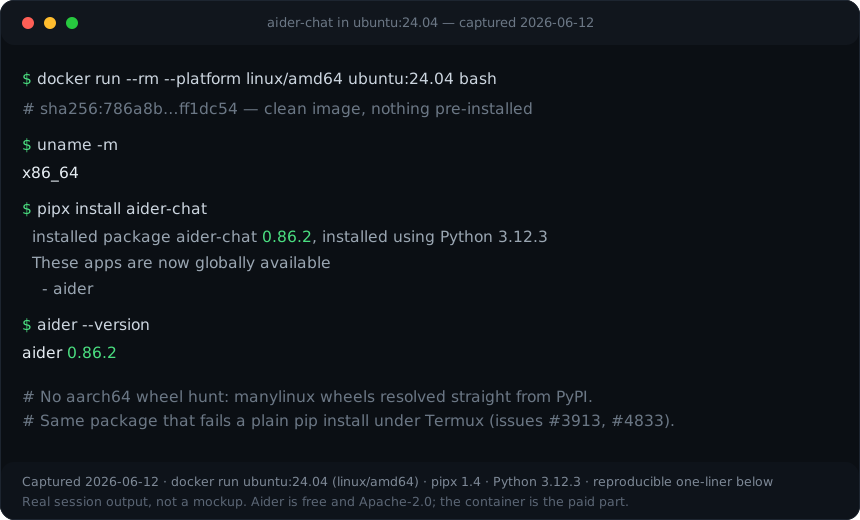
aider-chat 0.86.2 in one
pipx install, no aarch64 wheel hunt. Reproduce it yourself:
docker run --rm --platform linux/amd64 ubuntu:24.04 bash -lc 'apt-get
        update && apt-get install -y pipx && pipx install
        aider-chat && aider --version'
.
Mind the easy mistake in both directions. "Aider can't run on a phone" is wrong: it runs fine on ARM Android via Termux with effort, and it runs cleanly inside any x86_64 Linux container. But "Aider has a mobile app you just install" is also wrong: there is no app, no GUI, no iOS path. Be precise. The gap is product, not capability, and the friction is the install, not the agent. That precision is the whole comparison.
What happened when we installed Aider inside Cosyra?
It installed like any pip package, in seconds, with none of the Termux
aarch64 wheel pain. Aider is not one of the four agents we pre-install, so
we added it ourselves. The container is x86_64 Ubuntu 24.04 with glibc and a
standard Python toolchain, so pip install aider-chat pulls the prebuilt
manylinux wheels straight from PyPI, the same wheels that have no aarch64 builds
and so fail to compile under Termux. Here's the session.
$ uname -m && python3 --version
x86_64
Python 3.12.3
$ # On x86_64 the manylinux wheels resolve. No aarch64 hunt
$ pip install aider-chat
Successfully installed aider-chat-0.86.2
$ aider --version
aider 0.86.2
$ aider --model anthropic/claude-sonnet # BYOK, your key
> Aider v0.86.2 · git repo · repo-map enabled · main
The contrast with the phone-native path is the comparison in one screen. On a phone with Termux alone, this same install hits the aarch64 wheel gap that Aider's own issue tracker documents: #3913, "HELP: Cannot install aider-chat on Termux," from a user whose only computer is an Android tablet, and #4833, an open request for an official Termux/Android install guide and pre-built wheels (both open, verified 2026-06-11). Inside the container none of that applies. We did the install on the couch, which is exactly the no-laptop context this is supposed to serve.
Where does Aider beat Cosyra?
Aider beats Cosyra on being free and open-source, running fully offline with a local model, model-switching maturity, and a git-native workflow that is its signature craft. We ship a paid hosted product and we still think Aider is excellent, and that you should run it. Here's where it's the better pick, with the receipts from aider.chat and its GitHub repo, verified 2026-06-11.
- Free, Apache-2.0, and fully local. The tool costs nothing and the source is open (github.com/Aider-AI/aider). Point it at a local model with Ollama and you run with zero API spend, offline, on a laptop. Cosyra is a cloud machine and cannot match "offline on a plane with no signal." If that's your constraint, Aider wins outright.
- Model flexibility nothing else matches. Aider connects to Anthropic, OpenAI, Gemini, DeepSeek, GROQ, OpenRouter, xAI, Bedrock, any OpenAI-compatible endpoint, and local models (aider.chat/docs/llms.html). Switch the cheapest capable model in for boring work and the strongest in for hard refactors. Our pre-installed agents each pin to their own provider; Aider treats the model as a dial.
- Git-native auto-commit workflow + repo map. Every AI edit is a commit you can diff or undo with plain git, and the repo map gives the model structural context across a large codebase. It's a mature, opinionated loop with 6.8M installs behind it, and it's the reason a lot of people reach for Aider over an editor-embedded agent.
- No vendor in the loop. Your repo, your models, your machine if you self-host. Some developers specifically want nothing proprietary between them and the code. Aider gives them that; a hosted container by definition doesn't. If open-source is the deciding factor, also weigh the autonomous-agent angle in our Cosyra vs OpenHands comparison. OpenHands is open-source (MIT at its core) and runs whole tasks unattended, a different shape of open than Aider's interactive pair-programming loop.
Where does Cosyra beat Aider?
Cosyra beats Aider on having a phone story at all, a zero-friction install that skips the Termux aarch64 fight, native apps, and a persistent workspace that follows you across devices. The trade-off for Aider's freedom is that it hands you no machine and no mobile surface; you supply both. We'd rather hand you the machine.
There's a phone story at all, and Aider has none
This is the load-bearing difference. Aider is a terminal CLI with no mobile
app, no GUI, and no iOS path. Its mobile story is "run it inside a Linux
environment you reach from the phone," and the only such environment on a
phone itself is Termux, where the aarch64 wheel gap turns a one-line install
into a compile-from-source project. Our native
Google Play and
App Store apps put a real Ubuntu 24.04 terminal in
your hand, and Aider installs there in one clean pip command.
The install just resolves, no Termux wheel hunt
Because the container is x86_64 Ubuntu with glibc, pip install aider-chat pulls the standard manylinux wheels for tree-sitter and the rest of Aider's
native dependencies. There is no aarch64 wheel to hunt down, no community wheel
repo to trust, no proot-distro dance. The two open Termux issues,
#4833 and
#3913, simply
don't apply here. The same is true for the four agents we ship and for our
Aider on your phone walkthrough.
Native apps and a persistent workspace across devices
A Cosyra container persists in the cloud and is the same container whether you reach it from an iPhone, an Android tablet, or a laptop browser. Drop your phone, buy a new one, log in, and your repo, your Aider config, and your shell history are still there. With Aider standalone you re-provision whatever machine you happen to be on, and there's no "pick up where you left off from another device" unless you build it yourself with tmux on a VPS.
Four agents pre-installed, and Aider runs alongside them
On first boot the container already has Claude Code, Codex CLI, OpenCode,
and Antigravity CLI on the PATH, all BYOK, so you pick the right tool per
task. Add Aider with one pip install and it sits in the same environment,
sharing the same repo and home volume. You're not choosing between Aider and the
bundled agents; you're running all of them from one phone terminal, covered in
our
AI coding agents on mobile
pillar.
An opinion the Aider crowd will push back on
We think the right home for Aider, for most people, is a cloud container you reach from a phone, not a laptop you have to be sitting at. The local-first crowd will disagree, and loudly: they'll say the whole point of Aider is that it's yours, offline, on your own metal, with a local model and no cloud in the loop. For privacy-sensitive or air-gapped work, they're right, and we'll say so plainly. But for the much larger group whose "machine" is whatever's in their pocket on the train, a managed x86_64 container where the install just works beats fighting Termux wheels or carrying a laptop everywhere. That's the exact reason we built Cosyra as a hosted terminal with a native app instead of shipping yet another CLI.
Who should pick Aider instead of Cosyra?
Pick Aider instead of Cosyra if you want free and open-source, fully offline local-model work, or maximal model flexibility on a machine you already control, and you don't need a phone. For those profiles Aider is the better tool, and we'd tell you so. We run Aider ourselves; the question is only where you run it.
Try Aider first if you are one of these profiles
- You want free and fully offline. You already have a laptop or workstation, you want zero subscription, and you want to run against a local model (Ollama) with no API spend and no network. Aider's whole design fits that, and Cosyra's cloud container cannot match offline. This is the clearest case to skip us.
- You want maximal model control. You switch between Claude, DeepSeek, a local Qwen, and an OpenAI-compatible endpoint depending on the job and the bill. Aider treats the model as a dial across more providers than any single bundled agent, and you keep that flexibility whether or not Cosyra is involved.
- You want nothing proprietary in the loop. Your repo, your keys, your machine, open-source agent. If a hosted environment is a non-starter for policy or principle, Aider on your own metal is the answer, and you don't need us for it.
We reach for Aider when we want a free, model-agnostic pair programmer on a machine we control, and for Cosyra when we want that same kind of agent on a phone with our hands on the repo and no Termux build to babysit. They aren't mutually exclusive: you install Aider inside a Cosyra container, so the line between "the agent" and "the machine" is thinner than it looks.
How do you try Cosyra if you're coming from Aider?
You try Cosyra from an Aider background in about two minutes: install from
the App Store or Google Play, sign in, and you land in a fresh Ubuntu 24.04
x86_64 container instead of a Termux build log. Your four agents are already
on the PATH, and Aider is one clean pip install away, no aarch64
wheel hunt. The session below is what we run on a fresh install.
$ # Install Cosyra, open the app, drop into the container.
$ cat /etc/os-release | head -1
PRETTY_NAME="Ubuntu 24.04 LTS"
$ which claude codex opencode agy
/usr/local/bin/claude
/usr/local/bin/codex
/usr/local/bin/opencode
/usr/local/bin/agy
$ # Want Aider too? One clean install, manylinux wheels resolve.
$ pip install aider-chat && aider --version
aider 0.86.2
The big unlock for most people coming from Aider: you get a phone. The container is the always-on machine, it hibernates when idle and resumes where you left off, you reach it the same way from any device, and Aider runs in it exactly as it would on a laptop, no aarch64 compromise. For the full mobile setup, see how to run Aider from your phone.
Frequently asked questions
Is there an Aider mobile app?
No. Aider is a terminal CLI with no GUI and no native iOS, iPadOS, or Android app, the same shape as Claude Code, Codex CLI, OpenCode, and Antigravity CLI. Its own tagline is "AI pair programming in your terminal" (aider.chat, verified 2026-06-11). Using it from a phone means running it inside a Linux environment you reach from the phone. There is no app to install on the phone itself.
[source: aider.chat, "AI pair programming in your terminal", terminal CLI, no app]
Can I install Aider on Termux?
You can, but not with a plain pip install aider-chat. Aider
is a Python package whose native dependencies (tree-sitter for the repo
map, plus the usual scientific-stack deps) don't all ship prebuilt aarch64
wheels, so the build frequently fails on Termux. Open issue #3913 is
literally titled "HELP: Cannot install aider-chat on Termux," and #4833
requests an official Termux/Android (aarch64) install guide plus pre-built
wheels (both open, verified 2026-06-11). It works with documented fixes or
community wheels, but it's not out-of-the-box.
[source: aider #3913, "HELP: Cannot install aider-chat on Termux"]
Why does pip install aider-chat fail on Android (aarch64)?
Because several of Aider's native dependencies have no prebuilt aarch64 wheels on PyPI, so pip tries to compile them from source inside Termux's Bionic libc environment and the build breaks. Issue #4833 (open, 2026-02-15) tracks this exact gap and points to a community wheel repo as the workaround. On an x86_64 Linux machine the standard manylinux wheels resolve and the problem disappears, which is why running Aider inside a normal Ubuntu container sidesteps it entirely.
[source: aider #4833, "Termux/Android (aarch64) installation guide and pre-built wheels"]
Does Aider work with Claude, GPT, and local models?
Yes. Aider is model-agnostic, which is its defining strength. It connects to Anthropic, OpenAI, Google Gemini, DeepSeek, GROQ, OpenRouter, Azure, xAI, Bedrock, any OpenAI-compatible endpoint, and local models via Ollama (verified 2026-06-11). You bring your own API key per provider, or run a fully local model with no API spend at all. It doesn't host or proxy any models itself.
[source: aider.chat/docs/llms.html, provider list incl. Ollama local models]
Is Aider free?
The tool is free and Apache-2.0 licensed, with no subscription and no paid tier (verified 2026-06-11). You pay only your own LLM provider bills, or nothing if you run a local model. So Cosyra's $20/month isn't a price for Aider, it's the price of the always-on x86_64 machine you run Aider (and four other agents) on from a phone. The agent stays free either way.
[source: github.com/Aider-AI/aider, Apache-2.0 license, BYOK]
Can I run Aider inside a cloud container like Cosyra?
Yes. A Cosyra container is x86_64 Ubuntu 24.04 with glibc and a standard
Python toolchain, so pip install aider-chat (or the
aider-install path) pulls the prebuilt manylinux wheels that Termux's
aarch64 environment lacks. We ran exactly this. Aider isn't one of Cosyra's
four pre-installed agents (those are
Claude Code, Codex CLI, OpenCode, and Antigravity CLI), so you install it yourself once, and it persists with the container's
home volume.
Four agents pre-installed, and Aider is one clean pip install away. We run them in a real x86_64 Ubuntu container, reached from a native iOS or Android app, with no laptop to keep open and no Termux wheel fight. Two-minute setup.
Aider from your phone · Cosyra vs OpenHands · AI coding agents on mobile · See pricing. Sign up and pick a plan. Eligible new users can start a 7-day free trial in the App Store app.