Short answer. OpenHands (formerly OpenDevin) is an open-source autonomous coding agent. You run it two ways: a local Agent Canvas web UI that needs Node.js 22.12+, uv, and Docker on a real machine, or OpenHands Cloud, whose free tier you can drive from a phone browser at 10 conversations a day. Cosyra is a native iOS and Android app paired with a managed Ubuntu 24.04 container that already has Claude Code, Codex CLI, OpenCode, and Antigravity CLI installed, plus an interactive shell. OpenHands hands you an agent in a web canvas. Cosyra hands you a Linux machine in your pocket. If the phone is your primary device, that difference is the whole comparison.
Quick decision. Pick the path that matches your constraint:
- You want an open-source agent on your own hardware. OpenHands is MIT at its core and self-hostable, no contest. Where OpenHands wins ↓
- The phone is the primary device. Cosyra is a native iOS and Android app with a real shell and four agents pre-installed. Where Cosyra wins ↓
- You want the side-by-side. Twelve attributes, two columns, no marketing. Feature table ↓
- You just want the verdict, who should pick which. Decision framework ↓
We rate OpenHands highly, and we want to be clear about that up front. It is one of the most-starred open-source coding agents on GitHub for a reason: it plans, edits across a codebase, runs commands, browses, and opens pull requests, and you can run the whole thing on your own box. If your goal is an auditable autonomous agent you control end to end, it is a strong default. What it is not is a terminal in your pocket. We ran both for real: OpenHands Cloud in mobile Safari and the local Agent Canvas on a laptop, then Cosyra from an Android phone on a train with the laptop shut in a bag. The trade-offs below are the ones we actually hit.
This post was written by the Cosyra team. We compared Cosyra against OpenHands based on hands-on testing of both, and cross-checked every OpenHands fact against the project's own site, the OpenHands/OpenHands repo, its docs, and our internal competitor factsheet. Source verification date 2026-06-29. Where the project has not published a specification, we say so rather than guess.
tl;dr
Use OpenHands if you want an open-source, self-hostable autonomous agent and you are fine running it on a machine you maintain or steering it from a browser. Use Cosyra if your main device is a phone and you want a real interactive shell with four agents pre-installed, in about two minutes.
App Store · Google Play. Eligible new users can start a 7-day free trial in the App Store app.
How do Cosyra and OpenHands compare feature by feature?
The core difference is shape. Cosyra is a hosted mobile cloud terminal with its own managed Ubuntu container and native phone apps. OpenHands is an open-source autonomous agent you either self-host as a local web canvas or drive from OpenHands Cloud. The table below maps them on twelve attributes as of 2026-06-29. OpenHands' latest cloud release is cloud-1.40.0, published 2026-06-26; the repo carries 78,636 stars.
| Feature | Cosyra | OpenHands |
|---|---|---|
| Pricing | $20/month Core or $30/month Pro (USD) | Free self-host / Free Cloud (capped) / Enterprise custom pricing |
| Free tier | None. 7-day free trial for eligible new users in the App Store app | Local self-host free; Cloud Individual free at 10 conversations/day |
| OS support | Native iOS + Android apps, plus web | macOS, Linux, Windows (Docker) for local; Cloud via responsive web |
| AI agents pre-installed | Claude Code, Codex CLI, OpenCode, Antigravity CLI | OpenHands is the agent; model-agnostic, drives any ACP agent |
| Persistent storage | 30 GB per user | Self-host: your disk. Cloud: managed conversation state |
| Offline capability | No, the container lives in the cloud | Self-host runs locally, but model inference still needs a network |
| Container sandboxing | Per-user Ubuntu 24.04 x86_64 container on Azure AKS | Docker-based sandboxed execution (local) or managed (Cloud) |
| Interactive shell | Yes, a real bash prompt you type into | No, agent canvas; you steer, you don't get a prompt |
| File sync / cross-device | Same container from iPhone, Android, and web | Self-host tied to one machine; Cloud follows your login |
| Max session length | Hibernation + resume; 120 hours/month compute | Self-host bounded by your machine; Cloud free capped 10/day |
| API key model | BYOK. Pay Anthropic / OpenAI / Google directly | BYOK / model-agnostic, or Cloud models at cost |
| Open source | Proprietary, hosted only | MIT core (enterprise/ separately licensed); self-hostable |
Want the phone-native side of this comparison? Cosyra ships on the App Store and Google Play today with Claude Code, Codex CLI, OpenCode, and Antigravity CLI pre-installed in a real Ubuntu container. Two-minute setup. Eligible new users can start a 7-day free trial in the App Store app.
What does "OpenHands on a phone" actually look like?
This is where the comparison gets honest, because OpenHands is not a tool that simply fails on mobile the way a desktop terminal app does. OpenHands Cloud's free Individual tier explicitly offers hosted access from desktop and mobile, so you really can drive the agent from a phone browser. What you get there is a conversation: you describe a task, the agent works in a sandboxed container in OpenHands' cloud, and it reports back, capped at 10 conversations a day on the free tier as of 2026-06-29. What you do not get is a shell. The reconstruction below puts the two mobile experiences side by side.
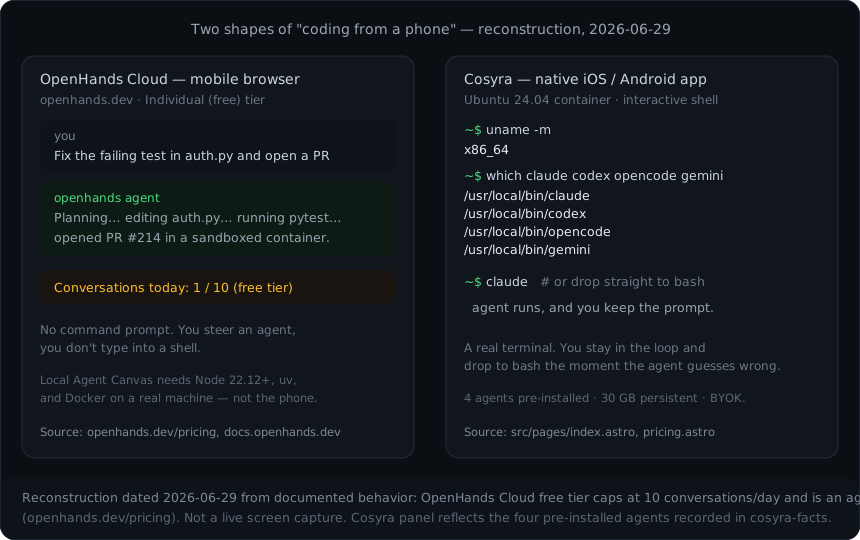
Both panels are legitimate ways to code from a phone, but they answer different questions. OpenHands answers "can something do this engineering task for me while I watch?" Cosyra answers "can I have a real Linux machine in my hand, with agents on it, that I drive directly?" We think the second question is the one most people who code on a phone are actually asking, which is why we built a terminal rather than a canvas. Plenty of people who favor full autonomy will disagree, and for batch work where you genuinely want to fire and forget, they have a point. For a wider view of the phone-native pattern, see our guide to running AI coding agents on your phone, or the OpenHands-specific how to run OpenHands on your phone walkthrough, which covers the browser path, a self-hosted Agent Canvas, and a cloud-shell option step by step.
Where does OpenHands beat Cosyra?
OpenHands beats Cosyra on openness, self-hosting, model flexibility, and the weight of a large open-source community behind it. We respect the project. It is genuinely open, genuinely capable, and the autonomous-agent design is a sane answer to a real problem.
- Genuinely open source and self-hostable. The core is MIT-licensed (the enterprise/ directory is separately licensed), with 78,636 stars and 10,003 forks as of 2026-06-29. You can run the whole agent on your own hardware with full control of code and data. Cosyra is not open source, full stop. If that is a requirement, this is the end of the discussion.
- Model-agnostic and BYOK. OpenHands works with any LLM and can orchestrate Claude Code, Codex, Gemini, or any ACP-compatible agent per its documentation. No model lock-in. Cosyra is also BYOK, but OpenHands' agent layer is model-portable by design.
- A free local path that never touches our cloud. Self-host the Agent Canvas and your code stays on your machine. Some teams require exactly that, and no hosted product can match it.
- A mature autonomous workflow. Plan, edit across a codebase, run commands, open a PR. OpenHands does the whole loop, backed by an active research project (formerly OpenDevin) with frequent releases. If you want the agent to finish a task while you do something else, that is its home turf.
Where does Cosyra beat OpenHands?
Cosyra beats OpenHands on being a real phone tool: native iOS and Android apps, an interactive shell rather than a canvas, four agents already installed, and a persistent cross-device workspace with nothing for you to host. The trade-off for "open source you run yourself" is that there is no machine in your pocket that runs it, and no shell when you drive the cloud from a phone.
An interactive shell, not just an agent canvas
This is the difference that matters most on a phone. Cosyra gives you a real
bash prompt in an Ubuntu 24.04 container. The four agents run inside it, but
you can also cd, git log, tail a file, or kill a
process the instant the agent does something you did not want. OpenHands
keeps you in a conversation with the agent. We think staying in the loop
with a shell beats fire-and-forget for mobile work, because the moment an
agent guesses wrong on a small screen, you want to grab the wheel, not type
another paragraph of correction.
Native iOS and Android apps with four agents installed
Cosyra is a native App Store and Google Play app, and the container ships with Claude Code, Codex CLI, OpenCode, and Antigravity CLI already on PATH. OpenHands has no native mobile app at all. Its mobile story is the responsive Cloud web UI in a browser. We ship a touch-tuned terminal with a key toolbar so the phone keyboard stops being the bottleneck. We think the phone keyboard is fine for agent-driven coding, where you write prompts and read diffs more than you type raw code. Most people who disagree have not tried it on a real commute.
No machine to host and no daily cap
The honest local path for OpenHands is a machine running Node 22.12+, uv, and Docker that you keep online, and the zero-setup path (OpenHands Cloud free) caps you at 10 conversations a day. Cosyra is the box. There is nothing in your apartment to leave running, and Pro gives you 120 hours of compute a month with a persistent 30 GB workspace, documented on the pricing page. Open it on the train from Android, keep going on the couch from an iPhone, finish at a desk in the browser. The container hibernates after ten minutes idle and resumes on reopen, so you do not re-clone or re-auth.
Who should pick OpenHands and who should pick Cosyra?
Pick OpenHands if openness and self-hosting are non-negotiable, or if you want an agent to finish tasks autonomously while you do something else. Pick Cosyra if the phone is your primary device and you want a real shell with agents ready the moment the app opens. We mean this honestly: the answer is not always "use our product."
Try OpenHands first if…
- You need an open-source agent you can audit and run entirely on your own hardware, with no hosted dependency.
- Your workflow is "describe a task, let the agent open a PR, review it later," and full autonomy is the point rather than a downside.
- You have a machine you are happy to keep online with Docker, or you are fine living inside the Cloud free tier's 10-conversations-a-day cap.
Choose Cosyra if…
- Your main interface is the phone, iPhone, Android, or both, and you want native apps rather than a browser session.
- You want a real interactive shell, not an agent canvas, so you can grab the wheel the moment an agent guesses wrong.
- You want four agents (Claude Code, Codex CLI, OpenCode, Antigravity CLI) pre-installed in a managed container, with nothing to self-host.
- You want a persistent workspace that follows you across devices with documented resources (30 GB storage, 120 hours/month, Ubuntu 24.04).
We are biased, obviously. But if open source and self-hosting are the things you cannot give up, OpenHands is the better tool, and we would rather you pick it than be disappointed by us. Phone-native, with a real shell and four agents in a managed container, is where Cosyra earns the difference. If you are weighing the on-device Android route specifically, our Cosyra vs Termux comparison covers why installing a full agent stack on the phone itself stays painful.
Can you use both OpenHands and Cosyra together?
Yes, and they are more complementary than competing. Both run in the cloud and both are BYOK, so a reasonable setup is to drive OpenHands Cloud from a phone browser for autonomous, fire-and-forget tasks, and open Cosyra when you want a real shell to inspect what the agent did, run the test suite yourself, or make a quick manual fix. We do not pre-install OpenHands in the Cosyra container, and we do not claim you can run the OpenHands Agent Canvas inside Cosyra, because Agent Canvas relies on Docker for sandboxed execution and we make no Docker-in-Docker guarantee. Doing it on the phone itself is a harder problem than most write-ups admit. We took the on-device routes apart in run Docker on Termux: what actually works. The session below is what a normal Cosyra container looks like, four agents on PATH and a prompt waiting.
$ uname -m
x86_64
$ which claude codex opencode agy
/usr/local/bin/claude
/usr/local/bin/codex
/usr/local/bin/opencode
/usr/local/bin/agy
$ claude # run an agent, keep the prompt
$ # …then drop back to bash to check its work:
$ git diff --stat
The point of the shell is that you are never more than one command from taking over. OpenHands gives you an agent that finishes the job; Cosyra gives you the machine the job runs on. For the broader landscape, our Cosyra vs Aider comparison covers another BYOK agent and where the same shape difference shows up.
Frequently asked questions
Can you run OpenHands on a phone?
Partly. OpenHands Cloud's free Individual tier offers hosted access from
desktop and mobile, so you can drive the agent from a phone browser,
capped at 10 conversations a day as of 2026-06-29. You cannot install
OpenHands on the phone itself: the local Agent Canvas needs Node.js
22.12+, uv, and Docker on a real machine and serves a web UI on localhost:8000. There is no native iOS or Android app.
[source: openhands.dev pricing]
Is OpenHands open source, and what license?
Yes. OpenHands (formerly OpenDevin) is MIT-licensed at its core, with the
enterprise/ directory under a separate enterprise license. GitHub
shows NOASSERTION because of that split, but the core is genuinely MIT. As of
2026-06-29 the repo has 78,636 stars and 10,003 forks. Cosyra is not open source.
[source: OpenHands/OpenHands repo]
Does OpenHands give you a terminal on your phone?
No. OpenHands is an agent canvas: you describe a task and the agent plans, edits code, runs commands, and can open a pull request in a sandboxed container. You steer it from a conversation UI, you do not type into a bash prompt. A mobile cloud terminal like Cosyra hands you an actual interactive Ubuntu shell instead.
Does Cosyra ship OpenHands pre-installed?
No. Cosyra pre-installs four agents: Claude Code, Codex CLI, OpenCode, and Antigravity CLI. OpenHands is not one of them, and we do not claim you can run the Agent Canvas inside a Cosyra container, because it relies on Docker for sandboxed execution and we make no Docker-in-Docker guarantee. The honest combination is OpenHands Cloud in a browser plus Cosyra for a real shell.
What do I need to self-host OpenHands locally?
Node.js 22.12 or later, uv, and Docker on a machine you run. Start it with
npm install -g @openhands/agent-canvas then
agent-canvas, or with the published Docker image; it serves a
GUI at http://localhost:8000 on macOS, Linux, or Windows via Docker
Desktop, as of 2026-06-29. That is a desktop or server runtime, not a phone
install.
tl;dr
Use OpenHands if you want an open-source, self-hostable autonomous agent and you are fine running it on a machine you maintain or steering it from a browser. Use Cosyra if your main device is a phone and you want a real interactive shell with four agents pre-installed and nothing to host.
App Store · Google Play · AI agents on mobile · Cosyra vs Termux
Native iPhone and Android apps, available now on the App Store and Google Play. Cosyra runs Claude Code, Codex CLI, OpenCode, and Antigravity CLI in a real Ubuntu 24.04 container with an interactive shell, 30 GB of persistent storage, and documented session hibernation.