OpenHands (formerly OpenDevin) has no iPhone or Android app, so running it from a phone means reaching it, not installing it. The direct way: open OpenHands Cloud in your phone browser and steer the agent from the responsive web UI. The free Individual tier gives desktop-and-mobile access capped at 10 conversations a day. You can also self-host the open-source Agent Canvas on your own box and reach its web UI from the phone. One thing to know up front: OpenHands gives you an agent canvas, not a shell. If you also want a real terminal in your pocket, that is a different tool. Here is each path.
Quick decision: pick the path you came for.
- OpenHands Cloud (mobile web): you want the agent running now, from a phone browser, with nothing to install. The three paths ↓
- What am I actually using? You want the honest read on OpenHands, its two shapes, the license, and what it costs. What OpenHands is ↓
- Android / Termux: you want it on-device and need to know why that path does not exist. The Docker caveat ↓
Not sure which fits? The side-by-side comparison ↓ lines the paths up on what runs where, and what each costs.
This guide was written by the Cosyra team. We checked every moving part against primary sources on 2026-06-29: the OpenHands pricing page, the OpenHands docs, and the OpenHands/OpenHands repo (license, stars, and latest release read through the GitHub API). We run the four agent CLIs described below in our own production containers, so the "different shape" section is written from operating one, not from reading about it. Versions, prices, and dates below carry that verification date.
What is OpenHands?
OpenHands, formerly OpenDevin, is an open-source AI software-development agent: you describe a task and it plans, edits code, runs commands, browses, and opens a pull request, all inside a sandboxed environment. It began as the community's open answer to Devin, and it is one of the most-starred coding-agent projects on GitHub. The important thing for a phone is that it ships in two distinct shapes, and mixing them up is where bad advice starts.
- Repo: OpenHands/OpenHands,
about 78,600 stars and 10,000 forks, latest release tagged
cloud-1.40.0(published 2026-06-26) per the GitHub API on 2026-06-29. - License: MIT for the core, with the
enterprise/directory under a separate enterprise license. GitHub's classifier reportsNOASSERTIONbecause of that split; the core is genuinely MIT. - Two shapes: the local Agent Canvas (a web UI you run on your own machine) and OpenHands Cloud (hosted SaaS). Only one of them is reachable from a phone without a server of your own.
- Models: model-agnostic, bring-your-own-key. It works with any LLM and can drive Claude Code, Codex, OpenCode-style agents, or Gemini, no single locked model.
Here is an opinion OpenHands' own framing would push back on: for coding
from a phone, watching an agent work in a canvas is the easy 80%, and the
hard 20% is when it goes sideways and you need to read a stack trace or run
git diff yourself. OpenHands is built around "the agent does the
work, you supervise," which is genuinely good for fire-and-forget tasks. But on
a train with ten minutes and a half-broken branch, we would rather have a shell
than a supervise button. That is a philosophy difference, not a bug, and it is
exactly why the two tools sit well next to each other.
How can you run OpenHands from a phone?
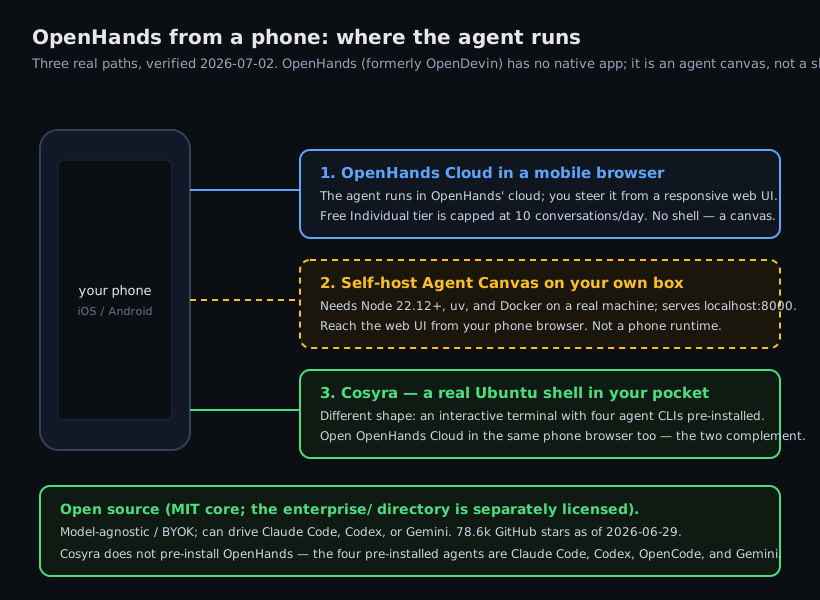
Three ways, in order of how little you have to set up: OpenHands Cloud in a mobile browser, a self-hosted Agent Canvas you reach from the phone, and a separate cloud shell for the hands-on work OpenHands does not cover.
1. OpenHands Cloud in a mobile browser
This is the honest, direct answer to "OpenHands on a phone." Sign in to OpenHands Cloud from mobile Safari or Chrome. The pricing page's Individual tier lists, verbatim as of 2026-06-29, "hosted cloud access from desktop and mobile," free, one user, capped at 10 conversations per day. The agent executes in OpenHands' infrastructure; your phone is the screen you steer from.
- Works when: you want an autonomous agent to take a task and open a PR while you are away from a laptop.
- Breaks when: you hit the 10-conversations-a-day cap, or you need to drop into a terminal to fix something by hand. There is no shell.
- Cost: free Individual tier; BYOK or OpenHands' at-cost inference with no markup. Paid Enterprise pricing is custom and not listed.
2. Self-host the Agent Canvas, reach it from your phone
The local Agent Canvas is the free, open-source web UI. You run it on a machine you own, then point your phone browser at it. Two install routes, both desktop/server only:
$ node --version # needs 22.12 or later
v22.12.0
$ npm install -g @openhands/agent-canvas
$ agent-canvas # serves http://localhost:8000
OpenHands Agent Canvas listening on :8000
There is also a Docker image (ghcr.io/openhands/agent-canvas:latest) if you prefer a container. Either way it needs Node.js 22.12+, uv, and Docker for sandboxed execution, and it binds a web UI to
localhost:8000 on a real machine. You can reach that UI from a phone
browser over your network or a tunnel, but it is a server runtime, so you are
back to keeping a box awake and managing the connection, which is the babysitting
a hosted option removes.
3. Why there is no on-device Android/Termux path
People ask whether they can just install the Agent Canvas in Termux and run OpenHands on the phone itself. The honest answer is no, and the reason is concrete: the Agent Canvas uses Docker for sandboxed agent execution, and Docker does not run natively under Termux's Android userland. We probed that limit first-hand in what actually works when you run Docker on Termux. The emulated paths need root, a QEMU VM, and gigabytes of free space, which is not a foundation to hang an agent sandbox on. There is no supported "run OpenHands on your phone" path, and we will not invent one. The realistic Android route is OpenHands Cloud in a browser, where the sandbox lives in OpenHands' cloud and Termux never enters the picture.
4. Add a real shell for the hands-on 20%
OpenHands gives you an agent canvas, not a bash prompt. When you
want to type commands yourself (read a log, stage a hunk, drive a coding CLI by
hand), you want an actual terminal. That is a different tool, and it runs happily
on the same phone next to an OpenHands Cloud tab.
Cosyra for iOS and Cosyra for Android give you a persistent Ubuntu 24.04 x86_64 container reached from native apps, with four agent CLIs pre-installed: Claude Code, Codex, OpenCode, and Antigravity. To be clear about what we do and do not do: we do not pre-install OpenHands, and we do not claim you can run its Docker-based Agent Canvas inside our container. What we give you is the shell OpenHands does not: a real Linux box in your pocket.
$ cat /etc/os-release | head -1
PRETTY_NAME="Ubuntu 24.04 LTS"
$ git clone https://github.com/your-org/your-app.git
$ cd your-app && claude # or codex, opencode, agy
Claude Code · type your request
Try the shell OpenHands does not give you. Plans start at $20/month. A real Ubuntu 24.04 box with Claude Code, Codex, OpenCode, and Antigravity already installed. Drive an agent by hand while OpenHands Cloud runs in the next tab. App Store / Google Play / Pricing details
What are the real limits of OpenHands on a phone?
- No interactive shell. OpenHands is an agent canvas. When the agent stalls and you want to type a command, the mobile web UI has nowhere to type it. That is the single biggest gap on a phone.
- The free cloud tier is capped. 10 conversations per day on the Individual tier. Fine for occasional tasks; a wall if OpenHands is your daily driver.
- Self-hosting is not a phone thing. Node 22.12+, uv, and Docker on a real machine. Reachable from a phone browser, but you maintain the box.
- Two products, one name. "OpenHands" can mean the local Agent Canvas or OpenHands Cloud. Be explicit about which one a tutorial is talking about, or you will follow desktop steps expecting a phone result.
OpenHands Cloud vs self-host vs a cloud shell
OpenHands Cloud runs the agent for you and works from a phone browser today; self-hosting the Agent Canvas is free but needs a machine you keep awake; a mobile cloud terminal is a different shape that hands you the shell OpenHands omits. The table lines them up, checked 2026-06-29.
| Feature | OpenHands Cloud | Self-hosted Canvas | Cosyra |
|---|---|---|---|
| Reachable from a phone | Yes (mobile web) | Web UI over your network | Yes (native apps) |
| Interactive shell on the phone | No (agent canvas) | No (agent canvas) | Yes |
| Needs a machine you keep awake | No | Yes | No |
| Open source | Core is MIT | Core is MIT | No |
| Free tier | 10 conversations/day | Free (self-run) | None; 7-day trial in the App Store app for eligible new users |
| Cost (excl. AI inference) | Free / Enterprise custom | Your box + your time | From $20/mo |
Prefer an agent you can drive from a real terminal on the phone? See Claude Code on phone, OpenCode on phone, and the pillar on AI coding agents on mobile. For the head-to-head on which shape fits you, read Cosyra vs OpenHands.
Frequently asked questions
Can you run OpenHands on a phone?
Yes, but not as a native app and not on the device itself. OpenHands (formerly OpenDevin) has no iOS or Android app. The direct path is OpenHands Cloud in a mobile browser: the agent runs in OpenHands' cloud and you steer it from a responsive web UI, with a free Individual tier capped at 10 conversations per day as of 2026-06-29. The local Agent Canvas needs Node.js 22.12+, uv, and Docker on a real machine, so it is not a phone install. What you do not get either way is an interactive shell.
[source: OpenHands pricing page]
Is OpenHands the same as OpenDevin?
Yes. OpenDevin was the original name. The open-source project that started as the community answer to Devin was renamed to OpenHands; the org is now OpenHands/OpenHands and the site is openhands.dev, with the old all-hands.dev URLs redirecting there. Old posts and issues still say OpenDevin, but the current name is OpenHands. Treat OpenDevin as the former name only.
[source: OpenHands/OpenHands repository]
Is OpenHands free and open source?
The core is genuinely open source under the MIT license, with the
enterprise/ directory under a separate enterprise license, so state
the split rather than a flat "MIT." As of 2026-06-29 the repo showed about 78,600
stars and 10,000 forks. There are two free ways in: self-host the Agent Canvas
for free, or use the free OpenHands Cloud Individual tier (capped at 10 conversations/day).
You still pay for AI inference, BYOK, or OpenHands' at-cost access with no markup.
[source: OpenHands/OpenHands repository, license and metrics]
Does OpenHands run in Termux on Android?
Not the local Agent Canvas. It needs Node.js 22.12+, uv, and Docker for sandboxed agent execution, and Docker does not run natively under Termux's Android userland, so a phone-native install is not a supported path, and we will not claim one works. The realistic Android route is OpenHands Cloud in a mobile browser, where the agent executes in OpenHands' cloud and Termux is irrelevant.
[source: OpenHands docs, running OpenHands]
What is the difference between OpenHands and a mobile cloud terminal?
They are different shapes that overlap. OpenHands hands you an autonomous agent in a web canvas: describe a task, it plans, edits, and opens a PR, and you watch. A mobile cloud terminal like Cosyra hands you an interactive Ubuntu shell on the phone with agent CLIs pre-installed, so your hands stay on the repo. Both run in the cloud and both are BYOK, so you can use them together: OpenHands Cloud for fire-and-forget tasks, a cloud shell for hands-on work.
tl;dr
OpenHands (formerly OpenDevin) is an open-source AI coding agent with no mobile app. To use it from a phone, open OpenHands Cloud in a mobile browser (free Individual tier, 10 conversations/day) or self-host the Agent Canvas on your own box and reach its web UI. There is no on-device Android path. The Agent Canvas needs Docker. And there is no shell: OpenHands is an agent canvas. For a real terminal in your pocket, run a mobile cloud terminal alongside it.
App Store / Google Play. Plans start at $20/month.
Get the shell OpenHands does not give you. Install Cosyra, open a repo, and drive Claude Code, Codex, OpenCode, or Antigravity by hand, from your phone.