You can run Qwen Code on your phone today, iPhone or Android, but not by
installing an app, because Alibaba ships no mobile build. Qwen Code is a
Node.js command-line tool that needs Node 22 or newer and a real Linux
shell. The fastest path: install Cosyra for iOS or
Cosyra for Android, open the Ubuntu container,
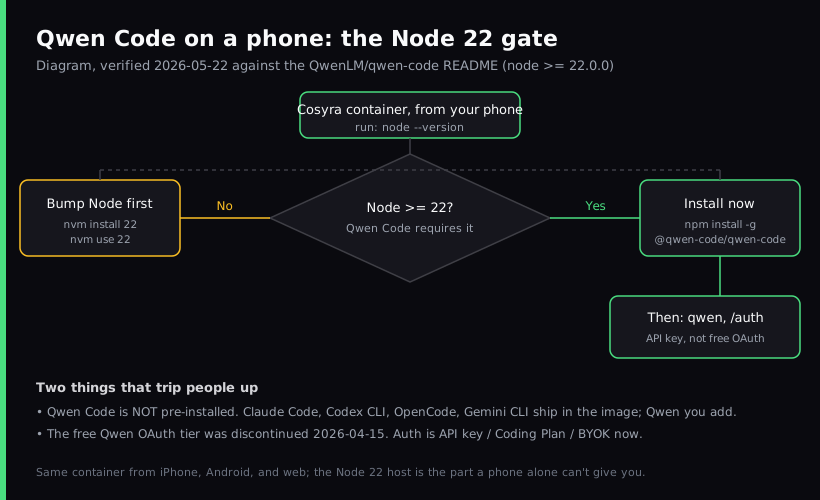
confirm Node is 22+, then npm install -g @qwen-code/qwen-code.
Qwen Code is not one of the agents we pre-install, so this is the one guide
in the set where you add the tool yourself. Plans start at $20/month.
This guide was written by the Cosyra team. We install and run Qwen Code in a Cosyra container from a phone, and we cross-checked every claim about Qwen Code against the official QwenLM/qwen-code repo and the Qwen Code docs, verified 2026-06-24.
One thing changed recently and trips everyone up: the free Qwen OAuth tier was discontinued on 2026-04-15. The quota was cut from 1,000 to 100 requests per day on 2026-04-13, then the free tier was removed two days later. If a tutorial tells you to "just sign in with Qwen OAuth for free," it predates that change. As of 2026-06-15 you bring an API key.
What is Qwen Code?
Qwen Code is Alibaba's open-source terminal coding agent, published as the
@qwen-code/qwen-code npm package under Apache-2.0. The latest release
is v0.19.2 (2026-06-24), and the repo sits at roughly 25,500 GitHub stars as of
2026-06-24. The README's tagline calls it "the open-source AI coding agent that
lives in your terminal," and it pairs the CLI with Alibaba's open-weight Qwen3-Coder
model.
Here is the part most blog posts skip: Qwen Code is a fork of Google's
Gemini CLI. The README says so directly. "This project is based on Google
Gemini CLI… our main contribution focuses on parser-level adaptations to
better support Qwen-Coder models." That lineage is useful to know, because
if you already run Gemini CLI on your phone, the command surface, the /auth flow, and the project structure
of Qwen Code will feel familiar. The two diverge on the model and on cost.
The opinion we hold that Alibaba's marketing would soften: the headline feature of Qwen Code right now is not raw capability, it is that Qwen3-Coder is a genuinely good open-weight model you can point the CLI at. If you want the strongest closed model on a phone, Claude Code is still our default. We reach for Qwen Code specifically when we want an open-weight model in the loop and we are bringing our own key anyway.
How can you run Qwen Code on a phone?
You can run Qwen Code on a phone three ways, and all three put the actual Node process somewhere with a real shell: a cloud Ubuntu container reached from a native mobile app (Cosyra), Termux on Android with workarounds, or an SSH client into a VPS you own. Qwen Code needs Node 22+, which is the detail that decides how painful each path is. Comparison current as of 2026-06-24.
1. Cosyra: cloud Ubuntu container, you add Qwen Code with npm
This is what we built: a native iOS and Android terminal connected to a
persistent Ubuntu 24.04 container. Claude Code, Codex CLI, OpenCode, and
Antigravity CLI are already installed; Qwen Code is the one you add. On a
clean Node 22 it is a single npm install -g and you are running.
- Works when: you want an x86_64 shell that does not fight Node-native builds, dual-platform iOS and Android, and the same container from your phone, tablet, and the web.
- Breaks when: you are offline. The container lives in the cloud, so no internet means no terminal. Full trade-off list in Cosyra vs Termux.
- Cost: Core is $20/month and Pro is $30/month. Eligible new users can start a 7-day free trial in the App Store app. Qwen tokens are billed by your provider. See pricing.
2. Termux on Android, with workarounds
Install Termux from F-Droid, pkg install nodejs to get a recent Node,
then npm install -g @qwen-code/qwen-code. On paper this works.
In practice, the QwenLM/qwen-code repo has an open issue titled "Error
Install Qwen latest version in termux," and Node-on-Termux installs
routinely hit native-module and libc mismatches. Termux runs on Android's
Bionic libc and an arm64 userland, which is precisely where these binary
installs tend to fail.
- Works when: you are an Android power user, you keep your Termux Node current, and you accept occasional install debugging.
- Breaks when: a release needs a newer native dependency, or Android 12+'s phantom-process killer terminates a long session. See the Termux-for-iPhone reality check for why Termux is Android-only in the first place.
- Cost: free Termux, free CLI, you pay your model provider. The real cost is time spent on install failures.
3. SSH from an iOS client into your own VPS
On iPhone or iPad, an SSH client like Blink Shell into a VPS works. Spin up
a box (Hetzner, Scaleway, DigitalOcean), install Node 22 and
npm install -g @qwen-code/qwen-code on it, SSH in inside a tmux session,
and run qwen. API-key auth is the simplest path here because a
browser round-trip over SSH is awkward.
- Works when: you want a box that is yours and an iOS-native keyboard.
- Breaks when: you do not want to be a sysadmin. Patching, hardening, and backups are on you. More in SSH from your phone.
- Cost: the SSH client (Blink is $19.99/year) plus the VPS ($5 to $40/month). No Android equivalent for Blink.
How do you set up Qwen Code on iPhone or Android?
You set up Qwen Code on iPhone or Android in about five minutes with Cosyra:
install the app, open the container, confirm Node is 22+, install Qwen Code
with npm, authenticate with an API key, and run qwen. The Node
check is the step that saves you a confusing failure later.
Step 1: Install Cosyra and open a container
Download from the App Store or Google Play. Sign in with Apple, Google, or email. On first launch we provision a fresh Ubuntu 24.04 container with Node.js, Python, Git, and tmux already on it.
Welcome to Cosyra.
Ubuntu 24.04.1 LTS (x86_64)
Pre-installed: claude, codex, agy, opencode
(qwen is not pre-installed. We add it below)
Step 2: Check the container's Node version
Qwen Code requires Node.js 22 or newer. The README carries a
node >= 22.0.0 badge. Check what you have before installing, because
an install against Node 20 fails in a way that is annoying to diagnose.
$ node --version
v20.18.1
# below 22, bump it in the next step
Step 3: Install Node 22 with nvm (if you are below 22)
If node --version is under 22, install Node 22 with nvm. The container
has persistent storage, so this is a one-time step. It survives hibernation and
the next time you open the app.
$ nvm install 22 && nvm use 22
Now using node v22.14.0 (npm v10.9.2)
$ node --version
v22.14.0
Step 4: Install Qwen Code with npm
With Node 22 in place, install Qwen Code globally and confirm the binary is on your PATH.
$ npm install -g @qwen-code/qwen-code@latest
added 1 package in 14s
$ qwen --version
0.19.2
Step 5: Authenticate with an API key and run qwen
Launch qwen and run /auth. Because the free OAuth
tier ended on 2026-04-15, pick the API-key path: an Alibaba Cloud Model
Studio key, an Alibaba Coding Plan, or any OpenAI-compatible key you bring.
Export it once and it persists in your shell config.
$ echo 'export OPENAI_API_KEY="your-key-here"' >> ~/.bashrc
$ source ~/.bashrc
$ git clone https://github.com/your-org/your-project.git && cd your-project
$ qwen
Qwen Code 0.19.2, workspace: /home/cosyra/your-project
> Summarize this repo and flag the riskiest files.
Try Cosyra. Eligible new users can start a 7-day free trial in the App Store app. Claude Code, Codex CLI, OpenCode, and Antigravity CLI come pre-installed; add Qwen Code with one npm command. App Store / Google Play / Pricing details
What can you actually do with Qwen Code on your phone?
The honest pitch for Qwen Code on a phone is open-weight model access from a terminal you already carry. Three sessions we run from a phone.
Review a diff on the train with an open-weight model
You pushed a branch before leaving the office. On the train home, open
Cosyra, cd into the repo, run qwen, and ask it to
review the diff against main and flag anything risky. Qwen3-Coder is tuned
for code, and you are paying your own key, so a long review session is a
cost you control rather than a metered surprise.
Generate tests for a module from the couch
Saturday morning, phone in hand. Point Qwen Code at a file: "read
src/billing/invoice.ts and write a Vitest suite for the three pricing
tiers and the proration edge cases." Review the proposed test file, approve, run
it in the same shell.
Compare an open model against your closed default
Because Qwen Code shares Gemini CLI's bones and you can also run Claude Code and Codex CLI in the same container, a phone session is a low-stakes place to A/B the same prompt across an open-weight model and a closed one. We do this when deciding which agent to keep on a given repo. The honest answer is usually "it depends on the task," which is exactly why having all of them one command apart is useful.
What are the real limits of running Qwen Code on a phone?
Knowing where Qwen Code stops helps you match it to the right job instead of fighting it.
- No offline mode. The container and the model API both live in the cloud. No internet, no Qwen. If you code on planes with no wifi, this is not the right tool for that slot.
- No free OAuth tier anymore. The 1,000-requests-per-day free OAuth path was discontinued on 2026-04-15. Budget for an API key or a Coding Plan; do not architect around a free tier that no longer exists.
- Node 22 is a hard floor. Older Linux images default to Node
20, and the install simply will not run on it. Always check
node --versionfirst. - Not pre-installed on Cosyra. Unlike Claude Code, Codex CLI, OpenCode, and Antigravity CLI, you install Qwen Code yourself. It is one command, but it is a command. See the AI coding agents on mobile pillar for the cross-agent picture.
- No Docker-in-Docker guarantee. If your project's tests need
docker, verify before committing to phone-only.
How does Cosyra compare to Termux and Blink+VPS for Qwen Code?
Cosyra wins on a clean x86_64 Node 22 and dual-platform use; Termux wins if you are an Android power user who accepts the install tax; an SSH client plus a VPS wins on iOS if you want a box you own. None is strictly best. Comparison as of 2026-06-24.
| Feature | Cosyra | Termux + workarounds | Blink + VPS |
|---|---|---|---|
| Qwen Code install | One npm command on Node 22 | Brittle (open Termux issue) | You install on the VPS |
| Node 22 available cleanly | Yes (nvm, persistent) | Sometimes; libc mismatches | Yes |
| Platforms | iOS + Android | Android only | iOS only |
| Architecture | x86_64 | arm64 / Bionic | x86_64 (typical VPS) |
| Requires always-on machine | No | No (local only) | Yes (your VPS) |
| Setup time (cold) | ~5 min | 30 min + troubleshooting | 30 to 60 min |
| Price (not counting tokens) | From $20/mo | Free | $19.99/yr + VPS (~$5–40/mo) |
Who should pick each option?
Choose Termux if you are on Android, you live in the terminal, and you do not mind pinning versions and debugging the occasional native-build failure to keep everything local and free. Choose an SSH client plus a VPS if you are on iOS, you already run a box, and you want full control of the host. Choose Cosyra if you want a clean Node 22 on both iOS and Android without maintaining a machine, and you want Claude Code, Codex CLI, OpenCode, and Antigravity CLI sitting next to Qwen Code in the same container.
For the same walkthrough with the agents we pre-install, see Antigravity on a phone (Google's successor to Gemini CLI, the tool Qwen Code is forked from), OpenCode on phone (the other open-source agent), and Codex CLI on phone. For another user-installed CLI with the same not-pre-installed caveat, see Aider on phone. It is Python rather than Node, so its phone install hinges on aarch64 wheels instead of the Node 22 gate. Two more agents land in the same install-it-yourself bucket and trip people up on mobile: see Cline on phone, the 62.9k-star agent that ships no mobile app at all, and goose on phone, whose free iOS app is a remote control rather than an on-device agent.
If you're weighing Qwen Code against a managed phone terminal rather than setting it up yourself, our head-to-head Cosyra vs Qwen Code comparison lays out where each one wins, with the Node 22 runtime as the deciding detail.
Frequently asked questions
Can you run Qwen Code on a phone?
Yes, indirectly. Qwen Code is a Node.js 22+ command-line tool with no
native iOS or Android build, so you run it on a real Linux shell and drive
that shell from your phone. The least-friction path is a cloud Ubuntu
container reached from a native app: confirm Node 22, then
npm install -g @qwen-code/qwen-code.
[source: GitHub, QwenLM/qwen-code README, Node 22 requirement + distribution]
Is the Qwen Code free OAuth tier still available?
No. The free Qwen OAuth tier was discontinued on 2026-04-15. The repo's own auth changes show the quota cut from 1,000 to 100 requests per day on 2026-04-13, then the free tier disabled entirely. As of 2026-06-15 you authenticate with an API key or a Coding Plan.
[source: GitHub, qwen-code, disable Qwen OAuth free tier (discontinued)]
Why did the free request quota drop before it was removed?
Alibaba adjusted the free OAuth quota from 1,000 to 100 requests per day on 2026-04-13 as a policy change, then removed the free OAuth tier two days later. If you saw a sudden 429 "free allocated quota exceeded" around then, that is why. Bring an API key for a stable path.
[source: GitHub, qwen-code, adjust Qwen OAuth free tier quota from 1,000 to 100 requests/day]
Does Qwen Code install cleanly on Termux on Android?
Not reliably as of 2026-06-24. There is an open repo issue titled "Error Install Qwen latest version in termux," and a broader class of install failures where a system's Node hits a glibc-version mismatch. Termux's arm64 Bionic userland is where Node-native installs commonly break, so an x86_64 cloud container is the lower-friction route on Android.
[source: GitHub, qwen-code issue #845, Error Install Qwen latest version in termux]
What Node.js version does Qwen Code need?
Node.js 22.0.0 or newer. The README badge reads node >= 22.0.0
and the prerequisites say "Make sure you have Node.js 22 or later installed."
On a container that defaults to Node 20, install Node 22 with
nvm install 22 before the npm install.
[source: GitHub, QwenLM/qwen-code README, prerequisites]
Is Qwen Code the same as Gemini CLI?
No, but it is a fork of it. The README states the project "is based on Google Gemini CLI" with "parser-level adaptations to better support Qwen-Coder models." The command surface is close to Gemini CLI; the model and the auth model differ.
[source: GitHub, QwenLM/qwen-code README, lineage statement]
tl;dr
Qwen Code is Alibaba's open-source terminal agent, forked from Gemini CLI.
It is a Node.js 22+ CLI with no mobile build, so on a phone you run it on
a Linux shell. Use Cosyra if you want a clean Node 22 on iOS and Android
without maintaining a box. Install the app, bump Node to 22, then
npm install -g @qwen-code/qwen-code. Use Termux if you are an
Android power user who accepts the install tax. Either way, the free OAuth
tier ended 2026-04-15, so bring an API key.
App Store / Google Play. Sign up and pick a plan. Eligible new users can start a 7-day free trial in the App Store app.
Run Qwen Code from your phone. Install Cosyra, confirm Node
22, install Qwen Code with npm, run qwen.