Short answer. Cosyra vs Qwen Code is not agent-vs-agent; it's
the agent versus the machine you run it on. Qwen Code is Alibaba's free, open-source
(Apache-2.0) terminal coding agent, forked from
Google Gemini CLI,
a Node.js 22+ CLI with no mobile app of any kind (verified 2026-06-13).
Cosyra is a paid mobile cloud terminal: a per-user Ubuntu 24.04 container
with
Claude Code, Codex CLI, OpenCode, and Antigravity CLI pre-installed, reached from native iOS and Android apps, where you can add
qwen with one npm install once Node 22 is in place. You don't pick
one instead of the other. You run Qwen Code on Cosyra.
We wrote this after doing the thing the comparison is actually about: we
installed Qwen Code itself in a clean Node 22 x86_64 container with
npm install -g @qwen-code/qwen-code@latest, on the couch with
no laptop open. It resolved to qwen 0.19.1 in seconds. The catch
on a phone is never the package, it's the runtime: Qwen Code needs Node 22+, and
that is precisely the wall its open Termux issue #845 keeps hitting on Android.
A container where you own the Node version makes that wall disappear.
This post was written by the Cosyra team. We compared Cosyra against Qwen
Code based on hands-on testing of both, installing
@qwen-code/qwen-code in a clean Node 22 container, reading the
Qwen Code README and docs first-hand, and checking the GitHub repo, the open
Termux install issue, and the npm release metadata, plus our internal Qwen Code
factsheet. Version, stars, license, Node requirement, and the paid-auth change
were verified 2026-06-13.
tl;dr
Use Qwen Code if you want a free, open-source, terminal coding agent tuned for Qwen3-Coder that runs on a machine you already control, with provider-agnostic BYOK and no subscription for the tool. Use Cosyra if you want to run Qwen Code (or four other agents) from a phone: a real interactive terminal on iOS or Android where you own the Node 22 runtime, instead of fighting the Termux install issue #845. They solve different problems, and you can run Qwen Code inside Cosyra.
App Store · Google Play. Sign up and pick a plan. Eligible new users can start a 7-day free trial in the App Store app.
Want a phone that runs Qwen Code?
Our container is an always-on x86_64 Linux machine you reach from a phone, with
Claude Code, Codex CLI, OpenCode, and Antigravity CLI ready to drive, and a
Node runtime you control so npm install -g @qwen-code/qwen-code just resolves.
App Store · Google Play · Pricing. Sign up and pick a plan, from $20/month.
How do Cosyra and Qwen Code compare feature by feature?
Cosyra is a cloud Ubuntu container reached from native iOS and Android apps with agents pre-installed; Qwen Code is a free terminal CLI you install on a Node 22+ machine you already have. Cosyra's $20/month is that machine; Qwen Code costs nothing but gives you no machine to run it on, and no phone story. The table below lines them up on twelve attributes, verified 2026-06-13.
| Feature | Cosyra | Qwen Code |
|---|---|---|
| Pricing | $20 / month Core or $30 / month Pro | Free (Apache-2.0); you pay only your own model bills |
| Free tier | None. 7-day free trial for eligible new users in the App Store app | Tool is free; Qwen OAuth free tier ended 2026-04-15, BYO key now |
| OS support | iOS, Android, web | macOS, Linux, Windows terminal; no mobile app |
| AI agents pre-installed | Claude Code, Codex CLI, OpenCode, Antigravity CLI (BYOK) | Qwen Code is the agent; install it yourself with npm |
| Phone install path | Native app, then a real shell in about two minutes | Termux only, and Node 22 install is open issue #845 |
| Persistent storage | 30 GB cloud, survives device loss | Local disk on whatever machine you run it |
| Offline capability | No (cloud-only) | Yes, on a local machine with a local/compatible model |
| Container sandboxing | Per-user Ubuntu container on Azure AKS | None; runs on whatever machine you give it |
| Port forwarding | Yes: preview a dev server from the app | N/A; it's a CLI, not an environment |
| File sync across devices | Same container from any device | None; your repo lives on one local machine |
| API key model | BYOK (you pay Anthropic / OpenAI / Google) | BYOK: Alibaba Model Studio, OpenRouter, OpenAI-compatible |
| Open-source status | Client app closed, orchestration proprietary | Open source, Apache-2.0, forked from Gemini CLI |
Want the phone half of this comparison?
We ship a persistent x86_64 Ubuntu container with four agents pre-installed
and a Node runtime you control, so
npm install -g @qwen-code/qwen-code resolves cleanly on iOS and
Android.
App Store · Google Play · Pricing. Sign up and pick a plan. Eligible new users can start a 7-day free trial in the App Store app.
Why "vs" is the wrong frame for these two
The honest way to read this pair is the agent versus the machine you run it on. Qwen Code is a terminal coding agent: you describe a change and it edits files, runs tools, and automates tasks from the shell, with Skills and SubAgents that the README itself calls "a Claude Code-like experience." It is young but moving fast, 25,476 stars and a v0.19.1 release dated 2026-06-23 (verified 2026-06-24). What it is not is a place to run it. Qwen Code assumes you already have a machine with Node 22+. Cosyra is exactly that machine, with a native app on the phone. So the real question isn't "Qwen Code or Cosyra," it's "Qwen Code on a laptop or a Termux build fight, versus Qwen Code on a cloud container you reach from your phone."
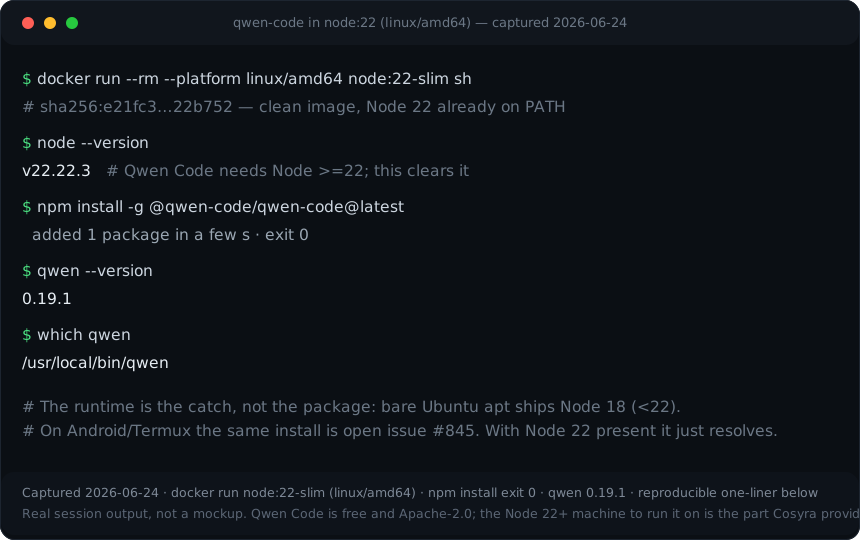
qwen 0.19.1 with one npm install. The runtime
is the catch, not the package. Reproduce it yourself:
docker run --rm --platform linux/amd64 node:22-slim sh -c 'npm install
        -g @qwen-code/qwen-code@latest && qwen --version'
.
Mind the easy mistake in both directions. "Qwen Code can't run on a phone" is wrong: it runs fine inside any x86_64 Linux container, and with effort on Android once you sort Node 22. But "Qwen Code has a mobile app you just install" is also wrong: there is no official app, no GUI, no iOS path. Be precise. The gap is product, not capability, and the friction is the Node 22 runtime, not the agent. That precision is the whole comparison.
What happened when we installed Qwen Code inside a container?
It installed like any npm global, in seconds, with none of the Termux Node
pain. Qwen Code is not one of the four agents we pre-install, so we added it
ourselves. The container had Node 22 on the PATH, so
npm install -g @qwen-code/qwen-code@latest pulled the package and
dropped a qwen binary at /usr/local/bin/qwen.
Here's the session.
$ node --version
v22.22.3
$ # Qwen Code needs Node >=22. This clears it
$ npm install -g @qwen-code/qwen-code@latest
added 1 package · exit 0
$ qwen --version
0.19.1
$ which qwen
/usr/local/bin/qwen
$ qwen # then /auth to set your BYO key
The contrast with the phone-native path is the comparison in one screen. On a phone with Termux alone, getting Node 22 and this same install to complete is exactly what Qwen Code's own issue tracker documents: #845, "Error Install Qwen latest version in termux," open since 2025-10-19 (verified 2026-06-13). Inside a container where you own the Node version, none of that applies. We did the install on the couch, which is exactly the no-laptop context this is supposed to serve.
Where does Qwen Code beat Cosyra?
Qwen Code beats Cosyra on being free and open-source, running fully on a machine you control, model choice tuned for Qwen3-Coder, and a familiar Gemini CLI command surface. We ship a paid hosted product and we still think Qwen Code is worth running. Here's where it's the better pick, with the receipts from the GitHub repo and README, verified 2026-06-13.
- Free, Apache-2.0, and yours to run anywhere. The tool costs nothing and the source is open (github.com/QwenLM/qwen-code). On a laptop you already own, you run it with zero hosting cost and pay only your model provider. Cosyra is a cloud machine and cannot match "offline on a plane with no signal" the way a local install against a local-friendly endpoint can. If that's your constraint, Qwen Code wins outright.
- Model choice tuned for Qwen3-Coder. Qwen Code ships alongside the open-weight Qwen3-Coder models and also speaks OpenAI-, Anthropic-, and Gemini-compatible endpoints via Alibaba Model Studio, OpenRouter, or your own key (README, verified 2026-06-13). If Qwen3-Coder is the model you want to drive, this is the agent built around it.
- Familiar Gemini CLI surface. Because it's a fork of Gemini CLI with parser-level adaptations, the commands and slash menu will feel familiar
if you've used
gemini. That's a real onboarding advantage Cosyra has nothing to do with. - No vendor machine in the loop. Your repo, your key, your hardware. Some developers specifically want nothing hosted between them and the code. Qwen Code on your own metal gives them that; a hosted container by definition doesn't.
Where does Cosyra beat Qwen Code?
Cosyra beats Qwen Code on having a phone story at all, a Node 22 runtime you control instead of the Termux install fight, native apps, and a persistent workspace that follows you across devices. The trade-off for Qwen Code's freedom is that it hands you no machine and no mobile surface; you supply both. We'd rather hand you the machine.
There's a phone story at all, and Qwen Code has none
This is the load-bearing difference. Qwen Code is a terminal CLI with no official mobile app, no GUI, and no iOS path. Its mobile story is "run it inside a Linux environment you reach from the phone," and the only such environment on a phone itself is Termux, where the Node 22 requirement turns a one-line install into open issue #845. Our native Google Play and App Store apps put a real Ubuntu 24.04 terminal in your hand, and you control the Node version inside it.
You own the Node 22 runtime, no Termux fight
Because the container is x86_64 Ubuntu with a real package manager and a
Node runtime you control, you can guarantee Node 22 and then
npm install -g @qwen-code/qwen-code resolves like any npm global.
Check node --version first; if your container is older than 22, install
Node 22 with nvm or NodeSource, which you're free to do because the container
is yours. There's no proot-distro dance and no waiting on issue #845.
The same is true for the four agents we ship and for our
Qwen Code on your phone walkthrough.
Native apps and a persistent workspace across devices
A Cosyra container persists in the cloud and is the same container whether
you reach it from an iPhone, an Android tablet, or a laptop browser. Drop
your phone on the train, buy a new one, log in, and your repo, your Qwen
Code config in ~/.qwen, and your shell history are still there.
With Qwen Code standalone you re-provision whatever machine you happen to be
on, and there's no "pick up where you left off from another device" unless
you build it yourself with tmux on a VPS.
Four agents pre-installed, and Qwen Code runs alongside them
On first boot the container already has Claude Code, Codex CLI, OpenCode,
and Antigravity CLI on the PATH, all BYOK, so you pick the right tool per
task. Add Qwen Code with one npm install and it sits in the same
environment, sharing the same repo and home volume. Qwen Code is a Gemini CLI
fork, and Google has steered Gemini CLI users toward its Go-based successor,
Antigravity CLI, which is
the Google agent we ship now. You're not choosing between Qwen Code and the
bundled agents; you're running all of them from one phone terminal, covered
in our
AI coding agents on mobile
pillar.
An opinion the Qwen Code crowd will push back on
We think the right home for a terminal agent like Qwen Code, for most people, is a cloud container you reach from a phone, not a laptop you have to be sitting at. The local-first crowd will disagree, and loudly: they'll say the whole point of an open-source CLI is that it's yours, on your own metal, with no cloud in the loop. For privacy-sensitive or air-gapped work, they're right, and we'll say so plainly. But for the much larger group whose "machine" is whatever's in their pocket on the train, a managed x86_64 container where you control the Node runtime beats fighting Termux's Node 22 issue or carrying a laptop everywhere. That's the exact reason we built Cosyra as a hosted terminal with a native app instead of shipping yet another CLI.
Who should pick Qwen Code instead of Cosyra?
Pick Qwen Code instead of Cosyra if you want free and open-source, work on a machine you already control, or specifically want the Qwen3-Coder models, and you don't need a phone. For those profiles Qwen Code is the better tool, and we'd tell you so. The question is only where you run it.
Try Qwen Code first if you are one of these profiles
- You want free and you already have a machine. You have a laptop or workstation with Node 22, you want zero subscription, and you're happy paying only your model provider. Qwen Code's whole design fits that, and Cosyra's cloud container is overhead you don't need. This is the clearest case to skip us.
- You want Qwen3-Coder specifically. You're betting on Alibaba's open-weight coding model and want the agent built to co-evolve with it. Qwen Code is that agent, and you keep that whether or not Cosyra is involved.
- You want nothing hosted in the loop. Your repo, your keys, your machine, open-source agent. If a hosted environment is a non-starter for policy or principle, Qwen Code on your own metal is the answer, and you don't need us for it.
We reach for Qwen Code when we want a free, open-source agent on a machine we control, and for Cosyra when we want that same kind of agent on a phone with our hands on the repo and no Termux build to babysit. They aren't mutually exclusive: you install Qwen Code inside a Cosyra container, so the line between "the agent" and "the machine" is thinner than it looks.
How do you try Cosyra if you're coming from Qwen Code?
You try Cosyra from a Qwen Code background in about two minutes: install
from the App Store or Google Play, sign in, and you land in a fresh Ubuntu
24.04 x86_64 container instead of a Termux Node build log. Your four agents
are already on the PATH, and Qwen Code is one npm install away once
you've confirmed Node 22. The session below is what we run on a fresh install.
$ # Install Cosyra, open the app, drop into the container.
$ cat /etc/os-release | head -1
PRETTY_NAME="Ubuntu 24.04 LTS"
$ which claude codex opencode agy
/usr/local/bin/claude
/usr/local/bin/codex
/usr/local/bin/opencode
/usr/local/bin/agy
$ node --version # confirm 22+ before adding qwen
$ npm install -g @qwen-code/qwen-code@latest && qwen --version
0.19.1
The big unlock for most people coming from Qwen Code: you get a phone. The container is the always-on machine, it hibernates when idle and resumes where you left off, you reach it the same way from any device, and Qwen Code runs in it exactly as it would on a laptop once Node 22 is set. For the full mobile setup, see how to run Qwen Code from your phone, and the related Gemini CLI on your phone guide since the two share a command surface. If you are weighing other open-source, npm-installed terminal agents, Cosyra vs Kilo Code covers Kilo CLI, which drops into the same container the same way.
Frequently asked questions
Does Qwen Code have a mobile app?
No. Qwen Code is a Node.js terminal CLI with no official iOS, Android, or browser build. Its README calls it "an open-source AI agent that lives in your terminal" (verified 2026-06-13). Running it from a phone means running it inside a Linux environment you reach from the phone; there is no app to install on the phone itself.
[source: github.com/QwenLM/qwen-code README, "lives in your terminal," no mobile build]
Can I install Qwen Code on Termux?
It's the rough path, not the smooth one. Qwen Code requires Node.js >=
22, and getting a working Node 22 plus the install to complete inside
Termux is exactly what users hit trouble with. Issue #845, "Error Install
Qwen latest version in termux," has been open since 2025-10-19 (verified
2026-06-13). On an x86_64 Linux container where you control the Node
version, the same npm install resolves in seconds.
[source: qwen-code #845, "Error Install Qwen latest version in termux," open]
What Node version does Qwen Code need?
Node.js 22 or later. The package.json pins
engines.node to >=22.0.0 and the README prerequisites
say the same (verified 2026-06-13 via gh api). This is the real catch on a phone:
a bare Ubuntu apt install ships Node 18, and Termux's Node can lag, so the runtime
is the part you have to get right before
npm install -g @qwen-code/qwen-code even runs.
[source: github.com/QwenLM/qwen-code README + package.json engines.node >=22.0.0]
Is Qwen Code free?
The tool is free and Apache-2.0 licensed. What changed: the Qwen OAuth free tier was discontinued on 2026-04-15 (README News section, verified 2026-06-13). You now run it with an Alibaba Cloud Model Studio key, an Alibaba Coding Plan subscription, or any OpenAI-/Anthropic-/Gemini-compatible API key you bring yourself. So the agent costs nothing to download; you pay your model provider. Cosyra's $20/month isn't a price for Qwen Code, it's the Node 22 machine you run it on from a phone.
[source: github.com/QwenLM/qwen-code README News, Qwen OAuth free tier discontinued 2026-04-15]
Is Qwen Code related to Gemini CLI?
Yes, directly. The README states "This project is based on Google Gemini
CLI ... Our main contribution focuses on parser-level adaptations to
better support Qwen-Coder models" (verified 2026-06-13). Qwen Code is a
fork of Gemini CLI, so the command surface and slash commands will feel
familiar if you have used gemini. Cosyra pre-installs
Antigravity CLI, Google's successor to Gemini CLI, and Qwen Code is an
easy sibling to add.
[source: Google Gemini CLI repo, the upstream Qwen Code forks]
Can I run Qwen Code inside a cloud container like Cosyra?
Yes, once Node 22 is in place. A Cosyra container is x86_64 Ubuntu 24.04
with a real package manager and Node.js pre-installed, and you control it,
so npm install -g @qwen-code/qwen-code adds the
qwen binary the same way you'd add any Node CLI. Verify
node --version is 22+ first; if it isn't, install Node 22 in the
container yourself. Qwen Code isn't one of Cosyra's four pre-installed agents
(those are
Claude Code, Codex CLI, OpenCode, and Antigravity CLI), so you add it once and it persists with the home volume.
[source: qwen-code GitHub releases, v0.19.1 npm install path]
Four agents pre-installed, and Qwen Code is one npm install away. We run them in a real x86_64 Ubuntu container, reached from a native iOS or Android app, with a Node runtime you control and no Termux fight. Two-minute setup.
Qwen Code from your phone · AI coding agents on mobile · See pricing. Sign up and pick a plan. Eligible new users can start a 7-day free trial in the App Store app.