Short answer. Cosyra vs Antigravity isn't agent-vs-agent; it's
two different shapes. Antigravity CLI is Google's terminal AI coding agent, the
successor to Gemini CLI, built in Go and invoked as agy. It has no iPhone build and no phone app; on Android it runs inside Termux since version 1.2.15. Cosyra is a paid
mobile cloud terminal: a per-user Ubuntu 24.04 container with
Claude Code, Codex CLI, OpenCode, and Antigravity CLI pre-installed, reached from native iOS and Android apps. Run agy on your own machine, and open Cosyra when you want the same agent on a phone
without setting up Termux.
We wrote this after checking the facts first-hand. On 2026-07-12 we hit the
google-antigravity/antigravity-cli
repo through the GitHub API: latest release v1.1.1,
published 2026-07-10, 1,572 stars, and still no LICENSE file
(license: null). We read the official Bash installer and
confirmed it sets BINARY_PATH=".../agy" and probes for
Darwin or Linux on x86_64/arm64, with no Android or
iOS target at the time. That one detail shaped this comparison: Antigravity had
nowhere to run natively on a phone, and Cosyra puts the machine, and the terminal,
on the phone.
Update, 2026-10-08. The Cosyra workspace now ships Antigravity
CLI pre-installed as agy, in place of Gemini CLI. Google has
moved too: version 1.2.15 (2026-10-02) added a native Android build that
runs in Termux, there are Windows installers, and since 1.1.13 the CLI
accepts a GEMINI_API_KEY. There is still no iOS build. This
page is updated for those changes. The repo and installer checks above are
from 2026-07-12.
This post was written by the Cosyra team. We compared Cosyra against Antigravity CLI based on hands-on testing of both, reading the google-antigravity/antigravity-cli repo and its installer, checking the Gemini CLI transition notice, and running Cosyra from a phone, plus our internal Antigravity factsheet. Versions, star counts, and the platform list were verified 2026-07-12; Antigravity's docs pages are JS-rendered, so quota numbers we couldn't source are left out rather than guessed.
tl;dr
Use Antigravity CLI if you code on a Mac or Linux laptop, you're
in Google's AI ecosystem (AI Pro, Ultra, or the free Code Assist for individuals
tier), and you want a fast Gemini-backed terminal agent on that machine. Use
Cosyra if you want to actually code from a phone: a real terminal
and four agent CLIs, agy included, on iOS or Android over a persistent
cloud container, with no laptop to keep awake. Antigravity has no iPhone build
and no phone app. On Android it runs in Termux, and on an iPhone it needs a
Linux machine like this one.
App Store · Google Play. Sign up and pick a plan. Eligible new users can start a 7-day free trial in the App Store app.
Want Google's agent on a phone? Our container is the always-on x86_64 Linux machine a terminal agent needs. Antigravity CLI is one of the four agents we pre-install, reached from a native iOS or Android app with no PC left running at home.
App Store · Google Play · Pricing. Sign up and pick a plan, from $20/month.
What is Antigravity CLI, and why did it replace Gemini CLI?
Antigravity CLI is Google's terminal-native AI coding agent, announced 2026-05-20 in a Google Developers Blog post titled "An important update: Transitioning Gemini CLI to Antigravity CLI." It shares a unified architecture with the Antigravity desktop app, is rewritten in Go (Gemini CLI was a Node.js binary), and carries over Agent Skills, Hooks, Subagents, and Extensions, though Google is explicit that there isn't 1:1 feature parity at launch.
The transition has a hard date, and it matters if you were using Gemini CLI on a phone through a free personal Google account. On 2026-06-18, Gemini CLI and the Code Assist IDE extensions stopped serving requests for free individual users, Google AI Pro subscribers, and Ultra subscribers. What kept working: organizations on a Gemini Code Assist Standard or Enterprise license through Google Cloud, and anyone calling Gemini through a paid API key. If you drive Gemini CLI from a phone with your own paid key (BYOK), that path is unaffected; if you were on the free personal tier, Antigravity CLI is where Google is pointing you now.
So the honest framing for this page: Antigravity CLI is the current Google terminal agent, and it's a good one. The question isn't whether it's capable, it's where it can run, and for a phone the answer is Termux on Android and nothing native on an iPhone. That is why we ship it inside the Cosyra container.
How do Cosyra and Antigravity CLI compare feature by feature?
Cosyra is a cloud Ubuntu container reached from native iOS and Android apps with AI agents pre-installed; Antigravity CLI is a terminal agent that runs on your own machine. Antigravity is free with a Google account and keeps your code on your laptop; Cosyra is the machine that runs an agent on the phone itself. The table lines them up on thirteen attributes, verified 2026-07-12, with the platform and sign-in rows updated 2026-10-08.
| Feature | Cosyra | Antigravity CLI |
|---|---|---|
| Pricing | $20 / month Core or $30 / month Pro | No separate CLI fee; needs a Google AI account tier or a Gemini API key |
| Free tier | None. 7-day free trial for eligible new users in the App Store app | Free via Code Assist for individuals (Google login) |
| OS support | iOS, Android, web | macOS, Linux, Windows; Android in Termux since 1.2.15; no iOS build |
| Runs a coding agent on the phone | Yes, real terminal + agent CLIs on iOS and Android | Android only, inside Termux. No iPhone or iPad path |
| AI agents pre-installed | Claude Code, Codex CLI, OpenCode, Antigravity CLI | It is the agent (Gemini-backed), invoked as agy |
| Where the agent runs | In the cloud container; phone is the terminal | On your own machine, or a remote box you SSH into |
| Model / vendor | BYOK: Anthropic, OpenAI, or Google, your choice | Google / Gemini via your Google account or a Gemini API key |
| Persistent storage | 30 GB cloud, survives device loss | Your local disk |
| Offline capability | No (cloud-only) | Binary is local, but the agent needs network for Google's models |
| Container / isolation | Per-user Ubuntu 24.04 container on Azure AKS | None; runs directly in your shell |
| File sync across devices | Same container from any device | On you (tied to the local machine) |
| Max session length | Hibernates on idle, resumes on reopen | As long as your machine and terminal stay on |
| Open-source status | Client app closed, orchestration proprietary | Unconfirmed: no LICENSE in the repo as of 2026-07-12 |
Want the phone side of this comparison? We ship a persistent x86_64 Ubuntu container with four agents pre-installed, including Antigravity CLI, on iOS and Android, in about two minutes, with no laptop kept open.
App Store · Google Play · Pricing. Sign up and pick a plan. Eligible new users can start a 7-day free trial in the App Store app.
Where does the coding actually run?
The headline that matters for a phone isn't price or model quality, it's where the code runs. Antigravity CLI runs on the machine you install it on: a Mac, a Linux box, a Windows PC, or, since 1.2.15, an Android phone running Termux. It has no path onto iOS. Cosyra has one surface, a native app over a cloud container, and the agent runs there, on hardware you never have to own or keep on.
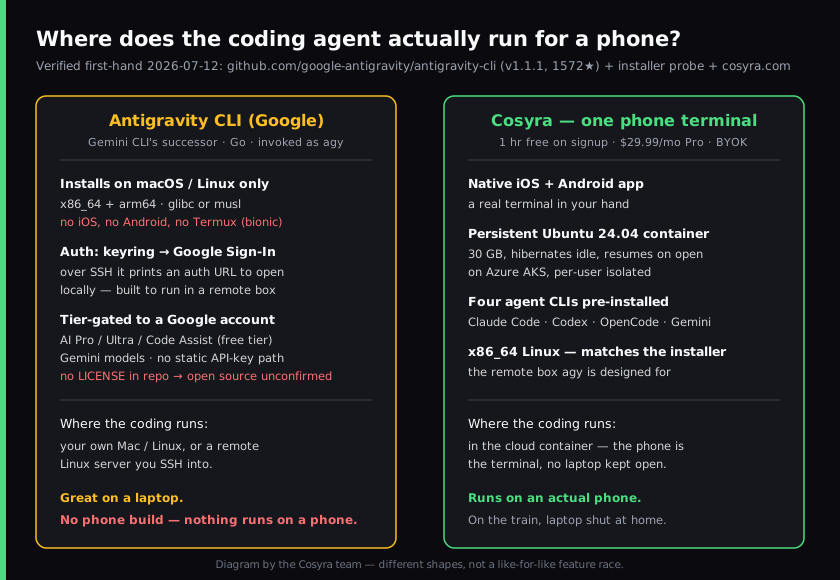
We reach the same container from an iPhone on the train, an Android tablet on the couch, or a laptop browser at a desk, and it's the same files and the same half-finished agent session each time. Antigravity's model assumes there's a computer in front of you, and the CLI runs on it. If that computer is an iPhone, the assumption breaks, because Google ships no iOS build. On Android it means running the agent inside Termux on the phone itself.
Where does Antigravity CLI beat Cosyra?
Antigravity beats Cosyra on being free with a Google account, on running locally so your code never leaves your machine, on deep Gemini integration, and on being a first-class Google product with a desktop app beside it. We ship a paid mobile product and we still think Antigravity is the right tool for a lot of people. Here's where it's the better pick.
- It runs on an Android phone now. Since version 1.2.15 the official installer puts a native build in Termux. If your phone is Android and you are comfortable in Termux, that is a local option with no monthly fee. It does not help on an iPhone.
- Free with a Google AI account. If you already pay for Google AI Pro or Ultra, or you use the free Code Assist for individuals tier, the CLI costs you nothing on top. There's no separate compute bill and no card to add. Cosyra's compute is a subscription from $20/month. On price to start, Antigravity wins.
- Your code stays on your machine. Antigravity runs the agent locally, so your source never leaves the laptop unless the model call sends it. For air-gapped-ish workflows or strict data-handling rules, a local CLI is easier to reason about than a cloud container. (Worth knowing: per its README, using the CLI opts you into Google collecting your "Interactions" data to improve the product, which you can turn off in settings, so check that if privacy is the reason you're choosing local.)
- Deep Gemini integration, and a real 1.x line. It's Google's own agent, tuned for Gemini, shipping fast, going from v1.0.4 in early June to v1.1.1 by 2026-07-10. If you want the tightest Gemini experience in a terminal, this is the first-party path.
- Built for remote boxes. Antigravity's auth flow detects an SSH session and prints an authorization URL you complete locally, and the installer ships glibc and musl Linux builds. It's clearly designed to run on servers, not just laptops, a genuine strength if you live in remote shells.
- A desktop app beside it. The CLI shares a unified architecture with the Antigravity desktop app, so if you want a GUI editor and a terminal agent from the same vendor, Google gives you both. Cosyra is terminal-only by design.
Where does Cosyra beat Antigravity CLI?
Cosyra beats Antigravity on the one thing this page is about: running a coding agent on an actual phone, with a real terminal, over a workspace that follows you across devices and needs no laptop kept awake. Antigravity has no phone app and no iPhone build. On an iPhone the comparison is "a mobile terminal" versus "no mobile at all." On Android it is a cloud container versus Termux on the phone.
It runs a coding agent on any phone; Antigravity has no iPhone build
This is the load-bearing difference. Antigravity has no iOS build, so
there's no native way to put agy on an iPhone, and on Android it
means setting up Termux. Our native
Google Play and
App Store apps put a real Ubuntu terminal in your
hand, and that terminal runs agents directly: Claude Code, Codex, OpenCode, and
Antigravity CLI itself are already on the PATH. If you want to code from an iPhone
at all, that's the gap.
No laptop to keep awake
Antigravity runs on the machine you installed it on. To reach it from a phone you'd need that machine on, reachable, and set up for SSH, a home server you power and babysit. Our container is the always-on Linux machine, in the cloud, reached from a native app with nothing running at home. It keeps working whether your laptop is shut or in another city.
Not locked to one model vendor
Antigravity signs in to Google, by account or API key, and runs Gemini. That's great if Gemini is your model; it's a wall if it isn't. We're BYOK, so the same container runs Claude Code against Anthropic, Codex against OpenAI, Antigravity CLI against Google, and OpenCode against whatever you point it at, from one phone, one login, one shell. You pick the model per task, not per vendor account.
A persistent workspace across devices, no machine to supply
A Cosyra container persists in the cloud and is the same container whether you reach it from an iPhone, an Android tablet, or a laptop browser. Drop your phone, buy a new one, log in, and your repo, your shell history, and your half-finished agent session are still there. With a local CLI like Antigravity, coding state lives on whatever machine you installed it on; move devices and you're setting it up again.
An opinion Antigravity's crowd will push back on
We think the phone keyboard is fine for agent-driven coding, and that a
phone terminal running the agent beats a laptop CLI you can only reach when
the laptop is on. Plenty of good engineers will disagree. At a desk with a
real editor and a fast local shell, agy is a lovely way to work,
and they're right about that. But for someone who wants to kick off and steer
an agent from a phone in a waiting room, "install our CLI on your Mac" isn't an
answer; it's a reason to leave a laptop running. That's the exact reason we built
Cosyra as a hosted container with a native app instead of another binary you install
yourself.
Who should pick Antigravity CLI instead of Cosyra?
Pick Antigravity CLI instead of Cosyra if you code on a Mac or Linux laptop, you're already in Google's AI ecosystem, or you want your source to stay on your own machine. For those profiles Antigravity is the better tool, and we'd tell you so.
Try Antigravity first if you are one of these profiles
- Laptop-first and in the Google ecosystem. You code at a Mac or Linux machine, you pay for Google AI Pro or Ultra (or use the free Code Assist tier), and a phone isn't your primary surface. Antigravity is free on top of what you already pay and tuned for Gemini. That's a better fit than a paid mobile container.
- Local-only by policy. You need the agent and your source on a machine you control, not a cloud container. A local CLI is easier to reason about for that; just remember to check the data-collection opt-out in settings.
- Server and SSH heavy. You live in remote shells and want a Google agent that authenticates cleanly over SSH. Antigravity's SSH URL-paste auth and glibc/musl Linux builds are built for exactly that.
We use terminal agents at our desks too. The line we draw is mobility: when we want an agent on an iPhone with no PC to keep open, a CLI you install on your own machine can't get there, and a hosted container with a native app can.
How do you try Cosyra if you're coming from Antigravity?
You try Cosyra from an Antigravity background in about two minutes: install
from the App Store or Google Play, sign in, and you land in a fresh Ubuntu
24.04 x86_64 container instead of a laptop shell. Your four agents are
already on the PATH, including agy itself, so the agent you came
from is one command away. The session below is what we run on a fresh install.
$ # Install Cosyra, open the app, drop into the container.
$ cat /etc/os-release | head -1
PRETTY_NAME="Ubuntu 24.04 LTS"
$ uname -m
x86_64
$ which claude codex opencode agy
/usr/local/bin/claude
/usr/local/bin/codex
/usr/local/bin/opencode
/usr/local/bin/agy
$ # The agent you came from is already here. Sign in with Google.
$ agy
The big unlock for most people coming from Antigravity: there's no laptop in the loop anymore. The container is the always-on machine, it hibernates when idle and resumes where you left off, and you reach it the same way from any device. The agent runs in it whether the app that started it is an iPhone or an Android tablet.
Frequently asked questions
What happened to Gemini CLI: is it shut down?
Not fully. On 2026-06-18 Gemini CLI (and the Gemini Code Assist IDE extensions) stopped serving requests for free individual users, Google AI Pro subscribers, and Ultra subscribers. Organizations on a Gemini Code Assist Standard or Enterprise license through Google Cloud, and developers calling Gemini through paid API keys, are unaffected. Google says their access "remains unchanged." Antigravity CLI, announced 2026-05-20, is the successor for the tiers that were cut off.
[source: Google Developers Blog: Gemini CLI to Antigravity CLI transition, 2026-06-18 cutoff]
Can I run Antigravity CLI on iPhone or Android?
On Android, yes: since version 1.2.15 (2026-10-02) Google ships a native
Android build that runs in Termux, and the official installer picks it. On
iPhone and iPad, no: there is no iOS build. There is no phone app on
either. Cosyra runs agy pre-installed in a cloud Linux container
you open from an iPhone or an Android phone.
[source: Antigravity CLI changelog, 1.2.15: native Android binaries for Termux]
Is Antigravity CLI open source?
Unconfirmed as of 2026-07-12. Gemini CLI was Apache-2.0, but the
Antigravity CLI repo still has no LICENSE file. The GitHub API reports
license: null even at release v1.1.1 (2026-07-10, 1,572 stars).
And it exposes no source tree, only releases, an installer, and a README. So
don't call Antigravity CLI open source until Google publishes a license.
[source: google-antigravity/antigravity-cli repo: no LICENSE, license: null]
Is Antigravity CLI free, and how do I authenticate it?
It's free to use with a Google AI Pro or Ultra subscription, or the free
Code Assist for individuals tier. There's no separate CLI fee. Sign-in is
account-based by default: it uses the system keyring and falls back to
Google Sign-In, opening your browser locally. Over SSH it detects the
session and prints an authorization URL you complete on your own machine.
Since version 1.1.13 (2026-08-14) it can also run on a
GEMINI_API_KEY, with modelProvider set to
gemini in settings.json. The binary is invoked
as agy, not av.
[source: Google Cloud blog: choosing Antigravity or Gemini CLI, tier gating]
How do I run an AI coding agent from my phone if Antigravity has no phone app?
Put the agent on a Linux machine you can reach from the phone, and reach it from a native app. Cosyra is that machine: a persistent Ubuntu 24.04 x86_64 container with Claude Code, Codex CLI, OpenCode, and Antigravity CLI already on the PATH, reached from iOS and Android. You drive real agents from a terminal on the phone, and the compute runs in the cloud rather than on a laptop you left at home.
[see: the AI coding agents we pre-install on mobile]
Does Antigravity CLI run inside a Cosyra container?
Yes. It is pre-installed. The Cosyra workspace image ships Antigravity CLI
as agy, in place of Gemini CLI. Tap the Antigravity shortcut
on Terminals (app 2.8.5 and earlier label it Gemini CLI) or type
agy, then sign in with your Google account from the link it
prints.
[source: antigravity.google CLI overview: install targets and auth]
Four agents pre-installed, Antigravity CLI among them, on a phone. We run them in a real x86_64 Ubuntu container, reached from a native iOS or Android app, with no laptop to keep open. Two-minute setup.
Gemini CLI on your phone · AI coding agents on mobile · Antigravity on your phone · See pricing. Sign up and pick a plan. Eligible new users can start a 7-day free trial in the App Store app.