Google Antigravity on a phone does not exist as a native app, and it is
worth being blunt about that up front. Antigravity ships in two forms: the
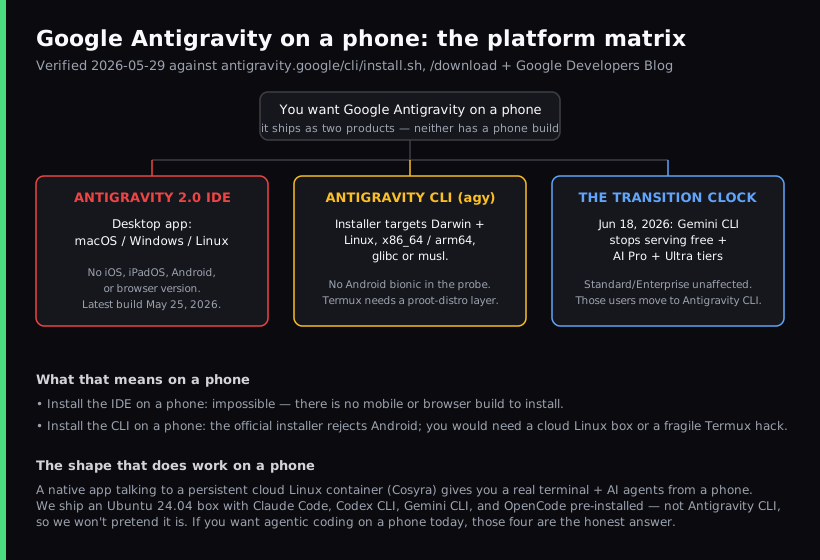
Antigravity 2.0 desktop IDE, which downloads only for macOS, Windows, and Linux, and the Antigravity
CLI (binary name agy), whose installer targets those same
desktop systems and, since version 1.2.15, Termux on Android. There is no
iOS or iPadOS version of either, no Android app, and no browser version of
the IDE. If your goal is to run an AI coding agent from a phone, the honest
answer is a native app talking to a persistent cloud Linux box, which is
what we build at Cosyra. The Antigravity CLI is
pre-installed there as agy.
This guide separates the two questions people actually mean when they search "antigravity on phone," because conflating them is where most write-ups go wrong. One is "can I install the Antigravity IDE on my iPad or phone?" The other is "can I run the Antigravity CLI from a mobile terminal?" We cover what each one is, the Gemini CLI to Antigravity CLI transition that landed on June 18, 2026, what changed for Termux on Android, and the alternative that runs from a phone today. For the wider map see our AI coding agents on mobile pillar and the mobile coding terminal pillar, and for the same Google-tool-without-a-mobile-app pattern see Firebase Studio on phone or its iPad sibling Firebase Studio on iPad.
Can you run the Antigravity IDE on a phone or iPad?
No. The Antigravity IDE is Google's agent-first desktop editor, launched in November 2025 as its answer to the AI-native editor wave. It is a standalone application for macOS, Windows, and Linux, and the official download page lists only those three platforms. Google has kept shipping desktop builds of the 2.x line since the Antigravity 2.0 launch at I/O 2026. We re-checked the download page on 2026-07-25 and it still lists only those three platforms (each with x64 and arm64 builds), with no mobile or browser build added. There is no iPad app, no iOS or Android app, and no hosted browser version you can open in mobile Safari. So unlike a browser IDE that at least loads on a tablet before falling apart, the Antigravity IDE has nothing to open on a phone at all.
That makes the IDE question short. If the device in your hand is a phone or an iPad, the Antigravity IDE is not an option you can install, full stop. The more interesting question is the second one, because the Antigravity CLI is a terminal program, and terminals are exactly the thing people expect to run on a phone.
What about the Antigravity CLI (agy)?
The Antigravity CLI is Google's Go-built successor to the Gemini CLI, announced in May 2026 and available to everyone. It is a terminal-native agent that carries over Agent Skills, Hooks, Subagents, and Extensions from the Gemini CLI (now packaged as Antigravity plugins). A terminal agent is closer to what works on a phone than a GUI IDE, so this is the path worth examining honestly.
We read the official install.sh on 2026-05-29 and re-read it on 2026-10-08.
The platform check now has an Android branch:
$ # antigravity.google/cli/install.sh (excerpt)
case "$(uname -s)" in
Darwin) os="darwin" ;;
Linux) if [ "$(uname -o 2>/dev/null)" = "Android" ]; then os="android"; else os="linux"; fi ;;
*) echo "Fatal: Unsupported operating system"; exit 1 ;;
case "$(uname -m)" in
x86_64|amd64) arch="amd64" ;;
arm64|aarch64) arch="arm64" ;;
*) echo "Fatal: Unsupported architecture"; exit 1 ;;
# Linux: picks linux_<arch> or linux_<arch>_musl. Android: android_<arch>
Two things follow from that. On a desktop or a cloud Linux box the installer
drops agy into ~/.local/bin and you are done. On a phone
running Termux, the installer now detects Android and downloads a native build.
Google added prebuilt Android binaries in
version 1.2.15 (2026-10-02), so the CLI runs directly in Termux with no
proot-distro layer. Before that the installer picked the glibc build,
which does not run on Android's bionic libc, and the working routes were community
ones: a proot-distro glibc layer, or the third-party fork
wallentx/antigravity-cli-termux. We have not run the official Android build inside a Termux session
ourselves, so treat it as shipped by Google, not tested by us. There is
still no iOS build, and the CLI carries no LICENSE file, so its open-source
status is unconfirmed as of 2026-10-08.
Sign-in used to be the bigger mobile blocker. The Antigravity CLI
authenticates with a system keyring and a browser-based Google sign-in. A
mobile terminal has no graphical browser of its own, so the CLI prints a
sign-in link that you open in the phone's browser. Until August 2026 that
was the only way in. Since version 1.1.13 (2026-08-14) the CLI also reads a
GEMINI_API_KEY when modelProvider is set to
gemini in settings.json, and the
feature request for key sign-in in headless use was closed as completed on 2026-09-21. We think a key from an environment variable
is the right default for headless and mobile use. Claude Code and Codex CLI already
work that way in a cloud terminal you reach from a phone.
The Gemini CLI sunset that landed on June 18, 2026
If you came here because your phone workflow used the Gemini CLI free tier, this already happened. Google's transition announcement (published 2026-05-19) said that on June 18, 2026, Gemini CLI and the Gemini Code Assist IDE extensions would stop serving requests for free Gemini Code Assist for individuals, Google AI Pro, and Google AI Ultra subscribers. That date has passed, and we confirmed on 2026-07-25 that the announcement was never postponed. Two groups kept their access unchanged: organizations on a Gemini Code Assist Standard or Enterprise license, and developers calling Gemini through paid Gemini or Gemini Enterprise Agent Platform API keys. The replacement Google names is the Antigravity CLI.
We made the same move. Cosyra containers used to ship the Gemini CLI, and
they now ship the Antigravity CLI as agy in its place. If you still
want the Gemini CLI on a paid key, it installs with one npm command, and our
Gemini CLI on phone guide walks
through that setup. Claude Code, Codex CLI, and OpenCode are pre-installed too,
and those do not depend on the Gemini transition at all.
How do you actually run an AI agent from your phone?
The shape that works on a phone is the one both Antigravity forms are missing: a native mobile app talking to a persistent cloud Linux environment. The phone's job is to be a good client to a real Linux box, not to host a desktop IDE or a glibc binary it was never built to run. We start a task on a train, hibernate the container when the stop comes, and pick the same session up on the couch an hour later without re-cloning or re-authing.
That is what we build. The Cosyra app on iOS and Android gives you a
persistent Ubuntu 24.04 container with Claude Code, Codex CLI, OpenCode, and
the Antigravity CLI already installed, 30 GB of storage, and hibernation
that resumes exactly where you left off. The Antigravity CLI is there as
agy: it replaced the Gemini CLI in the workspace image. You
sign in with your Google account from a link the CLI prints.
Step 1: Install Cosyra
Install Cosyra from the App Store or Google Play. Sign in with Apple, Google, or email, and the app provisions a fresh Ubuntu container on first launch. There is no desktop step and no separate server to rent.
Step 2: Start agy and sign in
Tap the Antigravity shortcut on Terminals, or type
agy in a terminal. App 2.8.5 and earlier label the shortcut Gemini
CLI. The CLI prints a Google sign-in link. Follow it to sign in with your Google
account. No API key is needed.
$ # Already on the PATH, nothing to install
$ agy
# Prints a Google sign-in link. Open it.
Step 3: Run an agent
Clone a repo and start a session:
$ git clone https://github.com/your-org/your-project.git
Cloning into 'your-project'...
$ cd your-project
$ agy
> Add a health-check endpoint and a test, then run the suite.
Run an agent from your phone. Sign up and pick a plan. Eligible new users can start a 7-day free trial in the App Store app. App Store / Google Play / Pricing details
How do the realistic phone paths compare?
Lined up by what matters on a phone, whether there is anything to install at all, whether the install is supported or a hack, and how you authenticate, the options sort out clearly. The table covers the realistic paths as of 2026-10-08.
| Feature | Antigravity IDE | Antigravity CLI on Termux | Cosyra (phone app) |
|---|---|---|---|
| Native phone app | No (desktop only) | No (Termux is the host) | Yes (iOS + Android) |
| Install on a phone | Nothing to install | Official installer (Android only) | One app install |
| Officially supported | n/a on mobile | Official build on Android since 1.2.15. No iOS | Yes |
| Persistent environment | Local desktop | Local on the phone | Ubuntu 24.04, 30 GB |
| AI agents available | Antigravity (in-IDE) | agy | 4 CLIs pre-installed, agy included |
| Auth model | Google sign-in | Google sign-in or GEMINI_API_KEY | Google sign-in or GEMINI_API_KEY for agy, your own key or account for the rest |
| Works offline | Yes (local) | Yes (local) | No (cloud container) |
| Free entry | Free preview (desktop) | Free (Termux + your key) | 7-day trial in the App Store app (eligible new users) |
Where the Antigravity tools win
A fair guide names what the other tools do better, so here it is with no hedging. If these describe your situation, use Antigravity and not Cosyra:
- You are on a desktop. The Antigravity IDE is a polished, agent-first editor, and on a Mac, Windows, or Linux machine it is a genuinely strong workspace for building with agents in a GUI. We do not offer a desktop IDE.
- Price on the IDE. The Antigravity IDE is free in public preview for individuals, against our subscription, which starts at $20/month. On cost alone the IDE wins on a desktop.
- It runs offline and local. Both Antigravity forms run on your own hardware, so they keep working with no internet. A cloud container like ours needs a connection, which is a real trade-off we name honestly.
- Go-built CLI speed and Google integration. The Antigravity CLI is snappy, and if you live inside Google AI Pro or Ultra, its account-based auth is one less key to manage on a machine that has a browser.
Who should pick which?
Here is the decision framework we would give a friend, with the device question front and center.
- Pick the Antigravity IDE if you work on a desktop, you want a free agent-first editor with a graphical workspace, and you are happy inside Google's account-based auth. The phone is simply not its arena.
- Pick the Antigravity CLI if you want Google's terminal agent on a Mac, a Windows or Linux machine, a cloud box you control, or an Android phone running Termux. On a desktop or your own server it is a fine tool.
- Pick Cosyra if the device in your hand is a phone or a tablet, you want a real terminal and AI coding CLIs you drive yourself, the Antigravity CLI among them, and you want a persistent box that follows you across devices. This is the case neither Antigravity form covers on an iPhone or iPad. We lay the two products side by side in Cosyra vs Antigravity.
- Try Termux first if you specifically want a local, offline terminal on Android, you are comfortable in Termux, and a cloud container is a non-starter for you. Since version 1.2.15 the Antigravity CLI installs there with Google's own installer. See our Cosyra vs Termux comparison for where that line falls.
Frequently asked questions
Can you run Google Antigravity on a phone or tablet?
There is no phone app for either form of Antigravity. The Antigravity 2.0
IDE downloads only for macOS, Windows, and Linux, with no iOS, iPadOS,
Android, or browser build. The Antigravity CLI has no iOS build. On
Android it runs inside Termux since version 1.2.15 (2026-10-02). On any
phone it runs inside a cloud Linux container: Cosyra ships it
pre-installed as agy.
[source: Google Antigravity official download page]
Can I install the Antigravity CLI on Termux on Android?
Yes, since version 1.2.15 (2026-10-02). Google ships prebuilt native Android binaries that run directly in Termux with no proot-distro layer, and the official installer detects Termux and picks that build. Before that the routes were a third-party fork, wallentx/antigravity-cli-termux, or the official glibc binary inside proot-distro. We have not run the official Android build ourselves. The CLI still has no LICENSE file, so its open-source status is unconfirmed.
[source: Antigravity CLI changelog, 1.2.15: native Android binaries for Termux]
When does Gemini CLI stop working?
It already changed. On June 18, 2026, Gemini CLI and the Gemini Code Assist IDE extensions stopped serving requests for free Gemini Code Assist for individuals, Google AI Pro, and Google AI Ultra subscribers. Two groups kept access: organizations on a Gemini Code Assist Standard or Enterprise license, and developers using paid Gemini or Gemini Enterprise Agent Platform API keys. Google points the affected users to the Antigravity CLI as the replacement.
[source: Google Developers Blog, Gemini CLI to Antigravity CLI]
What is the difference between the Antigravity IDE and the Antigravity CLI?
The Antigravity IDE is a desktop agentic editor aimed at people who build with agents in a graphical workspace. The Antigravity CLI, binary name agy, is a terminal-native agent aimed at keyboard-driven and remote or CI workflows. Both are Google products. Neither has a phone app. The IDE is desktop-only. The CLI also runs in Termux on Android and on remote Linux machines.
[source: Google Cloud blog, choosing Antigravity or Gemini CLI]
Which operating systems does the Antigravity CLI support?
macOS and Linux through the Bash installer, on x86_64 or arm64, with a glibc or a musl variant on Linux, plus 64-bit Windows through a PowerShell installer. Since version 1.2.15 (2026-10-02) the Bash installer also detects Termux on Android and installs a native Android build. It prints a fatal error and exits on any other operating system or architecture. There is no iOS target.
tl;dr
Google Antigravity has no phone app. The Antigravity 2.0 IDE is desktop only (macOS, Windows, Linux). The Antigravity CLI installs on those desktops and, since version 1.2.15, in Termux on Android. It has no iOS build. Gemini CLI's free, AI Pro, and Ultra tiers stopped serving on June 18, 2026, which moved those users to the Antigravity CLI. To run it from any phone, an iPhone included, use a native app on a persistent cloud Linux box. That is Cosyra, with Claude Code, Codex CLI, OpenCode, and the Antigravity CLI pre-installed.
App Store / Google Play. Sign up and pick a plan. Eligible new users can start a 7-day free trial in the App Store app. See pricing.
For the agent-by-agent picture across phone and tablet, our AI coding agents on mobile guide maps every option, and the mobile coding terminal pillar covers the terminal-on-a-device decision end to end. If you want the Anthropic agent specifically, see Claude Code on your phone.
Run the Antigravity CLI from your phone in 3 minutes.
Install Cosyra, type agy, sign in with Google.