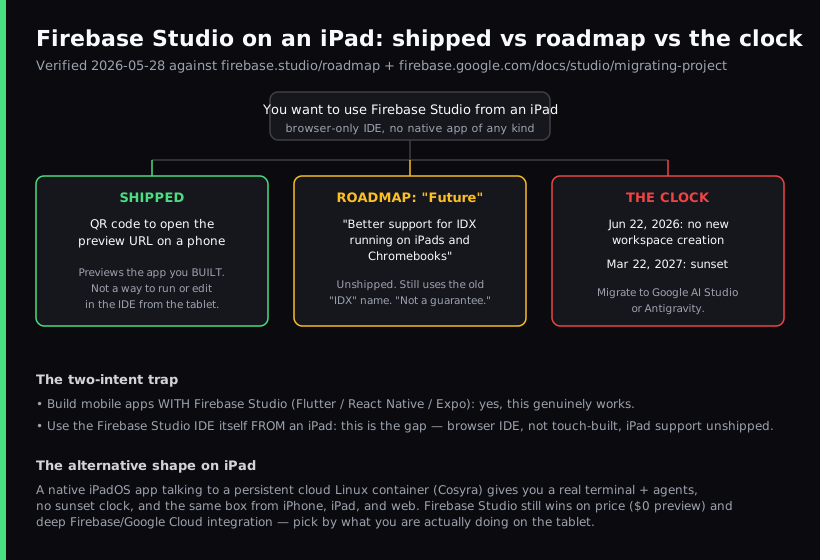
Firebase Studio on an iPad is a half-answer: it opens in Safari because it is a browser app, but Google built it for a desktop browser and has not shipped real iPad support. The official Firebase Studio roadmap still lists "Better support for IDX running on iPads and Chromebooks" under the status "Future," and the whole product is scheduled to sunset on March 22, 2027. You can build mobile apps with Firebase Studio, but using the IDE itself from an iPad is the part that does not really work yet. If your goal is to actually code on a tablet, the honest answer is a native app plus a persistent cloud Linux box, which is what we build at Cosyra.
This guide separates the two questions people are actually asking, because conflating them is where most write-ups go wrong. One question is "can Firebase Studio build mobile apps?". Yes, it does Flutter, React Native, and Expo. The other is "can I sit on the couch with an iPad and use the Firebase Studio IDE?". That is the gap. We cover what is shipped, what is only on the roadmap, what the 2027 sunset means for anyone learning it now, and the alternatives that run natively on an iPad today. For the Apple-specific agent-coding story see our Claude Code on iPad guide; for the head-to-head feature-by-feature read against the native-app alternative, our Cosyra vs Firebase Studio comparison covers pricing, sunset, and where each tool wins; and for the same browser-IDE-without-a-mobile-app pattern in other products see Gitpod on iPad (now Ona), Coder on iPad (whose official docs document the Safari PWA bugs on the same page as the install), and Cosyra vs GitHub Codespaces on mobile, and if you want to try Microsoft's browser IDE on the tablet before deciding, our GitHub Codespaces on iPad walkthrough covers the Safari setup step by step. For Google's other browser-only iPad surface, an async agent that triggers in Safari and hands back a pull request instead of opening an editor, with the same no-native-iPadOS-app constraint as Firebase Studio, see Jules on iPad.
Can you use Firebase Studio on an iPad?
You can open Firebase Studio on an iPad, but you cannot meaningfully work in it the way you would on a laptop. It is a browser-only IDE built on Code OSS (the open core of VS Code) running inside a Google Cloud VM, with Gemini wired in. The same browser-sandbox ceiling shows up if you skip Firebase and open plain VS Code on an iPad at vscode.dev: the editor loads, but there is no integrated terminal and nothing to run your build, because the browser tab is the limit, not the iPad. There is no native iOS, iPadOS, or Android app of any kind. Loading a full desktop IDE in iPad Safari gives you a cramped, touch-hostile surface: the file tree, command palette, and panels assume a mouse, a keyboard, and a wide window.
Google is candid about this in its own roadmap. The relevant line is:
"Better support for IDX running on iPads and Chromebooks". Status: Future.
Two things stand out. First, it is still called "IDX," the deprecated Project IDX name, which signals a low-priority legacy entry rather than active work. Second, the roadmap carries an explicit disclaimer that it is "not exhaustive, nor a guarantee we'll complete everything." Pair that with the sunset date below and the realistic read is that proper iPad support may never ship. We think that is the part most "Firebase Studio on iPad" posts bury, and burying it does the reader a disservice.
What actually works on a tablet today?
The only shipped feature that touches mobile at all is a preview convenience, not IDE access. From the same roadmap, marked "Completed": "QR Code to open preview URL on mobile device." That lets you scan a code on your desktop and open the running preview of the app you built on your phone. It previews output. It is not a way to run or edit in the IDE from the tablet.
On a phone the experience degrades further. When Firebase Studio launched, a well-known developer tried it in Mobile Safari and reported on Hacker News that it "clearly wasn't designed with mobile in mind," and that the preview panel rendered blank until he switched back to a desktop browser. His exact frustration was that he does most of his prototyping on a phone, and the tool did not meet him there. That single comment captures the whole gap better than a spec sheet would.
To be clear about what does work, because the honest version of this matters: Firebase Studio genuinely builds mobile apps. It ships Flutter, React Native, and Expo templates, an in-browser Android emulator for testing what you build, and Expo Go phone previews. If your task is "scaffold and prototype a mobile app with an AI agent and a desktop browser," it is a capable tool. The trap is assuming that "builds mobile apps" implies "runs on a tablet." Those are different sentences.
Firebase Studio sunsets on March 22, 2027
This is the fact that should weigh on any tablet decision. Google's migration page states plainly that Firebase Studio is sunsetting on March 22, 2027, and that as of June 22, 2026 new workspace creation and user signup are disabled. That second date has already passed, so a new reader can no longer sign up or create a workspace at all. The recommended paths off the product are Google AI Studio for browser-based prototyping and Antigravity for code-first, agentic development.
Investing weeks learning a tool's quirks on an iPad only to migrate off it within a year is a poor trade. The roadmap item that would make iPad use pleasant is unshipped and non-binding, and the product carrying that roadmap has an end date. We would not tell a friend to build an iPad workflow around Firebase Studio in mid-2026. That is an opinion the Firebase team would push back on, and we will hold it anyway: a tablet workflow you cannot fully use today, on a product scheduled to shut down, is not where your setup time should go.
What about a Chromebook?
A Chromebook is the better of the two devices in that roadmap line, simply because it runs a desktop-class Chrome browser. The IDE is more usable in a real Chrome window than in iPad Safari, and several community write-ups note Firebase Studio "works better on Chromebooks currently." But it is the same unshipped "Future" roadmap entry, and the same March 22, 2027 sunset applies. A Chromebook does not change the deprecation math; it only makes the interim experience less painful. If you are on a managed school Chromebook, the browser route also sidesteps the locked-down Linux toggle, which is a real plus there.
How do you actually code on an iPad instead?
The pattern that works on an iPad is the one Firebase Studio is missing: a native app talking to a persistent cloud Linux environment. The iPad's job is to be a good client to a real Linux box, not to pretend it can run a desktop IDE in a browser tab. Once you accept that, the "iPad is bad for coding" complaints mostly dissolve.
That is what we build. The Cosyra iOS app is a universal binary that runs natively on iPad with full iPadOS multitasking, Split View, Slide Over, and Stage Manager on M-series iPads. You get a persistent Ubuntu 24.04 container with Claude Code, Codex CLI, OpenCode, and Antigravity CLI already installed, 30 GB of storage, and hibernation that resumes exactly where you left off. The same container is reachable from iPhone, iPad, and the web, so we start a task on an iPad on the couch and pick it up on a phone in a waiting room without re-cloning anything.
Step 1: Install Cosyra from the App Store
Open the App Store on your iPad and install Cosyra. The same listing covers iPhone, iPad Pro, iPad Air, and iPad mini. Sign in with Apple, Google, or email, and the app provisions a fresh Ubuntu container on first launch.
Step 2: Add your model API key
Cosyra is bring-your-own-key, so you pay Anthropic, OpenAI, or Google directly rather than through us. In the terminal:
$ # Persists across sessions and device switches
$ echo 'export ANTHROPIC_API_KEY="sk-ant-your-key-here"' >> ~/.bashrc
$ source ~/.bashrc
$ claude --version
Claude Code (latest)
Step 3: Run an agent
Clone a repo and start a session:
$ git clone https://github.com/your-org/your-project.git
Cloning into 'your-project'...
$ cd your-project
$ claude
Claude Code (latest)
Type your prompt, or type "/" for commands.
> Add a health-check endpoint and a test, then run the suite.
Try it on your iPad. Sign up and pick a plan. Eligible new users can start a 7-day free trial in the App Store app. App Store / Google Play / Pricing details
How do the iPad coding options compare?
Lined up against what matters on a tablet, a native app, a persistent environment, and whether the tool is on a deprecation clock, the options sort out clearly. The table covers the realistic paths as of 2026-05-28.
| Feature | Firebase Studio (Safari) | Cosyra (iPad app) | Codespaces (Safari) |
|---|---|---|---|
| Native iPad app | No (browser only) | Yes | No (browser only) |
| Real iPad support shipped | No (roadmap "Future") | Yes | Partial (web editor) |
| Persistent environment | Ephemeral workspaces | Ubuntu 24.04, 30 GB | Per-repo, idle timeout |
| AI agents | Gemini (in-IDE) | 4 CLIs pre-installed | Copilot (in-IDE) |
| Builds mobile apps | Yes (Flutter/RN/Expo) | Yes (your own toolchain) | Yes (your own toolchain) |
| API key model | Gemini metered | BYOK (pay provider) | GitHub plan |
| Free tier | Yes (3 workspaces) | None. 7-day trial in the App Store app (eligible new users) | Monthly free hours |
| Being sunset | Yes (Mar 22, 2027) | No | No |
| Cost | $0 (Premium for caps) | From $20/mo | Usage-based |
Firebase Studio is one row in a much longer table. If you want the full field, every IDE, agent, and cloud container ranked by what actually runs on a tablet, our coding on iPad guide covers it.
Where Firebase Studio wins
A fair comparison names what the other tool does better, so here it is, with no hedging. Firebase Studio beats Cosyra on these axes, and if they describe your situation you should use it:
- Price. Firebase Studio is free during its availability (3 workspaces), against our subscription, which starts at $20/month. On cost alone, it wins.
- Firebase and Google Cloud integration. Emulators, App Hosting deploy, and Blaze billing live in one place. We do not replicate that, and if your whole backend is Firebase, that integration is worth a lot.
- The App Prototyping agent. Its no-code prompt-to-app flow (Next.js web output) is a lower-floor workflow than our terminal-first agents, and is genuinely better for non-developers prototyping a web app.
- In-browser Android emulator. Testing a Flutter or React Native build without leaving the browser is a real convenience we do not offer.
Who should pick which?
Here is the decision framework we would give a friend, with the tablet question front and center.
- Stay on Firebase Studio if you already created a workspace before June 22, 2026, you are on a laptop or desktop, and you are finishing a Flutter / React Native / web app whose backend is Firebase. Existing workspaces keep working until the March 22, 2027 sunset, so it is fine to ship a prototype you have already started. New users no longer have this option: signup and new workspace creation are closed.
- Pick Cosyra if the device in your hands is an iPad or an iPhone, you want a real terminal and AI coding CLIs you drive yourself, and you want a persistent box that is not on a shutdown clock and follows you across devices.
- If you are new to Firebase Studio, you cannot start it at all anymore. Signup closed on June 22, 2026. Google routes new non-developers who want prompt-to-app prototyping to Google AI Studio, and code-first users to Antigravity. Neither ships a native tablet app either, which is the gap Cosyra fills on an iPad.
Frequently asked questions
Can you use Firebase Studio on an iPad?
Firebase Studio loads in iPad Safari because it is a browser app, but it is built for a desktop browser and Google has not shipped real iPad support. The official roadmap lists "Better support for IDX running on iPads and Chromebooks" under the status "Future," with a note that the roadmap is not a guarantee. It technically opens, but editing in the IDE on an iPad is not a supported, polished workflow today.
[source: Firebase Studio official roadmap]
Does Firebase Studio work in mobile Safari on a phone?
Not well. A developer who tried Firebase Studio in Mobile Safari at launch reported it "clearly wasn't designed with mobile in mind," and that the preview panel rendered blank until they switched back to a desktop browser. It is a desktop IDE running in a browser, and phone-sized screens are not the target.
[source: Hacker News, "Firebase Studio" launch thread]
Is Firebase Studio being discontinued?
Yes, and it is already closed to new users. Google's migration page states Firebase Studio is sunsetting on March 22, 2027, and that as of June 22, 2026 new workspace creation and user signup are disabled. If you do not already have a workspace you cannot start one. Google points you to Google AI Studio for browser prototyping or Antigravity for code-first agentic work instead. For anyone choosing a tool to invest tablet time in today, Firebase Studio is no longer an option you can pick up.
[source: Firebase Studio sunset and migration, official docs]
Is Firebase Studio the same as Project IDX?
Yes. Firebase Studio is the renamed and merged successor to Project IDX (combined with Gemini in Firebase). Google's own docs confirm "Project IDX is now part of Firebase Studio," and existing IDX projects were migrated automatically. The roadmap still uses the old "IDX" name in the iPad/Chromebook item, a tell that it is a legacy entry.
[source: "Project IDX is now part of Firebase Studio", official docs]
Can I run Firebase Studio on a Chromebook?
Better than on an iPad, but it is the same unshipped roadmap item. The roadmap line groups iPads and Chromebooks together under "Future." A Chromebook at least runs a desktop-class Chrome browser, so the IDE is more usable there than on an iPad. It is still subject to the same March 22, 2027 sunset.
[source: Firebase Studio official roadmap]
How many Firebase Studio workspaces can I create for free?
Three. Firebase Studio access is free during its availability, and the only paid lever is workspace count: 3 workspaces without the Google Developer Program, 10 on the Standard tier, and 30 on the paid Premium tier. Without Premium there is also a combined cap of 2 workspaces across Flutter, React Native, and Expo project types.
tl;dr
Firebase Studio is a browser-only IDE with no native app. It opens in iPad Safari but is not built for it, real iPad support is an unshipped roadmap item Google labels "Future," and the whole product sunsets March 22, 2027 (signup and new workspaces already closed as of June 22, 2026, so new users cannot start it). It does build mobile apps, so existing workspaces can still use it on a laptop for that. To actually code on an iPad, use a native app on a persistent cloud Linux box. That is Cosyra, with four AI CLIs pre-installed and no shutdown clock.
App Store / Google Play. Sign up and pick a plan. Eligible new users can start a 7-day free trial in the App Store app. See pricing.
For the wider picture, our guide to AI coding agents on mobile maps every agent across phone and tablet, and the mobile coding terminal pillar covers the terminal-on-a-device decision end to end. For the phone-shaped version of this same Firebase Studio question see Firebase Studio on a phone, and if you are weighing iOS terminal apps specifically, see the best terminal apps for iPhone.
Get a real dev environment on your iPad in 3 minutes. Install Cosyra, add your API key, run an agent in a persistent Ubuntu container.