Short answer. The best terminal app for iPhone depends on where you want Linux to run. Blink Shell is the best SSH/Mosh client if you already own a server. iSH is the best free local Linux shell. a-Shell is the fastest native on-device toolkit. Termius is the best cross-platform SSH client for teams. And if what you really want is to run Claude Code or Codex CLI from your phone, none of the local apps do that today, so a cloud terminal with the agents pre-installed is the practical pick. We tested all five; here is the honest 2026 ranking.
We ran every option below on an iPhone 15 Pro on iOS 18 over the past year, both on Wi-Fi at a desk and on a flaky train connection where it actually matters. We are the team behind Cosyra, one of the five options, so we will say plainly where each competitor wins. That is the only kind of roundup worth reading.
This post was written by the Cosyra team. We cross-checked every claim below against each project's own documentation, GitHub repositories, and App Store listings, plus our internal competitor factsheets. Source verification date 2026-05-21; App Store ratings, app versions, and pricing re-verified first-hand 2026-06-08.
tl;dr
Use Blink Shell if you own a server and want the slickest iOS SSH/Mosh client. Use iSH if you want a free, fully offline Linux shell and accept slow x86 emulation. Use a-Shell for native-speed Unix utilities that fit its bundle. Use Termius if you live across iPhone, Android, Mac, and Windows and want synced SSH with team features. Use Cosyra if you want Claude Code, Codex CLI, OpenCode, and Gemini CLI already installed in a real Ubuntu container, reached from a native iOS app, with no server to maintain.
App Store · Google Play. Sign up, 1 hour free, no credit card. Extend with a 10-hour, 7-day trial when you want more.
Want to run AI coding agents from your iPhone? Cosyra ships a per-user Ubuntu 24.04 container with Claude Code, Codex CLI, OpenCode, and Gemini CLI pre-installed. Reached from a native iOS app, with no SSH client to configure and no emulator overhead.
App Store · Google Play · Pricing. 1 hour free on signup, no credit card.
How we picked the best terminal app for iPhone
Most "best terminal app for iPhone" lists rank these as if they all do the same job. They do not. Three of them are SSH clients that need a server somewhere; two run something locally on the phone; one is a cloud environment. We think ranking them on a single "which is best" axis is the wrong frame. The real question is: where do you want your Linux to run, and do you need to run an AI coding agent on it? We scored each option on five things that change the answer.
- Where Linux actually runs: on the phone, on a server you own, or in a managed cloud container. This is the single biggest fork in the decision.
- Whether AI coding agents run: Claude Code, Codex CLI, Gemini CLI, and OpenCode are the workloads people increasingly want from a phone (here is running OpenCode on your phone), and they break on most local options for a concrete technical reason we explain below.
- Offline capability: does it work in airplane mode, or does it need a connection to a server or the cloud?
- Cost: free, one-time, or subscription, plus whether you also have to pay for and maintain a server.
- Setup and upkeep: how much work before you have a usable shell, and how much to keep it working.
The 5 best terminal apps for iPhone in 2026
Ranked by how well each does its own job, not forced onto one scale. We have used all five in real work, including from the couch and on the move.
1. Blink Shell: best SSH and Mosh client
Blink Shell is the terminal serious iOS users reach for when they have a server to connect to. It is a desktop-grade SSH and Mosh client with excellent external-keyboard handling, SFTP, and Files.app integration. Mosh is the standout: it keeps a session alive through network drops and IP changes, which is exactly what you want on a train or a spotty cellular link where plain SSH would hang. Blink is open source (GPL) and now lists Apple Vision Pro support. Pricing is $19.99/year for Blink+ after a 14-day trial as of 2026-06-30. The honest catch: Blink is a client. By itself it does not run Linux on your phone, so you still need a laptop, a VPS, or a Codespace on the other end. Blink recently launched Blink Build, a managed cloud VM in open beta gated behind Blink Plus, but it does not pre-install AI coding agents. Its App Store rating sits at 3.08 out of 5 across 407 ratings (App Store, verified 2026-06-30). A newer iOS client in the same SSH-and-Mosh mold, Moshi, leans harder into the AI-agent angle and markets itself as the mobile front-end for Claude Code and friends running on a box you own, at $7.99/month for Moshi Pro on top of a free tier that already covers plain SSH (getmoshi.app/pricing, verified 2026-07-20). The agent still runs on the server, not the phone, which is the same catch as Blink; we put that shape next to a hosted container in Cosyra vs Moshi.
2. iSH: best free local Linux shell
iSH is the closest thing to a real Linux box that lives entirely on your iPhone. It runs Alpine Linux locally by emulating 32-bit x86 in user mode and translating syscalls, so you get a genuine apk package manager, a real shell, and full offline use. It is free, open source, and rated 4.7 out of 5 across 1,219 App Store ratings as of 2026-06-30. The trade-offs are real and measurable: the iSH project itself documents 3 to 5 times overhead versus native execution, and Alpine's musl libc means many precompiled binaries will not run without recompiling. Note one nuance: the App Store stable build (1.3.2) has not moved since 2023, but the GitHub repo and TestFlight track are active in 2026, so iSH is alive, just slow to ship a stable cut. For a measured head-to-head, see Cosyra vs iSH.
3. a-Shell: best native, offline toolkit
a-Shell takes the opposite approach to iSH. Instead of emulating x86, it ships a curated set of Unix utilities compiled natively for iOS: Python 3.11, Lua, Perl, a JavaScript runtime, C/C++ to WebAssembly, plus vim, awk, sed, grep, git, ssh, and more. Native speed, no emulator tax, fully offline, free, and BSD-licensed. The boundary is the bundle: there is no apt and no apk, so you cannot install arbitrary Linux packages, pip only installs pure-Python packages, and iOS forbids fork(2) so anything that spawns subprocesses will not work. a-Shell is the right pick when your work fits what it ships and you want speed without an emulator. It is the wrong pick if you expect "whatever I apt install shows up on my phone." See our breakdown of coding Python on a phone for which pip packages actually install on a-Shell, iSH, Termux, and a cloud container, or our head-to-head Cosyra vs a-Shell if you want the cloud-container side of the trade-off laid out feature by feature.
4. Termius: best cross-platform SSH client
Termius is the SSH client to pick if your life spans more than one device. It runs on iOS, Android, iPadOS, macOS, Windows, and Linux, with an encrypted vault that syncs your hosts, keys, and snippets across all of them. The free Starter tier covers SSH, SFTP, and port forwarding; Pro is $10/month on annual billing, and Team tiers add multiplayer sessions and shared vaults. Like Blink, Termius is a client, not an environment: you still need a Linux machine to connect to. Its built-in AI is an infrastructure-command assistant for tasks like troubleshooting and updates, not a code-authoring agent like Claude Code. Pick Termius when cross-device sync and team features matter more than running anything locally.
5. Cosyra: best for running AI coding agents
This is what we ship, so weigh it accordingly. Cosyra runs a per-user Ubuntu 24.04 container on Azure with Claude Code, Codex CLI, OpenCode, and Gemini CLI pre-installed. You install a native iPhone app, sign in, and the terminal opens into a real x86_64 Linux environment with apt, 30 GB of persistent storage, and session hibernation that resumes where you left off. There is no SSH client to configure and no server to keep awake, which is the whole point: the friction of setting up an agent on a phone is what kills the workflow for most people. The honest trade-offs versus the local apps: you need an internet connection, and your code sits on our infrastructure rather than only on your device. Where it wins is the thing the other four cannot do without a server you maintain. Open a phone, and the agent is already there. The same container is reachable from Android and the web too.
Skip the server setup. Cosyra is a native iPhone and iPad app paired with a managed Ubuntu 24.04 container. Claude Code, Codex CLI, OpenCode, and Gemini CLI come pre-installed.
App Store · Google Play · Pricing. 1 hour free on signup, no credit card. Extend with a 10-hour, 7-day trial.
How the best iPhone terminal apps compare
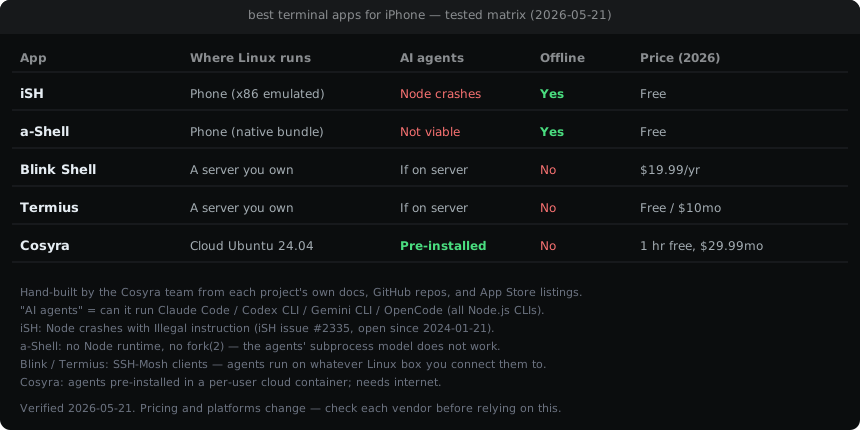
The table maps the five options against the dimensions that drive the pick. Verified 2026-05-21 from each project's own documentation and App Store listing; prices and ratings re-verified 2026-06-08.
| Dimension | Blink | iSH | a-Shell | Termius | Cosyra |
|---|---|---|---|---|---|
| Where Linux runs | Server you own | Phone (emulated) | Phone (native) | Server you own | Cloud container |
| OS support | iOS, iPadOS, visionOS | iOS, iPadOS, macOS, visionOS | iOS, iPadOS, macOS, visionOS | iOS, Android, Mac, Win, Linux | iOS, Android, web |
| AI agents pre-installed | No (client) | No (Node crashes) | No (no Node) | No (client) | Yes |
| Package manager | Server's | apk (Alpine) | None (bundled) | Server's | apt (Ubuntu) |
| Offline use | No | Yes | Yes | No | No |
| Persistent storage | On your server | In-app sandbox | In-app sandbox | On your server | 30 GB per user |
| API key model | N/A (client) | N/A | N/A | N/A (client) | BYOK |
| Open source | Yes (GPL) | Yes | Yes (BSD) | No | No |
| Price (2026-06-08) | $19.99/yr | Free | Free | Free / $10/mo | 1 hr free, $29.99/mo |
Which terminal app should you pick?
A decision framework that names the user, not the feature.
- Pick Blink Shell if you already run a laptop or VPS and want the best iOS-side client for it. Mosh through network drops and the keyboard handling are worth the $19.99/year on their own.
- Pick iSH if you want a free, fully offline Linux shell on the device, your work fits Alpine and musl, and you accept that anything CPU-heavy will be visibly slow. Great for learning Unix or scripting; not for AI agents.
- Pick a-Shell if your work fits its native bundle and you want speed without an emulator. Light text processing, Python, scripting. Not a stand-in for apt.
- Pick Termius if you switch between several platforms and want one synced SSH client with team collaboration. Still needs a server to connect to.
- Pick Cosyra if you want Claude Code, Codex CLI, OpenCode, and Gemini CLI already installed in a real Ubuntu container, reached from a native app, with no server to maintain. We trade offline use and "your code on our infra" for "no setup, the agent is already there."
Can you run AI coding agents on iPhone?
This is the question that splits the field, so it is worth being precise. Claude Code, Codex CLI, Gemini CLI, and OpenCode are all Node.js command-line tools. To run them you need a working modern Node runtime and the ability to spawn subprocesses. That is exactly what the local iPhone apps cannot give you.
On iSH, you can apk add nodejs npm, but the Node binary itself
crashes with Illegal instruction because iSH's i386 emulator does
not implement the instructions modern Node emits. That is
iSH issue #2335,
filed 2024-01-21 and still open. On a-Shell there is no first-class Node
runtime at all, and iOS forbids fork(2), so the subprocess model these
agents depend on is off the table. So "run Claude Code locally on my iPhone"
is not a thing today, regardless of which on-device app you pick.
The setups that do work: SSH from Blink or Termius into a laptop or VPS that runs the agent, holding the session open with mosh and tmux; or a cloud terminal that ships the agents pre-installed in a real Linux container reached from a native app. We think the phone keyboard is fine for this, because agent-driven coding is mostly describing a task and reviewing a diff, not typing for hours. People who disagree usually have not tried it on a real task. The full landscape is in our AI coding agents on mobile pillar, and the SSH route is in SSH from phone. For the whole iPhone story, terminals, agents, and what the hardware actually handles, see coding on iPhone.
Frequently asked questions
What is the best terminal app for iPhone in 2026?
It depends on where you want Linux to run. Blink Shell is the best SSH/Mosh client if you own a server ($19.99/year). iSH is the best free local Linux shell, with a-Shell as the faster, narrower native alternative. Termius is the best cross-platform SSH client. If you want to run AI coding agents like Claude Code from your phone, none of the local apps do that today, so a cloud terminal with the agents pre-installed is the practical pick.
[source: blink.sh, verified 2026-05-21]
Is there a real Linux terminal for iPhone?
iSH comes closest by running Alpine Linux locally through 32-bit x86 user-mode emulation, at roughly 3 to 5 times native overhead. a-Shell ships native Unix tools but is not a full Linux distro and has no apt or apk. Neither installs arbitrary Ubuntu packages. For a real Ubuntu environment, SSH into a Linux box or open a cloud container from a native app.
[source: ish-app/ish on GitHub]
Can I run Claude Code on iPhone?
Not inside the local iOS terminal apps. On iSH, modern Node binaries crash with "Illegal instruction" (iSH issue #2335, open since 2024-01-21), and a-Shell has no Node runtime and forbids fork(2). The working setups are SSH into a server that runs the agent, or a cloud terminal that ships Claude Code, Codex CLI, OpenCode, and Gemini CLI pre-installed.
[source: iSH issue #2335, open since 2024-01-21]
Is Blink Shell worth it?
If you already run a server to SSH into, yes. Blink is a desktop-grade iOS terminal with Mosh, strong keyboard support, and SFTP, at $19.99/year for Blink+ after a 14-day trial. The catch is that Blink is a client and does not run Linux on the phone by itself. Its App Store rating is 3.08 out of 5 across 407 ratings as of 2026-06-30.
[source: blink.sh + App Store listing]
What's the difference between iSH and a-Shell?
iSH emulates 32-bit x86 to run a real Alpine Linux userland with apk, so you get Linux semantics at an emulation cost and are stuck on musl libc. a-Shell ships Unix tools compiled natively for iOS, so it is fast but is not Linux and cannot install arbitrary packages. Pick iSH for apk and Linux behavior; pick a-Shell for native speed when your work fits its bundle.
[source: holzschu/a-shell on GitHub]
Is there a free terminal app for iPhone?
Yes. iSH and a-Shell are both free and open source. Termius has a free Starter tier for SSH. Blink has a free legacy Classic SKU, though its current terminal is a subscription. A cloud terminal like Cosyra gives every signup 1 hour of free compute with no credit card, then a 10-hour, 7-day trial when you want more.
Related guides
- Cosyra vs iSH, the measured iOS head-to-head: Alpine emulation overhead vs a cloud Ubuntu container.
- Cosyra vs Blink Shell, Blink's roadmap including Blink Build, and where each fits.
- Termux for iPhone, why there is no Termux on iOS, and the four real options for a Linux shell.
- SSH from phone in 2026, the Tailscale, mosh, and tmux setup, and what breaks where.
- AI coding agents on mobile, Claude Code, Codex CLI, OpenCode, and Gemini CLI on iPhone and Android.
- The mobile coding terminal pillar, four ways to get a real Linux terminal on your phone, with honest trade-offs.
- Run Warp Terminal on your phone. Warp ships Mac, Linux, and Windows builds but no mobile app; the agent-in-a-shell route that works from iOS.
 scan to install