Gitpod on an iPad is a half-answer, and the first thing to know is that Gitpod is now Ona. It rebranded on September 2, 2025 and re-centered on autonomous AI agents. We checked today: the iPad feature request (gitpod-io/gitpod#850) has been open since 2019, and gitpod.io now returns HTTP 200 and loads the app directly rather than 308-redirecting to ona.com. Ona runs as VS Code in a browser, so it opens in iPad Safari, but there has never been a native app, and using the IDE itself from a tablet is the part that does not really work. If your goal is to actually code on an iPad, the honest answer is a native app plus a persistent cloud Linux box, which is what we build at Cosyra.
There are two different questions hiding inside "Gitpod on iPad," and
conflating them is where most write-ups go wrong. One is "can Ona run AI
agents for me in the cloud?" Yes, that is now its entire business,
fire-and-forget "task in, pull request out." The other is "can I sit on the
couch with an iPad and use Gitpod interactively?" That is the gap. This
guide covers the rebrand, what genuinely works on a tablet, where Ona still
wins, and the setup that runs natively on an iPad today. For the
Apple-specific agent story see our
Claude Code on iPad guide, and
for the same browser-IDE-without-an-app pattern in a different product, see
Firebase Studio on iPad.
Coder (the self-hosted enterprise platform) has the same iPhone shape, the
official docs steer iOS users into the iSH emulator, and we walked through
that maze in
Coder on iPhone. The iPad shape
of that same product, a Safari PWA install with documented keyboard,
terminal, and ctrl+c limits Coder publishes itself, is in
Coder on iPad.
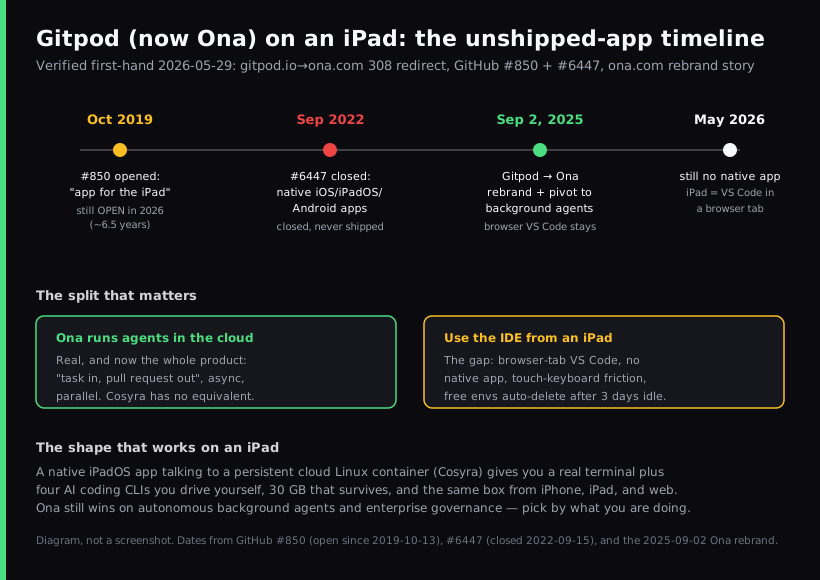
Wait, Gitpod is now Ona?
Yes, and it matters for anything you read about "Gitpod on iPad," because almost all of it predates the change. On September 2, 2025 the company announced "Gitpod is now Ona: your AI software engineer" and re-centered the product on autonomous background agents. The verbatim framing from the rebrand story is blunt about why:
"IDEs defined the last era. Agents define the next."
Two practical consequences. First, the browser VS Code environment did not disappear. The same page says engineers still get "VS Code in the browser, or if you're feeling nostalgic: your favorite desktop IDE." Second, the headline product is now the agent, not the IDE. So when you go looking for "the Gitpod iPad app," you are looking for something from a product era that the company itself has moved past. Gitpod is not dead, it is renamed and reaimed, and the mobile story did not change in the process.
Can you use Gitpod (Ona) on an iPad?
You can open it, and you cannot meaningfully work in it the way you would on a laptop. Ona runs full VS Code in a browser inside a cloud environment, so it loads in iPad Safari. But it is a desktop IDE in a touch browser: the file tree, command palette, and side panels assume a mouse, a hardware keyboard, and a wide window. There is no native iPad app smoothing any of that over. It is the same wall you hit with plain VS Code on an iPad at vscode.dev: the editor opens in Safari, but a browser tab cannot give you an integrated terminal to run the code you just edited.
The clearest evidence is Gitpod's own issue tracker. A feature request titled "Feature Request: app for the iPad" was opened on October 13, 2019. We re-checked it today and it is still open, roughly six and a half years later, with no native iPad app shipped. A separate, broader request, "A Gitpod experience via Native Mobile Applications (iOS, iPadOS, Android)", was opened in 2021 and closed in September 2022 without a native client ever arriving. Two requests, six-plus years, zero native apps. That is not an accident; it is a product decision, and it is the same decision today under the Ona name.
We think a six-year-old, still-open iPad request tells you exactly how much priority a touch-first experience has had, and how much it is likely to get now that the company's whole pitch is async agents rather than interactive editing. The Ona team would frame that differently, and would say the browser already works everywhere, so a native app is unnecessary. We disagree: a desktop IDE in a mobile Safari tab is not the same thing as an app built for the device in your hands on the train.
What "works on your phone" actually means
The Ona rebrand page does say the product "runs full VS Code in the browser and also works on your phone." That is true, and worth taking at face value: the browser interface is reachable from a phone or tablet browser. What it is not is a native app. You are loading desktop VS Code in a mobile browser tab, driving it with a touch keyboard. For reading a file, kicking off an agent run, or checking on a background task, that is fine. For sustained editing, multi-pane layouts, keyboard shortcuts, a terminal you actually type in, a browser tab on a tablet fights you.
This is the honest version of the answer that the stale, pre-rebrand "code from your iPad with Gitpod" tutorials skip. They tend to assume a Magic Keyboard and treat the iPad as a thin window onto a desktop browser. That works, in the narrow sense that the pixels render. It is just not a workflow designed for the device.
Where Ona genuinely wins
A fair guide names what the other tool does better, so here it is with no hedging. If these describe your situation, use Ona and do not look back:
- Autonomous background agents. Ona's whole current product is fire-and-forget "task in, pull request out," running multiple agents in parallel, each in its own ephemeral environment. That is a workflow we do not offer. Cosyra is interactive, you-in-the-loop. If you want to hand off a task and come back to a PR, that is Ona's lane.
- Enterprise governance. Ona Guardrails, RBAC, SSO/OIDC, audit trails, command-level controls, and self-hosted VPC deployment on Enterprise, is a deeper compliance story than we have. A regulated team will care about that.
- Bigger compute ceilings. Core tiers go up to 32 cores and 128 GB of RAM with GPU options. We do not publish specs at that scale.
- Prebuilds and team collaboration. Reproducible environments via devcontainer.json and prebuilds are baked in for teams.
How do you actually code on an iPad instead?
The pattern that works on an iPad is the one Gitpod never shipped: a native app talking to a persistent cloud Linux environment. The iPad's job is to be a good client to a real Linux box, not to pretend it can run a desktop IDE in a browser tab. Once you accept that division of labor, most "iPad is bad for coding" complaints dissolve.
That is what we build. The Cosyra iOS app is a universal binary that runs natively on iPad with full iPadOS multitasking: Split View, Slide Over, and Stage Manager on M-series iPads. You get a persistent Ubuntu 24.04 container with Claude Code, Codex CLI, OpenCode, and Antigravity CLI already installed, 30 GB of storage, and hibernation that resumes exactly where you left off. The same container is reachable from iPhone, iPad, and the web, so we start a task on an iPad on the couch and pick it up on a phone in a waiting room without re-cloning anything.
Step 1: Install Cosyra from the App Store
Open the App Store on your iPad and install Cosyra. The same listing covers iPhone, iPad Pro, iPad Air, and iPad mini. Sign in with Apple, Google, or email, and the app provisions a fresh Ubuntu container on first launch.
Step 2: Add your model API key
Cosyra is bring-your-own-key, so you pay Anthropic, OpenAI, or Google directly rather than through us. In the terminal:
$ # Persists across sessions and device switches
$ echo 'export ANTHROPIC_API_KEY="sk-ant-your-key-here"' >> ~/.bashrc
$ source ~/.bashrc
$ claude --version
Claude Code (latest)
Step 3: Run an agent
Clone a repo and start a session:
$ git clone https://github.com/your-org/your-project.git
Cloning into 'your-project'...
$ cd your-project
$ claude
Claude Code (latest)
Type your prompt, or type "/" for commands.
> Add a health-check endpoint and a test, then run the suite.
Try it on your iPad. Sign up and pick a plan. Eligible new users can start a 7-day free trial in the App Store app. App Store / Google Play / Pricing details
How do the iPad coding options compare?
Lined up against what matters on a tablet (a native app, a persistent environment, and how it is priced), the options sort out clearly. The table covers the realistic paths as of 2026-07-04.
| Feature | Gitpod / Ona (Safari) | Cosyra (iPad app) | Codespaces (Safari) |
|---|---|---|---|
| Native iPad app | No (browser only) | Yes | No (browser only) |
| Native app ever shipped | No (#850 open since 2019) | Yes (iOS + Android) | No |
| Persistent environment | Auto-delete after 7 days idle | Ubuntu 24.04, 30 GB | Per-repo, idle timeout |
| You-drive-it AI agents | Async background agents | 4 CLIs pre-installed | Copilot (in-IDE) |
| Interactive terminal | In browser tab | Native, full-screen | In browser tab |
| API key model | OCU credit meter | BYOK (pay provider) | GitHub plan |
| Pricing model | OCUs, Core from $20/mo | Flat $20 or $30/mo | Usage-based |
| Free entry | None (Core from $20/mo) | 7-day trial in the App Store app (eligible new users) | Monthly free hours |
Gitpod (Ona) is one option among many here. For the whole landscape of editors and agents tested against the iPad's sandbox, our coding on iPad guide ranks them together, and our Ona on a phone guide runs the same test on a phone screen instead of the iPad.
Who should pick which?
Here is the decision framework we would give a friend, with the tablet question front and center.
- Pick Ona if you want autonomous agents doing work in the background and opening pull requests, your team needs enterprise governance and self-hosted VPC deployment, or you live on a laptop and only occasionally glance at a run from a phone browser. Its center of gravity is async, server-side work, and it is good at it.
- Pick Cosyra if the device in your hands is an iPad or iPhone, you want a real interactive terminal and AI coding CLIs you drive yourself, and you want a persistent box that follows you across devices instead of auto-deleting after a few idle days.
- Try Ona first if your work is genuinely batchable, well-scoped tasks you can hand off and review later, or you are evaluating background-agent platforms for a team. In those cases its strengths line up with your needs, and the lack of a native app barely matters because you are not the one typing in the editor.
Frequently asked questions
Is Gitpod the same as Ona?
Yes. Gitpod rebranded to Ona on September 2, 2025, with the announcement "Gitpod is now Ona: your AI software engineer." Visit gitpod.io today and it returns HTTP 200, loading the app directly, and as of 2026-07-04 it no longer 308-redirects to ona.com the way it did right after the rebrand, though sign-in still lives at app.gitpod.io. The product re-centered on autonomous background agents, but the browser VS Code environment still ships underneath.
[source: "Gitpod is now Ona", official rebrand announcement]
Can you use Gitpod on an iPad?
Only as a browser tab. Gitpod, now Ona, runs full VS Code in a browser, so it opens in iPad Safari, but there is no native iPad app. A feature request titled "app for the iPad" has been open since October 2019 and is still open in 2026, roughly six and a half years later. It loads, but a desktop IDE in a touch browser is not a polished iPad workflow.
[source: gitpod-io/gitpod#850, "Feature Request: app for the iPad"]
Does Gitpod or Ona have a native iPad or iPhone app?
No. A dedicated request, "A Gitpod experience via Native Mobile Applications (iOS, iPadOS, Android)," was opened in 2021 and closed in September 2022 without a native client shipping. There is no official Gitpod or Ona app on the App Store or Google Play. The only mobile artifact is an unofficial community side-project, not a shipped product.
[source: gitpod-io/gitpod#6447, native mobile applications request]
Is Gitpod being shut down?
No. This is a rebrand and a strategic pivot, not a shutdown. Gitpod became Ona on September 2, 2025, and the product, including VS Code in the browser, is still live. That is different from a product on a sunset clock. If you read "Gitpod is dead," it is wrong: it changed its name and its center of gravity to AI agents.
[source: "Gitpod is now Ona", official rebrand announcement]
Ona says it "works on your phone": what does that actually mean?
The rebrand page states Ona "runs full VS Code in the browser and also works on your phone." That means the browser interface is reachable from a phone browser, not that there is a native app. You are loading desktop VS Code in a mobile browser tab, with a touch keyboard. It is genuinely reachable, but it is the browser-tab experience, not an app built for the device.
[source: "Gitpod is now Ona", official rebrand announcement]
What happens to my Ona environment if I leave it idle on a tablet?
Environments auto-delete after 7 days of inactivity on Core. As of 2026-07-04 Ona no longer lists a free tier; the entry plan is Core at $20/month (80–2,200 pooled OCUs metered by usage), and the old $10 / 40-OCU rate is now a paid add-on for buying extra OCUs, not a free credit. If you dip in and out from a tablet over a week, an idle environment can still lapse between sessions. A persistent container that hibernates and resumes is a different model.
tl;dr
Gitpod is now Ona (rebranded September 2, 2025) and runs as VS Code in a browser, with no native app. The iPad request has been open since 2019. It opens in iPad Safari and "works on your phone" as a browser tab, but that is a desktop IDE on a touch screen, and idle environments auto-delete after 7 days. Ona wins on autonomous background agents and enterprise governance, so use it for that. To actually code on an iPad, use a native app on a persistent cloud Linux box. That is Cosyra, with four AI CLIs pre-installed.
App Store / Google Play. Sign up and pick a plan. Eligible new users can start a 7-day free trial in the App Store app. See pricing.
For the wider picture, our guide to AI coding agents on mobile maps every agent across phone and tablet, and the mobile coding terminal pillar covers the terminal-on-a-device decision end to end. The cloud IDE on phone pillar lines Ona up against Coder, Firebase Studio, Codespaces, and Replit on the same question. Daytona used to belong in that lineup too, but it pivoted out of human development environments into AI sandbox infrastructure in April 2025; if that migration is what pushed you toward Ona, our Daytona alternative for humans guide tracks where the sit-in-it workflow went. If you are weighing the browser-IDE-without-an-app pattern specifically, see Cosyra vs GitHub Codespaces on mobile, or the hands-on GitHub Codespaces on iPad setup guide if you want to run Codespaces in Safari yourself first. Sealos DevBox fits the same browser-IDE-without-an-app slot, source-available, reached from a desktop IDE or a browser tab, with no native iOS client; Sealos on phone covers what that means on an iPad. For the head-to-head on this exact pair, see Cosyra vs Gitpod (Ona).
Get a real dev environment on your iPad in 3 minutes. Install Cosyra, add your API key, run an agent in a persistent Ubuntu container.