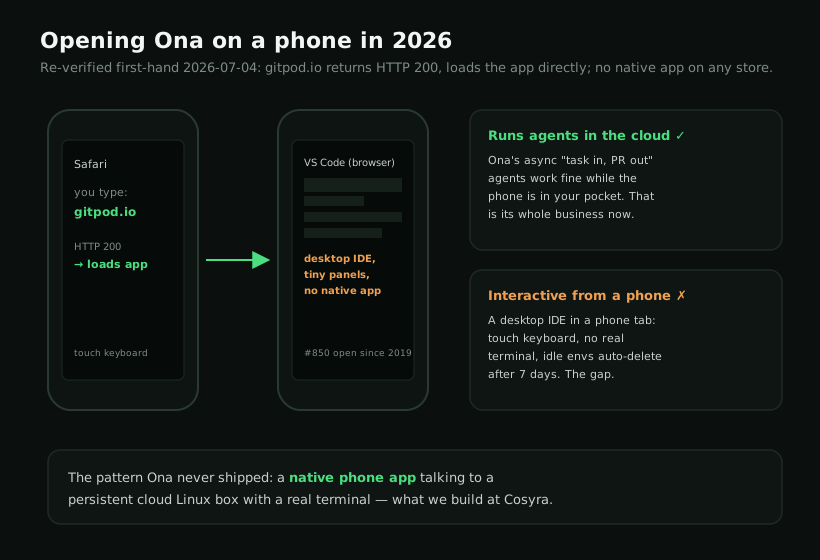
Ona on a phone is a half-answer, and the first thing to know is that Ona is Gitpod. The company rebranded on September 2, 2025 and re-centered on autonomous AI agents. We re-checked on 2026-07-04: gitpod.io now returns HTTP 200 and loads the app directly, no longer 308-redirecting to ona.com the way it did right after the rebrand. Ona runs as VS Code in a browser, so it opens in a phone browser, but there has never been a native iOS or Android app, and driving a desktop IDE from a phone tab is the part that does not really work. If your goal is to actually code from a phone, the honest answer is a native app plus a persistent cloud Linux box, which is what we build at Cosyra.
There are two different questions hiding inside "Ona on phone," and conflating them is where most write-ups go wrong. One is "can Ona run AI agents for me in the cloud?" Yes, that is now its entire business, fire-and-forget "task in, pull request out," and it keeps running whether your phone is awake or in your pocket. The other is "can I stand on a train platform and use Ona interactively?" That is the gap. This guide covers the rebrand, what genuinely works from a phone, where Ona still wins, and the setup that runs natively on a phone today. For the tablet version of the same question, see our Gitpod on iPad guide, and for the phone-first agent story see Claude Code on phone.
Wait, what is Ona, and is Gitpod gone?
Ona is the new name for Gitpod, and the renaming matters here because almost everything written about "Gitpod on a phone" predates it. On September 2, 2025 the company announced "Gitpod is now Ona: your AI software engineer" and re-centered the product on autonomous background agents. The verbatim framing from the official rebrand story is blunt about the bet:
"IDEs defined the last era. Agents define the next."
Two practical consequences for phone users. First, the browser VS Code environment did not disappear, and the same page says engineers still get "VS Code in the browser, or if you're feeling nostalgic: your favorite desktop IDE." Second, the headline product is now the agent, not the editor. So when you go looking for "the Gitpod phone app," you are looking for something from a product era the company itself has moved past. Gitpod is not dead; it is renamed and reaimed, and the mobile story did not change in the process.
Can you use Ona on a phone?
You can open it, and you cannot meaningfully work in it the way you would on a laptop. Ona runs full VS Code in a browser inside a cloud environment, so it loads in mobile Safari or Chrome. But it is a desktop IDE in a touch browser, and a phone makes that worse than a tablet does: the file tree, command palette, and side panels assume a mouse and a wide window, and you are trying to hit them on a five-inch screen with a software keyboard covering half of it. There is no native phone app smoothing any of that over.
The clearest evidence is Gitpod's own issue tracker. A feature request titled "Feature Request: app for the iPad" was opened on October 13, 2019. We re-checked it on 2026-06-13 and it is still open, over six years later, with no native app shipped. A separate, broader request, "A Gitpod experience via Native Mobile Applications (iOS, iPadOS, Android)", was opened in 2021 and closed in September 2022 without a native client ever arriving. Two requests, six-plus years, zero native apps on either store. That is not an oversight; it is a product decision, and it is the same decision today under the Ona name.
We think a six-year-old, still-open mobile-app request tells you exactly how much priority a touch-first experience has had, and how much it is likely to get now that the company's whole pitch is async agents rather than interactive editing. The Ona team would frame that differently and say the browser already works everywhere, so a native app is unnecessary. We disagree: a desktop IDE in a phone browser tab is not the same thing as an app built for the device in your hand on the 7:48 train.
What "works on your phone" actually means
The Ona rebrand page does say the product "runs full VS Code in the browser and also works on your phone." That is true and worth taking at face value: the browser interface is reachable from a phone browser. What it is not is a native app. You are loading desktop VS Code in a mobile tab and driving it with a touch keyboard. For reading a file, kicking off an agent run, or checking on a background task between meetings, that is fine. For sustained work like typing in a terminal, juggling multi-pane layouts, and hitting keyboard shortcuts, a browser tab on a phone fights you the whole way.
This is the honest version that the stale, pre-rebrand "code from your phone with Gitpod" tutorials skip. They tend to assume you will pair a tablet with a Magic Keyboard and treat the device as a thin window onto a desktop browser. That works in the narrow sense that the pixels render. It is just not a workflow designed for a phone you are holding one-handed on a bus.
Where Ona genuinely wins
A fair guide names what the other tool does better, so here it is with no hedging. If these describe your situation, use Ona and do not look back:
- Autonomous background agents. Ona's whole current product is fire-and-forget "task in, pull request out," running multiple agents in parallel, each in its own ephemeral environment. That is a workflow we do not offer. Cosyra is interactive, you-in-the-loop. If you want to hand off a task from a phone and come back to a PR, that is Ona's lane, and a phone is a perfectly good remote control for it.
- Enterprise governance. Ona Guardrails (RBAC, SSO/OIDC, audit trails, command-level controls, and self-hosted VPC deployment on Enterprise) is a deeper compliance story than we have. A regulated team will care about that.
- Bigger compute ceilings. Core tiers go up to 32 cores and 128 GB of RAM with GPU options. We do not publish specs at that scale.
- Prebuilds and team collaboration. Reproducible environments via devcontainer.json and prebuilds are baked in for teams.
How do you actually code from a phone instead?
The pattern that works on a phone is the one Gitpod never shipped: a native app talking to a persistent cloud Linux environment. The phone's job is to be a good client to a real Linux box, not to pretend it can run a desktop IDE in a browser tab. Once you accept that division of labor, most "you can't code on a phone" complaints dissolve.
That is what we build. Cosyra ships real iOS and Android apps whose whole job is a terminal. You get a persistent Ubuntu 24.04 container with Claude Code, Codex CLI, OpenCode, and Antigravity CLI already installed, 30 GB of storage, and hibernation that resumes exactly where you left off. The same container is reachable from a phone, a tablet, and the web, so we start a task on a phone in a waiting room and pick it up on a laptop later without re-cloning anything.
Step 1: Install Cosyra from the App Store or Google Play
Install Cosyra on iPhone from the App Store or on Android from Google Play. Sign in with Apple, Google, or email, and the app provisions a fresh Ubuntu container on first launch. The terminal is native, not a desktop IDE wedged into a browser tab.
Step 2: Add your model API key
Cosyra is bring-your-own-key, so you pay Anthropic, OpenAI, or Google directly rather than through us. In the terminal:
$ # Persists across sessions and device switches
$ echo 'export ANTHROPIC_API_KEY="sk-ant-your-key-here"' >> ~/.bashrc
$ source ~/.bashrc
$ claude --version
Claude Code (latest)
Step 3: Run an agent from the train
Clone a repo and start a session:
$ git clone https://github.com/your-org/your-project.git
Cloning into 'your-project'...
$ cd your-project
$ claude
Claude Code (latest)
Type your prompt, or type "/" for commands.
> Add a health-check endpoint and a test, then run the suite.
Try it on your phone. Sign up and pick a plan. Eligible new users can start a 7-day free trial in the App Store app. App Store / Google Play / Pricing details
How do the phone coding options compare?
Lined up against what matters on a phone (a native app, a persistent environment, and how it is priced), the options sort out clearly. The table covers the realistic paths as of 2026-06-13.
| Feature | Ona / Gitpod (browser) | Cosyra (phone app) | Codespaces (browser) |
|---|---|---|---|
| Native phone app | No (browser only) | Yes (iOS + Android) | No (browser only) |
| Native app ever shipped | No (#6447 closed unshipped) | Yes | No |
| Persistent environment | Auto-delete 3–7 days idle | Ubuntu 24.04, 30 GB | Per-repo, idle timeout |
| You-drive-it AI agents | Async background agents | 4 CLIs pre-installed | Copilot (in-IDE) |
| Interactive terminal | In browser tab | Native, full-screen | In browser tab |
| API key model | OCU credit meter | BYOK (pay provider) | GitHub plan |
| Pricing model | Metered (OCUs) | Flat $20 or $30/mo | Usage-based |
| Free entry | None (Core from $20/mo) | 7-day trial in the App Store app (eligible new users) | Monthly free hours |
Ona is one option among many here. For the whole landscape of browser IDEs and agents tested against the phone, our cloud IDE on phone pillar lines Ona up against Coder, Firebase Studio, Codespaces, and Replit on the same question. Firebase Studio has the exact same shape, a Google browser IDE with no native app, and we walked through it in Firebase Studio on phone.
Who should pick which?
Here is the decision framework we would give a friend, with the phone question front and center.
- Pick Ona if you want autonomous agents doing work in the background and opening pull requests, your team needs enterprise governance and self-hosted VPC deployment, or you live on a laptop and only glance at a run from a phone browser now and then. Its center of gravity is async, server-side work, and a phone is a fine remote control for that.
- Pick Cosyra if the device in your hand is a phone, you want a real interactive terminal and AI coding CLIs you drive yourself, and you want a persistent box that follows you across devices instead of auto-deleting after a few idle days.
- Try Ona first if your work is genuinely batchable, well-scoped tasks you can hand off and review later, or you are evaluating background-agent platforms for a team. In those cases its strengths line up with your needs, and the missing native app barely matters because you are not the one typing in the editor.
Frequently asked questions
Is there an Ona or Gitpod app for iPhone or Android?
No. There is no official Gitpod or Ona app on the App Store or Google Play. A request titled "A Gitpod experience via Native Mobile Applications (iOS, iPadOS, Android)" was opened in 2021 and closed in September 2022 without a native client shipping. The only mobile artifact is an unofficial community side-project, not a published app.
[source: gitpod-io/gitpod#6447, native mobile applications request]
Can I use Ona from my phone's browser?
Yes, as a browser tab. The Ona rebrand page says the product "runs full VS Code in the browser and also works on your phone." That means the browser interface loads on a phone, not that there is a native app. You are driving a desktop IDE with a touch keyboard in a small Safari or Chrome tab. It renders; it is not a workflow built for the device in your hand.
[source: "Gitpod is now Ona", official rebrand announcement]
Is Gitpod the same thing as Ona now?
Yes. Gitpod rebranded to Ona on September 2, 2025, with the announcement "Gitpod is now Ona: your AI software engineer." We re-checked on 2026-07-04: gitpod.io now returns HTTP 200 and loads the app directly, no longer 308-redirecting to ona.com the way it did right after the rebrand. The product re-centered on autonomous background agents, but the browser VS Code environment still ships underneath and sign-in still lives at app.gitpod.io.
[source: "Gitpod is now Ona", official rebrand announcement]
Will my Ona environment still be there when I come back to it on my phone later?
Maybe not. Environments auto-delete after 7 days of inactivity on Core. As of 2026-07-04 Ona no longer lists a free tier; the entry plan is Core at $20/month (80–2,200 pooled OCUs metered by usage), and the old $10 / 40-OCU rate is now a paid add-on for extra OCUs, not a free credit. If you dip in and out from a phone across a week, an idle environment can be gone between sessions. A container that hibernates and resumes is a different model.
[source: Ona pricing, official site]
Can Ona's AI agents run while my phone is in my pocket?
Yes, and this is the part Ona is genuinely good at. Its current product is autonomous background agents, "task in, pull request out," that run server-side and keep going whether or not your phone is awake. That is a real workflow and a fair reason to use Ona. It is separate from the question of sitting on a train and typing in the editor interactively, which is the part with no native app.
tl;dr
Gitpod is now Ona (rebranded September 2, 2025) and runs as VS Code in a browser, with no native app. The mobile-app request has gone unshipped since 2019. It opens in a phone browser and "works on your phone" as a tab, but that is a desktop IDE on a touch screen, and idle environments auto-delete after 7 days. Ona wins on autonomous background agents and enterprise governance, so use it for that. To actually code on a phone, use a native app on a persistent cloud Linux box. That is Cosyra, with four AI CLIs pre-installed.
App Store / Google Play. Sign up and pick a plan. Eligible new users can start a 7-day free trial in the App Store app. See pricing.
For the wider picture, our guide to AI coding agents on mobile maps every agent across phone and tablet, and the mobile coding terminal pillar covers the terminal-on-a-device decision end to end. For the head-to-head on this exact pair, see Cosyra vs Gitpod (Ona). And if Daytona's 2025 pivot out of human dev environments is what pushed you toward Ona, our Daytona alternative for humans guide tracks where the sit-in-it workflow went.
Get a real dev environment on your phone in 3 minutes. Install Cosyra, add your API key, run an agent in a persistent Ubuntu container.