Coder on iPad in 2026 is not an iPad app. Coder ships no native iPadOS
client, has never shipped one, and its official iPad documentation tells
users to install code-server as a Progressive Web App in Safari (Share,
then Add to Home Screen) and then publishes a list of things that do not work
in that PWA: the keyboard disappears sometimes, cmd+n opens a new
browser tab instead of a new file, trackpad scrolling is broken on iPadOS below
14.5, terminal text may not display, ctrl+c cannot stop a long-running
process in the browser, and the iPad has to reach the server over a domain name
because Safari blocks WebSockets to bare IPs. We re-verified every one of those
bullet points against
coder.com/docs/code-server/ipad on 2026-07-04. If your goal is to actually code from an iPad, not to babysit
a Safari PWA that cannot stop its own processes, the honest path is a native iPad
app talking to a persistent cloud Linux box, which is what we build at Cosyra.
This guide walks the official Coder iPad steps verbatim, names the
limitations Coder itself documents on the same page (so nobody can say we
invented them), looks at the maintainer's long-standing "install the PWA, or
plug it into a monitor" position from code-server discussion #2840, and lays out the native-iPad-app alternative end to end. Coder itself is
worth a fair read. It is the leading self-hosted cloud-dev-environment
platform, AGPL-3.0, 13,702 GitHub stars on
coder/coder and 78,184 on the older MIT
coder/code-server project, latest release v2.33.11 on 2026-06-30.
code-server is VS Code itself recompiled to run in a browser, so the iPad experience
is the same one you get from Microsoft's own
VS Code on an iPad at vscode.dev, a
desktop editor wedged into a Safari tab, with the terminal as the first thing
that breaks. The iPad story is "use Safari and accept these documented bugs."
That is the gap this guide covers. For the iPhone-shaped version see our
Coder on iPhone companion, for the
sibling "no native iPad app" story in two other products see
Firebase Studio on iPad and
Gitpod on iPad (now Ona), and for
the wider context the
mobile coding terminal pillar
covers the device-vs-terminal decision end to end, and the
cloud IDE on phone pillar lines
Coder up against Gitpod (Ona), Firebase Studio, Codespaces, and Replit on the
same phone-and-tablet question.
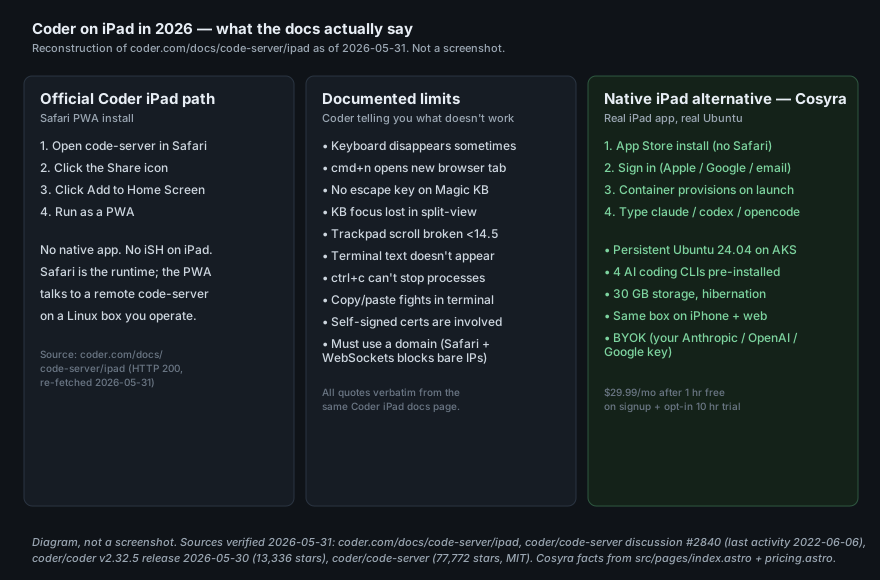
coder.com/docs/code-server/ipad and
coder/code-server discussion #2840 (diagram is a reconstruction
of the documented steps, not a screenshot of a running iPad).
Does Coder have an iPad app?
No. There is no coder/coder iPad app on the App Store and no
code-server iPad app on the App Store. Coder's two products (the
AGPL-3.0 self-hosted platform and the MIT browser-VS-Code project) share the same
mobile answer, and that answer is "use a browser." The
mobile-app request thread (code-server #2840) has been open since 2021-03-07, last activity 2022-06-06, still unresolved five
years later. Maintainer @bpmct in that thread:
"If you're using a mobile browser that supports it, you can install the PWA to your home screen... Ideally, connecting to an external monitor with something like Dex is the move."
Translation: install the Progressive Web App, or plug the tablet into a monitor and use it like a laptop. That advice is fine if you are at a desk with a stand and an external display. On a real iPad on a couch, the PWA route opens code-server in a Safari window with the limits Coder itself publishes on the iPad docs page. We think the honest framing is that Coder's iPad story is for desktops being temporarily accessed through a tablet-shaped browser, not for one engineer on a sofa with no laptop. Coder's own 2021 blog post on iPad coding concludes that "for professional developers and serious hobbyists, [a cloud-based IDE] is the way to go". That is the lane this guide is in.
The official Coder iPad install, step by step
Coder publishes its iPad guide at
coder.com/docs/code-server/ipad. We re-fetched the page 2026-07-04; the install path is unchanged. Walking
it in order:
# 1. Open code-server in Safari on your iPad.
# code-server itself must already be running on a Linux box
# you operate, reachable over a domain name (see step 4).
# 2. Tap the Share icon in Safari.
# 3. Tap Add to Home Screen.
# Coder calls this 'running code-server as a PWA'.
# 4. Make sure the URL is a domain name, not a bare IP.
# Coder docs: 'Your iPad must access code-server via a
# domain name... Otherwise, Safari will not allow
# WebSockets connections.'
Nothing in that flow is wrong. The PWA installs; the browser shortcut appears on the home screen; code-server opens. What the flow does not explain is what the install costs the iPad user the first time they hit a real workflow. Coder publishes those costs on the same page, and they are worth being explicit about before deciding to follow the steps.
The limits Coder publishes on the same page
Verbatim from coder.com/docs/code-server/ipad, re-verified
2026-07-04. These are not third-party complaints. They are Coder telling its
own iPad users what does not work in the PWA install they just walked
through.
- "The keyboard disappear sometimes"
-
"
cmd + nopens new browser window instead of new file, and it's difficult to set alternative as a workaround" - "In general, expect to edit your keyboard shortcuts"
- "There's no escape key by default on the Magic Keyboard"
- "Keyboard may lose focus in Safari / split view"
- "Trackpad scrolling does not work on iPadOS < 14.5"
- "Terminal text does not appear by default"
- "Copy & paste in terminal does not work well with keyboard shortcuts"
-
"
ctrl+cdoes not stop a long-running process in the browser" - "Getting self-signed certificates to work [is] an involved process"
- "Your iPad must access code-server via a domain name... Safari will not allow WebSockets connections" otherwise
The one that hurts the most in practice is the ctrl+c bullet. Stopping
a runaway process from the terminal is muscle memory; on an iPad with the official
Coder PWA install, that muscle memory is broken. We watched a friend run a long
pytest session against a remote code-server during a coffee-shop
work block, realise five minutes in that the wrong test selection was running,
and have no way to stop it from the iPad. They had to SSH into the box from a
phone in a separate app and kill the python process by PID. The PWA tab kept happily
streaming output. That is the shape of the bug.
The domain-name requirement is real and easy to miss
"Your iPad must access code-server via a domain name... Safari will not
allow WebSockets connections". Read past it on a first scan and you will set
up code-server on a home server, point the iPad at
http://192.168.1.42:8443, and discover the terminal never
finishes connecting. The fix is a DNS record, a public hostname, a reverse
proxy with a real cert, or a service like Tailscale Funnel that gives you a
stable domain in front of the box. On a managed cloud terminal, none of that
is your problem to solve. The operator owns the domain and the TLS. We do.
That is one reason the on-call developer using Cosyra from an iPad on a
train is not configuring nginx.
iPad Pro with a Magic Keyboard is the best case; iPad mini on a couch is the worst
On an 11-inch or 13-inch iPad Pro plugged into a Magic Keyboard, a real
mouse, and a USB-C monitor, the Coder PWA is workable for short read-only
sessions, viewing a diff, leaving a quick comment, doing the equivalent of git status against a remote workspace. We tried it. It does not crash. It does, however,
eat the documented limits as a flat tax: every keyboard shortcut you depend on
is one Safari override away from a broken workflow, and the missing esc key on the Magic Keyboard is real. You remap it or you live without it.
On an iPad mini or a base iPad propped against a knee on the couch, the PWA stops being a developer environment and becomes a small Safari window that happens to show some code. The thing that breaks first is the keyboard-focus-in-split-view bullet from the docs: as soon as you try to pull up notes or messages alongside the editor, focus shifts and you are typing into the wrong app. On a real iPad app with its own editor surface, split-view is fine because the editor owns the focus, not a Safari tab.
How to actually code on an iPad instead
The pattern that works on a tablet is the one Coder is missing: a native iPad app talking to a persistent cloud Linux environment. The iPad's job is to be a good native client to a real Linux box, not to host a downgraded desktop IDE inside a Safari window with documented keyboard bugs. We hold the opinion that the iPad keyboard plus AI-driven coding is genuinely fine on a couch. Most people who disagree have not tried handing the keystrokes off to Claude Code, Codex CLI, or Antigravity CLI and only typing prompts and reviewing diffs. That is the workflow the iPad was always good for; it just needed a native terminal app to host it.
That is what we build. The Cosyra iPad app is a real iPadOS app. On first launch we provision a fresh Ubuntu 24.04 container on Azure AKS with Claude Code, Codex CLI, OpenCode, and Antigravity CLI already installed, 30 GB of persistent storage, and hibernation that resumes exactly where you left off. The same container is reachable from the iPhone in your pocket, the iPad on the couch, and the web on whatever borrowed device you find in a coffee shop. No PWA, no Safari split-view focus loss, no domain-name-or-bust requirement.
Step 1: Install Cosyra from the App Store
Open the App Store on your iPad and install Cosyra. Sign in with Apple, Google, or email; the app provisions a fresh Ubuntu container on first launch. Android tablet users get the same flow via Google Play.
Step 2: Add your model API key
Cosyra is bring-your-own-key, so you pay Anthropic, OpenAI, or Google directly rather than through us. In the terminal:
$ # Persists across sessions and device switches
$ echo 'export ANTHROPIC_API_KEY="sk-ant-your-key-here"' >> ~/.bashrc
$ source ~/.bashrc
$ claude --version
Claude Code (latest)
Step 3: Clone a repo and run an agent
$ git clone https://github.com/your-org/your-project.git
Cloning into 'your-project'...
$ cd your-project
$ claude
Claude Code (latest)
Type your prompt, or type "/" for commands.
> Add a /healthz endpoint, a test, and run the suite.
# Hit ctrl+c whenever you want. It actually stops the process.
Try it on your iPad. Sign up and pick a plan. Eligible new users can start a 7-day free trial in the App Store app. App Store / Google Play / Pricing details
How the iPad coding options compare
Lined up against what matters on a tablet, a native app, a working terminal, and what the install actually asks of you, the options sort out clearly. The table covers the realistic paths as of 2026-07-04.
| Feature | Coder (official iPad path) | Cosyra (iPad app) |
|---|---|---|
| Native iPadOS app | No (Safari PWA) | Yes |
| Install path on iPad | Open in Safari, Share, Add to Home Screen | App Store install |
| Network requirement | Must reach code-server via a domain name (Safari blocks bare-IP WebSockets) | Standard HTTPS to Cosyra (we own the domain + TLS) |
ctrl+c stops a running process | No (Coder documents this) | Yes |
| Keyboard focus in split-view | "Keyboard may lose focus in Safari / split view" | Native app owns focus |
| Magic Keyboard shortcuts | "No escape key by default", "cmd+n opens new browser window" | Real native shortcuts |
| Connects to a remote managed workspace | Self-hosted code-server only | Yes (persistent Azure AKS container) |
| AI agents | You install them on your own box | 4 CLIs pre-installed |
| Persistent storage | Whatever your remote box has | 30 GB persistent |
| Sleep / hibernation | iPad freezes the Safari tab; remote box stays up at your cost | Container hibernates and resumes; idle time is not metered |
| BYOK model billing | n/a (your own setup) | BYOK (pay provider directly) |
| Free entry | Free (code-server is OSS); you pay for the Linux box and the domain | 7-day trial in the App Store app (eligible new users) |
| Ongoing cost | $0 software + your VM/domain/TLS bill + your time | From $20/mo |
That table is just the Coder slice. For every other editor, agent, and cloud terminal measured against the same iPad constraints, our coding on iPad guide lines them all up side by side.
Where Coder wins, honestly
A fair comparison names what the other tool does better. Coder beats Cosyra on these axes, and if they describe your situation you should pick Coder, not us:
- Self-hosting and air-gap. Coder runs in your own VPC, private Kubernetes cluster, or a fully air-gapped network. We are managed SaaS on Azure AKS, and we cannot match that. For a regulated bank, a defence contractor, or any team that cannot send source code through a third-party SaaS, Coder is the right pick.
- Enterprise governance. RBAC, audit logging, OIDC group sync, resource quotas, the AI Governance add-on, the Agent Firewall add-on. We do not match that depth.
- Infrastructure flexibility. Coder workspaces are arbitrary Terraform-defined VMs or containers. Pick the CPU, RAM, GPU, region, Kubernetes namespace, persistent volume, within the limits of your cloud account. Cosyra is a fixed-size container per Pro user.
- IDE selection per workspace. VS Code Desktop, VS Code in a browser via code-server, JetBrains Gateway, Cursor, web terminal, all addressable through one control plane. Cosyra is terminal-first and ships AI CLIs, not full IDEs.
- Open source.
coder/coderis AGPL-3.0;code-serveris MIT. Fork them, audit them, deploy them. Cosyra is closed SaaS.
Who should pick which
Here is the decision framework we would give a friend, with the iPad question front and centre.
- Pick Coder if you are a platform-engineering team at a regulated enterprise that needs air-gapped, audited, self-hosted dev environments, you have a dedicated team to operate the control plane and write Terraform, and your developers sit at desks with monitors. Coder's whole design is for that audience.
- Pick Cosyra if the device on your lap is an iPad, you want a real terminal and AI coding CLIs you drive yourself, and you want a persistent box that follows you across iPad, iPhone, and web without you operating any infrastructure or owning a domain in front of it.
- Try Coder first if the only reason you are searching "Coder
on iPad" is that someone on your platform team set Coder up at work and asked
you to access it from a tablet occasionally. Install the PWA from Safari pointed
at your company Coder dashboard (the URL has to be a domain, not an IP), accept
the rough edges Coder itself documents, remap the keyboard shortcuts you care
about, and use it for short read-only sessions. For anything where stopping
a process with
ctrl+cmatters, switch to a different surface.
Frequently asked questions
Does Coder have an iPad app?
No. Coder ships no native iPadOS app and has never shipped one. Its
official iPad guide tells users to install code-server as a Progressive
Web App in Safari (Share, then Add to Home Screen) and explicitly lists
the things that do not work: the keyboard disappears sometimes,
cmd+n opens a new browser window instead of a new file, trackpad
scrolling is broken on iPadOS below 14.5, terminal text may not display, ctrl+c does not stop a long-running process in the browser, copy/paste in the terminal
fights keyboard shortcuts, the keyboard loses focus in Safari split-view, and
the iPad must reach code-server via a domain name because Safari blocks WebSockets
to bare IPs.
[source: Coder official iPad docs]
What does Coder's official iPad guide actually tell me to install?
Three clicks in Safari. Open code-server in Safari, click the Share icon,
click Add to Home Screen. The page calls this "running code-server as a
PWA" and says it "gets you more screen real estate and access to top-level
keyboard shortcuts since its running like a native app." What is missing
from that sentence is everything Coder also documents on the same page:
keyboard focus loss, no escape key on the Magic Keyboard by default, ctrl+c broken, copy/paste broken, and the WebSocket-via-domain-name requirement.
The PWA install is real; the limits are also real.
[source: Coder official iPad docs]
If ctrl+c does not stop a process in Safari, how do I kill a runaway
command on iPad?
On Coder's official iPad path you cannot, at least not from inside the
browser terminal. Coder's docs say "ctrl+c does not stop a long-running
process in the browser." The realistic recovery options are SSH into the remote
box from a separate session and kill the process there, or reload the PWA tab
and lose the terminal scrollback. On a native terminal app, ctrl+c sends SIGINT to the foreground process the way it has since the 1970s. That
is one of the reasons we built a native iPad app for Cosyra instead of shipping
a Safari PWA.
[source: Coder official iPad docs]
Coder's coder/code-server has 78,184 GitHub stars. Why is there
still no iPad app?
Because the maintainers have said publicly that there will not be one. The
long-running mobile-app request thread on
coder/code-server (discussion #2840, opened 2021-03-07, last activity
2022-06-06, still open) contains the maintainer
@bpmct's answer: "If you're using a mobile browser that
supports it, you can install the PWA to your home screen... Ideally,
connecting to an external monitor with something like Dex is the move."
Translation: install the PWA, or plug your tablet into a monitor and use
it like a laptop. A native iPad app is not on the roadmap and has not been
for five years.
[source: coder/code-server discussion #2840, maintainer @bpmct]
Is Coder being shut down or rebranded like Firebase Studio or Gitpod?
No. Coder is stable, still branded as Coder, and shipping. The latest
coder/coder release is v2.33.11, published 2026-06-30, with 13,702
stars on the AGPL-3.0 platform repo and 78,184 stars on the MIT
code-server repo (both verified first-hand 2026-07-04). Coder is
not on a sunset clock the way Firebase Studio is (sunsets 2027-03-22) and has
not rebranded the way Gitpod did when it became Ona on 2025-09-02. The honest
critique of Coder on an iPad is the mobile-client gap, not the health of the
project.
[source: coder/coder latest release on GitHub]
Coder's own blog has a post about coding on an iPad. What does it actually say?
Coder's 2021-10-07 post, A Guide to Writing Code on an iPad, is unusually honest about the limits. It says "most people would still agree that the experience is better using a laptop," that "the biggest hurdle to using an iPad for coding is its lack of a runtime environment for most languages, forcing you to move your files to a server for compiling and testing," and that "if you make your living writing code or just spend lots of time coding, using the native apps will be too frustrating in the long run." Its conclusion: "For professional developers and serious hobbyists, [a cloud-based IDE] is the way to go." That is the lane Cosyra fills, with a native iPad app instead of a Safari PWA.
[source: Coder blog, A Guide to Writing Code on an iPad, 2021-10-07]
tl;dr
Coder ships no iPad app. Its official iPad guide installs code-server as a
Safari PWA (Share, Add to Home Screen) and Coder itself documents the bugs
on the same page: keyboard disappears, cmd+n opens a browser tab,
no escape key on the Magic Keyboard, focus lost in split-view, ctrl+c cannot stop a running process, copy/paste fights shortcuts, must access via
a domain name because Safari blocks WebSockets to bare IPs. To actually code
on an iPad, use a native iPad app talking to a real Linux box. That is Cosyra,
with four AI CLIs pre-installed and a working ctrl+c.
App Store / Google Play. Sign up and pick a plan. Eligible new users can start a 7-day free trial in the App Store app. See pricing.
For the wider picture, our guide to AI coding agents on mobile maps every agent across phone and tablet, and the Claude Code on iPad guide is the agent-specific companion. For the iPhone-shaped version of this exact question see Coder on iPhone, the head-to-head against Cosyra in Cosyra vs Coder, and for the same "cloud IDE without a native iPad app" pattern in two other products see Firebase Studio on iPad and Gitpod on iPad (now Ona).
Get a real dev environment on your iPad in 3 minutes. Install Cosyra, add your API key, run an agent in a persistent Ubuntu container.