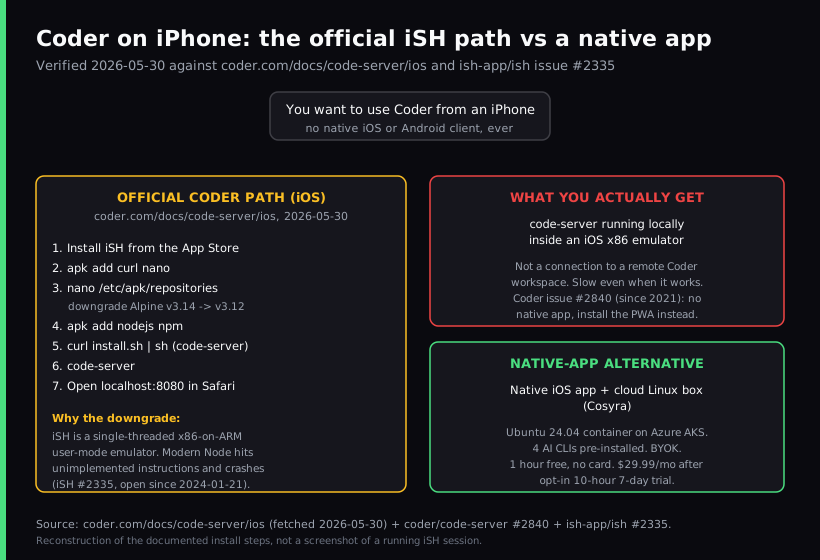
Coder on an iPhone is a polite fiction. Coder ships no native iOS app, has
never shipped one, and its official iOS documentation tells users to install
iSH from the App Store,
downgrade the Alpine repositories from v3.14 to v3.12 so an old
NodeJS works inside the iSH x86 emulator, then install code-server and open localhost:8080 in Safari. That is the answer Coder maintains
itself, verified first-hand 2026-07-04. If your goal is to actually code from
a phone, not to recreate a 2020-era Alpine snapshot in an emulator, the honest
path is a native iOS app talking to a persistent cloud Linux box, which is what
we build at Cosyra.
This guide walks the official Coder iOS steps verbatim, explains why the Alpine downgrade is required (it is a real Node bug in iSH, not a documentation quirk), shows what you actually get if you follow them (a local code-server in an emulator, not a session against your remote Coder workspace), and lays out the native-app alternative. Coder itself is worth a fair read. It is the leading self-hosted cloud-dev-environment platform, AGPL-3.0, 13,702 GitHub stars, latest release v2.33.11 on 2026-06-30, but it was never built for one developer holding a phone on a train. For the iPad-shaped version of this question see our Firebase Studio on iPad guide, and for the rebranded-Gitpod cousin see Gitpod on iPad (now Ona). For the wider picture the mobile coding terminal pillar covers the terminal-on-a-device decision end to end, and the cloud IDE on phone pillar compares Coder against Gitpod, Firebase Studio, Codespaces, and Replit on the same question.
Does Coder have an iPhone app?
No native iOS app, no native iPadOS app, no native Android app, not for
coder/coder, the AGPL-3.0 platform, and not for code-server, the older MIT
project that puts browser-based VS Code in front of any Linux box. Both ship
from the same company; both share the same mobile answer; and that answer
is, "use a browser, or use an x86 emulator." The
long-running mobile-app request thread (code-server #2840) has been open since 2021-03-07, last activity 2021-05-12, still unresolved five
years later. Maintainer @bpmct in that thread:
"If you're using a mobile browser that supports it, you can install the PWA to your home screen... Ideally, connecting to an external monitor with something like Dex is the move."
Translation: there is no plan to ship a native app; the suggestion is to pin the Progressive Web App to your home screen, or plug your phone into a monitor and use it like a laptop. That advice is fine if you are at a desk. On an actual phone, the PWA route opens code-server in Safari and the iSH route opens code-server in an emulator. Neither is a connection to a remote, managed Coder workspace from a real iOS app. We think the honest framing is that Coder's mobile story is for desktops being temporarily accessed through a phone-shaped browser, not for one engineer on a couch with no laptop. Coder's own 2021 blog post on iPad coding concludes that, for professional developers, a proper cloud-based IDE is "the way to go". That is the lane this guide is in.
The official Coder iOS install, step by step
Coder publishes its iOS guide at
coder.com/docs/code-server/ios. We re-fetched the page 2026-07-04; the seven steps are unchanged. Walking
them in order:
# 1. Install iSH from the App Store on your iPhone.
# iSH is a single-threaded x86-on-ARM user-mode emulator.
$ apk add curl nano
# 2. Pull in curl (for the code-server installer) and nano (to edit a config).
$ nano /etc/apk/repositories
# 3. Edit both repository lines: change v3.14 -> v3.12.
# This points apk at a 2020-era Alpine snapshot whose NodeJS
# is old enough that iSH's emulator can still run it.
$ apk add nodejs npm
# 4. Install NodeJS + npm from the downgraded repos.
$ curl -fsSL https://code-server.dev/install.sh | sh
# 5. Install code-server.
$ code-server
# 6. Run it.
# 7. Open localhost:8080 in Safari.
Nothing in that script is wrong. The steps work; people have shipped end-to-end installs on iSH. What the steps do not do is explain what they cost the user. Three trade-offs are worth being explicit about before deciding to follow them.
Trade-off 1: you are coding inside a CPU emulator
iSH runs Alpine on i386 (32-bit x86) on top of an ARM iPhone via user-mode emulation plus syscall translation. iSH's own developers acknowledge roughly three-to-five-times overhead on typical workloads. Shell scripting and editing are fine. Anything compute-heavy, running tests, transpiling, a real Node server under load, is painful. The iPhone is doing the work of an emulator pretending to be a 32-bit Intel chip pretending to run Alpine. We have run tests inside iSH on a real iPhone and watched a simple npm script take long enough that the iOS scheduler suspended the app mid-run; on the iPhone there is no laptop to fall back to.
Trade-off 2: the Alpine downgrade exists because NodeJS crashes on iSH
The reason step 3 has you editing repositories is not stylistic. It is the
fix for a tracked bug:
ish-app/ish issue #2335, "Node/NPM giving illegal instructions error," opened 2024-01-21 and still open. Modern Node prebuilt binaries emit instructions
that iSH's emulator does not implement, so node --version dies with
Illegal instruction. The Alpine v3.12 repos pin to a 2020-era
Node that pre-dates those instructions, which is why the official guide pins
them. Practical implication: every new Node CLI in the ecosystem, including
Claude Code, Codex CLI, OpenCode, and Gemini CLI, which are all Node
packages, will keep failing on the iSH path until either iSH implements the
missing instructions or you stay on a 2020 Node forever. The whole
Alpine-downgrade step is a workaround for an upstream emulator gap, not a
one-time setup quirk.
Trade-off 3: this gets you local code-server, not your remote Coder workspace
The last line of the guide is "Access on localhost:8080 in your browser."
That is local. The code-server you just installed is running on the iPhone,
inside iSH, talking to itself. If your reason for searching "Coder on
iPhone" was "I have a coder/coder workspace at https://coder.mycompany.com and I want to attach to it from my phone," the official iOS guide does not give
you that. To reach a remote Coder workspace from an iPhone you are back to the
PWA install in mobile Safari that maintainer @bpmct recommended in
#2840, with whatever limitations Safari and the workspace's authentication flow
impose. The iSH path is its own dead end.
What about iPad? Is the official guide better there?
Yes, but it is the same shape of compromise. Coder's iPad guide at
coder.com/docs/code-server/ipad skips iSH and tells iPad users to install code-server as a Progressive Web App
via Safari (Share -> Add to Home Screen) on top of a remote code-server instance
running on a Linux box you own. It is better than iSH because there is no emulator
in the loop. It is still browser-based, and Coder names a long list of documented
limits on the same page (verbatim, verified 2026-07-04):
- "Self-signed certificates require involved configuration processes"
-
"Keyboard problems: The keyboard occasionally disappears, and standard
shortcuts like
cmd+nmay not function as expected" - "Trackpad scrolling doesn't work on iPadOS versions below 14.5"
-
"Terminal issues: Text may not display by default, and
ctrl+ccannot stop running processes" - "Copy/paste functionality in terminals has limitations with keyboard shortcuts"
- "Focus loss can occur in Safari split-view mode"
- "Your iPad must access code-server via a domain name... Otherwise, Safari will not allow WebSockets connections."
These are not third-party complaints; they are Coder telling its own iPad users which keyboard shortcuts and terminal signals will not work. We think any post about Coder on a tablet that does not surface those bullet points is doing the reader a disservice. They are the load-bearing sentences on Coder's own page.
How to actually code on an iPhone instead
The pattern that works on a phone is the one Coder is missing: a native iOS app talking to a persistent cloud Linux environment. The phone's job is to be a good client to a real Linux box, not to run a downgraded Alpine inside an x86 emulator. Once you accept that split, the "iPhone is bad for coding" complaints mostly evaporate. The keyboard is fine for agent-driven coding. Most people who disagree have not tried handing the keystrokes off to Claude Code, Codex CLI, or Antigravity CLI and only typing prompts and reviewing diffs. We hold that opinion against the laptop-first consensus and we will keep holding it.
That is what we build. The Cosyra iOS app is a native iPhone and iPad app. On first launch we provision a fresh Ubuntu 24.04 container on Azure AKS with Claude Code, Codex CLI, OpenCode, and Antigravity CLI already installed, 30 GB of storage, and hibernation that resumes exactly where you left off. The same container is reachable from the iPhone in your pocket, the iPad on the couch, and the web on whatever borrowed device you find in a coffee shop. No iSH, no Alpine downgrade, no localhost in Safari.
Step 1: Install Cosyra from the App Store
Open the App Store on your iPhone and install Cosyra. Sign in with Apple, Google, or email; the app provisions a fresh Ubuntu container on first launch. Android users get the same flow via Google Play.
Step 2: Add your model API key
Cosyra is bring-your-own-key, so you pay Anthropic, OpenAI, or Google directly rather than through us. In the terminal:
$ # Persists across sessions and device switches
$ echo 'export ANTHROPIC_API_KEY="sk-ant-your-key-here"' >> ~/.bashrc
$ source ~/.bashrc
$ claude --version
Claude Code (latest)
Step 3: Clone a repo and run an agent
$ git clone https://github.com/your-org/your-project.git
Cloning into 'your-project'...
$ cd your-project
$ claude
Claude Code (latest)
Type your prompt, or type "/" for commands.
> Add a /healthz endpoint, a test, and run the suite.
Try it on your iPhone. Sign up and pick a plan. Eligible new users can start a 7-day free trial in the App Store app. App Store / Google Play / Pricing details
How the iPhone coding options compare
Lined up against what matters on a phone, a native app, a persistent environment, and what the install step actually asks you to do, the options sort out clearly. The table covers the realistic paths as of 2026-07-04.
| Feature | Coder (official iOS path) | Cosyra (iOS app) |
|---|---|---|
| Native iOS app | No (Safari + iSH) | Yes |
| Install path on iPhone | iSH + downgrade Alpine to v3.12 + npm + code-server | App Store install |
| Runs inside a CPU emulator | Yes (i386-on-ARM via iSH) | No (real Ubuntu on Azure AKS) |
| Connects to a remote managed workspace | No (local code-server only) | Yes (persistent container) |
| AI agents | You install them (Node bug blocks modern Node CLIs) | 4 CLIs pre-installed |
| Persistent storage | iSH app sandbox (lost on uninstall) | 30 GB persistent |
| Sleep / hibernation | iOS suspends iSH ~30s after backgrounded | Container hibernates and resumes |
| BYOK model billing | n/a (your own setup) | BYOK (pay provider directly) |
| Free entry | Free (iSH is free, code-server is OSS) | 7-day trial in the App Store app (eligible new users) |
| Ongoing cost | $0 software + your time | From $20/mo |
Where Coder wins, honestly
A fair comparison names what the other tool does better. Coder beats Cosyra on these axes, and if they describe your situation you should pick Coder, not us:
- Self-hosting and air-gap. Coder runs in your own VPC, private Kubernetes cluster, or a fully air-gapped network. We are managed SaaS on Azure AKS, and we cannot match that. For a regulated bank, a defence contractor, or any team that cannot send source code through a third-party SaaS, Coder is the answer.
- Enterprise governance. RBAC, audit logging, OIDC group sync, resource quotas, the AI Governance add-on, the Agent Firewall add-on. We do not match this depth.
- Infrastructure flexibility. Coder workspaces are arbitrary Terraform-defined VMs or containers. You pick the CPU, RAM, GPU, region, Kubernetes namespace, persistent volume, within the limits of your cloud account. Cosyra is a fixed-size container per Pro user.
- IDE selection per workspace. VS Code Desktop, VS Code in a browser via code-server, JetBrains Gateway, Cursor, web terminal, all addressable through one control plane. Cosyra is terminal-first and ships AI CLIs, not full IDEs.
- Open source. coder/coder is AGPL-3.0; code-server is MIT. Fork them, audit them, deploy them. Cosyra is closed SaaS.
Who should pick which
Here is the decision framework we would give a friend, with the phone question front and centre.
- Pick Coder if you are a platform-engineering team at a regulated enterprise that needs air-gapped, audited, self-hosted dev environments, you have a dedicated team to operate the control plane and write Terraform, and your developers sit at desks with monitors. Coder's whole design is for that audience.
- Pick Cosyra if the device in your hands is an iPhone or iPad, you want a real terminal and AI coding CLIs you drive yourself, and you want a persistent box that follows you across devices without you operating any infrastructure.
- Try Coder first if the only reason you are searching "Coder on iPhone" is that someone on your platform team set Coder up at work and asked you to access it from a phone occasionally. Install the PWA from mobile Safari pointed at your company Coder dashboard, accept the rough edges Coder itself documents, and use it for short read-only sessions. For everything else, install Cosyra and keep your personal-project work there.
Frequently asked questions
Does Coder have an iPhone app?
No. Coder has never shipped a native iOS or Android app. Its official iOS
documentation instructs users to install iSH from the App Store, then
install code-server inside that emulator and access it at
localhost:8080 in Safari. The long-running mobile-app request thread
on coder/code-server confirms the maintainer position: install the Progressive
Web App from a mobile browser, or plug the phone into a monitor with something
like Samsung Dex and use it like a laptop.
[source: coder/code-server discussion #2840, maintainer @bpmct]
Why does Coder's iOS guide tell me to downgrade Alpine to v3.12?
Because the Node.js version packaged in current Alpine releases fails to
run inside iSH's i386 user-mode emulator. iSH issue #2335 has tracked the
underlying bug since January 2024: modern Node prebuilt binaries emit
instructions the iSH emulator does not implement and crash with
Illegal instruction on
node --version. The Alpine v3.12 repos point at a 2020-era
Node snapshot that pre-dates those instructions, which is why Coder's step
3 edits /etc/apk/repositories before installing
nodejs.
[source: ish-app/ish issue #2335, Node/NPM Illegal instruction]
If I follow Coder's iOS steps, am I actually connected to my remote Coder workspace?
No. The official iOS guide installs code-server locally inside
iSH and tells you to open localhost:8080. That gives you a
single-user, single-machine VS Code instance running in an x86 emulator on
the phone. It is not a session against your remote coder/coder workspace.
To attach to a real Coder workspace from a phone you would need a separate
path, such as a coder CLI binary that runs under iSH (the same Node and
i386 limits apply), or a browser PWA pointed at your Coder dashboard.
[source: Coder official iOS docs]
Does code-server have an iPad guide too, and is it any better than the iPhone one?
Yes, and it is better but still has documented limits. Coder's iPad guide
tells users to install code-server as a Progressive Web App in Safari
(Share -> Add to Home Screen) and then lists known issues: keyboard
occasionally disappears, cmd+n may not function, trackpad scrolling
broken on iPadOS below 14.5, terminal text may not display,
ctrl+c cannot stop running processes, copy/paste in the terminal
has limits, focus loss in Safari split-view, and you must access code-server
via a domain name because Safari blocks WebSockets to bare IPs. These are Coder
telling its own iPad users which things do not work.
[source: Coder official iPad docs]
Is Coder being shut down or rebranded like Firebase Studio or Gitpod?
No. Coder is stable, still branded as Coder, and shipping. The latest release at the time of writing is v2.33.11, published 2026-06-30 on the coder/coder GitHub. Coder is not on a sunset clock the way Firebase Studio is (sunsets 2027-03-22), and it has not rebranded the way Gitpod did when it became Ona on 2025-09-02. The honest critique of Coder on a phone is the mobile gap, not the product's health.
[source: coder/coder latest release on GitHub]
Coder's own blog has a post about coding on an iPad. What does it actually say?
Coder's 2021-10-07 post, A Guide to Writing Code on an iPad, is unusually honest about the limits. It states that most people would still agree the experience is better using a laptop, that the biggest hurdle is the iPad's lack of a local runtime for most languages forcing you to move files to a server, and that for professional developers a cloud-based IDE is the way to go. That is the exact lane Cosyra fills, with a native iOS app instead of a Safari PWA or an iSH emulator.
[source: Coder blog, A Guide to Writing Code on an iPad, 2021-10-07]
tl;dr
Coder ships no iPhone or Android app. Its official iOS guide tells you to
install iSH, downgrade Alpine repos from v3.14 to v3.12 so an old NodeJS
works, then install code-server and open
localhost:8080 in Safari. The downgrade exists because modern Node
crashes under iSH (issue #2335, open since 2024). What you end up with is local
code-server inside an emulator, not a session against your remote Coder workspace.
To actually code on an iPhone, use a native iOS app talking to a real Linux
box. That is Cosyra, with four AI CLIs pre-installed and no Alpine downgrade.
App Store / Google Play. Sign up and pick a plan. Eligible new users can start a 7-day free trial in the App Store app. See pricing.
For the wider picture, our guide to AI coding agents on mobile maps every agent across phone and tablet, and the Claude Code on phone guide is the agent-specific companion. The iPad-shaped version of this exact Coder question, same PWA install, longer list of documented limits because Safari on iPad behaves a little differently, is in our Coder on iPad guide, and the head-to-head against Cosyra is in Cosyra vs Coder. For the same "cloud IDE without a native mobile app" pattern in two other products, see Firebase Studio on iPad and Gitpod on iPad (now Ona). The Kubernetes-backed take on the same shape is in our Sealos on phone guide.
Get a real dev environment on your iPhone in 3 minutes. Install Cosyra, add your API key, run an agent in a persistent Ubuntu container.