Sealos on phone means one thing in 2026: the Sealos DevBox dashboard in a mobile browser, with no native app. Sealos is a Kubernetes-backed, source-available cloud platform, and DevBox is its cloud dev-environment module, a remote workspace you reach from a desktop IDE like VS Code, Cursor, or JetBrains, or from a browser terminal. You can open it on a phone, and it loads, but it is a control panel built for a laptop. If the device in your pocket is where you actually want to code, on the train, in a coffee queue, on the couch, the path that fits is a native app talking to a persistent cloud Linux box, which is what we build at Cosyra.
This guide covers what genuinely works with Sealos DevBox from a phone, the pricing model most write-ups skip, where Sealos clearly wins, and a terminal-first setup built for a phone. For the wider landscape of cloud IDEs on a phone, see our cloud IDE on phone pillar; for the closest sibling case, our Coder on iPhone guide covers another remote-workspace tool with the same browser-or-desktop shape.
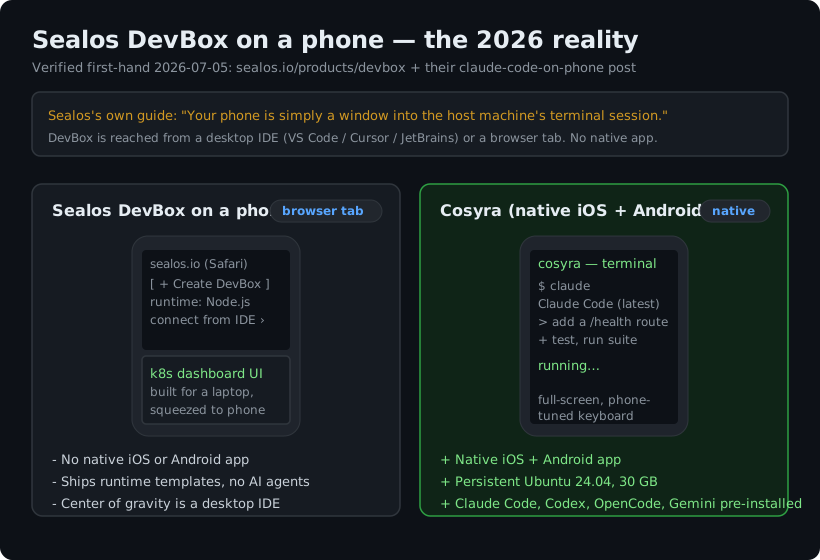
What running Sealos on a phone looks like
We read Sealos's own DevBox product page and its claude-code-on-phone post first-hand rather than trust a years-old tutorial, because their own docs are the honest tell for how they expect the phone to be used. The answer is consistent: Sealos treats the phone as a secondary surface. DevBox is a real Linux container on their Kubernetes cluster, and the compute is genuine, but the supported way in is a desktop IDE connecting over remote SSH, or a browser terminal in a tab.
Open the Sealos dashboard on a phone and you get the second path: a Kubernetes-oriented web console where you create a DevBox, pick a runtime template, and copy connection details meant to be pasted into a desktop editor. It works, in the sense that the page renders and the container is live. The friction is the input and layout layer. The console assumes a wide window and a mouse; the "connect from your IDE" flow assumes there is an IDE, which a phone does not have; and the browser terminal shrinks to a few lines once the on-screen keyboard claims half the viewport. None of this is a bug. It is a laptop control plane driven by touch on the smallest screen you own, and there is no native app to retune it.
One more gap worth naming: DevBox ships runtime templates, not coding agents. You get Node.js, Python, Go, and similar stacks, but Claude Code, Codex CLI, OpenCode, and Antigravity CLI are not pre-installed, so you add whichever agent you want yourself inside the box. That is fine on a laptop where typing an install command is nothing. On a phone, every extra setup step you own is a step you are doing one-handed.
Does Sealos have a mobile app?
No. As of 2026-07-05 there is no native iOS or Android client for Sealos or Sealos DevBox in either app store. The product framing is "code from any device," which resolves to a browser tab. Sealos's own mobile guide is explicit about the philosophy. It recommends DevBox as one of five ways to reach Claude Code from a phone, under the heading "Bootstrap on Desktop, Iterate on Mobile," and states plainly:
"The real value of a mobile coding setup isn't to replace your desktop, but to extend it. Your phone is simply a window into the host machine's terminal session."
That is a coherent position, and for a platform-engineering audience it is probably the right one. We just disagree with it as a default. We think the phone should be the device, not a viewer onto a machine parked somewhere else. Sealos would argue the browser already reaches every device and a native client is redundant next to a full lifecycle platform. That holds right up until you try to type in a terminal one-handed on a train, at which point a desktop console in a tab is reachable but not built for the device, and on a phone that gap is the whole story.
Pricing and what you actually get, dated
Sealos prices differently from a flat subscription, so it is worth spelling out with a verification date. Against sealos.io/pricing, verified 2026-07-05, the resource tiers are Starter $7/mo (2 vCPU, 2 Gi RAM), Hobby $25/mo (4 vCPU, 4 Gi RAM, marked most popular), Standard $128/mo, Pro $512/mo, and Team $2030/mo, each with a separate metered AI-credit allotment, plus a 7-day no-card resource trial. You are paying for compute tier and AI credits, and Sealos resells the AI credits rather than letting you point at your own provider.
That model earns its keep if you want one platform to develop and then ship to production Kubernetes, with managed databases alongside. It is a different trade from bringing your own key. We charge a flat $20 or $30/mo, and we are bring-your-own-key: you pay Anthropic, OpenAI, or Google directly, with no platform AI-credit meter in the middle. Neither is strictly cheaper. They are different economics for different jobs.
Want a native phone client instead of a browser console? Cosyra is a native iOS and Android app on a persistent Ubuntu container, with a terminal built for the phone keyboard and four AI CLIs pre-installed. Sign up and pick a plan. Eligible new users can start a 7-day free trial in the App Store app. App Store / Google Play / Pricing details
Where Sealos genuinely wins
A fair guide names what the other tool does better, so here it is with no hedging. If these describe your situation, Sealos is the stronger pick and a phone is beside the point:
- Full lifecycle, not just dev. DevBox to package to one-click deploy on production Kubernetes, with managed MySQL, PostgreSQL, Redis, and MongoDB and an app-template store. Cosyra is a dev environment, not a production-hosting platform, and we make no Kubernetes or Docker-in-Docker guarantee.
- Self-hostable. The source-available core deploys on a private or on-prem cluster, hybrid, or any major cloud. Cosyra is hosted-only on Azure. If air-gap or data residency is a hard requirement, that decides it.
- Desktop IDE integration. First-class VS Code, Cursor, and JetBrains remote connection for full-screen laptop work. Our strength is the native mobile app, not desktop IDE remoting.
- Scales far past one box. Tiers to 64 vCPU and 128 Gi and beyond, managed databases, microservice architectures. Cosyra is a single persistent personal container.
How do you actually code on a phone instead?
The pattern that fits a phone is the one a Kubernetes platform never sets out to build: a native app talking to a persistent cloud Linux environment, where the agent does most of the typing. The phone's job is to be a good client to a real Linux box and a good remote control for an AI coding agent, not to render a desktop console in a tab. We ship Claude Code, Codex CLI, OpenCode, and Antigravity CLI pre-installed because setup friction is the main thing that kills agent-driven mobile dev. Here is the three-minute version on a phone.
Step 1: Install Cosyra on your phone
Install Cosyra from the App Store or Google Play. Sign in with Apple, Google, or email, and the app provisions a fresh Ubuntu 24.04 container on first launch. The terminal is full-screen and the keyboard handling is tuned for a phone, so you are not fighting a laptop layout shrunk into a browser tab.
Step 2: Add your model API key
Cosyra is bring-your-own-key, so you pay your model provider directly rather than buying metered credits. In the terminal:
$ # Persists across sessions and device switches
$ echo 'export ANTHROPIC_API_KEY="sk-ant-your-key-here"' >> ~/.bashrc
$ source ~/.bashrc
$ claude --version
Claude Code (latest)
Step 3: Run an agent and let it type
Clone a repo and start a session. The point on a phone is that you steer in short prompts and the agent does the keyboarding:
$ git clone https://github.com/your-org/your-project.git
Cloning into 'your-project'...
$ cd your-project
$ claude
Claude Code (latest)
Type your prompt, or type "/" for commands.
> Add a health-check endpoint and a test, then run the suite.
How do the phone options compare?
Lined up against what matters on a phone, a native app, a persistent environment, pre-installed agents, and a terminal you can actually type in, the options sort out clearly. The table covers the realistic phone paths as of 2026-07-05.
| Feature | Sealos DevBox (browser) | Cosyra (native app) | Self-host + SSH |
|---|---|---|---|
| Native phone app | No (browser only) | Yes (iOS + Android) | No (bring an SSH client) |
| Hosted environment included | Yes (k8s cluster) | Yes (Ubuntu 24.04) | No (you run the server) |
| AI agents pre-installed | None (templates only) | 4 CLIs pre-installed | None |
| Terminal on the phone | In browser tab | Native, full-screen | Native (via SSH app) |
| API key model | Metered AI credits | BYOK (pay provider) | BYOK |
| Pricing model | Resource tier ($7–$2030/mo) | Flat $20 or $30/mo | Your server cost |
| Self-host option | Yes (source-available) | No (Azure-hosted) | Yes (it is your box) |
| Free entry | 7-day resource trial | 7-day trial in the App Store app (eligible new users) | None |
Sealos is one option among several here. For the whole cloud-IDE landscape on a phone, our cloud IDE on phone pillar lines Coder, Gitpod, Firebase Studio, Codespaces, and Replit up against the same question, and the mobile coding terminal pillar covers the terminal-on-a-device decision end to end.
Who should pick which?
Here is the decision framework we would give a friend, with the phone in hand.
- Pick Sealos if you want one platform to develop and ship to production Kubernetes, you work mostly on a laptop with a desktop IDE, and you need self-hosting or managed databases. Its lifecycle scope and source-available self-host are genuinely strong, and the phone is not the point.
- Pick Cosyra if the phone in your pocket is where you want to code, you want a real full-screen terminal and AI coding CLIs you drive yourself, and you want a persistent box that follows you to the web and a second device instead of a console meant for a laptop.
- Try self-host + SSH first if you already run an always-on machine and just want a native SSH client into it. It brings no hosted environment and no agents (you supply the server and the setup), but it is the cheapest path if the hardware is already there.
Frequently asked questions
Can you run Sealos on a phone?
Only through a mobile browser. Sealos DevBox is reached from a desktop IDE (VS Code, Cursor, or JetBrains connecting to the remote box) or from a browser terminal, per the DevBox product page verified 2026-07-05. You can open the Sealos dashboard in mobile Safari or Chrome and it loads, but it is a Kubernetes control panel built for a laptop, so creating a DevBox and wiring an IDE to it is cramped on a phone screen. There is no native app to retune any of it.
[source: Sealos DevBox product page]
Does Sealos have a mobile app?
No. There is no native iOS app and no native Android app for Sealos or Sealos DevBox as of 2026-07-05; App Store and Play Store searches return no first-party client. Sealos's framing is "use any device to code," which in practice means a browser tab. Its own claude-code-on-phone post calls the phone "a window into the host machine's terminal session," the opposite of a phone-first setup.
[source: Sealos, "Claude Code on phone"]
Does Sealos DevBox come with Claude Code or other AI agents?
No. DevBox provisions language and framework runtime templates (Node.js, Python, Go, and so on) as containers; it does not pre-install Claude Code, Codex CLI, OpenCode, or Antigravity CLI. You install the agent you want yourself inside the box. A container that ships those four CLIs already installed skips that setup on every new environment.
[source: Sealos DevBox product page]
How much does Sealos cost?
Sealos prices on resource tier plus a metered AI-credit allotment, verified 2026-07-05 against sealos.io/pricing: Starter $7/mo, Hobby $25/mo, Standard $128/mo, Pro $512/mo, Team $2030/mo, plus a 7-day no-card resource trial. That is a different model from a flat subscription. You are paying for vCPU, RAM, disk, and AI credits by the tier, and it resells AI credits rather than letting you bring your own provider key.
Is Sealos open source?
Source-available, not OSI open source. The Sealos core is released under the Sealos Sustainable Use License v1.0, a fair-code license, which is why the GitHub API reports the license as NOASSERTION. You can read and self-host the code, but calling it "open source" without the qualifier is imprecise. The underlying Kubernetes it builds on is Apache-2.0; Sealos's own code is sustainable-use.
[source: labring/sealos on GitHub]
How do I actually get a terminal on my phone instead?
Two honest paths. You can self-host Sealos or SSH into a machine you already run, both of which need a server and setup first. Or you install a native app that talks to a hosted cloud Linux container, which is what we build at Cosyra: a full-screen terminal tuned for the phone keyboard, on a persistent Ubuntu box, with the AI coding CLIs already installed.
tl;dr
Sealos on a phone means the DevBox dashboard in a mobile browser. Sealos is a Kubernetes-backed, source-available cloud platform, and DevBox is a remote workspace reached from a desktop IDE or a browser terminal. There is no native app, and it ships runtime templates, not AI agents. Its pricing is resource-tiered ($7–$2030/mo) with metered AI credits, and its own guide treats the phone as a window into a host machine. Pick Sealos if you want a full lifecycle platform with self-hosting from a laptop. To actually code on a phone, use a native app on a persistent cloud Linux box with the agent doing the typing. That is Cosyra, with four AI CLIs pre-installed.
App Store / Google Play. Sign up and pick a plan. Eligible new users can start a 7-day free trial in the App Store app. See pricing.
For the wider picture, our guide to AI coding agents on mobile maps every agent across phone and tablet, and the Coder on iPhone guide walks the same browser-or-desktop question for another remote-workspace tool.
Get a real dev environment on your phone in 3 minutes. Install Cosyra, add your API key, run an agent in a persistent Ubuntu container.