Short answer. Coder is an AGPL-3.0 self-hosted cloud-dev-environment platform built for enterprise platform teams: write Terraform, run a control plane in your own Kubernetes cluster, give a hundred engineers reproducible workspaces. We built Cosyra for a different job, a managed mobile cloud terminal with native iOS and Android apps, a persistent Ubuntu 24.04 x86_64 container on Azure AKS, and Claude Code, Codex CLI, OpenCode, and Antigravity CLI pre-installed. Coder is not deprecated and it did not rebrand; the project is healthy (latest release v2.33.11 on 2026-06-30). It just has no native mobile app. If you are a platform team running a fleet, Coder is the right answer. If you are one developer who wants to code from a phone on the train, we think Cosyra is the better fit.
We wrote this after spending a Saturday on a couch with an iPad, a Pixel 8, and a MacBook, running both products against the same real task: clone a TypeScript repo, ask an AI agent to fix a small function, and ship the diff. Coder on the iPad meant a Safari PWA pointed at a code-server we had stood up on a $24/month DigitalOcean droplet, fighting the documented keyboard and terminal issues. Cosyra's iOS app handled the same task in a single sit-down without leaving the couch. We will show you exactly what we hit, and we will be honest about the parts of Coder we cannot match.
This post was written by the Cosyra team. We compared Cosyra against Coder based on hands-on testing of both, first-hand re-reads on 2026-07-04 of coder.com/, coder.com/pricing, coder.com/docs/code-server/ios, coder.com/docs/code-server/ipad, and coder.com/blog/a-guide-to-writing-code-on-an-ipad (all HTTP 200), live gh api calls against coder/coder (13,702 stars, AGPL-3.0, latest release v2.33.11 on 2026-06-30) and coder/code-server (78,184 stars, MIT), the long-running code-server discussion #2840 (open since 2021-03-07, last activity 2022-06-06), and our internal factsheet. Every claim below traces back to one of those sources.
tl;dr
Use Coder if you are a platform-engineering team at a regulated enterprise that needs self-hosted, audited, air-gapped cloud dev environments, VS Code or JetBrains as the editor, GPU workspaces, and a vendor that answers procurement questionnaires. Use Cosyra if you are an individual developer who wants to drive AI coding agents from a phone or tablet today in a persistent Ubuntu container with predictable flat pricing. Different lanes.
App Store · Google Play. Sign up and pick a plan. Eligible new users can start a 7-day free trial in the App Store app.
Coming to Coder because no native mobile app shipped? We run a persistent Ubuntu 24.04 container with Claude Code, Codex CLI, OpenCode, and Antigravity CLI pre-installed, reached from a real native iOS or Android app. Two-minute setup, no Terraform.
App Store · Google Play · Pricing. Sign up and pick a plan. Eligible new users can start a 7-day free trial in the App Store app.
Coder vs code-server: get the product right first
Almost every "Coder alternative" listicle conflates two distinct products from the same company, and the conflation matters because their licenses, deployment models, and target users differ. Get this straight before the rest of the post is useful.
- coder/coder is the flagship: a self-hosted cloud-dev-environment platform, AGPL-3.0, Go-built control plane, 13,702 stars on 2026-07-04. The customer runs the control plane in their own AWS / Azure / GCP / Kubernetes / bare-metal environment, defines workspaces with Terraform, and connects them through a Wireguard tunnel. Latest release v2.33.11 on 2026-06-30. When this post says "Coder" without qualification, it means this product.
- coder/code-server is the older, MIT-licensed sibling: a single binary that puts VS Code in a browser on any Linux box, 78,184 stars on 2026-07-04. Same company, completely different deployment story (no control plane, no Terraform), and a different audience (anyone who wants browser VS Code on a Linux machine they own). If that is the product you actually mean, read Cosyra vs code-server instead.
Both products share the same "no native mobile app" answer, and Coder's
official iOS and iPad documentation lives under
coder.com/docs/code-server/..., which is itself a clue that the
mobile story is told through code-server even when the customer is on the
platform. We will be specific below about which product a given claim
applies to. We have a separate guide that contests the
cosyra-vs-gitpod intent for the other
major cloud-IDE-with-no-mobile-app, and the
cloud IDE on phone pillar lines
Coder up against the other browser-only platforms on the same cross-device question.
Coder is healthy, not deprecated, not rebranded, not on a sunset clock
A common mistake when borrowing comparison-post language is to slot Coder into the same "vendor is winding down" framing that fits Firebase Studio (sunset announced for 2027-03-22) or Gitpod (rebranded to Ona on 2025-09-02). Coder belongs in neither bucket. The one name in this category that genuinely left it is Daytona, which pivoted from a development-environment manager to AI sandbox infrastructure in April 2025 (we cover what that pivot leaves for phone users in Daytona on a phone, and which human development-environment tools now fill the gap it vacated in our Daytona alternative for humans guide). We re-verified on 2026-07-04: the latest release on coder/coder is v2.33.11 shipped 2026-06-30, a routine minor-series bump from the v2.32.x line this post first cited. The platform repo now sits at 13,702 stars. Coder Technologies is in Austin, was founded in 2017, and is eight years into shipping. The honest critique is the mobile gap and the pricing opacity. The project's vitality is not the story.
How do Cosyra and Coder compare feature by feature?
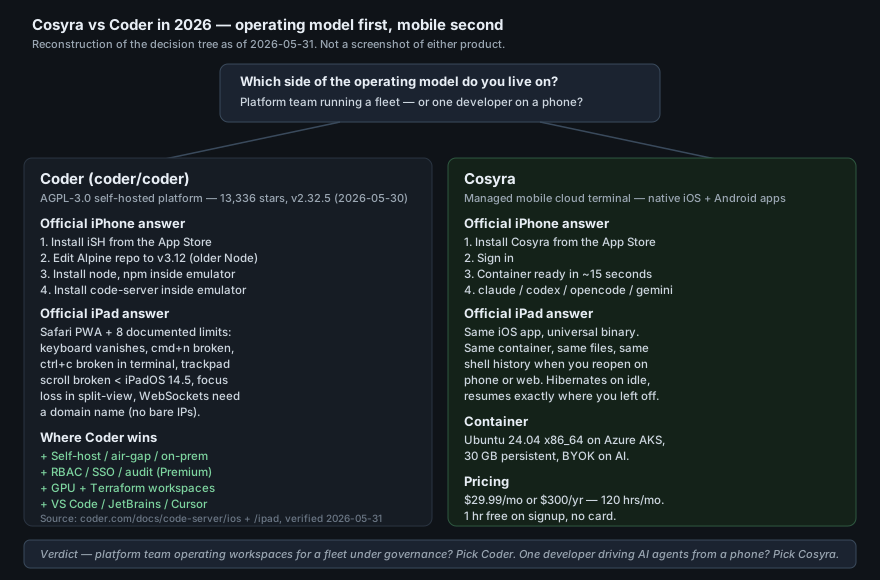
Cosyra is a managed mobile cloud terminal with native iOS and Android apps backed by a persistent Ubuntu 24.04 x86_64 container on Azure AKS, with four AI coding CLIs pre-installed and pricing from $20/month. Coder is a self-hosted enterprise cloud-dev-environment platform, AGPL-3.0, where workspaces are Terraform-defined VMs/containers on the customer's own cloud, accessed through a Wireguard tunnel. The table below lines them up on twelve attributes, re-verified 2026-07-04 against coder.com, the pricing page, the official iOS and iPad docs, and live gh api calls.
| Feature | Cosyra | Coder |
|---|---|---|
| Pricing | $20/month Core or $30/month Pro, flat | Community Free OSS + your cloud bill; Premium "Annually per user", dollar amount undisclosed |
| Free tier | None. 7-day free trial for eligible new users in the App Store app | Community is free OSS forever; customer pays the cloud bill |
| Hosting model | Managed Azure AKS, container per Pro user | Self-hosted on your AWS / Azure / GCP / k8s / bare-metal |
| OS support | Native iOS app, native Android app, web | Browser PWA only; no native mobile app, ever |
| Official iPhone answer | Native iOS app from the App Store | iSH + edit Alpine repo to v3.12 + install Node + install code-server inside emulator |
| Official iPad answer | Universal iOS app (iPad-native) | Safari PWA with documented keyboard, terminal, WebSocket issues |
| AI agents shipped | Claude Code, Codex CLI, OpenCode, Antigravity CLI (4 CLIs, BYOK) | AI agent task assignment (Community); Agent Firewall / AI Gateway paid add-ons |
| Editor / surface | Terminal-first; CLIs in a real shell | VS Code Desktop, VS Code browser, JetBrains Gateway, Cursor, web terminal |
| Persistent storage | 30 GB persistent, survives device loss + idle | Whatever the workspace template provisions on your infrastructure |
| Setup work | Install app, sign in, container provisions in ~15 seconds | Stand up control plane + write Terraform + manage Kubernetes |
| Enterprise governance | None published; consumer in-app purchase product | Premium: RBAC, audit, OIDC group sync, quotas, HA, workspace proxies |
| License | Closed SaaS | AGPL-3.0 (coder/coder); MIT (code-server) |
The honest read of that table: Cosyra and Coder look like rivals on the surface (both put a Linux dev environment in the cloud) and diverge completely on the operating model. Coder hands you a control plane and expects a platform team to operate it for a fleet. We hand you a phone app and expect one developer to use it. The right pick depends on which side of that operating model your day-to-day actually lives on.
Want the individual-mobile side of this comparison? We run a persistent Ubuntu container with Claude Code, Codex CLI, OpenCode, and Antigravity CLI pre-installed, on iOS and Android, in about two minutes.
App Store · Google Play · Pricing. Sign up and pick a plan. Eligible new users can start a 7-day free trial in the App Store app.
What happens when you run the same workload on Cosyra and Coder?
We picked a 3,000-line TypeScript project we already had on GitHub, asked an agent to find a retry-backoff function and add jitter, and tried to ship the diff from a tablet without touching a laptop. Same workload, both products, same coffee-shop Wi-Fi, same Saturday afternoon.
On Coder: we already had a code-server instance up on a small DigitalOcean
droplet behind a domain name and TLS (the Safari-PWA requirement). We opened
the PWA from the iPad home screen, signed in, and the editor loaded. Within
five minutes we hit two of the limits documented in
coder.com/docs/code-server/ipad: the on-screen keyboard sometimes vanished when we tapped the editor pane,
and cmd+n opened a new Safari window instead of a new file in the
editor. We worked around both, opened files from the tree, switched to a hardware
keyboard, and eventually shipped the diff. The agent itself worked fine; the friction
was the input surface. If we had been on the iPhone, the official answer would
have been iSH + Alpine v3.12 + Node + code-server inside the emulator, which we
set up once for the
coder-on-iphone ship and would not
voluntarily do again.
On Cosyra: opened the iOS app on the same iPad, tapped into the existing
container, typed git clone, cd, then
claude, pasted the prompt, and accepted the diff with one tap.
Total wall-clock: about three minutes, most of it the clone over LTE. We
then unlocked the Pixel 8, opened the Cosyra Android app, and the same
container was waiting at the same prompt because the container is not tied
to a device. The session below captures the commands.
$ # On the iPad, fresh open of the Cosyra iOS app.
$ uname -m && cat /etc/os-release | head -1
x86_64
PRETTY_NAME="Ubuntu 24.04 LTS"
$ git clone https://github.com/our-team/example.git
$ cd example && claude
> find the retry-backoff function and add jitter
# model reads tree, edits src/retry.ts, shows diff, applied.
$ # Lock iPad. Open Pixel 8 Cosyra Android app.
$ # Same container, same prompt, same files.
$ git status
modified: src/retry.ts
$ git diff --stat && git commit -am "add jitter to retry"
The honest flip side: if our job had been "operate a hundred isolated dev environments for a hundred engineers across two business units with a SOC 2 auditor watching," Coder would have crushed our experience. We do not have an equivalent. Our container is per-user, not per-team, and our enterprise governance story is "consumer in-app purchase." The two products optimise for different operating models, and the only honest answer is to say which is which.
Where does Coder beat Cosyra?
Coder beats Cosyra on self-hosting and air-gap, on enterprise governance, on infrastructure flexibility, on open source, and on IDE selection. We ship a cloud terminal product and we still think Coder is the right tool for several real jobs. If you sit inside any of the five profiles below, Coder is the honest pick, not Cosyra.
- Self-hosting, air-gap, on-prem. Coder runs in your VPC, your private k8s cluster, or fully air-gapped. We run on Azure AKS that we operate. If you are a regulated bank, a defense contractor, a healthcare provider that cannot send source code through third-party SaaS, Coder is the answer and Cosyra is not. Read the Coder homepage. It names "tech innovators and streaming companies, financial services firms, government and defense agencies" as the target buyer for exactly this reason.
- Enterprise governance. RBAC, audit logging, OIDC group sync, multi-org controls, resource quotas, HA, workspace proxies, idle-workspace autostop, custom branding, AI Governance add-on, Agent Firewall add-on. If you have a procurement team that asks for SSO and a SOC 2 letter on the first call, Premium Coder has the shape that conversation needs. We are a consumer in-app-purchase product without any of that.
- Infrastructure flexibility. Workspaces are arbitrary Terraform-defined VMs or containers. Pick the CPU, RAM, GPU, region, Kubernetes namespace, persistent volume, within the limits of your cloud account. Our container is fixed-size per Pro user. If a single workspace needs 32 cores and a GPU, Coder scales there and we do not.
- Open source. AGPL-3.0 for the platform, MIT for code-server. Fork it, audit it, deploy it offline. Cosyra is closed SaaS, and there are real organizations that will only run software they can read end-to-end.
- IDE selection per workspace. VS Code Desktop, VS Code in a browser (via code-server), JetBrains Gateway, Cursor, plus the web terminal, all addressable through one control plane. We ship a terminal-first experience with AI CLIs; if your day is mostly clicking around JetBrains panels with the debugger attached, our surface is the wrong one and Coder's is not.
Two of these wins come with caveats worth naming. The self-hosted story is real, but operating a Coder control plane is a real ongoing job. You need a platform team, an OIDC provider, a Kubernetes cluster or VM fleet, and a budget for the underlying compute. And the Premium dollar amount is not publicly disclosed; the page lists it as "Annually per user" and gates the number behind a "Start a trial" form, which is a normal enterprise sales motion and a meaningful friction for a single developer or a five-person startup trying to scope a budget on a Sunday afternoon. State the model, not a verdict.
Where does Cosyra beat Coder?
Cosyra beats Coder on native mobile apps, on AI CLIs pre-installed, on zero infrastructure to operate, on flat predictable pricing, and on the individual-developer focus. The trade-off for those wins is no self-hosted option, no enterprise governance plane, no IDE selection beyond the terminal, and no Terraform-defined workspaces. If your work lives in any of the five lanes below, we think we are the better pick.
Native iOS and Android apps, not a Safari PWA
Coder has never shipped a native app on any store. The official iPhone
answer is install iSH, downgrade Alpine to v3.12 so a 2020-era Node.js
works, install code-server inside the emulator. The official iPad answer is
install code-server as a Progressive Web App in Safari, with a documented
list of limits that includes the keyboard disappearing,
cmd+n opening a new browser window instead of a new file in the editor,
the terminal not always showing text, ctrl+c
failing to stop a long-running process, trackpad scrolling broken on iPadOS below
14.5, focus loss in Safari split-view, and the requirement that the iPad reach
code-server via a domain name because Safari blocks WebSockets to bare IPs. Maintainer
@bpmct's own suggestion on
code-server discussion #2840 is "install the PWA to your home screen" or "connect to an external monitor
with something like Dex." We ship a real iOS app and a real Android app, both
backed by the same container, both built to be the primary entry point.
Four AI CLIs pre-installed, kept current, BYOK
Cosyra containers ship with Claude Code, Codex CLI, OpenCode, and
Antigravity CLI on PATH from the moment you sign in. You bring your own API
keys, Anthropic, OpenAI, Google, and pay those providers directly with no
markup. Coder has AI agent task assignment in the Community tier and Agent
Firewall and AI Gateway as paid add-ons, which is a real story for a
platform team that wants centralized policy on what models can be called and
what they can do, but it's not the same as "ssh open, four binaries already
there, run claude." Our take on which CLI to pick for which job
lives in
Claude Code vs Gemini CLI and
Claude Code vs Codex CLI on phone.
Zero infrastructure to operate
Coder requires a control plane in your cloud, Terraform templates per workspace type, an OIDC provider, a Wireguard configuration, a persistent database, and a team to keep all of that healthy. Cosyra is "install the app, the container provisions in roughly fifteen seconds." For an individual developer on a Sunday evening, the difference between "I have a working dev environment in two minutes" and "I have a list of YAML files to write" is the whole product.
Flat predictable pricing, no cloud bill of your own
Cosyra is $20/month on Core or $30/month on Pro, with 120 hours of compute included and 30 GB of persistent storage. Coder Community is free as software but the customer pays the underlying AWS / Azure / GCP / Kubernetes bill, which is fine when that bill is amortized across a team and a procurement cycle, and very much not fine when you are one person trying to figure out whether this will cost $30 or $300 a month. Premium is "Annually per user," dollar amount undisclosed. Different shapes for different buyers.
Same container on every device
Sit on the train, edit on your phone. Get home, open the iPad, same shell history. Pull out the laptop, open the web client, same files, same agent session. Coder workspaces are tied to whatever device you point a browser or VS Code Desktop at; there is no native app that picks up the same state on a phone five minutes later. Our cross-device continuity is documented in the mobile coding terminal guide, and the cloud IDE on phone pillar lines Coder up against the other browser-only cloud IDEs on the same cross-device question.
Opinion a competitor would disagree with
We think the platform model is the wrong shape for the individual developer who wants to code from a phone. The Coder bet is that the interesting unit of work is "a team operating workspaces under governance," and that bet is correct for the buyer Coder is built for. Our counter-bet is that the much larger population of working developers is one person on a couch with a phone, an API key, and thirty minutes between meetings. And that person does not want to write Terraform. Plenty of people will disagree with us, and most of them sit on the platform-engineering side of the table at a company with a procurement department. We built Cosyra around the belief that the people disagreeing haven't actually tried handing keystrokes to Claude Code from a phone in a waiting room for a real afternoon.
Who should pick Coder instead of Cosyra?
Pick Coder instead of Cosyra if you are a platform-engineering team at a regulated enterprise, if you need self-hosted air-gap deployment, if you need GPU workspaces, if you need VS Code or JetBrains as the editor surface, or if you need a vendor that will sign an MSA and answer a SOC 2 questionnaire. Coder is the right answer for those five profiles, full stop.
Pick Coder if you are one of these profiles
- Regulated enterprise platform team. Bank, defense contractor, healthcare provider, government agency that cannot send source code through third-party SaaS. You need on-prem or air-gapped deployment with full audit logs and OIDC group sync. Cosyra cannot meet that compliance shape and Coder explicitly can.
- VS Code or JetBrains as the daily driver. Your team is a hundred engineers who live inside the IDE, debugger attached, refactoring tools open, Copilot panel docked. Cosyra is terminal-first and that is a deliberate product choice, not a missing feature. If your day is the editor UI, Coder fits and Cosyra does not.
- GPU / large-RAM workspaces. You need 32 cores or 128 GB RAM or an H100 inside the workspace, and you need it within a few minutes of starting. Coder workspaces are Terraform-defined VMs; you can size them to whatever your cloud account allows. Our sessions are sized for interactive coding.
- Team operating a fleet of workspaces. You need reproducible templates, resource quotas per team, workspace proxies, central upgrade rollouts, and a control plane that the platform team manages. That is the whole point of Coder. It is not what Cosyra is.
- Open-source-only IT policy. Your organization will only run AGPL or MIT code you can audit and fork. Coder qualifies on both products; Cosyra does not.
We run a Coder workspace on one of our test droplets specifically because we wanted to write this comparison from first-hand experience, not from a blog summary. The platform is genuinely good at what it is built for, enterprise platform teams shipping reproducible workspaces under governance. Where it does not fit is our exact use case (one developer, one phone, one afternoon on the train), and that gap is what Cosyra exists to fill. They are not mutually exclusive tools. You can run Coder at work and Cosyra on the weekend, and they will not fight each other.
How do you try Cosyra if you're coming from Coder?
You try Cosyra from a Coder background in about two minutes: install the iOS
or Android app, sign in, and land in a fresh Ubuntu 24.04 x86_64 container
with four AI CLIs already on PATH. The conceptual jump is "control plane
plus Terraform-defined workspaces with VS Code attached" to "a single
persistent terminal on a phone, with agents you talk to in plain text."
Muscle memory for coder ssh,
coder workspaces, or a main.tf per workspace template
does not carry over. There are no templates because there is only one container
shape. But if your day was mostly git,
npm, and a single agent, you will feel at home immediately. The
session below captures a first-time install coming from Coder.
$ # Install Cosyra from App Store or Google Play, sign in,
$ # land in your container.
$ uname -m && lsb_release -d
x86_64
Description: Ubuntu 24.04 LTS
$ # Your agents are already on PATH.
$ which claude codex opencode agy
/usr/local/bin/claude
/usr/local/bin/codex
/usr/local/bin/opencode
/usr/local/bin/agy
$ # No Terraform. No control plane. One container.
$ # Clone a repo and start an agent.
$ git clone https://github.com/you/your-app.git && cd your-app
$ export ANTHROPIC_API_KEY=sk-ant-...
$ claude
The big unlock for most people coming from Coder is the operating-model flip. You stop running a control plane because there isn't one. You stop writing Terraform because there is only one container shape. You stop pointing a Safari PWA at code-server because there is a real iOS app and a real Android app. And if you still need self-hosted, audited, air-gap workspaces for your day job, you keep your Coder deployment too. They live in different lanes.
Frequently asked questions
Is Coder the same product as code-server?
No. Coder (coder/coder) is the AGPL-3.0 self-hosted cloud-dev-environment platform; the customer runs a control plane in their own AWS / Azure / GCP / Kubernetes account, defines workspaces with Terraform, and connects them through a Wireguard tunnel. code-server (coder/code-server) is a separate, older, MIT-licensed project from the same company: a single binary that puts VS Code in a browser on any Linux box. Both ship from Coder Technologies, both share the same "no native mobile app" answer, but their licenses, deployment models, and audiences differ. Verified 2026-07-04: coder/coder is AGPL-3.0 with 13,702 stars; code-server is MIT with 78,184 stars.
[source: coder/coder GitHub, verified 2026-07-04]
Does Coder have a native iOS or Android app?
No. There is no native Coder app for iPhone, iPad, or Android, and there
never has been. Verified first-hand 2026-07-04 against the
official iOS guide and
the
official iPad guide:
the iOS answer is install iSH, downgrade Alpine to v3.12, install Node.js
and npm, install code-server inside the emulator. The iPad answer is
install code-server as a Safari PWA, with documented limits that include
the keyboard disappearing, broken cmd+n, broken ctrl+c in the terminal, broken trackpad scrolling on iPadOS below 14.5, focus loss
in Safari split-view, and the requirement that the iPad reach code-server via
a domain name because Safari blocks WebSockets to bare IPs.
[source: Coder official iOS guide, verified 2026-07-04]
How much does Coder cost compared to Cosyra?
The two products price two different things. Coder Community is free and open source (AGPL-3.0). But the customer pays the underlying AWS / Azure / GCP / Kubernetes bill for every workspace VM. Coder Premium adds RBAC, audit logging, OIDC group sync, multi-org controls, HA, workspace proxies, and unlimited integrations; the pricing page lists it as "Annually per user" but does not publicly disclose the dollar amount (gated behind a "Start a trial" form, verified 2026-07-04). Agent Firewall and AI Gateway are paid add-ons even within Premium. Cosyra is flat $20/month on Core or $30/month on Pro, with 120 hours of compute included and 30 GB of persistent storage on managed Azure AKS, no cloud bill, no platform team.
[source: Coder pricing, verified 2026-07-04]
Can a single developer self-host Coder for their own use?
Technically yes, practically no for the use case Cosyra serves. The Coder control plane wants a Kubernetes cluster or a VM fleet, Terraform templates per workspace type, an OIDC provider for SSO, a Wireguard configuration, and a persistent database. A solo developer who "just wants to code from a phone on the train" is spending an afternoon on YAML and a monthly cloud bill before they write a single line of application code. Coder's own homepage names its buyer as "tech innovators and streaming companies, financial services firms, government and defense agencies", platform-engineering teams at large enterprises, not one person on a couch.
[source: coder.com homepage, verified 2026-05-31]
Is Coder deprecated, rebranded, or being sunset?
No, none of the above. Coder is actively maintained: the latest release is v2.33.11, published 2026-06-30 (verified 2026-07-04 via gh api repos/coder/coder/releases/latest), a routine minor-series bump from the v2.32.x line this post first cited, with the platform repo now at 13,702 stars. Coder did not rebrand the way Gitpod rebranded to Ona on 2025-09-02. Coder is not on a sunset clock the way Firebase Studio is. Coder is stable, branded as Coder, AGPL-3.0, shipping. The honest critique is the mobile gap, not the project's vitality.
[source: coder/coder GitHub releases, verified 2026-07-04]
What does Coder do that Cosyra does not?
Five real wins. Self-hosting and air-gap support (Coder runs in your VPC; we are managed SaaS on Azure AKS). Enterprise governance (RBAC, audit logs, OIDC group sync, resource quotas, AI Governance add-on, Agent Firewall add-on). Infrastructure flexibility (arbitrary CPU / RAM / GPU per workspace, Terraform-defined, on your cloud). Open source (AGPL-3.0 for the platform, MIT for code-server). IDE selection per workspace (VS Code Desktop, VS Code browser, JetBrains Gateway, Cursor, web terminal). We do not match any of these.
[source: coder.com homepage, verified 2026-05-31]
What does Cosyra do that Coder does not?
Five. Native iOS and Android apps purpose-built to be a mobile cloud terminal: Coder ships zero mobile apps. Four AI coding CLIs pre-installed and kept up to date in every container (Claude Code, Codex CLI, OpenCode, Antigravity CLI): Coder gives you a Linux box and you install the agents yourself. Zero infrastructure to operate: no Terraform, no Kubernetes cluster, no control plane, no cloud bill. Flat predictable pricing: $20 or $30/month with 120 hours of compute included. Individual-developer focus: our audience is one person on a train, not a platform-engineering team operating a fleet.
[source: Cosyra pricing + product page]
Is Cosyra a Coder alternative?
Only on the individual-developer, mobile-first axis. If you are a platform-engineering team at a regulated enterprise that needs self-hosted, audited, air-gapped dev environments for a hundred engineers on monitored corporate hardware, Cosyra is not an alternative and we will not pretend to be. Read coder.com and pick Coder. If you are one developer who wants to drive an AI coding agent from a phone or iPad on the train, in the school pickup line, at a coffee shop, Cosyra is the direct answer: install the app, four CLIs are pre-installed, a persistent Ubuntu 24.04 container hibernates and resumes across devices.
[source: code-server #2840 maintainer position, verified 2026-05-31]
Pre-installed Claude Code, Codex CLI, OpenCode, and Antigravity CLI. We run them in a real x86_64 Ubuntu 24.04 container, reached from a native iOS or Android app. Two-minute setup, no Terraform.
Coder on iPhone · Coder on iPad · Cosyra vs Gitpod (Ona) · Cosyra vs Firebase Studio · See pricing. Sign up and pick a plan. Eligible new users can start a 7-day free trial in the App Store app.