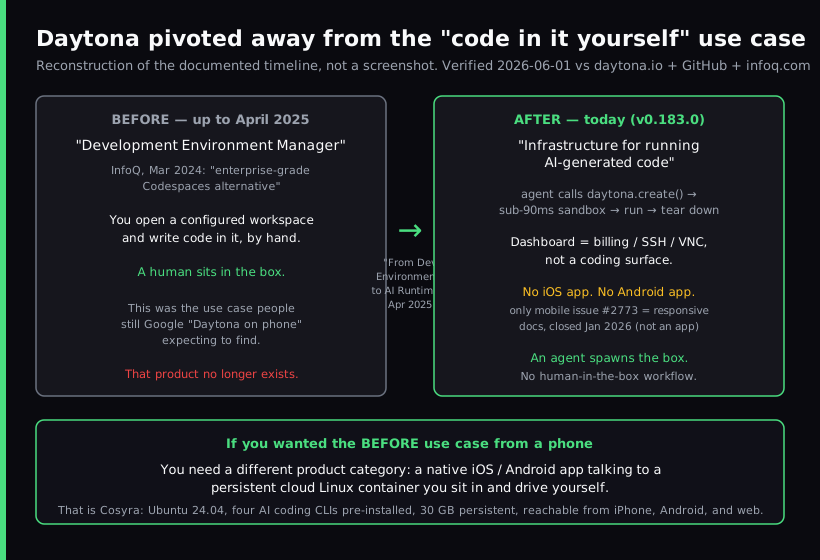
There is no Daytona app for your phone, and there is no Daytona web IDE you can sit in from a phone either. Daytona used to be a self-hosted development environment manager, the "open a configured workspace and write code in it" shape that people compared to GitHub Codespaces. It pivoted to an AI sandbox runtime in 2025, and the human-in-the-box workflow went with it. If you searched "Daytona on phone" hoping to code from your phone in a Daytona workspace, the honest answer is that the product you were looking for no longer exists in that form, and the thing that replaces it for a phone is a native app plus a persistent cloud Linux box, which is what we build at Cosyra.
This guide is the current-state answer rather than a rehash of a 2024 listicle. We cover what Daytona is now, why that removed it from the code-from-a-phone conversation, what it costs if you tried anyway, where Daytona is genuinely the right tool, and the setup that actually works on a phone today. For the wider map see the cloud IDE on phone pillar, and for the agent-on-mobile picture see the AI coding agents on mobile pillar.
Can you use Daytona on a phone?
Not for coding. You can open app.daytona.io in mobile Safari or Chrome
and see your account, but that page is the operational dashboard (billing, observability,
and a way to SSH or VNC into a sandbox), not an editor you write code in. Daytona's
current product is an SDK and API: your agent calls daytona.create(), gets an isolated container in under 90 ms, runs the code it generated,
reads the result back, and tears the sandbox down. Daytona's own phrasing
for the design goal is that it "assumes no one is watching." A phone has no
role in that loop, because a human has no role in that loop.
So the question splits in two, and conflating them is where most write-ups go wrong. "Can Daytona run my AI-generated code in a sandbox?" Yes, that is the entire product. "Can I sit on a phone and code by hand inside a Daytona workspace?" No, that workflow was retired with the pivot. The rest of this guide is about the second question, because that is the one people typing "Daytona on phone" are actually asking.
What Daytona is now, and why the phone use case left
Daytona launched as a Development Environment Manager. In March 2024 InfoQ described it as exactly that, and as an "enterprise-grade Codespaces alternative", a tool that started a fully configured dev environment with a single command, for teams that wanted self-hosted, standardized workspaces. That is the Daytona people remember, and it is the one that would have made sense to reach for from a phone if it had ever shipped a mobile client.
In 2025 the company changed direction. Its homepage now reads, verbatim as of 2026-07-01, "Secure and Elastic Infrastructure for Running Your AI-Generated Code." The public core repo (AGPL-3.0, 72,325 stars when we checked on 2026-07-01) is a sandbox runtime with SDKs in Python, TypeScript, Ruby, Go, and Java, but it stopped moving. As of June 2026 the repo carries a banner: "Daytona's core development has moved to a private codebase. This repository will receive no further updates, fixes, or releases." The final open release is v0.190.0, published 2026-06-23; you can still fork and build on that frozen snapshot under the AGPL-3.0 license, just without upstream support. None of that is a coding environment for a person. The pre-pivot "sit in your workspace" use case is gone, and nothing suggests it is coming back.
We think that was a sharp, correct call for Daytona's market. Agent sandbox runtime is a real and growing category, and they are good at it. It just means Daytona is no longer in the same conversation as a mobile cloud dev environment. The companies still publishing "Daytona on iPhone" content are describing a product that stopped existing over a year ago. If you reached a "Daytona alternatives" list looking for that old human IDE, we line up the real replacements in Daytona alternative for humans, and lay the two products side by side in Cosyra vs Daytona.
Is there a Daytona mobile app?
No. There is no native iOS app and no native Android app, and there is no progressive web app built for a phone. We searched the daytonaio/daytona issue tracker for anything mobile on 2026-06-01: the single mobile-keyword result is issue #2773, "minor updates needed to the site and docs in mobile view," which is about making the documentation site readable in a phone browser, not about a client app. It was closed on 2026-01-14. Mobile developers are simply not in Daytona's target audience after the pivot, and the issue tracker reflects that.
What would Daytona cost if you tried anyway?
Daytona's hosted service is pure pay-as-you-go, billed per second. The public rates on its pricing page as of 2026-07-01: vCPU at $0.0504/hour, memory at $0.0162/GiB-hour, and storage at $0.000108/GiB-hour with the first 5 GiB per workspace free, plus a $200 signup credit. GPUs are available at $3.03/hour for an RTX PRO 6000 and $3.95/hour for an H100.
That metering is the right shape for bursty agent workloads. You pay for the seconds a sandbox is alive and nothing when it is gone. It is the wrong shape for "I have twenty spare minutes on the train and I want to poke at a side project." We think a flat monthly price beats a per-second meter for a human who codes in irregular bursts from a phone, precisely because you stop doing mental math about rates and just open the app. That is a preference Daytona's pay-as-you-go model is built to disagree with, and for their actual customers, agents running batch jobs, they are right and we would be wrong.
How to actually code on a phone instead
The pattern that works on a phone is the one Daytona retired: a native iOS or Android app talking to a persistent cloud Linux container you sit in and drive yourself. The phone's job is to be a good client to a real Linux box, not to host a desktop IDE in a browser tab and not to be cut out of the loop entirely. On that surface you are mostly typing short prompts to an agent and reviewing its diffs, which thumbs handle fine on a couch or in a waiting room.
That is what we build. The Cosyra iOS and Android apps give you a persistent Ubuntu 24.04 container with Claude Code, Codex CLI, OpenCode, and Antigravity CLI already installed, 30 GB of storage, and hibernation that resumes exactly where you left off. The same container is reachable from iPhone, Android, and web, so we start a task on a phone on the train and pick it up on a laptop at a coffee shop without re-cloning anything.
Step 1: Install Cosyra from the App Store or Google Play
Open the App Store on iPhone or Google Play on Android and install Cosyra. Sign in with Apple, Google, or email. The app provisions a fresh Ubuntu container on first launch. Sign up and pick a plan. Eligible new users can start a 7-day free trial in the App Store app.
Step 2: Add your model API key
Cosyra is bring-your-own-key, so you pay Anthropic, OpenAI, or Google directly rather than through us. In the terminal:
$ # Persists across sessions and device switches
$ echo 'export ANTHROPIC_API_KEY="sk-ant-your-key-here"' >> ~/.bashrc
$ source ~/.bashrc
$ claude --version
Claude Code (latest)
Step 3: Run an agent
Clone a repo and start a session:
$ git clone https://github.com/your-org/your-project.git
Cloning into 'your-project'...
$ cd your-project
$ claude
Claude Code (latest)
Type your prompt, or type "/" for commands.
> Add a health-check endpoint and a test, then run the suite.
Try it on your phone. Sign up and pick a plan. Eligible new users can start a 7-day free trial in the App Store app. App Store / Google Play / Pricing details
Daytona vs a phone-first setup, side by side
Lined up against what matters for coding from a phone, a native app, a box you can sit in, and a price you can predict, the two products sort out cleanly. They are aimed at different users, and the table makes that obvious. Verified 2026-06-01.
| Feature | Daytona (today) | Cosyra (iOS / Android app) |
|---|---|---|
| Native phone app | No | Yes (iOS + Android) |
| Human-interactive coding session | No (agent-driven SDK) | Yes (you sit in the box) |
| Persistent environment | Ephemeral sandboxes | Ubuntu 24.04, 30 GB |
| AI coding CLIs | None pre-installed | 4 pre-installed |
| Pricing model | Per-second metering | Flat $20 or $30/mo |
| GPU access | Yes (H100, RTX PRO 6000) | No |
| Self-host / open source | Frozen AGPL-3.0 snapshot (repo unmaintained since June 2026) | No (SaaS on Azure) |
| Free tier | $200 signup credit | None. 7-day trial in the App Store app (eligible new users) |
Where Daytona wins
Different products, different jobs. Daytona beats us cleanly on these axes, and if any describe you, Daytona is the right call and a phone is not part of the picture:
- Building your own AI agent. If your product is an agent that needs to run generated code safely, Daytona is purpose-built and Cosyra is the wrong tool entirely. This is its home turf.
- GPU workloads. H100 and RTX PRO 6000 at fair per-hour rates. We have no GPU offering at all.
- Self-hosting and air-gap. Daytona's Customer Managed Compute lets you run the core on your own infrastructure. Since June 2026 that means a frozen v0.190.0 snapshot with no upstream fixes, but the option is real. Cosyra is SaaS-only on Azure.
- Open-source auditability. The AGPL-3.0 core is public on GitHub. As of June 2026 it is a frozen snapshot rather than an active project, the repo gets no further updates, but you can still read and fork it. Cosyra is closed-source.
- Bursty pay-as-you-go. A $200 credit plus per-second billing is the right meter for one-off experiments and batch agent jobs.
Who should pick which
Here is the decision framework we would give a friend.
- Pick Daytona if you are building an AI agent or product that needs a sandbox runtime to execute generated code, you want GPU access or a self-hosted option, and the "user" of the environment is software, not a person at a keyboard.
- Pick Cosyra if the device in your hand is a phone, you want a real terminal and AI coding CLIs you drive yourself, and you want a persistent box that follows you across iPhone, Android, and web at a predictable monthly price.
- Try Daytona first if you are not sure whether your workload is "an agent spinning up sandboxes." If it is, you do not need a mobile dev environment at all, and Daytona's free $200 credit is plenty to find out before you commit.
One honest gap on our side worth stating plainly: Cosyra has no offline mode. The container lives in the cloud, so no connection means no terminal. If you code primarily on flights with no Wi-Fi, neither of these is your tool. A local setup is. For everywhere with a signal, the cloud box is the trade we happily make.
Frequently asked questions
Does Daytona have a mobile app?
No. There is no native iOS app and no native Android app for Daytona. We searched the daytonaio/daytona repository for mobile-related issues on 2026-06-01 and the only result is issue #2773, "minor updates needed to the site and docs in mobile view," which was about making the documentation site responsive in a mobile browser, not about shipping a client app. It was closed on 2026-01-14.
[source: daytonaio/daytona issue #2773, GitHub]
Is Daytona still a development environment manager?
No. Daytona started as a self-hosted Development Environment Manager, but it pivoted to an AI sandbox runtime, announced in its "From Dev Environments to AI Runtimes" post in April 2025. Its homepage now reads "Secure and Elastic Infrastructure for Running Your AI-Generated Code." The "open a workspace and code in it" product is the old Daytona; that is not what the current product does.
[source: "From Dev Environments to AI Runtimes", daytona.io]
Wasn't Daytona a GitHub Codespaces alternative?
It was, before the pivot. In March 2024 InfoQ described Daytona as a Development Environment Management tool and an "enterprise-grade Codespaces alternative." That framing is accurate for pre-2025 Daytona and stale for the current product. Most "Daytona alternatives" listicles now compare it against AI sandbox tools like E2B, Modal, Vercel Sandbox, and Cloudflare Workers, not against Codespaces or Gitpod.
[source: "Development Environment Manager Daytona Now Open Source", InfoQ, 2024-03-23]
Can I open Daytona from my phone's browser?
You can load app.daytona.io in mobile Safari or Chrome, but it is the operational dashboard, not a coding surface. By Daytona's own framing the product "assumes no one is watching": it is built for an agent to call daytona.create() over the SDK, run generated code in a sandbox, and tear it down. The dashboard handles billing, observability, and SSH or VNC into a sandbox. There is no in-browser code editor for you to sit in from a phone.
[source: "Redefining the agent experience", daytona.io]
Is Daytona open source, and how much does it cost?
The core was open source under AGPL-3.0 on GitHub (72,325 stars as of 2026-07-01), but as of June 2026 Daytona moved its core development to a private codebase. The public repo now carries a banner saying it will receive no further updates, fixes, or releases. The final open release is v0.190.0 (2026-06-23), and the AGPL-3.0 license text is intact at that tag, so you can still fork and build on the frozen snapshot, just without upstream support. The hosted service is pure pay-as-you-go: vCPU at $0.0504/hour, memory at $0.0162/GiB-hour, storage at $0.000108/GiB-hour (first 5 GiB per workspace free), plus a $200 signup credit. GPUs are available at $3.03/hour (RTX PRO 6000) and $3.95/hour (H100). That metering is excellent for bursty agent jobs and awkward if you want to know in advance what a month of casual phone coding costs.
[source: Daytona pricing page]
What should I use to code on a phone instead?
If you wanted Daytona's pre-pivot use case from a phone, you want a different category: a native iOS or Android app talking to a persistent cloud Linux container that you sit in and drive yourself. That is what we build at Cosyra: an Ubuntu 24.04 container with Claude Code, Codex CLI, OpenCode, and Antigravity CLI pre-installed, 30 GB of persistent storage, and the same box reachable from iPhone, Android, and web.
tl;dr
Daytona has no mobile app and no human-facing web IDE. It pivoted from a self-hosted dev-environment manager to an AI sandbox runtime in 2025, so the "sit in a workspace and code" use case people search for is gone. The dashboard at app.daytona.io is billing and observability, not an editor. Use Daytona if you are building an agent that needs to run generated code, or you want GPUs or self-hosting. To actually code on a phone, use a native iOS or Android app on a persistent cloud Linux box. That is Cosyra, with four AI CLIs pre-installed.
App Store / Google Play. Sign up and pick a plan. Eligible new users can start a 7-day free trial in the App Store app. See pricing.
For the wider picture, our cloud IDE on phone pillar benchmarks every browser-based IDE you might open from a phone, and the mobile coding terminal pillar covers the terminal-on-a-device decision end to end. The same "this product pivoted or never shipped a mobile app, here is the honest current state" pattern shows up across the cluster: Gitpod rebranded to Ona and never shipped an app, which we walked through in Gitpod on iPad and, for what actually works when you open the same workspace from a phone, Ona on a phone; and Coder's official iOS docs hand iPhone users off to the iSH emulator, covered in Cosyra vs Coder. For the agent-focused version of the question, see Firebase Studio on a phone.
Get a real dev environment on your phone in 3 minutes. Install Cosyra, add your API key, run an agent in a persistent Ubuntu container.