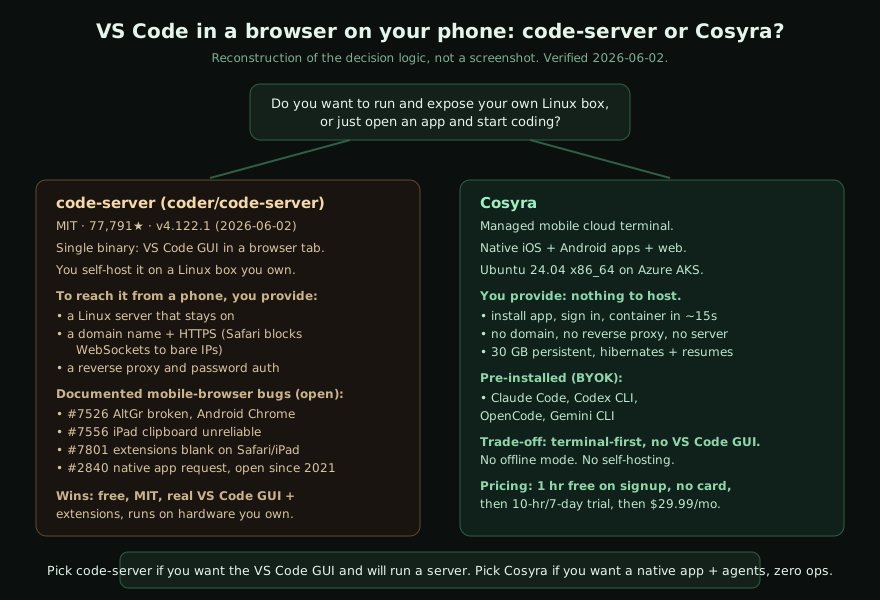
Short answer. Both put a dev environment behind a screen you reach from your phone, and that is where the resemblance stops. code-server is a free, MIT-licensed single binary that runs the VS Code graphical editor in a browser tab on a Linux box you own, host, and expose. We built Cosyra as a managed mobile cloud terminal: native iOS and Android apps, a persistent Ubuntu 24.04 x86_64 container on Azure AKS, and Claude Code, Codex CLI, OpenCode, and Gemini CLI pre-installed. If you want the VS Code GUI and will run your own server, pick code-server. If you want a native app with agents ready and zero infrastructure, that is us. This post compares Cosyra vs code-server with the honest trade-offs of each.
This post was written by the Cosyra team. We compared Cosyra against code-server based on hands-on testing of both, and every code-server fact below was re-verified first-hand on 2026-07-04 against the project's GitHub repository, release feed, official docs, and open issue tracker.
tl;dr
Use code-server if you want the full VS Code graphical editor and its extension marketplace, you already run a Linux box, and you are comfortable putting a domain, HTTPS, and a reverse proxy in front of it so a phone browser can reach it. Use Cosyra if you want to install an app, sign in, and land in a persistent Ubuntu container with AI coding agents already installed, with nothing to host and nothing to expose. One is software you operate; the other is a service you open.
App Store · Google Play. Sign up: 1 hour free, no credit card. Extend with a 10-hour, 7-day trial when you want more.
Tired of babysitting a reverse proxy to reach VS Code from your phone? We run a persistent Ubuntu 24.04 container with Claude Code, Codex CLI, OpenCode, and Gemini CLI pre-installed, reached from a real native iOS or Android app. Two-minute setup, no domain, no TLS config.
App Store · Google Play · Pricing. Sign up: 1 hour free, no credit card. Extend with a 10-hour, 7-day trial when you want more.
What code-server actually is (and is not)
code-server is one of the most-starred developer tools on GitHub: 78,184
stars, MIT-licensed, written in TypeScript, latest release v4.127.0
published 2026-07-02 (star count and release re-verified 2026-07-04 via gh api repos/coder/code-server). It is a single binary. You install it with
curl -fsSL https://code-server.dev/install.sh | sh, run
code-server, and it serves the VS Code editor on
localhost:8080 behind a password. That is the whole product: VS Code,
in a browser, on a Linux machine you provide.
Two things follow from that design, and both matter for phone use. First, the surface is the real VS Code GUI, with the file tree, the command palette, and the extension marketplace. Second, code-server hosts nothing for you. There is no cloud account, no provisioned container, no managed compute. You bring the Linux box, you keep it running, and if you want to reach it from a phone you also bring a domain name, a TLS certificate, and a reverse proxy. code-server is the editor; the server, the network, and the uptime are your job.
code-server vs the Coder platform: get the product right
Before going further, one disambiguation that trips up most "code-server alternative" articles. Coder Technologies ships two different products. This post is about the first one.
- coder/code-server is the MIT-licensed single binary that runs VS Code in a browser on any Linux box. 78,184 stars on 2026-07-04. No control plane, no Terraform, no SaaS. This is the product compared here.
- coder/coder is the AGPL-3.0 self-hosted cloud-dev-environment platform built for enterprise platform teams: a Go control plane, Terraform-defined workspaces, a Wireguard tunnel. Different license, different deployment model, different audience. We compare that product separately in Cosyra vs Coder.
The two share a company and the same "no native mobile app" answer, which is
why Coder documents both products' mobile story under the same
coder.com/docs/code-server/... path. We name code-server explicitly
throughout, and we line both products up against the other browser-only options
in the
cloud IDE on a phone pillar.
How do Cosyra and code-server compare feature by feature?
Cosyra is a managed mobile cloud terminal with native iOS and Android apps backed by a persistent Ubuntu 24.04 x86_64 container on Azure AKS, with four AI coding CLIs pre-installed and $29.99/month pricing after a 1-hour-on-signup free tier and an opt-in 10-hour, 7-day trial. code-server is free MIT software you self-host: the VS Code GUI in a browser on a Linux box you run and expose yourself. The table below lines them up on twelve attributes, re-verified 2026-07-04 against the GitHub repository, the release feed, and the official docs.
| Feature | Cosyra | code-server |
|---|---|---|
| Pricing | $29.99/month Pro, flat (or $300/year) | Free, MIT open source; you pay for the server you host it on |
| Free tier | 1 hour on signup + 10-hour, 7-day trial, no credit card | Free forever as software; the hosting cost is yours |
| OS support / mobile access | Native iOS app, native Android app, web | Mobile browser or Safari PWA only; no native app, ever |
| AI agents pre-installed | Claude Code, Codex CLI, OpenCode, Gemini CLI (BYOK) | None; install agents yourself, or use VS Code extensions |
| Persistent storage | 30 GB persistent, survives device loss and idle | Whatever disk the Linux box you host it on provides |
| Offline capability | No offline mode; the container lives in the cloud | Yes, if you self-host on a local machine on your LAN |
| Container / sandboxing | Isolated per-user container on Azure AKS | Runs as a process on your host; isolation is your setup |
| Port forwarding | Ports reached through the app and web client | Built-in VS Code port forwarding on your network |
| File sync | Same container across iPhone, Android, web; state persists | Files live on your host; sync is whatever you configure |
| Max session length | Hibernates after 10 min idle, resumes where you left off | As long as your server stays up; you own uptime |
| API key model | BYOK; you pay Anthropic / OpenAI / Google directly | No model layer; bring your own via extensions or CLIs |
| Open-source status | Closed SaaS | Open source, MIT (coder/code-server) |
The honest read of that table: code-server wins decisively on cost, license, and editor surface, and Cosyra wins decisively on mobile access, zero operations, and pre-installed agents. The deciding question is not which is "better" but whether you want to run a server or open an app, and whether you want a GUI editor or a terminal with agents.
Want the agents-ready side of this comparison? We run a persistent Ubuntu container with Claude Code, Codex CLI, OpenCode, and Gemini CLI pre-installed, on iOS and Android, in about two minutes. No Linux box to keep alive.
App Store · Google Play · Pricing. Sign up: 1 hour free, no credit card. Extend with a 10-hour, 7-day trial when you want more.
The mobile reality: what running code-server from a phone actually takes
code-server has no native mobile app and never has. The request thread, discussion #2840, "create a code-server app optimized for android," has been open since 2021-03-07 (verified 2026-06-02). The maintainer's own suggestion on that thread is to install the Progressive Web App to your home screen, or plug your phone into an external monitor with something like Samsung Dex and treat it like a laptop. So "code-server on a phone" means "a VS Code browser tab on a phone," and that path carries real, documented friction. If you want that same browser tab without standing up a server at all, that is Microsoft's hosted vscode.dev instead of self-hosted code-server. We put it head-to-head in Cosyra vs VS Code for the Web.
Start with what you have to stand up before the phone is even in the
picture. code-server serves over localhost by default; to reach it
from a phone on mobile data you need a public address, and the
official iPad guide is explicit
that the iPad must reach code-server through a domain name because Safari refuses
to open WebSockets to a bare IP. In practice that means a server that stays on,
a DNS record, a TLS certificate, and a reverse proxy with the right upgrade headers.
Misconfigure any of it and you get the blank white screen that recurs across the
issue tracker, including
issue #5062, "Can not work on mobile devices? It only show blank!" (filed 2022-04-02).
Then there is the browser surface itself. The iPad PWA limits are documented
by Coder, not by us: the keyboard occasionally disappears, cmd+n
may not work, trackpad scrolling breaks on iPadOS below 14.5, terminal text may
not display and ctrl+c cannot stop a running process, copy/paste
fights keyboard shortcuts, and focus is lost in Safari split-view. Open bugs keep
that list current:
#7556 (iPad clipboard
unreliable, 2025-11-08),
#7801
(webview-heavy extensions render blank on Safari/iPad, 2026-05-17), and on Android
#7526
(AltGr not working in Android Chrome, 2025-10-13). None of these are show-stoppers
for opening a file; all of them add up to "this is a desktop editor squeezed into
a mobile browser."
The Android-native escape hatch people reach for is Termux, and it is fragile. Issue #3329 ("Installation failed on Termux (Android 11)") and #7043 ("Error when running on termux proot distro") are representative: code-server's native Node dependencies do not resolve cleanly against Termux's Bionic libc and ARM userland, so the working path is usually a proot-distro Ubuntu inside Termux rather than Termux itself, running a heavy Node process on phone-class hardware. We took the other road. We run the container in the cloud on x86_64 Ubuntu, where everything resolves, and we put a native app in front of it so the input surface is a shell, not a VS Code keybinding layer fighting a soft keyboard. We think a terminal with agents beats a GUI editor squeezed into a mobile browser, and the open issue list above is the receipt.
Where code-server wins
A comparison that only listed code-server's mobile rough edges would be dishonest, because on its home turf code-server is excellent and free. Three wins that Cosyra does not match:
- It is free and MIT-licensed. No subscription, no per-seat fee, no vendor. You can read the source, fork it, audit it, and run it forever at zero software cost. The only bill is the machine you host it on, which can be a Raspberry Pi or a box you already own.
- It is the real VS Code GUI. The file explorer, the command palette, the integrated debugger, and crucially the extension marketplace all work. If your workflow lives in VS Code extensions, code-server gives you that exact environment in a browser. Cosyra is terminal-first and ships AI CLIs, not a graphical editor.
- It can run fully offline and on hardware you control. Host code-server on a laptop or a home server and you can reach it on your LAN with no internet at all. Cosyra's container lives in the cloud, so no connection means no terminal. For air-gapped or fully local setups, code-server wins and we do not pretend otherwise.
Who should pick code-server instead of Cosyra
Be the honest advisor here. The right pick is a function of who you are, not which marketing page you read last.
Choose code-server if you want the graphical VS Code editor and its extensions specifically, you already run a Linux box (home server, VPS, work machine) and do not mind exposing it with a domain and HTTPS, you value a free MIT-licensed tool with no vendor, or you need an offline, on-LAN, or air-gapped setup.
Choose Cosyra if you want to code from a phone or tablet today without running any server, you want Claude Code, Codex CLI, OpenCode, and Gemini CLI pre-installed in a persistent Ubuntu container, you want a native iOS or Android app instead of a Safari PWA with documented keyboard and WebSocket limits, and you would rather pay a flat $29.99/month than operate infrastructure.
Try code-server first if: (1) you already have a home server or VPS running and adding one binary plus a reverse proxy is an evening, not a project; (2) your editing is GUI-and-extension-heavy and a terminal would slow you down; (3) you need offline access on a local network and accept that the mobile browser experience has the documented rough edges above. In all three cases code-server is the better, cheaper fit, and we would point you to it.
Coming from code-server to Cosyra
If you have been reaching code-server through a Safari tab on the couch and
you are tired of the reverse proxy, the move to Cosyra is mostly about
deleting steps. There is no server to keep alive, no domain to renew, no TLS
to terminate. You install the app, sign in, and land in a container with the
agents already on PATH. The session below captures a first-time
install coming from a self-hosted code-server setup.
$ # Install Cosyra from App Store or Google Play, sign in,
$ # land in your container. No domain, no proxy, no TLS.
$ uname -m && lsb_release -d
x86_64
Description: Ubuntu 24.04 LTS
$ # The agents are already installed.
$ which claude codex opencode gemini
/usr/local/bin/claude
/usr/local/bin/codex
/usr/local/bin/opencode
/usr/local/bin/gemini
$ # Want the VS Code feel? Edit in the terminal with vim,
$ # or drive an agent and let it write the diff.
$ git clone https://github.com/you/your-app.git && cd your-app
$ export ANTHROPIC_API_KEY=sk-ant-...
$ claude
The honest catch on that flip: you give up the VS Code GUI. If the graphical editor is the thing you cannot live without, stay on code-server. If what you actually want on a phone is a real shell with agents ready and no server to babysit, this is the trade we made on purpose. We reach for it on the train, on the couch, and in the waiting room, where standing up a reverse proxy is the last thing anyone wants to do.
Frequently asked questions
Is there a native code-server app for Android or iPhone?
No. There is no native code-server app on the App Store or Google Play, and there never has been. The request thread, coder/code-server discussion #2840, has been open since 2021-03-07 with no native app shipped (verified 2026-06-02 via gh api). code-server runs in a browser tab, so mobile access is a mobile browser or a Safari PWA. Maintainer @bpmct's suggestion on that thread is to install the PWA to the home screen or connect the phone to an external monitor with something like Samsung Dex. Cosyra ships real native iOS and Android apps purpose-built to be a mobile cloud terminal.
[source: code-server discussion #2840, verified 2026-06-02]
What is the difference between code-server and the Coder platform?
They are two distinct products from Coder Technologies. code-server (coder/code-server) is the older, MIT-licensed, single-binary project that puts VS Code in a browser on any Linux box; 78,184 stars, latest release v4.127.0 published 2026-07-02. Coder (coder/coder) is the AGPL-3.0 self-hosted cloud-dev-environment platform with a Terraform-defined control plane for enterprise teams. This post is about code-server; for the platform comparison see Cosyra vs Coder.
[source: coder/code-server GitHub, verified 2026-07-04]
Can I run code-server on an iPad in Safari?
Yes, but with documented limits from Coder's own iPad guide (verified HTTP 200 on 2026-07-04). You install code-server as a Safari PWA, and the docs list known issues: the keyboard occasionally disappears, cmd+n may not work, trackpad scrolling is broken on iPadOS below 14.5, terminal text may not display and ctrl+c cannot stop a running process, copy/paste fights shortcuts, focus is lost in Safari split-view, and the iPad must reach code-server via a domain name because Safari will not open WebSockets to a bare IP. Open bugs #7556 (iPad clipboard, 2025-11-08) and #7801 (Safari/iPad extensions blank, 2026-05-17) are still tracking iPad breakage.
[source: Coder official iPad guide, verified 2026-07-04]
Why does code-server show a blank white screen on my phone?
It is usually a TLS, reverse-proxy, or mobile-browser rendering problem rather than a bad install. Issue #5062 ("Can not work on mobile devices? It only show blank!", filed 2022-04-02) traces to code-server needing HTTPS and a proper WebSocket upgrade path to render in a mobile browser. Because you self-host code-server, the fix is on you: terminate TLS correctly, set the proxy headers, serve over a real domain. With Cosyra there is no reverse proxy to misconfigure; the native app talks to your container and the terminal renders the same on iPhone, Android, and web.
[source: code-server issue #5062, verified 2026-06-02]
Can I install code-server inside Termux on Android?
People try, and it is fragile. Issue #3329 ("Installation failed on Termux (Android 11)", 2021-05-09) and #7043 ("Error when running on termux proot distro", 2024-10-19) are representative: code-server's native Node modules do not resolve cleanly against Termux's Bionic libc and ARM userland, so the common workaround is a proot-distro Ubuntu rather than Termux proper. Even when it boots, you are running a heavy Node process on phone hardware with no persistence guarantees. We run the container in the cloud on x86_64 Ubuntu instead, with a native app in front of it.
[source: code-server issue #3329, verified 2026-06-02]
Does the keyboard work correctly in code-server on Android?
Partly. Open issue #7526 ("AltGr not working on Android Chrome", filed 2025-10-13) is a current example: AltGr-composed characters do not register, which breaks accented characters and several programming symbols for non-US layouts. Mobile-keyboard quirks are a known rough edge for any VS Code-in-a-browser setup, because the web editor intercepts keystrokes the soft keyboard also wants. Cosyra is terminal-first, so the input surface is a shell rather than the full VS Code keybinding layer, which sidesteps most of these conflicts.
[source: code-server issue #7526, verified 2026-06-02]
Is Cosyra a code-server alternative?
On the mobile-first axis, yes; on the run-your-own-VS-Code axis, no, and we will be honest about that. If you specifically want the VS Code graphical editor with its extension marketplace, and you are happy to run and expose your own Linux server, code-server is free, MIT, and the right tool. If you want to open a native iOS or Android app, land in a persistent Ubuntu 24.04 container with Claude Code, Codex CLI, OpenCode, and Gemini CLI already installed, and never touch a reverse proxy, Cosyra is the direct answer.
Pre-installed Claude Code, Codex CLI, OpenCode, and Gemini CLI. We run them in a real x86_64 Ubuntu 24.04 container, reached from a native iOS or Android app. Two-minute setup, no server, no reverse proxy.
Cosyra vs Coder (the platform) · Coder on iPhone · Cloud IDE on a phone · VS Code on a phone (Microsoft's hosted vscode.dev, not code-server) · Mobile coding terminal · See pricing. Sign up: 1 hour free, no credit card. Extend with a 10-hour, 7-day trial when you want more.