Short answer. VS Code for the Web (vscode.dev) is a free, zero-install Microsoft editor that runs in your phone browser. And it has no terminal, no runtime, and cannot run, build, or debug your code, by Microsoft's own statement. It edits and commits files; it does not run them. We built Cosyra for the other half of that intent: a persistent Ubuntu 24.04 container reached from native iOS and Android apps, with a real terminal and Claude Code, Codex CLI, OpenCode, and Gemini CLI pre-installed. If you only need to edit and commit, vscode.dev is free and the right tool. If you need to actually run code or drive an AI agent from a phone, that is us. This post compares Cosyra vs VS Code for the Web with the honest trade-offs of each.
This post was written by the Cosyra team. We compared Cosyra against VS Code
for the Web based on hands-on testing of both, and every VS Code fact below
was re-verified first-hand on 2026-07-05 against Microsoft's official
documentation, the microsoft/vscode GitHub repository, and its open
issue tracker.
tl;dr
Use VS Code for the Web if your phone work is editing and committing files, config tweaks, docs, a quick PR review, or JSON/Markdown, and you want a free, zero-install editor with the real VS Code UI. Use Cosyra if you need a real terminal to run, build, or debug code, or to drive an AI coding agent, from a native app on a persistent Linux container. One is an editor with no computer behind it; the other is the computer.
App Store · Google Play. Sign up: 1 hour free, no credit card. Extend with a 10-hour, 7-day trial when you want more.
Reached for a terminal in vscode.dev and there wasn't one? We run a persistent Ubuntu 24.04 container with Claude Code, Codex CLI, OpenCode, and Gemini CLI pre-installed, reached from a real native iOS or Android app, with a shell that actually runs your code.
App Store · Google Play · Pricing. Sign up: 1 hour free, no credit card. Extend with a 10-hour, 7-day trial when you want more.
What VS Code for the Web actually is (and is not)
VS Code for the Web is Microsoft's own description: "a free, zero-install
Microsoft Visual Studio Code experience running entirely in your browser."
The editor it runs is the same Code OSS core as the desktop app. The
microsoft/vscode repository
is MIT-licensed, written in TypeScript, and sits at 187,044 stars (verified 2026-07-05
via gh api). You open vscode.dev, and you get the
file explorer, the command palette, syntax highlighting, and themes, with
nothing to install and no account required.
The catch is in the word "browser." VS Code for the Web runs inside the browser sandbox, and the official docs are blunt about what that costs you: "the terminal and debugger are not available, which makes sense since you can't compile, run, and debug a Rust or Go application within the browser sandbox." The editor is there; the computer is not. That single fact is the whole comparison, so it is worth stating plainly before the table: vscode.dev edits and commits your code, it does not run it.
First, untangle the four "VS Code on a phone" surfaces
Most "vscode.dev alternative" articles get this wrong, so it is worth thirty seconds. "VS Code on a phone" is not one product; it is four Microsoft-owned surfaces, and only one of them is what this post compares.
- VS Code for the Web (vscode.dev): the editor in a browser sandbox. No terminal, no runtime. This is the product compared here.
- github.dev: press the
.key on any GitHub repo or pull request. Even lighter: per GitHub's docs it is "a lightweight editing experience that runs entirely in your browser" to "navigate files… make and commit code changes." Edit-and-commit only, zero compute. - VS Code Desktop + Remote (Remote Tunnels, GitHub Codespaces, Remote-SSH): the full editor where the compute lives elsewhere. On a phone you reach it through a browser, which lands you back at vscode.dev. We compare the compute-behind-it option in Cosyra vs GitHub Codespaces on mobile.
- Third-party "VS Code mobile" apps: they exist in the Marketplace, but they are not official Microsoft products. There is no official native iOS or Android VS Code app.
One more distinction that trips people up: vscode.dev is not the same as code-server. code-server is Coder's MIT self-host project that puts VS Code in front of your own Linux box, so it does get you a terminal on that box. vscode.dev is Microsoft's hosted browser editor with no compute at all. Different products, different intent.
How do Cosyra and VS Code for the Web compare feature by feature?
Cosyra is a managed mobile cloud terminal with native iOS and Android apps backed by a persistent Ubuntu 24.04 x86_64 container on Azure AKS, with four AI coding CLIs pre-installed and $29.99/month pricing after a 1-hour-on-signup free tier and an opt-in 10-hour, 7-day trial. VS Code for the Web is a free, zero-install browser editor with no terminal and no runtime. The table below lines them up on twelve attributes, re-verified 2026-07-05 against Microsoft's docs, the GitHub repository, and the open issue tracker.
| Feature | Cosyra | VS Code for the Web (vscode.dev) |
|---|---|---|
| Pricing | $29.99/month Pro, flat (or $300/year) | Free; no compute to bill for |
| Free tier | 1 hour on signup + 10-hour, 7-day trial, no credit card | Free forever; no account needed for vscode.dev |
| OS support / mobile access | Native iOS app, native Android app, web | Any browser; no native mobile app, touch UX in Backlog since 2019 |
| AI agents pre-installed | Claude Code, Codex CLI, OpenCode, Gemini CLI (BYOK) | None; no terminal to run an agent CLI in |
| Terminal / runtime | Real terminal in a persistent Ubuntu container | None; "terminal and debugger are not available" (MS docs) |
| Run / build / debug code | Yes; npm run dev, pytest, compilers all execute | No; cannot compile, run, or debug in the browser sandbox |
| Persistent storage | 30 GB persistent, survives device loss and idle | Browser-local state only; fragile, per-browser |
| Offline capability | No offline mode; the container lives in the cloud | Limited; editor loads in-browser but repos need network |
| Container / sandboxing | Isolated per-user container on Azure AKS | Browser sandbox; that is the limitation, not a feature |
| File access | Full Linux filesystem in your container | File System Access API (folders in Chrome/Edge; Safari single files) |
| API key model | BYOK; you pay Anthropic / OpenAI / Google directly | No model layer; no terminal for a BYOK agent |
| Open-source status | Closed SaaS | Editor core MIT (microsoft/vscode); hosted service is Microsoft's |
The honest read of that table: VS Code for the Web wins decisively on cost, zero-install, and editor surface, and Cosyra wins decisively on having a real terminal, a runtime, pre-installed agents, and native apps. The deciding question is not which is "better" but whether you need to run your code from the phone or only edit it.
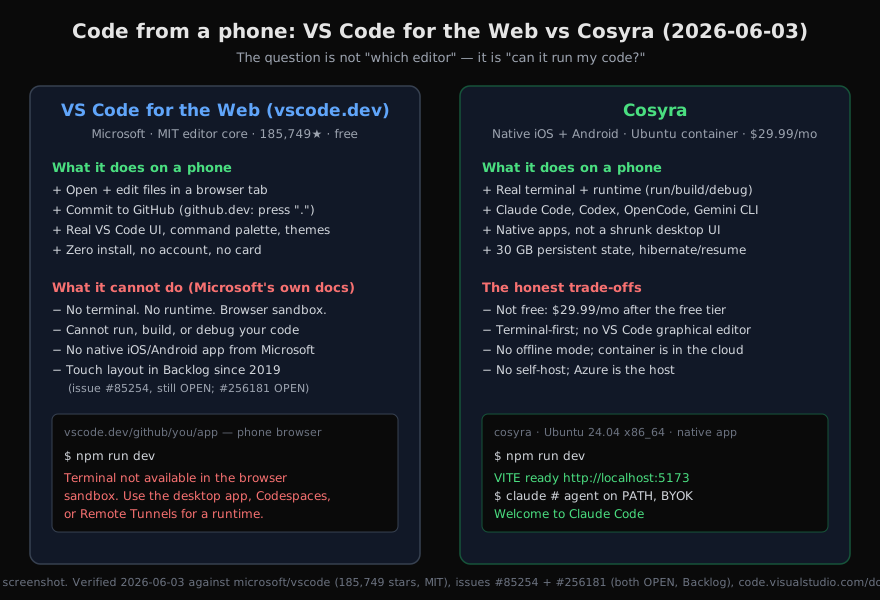
Want the side of this comparison with a real terminal? We run a persistent Ubuntu container with Claude Code, Codex CLI, OpenCode, and Gemini CLI pre-installed, on iOS and Android, in about two minutes, with a shell that runs your code, not just edits it.
App Store · Google Play · Pricing. Sign up: 1 hour free, no credit card. Extend with a 10-hour, 7-day trial when you want more.
The mobile reality: what vscode.dev on a phone actually gives you
We opened a repo in vscode.dev on a phone on the couch, edited a
file, and committed it back to GitHub in under a minute. For that job, editing
and committing, it is genuinely good. The editor is the real thing, the command
palette works, and there is nothing to install. Then we reached for a terminal
to run the project, and there was not one. That is not a bug we hit; it is the
documented design. Microsoft's docs send you elsewhere the moment you need "a
runtime to run, build, or debug your code" or "platform features such as a terminal",
to the desktop app, GitHub Codespaces, or Remote Tunnels.
The touch surface is the second wall. Microsoft's docs note "smaller screens may have certain limitations" and that "certain keyboard shortcuts may also work differently," which is the polite version. The detailed version lives in issue #85254, "Web: Mobile Safari support," opened 2019-11-21 and still OPEN in the Backlog milestone (verified 2026-07-05). The Microsoft maintainer on that thread lists the gaps directly: missing wheel-event support, the Escape key not reachable, function keys absent, and hover-triggered UI, definition hovers, title-bar actions, list quick-actions, invisible on a touch screen, with the conclusion that without an external keyboard and mouse the web UI is "difficult to use." A second request, #256181 ("Mobile-Friendly Layout for vscode.dev," opened 2025-07-16), asks for larger touch targets and a small-screen layout and is also OPEN/Backlog. Six-plus years, no ship.
So "vscode.dev on a phone" is, accurately, a desktop editor squeezed into a mobile browser, with no terminal behind it. We took the other road. We put a real shell in a persistent Ubuntu 24.04 x86_64 container in the cloud and a native app in front of it, so the input surface is a terminal built for the phone rather than a VS Code keybinding layer fighting a soft keyboard. We think a terminal you can actually run code in beats the real VS Code UI you can only edit in. And plenty of VS Code loyalists will disagree with that, which is fair. The difference shows up the instant you want to start a dev server on the train instead of just fixing a typo.
$ uname -m && lsb_release -d
x86_64
Description: Ubuntu 24.04 LTS
$ # The thing vscode.dev cannot do: run it.
$ git clone https://github.com/you/your-app.git && cd your-app
$ npm install && npm run dev
VITE v5 ready in 612 ms
→ Local: http://localhost:5173/
$ # Or hand the repo to an agent, already on PATH.
$ export ANTHROPIC_API_KEY=sk-ant-...
$ claude
Welcome to Claude Code
Where VS Code for the Web wins
A comparison that only listed vscode.dev's mobile gaps would be dishonest, because on its home turf it is excellent and free. Four wins that Cosyra does not match:
- It is truly free and zero-install. No account, no trial, no card. Open vscode.dev and edit. Cosyra is a paid container ($29.99/month Pro after the free tier). For occasional edits, free wins.
- It is instant for quick repo edits. Press
.on a GitHub repo and you are editing in a second. For a one-line README fix or reviewing a PR diff, github.dev is faster than spinning up any container. - It is the real VS Code editor. Familiar keybindings, the command palette, the Monaco editor, and web extensions for declarative tooling like themes and language grammars. Cosyra is terminal-first and ships AI CLIs, not a graphical editor.
- It is Microsoft-backed and will not be sunset. VS Code for the Web ships on a monthly cadence; there is no vendor-longevity risk. We are a smaller company, and that is a fair thing to weigh.
Who should pick VS Code for the Web instead of Cosyra
Be the honest advisor here. The right pick is a function of what you do on the phone, not which page you read last.
Choose VS Code for the Web if your phone work is editing and committing, config tweaks, docs, a quick PR review, you want a free, zero-install tool with no account, or you are primarily a JSON, Markdown, HTML, or CSS editor, languages Microsoft describes as "nearly identical to the desktop" on the web.
Choose Cosyra if you need to run, build, or debug code from a phone, you want to drive an AI coding agent like Claude Code or Codex CLI, you want a native iOS or Android app instead of a desktop UI shrunk into Safari, and you want persistent, full-Linux state that survives across sessions and devices.
Try VS Code for the Web first if: (1) you mostly review and edit, and a terminal would be dead weight; (2) you want zero cost and zero setup and never compile or run on the phone; (3) you live in JSON/Markdown/HTML/CSS, where the web editor is closest to desktop. In all three cases vscode.dev is the better, free fit, and we would point you to it before our own paywall.
Coming from vscode.dev to Cosyra
If you have been editing in a vscode.dev tab on the couch and keep hitting
the "I need to actually run this" wall, the move to Cosyra is mostly about
gaining a computer behind the editor. You install the app, sign in, and land
in a container with the agents already on PATH and a shell that runs
your code. The honest catch on that flip: you give up the VS Code graphical editor.
If the GUI and its extensions are the thing you cannot live without, stay on vscode.dev,
or pair it with Codespaces for the compute. If what you want on a phone is a real
shell with agents ready, this is the trade we made on purpose. We reach for it
on the train, on the couch, and in the waiting room, the exact places a browser
editor with no runtime leaves you stuck at "edited, but can't run it."
Frequently asked questions
Can you run code in VS Code for the Web (vscode.dev)?
No. It runs entirely in the browser sandbox, and Microsoft's docs state
that "the terminal and debugger are not available, which makes sense since
you can't compile, run, and debug a Rust or Go application within the
browser sandbox." You can open, edit, and commit files, but not run,
build, or debug. Microsoft points you to the desktop app, GitHub
Codespaces, or Remote Tunnels for a runtime. Cosyra gives you a real
terminal in a persistent Ubuntu 24.04 container, so a phone-side npm run dev
actually executes.
[source: VS Code for the Web docs, verified 2026-07-05]
Is there an official VS Code mobile app for iPhone or Android?
No. Microsoft ships no native iOS or Android VS Code app; the mobile story is "open vscode.dev in your phone browser." A touch-optimized layout has been an open request since 2019: issue #85254 ("Web: Mobile Safari support," created 2019-11-21) is still OPEN in Backlog, and #256181 (created 2025-07-16) is also OPEN/Backlog (verified 2026-07-05 via gh api). Third-party "VS Code mobile" apps are not Microsoft products. Cosyra ships real native iOS and Android apps.
[source: microsoft/vscode issue #85254, verified 2026-07-05]
What is the difference between vscode.dev and github.dev?
Both are Microsoft-owned browser editors with no compute, and github.dev
is even lighter. vscode.dev is the standalone "free, zero-install"
experience that can open local folders and remote repos by URL. github.dev
launches when you press . on a GitHub repo or PR; per GitHub's
docs it is "a lightweight editing experience that runs entirely in your browser"
to "navigate files… make and commit code changes." Neither has a terminal, debugger,
or runtime; both are edit-and-commit, not run-your-code.
[source: GitHub github.dev docs, verified 2026-07-05]
Is VS Code for the Web free, and why?
Yes. vscode.dev is free with no account, github.dev is free with a GitHub account. They are free precisely because they carry no compute: there is no server to bill for. The part that costs money, and the part you want on a phone to actually run code, is the runtime they do not provide. Cosyra is a paid managed Linux container ($29.99/month Pro after the free tier) because it gives you that runtime. They price two different things.
[source: VS Code for the Web docs, verified 2026-07-05]
Can I use vscode.dev on an iPad or with a touch screen?
You can open it, but the touch experience is officially limited and has been unshipped for over six years. The docs say "smaller screens may have certain limitations" and "certain keyboard shortcuts may also work differently." Issue #85254 carries the ios-ipados label and documents missing wheel events, an unreachable Escape key, absent function keys, and hover UI invisible on touch, concluding that without an external keyboard and mouse the web UI is "difficult to use" (verified 2026-07-05). Cosyra's native apps are built for touch.
[source: microsoft/vscode issue #85254, verified 2026-07-05]
Is Cosyra a vscode.dev alternative?
On the "I want to actually run code or an AI agent from my phone" axis, yes; on the "I want the VS Code graphical editor" axis, no, and we will say so plainly. If your phone work is editing and committing files, vscode.dev is free, instant, and the right tool. If you need a terminal, a runtime, and AI coding agents on a persistent Ubuntu container reached from a native app, that is what we built Cosyra to be.
Pre-installed Claude Code, Codex CLI, OpenCode, and Gemini CLI. We run them in a real x86_64 Ubuntu 24.04 container with a terminal that actually runs your code, reached from a native iOS or Android app. Two-minute setup, nothing to host.
VS Code on a phone (the how-to) · Cosyra vs code-server (the self-host one) · Cosyra vs Codespaces on mobile · Cosyra vs Zed (the native editor one) · AI coding agents on mobile · Mobile coding terminal · See pricing. Sign up: 1 hour free, no credit card. Extend with a 10-hour, 7-day trial when you want more.