VS Code on your phone is real, but it is narrower than the search makes it sound. Open vscode.dev in your phone browser and you get the actual VS Code editor: open a repo, edit files, commit. What you do not get is a terminal or a runtime. By Microsoft's own statement the browser version is "a very limited execution environment" where "the terminal and debugger are not available." So you can edit code on your phone, but you cannot run, build, or debug it there. If running code is what you came for, the honest answer is a native app plus a persistent cloud Linux box, which is what we build at Cosyra.
The confusing part is that "VS Code on a phone" is not one product. It is four different Microsoft-owned surfaces, and most write-ups blur them together. This guide separates them, quotes Microsoft's docs and GitHub issue tracker directly so you are not taking our word for it, and then shows the setup that actually gives you a terminal on a phone. For the head-to-head on the self-hosted cousin people confuse with vscode.dev, see our Cosyra vs code-server comparison; for Microsoft's own compute answer, our Cosyra vs GitHub Codespaces on mobile guide; and for the agent angle on Android specifically, our Claude Code on Android walkthrough. On a bigger screen the same browser-sandbox limit applies. See VS Code on iPad, where even a Magic Keyboard does not get you a terminal. And for the head-to-head on pricing, the feature table, and who should pick which, read Cosyra vs VS Code for the Web.
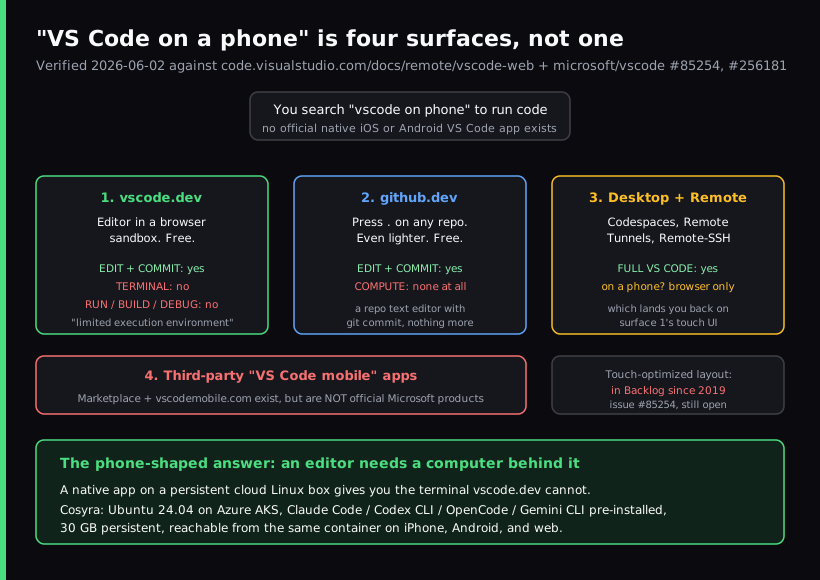
The four things people mean by "VS Code on a phone"
Get this disambiguation right and the rest of the answer falls out. When someone types "vscode on phone," they could be reaching for any of these:
- VS Code for the Web (vscode.dev). The real editor, compiled to run in the browser sandbox. Free, no install, no account needed. This is the one a phone search usually lands on. It edits and commits; it has no terminal.
- github.dev. Even lighter. Press the period key on any GitHub repo, or change .com to .dev in the URL, and you get a browser editor with zero compute. A repo text editor with git commit.
- VS Code Desktop plus Remote. Full desktop VS Code where the compute lives elsewhere (Codespaces, Remote Tunnels, Remote-SSH). This is not a phone product. On a phone you reach it through a browser, which puts you back on the first surface and its touch UI.
- Third-party "VS Code mobile" apps. Apps on the Marketplace and at vscodemobile.com use that name, but they are not Microsoft products. We would not present any of them as "VS Code's official app," because none is.
The short version: there is no official native iOS or Android VS Code app. The only first-party way to touch VS Code from a phone is a browser, and the browser version has no terminal.
What actually works on a phone today
vscode.dev on a phone is genuinely good at a specific, narrow job: reading and editing code, and committing it. If you want to fix a typo in a README, tweak a config file, review a pull request diff, or make a quick edit while you are away from a laptop, it works. The editor is the real Monaco editor with the command palette and keybindings you know, so there is no learning curve.
Language help is tiered. Microsoft's docs lay it out: most languages get syntax coloring and text-based completions; TypeScript, JavaScript, and Python get richer single-file completions and syntax errors; and JSON, HTML, CSS, and Markdown are "nearly identical to the desktop." What you lose is project-wide IntelliSense for most languages, because there is no compute to run a language server. For a Markdown or JSON edit on the train, none of that matters. For building software, it is the whole game.
The load-bearing limit: no terminal, no runtime
This is the fact that decides whether vscode.dev is enough for you. Straight from the official VS Code for the Web docs:
"the terminal and debugger are not available, which makes sense since you can't compile, run, and debug a Rust or Go application within the browser sandbox."
Microsoft is not hiding this, and it follows it with the recommended fix: "if you need access to a runtime to run, build, or debug your code, you want to use platform features such as a terminal … we recommend moving your work to the desktop application, GitHub Codespaces, or using Remote - Tunnels." Every one of those moves the compute to a real machine and reaches it over the network. The editor in your phone browser is, by design, just the front end.
We will say the opinionated part plainly, because it is the thing a "vscode on phone" search is really chasing: on a phone, the terminal is the product. The edit-and-commit workflow is fine for small fixes, but the reason people want to code from a phone in 2026 is to run a dev server, run a test, or hand a task to an AI coding agent. None of that happens in a browser sandbox. People who tell you vscode.dev is "enough" for mobile coding usually mean they only ever edit, not run.
Touch support has been in the Backlog since 2019
Even for editing, the phone experience is rough, and it has been a known gap for years. The touch request, issue #85254, "Web: Mobile Safari support," was opened on 2019-11-21. As of 2026-06-02 it is still open, in the Backlog milestone, labeled for web and iOS/iPadOS. A Microsoft maintainer documents the gaps in the thread: missing wheel-event support, the Escape key not reachable, function keys absent, and hover-triggered UI that is invisible on a touch screen. The in-thread conclusion is that without an external keyboard and mouse the web UI is "difficult to use."
A newer request, issue #256181, "Mobile-Friendly Layout for vscode.dev" (opened 2025-07-16), asks for larger touch targets, resizable panels, and a minimal small-screen layout. It is also open and in the Backlog with no commitment to ship. So the realistic read after six-plus years: a touch-optimized VS Code on the web may simply not arrive. That is worth knowing before you build a workflow around it on the couch.
github.dev: the same gap, even lighter
If you only need to edit a GitHub repo, github.dev is the fastest path. GitHub calls it "a lightweight editing experience that runs entirely in your browser," where you "navigate files and source code repositories" and "make and commit code changes." Press the period key on a repo and you are in. It is excellent for a one-line fix from a phone. It also has no terminal and no compute, so the same ceiling applies: edit and commit, do not run.
vscode.dev is not code-server
One distinction trips people up constantly, so it is worth a sentence: vscode.dev is not the same thing as code-server. code-server is Coder's MIT-licensed project that puts the VS Code UI in a browser in front of your own Linux machine, so it does get you a terminal, on that box. vscode.dev is Microsoft's hosted browser editor with no compute behind it. Different products, different answers to the "can I run code" question. We cover the self-hosted route in Cosyra vs code-server.
How to actually run code from your phone
The pattern that works is the one vscode.dev is missing: a native app talking to a persistent cloud Linux environment, so the editor has a computer behind it. The phone's job is to be a good client to a real Linux box, not to pretend a browser sandbox is a dev machine. That is what we build. You get a persistent Ubuntu 24.04 container on Azure AKS with Claude Code, Codex CLI, OpenCode, and Gemini CLI already installed, 30 GB of storage, and hibernation that resumes where you left off. The same container is reachable from iPhone, Android, and the web, so we start a task on a phone on the train and pick it up on a laptop later without re-cloning anything. Here is the three-minute setup.
Step 1: Install Cosyra
Install Cosyra from the App Store or Google Play. Sign in with Apple, Google, or email, and the app provisions a fresh Ubuntu container on first launch. This is a native app, not a desktop editor squeezed into Safari.
Step 2: Add your model API key
Cosyra is bring-your-own-key, so you pay Anthropic, OpenAI, or Google directly rather than through us. In the terminal:
$ # Persists across sessions and device switches
$ echo 'export ANTHROPIC_API_KEY="sk-ant-your-key-here"' >> ~/.bashrc
$ source ~/.bashrc
$ claude --version
Claude Code (latest)
Step 3: Run your code or an agent
This is the step the browser cannot do. Clone a repo and run it, or hand the work to an AI agent:
$ git clone https://github.com/your-org/your-project.git
Cloning into 'your-project'...
$ cd your-project && npm install
added 412 packages in 6s
$ npm test
Test Suites: 18 passed, 18 total
$ claude
Type your prompt, or type "/" for commands.
> Add a health-check endpoint and a test, then run the suite.
Try it on your phone. Sign up, 1 hour free, no credit card. Extend with a 10-hour, 7-day trial when you want more. App Store / Google Play / Pricing details
How the phone coding options compare
Lined up against what matters on a phone, a real terminal, a native app, and whether you can actually run your code, the surfaces sort out clearly. The table covers the realistic paths as of 2026-06-02.
| Feature | vscode.dev (browser) | github.dev (browser) | Cosyra (native app) |
|---|---|---|---|
| Edit and commit code | Yes | Yes | Yes |
| Terminal | No | No | Yes |
| Run / build / debug | No | No | Yes (real runtime) |
| Native mobile app | No (browser only) | No (browser only) | Yes (iOS + Android) |
| Touch-optimized | No (Backlog since 2019) | No | Yes |
| AI agents | Web extensions only | None | 4 CLIs pre-installed |
| Persistent environment | Browser local storage | None | Ubuntu 24.04, 30 GB |
| Cost | Free | Free | 1 hr free, then $29.99/mo |
Where VS Code for the Web wins
A fair comparison names what the other tool does better, so here it is with no hedging. vscode.dev and github.dev beat Cosyra on these, and if they describe your situation you should use them:
- Truly free and zero-install. No account, no trial, no card. Open vscode.dev and edit. Cosyra is a paid container ($29.99/mo Pro after the free trial).
- Instant for quick repo edits. Press the period key on a GitHub repo and you are editing in a second. For a one-line fix or a PR review, github.dev is faster than spinning up any container.
- The real VS Code editor UI. Familiar keybindings, command palette, the Monaco editor, no learning curve for existing VS Code users.
- Microsoft-backed, not going anywhere. vscode.dev is actively shipping monthly. No vendor-longevity worry.
Who should pick which?
Here is the decision framework we would give a friend, with the "can I run it" question front and center.
- Pick vscode.dev or github.dev if you only need to edit and commit (config tweaks, docs, a quick PR review), you want zero cost and zero setup, and you never compile or run from the phone. They are purpose-built for exactly that, and they are free.
- Pick Cosyra if the device in your hand is a phone and you need a real terminal: to run a dev server, run tests, or drive an AI coding agent. That is the part the browser sandbox cannot do, and it is the part we built for.
- Try vscode.dev first if you are not sure how much you actually need to run versus edit. Open a repo, make an edit, and the moment you reach for a terminal you will know which side of this line you are on.
Frequently asked questions
Can you run code in VS Code for the Web?
No. Microsoft's own docs state that in VS Code for the Web "the terminal and debugger are not available, which makes sense since you can't compile, run, and debug a Rust or Go application within the browser sandbox." vscode.dev is an editor running in your browser's sandbox, so you can write and commit code on your phone, but you cannot run, build, or debug it there.
[source: VS Code for the Web, official docs]
Is there an official VS Code app for iPhone or Android?
No. Microsoft ships no native iOS or Android VS Code app. The mobile story is "open vscode.dev in your phone browser." A touch-optimized mobile layout has been requested since GitHub issue #85254 was opened on 2019-11-21, and it is still open in the Backlog more than six years later. Third-party apps named "VS Code mobile" exist, but they are not Microsoft products.
[source: microsoft/vscode issue #85254, "Web: Mobile Safari support"]
Does vscode.dev work on a phone-sized screen?
It loads, but it is not built for touch. Microsoft's docs say "You can use VS Code for the Web on mobile devices, but smaller screens may have certain limitations," and "Certain keyboard shortcuts may also work differently." A second open request, issue #256181 (opened 2025-07-16), asks for larger touch targets and a small-screen layout, and it is also in the Backlog. In practice the file tree, command palette, and panels assume a mouse and a wide window.
[source: microsoft/vscode issue #256181, "Mobile-Friendly Layout"]
What is the difference between vscode.dev and github.dev?
github.dev is even lighter. GitHub describes it as "a lightweight editing experience that runs entirely in your browser" where you "navigate files and source code repositories" and "make and commit code changes." You open it by pressing the period key on any GitHub repo or by swapping .com for .dev in the URL. Like vscode.dev it has no terminal and no compute, so it is a repo text editor with git commit, not a dev environment.
[source: "The github.dev web-based editor", GitHub docs]
Can I open a terminal in vscode.dev?
No. The terminal is one of the things the browser sandbox explicitly does not provide. If you need a terminal, Microsoft tells you to leave the web version: "if you need access to a runtime to run, build, or debug your code, you want to use platform features such as a terminal … we recommend moving your work to the desktop application, GitHub Codespaces, or using Remote - Tunnels."
[source: VS Code for the Web, official docs]
If vscode.dev cannot run code, what is the fix on a phone?
You need an editor with a computer behind it. The options Microsoft itself points to (Codespaces, Remote Tunnels, the desktop app) all move the compute somewhere real and reach it over the network. On a phone the cleanest version is a native app talking to a persistent cloud Linux container with a real terminal, which is what we built Cosyra to be: you edit and run in the same place, on the device in your hand.
[source: VS Code for the Web, official docs, recommended alternatives]
tl;dr
VS Code on a phone means vscode.dev (or github.dev) in your browser. It is the real editor and it edits and commits fine, but it has no terminal and cannot run, build, or debug your code, by Microsoft's own statement. There is no official native VS Code mobile app, and a touch layout has been in the Backlog since 2019. Use vscode.dev for quick edits. To actually run code or an AI agent from a phone, use a native app on a persistent cloud Linux box with a real terminal. That is Cosyra, with four AI CLIs pre-installed.
App Store / Google Play. Sign up, 1 hour free, no credit card. Extend with a 10-hour, 7-day trial when you want more. See pricing.
For the wider picture, our guide to AI coding agents on mobile maps every agent across phone and tablet, and the mobile coding terminal pillar covers the terminal-on-a-device decision end to end. If you are weighing iOS terminal apps specifically, see the best terminal apps for iPhone. The popular AI forks of VS Code hit the same terminal-shaped wall: see Cursor on a phone and Windsurf on a phone. Cursor shipped a native iOS app in public beta on 2026-06-29, but it supervises cloud agents rather than opening a shell; Windsurf (now Devin Desktop) has no mobile app at all. Neither one puts a real terminal on your phone. Zed is not a VS Code fork at all. It is a separate Rust editor from the Atom and Tree-sitter team, and it still lands in the same spot: zed.dev/download lists macOS, Windows, and Linux only, with no mobile app and no web build (verified 2026-07-05). Zed on your phone covers what its Agent Panel can and cannot reach from glass.
Get a real terminal on your phone in 3 minutes. Install Cosyra, add your API key, run your code or an agent in a persistent Ubuntu container.