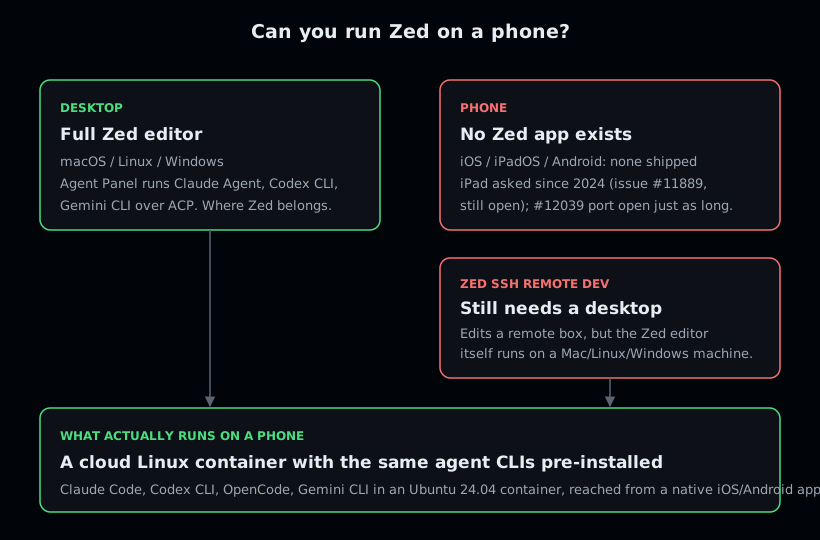
You cannot run Zed editor on a phone, because Zed ships desktop builds only: macOS, Linux, and Windows. There is no iOS, iPadOS, or Android app, and the SSH remote-development feature still runs the editor on a desktop machine. What you can do is run the same thing Zed gives you at a desk, the agent CLIs it drives over ACP, on a phone: open a cloud Ubuntu container from Cosyra for iOS or Cosyra for Android and run Claude Code, Codex CLI, OpenCode, or Gemini CLI, pre-installed. 1 hour free on signup, no credit card.
This guide was written by the Cosyra team. We cross-checked every claim about Zed against the official Zed site, the external-agents docs, and the zed-industries/zed repo, all verified 2026-07-09. Where Zed is genuinely ahead of us, we say so.
The distinction that matters: "Zed on a phone" and "Zed's agent loop on a phone" are not the same request. The first does not exist and is not on a public roadmap. The second is just the same agent CLIs in a real Linux shell, reached from a native app. We built the second. If you came here because you love Zed at your desk and want its agents in your pocket, the honest answer is that the editor is desktop-only, and the useful answer is below.
What is Zed?
Zed is a GPU-rendered, Rust-built desktop code editor from the team behind Atom and Tree-sitter, focused on speed, multiplayer collaboration, and AI. Its Agent Panel runs longer multi-step AI tasks, and Zed 1.0 (shipped 2026-04-29) added parallel agents, multiple agents working in one window. The repo sits at roughly 86,700 GitHub stars as of 2026-07-09, and the editor is one of the fastest you can put in front of a developer. The headline on the homepage is, verbatim, "Your last next editor."
The part that pulls people toward "Zed on phone" searches is the agents. Zed's Agent Panel does not ship its own model; it runs external agent CLIs in the background and talks to them over the Agent Client Protocol (ACP). Zed's own docs put it plainly: "Under the hood we run Gemini CLI in the background, and talk to it over ACP." The supported external agents are Claude Agent, Gemini CLI (the reference ACP implementation), Codex CLI, and GitHub Copilot. Three of those, Claude Code, Codex CLI, and Gemini CLI, are exactly the agents we pre-install in a Cosyra container. The gap is not the agents; it is the surface. Zed runs them at the desk and nowhere else.
The opinion we hold that a Zed loyalist will push back on: for mobile coding, the editor window is the wrong unit to obsess over. Zed's polish lives in the GPU-rendered multibuffer, the LSP integration, the parallel-agent panel, all of which assume a real keyboard and a desk. On a phone you are not getting that window anyway, so the question that matters is not "which editor" but "where do the agents run." Zed fans who think the editor chrome is the point will disagree. We think, on a phone, the agent's location is the whole game, and a hosted Linux box you reach from a native app beats an editor with no mobile build at all.
Why is there no Zed on a phone?
There is no Zed on a phone because Zed has never shipped a mobile build, and the requests for one have not turned into a roadmap. The homepage lists macOS, Linux, and Windows only. Two long-running GitHub issues tell the rest of the story:
- iPad, requested since 2024. Issue #11889 "iOS support for iPad" was opened on 2024-05-16 and is still open with 39 comments as of 2026-07-09. Two years of demand, no shipped build.
- A general iOS/Android port, open just as long. Issue #12039 "IOS/Android Port" was opened on 2024-05-19 and is still open with 35 comments as of 2026-07-09, with no roadmap commitment.
Zed does have SSH remote development, so it is fair to ask whether that counts as "Zed away from your machine." It does not solve the phone problem: remote dev lets the desktop Zed editor open and edit files on a server you own, but the editor itself is still a native app running on a Mac, Linux, or Windows machine. There is no client you type into on iOS, iPadOS, or Android. One more trap worth naming: posts about "building iOS apps in Zed" are about developing iOS apps on a Mac, not running Zed on an iPhone. Those are different things.
How do you run Zed's agents on iPhone or Android?
You run Zed's agents on iPhone or Android by putting the shell in the cloud and reaching it from a native app. With Cosyra that takes about four minutes: install the app, open the container, pick an agent CLI, add your API key, and start a session. The agent CLIs we pre-install are the part that gives you Zed's "agent in my workspace" loop without any setup.
Step 1: Install Cosyra and open a container
Download from the App Store or Google Play and sign in with Apple, Google, or email. On first launch we provision a fresh Ubuntu 24.04 x86_64 container with Node.js, Python, Git, and tmux already on it.
Welcome to Cosyra.
Ubuntu 24.04.1 LTS (x86_64)
Pre-installed: claude, codex, opencode, gemini
A real shell. The desktop Zed's mobile build never shipped.
Step 2: Pick the agent CLI you want to drive
Zed runs Claude Agent, Codex CLI, and Gemini CLI over ACP at the desk. We pre-install those same three plus OpenCode, so you do not have to assemble that yourself. Run whichever matches the model you pay for.
$ claude --version # Anthropic Claude Code
$ codex --version # OpenAI Codex CLI
$ opencode --version # open-source agent
$ gemini --version # Google Gemini CLI
Step 3: Add your provider API key (BYOK)
The agents are bring-your-own-key, the same arrangement Zed uses for its external agents, so you export the key for whichever model you use and write it into your shell config once. It persists in the container's home volume across sessions and across your phone, tablet, and the web. We do not proxy or meter model billing; you pay your provider.
$ echo 'export ANTHROPIC_API_KEY="your-key-here"' >> ~/.bashrc
$ source ~/.bashrc
# OpenAI, Gemini, or other providers work the same way
Step 4: Clone a repo and start a session
Clone your repository, cd into it, and start the agent. You describe
the change, it edits files and runs commands in the same shell. This is the Agent-Panel
loop, running on a phone.
$ git clone https://github.com/your-org/your-project.git && cd your-project
$ claude
> Add a --dry-run flag to the deploy script and update the README
Edited scripts/deploy.sh and README.md. Run the script to confirm.
Step 5: Keep it running with tmux
Wrap long sessions in tmux so a dropped signal or a locked phone
does not kill the agent mid-task. The session keeps running on the container;
you re-attach when you come back.
$ tmux new -s zed
# ...phone locks on the train, signal drops...
$ tmux attach -t zed
# right back in the session, agent still working
Try it free. 1 hour on signup, no credit card. Extend with a 10-hour, 7-day trial when you want more. Claude Code, Codex CLI, OpenCode, and Gemini CLI come pre-installed, so the agent part is ready the moment the container boots. App Store / Google Play / Pricing details
What does this actually feel like on a phone?
The honest pitch is an agent session you can start anywhere and a real shell underneath it. Three places we run it.
A fix on the train, committed before your stop
You noticed a bug on the way out. On the train, open Cosyra, cd
into the repo, run claude, and describe the fix. It edits the
file and you commit it. By the time you are off the train, the change is a
reviewable commit on the branch instead of a note you have to act on at the
desk where Zed lives.
A refactor from the couch with the agent doing the typing
Saturday morning, phone in hand. Point an agent at a module: "split this file into a parser and a formatter, keep the public API the same." The agent runs the edits and the tests in the same shell, and you review the diff on the phone before keeping it. The small on-screen keyboard barely matters because you are describing intent, not typing every line. This is the part of Zed's Agent Panel that survives the move to a phone.
Checking a long task from the waiting room
You kicked off a build or a long agent run before leaving. From a waiting room, attach to the tmux session and watch it finish, or steer it if it went sideways. The container kept running while your phone was in your pocket. For the cross-agent picture, see the AI coding agents on mobile pillar.
What are the real limits here?
This setup is not Zed, and it is not trying to be. Knowing where it stops helps you match it to the right job.
- You don't get Zed's editor. The GPU-rendered multibuffer, the LSP integration, the parallel-agent panel, none of that is here. At a desk, Zed's editor is genuinely one of the best, and we would use it there ourselves.
- No offline mode. The container lives in the cloud, so no internet means no terminal. Zed runs locally and keeps working on a plane; this does not. We lay out the full desk-vs-phone trade-off in Cosyra vs Zed, the iPad version of this setup in Zed on iPad, and the broader local-vs-cloud one in Cosyra vs Termux.
- Not open source. Zed's client is open source under GPL-3.0 plus Apache-2.0 and you can audit or self-build it. Cosyra is a managed SaaS on Azure; if an auditable client matters to you, that is a point for Zed.
- You pay your provider. The agent CLIs are BYOK, so model tokens are billed by Anthropic, OpenAI, or Google directly, the same as Zed's external agents. Our subscription covers the machine, not the model.
Who should pick which?
Choose Zed if you are at a desk and want one of the fastest native editors with parallel agent panels, you value open source and the ability to inspect or self-build the client, or you want the agent CLIs inside a full editor UI. Zed is the better tool for the laptop, and we will not pretend otherwise.
Choose Cosyra if you want to actually run those same agent CLIs from your phone on the train, the couch, or a waiting room, you want Claude Code, Codex CLI, OpenCode, and Gemini CLI sitting in one container with no install step, or you want a persistent Linux box that follows you across iPhone, Android, and web. Many people run both: Zed at the desk, Cosyra when the laptop is closed.
Try Zed first if your work happens almost entirely at a desk, you want a polished local editor more than a remote shell, or you specifically want an open-source client you can audit. For the open-source agent angle on the Cosyra side, see OpenCode on phone, and for the agent Zed lists first, Claude Code on phone. Zed runs Gemini CLI as its reference ACP implementation; to run that one on a phone, see Gemini CLI on phone. Three other desktop-only agentic tools land in the same spot and resolve the same way, by running the agent CLIs in a cloud container: Warp on a phone, Windsurf on a phone, and Kiro on a phone. Kiro (AWS) is built on the same Anthropic Claude Agent SDK as Claude Code, so the agent you run in the container shares that lineage even though the Kiro IDE itself is desktop-only. If you are weighing the broader question of what coding agents on a phone even look like, start with the AI coding agents on mobile pillar.
Frequently asked questions
Can you run Zed editor on a phone?
No. Zed ships desktop builds only, macOS, Linux, and Windows, and there is no iOS, iPadOS, or Android app. Its SSH remote-development feature still runs the editor itself on a desktop machine. To run the agent CLIs Zed drives at the desk, Claude Agent, Codex CLI, and Gemini CLI, on a phone, you run them on a real Linux box and reach it from a mobile app, which is what a cloud container does.
[source: zed.dev, macOS, Linux, Windows only, no mobile build]
Does Zed have an Android app?
No. A combined iOS/Android port has been requested since May 2024 in issue #12039 on the zed-industries/zed repo, which is still open with 35 comments as of 2026-07-09. There is no Android build to install, two years after the request was filed.
[source: GitHub, zed-industries/zed issue #12039, IOS/Android Port, open since 2024-05-19]
Is there a Zed app for iPhone or iPad?
No. iPad support has been an open issue (#11889 "iOS support for iPad") since May 2024, still open with 39 comments as of 2026-07-09, with no roadmap commitment. Zed's homepage lists macOS, Linux, and Windows only. There is no iOS or iPadOS build.
[source: GitHub, zed-industries/zed issue #11889, iOS support for iPad, open since 2024-05-16]
Does Zed run AI coding agents, and can I get that on mobile?
Yes, Zed is one of the better agent hosts: its Agent Panel runs Claude Agent, Codex CLI, Gemini CLI, and GitHub Copilot in the background over the Agent Client Protocol (ACP), and Zed 1.0 added parallel agents in one window. But it does that on the desktop only. To get the same agent CLIs on a phone, run them in a cloud Linux container reached from a native app.
[source: zed.dev/docs/ai/external-agents, Claude Agent, Gemini CLI, Codex CLI, Copilot over ACP]
Is Zed free, and is it open source?
Zed's editor is free to use, and the client is open source, dual-licensed under GPL-3.0 (LICENSE-GPL) and Apache-2.0 (LICENSE-APACHE); GitHub reports the license as NOASSERTION because of the dual layout. Paid tiers meter Zed-hosted AI tokens: Pro is $10/mo and Business is $30/seat, but bringing your own API keys or external agents is unlimited on the free Personal tier.
[source: zed.dev/pricing, Personal $0, Pro $10, Business $30/seat]
How do I use Zed's agents from my phone, then?
You cannot run Zed's client on a phone, so you run the same agent CLIs instead: open a cloud Ubuntu container from a native app and drive Claude Code, Codex CLI, OpenCode, or Gemini CLI from it. Three of those are the exact agents Zed runs over ACP at the desk, so the agent loop is the same, on a surface that actually exists on a phone.
[source: GitHub, zed-industries/zed, desktop editor, ACP agent host]
tl;dr
Zed is one of the fastest desktop editors, open source under GPL-3.0 plus Apache-2.0, and since Zed 1.0 (2026-04-29) it runs Claude Agent, Codex CLI, and Gemini CLI over ACP. But it has no mobile app: Mac, Linux, and Windows only, with iPad (#11889) and iOS/Android (#12039) open and unshipped since 2024. Use Zed if you live at a desk. Use Cosyra if you want those same agent CLIs on a phone: install the app, open the container, run Claude Code, Codex CLI, OpenCode, or Gemini CLI, and bring your own provider key. Many people run both.
App Store / Google Play. Sign up for 1 hour free, no credit card. Extend with a 10-hour, 7-day trial when you want more.
Run an agent CLI from your phone. Install Cosyra, open the container, run an agent CLI, start coding.