Zed on an iPad does not exist. There is no native iPadOS app, no iOS app, and, unlike VS Code with its vscode.dev in Safari, no browser version to fall back on. Zed is a GPU-accelerated desktop editor written in Rust; it runs on macOS, Linux, and Windows and nowhere else. So if you searched "zed on iPad" hoping to open your favorite editor on the tablet, the honest answer is that you can't, and no setting changes that. What you can do is run the same agent CLIs Zed drives (Claude Code, Codex CLI, Gemini CLI) from the iPad, in a cloud Linux container with a real terminal. That is what we build at Cosyra.
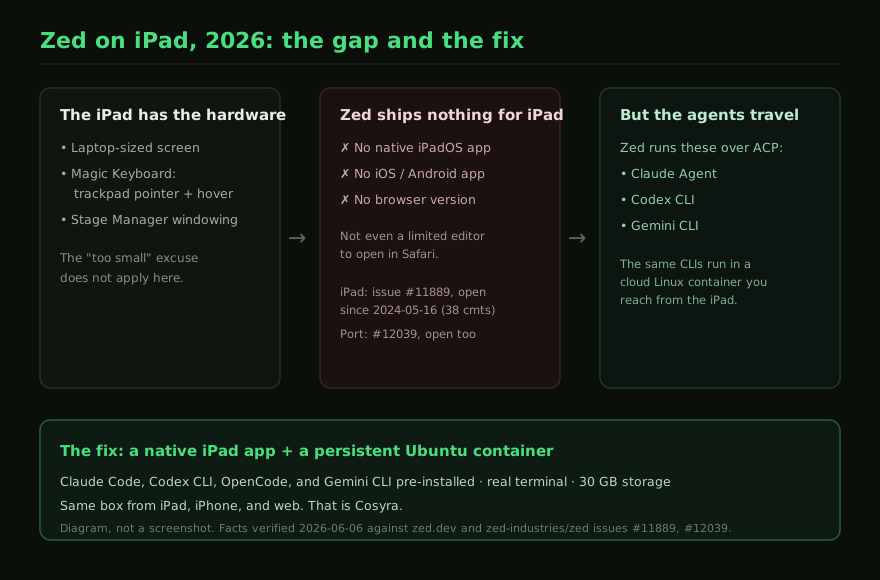
The iPad makes this sting more than the phone version does. We covered the phone case in Run Zed on your phone, where it is easy to assume the small screen is the blocker. On an iPad Pro with a Magic Keyboard, the screen is laptop-sized, the trackpad gives you a pointer and hover, and Stage Manager gives you windowing. The hardware is plainly good enough to host a serious editor. And Zed still has nothing to install. This guide quotes Zed's own download page and GitHub issue tracker directly so you are not taking our word for it, then shows the setup that gives you a terminal and those agents on the iPad anyway.
There is no Zed build for iPad, in any form
Start with the download page. Zed's official downloads are macOS, Linux, and Windows installers. There is no App Store listing, because there is no app to list. This is different from every browser-IDE we have written about: VS Code for the Web, Firebase Studio, and Coder all at least open in Safari with reduced features. Zed renders its UI with a custom GPU pipeline rather than HTML, so there is no web build to load in a tab. On an iPad you do not get a limited Zed; you get no Zed.
The request is not new and it is not hidden. Issue #11889, "iOS support for iPad," was opened on 2024-05-16 and is still open as of 2026-07-10, with 39 comments and the platform:general label but no milestone. The broader issue #12039, "IOS/Android Port," was opened on 2024-05-19 and is open just as long, with 35 comments. Two years of demand, no roadmap commitment. If you are choosing an iPad coding setup in 2026, the realistic read is that a native Zed for iPad may simply not arrive.
The iPad paradox: the hardware is ready, the editor is absent
Apple sells the iPad Pro as a laptop replacement, and for reading and editing it earns that. We opened a few browser editors on an iPad Pro with the Magic Keyboard, and the screen, the trackpad pointer, and the hardware keyboard all made them comfortable to use. The hardware is not the problem. The problem with Zed specifically is that there is no front end to put on that hardware in the first place: not a limited one, not a beta, not a web tab. Every other "X on iPad" question we have answered has at least a degraded path to discuss. Zed's path is a closed door.
We will say the opinionated part plainly, because it is what a "zed on iPad" search is really chasing: the thing that made Zed worth wanting on an iPad is not the editor chrome, it is what the editor now does. Since Zed 1.0 (shipped 2026-04-29), Zed's headline feature is running AI coding agents, multiple in parallel, in one window. People who want "Zed on iPad" in 2026 mostly want those agents on the iPad. The editor UI is the part that cannot travel; the agents are the part that can. Once you separate the two, the iPad problem gets a clean answer.
What Zed actually runs, and why it travels
Here is the detail that turns a dead end into a workflow. Zed does not bundle its own coding model. Its Agent Panel runs external agent CLIs as background processes and talks to them over the Agent Client Protocol (ACP). Zed's own docs put it bluntly: "Under the hood we run Gemini CLI in the background, and talk to it over ACP." The supported external agents are Claude Agent, Gemini CLI (the reference ACP implementation), Codex CLI, and GitHub Copilot.
Look at that list against what we pre-install in Cosyra: Claude Code, Codex CLI, OpenCode, and Gemini CLI. Three of the four agents Zed runs at the desk are the same CLIs we put in every container. Zed's value here is being a good host for those agents inside a fast desktop editor; it is not a proprietary agent you would lose by leaving Zed. So the question "how do I get Zed's agents on an iPad" has a literal answer: run the exact same CLIs, in a place that does have an iPad client.
The short version. You cannot run Zed on an iPad. You can run Claude Code, Codex CLI, and Gemini CLI (the agents Zed runs over ACP) on an iPad, in a Cosyra container, with a real terminal. Sign up, 1 hour free, no credit card. Extend with a 10-hour, 7-day trial when you want more. App Store / Google Play / Pricing details
Why "Zed remote development" does not rescue the iPad
A reasonable next thought is Zed's remote development: if Zed can edit code on a remote server, can the iPad be the thing connecting to it? No, and the reason is worth being precise about. Zed's remote development connects the Zed desktop editor to a server you own. The editor still runs locally, on a Mac, Linux, or Windows machine, and the server is just where your files and compute live. The client is the desktop app. Since that desktop app does not exist for iPad, remote development changes where your project sits, not which devices can open it. It is a feature for people who already have a desktop Zed; it does nothing for an iPad-only setup.
This is the same wall, from a different angle, that Zed's open-source nature cannot get you past either. Zed's client is open source under GPL-3.0 plus Apache-2.0 (the repo is dual-licensed; GitHub reports NOASSERTION), which is a genuine trust advantage over a closed SaaS. But an open-source desktop client you cannot build for iPadOS is still a desktop client. The license is great; it is not a mobile port.
How to run Zed's agents from an iPad
The pattern that works is the one Zed has no iPad version of: a native app talking to a persistent cloud Linux environment, so the agents have a computer behind them and the iPad is a good client to it. With the big screen and Magic Keyboard, the iPad is a very good client. You get a persistent Ubuntu 24.04 container on Azure AKS with Claude Code, Codex CLI, OpenCode, and Gemini CLI already installed, 30 GB of storage, and hibernation that resumes where you left off. The same container is reachable from iPad, iPhone, and the web, so we start a task on the iPad on the couch and pick it up on a laptop later without re-cloning anything. Here is the three-minute setup.
Step 1: Install Cosyra
Install Cosyra from the App Store (it runs on iPad and iPhone) or on Android from Google Play. Sign in with Apple, Google, or email, and the app provisions a fresh Ubuntu container on first launch. This is a native app, so it gets the full iPad keyboard and pointer, the hardware Zed has no way to use.
Step 2: Add your model API key
Cosyra is bring-your-own-key, the same BYOK arrangement Zed uses for its external agents, where billing is directly between you and the model provider. So you pay Anthropic, OpenAI, or Google directly rather than through us. In the terminal:
$ # Persists across sessions and device switches
$ echo 'export ANTHROPIC_API_KEY="sk-ant-your-key-here"' >> ~/.bashrc
$ source ~/.bashrc
$ claude --version
Claude Code (latest)
Step 3: Run the same agents Zed runs
This is the step Zed cannot do on an iPad, because there is no Zed on an iPad. Drive the same agent CLIs that Zed's Agent Panel runs over ACP, on the iPad's big screen:
$ git clone https://github.com/your-org/your-project.git
Cloning into 'your-project'...
$ cd your-project && npm install
added 412 packages in 6s
$ claude
Type your prompt, or type "/" for commands.
> Add a health-check endpoint and a test, then run the suite.
$ # or: codex # or: gemini
Try it on your iPad. Sign up, 1 hour free, no credit card. Extend with a 10-hour, 7-day trial when you want more. App Store / Google Play / Pricing details
How the iPad options compare for a Zed user
Lined up against what matters when the device on your lap is an iPad and you came from Zed (a real terminal, a native app, and whether you can run those same agents), the surfaces sort out clearly. The table covers the realistic paths as of 2026-07-10.
| Feature | Zed (desktop) | Zed on iPad | Cosyra (native iPad app) |
|---|---|---|---|
| Runs on an iPad at all | N/A (desktop only) | No (no build of any kind) | Yes (native app) |
| Browser fallback | N/A | No (no web version) | Web view + native app |
| Real terminal | Yes | No | Yes |
| Claude / Codex / Gemini agents | Yes (over ACP) | No | Yes (4 CLIs pre-installed) |
| Parallel agents in one window | Yes (Zed 1.0) | No | No (shell sessions, not a panel) |
| Open-source client | Yes (GPL-3.0 + Apache-2.0) | N/A | No (closed SaaS) |
| Persistent environment | Your local machine | None | Ubuntu 24.04, 30 GB |
| Cost | Editor free, AI metered | N/A | 1 hr free, then $29.99/mo |
Zed is one entry in a wider comparison. If you want every editor and agent measured against the iPad's limits in one place, our coding on iPad guide has the full rundown.
Where Zed wins (and an iPad can't change that)
A fair page names what the other tool does better, so here it is with no hedging. When you are at a desk, Zed beats a phone or tablet session on these, and if that describes your day you should use Zed there:
- Desktop editing UX. A GPU-rendered native editor with multibuffer, LSP, and parallel agent panels is a better place to edit than a shell-plus-editor in a tablet session. At a desk, use Zed.
- Parallel agents in one window. Zed 1.0's purpose-built feature runs several agents side by side in a dedicated UI. We run agents in shell sessions, not a parallel-agent panel.
- Open-source and auditable. Zed's client is GPL-3.0 + Apache-2.0; you can read it and build it yourself. Cosyra is closed-source SaaS on Azure.
- Free editor and local-first. Zed's editor costs nothing and runs offline on your machine; only Zed-hosted models are metered. Cosyra's compute past the free trial is a $29.99/mo subscription and needs a network connection.
Who should pick which?
Here is the decision framework we would give a friend. These are different shapes: a desktop editor versus a hosted machine with an iPad app, so the honest split is about where you are, not which is "better."
- Use Zed if you are at a desk on a Mac, Linux, or Windows machine and you want one of the fastest native editors with a parallel-agent panel, open-source auditability, and a free editor with BYOK agents. That is Zed at its best, and an iPad is not part of it.
- Use Cosyra if the device on your lap is an iPad and you want the same agents Zed runs (Claude Code, Codex, Gemini CLI) in a real terminal, with a native app and a persistent container that follows you across devices.
- Do both, honestly. Plenty of people run Zed at the desk and reach for the iPad on the couch or the train. The agents are the same CLIs in both places, so your habits carry over; only the surface changes.
Frequently asked questions
Is there a Zed app for iPad?
No. Zed ships installers for macOS, Linux, and Windows only. There is no native iPadOS build and no browser version, so there is nothing to open on an iPad at all. An iPad port has been requested in issue #11889 ("iOS support for iPad"), opened on 2024-05-16 and still open with 39 comments as of 2026-07-10, with no roadmap commitment two years on.
[source: zed-industries/zed issue #11889, "iOS support for iPad"]
Can you run Zed on an iPad in the browser?
No. Unlike VS Code, which at least runs as vscode.dev in Safari, Zed has no web version. Zed is a native, GPU-accelerated desktop editor written in Rust; it renders with its own GPU pipeline, not in a browser, so there is no Safari fallback on an iPad. The download page lists macOS, Linux, and Windows and nothing else.
[source: zed.dev/download, official platforms]
Does Zed have an iOS or Android app?
No. A general mobile port is tracked in issue #12039 ("IOS/Android Port"), opened on 2024-05-19 and still open with 35 comments as of 2026-07-10. There is no iOS app, no iPadOS app, and no Android app. Zed runs only on desktop operating systems.
[source: zed-industries/zed issue #12039, "IOS/Android Port"]
Can Zed's remote development let me use it from an iPad?
Not on its own. Zed's remote development connects the Zed desktop editor to a remote server you own, but the client is still the Zed desktop app, which does not run on an iPad. Remote dev moves where your code lives, not which devices can open the editor. To work from an iPad you need a client that actually runs there.
[source: zed.dev/download, desktop-only clients]
What AI agents does Zed run, and can I get them on an iPad?
Zed's Agent Panel runs external agent CLIs as background processes over the Agent Client Protocol (ACP): Claude Agent, Gemini CLI (the reference ACP implementation), Codex CLI, and GitHub Copilot. Three of those, Claude Code, Codex CLI, and Gemini CLI, are exactly the agents we pre-install in Cosyra. You cannot run Zed on an iPad, but you can run those same CLIs there in a cloud Linux container.
[source: Zed docs, external agents over ACP]
Will Zed ever support iPad?
There is no public commitment. The iPad request (#11889) has been open since 2024-05-16 with the platform:general label and no milestone, and the broader iOS/Android port (#12039) has been open just as long. After two years with no roadmap entry, planning your iPad coding setup around a future native Zed build is a bet we would not make.
[source: zed-industries/zed issue #11889, still open, no milestone]
tl;dr
There is no Zed on iPad: no native iPadOS app, no iOS or Android app, and no browser version, so unlike VS Code there is not even a limited editor to open in Safari. The iPad request (#11889) has sat open since 2024-05-16. But Zed's modern value is running agent CLIs (Claude Agent, Codex, Gemini CLI) over ACP, and those same CLIs run fine in a cloud Linux container you can reach from an iPad. Use Zed at the desk; to get its agents on an iPad with a real terminal, use a native app on a persistent Ubuntu box. That is Cosyra, with four AI CLIs pre-installed.
App Store / Google Play. Sign up, 1 hour free, no credit card. Extend with a 10-hour, 7-day trial when you want more. See pricing.
For the wider picture, our guide to AI coding agents on mobile maps every agent across phone and tablet. If you came from Zed specifically, see Run Zed on your phone for the iPhone and Android angle and Cosyra vs Zed for the full head-to-head. For other desktop-only editors that hit the same wall on a tablet, our VS Code on iPad, Claude Code on iPad, and Kiro on iPad guides cover the rest. Kiro, AWS's agentic IDE, hits the wall the same way Zed does: a desktop-only editor with no iPad build at all.
Get a real terminal on your iPad in 3 minutes. Install Cosyra, add your API key, run the same agents Zed runs (Claude Code, Codex, Gemini) in a persistent Ubuntu container.