You cannot run Kiro on iPad today. Kiro (AWS) ships the Kiro IDE for macOS, Windows, and Linux; Kiro Web, a browser dashboard for delegating autonomous agent tasks; and a CLI bound to a Kiro account. There is no iPadOS build to install. AWS has since announced a native iOS app, but as of 2026-07-22 it is a TestFlight waitlist with no ship date, and the signup page names iPhone and iOS, not iPad. What you can do on the iPad right now is run the same kind of thing Kiro gives you at a desk, a Claude-powered coding agent: open a cloud Ubuntu container from Cosyra for iPad and run Claude Code, Codex CLI, OpenCode, or Gemini CLI, pre-installed. 1 hour free on signup, no credit card.
This guide was written by the Cosyra team. We cross-checked every claim about Kiro against the official Kiro site, the Kiro pricing page, the Kiro downloads page, the Kiro mobile waitlist page, the Kiro Web page, and the kirodotdev/Kiro repo, re-verified 2026-07-22. Where Kiro is genuinely ahead of us, we say so.
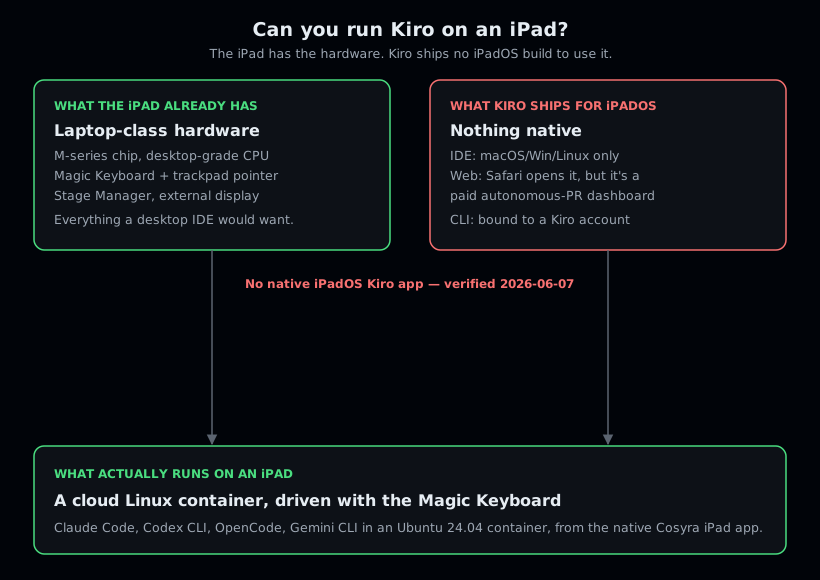
The iPad makes this gap sharper, not softer. A phone is easy to write off as too small for "real" coding. An iPad with a Magic Keyboard is not: M-series silicon, a trackpad, Stage Manager, an external display. It is the device where developers most reasonably expect a desktop IDE to just run. Kiro still ships nothing you can install on it, and the iOS app AWS is now taking waitlist signups for is pitched at the iPhone. So the honest answer is that the iPad has the hardware and Kiro has no iPadOS build to use it, and the useful answer, a real Linux shell reached from a native iPad app, is below.
What is Kiro, and why do people search for it on iPad?
Kiro is AWS's agentic IDE, built on Anthropic's Claude Agent SDK and defaulting to Claude Sonnet 4.5. The homepage headline, verbatim as of 2026-06-07, is "Bring engineering rigor to agentic development." Its signature is spec-driven development: you turn intent into specs, steering files, agent hooks, and "powers," and the agent validates correctness across a large codebase rather than free-typing edits. The editor is based on Code OSS, in AWS's own wording, not a direct VS Code fork, and it stays compatible with VS Code settings, themes, and Open VSX plugins.
The reason "kiro on ipad" is a search at all is the iPad's hardware. An iPad Pro with a Magic Keyboard is closer to a laptop than a phone: an M-series chip, a real trackpad with a pointer, Stage Manager for windows, and an external display. Someone who runs Kiro at a desk looks at that and assumes the desktop editor should just run on iPadOS. It does not, because AWS publishes no iPadOS build, and the gap is not the agent, it is the surface.
The opinion we hold that a Kiro fan will push back on: the iPad is the wrong place to chase Kiro's spec-driven editor, and the right place to run the agent directly. Kiro's polish lives in specs, steering, and the structured intent layer, all of which assume a desktop window manager and the patience to author specs. On an iPad you want to open a repo, describe a change, and review a diff with the Magic Keyboard in your lap on the couch. Kiro fans who think the spec scaffolding is the point will disagree. We think, on an iPad, the agent's location is the whole game, and a hosted Linux box you reach from a native app beats a desktop IDE with no iPadOS build at all.
Why is there no Kiro on iPad?
There is no Kiro on iPad because none of Kiro's shipping surfaces runs on iPadOS, and the one mobile surface AWS has announced is not out yet. It helps to name each surface, because "Kiro" means several different things and only by separating them does the iPad answer become clear:
- Kiro IDE, desktop only. The editor downloads for macOS, Windows, and Linux from kiro.dev. There is no iPadOS build. This is the surface "kiro on ipad" searches are actually about, and it does not run on an iPad, M-series chip or not.
- Kiro Web, a browser dashboard, not an iPad editor. Kiro Web opens in Safari, so it technically loads on an iPad, but it lets you delegate work to an autonomous agent that "owns the outcome" and hands you back a pull request, not a status update. As of 2026-07-22 it is labelled a preview and gated to the Pro, Pro+, Pro Max, and Power tiers. It is a delegate-and-review machine, not an interactive editor you code in, and a Magic Keyboard does not change what the product is.
- Kiro CLI, bound to a Kiro account. Kiro ships a CLI you install with a shell one-liner. "A CLI" sounds like "could run anywhere," but it is a Kiro-account-bound tool, not a generic agent you drop into your own Linux container. It does not turn an iPad into a Kiro workstation.
- Kiro for iOS, announced but not shipped. This changed since we first published. The downloads page now carries a Mobile entry, and it is a "Request early access" button rather than a download. The waitlist page pitches "Your Kiro coding sessions, native on iOS" and says AWS will "invite a limited number of people to try the app via Apple's TestFlight." As of 2026-07-22 there is no ship date, no public build, and the page names iOS and iPhone but not iPadOS, iPad, or Android. It also states the app will require a paid Kiro Pro, Pro+, Pro Max, or Power account. Worth knowing about; not something you can install on an iPad this afternoon.
One more trap worth naming: community-built, unofficial front-ends for the Kiro agent exist, which proves the demand is real. They are not an official AWS app, there is no iPadOS one we would endorse, and we would not route your code through a third-party front-end. The honest state of things as of 2026-07-22 is that AWS has announced an iOS client and shipped none, so the demand is still being met by other people's side projects.
How do you run a Kiro-style agent on an iPad?
You run a Kiro-style Claude agent on an iPad by putting the shell in the cloud and reaching it from the native app. With Cosyra that takes about four minutes: install the app, open the container, start Claude Code, add your API key, and start a session. The agent CLIs we pre-install are the part that gives you Kiro's "Claude agent in my workspace" loop without any setup, and the iPad's screen and keyboard make driving it feel close to a laptop.
Step 1: Install Cosyra on your iPad and open a container
Install from the App Store and sign in with Apple, Google, or email. On first launch we provision a fresh Ubuntu 24.04 x86_64 container with Node.js, Python, Git, and tmux already on it. The same container is reachable from your iPhone and the web too, so the iPad is one window onto a box that follows you.
Welcome to Cosyra.
Ubuntu 24.04.1 LTS (x86_64)
Pre-installed: claude, codex, opencode, gemini
A real shell, the Kiro iPadOS build that never shipped.
Step 2: Start Claude Code, the same agent lineage as Kiro
Kiro is built on Anthropic's Claude Agent SDK and defaults to Claude Sonnet
4.5. We pre-install Claude Code, the Anthropic agent CLI, plus Codex CLI,
OpenCode, and Gemini CLI, so you do not have to assemble that yourself. Run
whichever matches the model you pay for; claude is the closest match
to what Kiro runs.
$ claude --version # Anthropic Claude Code
$ codex --version # OpenAI Codex CLI
$ opencode --version # open-source agent
$ gemini --version # Google Gemini CLI
Step 3: Add your provider API key (BYOK)
Claude Code is bring-your-own-key, so you export your Anthropic key and write it into your shell config once. It persists in the container's home volume across sessions and across your iPad, iPhone, and the web. We do not proxy or meter model billing; you pay Anthropic directly, with none of Kiro's per-credit accounting or overage math.
$ echo 'export ANTHROPIC_API_KEY="your-key-here"' >> ~/.bashrc
$ source ~/.bashrc
# OpenAI, Gemini, or other providers work the same way
Step 4: Clone a repo and start a session
Clone your repository, cd into it, and start the agent. You describe
the change, it edits files and runs commands in the same shell. On the iPad you
read the diff on a screen big enough to actually scan it, and scroll with the
Magic Keyboard's trackpad. This is the Claude agent loop Kiro runs at the desk,
running on an iPad.
$ git clone https://github.com/your-org/your-project.git && cd your-project
$ claude
> Add a --dry-run flag to the deploy script and update the README
Edited scripts/deploy.sh and README.md. Run the script to confirm.
Step 5: Keep it running with tmux
Wrap long sessions in tmux so a dropped signal or a backgrounded
app does not kill the agent mid-task. iPadOS suspends background apps quickly,
so this matters more on an iPad than on a laptop. The session keeps running on
the container; you re-attach when you come back.
$ tmux new -s kiro
# ...you switch to Safari, iPadOS suspends the app...
$ tmux attach -t kiro
# right back in the session, agent still working
Try it free. 1 hour on signup, no credit card. Extend with a 10-hour, 7-day trial when you want more. Claude Code, Codex CLI, OpenCode, and Gemini CLI come pre-installed, so the Claude agent part is ready the moment the container boots. App Store / Google Play / Pricing details
What does this actually feel like on an iPad?
The honest pitch is a Claude agent session you can start anywhere and a real shell underneath it, on a screen big enough to read a diff. Three places we run it on an iPad.
A refactor from the couch with the Magic Keyboard in your lap
Saturday morning, iPad propped on the Magic Keyboard. Point Claude Code at a module: "split this file into a parser and a formatter, keep the public API the same." The agent runs the edits and the tests in the same shell, and you review the diff on a thirteen-inch screen instead of squinting at a phone. This is the part of Kiro's Claude workflow that survives the move to an iPad, and the bigger screen is where the iPad genuinely beats the phone.
A fix on a flight tray table, no Wi-Fi excuses needed once you land
You noticed a bug before boarding. On the tray table with the keyboard
folded out, open Cosyra, cd into the repo, run
claude, and describe the fix once you have connectivity. It
edits the file and you commit it. The container is the same one you left on
your desk, so the change lands on the branch, not in a notes app.
Checking a long task from the kitchen table
You kicked off a build or a long agent run before stepping away. From the kitchen table, pick up the iPad, attach to the tmux session, and watch it finish, or steer it if it went sideways. The container kept running while the app was suspended. For the cross-agent picture, see the AI coding agents on mobile pillar.
What are the real limits here?
This setup is not Kiro, and it is not trying to be. Knowing where it stops helps you match it to the right job.
- You don't get Kiro's spec-driven layer. Specs, steering, agent hooks, and "powers" are a genuinely differentiated way to manage intent across a large codebase, and none of that is here. At a desk, that structure is a real reason to use Kiro.
- No autonomous PR agent. Kiro Web takes a goal and hands back a pull request. Cosyra is an interactive terminal you drive, not a background agent that owns a task end to end. Those are different tools.
- No offline mode. The container lives in the cloud, so on a plane with no Wi-Fi the terminal is unreachable until you reconnect. We lay out the broader local-versus-cloud trade-off in Cosyra vs Termux.
- You pay your provider. Claude Code is BYOK, so model tokens are billed by Anthropic directly. Our subscription covers the machine, not the model, which is the opposite of Kiro's credit-metered model.
Who should pick which?
Choose Kiro if you live at a desk and want a spec-driven, Claude-powered IDE with structured intent, steering, and hooks, you want an autonomous agent that hands you back pull requests, or you are an AWS-native team that values IAM Identity Center SSO. A free tier with Claude Sonnet 4.5 makes it cheap to try, and we would reach for it at a desk too. For the full feature-by-feature breakdown, see Cosyra vs Kiro.
Choose Cosyra if you want to run a Claude agent from your iPad on the couch, a flight, or the kitchen table, you want Claude Code, Codex CLI, OpenCode, and Gemini CLI sitting in one container with no install step, or you want a persistent Linux box that follows you across iPad, iPhone, and web. Many people run both: Kiro at the desk, Cosyra when the iPad is the only screen open.
Try Kiro first if your work happens almost entirely at a desk, you want a spec-driven workflow more than a remote shell, or you want an autonomous agent that returns pull requests. Because Kiro is built on the same Anthropic lineage, the natural Cosyra starting point is Claude Code on iPad. If you landed here from a phone instead of a tablet, the same answer applies on the smaller screen: Kiro on a phone. Two other desktop-only agentic tools hit the same iPad wall and resolve the same way, by running the agent CLIs in a cloud container: Zed on an iPad and VS Code on an iPad. If you are weighing the broader question of what coding agents on a tablet even look like, start with the AI coding agents on mobile pillar, or our coding on iPad guide for the tablet-specific rundown.
Frequently asked questions
Is there a Kiro app for iPad?
No. As of 2026-07-22, Kiro ships as a desktop IDE (macOS, Windows, Linux), a browser dashboard called Kiro Web, and a CLI. There is no native iPadOS app on the App Store. AWS has announced a native iOS app, but it is a TestFlight waitlist with no ship date, and the signup page names iOS and iPhone rather than iPadOS or iPad. The iPad has the hardware a desktop IDE would want, an M-series chip, a Magic Keyboard with a trackpad, and Stage Manager, but Kiro ships nothing today that runs on iPadOS to use it. To get the kind of Claude-powered agent Kiro gives you, run that agent on a real Linux box and reach it from a native iPad app, which is what a cloud container does.
Can I just open Kiro Web in Safari on my iPad?
You can open Kiro Web in Safari, but it is not a coding environment you sit and type in. Kiro Web is a delegate-and-review autonomous agent: you assign it a goal and it hands back a pull request. As of 2026-07-22 it is labelled a preview and gated to the Pro, Pro+, Pro Max, and Power tiers. On an iPad it behaves like the autonomous-PR dashboard it is, not like a real editor or terminal, so a Magic Keyboard does not turn it into one. The limit is the product, not the input device.
[source: kiro.dev/web, autonomous agent returns a pull request, paid tiers only]
Does a Magic Keyboard make Kiro usable on an iPad?
It would help if there were a Kiro app to use it with, but there is not. The Magic Keyboard's trackpad adds a pointer and the iPad's M-series chip is laptop-class, so the hardware is genuinely capable of running a desktop-style workflow. The load-bearing problem is that Kiro publishes no iPadOS build at all. The keyboard removes the touch excuse; it does not conjure a Kiro app onto the iPad.
[source: kiro.dev, downloads page lists macOS, Windows, Linux only]
What is Kiro built on, and can I get that agent on an iPad?
Kiro is built on Anthropic's Claude Agent SDK and defaults to Claude Sonnet 4.5. That is the same Claude lineage as Claude Code, the agent CLI we pre-install in a Cosyra container. So the practical way to get a Kiro-style Claude agent on an iPad is to run Claude Code in a cloud Linux container reached from the native iPad app, with Codex CLI, OpenCode, and Gemini CLI alongside it.
[source: kiro.dev, built on Anthropic's Claude Agent SDK, Claude Sonnet 4.5 default]
Is Kiro open source, given the GitHub repo?
No. Kiro is closed-source. The github.com/kirodotdev/Kiro repository is an issues and feedback tracker, not the application source, and its README directs you to download from kiro.dev. The editor is based on Code OSS and is compatible with Open VSX plugins, but you cannot audit or self-build the Kiro product itself, and there is no community iPadOS build that AWS endorses.
[source: github.com/kirodotdev/Kiro, issues/feedback tracker, README points to kiro.dev download]
How much does Kiro cost compared with running the agent on an iPad with Cosyra?
As of 2026-07-22, Kiro is credit-metered: Free is $0/mo for 50 credits, Pro $20/mo for 1,000, Pro+ $40/mo for 2,000, Pro Max $100/mo for 5,000, and Power $200/mo for 10,000, with $0.04 per credit overage and no rollover. Pro Max is new since we first published. That price meters AI work on an editor you run on a desktop, which an iPad is not. Cosyra is $29.99/mo flat for the hosted machine and 30 GB of storage; you bring your own API key and pay Anthropic directly, so there is no per-prompt credit accounting. They buy different things.
tl;dr
Kiro is AWS's spec-driven, Claude-powered agentic IDE, built on Anthropic's Claude Agent SDK. It has no iPadOS app: what ships is a desktop IDE, a paid browser dashboard (Kiro Web), and an account-bound CLI, none of which runs on iPadOS as of 2026-07-22. A native iOS app is announced and waitlisted, not released, and it is pitched at the iPhone. The iPad has laptop-class hardware and Kiro ships nothing to use it. Use Kiro if you live at a desk. Use Cosyra if you want that same Claude agent on an iPad: install the app, open the container, run Claude Code, Codex CLI, OpenCode, or Gemini CLI, and bring your own provider key. Many people run both.
App Store / Google Play. Sign up for 1 hour free, no credit card. Extend with a 10-hour, 7-day trial when you want more.
Run a Claude agent from your iPad. Install Cosyra, open the container, run Claude Code, start coding.