Short answer. Cosyra vs Kiro is two different shapes, not a head-to-head. Kiro is AWS's agentic IDE: built on Anthropic's Claude Agent SDK, spec-driven, with a browser dashboard that hands you back pull requests. But the IDE runs on macOS, Linux, and Windows only, with no mobile app of any kind. Cosyra is a hosted Ubuntu container reached from native iOS and Android apps, with Claude Code, Codex CLI, OpenCode, and Gemini CLI pre-installed. If you are at a desk and want spec-driven development, use Kiro. If the device in your hand is a phone, we think Cosyra is the better fit.
We wrote this after running the same kind of Claude agent both ways: drive a spec-driven session in Kiro on a Mac at a desk, then drive the same Claude agent from a cloud container on an iPhone on a train. Both are good at what they do. Only one of them runs when there is no laptop in front of you, and the agent underneath, Anthropic's, is the same lineage on both.
Quick decision: pick the path that matches your situation:
- I want the feature-by-feature breakdown → 13-attribute comparison table for 2026
- I want to know where Kiro genuinely wins → five things Kiro does better, with sources
- I'm leaning toward Kiro. Am I right? → honest decision framework (with a "try Kiro first if…" subsection)
- I want that Claude agent on my phone today → two-minute Cosyra setup on iOS or Android
tl;dr
Use Kiro if you code at a desk and want spec-driven development, an autonomous agent that returns pull requests, a free tier with Claude Sonnet 4.5, or AWS-native team SSO. Use Cosyra if you want to run that same Claude agent from a phone, in a real terminal, already installed in a container that follows you across devices. Different tools for different places.
App Store · Google Play. 1 hour free on signup. Extend with a 10-hour, 7-day trial. No credit card.
This post was written by the Cosyra team. We compared Cosyra against Kiro based on hands-on testing of both, Kiro on macOS, Cosyra on iPhone and Android, plus first-hand reads of kiro.dev, kiro.dev/pricing, the Kiro GitHub feedback repository, and our internal Kiro factsheet. Kiro facts, pricing, and version numbers were re-verified first-hand on 2026-06-06.
Came here because you want Kiro on your phone and found there's no app? We ship a persistent Ubuntu 24.04 container with Claude Code, Codex CLI, OpenCode, and Gemini CLI pre-installed, reached from a native iOS or Android app. Two-minute setup.
App Store · Google Play · Pricing. Sign up. 1 hour free, no credit card. Extend with a 10-hour, 7-day trial when you want more.
How do Cosyra and Kiro compare feature by feature?
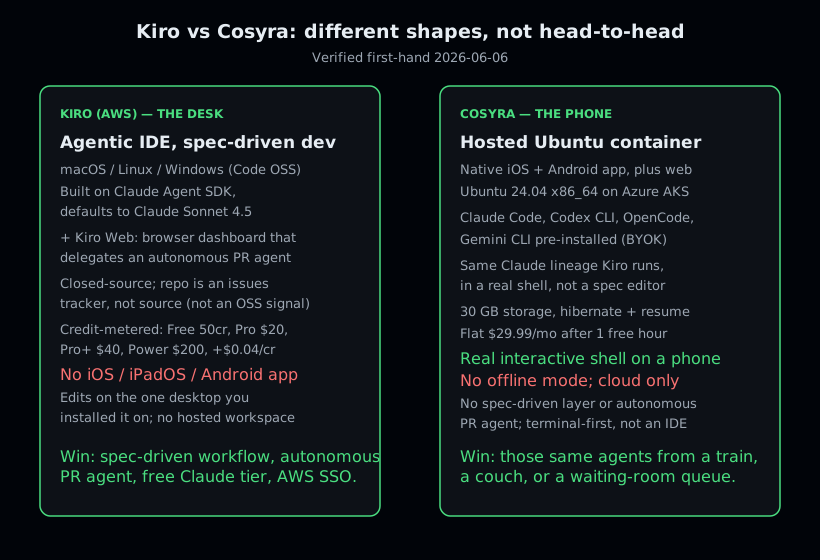
The core difference in Cosyra vs Kiro is the device and the shape. Kiro is a desktop agentic IDE plus a browser dashboard that delegates autonomous tasks; Cosyra is a hosted Linux container you reach from a phone. Kiro meters AI work in credits on an editor you run on your own machine; Cosyra charges a flat rate for the machine and storage, and you bring your own provider key. The table below lines them up on thirteen attributes as of 2026-06-06.
| Feature | Cosyra | Kiro |
|---|---|---|
| Pricing | $29.99 / month Pro, or $300 / year (flat) | Free $0; Pro $20, Pro+ $40, Pro Max $100, Power $200 / mo (credit-metered) |
| Free tier | 1 hour on signup + 10-hour, 7-day trial, no credit card | 50 credits/mo, incl. Claude Sonnet 4.5; no rollover |
| OS support | iOS, Android (native apps), plus web | macOS, Linux, Windows; no mobile app (iOS app announced, waitlist only) |
| AI agents pre-installed | Claude Code, Codex CLI, OpenCode, Gemini CLI in the container | Built-in agent on Claude Agent SDK (default Sonnet 4.5) |
| Persistent storage | 30 GB per user, hibernates and resumes in place | Your local disk; nothing hosted to persist between machines |
| Offline capability | No: the container is in the cloud, needs a network | Editor runs locally; agent calls and Kiro Web need a network |
| Container sandboxing | Per-user isolated Ubuntu 24.04 container on Azure AKS | None: runs directly on your host OS |
| Spec-driven workflow | No structured-spec layer; terminal-first | Yes: specs, steering, agent hooks, powers |
| File sync across devices | Same container from iPhone, Android, and web | Machine-bound; tied to whatever desktop it's installed on |
| Autonomous PR agent | No: interactive terminal, you drive each step | Yes: Kiro Web delegates a goal, returns a pull request |
| API key / billing model | BYOK: pay Anthropic / OpenAI / Google directly | Credits metered by Kiro; $0.04/credit overage, no rollover |
| Open-source status | Closed-source SaaS, orchestration proprietary | Closed-source; GitHub repo is an issues tracker, not source |
| Runs on a phone | Yes, that is the entire point | No; no iOS / iPadOS / Android build exists |
Want the phone-shaped version of Kiro's Claude agent? Native iOS and Android, Ubuntu 24.04, Claude Code already on the PATH, two-minute setup.
App Store · Google Play · Pricing. Sign up. 1 hour free, no credit card. Extend with a 10-hour, 7-day trial when you want more.
Which Kiro are we comparing? Name the surface first
Kiro is several distinct things, and conflating them is the fastest way to get a Cosyra vs Kiro comparison wrong. Before any feature claim, you have to say which surface you mean.
- Kiro IDE is the desktop editor, based on Code OSS, for macOS, Linux, and Windows. This is the surface relevant to anyone searching "kiro on phone" or "kiro on ipad," and it has no phone client.
- Kiro Web (app.kiro.dev) is a browser dashboard where you delegate a goal to an autonomous agent and get a pull request back. It is reachable in a browser, but it is a delegate-and-review machine, not an interactive terminal you'd drive from a phone, and it is gated to the paid tiers.
- Kiro CLI is a command-line tool bound to a Kiro account. A
CLI sounds like "could run anywhere," but it is account-bound tooling, not a
generic agent you drop into a Cosyra container. It is also where the older Amazon
Q Developer CLI landed: AWS's open-source
qcommand went maintenance-only in November 2025, and its own repo banner now names Kiro CLI as the closed-source successor (verified 2026-07-01). If you came here looking for theqcommand on a phone, we covered that path in running the Amazon Q CLI from your phone, and put it head-to-head with our own setup in Cosyra vs the Amazon Q Developer CLI.
For the rest of this post, "Kiro" means the desktop IDE unless we name Kiro Web or the CLI, because the IDE is the thing developers actually mean when they ask whether Kiro runs on a phone.
What actually happens when you try to use Kiro on a phone?
Nothing installs. We opened the App Store and the Play Store and searched for Kiro; there is no Kiro IDE app to download, because Kiro ships desktop installers for macOS, Windows, and Linux only. Kiro Web opens in a phone browser, but it is a dashboard for assigning autonomous tasks, not a place you sit and code; you describe a goal and wait for a pull request. So the real test is not "Kiro on a phone vs Cosyra on a phone"; only one of them is a coding environment on a phone.
The honest test is this: you want the thing Kiro gives you at a desk, a
Claude-powered agent editing files and running commands while you steer,
when you are away from your laptop. We did exactly that on an iPhone from a
train. We opened the Cosyra iOS app, dropped into a full-screen Ubuntu
shell, typed claude, pasted an Anthropic key, described a
refactor, approved the diff, and ran git commit && git push. The agent did the typing; our job was to prompt, review, and approve.
That loop is the part of Kiro people miss on mobile, and a cloud container
reproduces it because the agent underneath, Claude, is the very lineage Kiro
is built on.
The caveat runs the other way too. At a desk, Kiro is a genuinely better place to do structured work than a plain shell in our container. Its spec-driven workflow, steering, and agent hooks turn a vague intent into a validated, long-running task in ways a bare terminal does not. We are not claiming Cosyra replaces Kiro on a laptop; it does not, and it is not trying to. The claim is narrower: when the laptop is not there, Kiro gives you nothing to install on the phone, and a container gives you a shell with the same Claude agent.
Where does Kiro beat Cosyra?
Kiro beats Cosyra on spec-driven development, an autonomous PR agent, a free tier with a frontier Claude model, AWS-native enterprise SSO, and a full Code OSS editor with Open VSX plugins. We ship a product that competes for the same agentic-coding job, and Kiro is still the better answer for several real situations. Here are five, each backed by a first-hand source.
- Spec-driven development. Kiro's specs, steering, agent hooks, and powers are a genuinely differentiated way to manage intent and long-running tasks across a large codebase. Cosyra has no equivalent structured-spec layer, and for developers who want that discipline, it is a real reason to choose Kiro at a desk.
- An autonomous PR agent. Kiro Web lets you assign a goal and get a pull request back, with the agent writing code, running tests, and iterating until it is done. Cosyra is an interactive terminal; it does not try to be a background-agent service that hands you finished PRs.
- A free tier with Claude Sonnet 4.5. Kiro Free is $0/month for 50 credits including a frontier Claude model. For a developer who only codes at a desk and wants to try a Claude-powered IDE, that entry bar is lower than Cosyra's $29.99 flat after the free hour and trial.
- AWS-native enterprise path. Team plans use SSO via AWS IAM Identity Center, with centralized billing and usage analytics. If your org already lives on AWS, that is frictionless in a way Cosyra's consumer in-app-purchase model is not.
- A full desktop editor with plugins. Kiro is based on Code OSS
and is compatible with VS Code settings, themes, and Open VSX plugins. That
is a richer editing surface than a shell plus
vimin a mobile container, and at a desk it is a real ergonomic win.
Where does Cosyra beat Kiro?
Cosyra beats Kiro on the one axis Kiro does not contest: it runs on a phone. Add to that four agent CLIs in a real shell, a persistent workspace that follows you across devices, and flat, predictable pricing. These are different-shape strengths, so we are precise about each.
A real terminal on a phone, not a desktop-only IDE
Cosyra gives you an interactive Ubuntu 24.04 shell from the iOS and Android apps. Kiro has no mobile build you can install as of 2026-07-22, only an announced iOS TestFlight waitlist; the IDE is desktop-only and Kiro Web is a browser dashboard built for delegating tasks, not for sitting and coding on a phone screen. We did not wait for a mobile Kiro; we built the phone-native shell that runs the same Claude agent Kiro is built on.
Claude Code, Codex CLI, OpenCode, and Gemini CLI pre-installed
On a fresh Cosyra container, four agent CLIs are already on the PATH. You
export a provider key and type claude to start the same Anthropic
agent lineage Kiro defaults to. Kiro's agent is excellent, but it runs inside
a desktop editor you have to be sitting at. We pre-install the standalone CLIs
because setup friction is the main thing that kills agent-driven mobile coding;
nobody wants to npm install a toolchain one-handed on a phone keyboard.
$ uname -m
x86_64
$ cat /etc/os-release | head -1
PRETTY_NAME="Ubuntu 24.04 LTS"
$ which claude codex opencode gemini
/usr/local/bin/claude
/usr/local/bin/codex
/usr/local/bin/opencode
/usr/local/bin/gemini
$ export ANTHROPIC_API_KEY=sk-ant-...
$ claude
A persistent workspace that follows you across devices
Cosyra containers carry 30 GB of persistent storage and hibernate after 10 minutes idle, resuming in place on next open. The same container is reachable from your iPhone, your Android tablet, and the web: clone a repo on the couch, pick it up from the waiting room, finish at your desk, all in one shell. Kiro's IDE is tied to whatever desktop machine it is installed on; its state lives there, and there is no hosted workspace that travels with you.
Flat pricing instead of credit math
Kiro meters AI work in credits, with $0.04/credit overage, model-dependent credit costs, and no rollover, so a heavy month can cost more than the sticker price of the tier. Cosyra is a flat $29.99/month for the machine and storage, and because it is BYOK you pay Anthropic, OpenAI, or Google directly with no per-prompt accounting in between. For developers who run agents hard, predictable beats metered. For developers who barely touch a desk agent, Kiro's free tier is cheaper. We name both honestly.
An opinion Kiro's team would push back on
Here is where we disagree with the prevailing agentic-IDE view. Kiro's bet is that serious agent work belongs in a structured editor at a desk, with specs and steering and an autonomous agent that returns a PR. That is a coherent bet, and for large-codebase work it is a good one. But the conclusion underneath it, that the desk is where agent-driven coding happens, is the part we think is wrong. When the agent is doing the typing, the human's job shrinks to prompt, review, approve, and that job fits a phone fine. We think the phone keyboard is fine for agent-driven coding, and most people who disagree have not actually tried driving a Claude agent from a real shell on a train. Kiro's team would likely argue the spec-driven editor is where the work belongs; we built Cosyra because we don't think the desk is the only place the work happens.
Who should pick Kiro instead of Cosyra?
Pick Kiro if you are a desktop-primary developer who wants spec-driven development, you want an autonomous agent that hands you back pull requests, you want a free way to try a Claude-powered IDE, or you are an AWS-native team that values IAM Identity Center SSO. We use full desktop editors ourselves at our desks and Cosyra from our phones; they are not mutually exclusive, and the Claude lineage is the same on both.
Try Kiro first if you are one of these profiles
- Spec-driven, large-codebase developer. You want intent captured as specs, steering files, and agent hooks that validate long-running tasks. That structured discipline is Kiro's signature, and Cosyra does not try to match it.
- You want autonomous PRs, not an interactive shell. If your workflow is "assign a goal, review the pull request it produces," Kiro Web is built for exactly that. Cosyra is an interactive terminal; it is the wrong shape for fire-and-forget delegation.
- AWS-native team. You need SSO via IAM Identity Center, centralized billing, and usage analytics tied to your AWS org. Kiro slots into that; Cosyra's consumer in-app-purchase model does not.
We use a full desktop editor when we are sitting at a desk and want the richest editing surface on the machine. We use Cosyra when the only device we have is a phone. Different tools, different places. Choose by where you are, not by which is "better."
How do you try Cosyra if you're coming from Kiro?
You try Cosyra from a Kiro background in about two minutes: install from the App Store or Google Play, open the app, and you land in a fresh Ubuntu 24.04 x86_64 container with Claude Code, Codex CLI, OpenCode, and Gemini CLI already on PATH. The Claude agent you drive in Kiro translates directly, because Claude Code is the same Anthropic lineage; the difference is there is no install step and no machine to keep powered on. The session below shows the commands we run on a fresh install.
$ # Install Cosyra from the App Store or Google Play,
$ # open the app, drop into the container shell.
$ uname -m
x86_64
$ cat /etc/os-release | head -1
PRETTY_NAME="Ubuntu 24.04 LTS"
$ git clone https://github.com/you/your-repo
$ cd your-repo
$ export ANTHROPIC_API_KEY=sk-ant-...
$ claude
# The Claude agent is already on the PATH. No install, no machine to keep on.
If you wrap long Kiro sessions in a way that survives interruptions, the
Cosyra equivalent is tmux: start a named session, detach, and
reattach after your phone locks or the connection drops. We walk the whole
flow in our
guide to running Kiro's Claude agent on your phone when Kiro has no app, the tablet version in
Kiro on iPad, and the broader setup
in
How to Run Claude Code on Your Phone. For the full map of mobile coding options, the
AI coding agents on mobile pillar lays out every route. If your real comparison set is other desktop agentic editors,
the same desk-vs-phone logic shows up in
Cosyra vs Zed and
Cosyra vs Warp.
Frequently asked questions
Can you run Kiro on an iPhone or Android phone?
No. As of 2026-06-06, Kiro ships as a desktop IDE for macOS, Linux, and Windows, a browser dashboard called Kiro Web, and a CLI. There is no native iOS, iPadOS, or Android app on the App Store or Google Play. The IDE edits on the desktop machine it runs on. To get the Claude-powered agent loop Kiro gives you at a desk while you are on a phone, you run the same agent CLI in a cloud Linux container. That is what we built Cosyra to be.
[source: kiro.dev, desktop downloads (macOS/Windows/Linux), no mobile app, verified 2026-06-06]
Isn't Kiro Web a way to use Kiro from a phone browser?
Not in the way you'd want for coding. Kiro Web (app.kiro.dev) is a delegate-and-review dashboard: you assign a goal, an autonomous agent writes code, runs tests, and hands you back a pull request. It is gated to the Pro, Pro+, Pro Max, and Power tiers, and it is built for browsers, not phone screens. It is closer to a background-agent service than to an interactive terminal you'd drive one-handed. If what you want is a real shell where you type commands and watch an agent work, Kiro Web is the wrong shape; a cloud container with a phone app is the right one.
Is Kiro open source, given the GitHub repo?
No. Kiro is closed-source. The github.com/kirodotdev/Kiro repository had about 3.8k stars when we checked on 2026-06-06, but it is an issues and feedback tracker, not the application source; its README directs you to download from kiro.dev. The editor is based on Code OSS and takes Open VSX plugins, but you cannot audit or self-build the Kiro product itself. Treat that star count as a popularity signal, not an open-source one. Cosyra is closed-source too, so neither of us wins this on auditability.
Does Cosyra do spec-driven development like Kiro?
No, and we say so plainly. Kiro's specs, steering, agent hooks, and powers are a genuinely differentiated way to turn intent into long-running, validated tasks across a large codebase. Cosyra has no equivalent structured-spec layer. What Cosyra gives you is the same Claude agent Kiro is built on, running in a real terminal you reach from a phone. If structured spec-driven workflows are the reason you want Kiro, that is a real reason to pick Kiro at a desk.
[source: kiro.dev docs, specs, steering, agent hooks, powers, verified 2026-06-06]
How does Kiro's price compare to Cosyra's?
They buy different things, so we don't present them as a like-for-like dollar comparison. Kiro meters AI work in credits: Free is $0 (50 credits, including Claude Sonnet 4.5), Pro is $20/month (1,000 credits), Pro+ is $40 (2,000 credits), Pro Max is $100 (5,000 credits), and Power is $200 (10,000 credits), with $0.04/credit overage and no rollover (verified 2026-06-06). Cosyra is a flat $29.99/month for the hosted machine and 30 GB of storage, BYOK, so you pay your AI provider directly with no per-prompt credit math. Kiro's free tier with a frontier Claude model is a real advantage for desk-only developers; Cosyra's flat price is predictable if you run agents heavily.
What is the best way to run a Claude agent from a phone if I use Kiro at my desk?
Two honest paths, and plenty of developers use both. If you already own a Mac, Linux box, or Windows PC that stays on, you can install a coding agent there and reach it over SSH from a phone terminal app. If you do not want to keep a machine running, use a hosted container: Cosyra gives you an Ubuntu 24.04 shell from a native iOS or Android app with Claude Code pre-installed, the same Anthropic agent lineage Kiro is built on, plus Codex CLI, OpenCode, and Gemini CLI. We wrote the full walkthrough in our Kiro on phone guide.
Pre-installed Claude Code, Codex CLI, OpenCode, and Gemini CLI. We run them in a real x86_64 Ubuntu container, reached from a native iOS or Android app. Two-minute setup.
Kiro on phone · Cosyra vs Zed · AI coding agents on mobile · See pricing. Sign up. 1 hour free, no credit card. Extend with a 10-hour, 7-day trial when you want more.