The Amazon Q Developer CLI runs on macOS and Linux, with no iPhone or
Android build, and no mobile remote-control feature either. So to run
q from a phone you put it on a real Linux machine and reach it. The
fastest way: install
Cosyra for iOS or
Cosyra for Android, install the Linux build of
Amazon Q in the container, run q login with an AWS Builder ID, and
start q chat. One thing to know first: the open-source CLI went
maintenance-only in November 2025, and its named successor is the
closed-source Kiro CLI. Here is each path.
Quick decision: pick the path you came for.
- Cloud container (Cosyra): you want
qactually running somewhere your phone reaches, with no desktop left awake. Setup in ~5 minutes ↓ - Is it even still maintained? You heard the repo went quiet and want the honest status before you invest. The Kiro CLI transition ↓
- Termux (Android): you want it on-device and need to know why we can't promise it works. The glibc problem ↓
Not sure which fits? The side-by-side comparison ↓ lines the paths up on what runs where, and what each costs.
This guide was written by the Cosyra team. We checked every moving part against primary sources on 2026-07-01: the aws/amazon-q-developer-cli repo (including its maintenance banner), the AWS Amazon Q Developer command-line docs, and the pricing page. Versions, prices, and dates below carry that date. We also set the CLI up in a fresh Cosyra container to confirm the install and login flow described in the steps.
What is the Amazon Q Developer CLI?
The Amazon Q Developer CLI is AWS's agentic coding tool for the terminal. It
installs as the q command and its headline mode is
q chat, an agentic chat that reads and writes files in your
project, translates natural language into shell commands, and offers inline
ghost-text autocomplete. Its real differentiator is AWS: q can query
and reason about your live AWS account and resources, which no provider-neutral
coding CLI does. If your day job is AWS infrastructure, that is a genuine draw.
For the full head-to-head, free tier, AWS lock-in, and where each one wins, see
Cosyra vs the Amazon Q Developer CLI.
- Repo: aws/amazon-q-developer-cli, around 2,000 stars, dual-licensed Apache-2.0 and MIT (2026-07-01).
- Platforms: macOS (
brew install --cask amazon-q) and Linux (Ubuntu/Debian package or AppImage). No native Windows build, WSL only. No mobile app. - Auth: AWS Builder ID or IAM Identity Center via
q login, not a raw model API key. - Latest open release: v1.19.7, published 2025-11-17. That version number matters, which is the next section.
Because it is a native desktop binary that expects a real shell, it has the same mobile problem as every other coding CLI: the phone is the wrong place to run the process. The fix is putting the process somewhere real and reaching it from the phone.
Read this first: the CLI is maintenance-only
Before you invest an afternoon wiring this up, know what you are adopting. The open-source repo carries a banner, quoted verbatim (read 2026-07-01):
"This open source project is no longer being actively maintained and will only receive critical security fixes. Amazon Q Developer CLI is now available as Kiro CLI, a closed-source product."
Stated accurately: q is frozen, not dead. It still installs, still
runs q chat, and still gets critical security fixes, and the
last open release is v1.19.7 (2025-11-17). But forward development moved to
Kiro CLI, AWS's closed-source agentic tool built on the
Claude Agent SDK. We cover the successor in
Kiro on your phone and put it head-to-head
with our own setup in
Cosyra vs Kiro. If you
specifically want AWS's actively developed agent, Kiro is the tool AWS is
now shipping, but Kiro CLI is also desktop-only, so the same phone problem
applies to it.
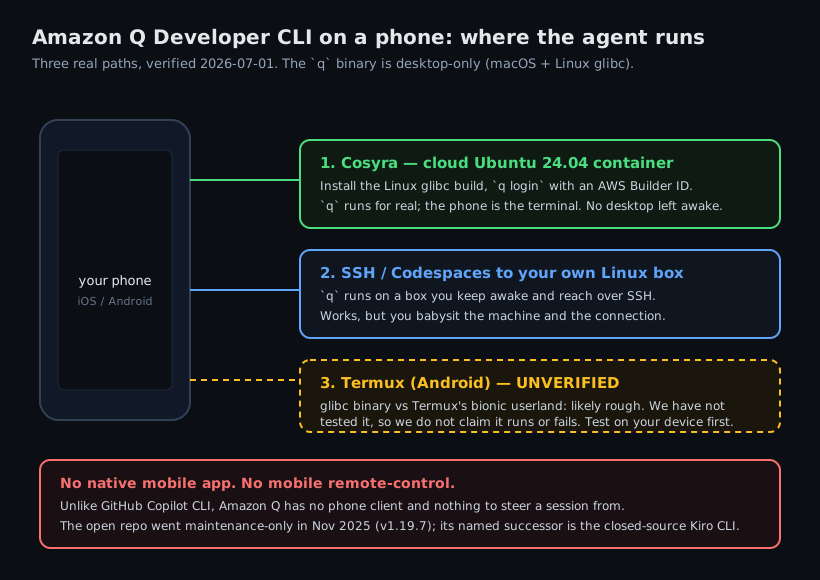
How can you run the Amazon Q CLI from a phone?
Three ways, in order of how well they work without a desktop: a cloud Ubuntu
container where q actually runs (Cosyra), SSH or Codespaces to your
own Linux box, and Termux on Android (which we can't promise works).
1. Cosyra: install the Amazon Q CLI in a cloud container
Cosyra is a native iOS and Android terminal connected to a persistent Ubuntu
24.04 x86_64 container. It is a normal glibc Linux box, so the Amazon Q
Linux build installs and runs, and q executes in the container, so
nothing of yours has to stay awake. We ship
four agent CLIs pre-installed
(Claude Code, Codex, OpenCode, Antigravity), and Amazon Q is a one-command add
on top.
- Works when: you want
qrunning on demand from either platform with no home machine to maintain. - Breaks when: you have no internet, or you need
qto reach AWS resources that are only visible from your own network. - Cost: Core is $20/month and Pro is $30/month. Eligible new users can start a 7-day free trial in the App Store app. See pricing. Your AWS Builder ID and any Amazon Q Pro charge are separate.
2. SSH or Codespaces to your own Linux box
Install q on a Linux machine you own (a home server, a VPS, or a
GitHub Codespace) and reach
it from a phone SSH client. The CLI runs for real, but you keep that box
awake and manage the connection, which is the babysitting a cloud container
removes.
3. Termux on Android: why we won't promise it
Here is the honest version, because guessing here is how bad advice spreads.
Amazon Q ships a glibc-linked Linux binary. Termux is a
bionic Android userland with no glibc, and that combination has
a track record of breaking glibc-linked agent binaries, the exact wall that stops
GitHub Copilot CLI installing in Termux, where a glibc addon "cannot mix glibc
and Bionic libraries in the same process." So a plain
q install in Termux is doubtful. But we have not run it on a device,
so we will not tell you it works or that it fails.
If you want to stay on-device, the credible route is a proot glibc distro inside Termux, the same pattern we walk through for a full Debian userland in running a Linux container on Android. Simpler and more reliable: a cloud x86_64 container, where the standard Linux build just installs.
How do you run the Amazon Q CLI on iPhone or Android with Cosyra?
Four steps: install the app, install q, sign in with an AWS
Builder ID, and run q chat in a repo.
Step 1: Install Cosyra and sign in
Download from the App Store or Google Play. You land in a persistent Ubuntu 24.04 x86_64 container, a real glibc Linux box, which is what Amazon Q's Linux build targets.
Step 2: Install the Amazon Q Developer CLI
Amazon Q is not one of the four agents we pre-install (it is AWS's own tool, authenticated to AWS), but it is a one-command add. Install the Linux build per the AWS docs (distro package or AppImage), then confirm the binary:
$ cat /etc/os-release | head -1
PRETTY_NAME="Ubuntu 24.04 LTS"
$ # install the Linux build per the AWS docs
$ q --version
q 1.19.7
Step 3: Sign in with an AWS Builder ID
Amazon Q authenticates with an AWS Builder ID or IAM Identity Center, not a
model API key. Run q login, choose the Builder ID option, and
it prints a device code and a URL. Open the URL, paste the code, approve,
and you are in.
$ q login
? Select login method › Use for Free with Builder ID
Confirm the code AB12-CD34 at:
https://device.sso.us-east-1.amazonaws.com/
✓ Logged in
Step 4: Clone a repo and start q chat
$ git clone https://github.com/your-org/your-app.git
$ cd your-app && q chat
Amazon Q · agentic chat. Type your request.
> Add input validation to the /signup handler
and a test for the empty-email case.
q proposes edits and waits for your approval before writing, so you
see the diff on the phone before anything lands on disk. Because the container
is persistent, you can start a change on the train, close the app, and pick the
same session back up on an iPad at your desk.
Try Cosyra. Plans start at $20/month. It is a real Ubuntu 24.04 glibc box, so the Amazon Q Linux build installs like it does on any Linux machine. App Store / Google Play / Pricing details
What are the real limits of running the Amazon Q CLI on a phone?
- No offline mode. The container is in the cloud; no internet, no terminal.
- AWS lock-in. Auth is an AWS Builder ID or IAM Identity Center against AWS-hosted models. We think tying your terminal agent to an AWS identity is the wrong default for anyone who isn't already all-in on AWS. The friction shows up the first time you want to point it at a non-AWS project. AWS would tell you the account integration is the whole point; both can be true.
- You are adopting a frozen tool. The open CLI is maintenance-only;
if you want the actively developed line, that is the closed-source Kiro CLI,
not
q. - Phone keyboards slow long prompts. Voice dictation and a Bluetooth keyboard help a lot on a phone.
Cosyra vs SSH vs Termux for the Amazon Q CLI
Cosyra runs q for real with nothing left awake; SSH or Codespaces
works if you already keep a Linux box on; Termux on Android is unverified. The
table lines them up, checked 2026-07-01.
| Feature | Cosyra | SSH / Codespaces | Termux |
|---|---|---|---|
| Amazon Q CLI actually runs | In the cloud container | On your own Linux box | Unverified (glibc vs bionic) |
| Needs a machine you keep awake | No | Yes | n/a |
| Platforms | iOS + Android | Any phone SSH client | Android only |
| Full shell on the phone | Yes | Yes (over SSH) | Yes, but Q may not install |
| Setup time | ~5 min | Depends on your box | Uncertain |
| Cost (excl. AWS charges) | From $20/mo | Your box + your time | Free |
Prefer one of the agents that is pre-installed and provider-neutral? See Claude Code on phone, Codex CLI on phone, Antigravity on a phone, and OpenCode on phone, or the pillar on AI coding agents on mobile.
Frequently asked questions
Can you run the Amazon Q Developer CLI on a phone?
Not as a native app. Amazon Q supports macOS and Linux only, there is no
Windows-native build (WSL only), and no mobile client of any kind. The
working path from a phone is to install the Linux build in a cloud Linux
container (Cosyra), where q genuinely runs and your phone is the
terminal, or to SSH from your phone to your own Linux box that has
q installed. Unlike GitHub Copilot CLI, Amazon Q has no mobile
remote-control feature, so there is no desktop session to steer from a phone.
[source: AWS Docs, installing the Amazon Q Developer CLI]
Is the Amazon Q Developer CLI still maintained?
It is maintenance-only, not dead. The repo banner (read 2026-07-01) states
the project "is no longer being actively maintained and will only receive
critical security fixes" and that Amazon Q Developer CLI "is now available
as Kiro CLI, a closed-source product." The last open release is v1.19.7
(2025-11-17). So q still installs, runs, and gets security fixes,
but forward development moved to the closed-source Kiro CLI.
[source: aws/amazon-q-developer-cli repository README]
Does the Amazon Q Developer CLI work in Termux on Android?
We do not know, and we will not claim either way without a hands-on test. Amazon Q ships a glibc-linked Linux binary; Termux is a bionic Android userland with no glibc, and that combination historically breaks glibc-linked agent binaries. So it is doubtful, but we have not run it. The reliable Android path is a proot glibc distro inside Termux, or a cloud x86_64 Linux container where the standard Linux build just works.
[source: AWS Docs, Amazon Q Developer CLI supported platforms]
Is the Amazon Q Developer CLI bring-your-own-key (BYOK)?
No. You authenticate with an AWS Builder ID or IAM Identity Center via
q login, and Amazon Q uses AWS-hosted models. That differs
from a provider-neutral BYOK CLI, where you paste your own Anthropic,
OpenAI, or Google API key and pay that provider directly. Cosyra's four
pre-installed agents are BYOK; Amazon Q is an AWS identity plus AWS-hosted
models.
[source: AWS Docs, using Amazon Q Developer on the command line]
What does the Amazon Q Developer CLI cost?
As of 2026-07-01 the AWS pricing page lists a Free tier at $0 (50 agentic requests per month, latest Claude models in the IDE or CLI, reference tracking, and up to 1,000 lines per month of Java transformation) and Amazon Q Developer Pro at $19 per user per month (expanded agentic-request limits, 4,000 lines per month of Java transform, an admin dashboard, and IP indemnity). That AWS bill is separate from whatever you run the CLI in.
tl;dr
The Amazon Q Developer CLI (q) is desktop-only (macOS and
Linux, no mobile app and no mobile remote-control), and its open repo went
maintenance-only in November 2025 (v1.19.7), with the closed-source Kiro
CLI as its successor. To run q from a phone, install the Linux
build in a cloud Ubuntu container (Cosyra), sign in with an AWS Builder ID,
and run
q chat. Termux on Android is unverified because Amazon Q
ships a glibc binary against a bionic userland.
App Store / Google Play. Plans start at $20/month.
Run the Amazon Q Developer CLI from your phone.
Install Cosyra, add the Linux build, q login, and go.