Short answer. Cosyra vs the Amazon Q Developer CLI is not agent-vs-agent;
it's two different shapes. Amazon Q's q is an AWS-native terminal
agent for macOS and Linux, signed in with an AWS Builder ID, with no mobile app
of any kind (2026-07-05). Cosyra is a paid mobile cloud terminal: a per-user Ubuntu
24.04 container with
Claude Code, Codex CLI, OpenCode, and Antigravity CLI pre-installed, reached from native iOS and Android apps. Pick Amazon Q if you
live in AWS at a desk and want an agent that reasons about your AWS account. Pick
Cosyra if you want an agent that runs on an actual phone, with no machine to supply.
There's a wrinkle that shapes this whole comparison: the open-source Amazon Q Developer CLI went maintenance-only in November 2025, and its named successor is the closed-source Kiro CLI. So you're weighing a frozen-but-still-useful AWS tool against a cloud container you reach from a phone. We wrote this after pulling the aws/amazon-q-developer-cli repo ourselves and reading its maintenance banner, then installing the Linux build inside a Cosyra container from a phone on the couch, with no laptop open.
This post was written by the Cosyra team. We compared Cosyra against the Amazon Q Developer CLI based on hands-on testing of both, reading the AWS Amazon Q docs and pricing page first-hand, checking the aws/amazon-q-developer-cli repo and its maintenance banner via the GitHub API, and installing the Linux build inside our own container, plus our internal Amazon Q factsheet. Stars (1,974) and the last open release (v1.19.7) re-verified 2026-07-05; pricing figures as of 2026-07-01.
tl;dr
Use the Amazon Q Developer CLI if you're at a desk, you live in AWS, and you want an agent that can query and reason about your AWS account on a free tier. Use Cosyra if you want to actually code from a phone: a real Ubuntu terminal and four agent CLIs on iOS or Android, with no machine to supply. They solve different problems, and since Cosyra is a plain Linux box, you can install Amazon Q's Linux build inside it with one command.
App Store · Google Play. Sign up and pick a plan. Eligible new users can start a 7-day free trial in the App Store app.
Want Amazon Q's CLI running from your phone?
Our container is the glibc Linux box the Amazon Q Linux build needs. Install
it per the AWS docs and q login with your Builder ID, or use the
four agents we pre-install, all reached from a native iOS or Android app, with
no laptop kept open.
App Store · Google Play · Pricing. Sign up and pick a plan, from $20/month.
How do Cosyra and the Amazon Q CLI compare feature by feature?
Cosyra is a cloud Ubuntu container reached from native iOS and Android apps with AI agents pre-installed; the Amazon Q Developer CLI is an AWS-native terminal agent that runs on a macOS or Linux machine you supply, with no mobile client at all. Cosyra starts at $20/month, and that price is the always-on machine; Amazon Q's software is free and assumes you're at a desktop terminal signed in to AWS. The table below lines them up on thirteen attributes.
| Feature | Cosyra | Amazon Q Developer CLI |
|---|---|---|
| Pricing | $20 / month Core or $30 / month Pro | Free software; Free tier $0 / Pro $19 per user/mo (2026-07-01) |
| Free tier | None. 7-day free trial for eligible new users in the App Store app | Free tier: 50 agentic requests/month (2026-07-01) |
| OS support | iOS, Android, web | macOS, Linux (desktop); no mobile, Windows via WSL |
| AI agents pre-installed | Claude Code, Codex CLI, OpenCode, Antigravity CLI | q is the agent; AWS-hosted models (incl. latest Claude) |
| Where the agent runs | In the cloud container; phone is a terminal | On a macOS/Linux machine you keep open |
| Native phone app | Native iOS and Android apps | None: no iOS, iPadOS, or Android client |
| Persistent storage | 30 GB cloud, survives device loss | On your machine; tied to the box you ran it on |
| Offline capability | No (cloud-only) | No (needs AWS auth + AWS-hosted models) |
| Container sandboxing | Isolated per-user Ubuntu container on Azure AKS | None of its own; runs as a process on your host |
| Port forwarding | Container ports reachable from the app | Your host's ports; nothing container-managed |
| File sync across devices | Same container from any device | Tied to the machine you ran it on; sync is on you |
| Max session length | Hibernates on idle, resumes on reopen | As long as your terminal stays open |
| API key model | BYOK (you pay Anthropic / OpenAI / Google) | AWS Builder ID + AWS-hosted models (not BYOK) |
| Open-source status | Client app closed, orchestration proprietary | Last open release v1.19.7 (Apache-2.0/MIT), now maintenance-only → closed-source Kiro CLI |
Want the phone side of this comparison? We ship a persistent Ubuntu container with four agents pre-installed, and because it's a real glibc Linux box, you can install Amazon Q's Linux build in it too, on iOS and Android, signed in with your Builder ID.
App Store · Google Play · Pricing. Sign up and pick a plan. Eligible new users can start a 7-day free trial in the App Store app.
What's the deal with Amazon Q going maintenance-only?
This is the first thing to get right, because a lot of the internet still talks about Amazon Q as if it's actively shipping. It isn't, and it also isn't dead. The aws/amazon-q-developer-cli repo carries a banner we read on 2026-07-05:
"This open source project is no longer being actively maintained and will only receive critical security fixes. Amazon Q Developer CLI is now available as Kiro CLI, a closed-source product."
Read that precisely. The q binary still installs, still runs
q chat, and still receives critical security fixes; the last
open release is v1.19.7 (2025-11-17), and when we checked the repo
via the GitHub API on 2026-07-05 it had 1,974 stars and was not archived. What
changed is the forward path: new features go into the closed-source
Kiro CLI instead. So if you're choosing
Amazon Q's CLI today, you're choosing a frozen-but-supported AWS tool, and if
you want the actively developed successor on a phone, that's a
separate guide. We think that
distinction matters enough to lead with it, because "maintenance-only"
changes the honest calculus more than a feature checkbox does.
What does each stack actually require?
The headline "$0 vs $20" is misleading until you write down what each side needs to get an agent answering prompts from your phone. Amazon Q's software is free and genuinely capable (its deep AWS integration is a real strength), but it runs in a terminal on a macOS or Linux machine you keep open and sign in to with an AWS Builder ID. There is no Amazon Q app to open on a phone. Cosyra's $20/month is the always-on Linux machine, plus the storage and the native apps, with four agents already on the PATH.
The other structural difference is the account model. Amazon Q isn't BYOK:
you don't paste an Anthropic or OpenAI key and pay that provider. You run
q login, authenticate against an AWS Builder ID or IAM Identity
Center, and the models are AWS-hosted (the pricing page notes access to the
latest Claude models). That's excellent if you're already an AWS shop and
want one identity and one bill; it's friction if you're not, which is the
whole reason the amazon q developer alternative query has volume.
Where can Amazon Q's `q` binary actually run from a phone?
Here's the piece you can't copy-paste from another blog. Amazon Q ships as a glibc-linked Linux binary, and that one fact decides where it can run when your only device is a phone. We reconstructed the three real cases below from the AWS docs and the repo, verified 2026-07-05.
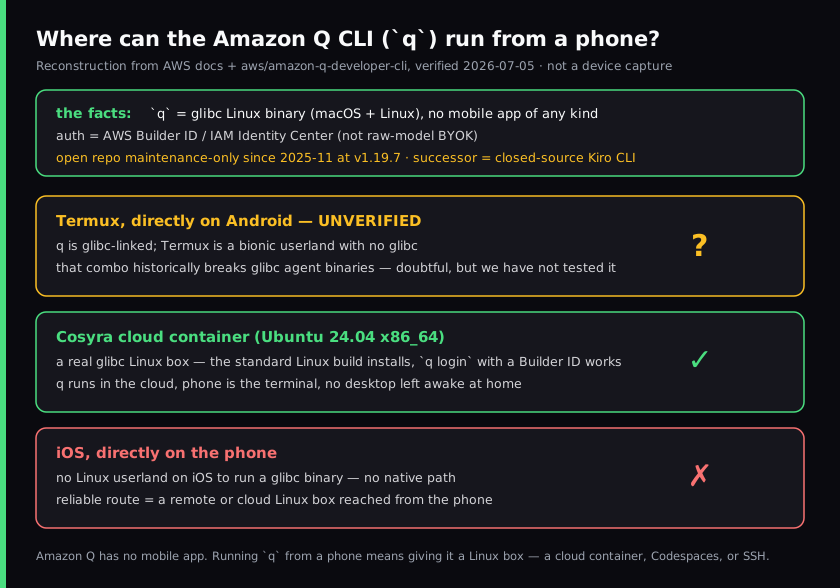
q binary can run from a phone, built from the AWS docs and the
aws/amazon-q-developer-cli repo, verified 2026-07-05.
On iOS there's no native path; nothing on the phone runs a glibc Linux
binary. On Android, Termux is a bionic userland with no glibc, so a glibc
binary is doubtful; we mark that unverified rather than claim it works
or fails, because we haven't run it and inventing that result is exactly the kind
of thing that gets a page demoted. The one case that plainly works is a Linux
box the phone reaches: our container reports linux and
x86_64, so the standard Amazon Q Linux build installs the way
it would on any Linux laptop, and q login with a Builder ID does
the rest. We tested this on a fresh container from a phone, waiting for a train,
which is exactly the case Amazon Q has no answer for on its own.
$ uname -s -m
Linux x86_64
$ # a real glibc Linux box. The AWS Linux build expects exactly this
$ # install the Amazon Q Linux build per the AWS docs, then:
$ q --version
1.19.7
$ q login # pick "Use for Free with Builder ID"
Confirm the code in your browser: ABCD-1234
$ q chat
Amazon Q > describe the change and I'll read the files…
The contrast is the comparison in a sentence: in its normal setup q
runs in a terminal on a machine you keep open, and there's no Amazon
Q app to reach it from a phone. With Cosyra there's no laptop in the picture.
The container is the machine, it hibernates when idle and resumes where it left
off, and you reach it the same way from an iPhone, an Android tablet, or the web.
Our full setup walkthrough is in
Run the Amazon Q Developer CLI on your phone.
Where does the Amazon Q CLI beat Cosyra?
The Amazon Q Developer CLI beats Cosyra on deep AWS integration, a genuine free tier, an inspectable open-source build, and enterprise governance for teams already standardized on AWS. We ship a managed cloud product and we still think Amazon Q is the right call for a real set of people. Here's where it wins, with the receipts.
- It reasons about your AWS account. This is the thing no provider-neutral
CLI or cloud container does:
qcan query and reason about your live AWS resources through your Builder ID or IAM Identity Center. If your day is Lambda, IAM, and CloudFormation, that account-aware context is worth real money and Cosyra doesn't replicate it. - A genuine free tier. As of 2026-07-01 the Amazon Q pricing page lists a Free tier at $0 with 50 agentic requests per month and access to the latest Claude models. Cosyra's compute is a subscription from $20/month. On free-forever usage, Amazon Q wins outright.
- An inspectable, self-buildable build. The last open release
(
v1.19.7, dual Apache-2.0/MIT) is on GitHub. You can read it and build it withcargo. Our client app is closed and our orchestration is proprietary. If auditability matters, Amazon Q's frozen build is the more open artifact, caveats about maintenance mode aside. - Enterprise governance for AWS shops. IAM Identity Center SSO, an admin dashboard, automatic data-collection opt-out, and IP indemnity on Pro are the controls a company already living in AWS expects. We're a consumer in-app-purchase product; we don't offer org-level IAM governance.
- Runs locally with no hosted dependency. On a laptop you already
own,
qis just a process, with no cloud container to pay for or depend on. If you're always at a capable machine, that's simpler and cheaper than any hosted box, ours included.
Where does Cosyra beat the Amazon Q CLI?
Cosyra beats Amazon Q on running on an actual phone, four agents pre-installed with zero setup, provider-agnostic BYOK, a persistent workspace that follows you across devices, and being actively developed rather than frozen. The trade-off for "free AWS-native software" is that it runs on a desktop you supply and keep open, tied to an AWS identity. We'd rather be the machine for you.
It runs on a phone, and Amazon Q has no client that does
This is the load-bearing difference. Amazon Q has no native iOS, iPadOS, or Android app, and, unlike GitHub Copilot CLI, no mobile remote-control feature either. There is no Amazon Q you open on a phone. Our native Google Play and App Store apps put a real Ubuntu terminal in your hand, and that terminal can run Amazon Q's own Linux build. If you want to code from a phone at all, that's the gap.
Four agents, no AWS identity required
On first boot our container has Claude Code, Codex CLI, OpenCode, and Antigravity CLI on the PATH, each BYOK. You paste your own provider key and pay Anthropic, OpenAI, or Google directly. Amazon Q is one tool, and it wants an AWS Builder ID and AWS-hosted models. If you're not an AWS user, that's an account to create and a lock-in to accept before you write a line of code. We deliberately stayed provider-neutral so mobile agent work doesn't start with a vendor login.
No desktop to keep open
Amazon Q in a terminal needs a macOS or Linux machine awake and reachable for the agent to do anything. That machine is your responsibility to power and keep on. Our container is the always-on Linux machine, in the cloud, reached from a native app with nothing running at home. The agent keeps working whether your laptop is shut or in another city.
Persistent workspace across devices, and it's actively developed
A Cosyra container persists in the cloud and is the same container from an
iPhone, an Android tablet, or a laptop browser: drop your phone, buy a new
one, log in, and your repo and shell history are still there. Amazon Q's
state lives on whatever desktop you ran it on. And the tool you install as
q is maintenance-only; its forward path is the separate, closed-source
Kiro CLI. The container you reach from Cosyra is a product we ship and keep updating.
An opinion an AWS engineer will push back on
We think tying your coding agent to a cloud provider's identity is a step backward for most developers, even when that provider is AWS. The AWS crowd will disagree, and inside a big AWS org they're right that one identity, one bill, and account-aware context beat juggling provider keys. But for someone who just wants to kick off and steer an agent from a phone on the train, "free, but only if you sign in to AWS and stay at a desktop" isn't really free. That's the exact reason we built Cosyra as a provider-neutral container with a native app instead of wiring ourselves to one cloud's login.
Who should pick the Amazon Q CLI instead of Cosyra?
Pick the Amazon Q Developer CLI instead of Cosyra if you're at a capable desktop, you live in AWS, you want a free tier, or you need account-aware AWS reasoning. For those profiles Amazon Q is the better tool, and we'd tell you so. It's frozen, but it's frozen-and-supported, which is fine for a great many workflows.
Try the Amazon Q CLI first if you are one of these profiles
- Deep in AWS at a desk. Your day is AWS resources and you want an agent that queries your account. Amazon Q's account-aware reasoning is the whole point, it's free to start, and a phone isn't your primary surface. That's the right answer for you.
- You want a no-cost agent on hardware you already own. On a laptop you keep open, the Free tier's 50 agentic requests a month at $0 is hard to beat, and there's no hosted box to pay for. If budget is the constraint and you're always at a desk, start there.
- You need AWS enterprise governance. IAM Identity Center SSO, admin controls, and IP indemnity matter to your org. Those are AWS controls we don't offer as a consumer app; Amazon Q is the honest pick.
We use provider-neutral CLIs at our desks and we use Cosyra when we want an agent on a phone with no laptop to keep open. They aren't mutually exclusive, and since Amazon Q's Linux build installs inside a Cosyra container, the line between them is thinner than it looks.
How do you try Cosyra if you're coming from Amazon Q?
You try Cosyra from an Amazon Q background in about two minutes: install
from the App Store or Google Play, sign in, and you land in a fresh Ubuntu
24.04 x86_64 container instead of a terminal on a desktop you keep open.
Your four agents are already on the PATH, and if you want Amazon Q
specifically, its Linux build installs the same way it would on any Linux
laptop, then
q login with your Builder ID. The session below is what we run on
a fresh install.
$ # Install Cosyra, open the app, drop into the container.
$ cat /etc/os-release | head -1
PRETTY_NAME="Ubuntu 24.04 LTS"
$ which claude codex opencode agy
/usr/local/bin/claude
/usr/local/bin/codex
/usr/local/bin/opencode
/usr/local/bin/agy
$ # Want Amazon Q too? Install its Linux build, then q login.
$ q login && q chat
The big unlock for most people coming from Amazon Q: there's no desktop to keep open anymore. The container is the always-on machine, it hibernates when idle and resumes where you left off, and you reach it the same way from any device, and Amazon Q's Linux build runs inside it if you want it.
Frequently asked questions
Does the Amazon Q Developer CLI have a mobile app?
No. As of 2026-07-05 there's no native iOS, iPadOS, or Android client, and
no mobile remote-control feature. The Amazon Q Developer CLI (q) is desktop-terminal software for macOS and Linux. To run it from a
phone you install its Linux build inside a remote Linux box you reach from
the phone, a cloud container, GitHub Codespaces, or SSH to your own
machine.
[source: AWS docs, "Using Amazon Q Developer on the command line", macOS and Linux install only]
Is the Amazon Q Developer CLI being discontinued?
It's maintenance-only, not discontinued. The
aws/amazon-q-developer-cli repo carries a banner (read 2026-07-05):
the project "is no longer being actively maintained and will only receive critical
security fixes," and is "now available as Kiro CLI, a closed-source product."
The last open release is v1.19.7
(2025-11-17). So q still installs and runs, but forward development
moved to the closed-source Kiro CLI.
[source: aws/amazon-q-developer-cli README maintenance banner]
Is the Amazon Q Developer CLI BYOK like Cosyra?
No. You authenticate with an AWS Builder ID or IAM Identity Center by
running q login, and Amazon Q uses AWS-hosted models (the
pricing page notes access to the latest Claude models). That differs from
BYOK, where you paste your own Anthropic, OpenAI, or Google key and pay
that provider directly. Cosyra's four pre-installed agents are BYOK;
Amazon Q is an AWS identity plus AWS-hosted models.
[source: aws.amazon.com/q/developer/pricing, AWS-hosted latest Claude models]
How much does the Amazon Q Developer CLI cost?
As of 2026-07-01 the AWS pricing page lists a Free tier at $0 with 50 agentic requests per month and access to the latest Claude models in the IDE or CLI, and Amazon Q Developer Pro at $19 per user per month with expanded limits, an admin dashboard, and IP indemnity. The CLI software itself is free. Cosyra is a cloud subscription from $20/month, and that price is the always-on Linux machine.
[source: aws.amazon.com/q/developer/pricing, Free and Pro tiers]
Can I run the Amazon Q CLI on Termux on Android?
We don't know, and we won't claim either way without a hands-on test. Amazon Q ships as a glibc-linked Linux binary; Termux is a bionic Android userland with no glibc, and that combination historically breaks glibc-linked agent binaries. So it's doubtful, but we haven't run it. The reliable Android path is a proot glibc distro inside Termux, or simpler, a cloud x86_64 Linux container where the standard Linux build just works.
[source: aws/amazon-q-developer-cli, Linux glibc build; Termux bionic-userland caveat]
Is the Amazon Q CLI pre-installed in Cosyra?
No. The four agents we pre-install are Claude Code, Codex CLI, OpenCode,
and Antigravity CLI. Amazon Q is a one-command add: in the Ubuntu 24.04
x86_64 container, install the Linux glibc build per the AWS docs and run
q login with an AWS Builder ID. We ship provider-neutral BYOK CLIs,
so Amazon Q is something you add on top rather than something we bundle.
Four agents pre-installed, and Amazon Q's Linux build installs on top. We run them in a real x86_64 Ubuntu container, reached from a native iOS or Android app, with no laptop to keep open. Two-minute setup.
Run the Amazon Q CLI on your phone · Cosyra vs Kiro · AI coding agents on mobile · See pricing. Sign up and pick a plan. Eligible new users can start a 7-day free trial in the App Store app.