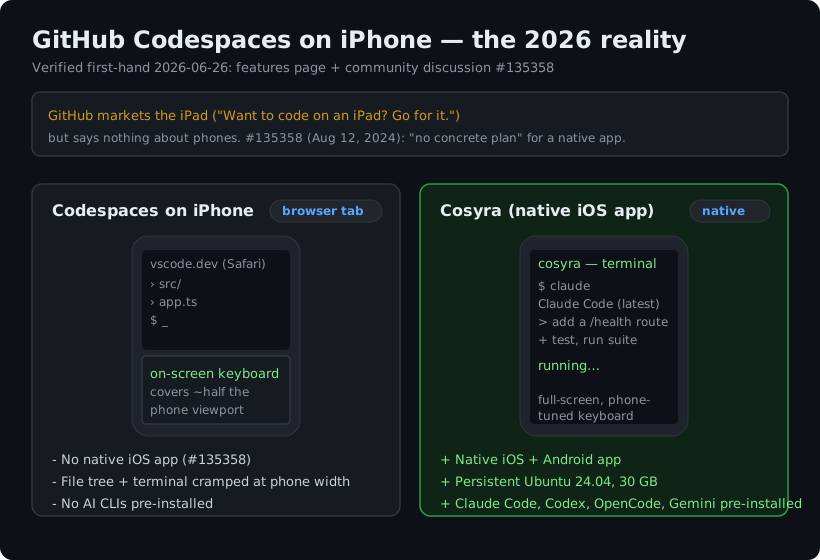
GitHub Codespaces on iPhone means one thing in 2026: vscode.dev in a mobile Safari tab, with no native app. GitHub markets the iPad explicitly on its own page, "Want to code on an iPad? Go for it.", and says nothing about phones, which is the honest tell. Your codespace does load on a phone, and with a Bluetooth keyboard you can make a small edit. But a desktop IDE on a five-inch screen, with the on-screen keyboard eating half the viewport, is not a coding setup so much as an emergency one. If the device in your pocket is where you actually want to code, the path that fits is a native app talking to a persistent cloud Linux box, which is what we build at Cosyra.
This guide covers what genuinely works in a codespace from an iPhone, the free tier and idle behavior most write-ups skip, where Codespaces clearly wins, and the terminal-first setup built for a phone. For the tablet version of this same question see our GitHub Codespaces on iPad guide; for the feature-by-feature head-to-head, see Cosyra vs GitHub Codespaces on mobile.
What actually works on an iPhone
We opened a codespace in iPhone Safari to see the current state rather than trust a years-old tutorial. The editor loads, your settings sync, and the integrated terminal runs inside the browser tab. The compute is real: the codespace is a full Linux container, and your phone is a thin client to it over the network. For reading a diff someone sent you, approving a quick change, or kicking off a build from a coffee queue, that is enough.
The friction is the input layer, and on a phone it is worse than on a tablet. There is usually no hardware keyboard, so the on-screen keyboard claims a large slice of an already small screen, and the terminal you are typing into shrinks to a few lines. The file tree expects a mouse; touch targets are tiny and text selection needs a long-press. The VS Code command palette assumes a wide window it does not have. None of this is a bug. It is a desktop IDE driven by touch on the smallest screen Apple ships, and there is no native app to retune any of it.
One more gap people hit: there is no first-party way to SSH into a codespace
from an iPhone. The gh codespace ssh command lives in the GitHub
CLI on a desktop shell, which an iPhone does not have. You are left with the browser
terminal or a third-party SSH app pointed somewhere else entirely.
Is there a GitHub Codespaces iPhone app?
No, and GitHub has effectively said so. In the community discussion about Codespaces in the iPad and tablet app (#135358), a GitHub staff member replied on August 12, 2024:
"We have been discussing the best way to support Codespaces on iPad but we do not have any concrete plan for that yet. However, it is definitely on our list!"
That comment was about the iPad, but the phone request is older and better documented, and it is worth laying out the full chain because it is the clearest evidence of where this sits. The original ask, "Codespaces coming to the mobile app?" (#3153), was opened January 12, 2021. A GitHub Developer Relations Manager replied the next day:
"Codespaces is still in beta and we are working closely with the team to figure out how mobile and Codespaces should work together."
Two later threads asked the same thing for phones: #55342 (May 12, 2023) and #162416 (June 11, 2025), the latter written by someone who wanted to code on the go and had been getting by with Termux and SSH. On June 16, 2025 a GitHub staff member closed both as duplicates of #3153, saying they would "pass on the note to the team to reinforce this feature request." Comments asking for an update were still arriving on #3153 as recently as June 2026, with no reply. All four discussions re-checked 2026-07-22.
So the honest summary is not that GitHub has never been asked. It is that GitHub has been asked since January 2021, has acknowledged the request more than once, and has shipped nothing in five and a half years, while the marketing page still reaches for the tablet when it wants a mobile example. We think a phone-first Codespaces is something GitHub has quietly decided not to build, because the browser already reaches every device and a native client is hard to justify on their side. GitHub would argue the browser is genuinely universal and an app would be redundant. We disagree the moment you try to type in a terminal one-handed on a train: a browser tab on a phone is reachable, but it is not built for the device, and on a phone that gap is the whole story.
The free tier and idle behavior, dated
Two facts trip people up, so here they are with a verification date. First, the free tier is per personal account. GitHub Free includes 120 core-hours, which the features page describes as "60 hours of run time on a 2 core codespace, plus 15 GB of storage each month"; GitHub Pro raises that to 180 core-hours and 20 GB. Organizations get no free quota, so org-owned codespaces bill from the first minute. Past the quota, a 2-core machine bills at $0.18 per hour and storage at $0.07 per GB-month. All re-verified 2026-07-22 against the GitHub billing docs; the quotas are unchanged from our 2026-05-19 check.
Worth knowing because it catches people out: the quota is metered in core-hours, not wall-clock hours, so a 2-core machine burns two core-hours for every hour you sit in it, and a 4-core machine burns four. That is why the free plan works out to 60 real hours a month, not 120. A GitHub community thread from February 2026 is a developer discovering this the hard way after their quota drained faster than the headline number suggested.
Second, a codespace does not stay warm while your phone is locked in your pocket. The default idle timeout is 30 minutes, configurable per user from 5 to 240 minutes, and an organization can cap it lower. Your files survive, but the container hibernates and the next session is a cold start. Phone sessions are short and frequent by nature, so you meet that cold start far more often than a laptop user would. A container built to hibernate and resume fast, holding your state, is a different daily rhythm.
Want a native iPhone client instead of a browser tab? Cosyra is a native iOS app on a persistent Ubuntu container, with a terminal built for the phone keyboard. Sign up and pick a plan. Eligible new users can start a 7-day free trial in the App Store app. App Store / Google Play / Pricing details
Where Codespaces genuinely wins
A fair guide names what the other tool does better, so here it is with no hedging. If these describe your situation, use Codespaces from your phone browser and do not overthink it:
- GitHub-native, one click from any repo. Codespaces spins up from a repo, branch, or pull request with the environment, secrets, and Actions already wired in. Nothing we do touches GitHub that tightly.
- A generous personal free tier. 120 core-hours and 15 GB a month at zero cost, no credit card, is hard to beat for occasional use.
- Reproducible dev containers. A committed
.devcontainer/devcontainer.jsontravels with the repo, so the whole team gets the same environment, and prebuilds cut cold-start time. - It is a phone fallback, not a phone tool. If your real machine is a laptop and the phone is just for the rare emergency edit, the browser is fine and a native app would be overkill.
How do you actually code on an iPhone instead?
The pattern that fits a phone is the one Codespaces never built: a native app talking to a persistent cloud Linux environment, where the agent does most of the typing. The phone's job is to be a good client to a real Linux box and a good remote control for an AI coding agent, not to render a desktop IDE in a tab. We ship Claude Code, Codex CLI, OpenCode, and Antigravity CLI pre-installed because setup friction is the main thing that kills agent-driven mobile dev; a codespace can run those same agents, but only after you author a dev container to add them. Here is the three-minute version on a phone.
Step 1: Install Cosyra from the App Store
Open the App Store on your iPhone and install Cosyra. Sign in with Apple, Google, or email, and the app provisions a fresh Ubuntu 24.04 container on first launch. The terminal is full-screen and the keyboard handling is tuned for a phone, so you are not fighting a desktop layout shrunk into a tab.
Step 2: Add your model API key
Cosyra is bring-your-own-key, so you pay Anthropic, OpenAI, or Google directly rather than through us. In the terminal:
$ # Persists across sessions and device switches
$ echo 'export ANTHROPIC_API_KEY="sk-ant-your-key-here"' >> ~/.bashrc
$ source ~/.bashrc
$ claude --version
Claude Code (latest)
Step 3: Run an agent and let it type
Clone a repo and start a session. The point on a phone is that you steer in short prompts and the agent does the keyboarding:
$ git clone https://github.com/your-org/your-project.git
Cloning into 'your-project'...
$ cd your-project
$ claude
Claude Code (latest)
Type your prompt, or type "/" for commands.
> Add a health-check endpoint and a test, then run the suite.
How do the iPhone coding options compare?
Lined up against what matters on a phone, a native app, a persistent environment, pre-installed agents, and a terminal you can actually type in, the options sort out clearly. The table covers the realistic phone paths as of 2026-06-26.
| Feature | Codespaces (Safari) | Cosyra (iOS app) | Blink Shell (SSH) |
|---|---|---|---|
| Native iPhone app | No (browser only) | Yes | Yes |
| Hosted environment included | Yes (GitHub VM) | Yes (Ubuntu 24.04) | No (bring your own host) |
| AI agents pre-installed | None (add via devcontainer) | 4 CLIs pre-installed | None |
| Terminal on the phone | In browser tab | Native, full-screen | Native, full-screen |
| Idle behavior | 30-min hibernate | Hibernate + resume | Depends on your host |
| API key model | GitHub plan | BYOK (pay provider) | None (just a client) |
| Pricing model | Usage-based (core-hrs) | Flat $20 or $30/mo | $19.99/yr (app only) |
| Free entry | 120 core-hrs/mo (personal) | 7-day trial in the App Store app (eligible new users) | Paid app, no host |
Codespaces is one option among several here. For the whole landscape of editors, shells, and agents tested against the iPhone, our coding on iPhone guide ranks them together, and the cloud IDE on phone pillar lines Codespaces up against Coder, Firebase Studio, Gitpod, and Replit on the same question.
Who should pick which?
Here is the decision framework we would give a friend, with the phone in hand.
- Pick Codespaces if you live in GitHub, work mostly on a laptop, and only need to reach a codespace from your phone in a rare pinch. Its GitHub integration and free personal tier are genuinely strong, and the browser is fine for a one-off emergency edit.
- Pick Cosyra if the phone in your pocket is where you want to code, you want a real full-screen terminal and AI coding CLIs you drive yourself, and you want a persistent box that follows you to the iPad and the web instead of cold-starting after every idle gap.
- Try Blink Shell first if you already run an always-on machine and just want a polished native SSH client into it from the phone. It is a great terminal, but it brings no hosted environment and no agents. You supply the server and the setup.
Frequently asked questions
Can you use GitHub Codespaces on an iPhone?
Yes, in mobile Safari, but it is cramped. GitHub's features page invites coding from an iPad ("Want to code on an iPad? Go for it.") and says nothing about phones. You can open vscode.dev in iPhone Safari and your codespace loads, but the VS Code UI is a desktop IDE on a five-to-six-inch screen, and the on-screen keyboard covers most of the viewport. It works for a one-line fix; it is rough for real work without a Bluetooth keyboard.
[source: GitHub Codespaces features page]
Does GitHub Codespaces have an iPhone app?
No. The request goes back to January 12, 2021, when discussion #3153 asked whether Codespaces was coming to the GitHub mobile app; a GitHub Developer Relations Manager replied the next day that they were "working closely with the team to figure out how mobile and Codespaces should work together." Two later phone requests (#55342 and #162416) were closed as duplicates of it on June 16, 2025. Nothing native has shipped. As of 2026-07-22 the only way to reach a codespace from a phone is the mobile browser.
[source: GitHub community discussion #3153]
Is GitHub Codespaces free to use from a phone?
For a personal GitHub account, yes, up to a quota. GitHub Free includes 120 core-hours (60 hours on a 2-core machine) plus 15 GB of storage per month; GitHub Pro raises that to 180 core-hours and 20 GB, re-verified 2026-07-22. Past the quota a 2-core machine is $0.18 per hour and storage is $0.07 per GB-month. Organizations get no free quota, so org-owned codespaces are billed from the first minute. The phone does not change billing; mobile Safari uses the same account quota a laptop would.
[source: GitHub Codespaces billing docs]
Can I run Claude Code on an iPhone through Codespaces?
Only if you install it yourself. Codespaces does not pre-install Claude
Code, Codex CLI, Gemini CLI, or OpenCode; you would add them in a
.devcontainer/devcontainer.json so the container builds with them
present, then drive that agent from the cramped browser terminal. It works,
but it is setup you own per repo. A container that ships four agent CLIs already
installed and gives you a native phone terminal skips both problems.
[source: GitHub Codespaces overview]
Does a codespace keep running when I lock my iPhone?
No. A codespace hibernates after 30 minutes of inactivity by default, configurable per user between 5 and 240 minutes, and organizations can force a shorter maximum. Your files persist, but the container goes cold and takes seconds to minutes to wake. On a phone, where you dip in for a minute at a bus stop and lock it again, you hit that cold start constantly.
[source: GitHub docs, setting your timeout period]
How do I get a real terminal on my iPhone instead?
Two honest paths. You can SSH from a terminal app like Blink Shell to a machine you already run, which needs a server and a key set up first. Or you install a native app that talks to a hosted cloud Linux container, which is what we build at Cosyra: a full-screen terminal tuned for the phone keyboard, on a persistent Ubuntu box, with the AI coding CLIs already installed.
tl;dr
GitHub Codespaces on an iPhone means VS Code in a mobile Safari tab. GitHub invites coding from an iPad but is silent on phones, there is no native app, and a staff member confirmed in August 2024 there is no concrete plan for one even on iPad. The personal free tier (120 core-hours, 15 GB) is real, the 30-minute idle timeout means constant cold starts on a phone, and no AI CLIs ship pre-installed. Use Codespaces if you live in GitHub and code on a laptop. To actually code on an iPhone, use a native app on a persistent cloud Linux box, with the agent doing the typing. That is Cosyra, with four AI CLIs pre-installed.
App Store / Google Play. Sign up and pick a plan. Eligible new users can start a 7-day free trial in the App Store app. See pricing.
For the wider picture, our guide to AI coding agents on mobile maps every agent across phone and tablet, and the mobile coding terminal pillar covers the terminal-on-a-device decision end to end. If you are weighing this exact pair for daily use, the Cosyra vs GitHub Codespaces on mobile comparison goes feature by feature. Sealos DevBox is another browser-first cloud box with no native phone app, so it hits the same terminal-in-a-tab wall on a handset. Sealos on phone covers what works and what does not.
Get a real dev environment on your iPhone in 3 minutes. Install Cosyra, add your API key, run an agent in a persistent Ubuntu container.