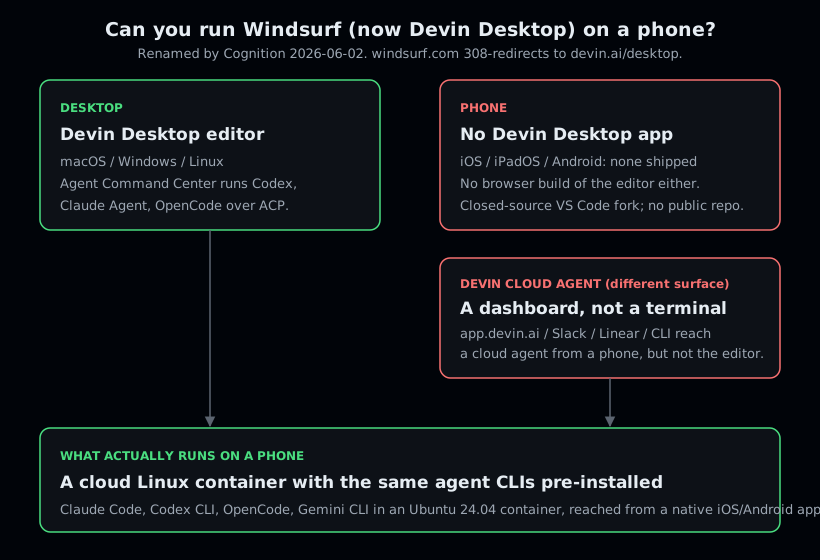
You cannot run Windsurf on phone hardware, because Windsurf, renamed Devin Desktop on 2026-06-02, ships desktop builds only: macOS, Windows, and Linux. There is no iOS, iPadOS, or Android app and no browser build of the editor. What you can do is run the same thing it gives you at a desk, the agent CLIs it drives over ACP, on a phone: open a cloud Ubuntu container from Cosyra for iOS or Cosyra for Android and run Claude Code, Codex CLI, OpenCode, or Gemini CLI, pre-installed. 1 hour free on signup, no credit card.
This guide was written by the Cosyra team. We cross-checked every claim about Windsurf and Devin Desktop against the official Devin Desktop page, the rename announcement, and the Devin Desktop FAQ, first verified 2026-06-04 and re-checked first-hand on 2026-07-08. The rename, the desktop-only platform list, and the pricing further down were all unchanged on that re-check. Where Devin Desktop is genuinely ahead of us, we say so.
The rename you should know first: Windsurf is now Devin Desktop.
Cognition renamed the editor on 2026-06-02, and windsurf.com 308-redirects
to devin.ai/desktop (we ran the curl -sI ourselves
on 2026-06-04 and again on 2026-07-08, still a 308). The product, your plan,
and your extensions are unchanged; only the name moved. What did not change
is the one thing this page is about: there is still no phone client.
What is Windsurf, now Devin Desktop?
Windsurf started as Codeium, became Windsurf when it shifted from autocomplete to an agentic IDE, and on 2026-06-02 was renamed Devin Desktop by Cognition, the company behind the autonomous engineer Devin. It is a proprietary VS Code fork for the desktop, with Cascade, multi-file edits, and Tab autocomplete inherited from the Windsurf lineage. The current pitch is its Agent Command Center: Spaces, a Kanban view, and, in the homepage's own words, "manage fleets of local and cloud agents from one surface."
The part that pulls people toward "windsurf on phone" searches is the agents. Devin Desktop is an ACP host: it runs external agent CLIs over the Agent Client Protocol, and the launch post lists the at-launch agents verbatim as "Codex, Claude Agent, OpenCode, and any other ACP-compatible agents." Three of those, Codex CLI, Claude Code, and OpenCode, are three of the four CLIs we pre-install in a Cosyra container. The gap is not the agents; it is the surface. Devin Desktop runs them at the desk and nowhere else.
Here is an opinion a Devin Desktop fan will push back on: for mobile coding, the editor chrome is the wrong thing to optimize. Devin Desktop's value is the fleet-management UX, the Kanban board of parallel agents, the local-plus-cloud orchestration, all of which assume a big screen and a keyboard at a desk. On a phone you are not getting that board anyway, so the question that matters is not "which editor" but "where do the agents run." People who think the Command Center is the whole point will disagree. We think, on a phone, the agent's location is the whole game, and a hosted Linux box you reach from a native app beats an editor with no mobile build at all.
Devin Desktop vs Devin the cloud agent
There are two different Devin surfaces, and "Devin on my phone" is ambiguous until you say which one:
- Devin Desktop is the editor, formerly Windsurf. It is desktop-only, with no phone client. This is the thing a "windsurf on phone" search is actually about. If you already think of the product by its new name, we cover it under that name too in Devin Desktop on your phone.
- Devin (the cloud agent) is Cognition's autonomous engineer, reachable from a phone browser at app.devin.ai, plus Slack, Linear, and a CLI. You can hand it a task from a phone, but it is a dashboard delegating to an autonomous agent, not a terminal or editor you type into.
So the editor has no phone client, and the cloud agent's web dashboard is browser-reachable but is not a phone terminal. Neither one gives you an interactive shell in your pocket. That is the gap a cloud container fills.
Why is there no Windsurf on a phone?
There is no Windsurf, or Devin Desktop, on a phone because it has never
shipped a mobile build, and the rename did not add one. The
desktop page leads with "Download for MacOS"
and lists Windows and Linux installers; the
FAQ references .app, .exe, and Linux binaries. Two things are worth naming so you
do not chase a dead end:
- Closed-source, so no community port. Devin Desktop is a proprietary VS Code fork. There is no public repository, which means there is no community mobile build and, unlike Zed or Warp, no star count to cite. The editor only exists in the builds Cognition ships, and those are desktop. Kiro (AWS) sits in the same closed-source spot for the opposite-looking reason: its GitHub repo carries roughly 3,800 stars, but that repo is an issues tracker, not the application source, so there is still no community mobile build to point at (verified 2026-06-05).
- The JetBrains path is still desktop. "Windsurf for JetBrains" runs as a plugin inside IntelliJ, PyCharm, and WebStorm, all desktop IDEs. It is another way to use the agents at a desk, not a way to put them on a phone.
How do you run Windsurf's agents on iPhone or Android?
You run Windsurf's agents on iPhone or Android by putting the shell in the cloud and reaching it from a native app. With Cosyra that takes about four minutes: install the app, open the container, pick an agent CLI, add your API key, and start a session. The agent CLIs we pre-install are the part that gives you Devin Desktop's "agents in my workspace" loop without any setup.
Step 1: Install Cosyra and open a container
Download from the App Store or Google Play and sign in with Apple, Google, or email. On first launch we provision a fresh Ubuntu 24.04 x86_64 container with Node.js, Python, Git, and tmux already on it.
Welcome to Cosyra.
Ubuntu 24.04.1 LTS (x86_64)
Pre-installed: claude, codex, opencode, gemini
A real shell, the mobile build Devin Desktop never shipped.
Step 2: Pick the agent CLI you want to drive
Devin Desktop runs Codex, Claude Agent, and OpenCode over ACP at the desk. We pre-install those same three plus Gemini CLI, so you do not have to assemble that yourself. Run whichever matches the model you pay for.
$ claude --version # Anthropic Claude Code
$ codex --version # OpenAI Codex CLI
$ opencode --version # open-source agent
$ gemini --version # Google Gemini CLI
Step 3: Add your provider API key (BYOK)
The agents are bring-your-own-key, the same arrangement Devin Desktop uses for its ACP agents, so you export the key for whichever model you use and write it into your shell config once. It persists in the container's home volume across sessions and across your phone, tablet, and the web. We do not proxy or meter model billing; you pay your provider.
$ echo 'export ANTHROPIC_API_KEY="your-key-here"' >> ~/.bashrc
$ source ~/.bashrc
# OpenAI, Gemini, or other providers work the same way
Step 4: Clone a repo and start a session
Clone your repository, cd into it, and start the agent. You describe
the change, it edits files and runs commands in the same shell. This is the Agent
Command Center loop, running on a phone.
$ git clone https://github.com/your-org/your-project.git && cd your-project
$ codex
> Add a --dry-run flag to the deploy script and update the README
Edited scripts/deploy.sh and README.md. Run the script to confirm.
Step 5: Keep it running with tmux
Wrap long sessions in tmux so a dropped signal or a locked phone
does not kill the agent mid-task. The session keeps running on the container;
you re-attach when you come back.
$ tmux new -s devin
# ...phone locks on the train, signal drops...
$ tmux attach -t devin
# right back in the session, agent still working
Try it free. 1 hour on signup, no credit card. Extend with a 10-hour, 7-day trial when you want more. Claude Code, Codex CLI, OpenCode, and Gemini CLI come pre-installed, so the agent part is ready the moment the container boots. App Store / Google Play / Pricing details
What does this actually feel like on a phone?
The honest pitch is an agent session you can start anywhere and a real shell underneath it. Three places we run it.
A fix on the train, committed before your stop
You noticed a bug on the way out. On the train, open Cosyra, cd
into the repo, run codex, and describe the fix. It edits the
file and you commit it. By the time you are off the train, the change is a
reviewable commit on the branch instead of a note you have to act on at the
desk where Devin Desktop lives.
A refactor from the couch with the agent doing the typing
Saturday morning, phone in hand. Point an agent at a module: "split this file into a parser and a formatter, keep the public API the same." The agent runs the edits and the tests in the same shell, and you review the diff on the phone before keeping it. The small on-screen keyboard barely matters because you are describing intent, not typing every line. This is the part of Devin Desktop's agent loop that survives the move to a phone.
Checking a long task from the waiting room
You kicked off a build or a long agent run before leaving. From a waiting room, attach to the tmux session and watch it finish, or steer it if it went sideways. The container kept running while your phone was in your pocket. For the cross-agent picture, see the AI coding agents on mobile pillar.
What are the real limits here?
This setup is not Devin Desktop, and it is not trying to be. Knowing where it stops helps you match it to the right job.
- You don't get the editor or the Command Center. The VS Code fork, Cascade, the Kanban fleet view, the local-plus-cloud agent orchestration, none of that is here. At a desk, that fleet UX is genuinely good, and we would reach for it there ourselves.
- No offline mode. The container lives in the cloud, so no internet means no terminal. A local desktop editor keeps working on a plane; this does not. Full trade-off list in Cosyra vs Termux.
- No autonomous-Devin handoff. Devin Desktop can delegate to the autonomous Devin cloud fleet. Cosyra gives you an interactive agent in a terminal you drive yourself; it is not an autonomous-agent orchestration product.
- You pay your provider. The agent CLIs are BYOK, so model tokens are billed by Anthropic, OpenAI, or Google directly, the same as Devin Desktop's ACP agents. Our subscription covers the machine, not the model.
Who should pick which?
Choose Devin Desktop if you are at a desk and want a top-tier VS Code-based AI IDE, you want to orchestrate fleets of local and cloud agents from a Kanban board, or you want to hand work off to the autonomous Devin cloud agent. It is the better tool for the laptop, and we will not pretend otherwise. Its free tier and $20 Pro are also a lower entry price for desk-only coding (pricing re-verified unchanged 2026-07-08 on the Devin pricing page: Free, Pro $20, Max $200, Teams $80 plus $40 per seat, Enterprise on request).
Choose Cosyra if you want to actually run those same agent CLIs from your phone on the train, the couch, or a waiting room, you want Claude Code, Codex CLI, OpenCode, and Gemini CLI sitting in one container with no install step, or you want a persistent Linux box that follows you across iPhone, Android, and web. Many people run both: Devin Desktop at the desk, Cosyra when the laptop is closed.
Try Devin Desktop first if your work happens almost entirely at a desk and you want a polished local editor with deep agent-fleet management more than a remote shell. Since Devin Desktop is a VS Code fork, the VS Code on phone guide covers the same desktop-editor-to-phone gap from the upstream angle. For the open-source agent that runs in both Devin Desktop and a Cosyra container, see OpenCode on phone, and for the first agent on Devin Desktop's list, Codex CLI on phone. If you are weighing the broader question of what coding agents on a phone even look like, start with the AI coding agents on mobile pillar. For the full desk-versus-phone breakdown, feature table, pricing, and an honest "where Devin Desktop wins" section, see Cosyra vs Windsurf (Devin Desktop).
Frequently asked questions
Can you run Windsurf on a phone?
No. Windsurf, renamed Devin Desktop on 2026-06-02, ships desktop builds only: macOS, Windows, and Linux. There is no iOS, iPadOS, or Android app, and no browser build of the editor. To run the agent CLIs it drives at the desk, Codex, Claude Agent, and OpenCode, on a phone, you run them on a real Linux box and reach it from a mobile app, which is what a cloud container does.
[source: devin.ai/desktop, macOS, Windows, Linux installers, no mobile build]
Is Windsurf now called Devin Desktop?
Yes. Cognition renamed Windsurf to Devin Desktop on 2026-06-02, and windsurf.com now 308-redirects to devin.ai/desktop. The launch post says it plainly: "Devin Desktop is the new name for Windsurf." Your plan, pricing, extensions, and settings carry over via a standard over-the-air update. If you searched for "windsurf on phone," you are searching for a product that exists under a new name and still has no mobile client.
[source: devin.ai, "Windsurf is now Devin Desktop", 2026-06-02]
Does Devin Desktop have an iOS or Android app?
No. The download page leads with macOS, Windows, and Linux installers, and neither the desktop page, the launch blog, nor the FAQ mentions any mobile or browser version. There is no App Store or Play Store listing because there is no mobile build. The JetBrains plugin path ("Windsurf for JetBrains") is still desktop too.
[source: docs.devin.ai, Devin Desktop FAQ, OS install paths]
Can I reach Devin from my phone through the cloud agent?
Partly, but be precise about which Devin you mean. Devin Desktop is the editor, and it has no phone client. Devin the cloud agent is a separate surface reachable from a phone browser at app.devin.ai, plus Slack, Linear, and a CLI. You can poke a cloud Devin session from a phone, but that is a dashboard handing work to an autonomous agent, not an interactive terminal or editor you type code into on the phone.
[source: app.devin.ai, Devin cloud-agent web surface, distinct from the desktop editor]
Is Devin Desktop open source?
No. Devin Desktop is a closed-source, proprietary VS Code fork, so there is no public repository and no GitHub star count to cite, unlike Zed or Warp. You cannot self-host or audit the editor. Cosyra is a managed service too, so if an auditable, open client matters to you, OpenCode running in a container is the open-source option on the phone side.
[source: cognition.ai, Cognition's Windsurf acquisition, proprietary product]
How do I use Windsurf's agents from my phone, then?
You cannot run the Devin Desktop editor on a phone, so you run the same agent CLIs instead: open a cloud Ubuntu container from a native app and drive Claude Code, Codex CLI, OpenCode, or Gemini CLI from it. Three of those, Codex, Claude Agent, and OpenCode, are the exact agents Devin Desktop runs over ACP at the desk, so the agent loop is the same, on a surface that actually exists on a phone.
[source: devin.ai/desktop, Agent Command Center runs Codex, Claude Agent, OpenCode over ACP]
tl;dr
Windsurf is now Devin Desktop (Cognition renamed it 2026-06-02, and windsurf.com redirects to devin.ai/desktop). It is a closed-source desktop VS Code fork: macOS, Windows, and Linux only, with no iOS, iPadOS, Android, or browser build, and its Agent Command Center runs Codex, Claude Agent, and OpenCode over ACP. Use Devin Desktop if you live at a desk. Use Cosyra if you want those same agent CLIs on a phone: install the app, open the container, run Claude Code, Codex CLI, OpenCode, or Gemini CLI, and bring your own provider key. Many people run both.
App Store / Google Play. Sign up for 1 hour free, no credit card. Extend with a 10-hour, 7-day trial when you want more.
Run an agent CLI from your phone. Install Cosyra, open the container, run an agent CLI, start coding.