Short answer. Cosyra vs Windsurf is really two different shapes, not a head-to-head. Windsurf is now Devin Desktop. Cognition renamed the editor on 2026-06-02, and windsurf.com redirects there. It is a top-tier desktop AI IDE whose Agent Command Center runs Codex, Claude Agent, and OpenCode over the Agent Client Protocol. But it ships for macOS, Windows, and Linux only, with no iOS, iPadOS, Android, or browser build. Cosyra is a hosted Ubuntu container reached from native iOS and Android apps, with Claude Code, Codex CLI, OpenCode, and Gemini CLI pre-installed. At a desk, use Devin Desktop. If the device in your hand is a phone, we think Cosyra is the better fit.
We wrote this after running the same agent loop both ways: drive a coding agent through Devin Desktop's Agent Command Center on a Mac at a desk, then drive the same kind of session from a cloud container on an iPhone on a train. Both are good. Only one of them runs when there is no laptop in front of you.
Quick decision: pick the path that matches your situation:
- I want the feature-by-feature breakdown → 13-attribute comparison table for 2026
- I want to know where Devin Desktop genuinely wins → five things it does better, with sources
- I'm leaning toward Devin Desktop. Am I right? → honest decision framework (with a "try Devin Desktop first if…" subsection)
- I want those agents on my phone today → two-minute Cosyra setup on iOS or Android
tl;dr
Use Windsurf (now Devin Desktop) if you code at a desk and want a top-tier VS Code-based AI IDE that orchestrates fleets of local and cloud agents from one editor, and you want a free tier or a $20 entry price. Use Cosyra if you want to run those same agent CLIs from an actual phone, already installed in a container that follows you across devices. They are different tools for different places.
App Store · Google Play. 1 hour free on signup. Extend with a 10-hour, 7-day trial. No credit card.
This post was written by the Cosyra team. We compared Cosyra against Windsurf, now Devin Desktop, based on hands-on testing of both, Devin Desktop on macOS, Cosyra on iPhone and Android, plus first-hand reads of devin.ai/desktop, the Devin pricing page, the rename announcement, and the Devin Desktop FAQ. Devin Desktop facts and pricing were re-verified first-hand on 2026-07-21; windsurf.com still 308-redirects to devin.ai/desktop.
Came here because you want Windsurf on your phone and found there's no app? We ship a persistent Ubuntu 24.04 container with Claude Code, Codex CLI, OpenCode, and Gemini CLI pre-installed, reached from a native iOS or Android app. Two-minute setup.
App Store · Google Play · Pricing. Sign up, 1 hour free, no credit card. Extend with a 10-hour, 7-day trial when you want more.
Wait. Isn't Windsurf called Devin Desktop now?
Yes, and any honest 2026 comparison has to start there. On 2026-06-02, Cognition renamed the Windsurf editor to Devin Desktop. The old domain windsurf.com 308-redirects to devin.ai/desktop, and Cognition's FAQ says directly that Devin Desktop is the new name for Windsurf. The change arrived as an over-the-air update; plans, pricing, extensions, and settings carried over, so existing Windsurf users woke up running Devin Desktop with no migration steps. Windsurf itself was previously Codeium, so this is the second rename of the same lineage.
We use both names below the way a reader would: "Windsurf" is still the query people type, "Devin Desktop" is what the product is called today. One thing the rename did not change is the platform story. There was no mobile app before, and there is no mobile app after. That is the gap this comparison is about.
There is one more precision point worth nailing down before the table, because it trips people up. There are two different Devin surfaces. Devin Desktop is the editor, and it is desktop-only. Devin the cloud agent is a separate autonomous engineer you reach from the web at app.devin.ai, Slack, Linear, and a CLI. You can poke a cloud Devin task from a phone browser, but that is a task dashboard, not a terminal where you drive Claude Code yourself. When this post says "Windsurf has no phone client," it means the editor. The cloud agent is a different product with a different job.
How do Cosyra and Windsurf compare feature by feature?
The core difference in Cosyra vs Windsurf is the device. Devin Desktop is a desktop AI IDE that runs on a machine you own; Cosyra is a hosted Linux container you reach from a phone. Devin's price meters agent quota and model usage; Cosyra charges a flat rate for the machine and storage. The table below lines them up on thirteen attributes as of 2026-07-21.
| Feature | Cosyra | Windsurf (Devin Desktop) |
|---|---|---|
| Pricing | $29.99 / month Pro, or $300 / year | Free $0; Pro $20/mo; Max $200/mo; Teams $80 + $40/seat |
| Free tier | 1 hour on signup + 10-hour, 7-day trial, no credit card | Free $0: light agent quota, unlimited inline edits + Tab |
| OS support | iOS, Android (native apps), plus web | macOS, Windows, Linux; no mobile or browser editor |
| AI agents pre-installed | Claude Code, Codex CLI, OpenCode, Gemini CLI in the container | Agent Command Center runs Devin Local, Codex, Claude Agent, OpenCode, Cascade over ACP |
| Persistent storage | 30 GB per user, hibernates and resumes in place | Your local disk; nothing hosted to persist between machines |
| Offline capability | No: the container is in the cloud, needs a network | Yes: the editor runs on your local machine, works offline |
| Container sandboxing | Per-user isolated Ubuntu 24.04 container on Azure AKS | None: runs directly on your host OS |
| Port forwarding | HTTPS tunnels to container ports | Local ports directly on the machine you run it on |
| File sync across devices | Same container from iPhone, Android, and web | Machine-bound; tied to the desktop it's installed on |
| Max session length | Persistent; hibernates after 10 min idle, resumes | As long as your machine stays on and the app stays open |
| API key / billing model | BYOK: pay Anthropic / OpenAI / Google directly | Agent quota + model usage metered by Devin tier |
| Open-source status | Closed-source SaaS, orchestration proprietary | Closed-source proprietary VS Code fork; no public repo |
| Runs on a phone | Yes, that is the entire point | No; no iOS / iPadOS / Android build exists |
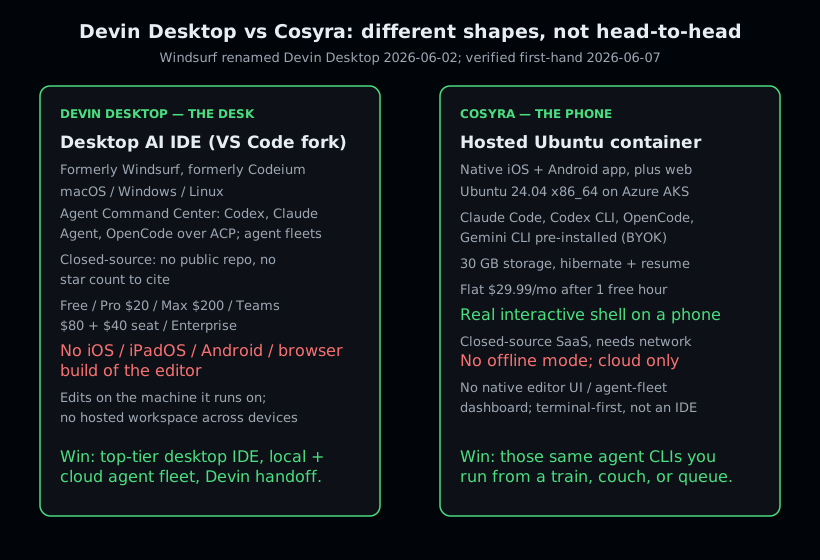
Want the phone-shaped version of Devin Desktop's agent loop? Native iOS and Android, Ubuntu 24.04, Claude Code and Codex CLI already on the PATH, two-minute setup.
App Store · Google Play · Pricing. Sign up, 1 hour free, no credit card. Extend with a 10-hour, 7-day trial when you want more.
What actually happens when you try to use Windsurf on a phone?
Nothing installs. We opened the App Store and the Play Store and searched for Windsurf and for Devin Desktop; there is no editor app to download, because Devin Desktop ships installers for Mac, Windows, and Linux only. There is no browser build of the editor either. The desktop app manages local and cloud agents from one surface, but that surface is the desktop app; the phone is not a client to it.
So the real test is not "Windsurf on a phone vs Cosyra on a phone"; only one
of them exists on a phone. The honest test is the thing Devin Desktop gives
you at a desk, an agent surface where you describe a change and an agent
edits files and runs commands, while you are away from your laptop. We did
exactly that on an iPhone from a train seat. We opened the Cosyra iOS app,
dropped into a full-screen Ubuntu shell, typed claude, pasted
an Anthropic key, described a refactor, approved the diff, and ran
git commit && git push. The agent did the typing; our
job was to prompt, review, and approve. That loop is the part of Devin
Desktop people miss on mobile, and it is the part a cloud container
reproduces, because two of Devin Desktop's at-launch ACP agents (Claude
Agent and Codex CLI) are the very CLIs we pre-install.
The honest caveat runs the other way too. On a Mac, Devin Desktop is a genuinely better editor than a plain shell in our container. Its VS Code lineage, Cascade-style multi-file edits, Tab autocomplete, and the Agent Command Center for managing fleets of agents are real ergonomic wins at a desk. We are not claiming Cosyra replaces Devin Desktop on a laptop; it does not, and it is not trying to. The claim is narrower and, we think, more useful: when the laptop is not there, Devin Desktop gives you nothing to install on the phone, and a container gives you a shell with the same agents.
Where does Windsurf (Devin Desktop) beat Cosyra?
Devin Desktop beats Cosyra on desktop editor UX, agent-fleet management, the Devin cloud handoff, a JetBrains path, and a free entry tier. We ship a product that competes for the same agentic-coding job, and Devin Desktop is still the better answer for several real situations. Here are five, each grounded in a first-hand source.
- A top-tier desktop IDE. Devin Desktop is a full VS Code fork
with Cascade-style multi-file edits, Tab autocomplete, and a mature extension
ecosystem. At a desk, that editing surface beats a shell plus
vimin a mobile container, and we use editors like it ourselves on a laptop. - Local plus cloud agent fleet management. The
Agent Command Center
(Spaces and a Kanban view) orchestrates many local and cloud agents in parallel
from one screen. Cosyra runs agents in shell sessions you split with
tmux; Devin Desktop has a purpose-built UI for managing fleets that a terminal does not match. - The Devin cloud handoff. From the desktop editor you can hand a task to the autonomous Devin cloud agent (reachable from web, Slack, Linear, and CLI) and pick the result back up. That end-to-end editor-to-autonomous-agent pipeline is something Cosyra does not try to be.
- A JetBrains path. "Windsurf for JetBrains" continues as a plugin for IntelliJ IDEA, PyCharm, and WebStorm. If your daily driver is a JetBrains IDE, that is a first-party route Cosyra does not offer.
- A free tier and a $20 entry price. Devin's Free tier is $0 and Pro is $20/month, a lower desk-only entry point than Cosyra's $29.99/month for the hosted machine. If you only ever code at a desk, that is real money saved.
Where does Cosyra beat Windsurf?
Cosyra beats Devin Desktop on the one axis it does not contest: it runs on a phone. Add to that AI CLIs pre-installed, a persistent workspace that follows you across devices, and not needing to supply your own machine. These are different-shape strengths, so we are precise about each.
A real terminal on a phone, not a desktop-only editor
Cosyra gives you an interactive Ubuntu 24.04 shell from the iOS and Android apps. Devin Desktop has no mobile build at all, not iOS, not iPadOS, not Android, not a browser editor. The rename to Devin Desktop did not change that. We did not wait for a mobile editor to appear; we built the phone-native shell that runs the same agents Devin Desktop drives over ACP.
Claude Code, Codex CLI, OpenCode, and Gemini CLI pre-installed
On a fresh Cosyra container, four agent CLIs are already on the PATH. You
export a provider key and type claude. Devin Desktop's Agent
Command Center is excellent, but it runs those agents inside a desktop
editor you have to be sitting at. We pre-install the standalone CLIs because
setup friction is the main thing that kills agent-driven mobile coding;
nobody wants to npm install a toolchain one-handed on a phone keyboard.
$ uname -m
x86_64
$ cat /etc/os-release | head -1
PRETTY_NAME="Ubuntu 24.04 LTS"
$ which claude codex opencode gemini
/usr/local/bin/claude
/usr/local/bin/codex
/usr/local/bin/opencode
/usr/local/bin/gemini
$ export ANTHROPIC_API_KEY=sk-ant-...
$ claude
A persistent workspace that follows you across devices
Cosyra containers carry 30 GB of persistent storage and hibernate after 10 minutes idle, resuming in place on next open. The same container is reachable from your iPhone, your Android tablet, and the web: clone a repo on the couch, pick it up from a waiting room, finish at your desk, all in one shell. Devin Desktop edits on whatever machine it is installed on; its state lives there, and there is no hosted workspace that travels with you.
You don't have to supply the machine
Devin Desktop still needs a computer: a Mac, Windows, or Linux box you own and keep running. Cosyra is the machine. There is nothing to leave powered on at home and SSH back into; the container is the thing you connect to. For a developer whose only always-available device is a phone, that removes the biggest hidden dependency in every "use my desktop editor remotely" workaround.
An opinion Cognition's team would push back on
Here is where we disagree with the prevailing AI-IDE view. Devin Desktop leaning harder into the Agent Command Center, managing fleets of agents from a desktop surface, is a reasonable bet for people at a desk. But the assumption underneath it, that serious agent-driven work belongs at a workstation, is the part we think is wrong. When the agent is doing the typing, the human's job shrinks to prompt, review, and approve, and that job fits a phone fine. We think the phone keyboard is fine for agent-driven coding, and most people who disagree have not actually tried driving an agent from a real shell on a train. Cognition's team would likely argue the editor, and the fleet dashboard around it, is where the work belongs; we built Cosyra because we don't think the desk is the only place the work happens.
Who should pick Windsurf (Devin Desktop) instead of Cosyra?
Pick Devin Desktop if you are a desktop-primary developer who wants a top-tier VS Code-based AI IDE, you want to manage local and cloud agent fleets from one editor, you want the Devin cloud handoff, you live in a JetBrains IDE, or you frequently work offline. We use fast native editors ourselves at our desks and Cosyra from our phones; they are not mutually exclusive.
Try Devin Desktop first if you are one of these profiles
- Desktop-primary developer. You code from a laptop or workstation 95% of the time. Devin Desktop's editor, multi-file edits, and Agent Command Center make your daily IDE better in ways a mobile container does not try to. For this shape of use, Devin Desktop is the right answer, not us.
- You want an agent fleet, not a single shell. If your workflow is dispatching many agents in parallel and handing tasks off to the autonomous Devin cloud, the Agent Command Center is built for exactly that. Cosyra is a terminal-first single workspace; it is not a fleet dashboard.
- Frequently offline. You work on planes, in dead zones, or against local-only files. A local editor beats a cloud container the moment the network drops. If a meaningful share of your work is offline, Devin Desktop wins.
We use a fast native editor when we are sitting at a desk and want the nicest editing surface on the machine. We use Cosyra when the only device we have is a phone. Different tools, different places. Choose by where you are, not by which is "better."
How do you try Cosyra if you're coming from Windsurf?
You try Cosyra from a Windsurf or Devin Desktop background in about two minutes: install from the App Store or Google Play, open the app, and you land in a fresh Ubuntu 24.04 x86_64 container with Claude Code, Codex CLI, OpenCode, and Gemini CLI already on PATH. The agents you drive from the Agent Command Center translate directly, two of the at-launch ACP agents (Claude Agent and Codex CLI) are the same CLIs here, and the difference is there is no install step and no machine to keep powered on. The session below shows the commands we run on a fresh install.
$ # Install Cosyra from the App Store or Google Play,
$ # open the app, drop into the container shell.
$ uname -m
x86_64
$ cat /etc/os-release | head -1
PRETTY_NAME="Ubuntu 24.04 LTS"
$ git clone https://github.com/you/your-repo
$ cd your-repo
$ export ANTHROPIC_API_KEY=sk-ant-...
$ claude
# The agent is already on the PATH. No install, no machine to keep on.
If you wrap long editor sessions in a way that survives interruptions, the
Cosyra equivalent is tmux: start a named session, detach, and
reattach after your phone locks or the connection drops. We walk the whole
flow in our
guide to running Windsurf's agents on your phone, and the post-rename version in
Devin Desktop on your phone. The broader setup is in
How to Run Claude Code on Your Phone, and for the full map of mobile coding options the
AI coding agents on mobile pillar lays out every route. If your real comparison set is other desktop tools, the
same desk-vs-phone logic shows up in
Cosyra vs Zed,
Cosyra vs Kiro, and, for the
closest analog to Windsurf, another editor-embedded agent,
Cosyra vs Cline, plus ByteDance's
own proprietary VS Code fork in
Cosyra vs Trae, all desktop-bound
agentic tools with the same no-mobile-build gap.
Frequently asked questions
Can you run Windsurf (Devin Desktop) on an iPhone or Android phone?
No. As of 2026-07-21, the Devin Desktop download page lists macOS, Windows, and Linux only. There is no native iOS, iPadOS, or Android app, and no browser build of the editor. Windsurf was renamed Devin Desktop on 2026-06-02, and windsurf.com now redirects to devin.ai/desktop, but the rename did not add a mobile surface. To get the agent loop Devin Desktop gives you at a desk while you are on a phone, you run the same agent CLIs in a cloud Linux container. That is what we built Cosyra to be.
[source: Devin Desktop download page: macOS, Windows, Linux only, verified 2026-07-21]
Is Windsurf still called Windsurf?
No. Cognition renamed the editor to Devin Desktop on 2026-06-02. The old domain windsurf.com 308-redirects to devin.ai/desktop, and Cognition's own FAQ states plainly that Devin Desktop is the new name for Windsurf. Plans, pricing, extensions, and settings carried over as an over-the-air update, so existing Windsurf installs became Devin Desktop without any migration work. If a 2026 post still calls it Windsurf without naming the rename, it is out of date.
[source: Cognition, "Windsurf is now Devin Desktop", dated 2026-06-02]
Is Devin Desktop open source?
No. Devin Desktop is a closed-source, proprietary VS Code fork from Cognition. There is no public source repository, which means there is no GitHub star count to quote for it the way you legitimately can for open-source editors like Zed or Warp. If reading or self-building your editor's source is a hard requirement, Devin Desktop cannot meet it. Cosyra's orchestration is also closed-source, so on pure auditability an open-source desktop editor beats both of us.
[source: Devin Desktop FAQ, Cognition docs, verified 2026-07-21]
Does Devin Desktop run AI agents like Claude Code?
Yes, at the desk. Devin Desktop's Agent Command Center runs external agents over the Agent Client Protocol (ACP). As of 2026-07-21 the desktop page lists Devin Local, Codex, Claude Agent, OpenCode, and Cascade, plus any other ACP-compatible agent — Cognition's own Devin Local and Cascade have joined the three third-party agents named at launch. Three of them overlap the four CLIs Cosyra pre-installs (Claude Code, Codex CLI, OpenCode, Gemini CLI). The difference is the surface: Devin Desktop runs them inside a desktop editor you sit at; Cosyra runs them in a shell you reach from a phone.
[source: Devin Desktop page, ACP agent list, verified 2026-07-21]
Can I use Devin the cloud agent from my phone instead?
Partly, but be precise about which Devin you mean. Devin Desktop is the editor and has no phone client. Devin the cloud agent is a separate surface reachable from the web at app.devin.ai, plus Slack, Linear, CLI, and API. You can kick off or check a cloud Devin task from a phone browser, but that is an autonomous-agent dashboard, not an interactive terminal or editor where you run Claude Code yourself and watch it work. If you want a real shell with the agents on the PATH, that is the container we run.
[source: Devin cloud agent web surface, browser-reachable, verified 2026-07-21]
How much does Devin Desktop cost compared to Cosyra?
Devin's unified plans cover both Devin Desktop and Devin Cloud: Free at $0, Pro at $20/month, Max at $200/month, Teams at $80 plus $40 per dev seat, and custom Enterprise. Cosyra is a flat $29.99/month, or $300/year, after a free hour. These buy different things: Devin's tiers meter agent quota and model usage on an editor you run on your own machine, while Cosyra's price is the hosted machine and 30 GB of storage itself, with the agent CLIs already installed. It is not a like-for-like dollar comparison, so we do not present it as one.
[source: Devin pricing page, Free / Pro $20 / Max $200 / Teams, verified 2026-07-21]
Pre-installed Claude Code, Codex CLI, OpenCode, and Gemini CLI. We run them in a real x86_64 Ubuntu container, reached from a native iOS or Android app. Two-minute setup.
Windsurf on phone · Cosyra vs Zed · AI coding agents on mobile · See pricing. Sign up, 1 hour free, no credit card. Extend with a 10-hour, 7-day trial when you want more.