Short answer. Cosyra vs Trae is not agent-vs-agent; it's two different shapes. Trae is ByteDance's AI IDE, and really two products: the proprietary Trae IDE / SOLO app (desktop and a desktop-browser Cloud IDE) and a separate open-source Trae Agent CLI. Trae has a free mobile app, but it's a work-assistant that dispatches tasks to your PC or Trae's cloud, not a terminal you code in. Cosyra is a paid mobile cloud terminal: a per-user Ubuntu 24.04 container with Claude Code, Codex CLI, OpenCode, and Antigravity CLI pre-installed, reached from native iOS and Android apps. Pick Trae for a full desktop IDE; pick Cosyra to run an agent on an actual phone.
We wrote this after doing the homework the comparison needs. On 2026-07-12
we cloned bytedance/trae-agent
and read its pyproject.toml and README first-hand: the CLI entry
point is trae-cli, it pins python >=3.12,
installs with uv sync, and is MIT-licensed with 11,826 GitHub
stars that day. We also checked the mobile app through the store listings.
The iOS build
id 6761401019 is v0.0.12 in the Productivity category, and
the Google Play tagline is "dispatch tasks by voice or text." That one detail
is the whole comparison: Trae's phone app dispatches work to a machine somewhere
else; Cosyra puts the machine, and the terminal, on the phone.
This post was written by the Cosyra team. We compared Cosyra against Trae based on hands-on testing of both (cloning and reading the bytedance/trae-agent repo, checking the TRAE app's store listings, and running Cosyra from a phone) plus our internal Trae factsheet. Stars, versions, and app details verified 2026-07-12; Trae pricing is corroborated across 2026 reviews and should be re-checked on trae.ai before you rely on a figure.
tl;dr
Use Trae if you want a free, full desktop AI IDE built on VS Code with bundled frontier models and a low paid tier from about $3/month, and you code at a desk. Use Cosyra if you want to actually code from a phone: a real terminal and agent CLIs on iOS or Android over a persistent cloud container, with no PC to keep awake. They solve different problems, and you can install the Trae Agent CLI inside Cosyra with one command.
App Store · Google Play. Sign up and pick a plan. Eligible new users can start a 7-day free trial in the App Store app.
Want a Trae-style agent running from your phone?
Our container is the always-on Linux machine the Trae Agent CLI needs. Install
it with uv, or use the four agents we pre-install, all
reached from a native iOS or Android app with no PC left on at home.
App Store · Google Play · Pricing. Sign up and pick a plan, from $20/month.
Which Trae are we even comparing?
Before any feature table, the one thing to get right about Trae is that "Trae" is two products under one ByteDance brand, and they have different licenses, prices, and platforms. Conflating them is how comparisons go wrong.
- Trae IDE / SOLO: a proprietary AI IDE built on VS Code, plus SOLO, a standalone agent app launched 2026-03-31 with a Code mode and an MTC ("More Than Coding") mode. Free tier plus paid tiers; desktop (macOS, Windows) and a desktop-browser Cloud IDE. This is the piece most people mean by "Trae." It is closed-source. Free is not the same as open.
- Trae Agent CLI: a separate, MIT-licensed research CLI at
github.com/bytedance/trae-agent. Its README describes it as a platform for "studying AI agent
architectures" and "ablation studies." BYOK, Python 3.12+,
trae-cli run. It runs anywhere Python runs, including a cloud Linux container reached from a phone.
Neither of those is a phone coding app. The mobile app on the stores is the
SOLO companion (its iOS bundle id is literally com.stone.solo.i18n): per the
Google Play listing and Apple's lookup API on 2026-07-12, it dispatches tasks to your PC or Trae's
cloud, writes documents, and answers code questions in a chat. There is no shell,
no repo you edit, no place the Trae Agent CLI runs on the device.
How do Cosyra and Trae compare feature by feature?
Cosyra is a cloud Ubuntu container reached from native iOS and Android apps with AI agents pre-installed; Trae is a desktop/browser AI IDE with a dispatch-only mobile companion and a separate open-source CLI. Trae is cheaper to start and gives you a full GUI editor at a desk; Cosyra is the machine that runs an agent on the phone itself. The table lines them up on thirteen attributes, verified 2026-07-12.
| Feature | Cosyra | Trae |
|---|---|---|
| Pricing | $20 / month Core or $30 / month Pro | Free tier; paid IDE/SOLO from ~$3/mo (Lite) to ~$100/mo (Ultra) |
| Free tier | None. 7-day free trial for eligible new users in the App Store app | Free IDE tier (limited usage); mobile app is free |
| OS support | iOS, Android, web | macOS, Windows, desktop browser; mobile app is dispatch-only |
| Runs a coding agent on the phone | Yes, real terminal + agent CLIs on iOS and Android | No; phone app dispatches tasks to a PC or Trae's cloud |
| AI agents pre-installed | Claude Code, Codex CLI, OpenCode, Antigravity CLI | Trae's own agent in the IDE; models bundled on paid tiers |
| Where the agent runs | In the cloud container; phone is the terminal | In the desktop IDE, or dispatched to your PC / Trae's cloud |
| Persistent storage | 30 GB cloud, survives device loss | On your machine (IDE workspace); cloud tasks are ephemeral |
| Offline capability | No (cloud-only) | IDE works offline with a local model; cloud/dispatch needs network |
| Editing UX | Terminal + agent CLIs in the container | Full VS Code-based GUI editor with extension compatibility |
| File sync across devices | Same container from any device | Tied to the desktop IDE; sync is on you |
| Max session length | Hibernates on idle, resumes on reopen | As long as your desktop and IDE stay open |
| API key model | BYOK (you pay Anthropic / OpenAI / Google) | Bundled models on paid tiers; CLI is BYOK |
| Open-source status | Client app closed, orchestration proprietary | IDE/SOLO proprietary; only the separate Trae Agent CLI is MIT |
Want the phone side of this comparison? We ship a persistent Ubuntu container with four agents pre-installed, and you can add the Trae Agent CLI into it too, on iOS and Android, in about two minutes.
App Store · Google Play · Pricing. Sign up and pick a plan. Eligible new users can start a 7-day free trial in the App Store app.
Where does the coding actually run?
The headline that matters for a phone isn't price, it's where the code runs. Trae's real coding surfaces are desktop or browser: the IDE and SOLO on macOS or Windows, or the Cloud IDE in a desktop browser. The phone app is a fourth surface that only dispatches or chats. Cosyra has one surface, a native app over a cloud container, and the agent runs there, on hardware you never have to own or keep on.
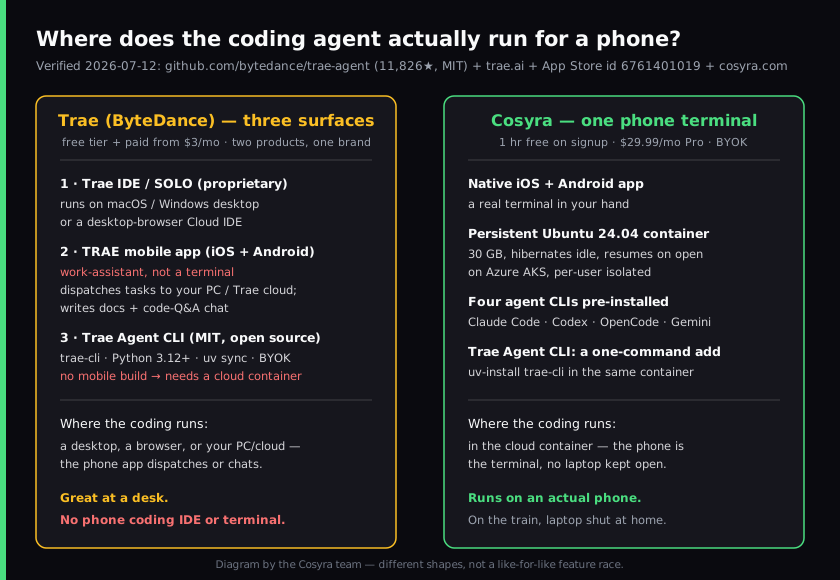
We reach the same container from an iPhone on the train, an Android tablet on the couch, or a laptop browser at a desk, and it's the same files and the same half-finished agent session each time. Trae's model assumes there's a desktop in the picture: the IDE runs on it, or the phone app dispatches to it. If you don't have a PC humming at home, that assumption is the gap.
Where does Trae beat Cosyra?
Trae beats Cosyra on being free to start, on having a real GUI editor, on bundled frontier models, and on desktop-grade agent runs for large refactors. We ship a paid mobile product and we still think Trae is a strong tool for the right person. Here's where it's the better pick.
- Free to start, and cheap to keep. Trae has a free tier, and its paid Lite tier is reported around $3/month, one of the lowest in the category, up to Ultra near $100/month (re-verify on trae.ai before quoting a figure; the pricing pages are JS-rendered and we corroborated tiers across 2026 reviews). Cosyra's compute is a subscription from $20/month. On price to start, Trae wins.
- A full GUI editor. Trae is a VS Code-based IDE with extension compatibility, so there's zero relearning for VS Code users, and multi-file refactors in a real editor beat typing in a phone-sized terminal at a desk. That's a category we don't try to compete in.
- Bundled models, no key juggling. Paid IDE/SOLO tiers include model usage (Claude, GPT, DeepSeek, and ByteDance's own Doubao) through a usage balance, so you don't manage provider keys. We're BYOK by design; that's a feature for some and friction for others.
- Desktop-grade SOLO and MTC. SOLO's agent runs on desktop hardware for big multi-step tasks, and its MTC ("More Than Coding") mode reaches past code into broader product work. A phone terminal won't match a desktop for a thousand-file refactor, and we won't pretend otherwise.
- A genuinely hackable open-source CLI. If you study agent internals, the MIT Trae Agent CLI is built for exactly that: modular, transparent, meant to be modified. That's a real strength Cosyra doesn't offer.
Where does Cosyra beat Trae?
Cosyra beats Trae on the one thing this page is about: running a coding agent on an actual phone, with a real terminal, over a workspace that follows you across devices and needs no PC kept awake. Trae's phone app is a controller for compute that lives somewhere else. We'd rather be the compute.
It runs a coding agent on the phone; Trae's app dispatches to a PC
This is the load-bearing difference. Per its store listings, the TRAE mobile app dispatches tasks by voice or text to your PC or Trae's cloud, writes documents, and runs a code-Q&A chat. There's no terminal, no shell, no repo you edit on the device. Our native Google Play and App Store apps put a real Ubuntu terminal in your hand, and that terminal runs agents directly. If you want to code from a phone at all, that's the gap.
No PC to keep awake
Trae's real coding surfaces need a desktop: the IDE runs on it, and the phone app dispatches to it (or to Trae's cloud). That machine is yours to power and keep reachable. Our container is the always-on Linux machine, in the cloud, reached from a native app with nothing running at home. It keeps working whether your laptop is shut or in another city.
The agent runs in the cloud, and it can be Trae's own CLI
On first boot our container already has Claude Code, Codex CLI, OpenCode, and Antigravity CLI on the PATH. And because the Trae Agent CLI is MIT-licensed and a normal Python package, you can add it to the same container and run it with your own key. So Cosyra can host Trae's agent, running in the cloud, driven from your phone. The full walkthrough is in Trae AI on your phone.
A persistent workspace across devices, no machine to supply
A Cosyra container persists in the cloud and is the same container whether you reach it from an iPhone, an Android tablet, or a laptop browser. Drop your phone, buy a new one, log in, and your repo, your shell history, and your half-finished agent session are still there. With Trae, coding state lives on whatever desktop you installed the IDE on; move devices and you're setting it up again.
An opinion Trae's crowd will push back on
We think a phone terminal that runs the agent beats a phone app that only hands the work to a machine you still have to own and keep on. The dispatch model is clever, but it quietly assumes a desktop is always part of your setup. Plenty of good engineers will disagree. At a desk with a real IDE and two monitors, Trae's editor is a better place to work than any terminal, and they're right about that. But for someone who wants to kick off and steer an agent from a phone in a waiting room, "free desktop IDE plus an app that pings your PC" isn't mobile coding; it's remote control of a desk you're not sitting at. That's the exact reason we built Cosyra as a hosted container with a native app instead of another desktop editor.
Who should pick Trae instead of Cosyra?
Pick Trae instead of Cosyra if you're desk-bound and want a free full IDE, if a low monthly price matters more than mobility, or if you want bundled models with no key to manage. For those profiles Trae is the better tool, and we'd tell you so.
Try Trae first if you are one of these profiles
- Desk-bound and want a real editor. You code at a desk with a GUI IDE open and a phone is not your primary surface. Trae's VS Code-based editor with multi-file refactors is a better editing experience than a terminal. And the free tier costs nothing to try.
- Price-sensitive and model-bundled. You want frontier models without juggling API keys, and a ~$3/month Lite tier fits your budget better than $20. If you're at a machine anyway, Trae's bundled-usage model is the cheaper path.
- Studying agent internals. You want to read and modify an agent's architecture. The MIT Trae Agent CLI is built for ablation studies and hacking; that's a research fit Cosyra doesn't serve.
We use desktop IDEs at our desks and we use Cosyra when we want an agent on a phone with no PC to keep open. They aren't mutually exclusive, and since you can install the Trae Agent CLI inside a Cosyra container, the line between them is thinner than it looks.
How do you try Cosyra if you're coming from Trae?
You try Cosyra from a Trae background in about two minutes: install from the App Store or Google Play, sign in, and you land in a fresh Ubuntu 24.04 x86_64 container instead of a desktop IDE. Your four agents are already on the PATH, and if you want Trae's own agent, it's a one-command add. The session below is what we run on a fresh install.
$ # Install Cosyra, open the app, drop into the container.
$ cat /etc/os-release | head -1
PRETTY_NAME="Ubuntu 24.04 LTS"
$ which claude codex opencode agy
/usr/local/bin/claude
/usr/local/bin/codex
/usr/local/bin/opencode
/usr/local/bin/agy
$ # Want Trae's agent too? MIT CLI, one add into this container.
$ uv tool install trae-agent # then trae-cli run "..."
The big unlock for most people coming from Trae: there's no desktop in the loop anymore. The container is the always-on machine, it hibernates when idle and resumes where you left off, and you reach it the same way from any device. The agent runs in it whether the app that started it is an iPhone or an Android tablet.
Frequently asked questions
Does Trae have a mobile app, and can I code on it?
Trae has a free mobile app on iOS and Android (TRAE - AI Work Assistant, v0.0.12, Productivity category, verified 2026-07-12), but it's a work-assistant, not a coding IDE or terminal. It dispatches tasks by voice or text to your PC or Trae's cloud, writes documents, and runs a code-Q&A chat. The coding compute is remote, and there's no phone terminal or repo editor. To run a coding agent on the phone itself you need a real terminal.
[source: Google Play TRAE listing, "dispatch tasks by voice or text"]
Is Trae open source?
Only one of the two Trae products is. The Trae IDE and SOLO app are proprietary (free to install, closed-source). The separate Trae Agent CLI is MIT-licensed, 11,826 stars on 2026-07-12, and BYOK. So "Trae is open source" is only true if you mean the CLI, not the IDE. Say which Trae.
[source: bytedance/trae-agent repo, MIT license]
Can I run the Trae Agent CLI from my phone?
Not directly, trae-cli is a Python 3.12+ package installed with
uv, and there's no iOS or Android build. The way to run it
from a phone is inside a cloud Linux container you reach from a native
app: add it on top of the container, set your provider key (BYOK), and
drive it from the terminal. That's the same place Cosyra's four
pre-installed agents run.
[source: trae-agent pyproject.toml, requires-python >=3.12, trae-cli entry point]
How much does Trae cost, and how is that different from Cosyra?
Trae has a free tier plus paid IDE/SOLO tiers reported from about $3/month (Lite) up to $100/month (Ultra), billed as a token usage balance. Re-verify current figures on trae.ai/pricing before relying on them. That buys editor usage and bundled models. Cosyra's $20/month is not the agent; it's the always-on Ubuntu machine, 30 GB storage, and native apps, with BYOK on top. Trae is cheaper to start; Cosyra is the machine that runs on a phone.
[source: trae.ai, pricing and product; re-verify tiers in a browser]
Is Trae SOLO available on mobile?
No. SOLO is ByteDance's standalone agent app (launched 2026-03-31) and it runs on the desktop and in a desktop browser (Cloud IDE). As of 2026-07-12 it was still gated (invitation/internal-testing per multiple 2026 reviews). The mobile app is the SOLO companion that dispatches cloud tasks, not SOLO itself running on the phone.
[source: docs.trae.ai, SOLO is a desktop/browser product]
Is the Trae Agent CLI pre-installed in Cosyra?
No. The four agents we pre-install are Claude Code, Codex CLI, OpenCode, and Antigravity CLI. Trae Agent is a one-command add: because it's MIT-licensed and a normal Python package, you install it inside the container the same way you would on any Linux box. We don't pre-install it, and we wouldn't claim it runs end to end in the container until we test it ourselves.
Four agents pre-installed, and Trae's own CLI is one add away. We run them in a real x86_64 Ubuntu container, reached from a native iOS or Android app, with no desktop to keep open. Two-minute setup.
Trae AI on your phone · AI coding agents on mobile · Cosyra vs Cursor · See pricing. Sign up and pick a plan. Eligible new users can start a 7-day free trial in the App Store app.