Short answer. Cursor and Cosyra are not the same shape. Cursor is a desktop-first AI IDE (macOS, Windows, Linux) built on VS Code; its phone story is an agent controller, a native iOS app (public beta since 2026-06-29) and an Android PWA, that lets you launch and review cloud agents, not a place to sit and type in a terminal. Cosyra is a native iOS and Android app over a managed Ubuntu 24.04 container with Claude Code, Codex CLI, OpenCode, and Antigravity CLI pre-installed. So if you searched "Cursor on phone": you can run Cursor's agents from your phone, but you cannot run Cursor itself there. For an interactive terminal on the phone, that is the gap Cosyra fills.
We use both. On a desktop, Cursor is excellent. It is the AI editor most of our own team reaches for when a laptop is open. The question this page answers is narrower: what happens when the laptop is closed and the only screen you have is the phone in your pocket? That is the moment Cursor's agent controller and Cosyra's terminal start to diverge, and it is worth being precise about which one you actually want.
This post was written by the Cosyra team. We compared Cosyra against Cursor based on hands-on use of both, Cursor's desktop IDE and its mobile agent surface (a native iOS app plus an Android PWA), and Cosyra's native apps. We cross-checked Cursor's facts against cursor.com, Cursor's docs and launch blog, and Cursor's community forum. Mobile/native-app facts re-verified 2026-07-06 against cursor.com/blog/ios-mobile-app; pricing 2026-06-23. Where Cursor has not published a detail, we say so rather than guess.
tl;dr
Use Cursor if the desktop IDE is your home base and you want to fire off background agents from your phone and review their diffs later. Use Cosyra if you want to actually work from the phone, drive an AI agent live in a real shell, run commands, edit files, on the train, on the couch, between meetings.
App Store · Google Play. Eligible new users can start a 7-day free trial in the App Store app.
What does "Cursor on your phone" actually mean?
Cursor launched its web and mobile experience around mid-2025 and paired it with cloud agents (background agents that run in their own cloud VMs) on 2026-02-24. On 2026-06-29 it went further and shipped a native iOS app in public beta on the App Store (any paid plan); on Android you still open cursor.com/agents and "install the app as a Progressive Web App (PWA)." From either one you "run tasks while you're away": launch a bug fix, build a feature, or ask a codebase question, then "review agent diffs, pull requests" when the work is done.
Read that carefully, because the wording is doing real work. The phone is a control surface for agents that run elsewhere. You start them, you add follow-up prompts, you review the result. You do not get a terminal, you do not get inline editing. For that, Cursor's docs say you "pick up the agent's work in Cursor," meaning the desktop IDE. That is a genuinely useful workflow, and we are not knocking it. It is just a different thing from "I have a Linux shell in my hand."
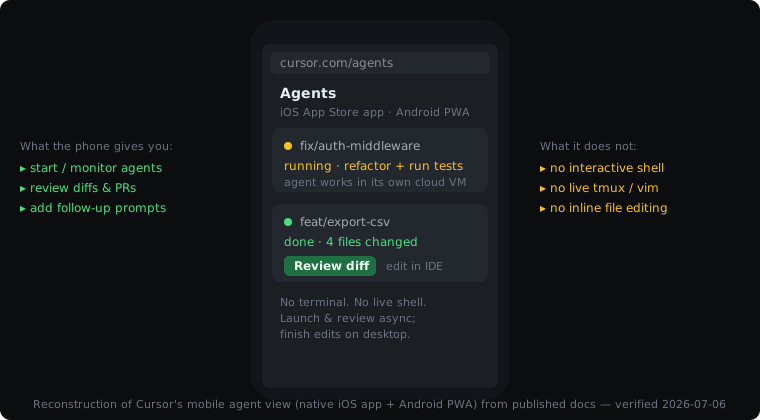
Here is the opinion we will plant a flag on, and that the Cursor-centric crowd tends to disagree with: async cloud agents are not the same as coding on your phone. Firing a task and checking the diff twenty minutes later is review, not flow. When we are standing on a train platform and want to actually push a change through (read the failing test, tell the agent what we meant, watch it re-run), we want a live shell, not a job queue. Plenty of people who say "the phone is fine for kicking off agents" have never tried driving one interactively. We think interactive beats async on a phone more often than Cursor's mobile design assumes. If you only want the mechanics of Cursor's mobile app, the install steps, and what each tap does, we wrote those up separately in Cursor on phone: what mobile actually does.
How do Cosyra and Cursor compare feature by feature?
The core difference: Cosyra is a hosted mobile cloud terminal with a real Ubuntu container behind a native app, while Cursor is a desktop AI IDE whose mobile presence supervises cloud agents, a native iOS app plus an Android PWA, neither with a shell. The table maps them on twelve attributes as of 2026-07-06. Where a value depends on Cursor's desktop versus mobile context, we split it out rather than flatten it.
| Feature | Cosyra | Cursor |
|---|---|---|
| Pricing | Core $20/mo or Pro $30/mo | Hobby free; Individual plan: Pro $20/mo, Pro+ $60/mo, Ultra $200/mo; Teams $40/user/mo (re-verified 2026-06-23) |
| Free tier | None. 7-day free trial for eligible new users in the App Store app | Hobby: free, no credit card, limited agent requests + tab completions |
| OS support | Native iOS + Android apps (also web) | Desktop IDE on macOS/Windows/Linux; mobile is a native iOS app (beta) + Android PWA (agent control, no editor) |
| AI agents pre-installed | Claude Code, Codex CLI, OpenCode, Antigravity CLI | Cursor's built-in agent (multi-model: GPT-5.5, Opus 4.8, Gemini 3.1 Pro, Grok 4.3) |
| Persistent storage | 30 GB per user (Pro) | Cloud-agent workspace tied to your repo; no published per-user GB |
| Offline capability | No (cloud container) | No on mobile (cloud agents need connectivity); desktop editing works offline |
| Container / sandboxing | Per-user Ubuntu 24.04 x86_64 container on Azure AKS | Cloud agents run in their own remote VMs ("their own computers") |
| Interactive shell on mobile | Yes, full Ubuntu shell with tmux, vim, git | No, the app/PWA launches/reviews agents; no terminal |
| File sync / where edits land | Files persist in the container, reachable from iPhone, Android, web | Edits land as repo diffs/PRs; inline editing in the desktop IDE |
| Max session length | Hibernates after 10 min idle, resumes on reopen; 120 hrs/mo | Agents run async until the task finishes; no published session cap |
| API key model | BYOK, your Anthropic / OpenAI / Google keys | Subscription + usage; models included (optional own-key in settings) |
| Open source | Proprietary, hosted | Proprietary (built on open-source VS Code / Code-OSS) |
Want the interactive-terminal side of this comparison? Cosyra ships on the App Store and Google Play with Claude Code, Codex CLI, OpenCode, and Antigravity CLI pre-installed in a real Ubuntu container. Two-minute setup. Plans start at $20/month.
Where does Cursor beat Cosyra?
Cursor is the market-leading AI code editor for a reason, and on a desktop it is in a different category from a mobile terminal. We would be lying if we pretended otherwise. Here is where Cursor is clearly the better tool.
- The desktop IDE itself. Syntax highlighting, visual diffs,
a debugger, refactoring tools, an extension ecosystem inherited from VS Code,
Cursor is a full editor. Cosyra gives you
vimin a terminal. For a long editing session at a desk, the IDE wins, full stop. - Multi-model in one UI. Cursor lets you switch between GPT-5.5, Opus 4.8, Gemini 3.1 Pro, and Grok 4.3 per request, with an autonomy slider for how independently the agent acts. See Cursor's features page. On Cosyra you switch by switching CLI, which is more friction.
- Async cloud agents that run while you are away. This is genuinely good on a phone for the right task: kick off a long refactor at the bus stop, get a Slack ping when it is done, review the PR. If your workflow is "delegate and review," Cursor's mobile is built for it and Cosyra is not.
- Bugbot and PR review. Cursor's Bugbot reviews pull requests automatically. Cosyra has no equivalent. Code review is on you or whatever agent you run.
- A free tier. Cursor's Hobby tier is free indefinitely, and Cursor Pro is $20/month, the same as Cosyra Core. If a desktop editor with a generous free tier is what you need, Cursor is the better deal.
Where does Cosyra beat Cursor?
Cosyra wins in exactly one place, but it is the place this whole page is about: actually working from the phone. Not delegating to an agent and checking back, sitting in a real Linux shell and driving the work forward with your thumbs.
A real interactive terminal, on the phone
Cosyra is a native app over an Ubuntu 24.04 container. You open it and you
are at a shell prompt with tmux, vim, git, Node, and Python, plus Claude Code, Codex CLI, OpenCode, and Antigravity
CLI pre-installed. You type a prompt to Claude Code, watch it edit, run the
tests yourself, read the failure, tell it what you meant, and push, all
without a laptop. Cursor's mobile app cannot do this; it has no terminal. We
built Cosyra this way because the thing that kills agent-driven mobile dev
is setup friction and the lack of a live shell, not the model.
A native app built for a shell, not for agent buttons
Cosyra ships on the App Store and
Google Play. Cursor now has a native iOS app
too (since 2026-06-29), so "native vs browser" is no longer the line. The
line is what the app is built to do. Cursor's app renders agent cards and a
Review diff button; there is no text-entry-into-a-shell to get right.
Cosyra's whole input surface exists to feed a terminal, which matters more
than it sounds: mobile keyboards mangle shell input with autocorrect,
smart-punctuation substitution, lost modifier keys, and flaky IME behavior,
and it is worse in Cursor's Android PWA, where a browser textarea needs a shim to behave. A purpose-built native terminal view handles Ctrl, Esc,
Tab, and pipe characters the way a shell expects. If you have ever SSH'd from
mobile Safari, you know the difference. For a deeper version of this argument,
see our
mobile coding terminal guide.
You drive the agent live, not async
Cursor's mobile model is fire-and-review. Cosyra's is hands-on-keyboard. When we are on the couch debugging something fiddly, the fast loop is: prompt, watch, correct, re-run, seconds apart, not minutes. That tight loop needs a live session, which is what a terminal gives you and a background-agent queue does not. If you want the agent-specific walkthrough, see our guide to running Claude Code on your phone.
BYOK and documented resources
Cosyra is BYOK, your Anthropic, OpenAI, or Google keys, billed by the provider directly, no markup from us. And we publish the numbers: Ubuntu 24.04, 30 GB persistent storage, 120 hours of compute per month, hibernation after ten minutes idle. Cursor bundles model usage into its subscription tiers, which is simpler for some and more opaque for others.
Who should pick Cursor and who should pick Cosyra?
These tools barely overlap, so the honest decision framework is about your primary surface, not about which is "better."
Try Cursor first if…
- Your home base is a laptop or desktop and you want the best AI IDE for it. Cursor on the desktop is hard to beat.
- Your mobile need is "delegate a task and review the result later." Cursor's cloud agents plus the iOS app and Android PWA are purpose-built for that.
- You want multi-model switching, Bugbot PR review, and a full editor with debugging, and a free tier to start on.
Choose Cosyra if…
- The phone is your coding surface a meaningful amount of the time, commuting, on call, away from a desk, and you want to actually work, not just review.
- You want a real interactive shell with tmux, vim, and git, and AI CLIs pre-installed, in a native app rather than a browser tab.
- You prefer BYOK and published resource specs you can plan against.
- You already drive Claude Code, Codex CLI, OpenCode, or Antigravity CLI and just want them on your phone without setup.
The honest summary: most developers who use both keep Cursor on the desktop and reach for Cosyra when the laptop is closed. They are complements far more than substitutes. If you only do one of the two, desk-bound IDE work, or phone-first terminal work, pick the one that matches where you actually sit.
How do you try Cosyra if you come from Cursor?
Setup takes about two minutes: install from the App Store or Google Play, open the app, and you land in an Ubuntu 24.04 x86_64 container with Claude Code, Codex CLI, OpenCode, and Antigravity CLI already installed. If you ran Cursor with your own API key in settings, the same keys work here. Paste them into the shell and go. The session below shows what a fresh install looks like.
$ uname -m
x86_64
$ cat /etc/os-release | head -1
PRETTY_NAME="Ubuntu 24.04 LTS"
$ which claude codex opencode agy
/usr/local/bin/claude
/usr/local/bin/codex
/usr/local/bin/opencode
/usr/local/bin/agy
$ # paste ANTHROPIC_API_KEY / OPENAI_API_KEY / GEMINI_API_KEY
$ claude "read the failing test and fix it"
# live shell, watch it edit, run tests, correct it, push.
Because it is a full Ubuntu, anything you would apt-get or
npm install -g on a server works here too. If your async, delegate-and-review
workflow already lives in Cursor's cloud agents, keep it there, and use Cosyra
for the moments you want to be hands-on from the phone. If you are cross-shopping
AI-native desktop editors more than cloud agents, Zed is the open-source one (GPL-3.0
+ Apache-2.0) that runs Claude Agent, Codex CLI, and Gemini CLI over the Agent
Client Protocol, and it shares Cursor's gap: no iOS or Android build. We lay that
trade out in
Cosyra vs Zed. The other VS Code
fork in this bracket, Windsurf, became Devin Desktop on 2026-06-02 and
carries the same desktop-only limit. We cover that head-to-head in
Cosyra vs Windsurf. ByteDance
ships its own VS Code fork, Trae: the IDE is macOS and Windows only (Linux
is still limited), and its free phone app is a task-dispatch work assistant,
not a coding IDE you type in, so it hits the same phone wall. We lay that
out in Cosyra vs Trae. For a
broader map of the category, see our
AI coding agents on mobile pillar.
Frequently asked questions
Is there a Cursor app for iPhone or Android?
On iPhone, yes as of 2026-06-29: Cursor shipped a native iOS app in public beta on the App Store, available on any paid plan. On Android there is still no native app. You install the web interface as a PWA from cursor.com/agents. A separate third-party "Cursor AI Mobile" iOS app also exists but is not made by Anysphere. Either official surface controls cloud agents; neither is a terminal. Cosyra ships native iOS and Android apps on both stores, with a real shell.
[source: Cursor blog: "Build from anywhere with Cursor for iOS", 2026-06-29]
Can I actually code on my phone with Cursor?
You can launch and supervise cloud agents from the iOS app or Android PWA, start a task, add follow-ups, run several in parallel, review the diffs and PRs. You cannot open an interactive shell or do inline editing on the phone; Cursor's docs have you "pick up the agent's work in Cursor" on the desktop for that.
[source: Cursor blog: "Cursor on web and mobile"]
How much does Cursor cost compared to Cosyra?
Cursor: free Hobby tier, then one Individual plan billed monthly or yearly with three usage levels, Pro $20/month, Pro+ $60/month, Ultra $200/month, plus Teams $40/user/month and custom Enterprise (as of 2026-06-23). Every paid plan includes a set amount of model usage; on-demand usage past that is billed in arrears. Cosyra: Core $20/month or Pro $30/month with a managed Ubuntu container, 30 GB storage, 120 hours of compute, and hibernation. Both are separate from your AI provider's model bill.
Is Cursor's mobile a native app or a PWA?
Both now, split by platform. On iPhone it is a native App Store app (public beta since 2026-06-29). On Android it is still a PWA. Cursor's docs say to "install the app as a Progressive Web App (PWA) for a native app experience," and agents work on "any desktop, tablet, or mobile browser." The important part for coding is the same either way: it launches and reviews cloud agents, with no interactive terminal.
[source: Cursor blog: "Build from anywhere with Cursor for iOS", 2026-06-29]
Does Cursor work offline on a phone?
No. The mobile experience drives cloud agents on remote VMs, so it needs connectivity. Cosyra is the same here: the container is in the cloud. For genuinely offline phone work, a local terminal like Termux is the only option, with the trade-offs we cover in our Cosyra vs Termux comparison.
[source: Cursor blog: "Cursor on web and mobile"]
Can I run Claude Code or a real terminal on my phone like Cursor's CLI?
Not inside Cursor's mobile app or PWA. Neither has a shell. To drive a CLI
agent live from a phone you need a real terminal, which is what Cosyra is:
a native app over an Ubuntu container with Claude Code, Codex CLI,
OpenCode, and Antigravity CLI installed, plus tmux, vim, and git. You can
add Cursor's own agent CLI on top. See
running the Cursor CLI on your phone, or our head-to-head
Cosyra vs Cursor CLI
comparison. If wrapping the Cursor CLI in a web UI is what you are after instead,
see our
Cosyra vs CloudCLI comparison.
[source: Cursor forum: "Introducing Cursor on Web & Mobile"]
tl;dr
Use Cursor if the desktop IDE is your home base and your phone need is launching and reviewing cloud agents. It is the market-leading AI editor and its mobile app (native on iOS, PWA on Android) is built for delegate-and-review. Use Cosyra if you want to actually work from the phone in a real interactive terminal with Claude Code, Codex CLI, OpenCode, and Antigravity CLI pre-installed. Most people who use both keep Cursor on the desk and Cosyra in the pocket.
App Store · Google Play · Pricing · AI coding agents on mobile
Native iPhone and Android apps, on the App Store and Google Play today. Cosyra runs Claude Code, Codex CLI, OpenCode, and Antigravity CLI in a real Ubuntu 24.04 container with 30 GB of persistent storage and session hibernation, a live terminal in your pocket, not a job queue.