Yes, you can use Cursor on your phone, but it is an agent dashboard, not the desktop IDE and not a terminal. On iPhone there is now a native iOS app (public beta since 2026-06-29, on any paid plan); on Android you still install cursor.com/agents as a Progressive Web App. Either way you start cloud agents, approve their steps, and review the pull requests they open. The actual code editing still happens back on a desktop. If what you actually want is an interactive coding environment on your phone, that is a different shape of tool, covered at the end.
This is the Cursor-specific companion to our broader AI coding agents on mobile pillar, and a sibling to the head-to-head in Cosyra vs Cursor. Cursor and a mobile terminal solve different halves of the same problem, so this guide sticks to one question: what does "Cursor on your phone" really get you, and where does it stop? If it is plain VS Code on your phone you are after rather than Cursor's agent layer, Cursor is a fork of VS Code, that guide covers what the browser build (vscode.dev) can and cannot do. Windsurf (renamed Devin Desktop in 2026) is another AI fork of VS Code in the same desktop-only spot; running Windsurf's agents from a phone follows the same cloud-container path this guide lays out. Zed sits outside the fork family (Rust, built by the Atom and Tree-sitter team) and still ends up desktop-only, so Zed on your phone answers the same question for its Agent Panel.
Jump to the part that matches what you came for:
- Just tell me how to set it up. Open the web interface and add it to your home screen. PWA setup ↓
- What can I actually do from the phone? Launch agents, approve steps, review PRs, not inline editing. Capabilities table ↓
- I want to type commands, not just approve them. That is a mobile terminal, not Cursor's web agent. The honest gap ↓
- Should I use Cursor's web agent or something else? Depends on whether you code interactively or supervise agents. Who should pick what ↓
What "Cursor on phone" actually is
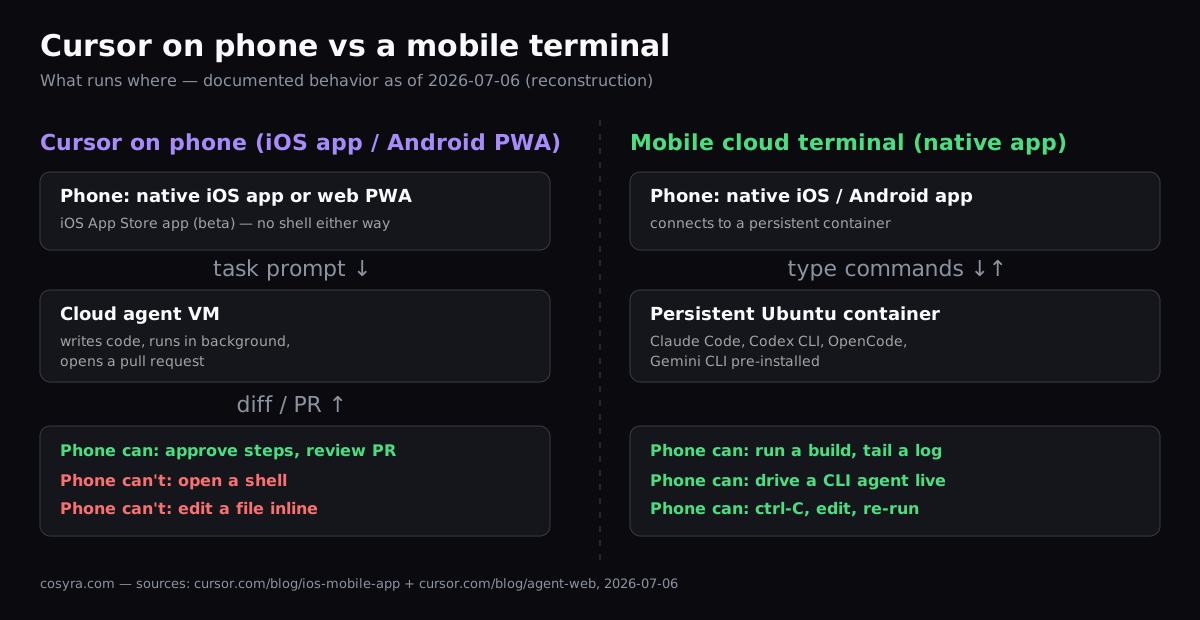
Cursor announced agents on web and mobile in a June 2025 blog post, framing it as agents that "can write code, answer complex questions, and scaffold out your work" from a browser. On iPhone that grew into a native App Store app, shipped in public beta on 2026-06-29; on Android the mobile half is still a PWA, not a native app. The wrapper changed, but the shape did not: whether you are in the iOS app or the Android web app, the compute happens in a cloud VM and your phone is the remote control.
That distinction matters because most people typing "cursor on phone" into Google are picturing the desktop IDE shrunk onto a screen: the editor, the Tab autocomplete, the inline diff. That is not what you get. What you get is a place to kick off an autonomous agent and supervise it. You write a task, the agent runs in the background, and you come back to a diff and a pull request. Cursor's docs and blog are consistent on this: review diffs, review and create pull requests, add follow-up instructions, run multiple agents in parallel. The editing surface is still the desktop. Approving a diff that way is fine for a quick sign-off; reviewing a pull request more thoroughly from your phone, checking it out, running its tests, AI-reviewing the diff, needs a real shell rather than a review surface.
How to set up Cursor on your phone
Setup now splits by platform. On iPhone you install a real app; on Android you pin the web interface to your home screen so it behaves like one:
- iPhone: install the App Store app. Search "Cursor" in the App Store, install the native app (public beta since 2026-06-29), and sign in with your Cursor account. It works on any paid plan, not the free Hobby tier.
- Android: install it as a PWA. There is no native Android app
yet. Open
cursor.com/agentsin Chrome, sign in, open the menu, then Install App for a full-screen icon with no address bar. - Launch or open an agent. Type a task to start a cloud agent, or tap into a running one to approve a step, send a follow-up, and read the diff it produced.
The one thing worth setting up before you leave your desk: connect the repositories you want the agent to touch. Cloud agents work against a connected Git repo, clone it into their VM, and push a branch. If the repo is not connected, the phone is a dead end. You cannot fix that from Safari as easily as from the desktop.
What you can and can't do from your phone
Here is the honest split between what Cursor's phone surface handles well and what it leaves on the desktop. This holds for both the iOS app and the Android PWA. The new native app did not add a shell. We pulled the "can" column from Cursor's own blog and docs, dated 2026-07-06:
| Task | On Cursor mobile (iOS app / Android PWA) |
|---|---|
| Start a cloud agent on a task | Yes, type a prompt, agent runs in a cloud VM |
| Approve / reject an agent step | Yes, the core mobile use case |
| Send follow-up prompts, add images | Yes |
| Review a diff and the pull request | Yes, review and create PRs from the web |
| Run multiple agents in parallel | Yes |
| Edit a file by hand, inline | No, pick that back up in the desktop IDE |
| Open an interactive shell / run a command | No, there is no terminal in the mobile surface |
| Tail a log or drive a CLI yourself | No, the agent runs commands, you do not |
Read that table top to bottom and the pattern is clear: the mobile experience is supervision, not authorship. That is a deliberate design choice, and for a lot of workflows it is the right one. Launch a bug fix from the coffee-shop queue, approve the agent's plan, and merge the PR from the couch that evening. You never touched a keyboard for the code itself.
The honest gap: agent control vs an interactive terminal
Here is an opinion the Cursor team would not share: agent-only control is
the wrong default for phone coding. Cursor has bet that on a phone you
should supervise an autonomous agent and nothing else. We think that bet is
half right. Plenty of the time on mobile you do want the agent to drive, but
the other half of the time you want to run one command. Pull the latest,
restart a dev server, check why a test failed, kill a stuck process, paste a
one-off
curl. Cursor's mobile surface has no terminal, so all of that
waits until you are back at a desk.
We build Cosyra for that other half. It is a native iOS and Android app
wired to a persistent Ubuntu 24.04 container on Azure, with Claude Code,
Codex CLI, OpenCode, and Gemini CLI already installed. You type into a real
shell, not a prompt box. You can run an agent interactively, watch its
output stream, ctrl-C it, and run a build right after, the same things you
would do in a desktop terminal, on the phone in your hand. The container
persists across app restarts and device switches, so a session you start on
the train is still there on the couch. If it is specifically Cursor's own
terminal agent you want, the agent CLI runs there too. We walk through
it in running the Cursor CLI on your phone.
To be precise about what this is and is not: Cosyra does not run the Cursor IDE, and we would not pretend it replaces Cursor on the desktop. They aren't direct substitutes. Cursor owns the desktop IDE workflow, a mobile terminal owns the type-a-command-from-anywhere workflow. The realistic setup for a lot of developers is both: Cursor's web agent to supervise long-running tasks, and a mobile terminal for hands-on work when you are away from the laptop. We unpack the full trade-off in Cosyra vs Cursor.
Want a real terminal on your phone, not just an approve button? Install Cosyra, open a persistent Ubuntu container, and type commands from anywhere.
 scan to install
 1 hour free on signup, no credit card. Extend with a 10-hour, 7-day trial when you want more. See pricing.
Who should pick what
Match the tool to how you actually work on mobile:
- Use Cursor's web agent if your mobile coding is mostly supervision: you queue tasks for autonomous agents, approve their steps between meetings, and review PRs. You already live in Cursor on the desktop and want the same agents reachable from a browser. This is the strongest fit for Cursor's mobile surface, and it is genuinely good at it.
- Use a mobile terminal (like Cosyra) if you want to type commands from your phone: run a build, restart a server, drive a CLI agent interactively, or tail a log, on a persistent Linux box reachable from a native app.
- Use both if you do long-running autonomous work and hands-on work from the same phone. They overlap less than you would think: one is a supervisor's dashboard, the other is a shell.
If you are weighing the broader field of agents that run from a phone (Claude Code, Codex CLI, Gemini CLI, OpenCode), start with our AI coding agents on mobile pillar, or the hands-on Claude Code on your phone walkthrough for the interactive-terminal path end to end.
Cursor on phone FAQ
Can I write code on my phone with Cursor, or only manage agents?
Mostly manage. Cursor's web and mobile surface lets you start cloud agents, send follow-up prompts, approve checkpoints, and review the diffs and pull requests an agent produces. The agent does the writing in a cloud VM; the hands-on editing happens back in the desktop IDE. The community remote-control tools that exist for Cursor are built around approving and steering an agent from a phone, not typing code into it.
[source: Cursor Community Forum, "Cursor on your phone: open-source remote control for agent mode"]
Is there an official Cursor app for iPhone or Android?
On iPhone, yes now. As of 2026-06-29 Cursor shipped a native iOS app in public beta on the App Store, available on any paid plan. On Android there is still no native app. Cursor's docs tell you to install the web interface as a Progressive Web App. Either way the app launches and reviews cloud agents; neither gives you a terminal or inline editing. Watch out for a third-party "Cursor AI Mobile" app on iOS that is not built by Anysphere.
[source: Cursor Blog, "Build from anywhere with Cursor for iOS", 2026-06-29]
How do I install Cursor on my phone, iOS app or Android PWA?
On iPhone, install the native Cursor app from the App Store and sign in. It is a public beta available on any paid Cursor plan as of 2026-06-29. On Android there is no native app yet, so open cursor.com/agents in Chrome, tap the menu, then "Install App" to pin it as a PWA. Both open to the same cloud-agent dashboard; the difference is one is a store download and the other is a web app under the hood.
[source: Cursor Docs, "Cloud Agents, Web and Mobile"]
Do Cursor's cloud agents keep running if I close the browser on my phone?
Yes. Cloud agents run in their own cloud VM, not on your phone, so an agent keeps working after you lock the screen or close the tab. You can launch a refactor on the train, put the phone away, and open the dashboard later to find the diff and a merge-ready pull request waiting.
[source: Cursor Blog, "Cursor on web and mobile"]
Can a Cursor cloud agent run a mobile emulator to test my app from my phone?
Not natively as of 2026-07-06. Running an iOS or Android emulator inside the cloud agent VM is an open feature request, not a built-in capability. The agent can build and produce artifacts like screenshots and logs, but driving a live emulator from the agent environment is not something Cursor ships today.
What if I want a real interactive terminal on my phone, not just agent control?
That is a different tool. Cursor's mobile surface is built to launch and review autonomous agents, not to give you a shell. If you want to type commands, run a build, tail a log, or drive a CLI agent interactively from your phone, you want a mobile cloud terminal, a persistent Linux container you reach from a native app. We build Cosyra for exactly that; plenty of developers pair Cursor on the desktop with a mobile terminal for the on-the-go half. See Claude Code on your phone for the interactive path.
tl;dr
Cursor on your phone is an agent dashboard, not a terminal. As of 2026-07-06 it is a native iOS app (public beta since 2026-06-29, paid plans) and, on Android, a web PWA at cursor.com/agents. Both used to start cloud agents, approve steps, and review pull requests. It is supervision, not authorship, and there is no shell in either one. If you want to type commands from your phone on a persistent Linux container, that is a mobile cloud terminal like Cosyra, and many developers run both: Cursor's agent dashboard for autonomous tasks, a terminal for hands-on work.
App Store / Google Play. Sign up: 1 hour free, no credit card. Extend with a 10-hour, 7-day trial when you want more.