Searching for Trae AI on phone in 2026 turns up something that surprised us when we checked: Trae now has a free mobile app on iOS and Android, but it is an AI work assistant, not a coding terminal. It dispatches tasks to your PC or Trae's cloud, writes documents, and answers code questions in a chat. The Trae IDE and SOLO run on desktop and browser only, and the separate Trae Agent CLI has no mobile build. So if you want a coding agent that actually runs from your phone, the honest path is a cloud Linux container. Here is exactly what each Trae surface does, and the fix.
Quick decision: what did you actually come for?
- "Does Trae have a phone app, and can it code?" Yes to the app, no to the coding. What the app really does ↓
- "Can I run the Trae Agent CLI from my phone?" No native build; here is the real path. Trae Agent on mobile ↓
- "Just get me a terminal where an agent runs." Setup in ~5 minutes ↓
The side-by-side ↓ lines up the app against a cloud terminal on what runs where.
This guide was written by the Cosyra team. We verified every Trae claim below first-hand on 2026-07-08: the bytedance/trae-agent repo and its README, the Google Play listing, and Apple's App Store record for the iOS app (id 6761401019). Where a number comes from a source we could only read secondhand, we say so.
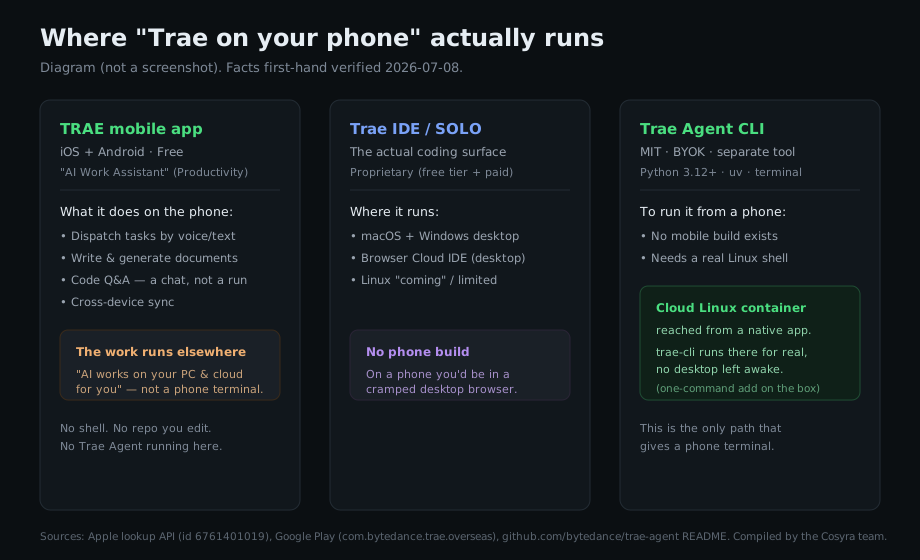
The Trae phone app is real, but it is a dispatcher, not a terminal
Six weeks ago the honest answer to "is there a Trae phone app" was murky. It
is not anymore. On 2026-07-08 we pulled the listings directly: the
free "TRAE - AI Work Assistant" app is live on the App Store
(id 6761401019, published by SPRING SG PTE. LTD., filed under Productivity and
Utilities) and on
Google Play as com.bytedance.trae.overseas. The iOS build we saw was
version 0.0.12, updated 2026-07-07. So the app absolutely exists.
What it is, though, matters more than that it exists. The App Store
description sells three things: writing and generating documents, an "AI
Code Q&A" that explains and suggests code in a chat, and voice or text
input. Google Play is blunter about the model. Its one-line pitch is
"Dispatch tasks by voice or text. AI works on your PC & cloud for
you." The bundle identifier on iOS is com.stone.solo.i18n, which
lines up with Trae SOLO: this is the SOLO mobile companion.
Read those together and the shape is clear. You speak or type a task on the phone; the actual work happens on a computer you own or on Trae's cloud; the app is where you kick it off, watch it, and chat about code. That is genuinely useful on a train or in a waiting room when you want to nudge something along. But it is not a terminal, it is not an editor, and the Trae Agent is not running on your phone. We think it is worth being precise here, because "dispatch a task to a PC you left powered on at home" is a different promise from "the agent runs where I am," and Trae's marketing would happily let the two blur together. We would not.
The three things called "Trae"
Most of the confusion around Trae comes from one word covering three products. Getting these straight is the whole game:
- Trae IDE / SOLO is the real coding surface. A VS Code fork plus SOLO, a standalone agent app. Proprietary, free tier plus paid tiers. Runs on macOS and Windows desktop and a browser Cloud IDE. No phone coding build, so on a phone you would be in a cramped desktop browser.
- TRAE mobile app is the free work assistant above. Dispatch, documents, code chat. Not a coding IDE.
- Trae Agent CLI is a separate, MIT open-source
terminal agent at
bytedance/trae-agent. Bring-your-own-key, launched with
trae-cli run. This is the piece that fits a real terminal, including a cloud one you reach from a phone.
So "run Trae on my phone" splits cleanly: the app if you want to dispatch and chat, or a cloud terminal if you want the Trae Agent CLI (or any agent) to actually run.
Can you run the Trae Agent CLI from a phone?
Not as a mobile app. There is no iOS or Android build, and there was never
going to be one. The
README documents a desktop/server install: clone the repo, then
uv sync --all-extras with the
uv package manager on Python 3.12+, then
activate the virtualenv. It expects a real Linux shell, a Python toolchain, and
BYOK credentials for OpenAI, Anthropic, Doubao, Azure, OpenRouter, Ollama, or
Gemini. None of that maps onto a phone runtime.
The documented setup (the one from the repo README, not a run we are claiming as a benchmark) looks like this:
$ git clone https://github.com/bytedance/trae-agent.git
$ cd trae-agent && uv sync --all-extras
Resolved 140 packages · installed .venv
$ source .venv/bin/activate
$ trae-cli run "add a null check to parse()"
Every one of those commands wants a POSIX shell. That is the whole reason a phone is the wrong place to run it directly, and the right place is a Linux box your phone reaches, which is what a cloud container is.
How to get a terminal on your phone where an agent runs
We build Cosyra for exactly this gap: a persistent Ubuntu 24.04 container on Azure AKS, reached from a native iOS or Android app, with a real terminal. We pre-install four agents, Claude Code, Codex CLI, OpenCode, and Antigravity CLI, because setup friction is the main thing that kills agent-driven mobile coding. The Trae Agent CLI is not one of the four, but it is a one-command add on top, the same way its README documents.
Step 1: Install Cosyra and open the terminal
Download from the App Store or Google Play and sign in. You land in a shell with Python, Node, Git, and tmux already there, the same container whether you open it from a phone, a tablet, or the web.
Step 2: Start with a pre-installed agent, or add Trae Agent
If you just want to code, one of the four pre-installed agents runs
immediately, and that part we test and ship. If you specifically want the
Trae Agent CLI, you install it on top with the Python toolchain from its
README; because the container has a real glibc userland and Python 3.12+,
the documented uv path is the one to follow. We have not benchmarked
a full Trae Agent session in a container for this post, so we are pointing you
at the documented install rather than claiming a number.
$ which claude codex opencode agy
/usr/local/bin/claude
/usr/local/bin/codex
/usr/local/bin/opencode
/usr/local/bin/agy
Step 3: Bring your key, clone a repo, and go
Cosyra is BYOK: you export your provider key, so you pay the model provider directly and we do not meter it. Clone your project, launch the agent, and review its proposed diff on the phone before anything is written. Because the container is persistent with 30 GB of storage and hibernates between sessions, you can start on the couch and pick the same session up on an iPad later without re-cloning or re-authing.
Try Cosyra. Sign up and pick a plan. Eligible new users can start a 7-day free trial in the App Store app. App Store / Google Play / Pricing details
The Trae app vs a cloud terminal, side by side
Both can legitimately be called "Trae on your phone"; they just answer different questions. The app dispatches and chats; a cloud terminal actually runs an agent. Checked 2026-07-08.
| What you want | TRAE mobile app | Cloud terminal (Cosyra) |
|---|---|---|
| A real shell on the phone | No | Yes |
| Where the agent runs | Your PC or Trae's cloud | The container your phone reaches |
| Edit a repo file by file | No (chat + dispatch) | Yes |
| Run the Trae Agent CLI | No | Yes (one-command add) |
| Needs a desktop left awake | Yes, for PC-side tasks | No |
| Price | Free | From $20/mo |
Prefer an agent that is already set up? See Claude Code on phone, Codex CLI on phone, and the pillar on AI coding agents on mobile. Curious how the underlying Linux box works on a phone? We cover it in running a Linux container on Android. For a full head-to-head on where each product runs the agent, see Cosyra vs Trae.
The honest limits
- No offline mode. The container is in the cloud; no internet, no terminal. A local option like Termux does work offline. That is a real trade-off.
- The Trae Agent CLI ships slowly. Its repo was last pushed 2026-02-05; it is MIT and not abandoned, but do not expect fast releases.
- BYOK means a second bill. You pay your model provider for tokens on top of the container. That is true of Trae's CLI too.
- Phone keyboards slow long prompts. Voice dictation and a Bluetooth keyboard help; the Trae app leaning on voice is a reasonable idea for its use case.
Frequently asked questions
Does Trae have a mobile app?
Yes. As of 2026-07-08 there is a free "TRAE - AI Work Assistant" app on
the App Store (id 6761401019) and Google Play (com.bytedance.trae.overseas). But it is a work-assistant and task-dispatch companion, not a coding
IDE or terminal. Google Play's own pitch is "Dispatch tasks by voice or
text. AI works on your PC & cloud for you." Trae has a phone app; it
just is not where your code runs.
[source: Google Play, TRAE listing]
Can the Trae app run code or a terminal on my phone?
No. The app dispatches tasks that execute on your PC or Trae's cloud, generates documents, and answers code questions in a chat. There is no shell, no repo you edit line by line, and no Trae Agent process on the phone. For an agent that actually runs where your phone is, use a cloud Linux container reached from a native app.
[source: Google Play, TRAE listing, "AI works on your PC & cloud"]
Can I run the Trae Agent CLI on Android or iPhone?
Not as a native build. The Trae Agent CLI is a separate MIT terminal tool
that needs Python 3.12+ and the uv package manager (uv sync --all-extras); there is no iOS or Android package. The working path from a phone is
to install it inside a cloud x86_64 Linux container where that Python
toolchain is available.
[source: bytedance/trae-agent README, install instructions]
Is Trae free?
The mobile app is free to install on both stores (verified 2026-07-08). The Trae IDE has a free tier plus paid tiers, and the Trae Agent CLI is free and MIT-licensed but bring-your-own-key, so model usage is a separate bill. "Free to install" is not "free to run large models."
[source: Google Play, TRAE listing, free install]
Is Trae open source?
Only the Trae Agent CLI is. It is MIT-licensed on GitHub. The Trae IDE, SOLO, and the mobile app are proprietary (free to use, closed-source). Answer "is Trae open source?" per product: the CLI yes, everything else no.
[source: bytedance/trae-agent, MIT license]
Why does trae-cli say "command not found" after I install it?
Almost always the virtualenv. Setup runs uv sync --all-extras, which creates a .venv you then activate with
source .venv/bin/activate before trae-cli is on your
PATH. It is a recurring open issue on the repo. In a cloud container you set
it up once and the environment persists across sessions.
[source: bytedance/trae-agent issue #86, "trae-cli command not found"]
tl;dr
Trae has a free phone app (iOS + Android), but it is an AI work assistant that dispatches tasks to your PC or Trae's cloud and chats about code, not a coding terminal. The Trae IDE and SOLO are desktop/browser only, and the separate MIT Trae Agent CLI has no mobile build. To actually run a coding agent from your phone, install it in a cloud Ubuntu container (Cosyra): four agents are pre-installed and the Trae Agent CLI is a one-command add.
App Store / Google Play. Plans start at $20/month.
Get a real terminal on your phone. Install Cosyra, start with a pre-installed agent, and add the Trae Agent CLI if you want it.