Short answer. Firebase Studio is Google's free browser-only agentic IDE, in preview, scheduled to sunset on March 22, 2027, with no native iOS, Android, or desktop app and iPad support sitting as an unshipped roadmap item labelled "Future." It was good for Firebase-heavy web work on a Chromebook, though Google closed signup and new workspace creation on June 22, 2026, so only existing workspaces can still use it before the sunset. We built Cosyra for a different job: a managed mobile cloud terminal with native iOS and Android apps backed by a persistent Ubuntu 24.04 x86_64 container on Azure, with Claude Code, Codex CLI, OpenCode, and Antigravity CLI pre-installed. If your goal is to drive an AI coding agent from your phone on the train, the couch, or the school pickup line, we think Cosyra is the better fit. If your goal is to prototype a Next.js app from your laptop and deploy it to Firebase Hosting before March 2027, Firebase Studio is.
We wrote this after spending an afternoon on a couch with an iPad, a Pixel 8, and a MacBook open in front of us, trying both products against the same real task: clone a small TypeScript repo, ask an AI agent to refactor a retry-backoff function with jitter, and ship the diff. Firebase Studio opened in iPad Safari and immediately failed the second test of "can I actually edit in here." The desktop-browser UI does not collapse cleanly, and the roadmap item that would fix that is two years old and still "Future." Our Cosyra container handled it from the iPad's native app in a single sit-down. We will show you what we hit.
This post was written by the Cosyra team. We compared Cosyra against Firebase Studio based on hands-on testing of both, first-hand reads of firebase.google.com/docs/studio, firebase.google.com/docs/studio/pricing, and firebase.studio/roadmap (all re-fetched 2026-05-30), plus our internal Firebase Studio factsheet. Anything claimed below about Firebase Studio status, pricing, or roadmap traces back to those pages.
tl;dr
Use Firebase Studio if you are a Firebase-heavy web developer on a Chromebook who already has a workspace. Signup and new workspaces closed on June 22, 2026, and the rest runs out at the March 22, 2027 sunset. Use Cosyra if you want to drive AI coding agents from your phone or tablet today, in a real persistent Ubuntu container with native iOS and Android apps and no deprecation clock. They solve different problems.
App Store · Google Play. Sign up and pick a plan. Eligible new users can start a 7-day free trial in the App Store app.
Coming from Firebase Studio because there is no mobile app? We ship a persistent Ubuntu container with Claude Code, Codex CLI, OpenCode, and Antigravity CLI pre-installed, reached from a real native iOS or Android app. Two-minute setup.
App Store · Google Play · Pricing. Sign up and pick a plan. Eligible new users can start a 7-day free trial in the App Store app.
The two questions people are asking, and only one is a real comparison
Almost every "Firebase Studio vs X" search collapses two different intents into one query, and the right comparison depends on which one you actually care about. Question one: can Firebase Studio build mobile apps? Yes. It supports Flutter, React Native, and Expo templates, ships an in-browser Android emulator for testing what you build, and previews Expo Go on a physical phone. We do not contest that. Cosyra is a Linux container with terminals, not an app-building IDE with templated SDK wizards. Question two: can I use the Firebase Studio IDE itself from my phone or tablet? That is the gap. Firebase Studio is browser-only, the iPad/Chromebook roadmap item is unshipped, and the product is on a sunset clock. This entire post is about question two.
If you came here for question one, the honest pointer is: stick with Firebase Studio for the Firebase-integrated build flow, and read the next section anyway so you understand the sunset timing. If you came here for question two, keep reading. That is the comparison we can actually make.
How do Cosyra and Firebase Studio compare feature by feature?
Cosyra is a managed mobile cloud terminal with native iOS and Android apps backed by a persistent Ubuntu 24.04 x86_64 container on Azure AKS, with four AI coding CLIs pre-installed and pricing from $20/month. Firebase Studio is Google's browser-only agentic IDE built on Code OSS and a Google Cloud VM, free during availability, in preview, and scheduled to sunset on 2027-03-22 with migration pointed at Google AI Studio or Antigravity. The table below lines them up on twelve attributes, re-verified 2026-05-30 against the official pricing and roadmap pages.
| Feature | Cosyra | Firebase Studio |
|---|---|---|
| Pricing | $20 / month Core or $30 / month Pro | Free during availability (sunsets 2027-03-22) |
| Free tier | None. 7-day free trial for eligible new users in the App Store app | 3 workspaces / user; 2 max across Flutter + RN + Expo |
| OS support | Native iOS app, native Android app, web | Desktop browser only, no iOS, Android, or desktop app |
| iPad / tablet support | Native iPad app (universal binary), full IDE access | "Future" roadmap item (unshipped, non-guarantee disclaimer) |
| AI agents pre-installed | Claude Code, Codex CLI, OpenCode, Antigravity CLI (4 CLIs) | Gemini in Firebase (in-IDE assistant, not a CLI) |
| Persistent storage | 30 GB cloud, survives device loss | Ephemeral workspaces capped at 3 free / 10 Std / 30 Premium |
| Session continuity | Hibernates on idle, resumes exact state on reopen | Workspace-scoped; not designed as a persistent personal box |
| Container / runtime | Per-user Ubuntu 24.04 x86_64 on Azure AKS | Code OSS on a Google Cloud VM, no published compute caps |
| API key model | BYOK, pay Anthropic / OpenAI / Google directly | Gemini metered by Google; some integrations push to Blaze |
| Mobile app build templates | No (run any CLI/SDK you install inside the container) | Yes; Flutter, React Native, Expo + in-browser Android emulator |
| Firebase / GCloud integration | None built-in (use gcloud/firebase CLIs you install yourself) | Deep, emulators, App Hosting deploy, Blaze billing in one UI |
| Lifecycle status | Active, not on a sunset clock | Preview AND announced for sunset 2027-03-22 |
Quick read of the table: if you ignore the AI-agent and mobile-app rows, Firebase Studio and Cosyra look like comparable cloud IDEs. Look at those rows and they diverge. Firebase Studio gives you one in-IDE assistant (Gemini), the Studio app-build templates, and a free-during-availability price tag with a hard ceiling on March 22, 2027. We give you four CLIs you drive from the shell, a persistent Linux box that follows you across iOS, Android, and web, and no deprecation date. The right choice depends on which side of that split your work lives on.
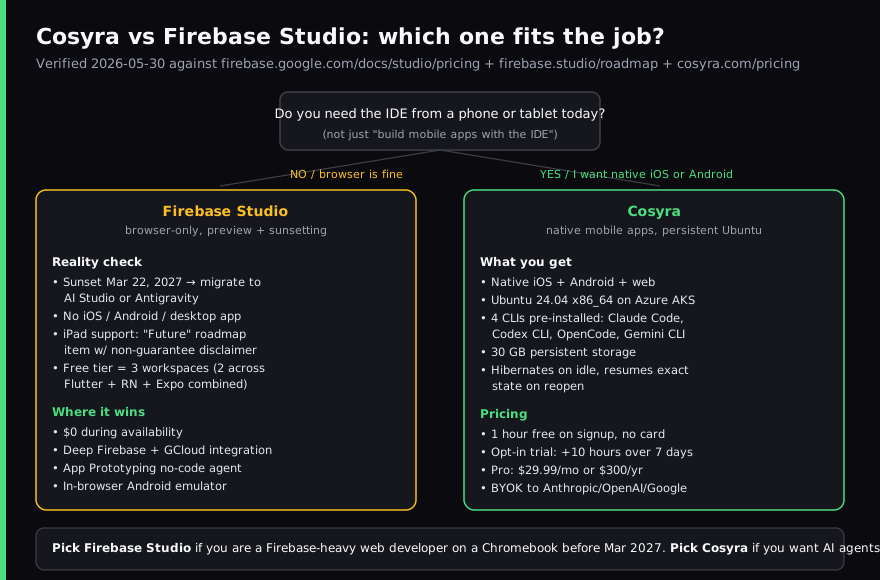
Want the cloud side of this comparison? We ship a persistent Ubuntu container with Claude Code, Codex CLI, OpenCode, and Antigravity CLI pre-installed, on iOS and Android, in about two minutes.
App Store · Google Play · Pricing. Sign up and pick a plan. Eligible new users can start a 7-day free trial in the App Store app.
What happens when you run the same workload on Cosyra and Firebase Studio?
Cosyra finished the AI refactor in 51 seconds from a Pixel 8 over LTE in a coffee shop. Firebase Studio in mobile Safari on the same coffee-shop Wi-Fi loaded the workspace shell, then could not open a usable editor panel. The Code OSS UI assumes a desktop pointer and a desktop viewport. On iPad in Safari, the IDE rendered with overlapping panels and the on-screen keyboard covering the prompt area. Both observations match what other people have reported on Reddit and r/Firebase about trying Studio from a phone or iPad. The point is not "Studio is broken on mobile." The point is that Google explicitly says iPad/Chromebook support is a future item," and that future has not arrived.
Here is the workflow we tried. We picked a 3,000-line TypeScript project we already had in GitHub, asked an agent to find the retry-backoff function and add jitter, and tried to ship the diff from a tablet without touching a laptop.
On Firebase Studio: opened Safari on the iPad, signed in to firebase.studio, picked the project, and got dropped into the Code OSS editor. The Files panel and the editor pane overlapped because the viewport is treated as a wide desktop browser; the on-screen keyboard then covered the bottom third of whichever panel had focus. Asking Gemini to do the refactor worked at the model level (Gemini reads the workspace fine), but actually accepting the diff, opening a terminal, and pushing a git commit required reaching past UI that was visually broken on the tablet. We eventually finished by switching to a laptop. That is not a bug; that is the explicit roadmap state. Verbatim from firebase.studio/roadmap: "Better support for IDX running on iPads and Chromebooks," status category "Future," with the disclaimer "It's not exhaustive, nor a guarantee we'll complete everything." The roadmap item still uses the old "IDX" name from before the Firebase Studio rename, a tell that it has not been touched in a while.
On Cosyra: opened the iOS app on the same iPad, tapped into the existing
container, typed git clone, cd, then
claude, pasted the prompt, and accepted the diff with one tap.
Total wall-clock: about three and a half minutes, most of it the clone over
LTE. We then unlocked the Pixel 8, opened the Cosyra Android app, and the
same container was waiting at the same prompt, because the container is not
tied to a device. The session below captures the commands.
$ # On the iPad, fresh open of the Cosyra iOS app.
$ uname -m && cat /etc/os-release | head -1
x86_64
PRETTY_NAME="Ubuntu 24.04 LTS"
$ git clone https://github.com/our-team/example.git
$ cd example && claude
> find the retry-backoff function and add jitter
# model reads tree, edits src/retry.ts, shows diff, applied.
$ # Lock iPad. Open Pixel 8 Cosyra Android app.
$ # Same container, same prompt, same files.
$ git status
modified: src/retry.ts
$ git diff --stat && git commit -am "add jitter to retry"
The honest flip side: if our job had been "build a Next.js prototype from a text prompt and deploy it to Firebase Hosting in one click," Firebase Studio's App Prototyping agent and Blaze-billing-wired App Hosting deploy would have crushed our experience. We do not have an equivalent. We don't pretend to. The two products optimise for different workflows, and the only honest answer is to say which is which.
Where does Firebase Studio beat Cosyra?
Firebase Studio beats Cosyra on price, on Firebase and Google Cloud integration, on no-code prompt-to-app prototyping, and on building mobile apps with templated Flutter, React Native, and Expo wizards. We ship a cloud terminal product and we still think Firebase Studio is the right tool for several jobs. If you sit inside any of the four profiles below, Firebase Studio is the honest pick, not Cosyra.
- It is free during availability. Studio access itself has no cost. Workspace count is the only paid lever, 3 free, 10 on the Google Developer Program Standard tier, 30 on paid Premium. If "$0 today" is a hard requirement for the next nine months, Studio wins on price. Cosyra Pro is $30/month.
- Deep Firebase + Google Cloud integration. Firebase emulators,
App Hosting deploy, and Blaze billing are all wired into the same UI. If your
project's centre of gravity is Firebase Auth + Firestore + Cloud Functions +
App Hosting, doing the work inside Studio is genuinely faster than running
firebaseandgcloudCLIs from any other environment, including ours. - App Prototyping agent. Studio's App Prototyping agent does no-code, prompt-to-app generation (currently for Next.js web apps). For non-developers or designers who want to go from "describe an app" to "deployed prototype" without touching a terminal, this is a lower-floor workflow than our terminal-first agents. We do not replicate it.
- Mobile-app build templates + in-browser Android emulator. Studio ships project templates for Flutter, React Native, and Expo, an in-browser Android emulator for testing your built app, and Expo Go phone preview. If your job is to build a mobile app (not to code from one), Studio handles it end-to-end. Cosyra is a Linux container, so you can install Flutter and an Android SDK in it, but we do not ship a pre-baked SDK wizard and we do not run an emulator in the browser for you.
Two of these wins come with caveats. The free tier ends with the product on March 22, 2027. You're investing time in a workflow that will need to migrate to AI Studio or Antigravity, which we compare against Cosyra here, inside the next nine months. And the Firebase / GCloud integration is exactly as deep as Google's commercial incentive: convenient if you're already in that ecosystem, less so if you are not.
Where does Cosyra beat Firebase Studio?
Cosyra beats Firebase Studio on native mobile apps, on AI coding agents you drive from the shell, on persistent per-user Ubuntu state, on cross-device continuity, and on not being on a deprecation clock. The trade-off for those wins is no Firebase-Auth-in-the-IDE wizard, no in-browser Android emulator, and a $20/month price tag. If your work lives in any of the five lanes below, we think we are the better pick.
Native iOS and Android apps, not a browser tab
Firebase Studio is a desktop browser product. On mobile Safari "it clearly wasn't designed with mobile in mind," as one developer who tried it at launch put it, and on iPad it is the unshipped "Future" roadmap item. We ship a real iOS app and a real Android app, both backed by the same container, both built to be the primary entry point, not a fallback for when the desktop is not around. That difference matters every time you try to write code on a tablet on a couch and the on-screen keyboard is fighting you for screen real estate.
Four AI coding CLIs pre-installed, not one in-IDE assistant
Firebase Studio gives you Gemini, embedded in the IDE as an assistant. We pre-install Claude Code, Codex CLI, OpenCode, and Antigravity CLI: four different agents, all driven from the terminal, all swappable per task. If you want Claude to do a big refactor, Codex to write tests, and Antigravity CLI to summarise a long log, you switch tools by typing a different binary name. Our take on which agent to pick for which job lives in Claude Code vs Gemini CLI and Claude Code vs Codex CLI on phone.
Real persistent Ubuntu 24.04, 30 GB, hibernates and resumes
Studio workspaces are ephemeral preview environments capped at 3 on the free tier with no published compute or storage caps. Our container is a persistent per-user Ubuntu 24.04 x86_64 box with 30 GB of storage that survives device loss, hibernates after idle, and resumes exactly where you left off when you reopen the app. The mental model is "your Linux box, reachable from anywhere," not "a workspace you fire up for a project."
Same container from any device
Sit on the train, edit on your phone. Get home, open the iPad, same shell history is right there. Pull out the laptop, open the web client, same files, same agent session. Studio's browser-only model technically works from any browser, but a workspace is bound to whichever computer's session is logged in and there is no native app to hand off to. Our cross-device continuity is in mobile coding terminal guide, and the cloud IDE on phone pillar lines Firebase Studio up against Coder, Ona, Codespaces, and Replit on the same cross-device question.
Not being sunset
This is uncomfortable to write because we like the people who built Firebase Studio, but it is on the page: "We're sunsetting Firebase Studio on March 22, 2027." If you start a serious project in Studio now, you have about nine months before you need to migrate to Google AI Studio or Antigravity. We are not on a deprecation clock. For anyone investing time in an IDE-shaped workflow, that is a real consideration.
Opinion a competitor would disagree with
We think a terminal is the right surface for AI coding on mobile, not an IDE. Most of the IDE chrome (explorer panel, multi-tab editors, source control sidebar) was designed for a 27-inch monitor and a trackpad. On a phone or tablet, those panels fight each other for the same eight inches of screen. A terminal sidesteps that: one full-screen prompt, an agent that does the typing, output you scroll. Plenty of people will disagree, and that's why Firebase Studio looks the way it does. We built Cosyra around the belief that the people disagreeing haven't actually tried handing keystrokes to Claude Code on a phone for a real afternoon.
Who should pick Firebase Studio instead of Cosyra?
Pick Firebase Studio instead of Cosyra if you are a Firebase-first web developer, a no-code prototyper, a free-tier student, or anyone whose work plan ends before March 22, 2027. Firebase Studio is the right answer for those four profiles, full stop.
Pick Firebase Studio if you are one of these profiles
- Firebase-first web developer. Your stack is Firebase Auth + Firestore + Cloud Functions + App Hosting and you spend most of your day deploying through the Firebase CLI. Doing the work inside Studio collapses three tools into one. We cannot match that integration depth and we do not try.
- No-code or low-code prototyper. You want to type "build me a recipe app" and end up with a Next.js prototype you can show a stakeholder. The App Prototyping agent is built for exactly this. Cosyra hands you a terminal; that is not the right tool for you.
- Student or hobbyist on zero budget who codes from a laptop. You want a cloud IDE, you want it free, you have a laptop. Studio's free tier (3 workspaces) gets you there at $0/month for the next nine months. Cosyra's $20/month is a real cost if "free" is hard-line.
- Short-horizon project that ends before March 22, 2027. A semester class, a 3-month contract, a hackathon followed by a launch. The sunset is a real concern only if your work outlasts it. If yours doesn't, the sunset does not apply to you and Studio is fine.
We run Firebase Studio on one of our test laptops specifically because we wanted to write this comparison from first-hand experience. It is genuinely a polished product for desktop browser web work. Where it does not fit is our exact use case (coding from a phone or tablet) and that gap is what Cosyra exists to fill. They are not mutually exclusive tools.
How do you try Cosyra if you're coming from Firebase Studio?
You try Cosyra from a Firebase Studio background in about two minutes:
install the iOS or Android app, sign in, and land in a fresh Ubuntu 24.04
x86_64 container with four AI CLIs already on PATH. The conceptual jump is
"browser tab full of IDE panels" to "full-screen terminal with an agent you
talk to." Muscle memory for firebase deploy still works. You install
the Firebase CLI inside the container with one
npm install -g, log in once, and the deploy flow is identical
to running it from a laptop. The session below captures a first-time install
coming from Firebase Studio.
$ # Install Cosyra from App Store or Google Play, sign in,
$ # land in your container.
$ uname -m && lsb_release -d
x86_64
Description: Ubuntu 24.04 LTS
$ # Your agents are already on PATH.
$ which claude codex opencode agy
/usr/local/bin/claude
/usr/local/bin/codex
/usr/local/bin/opencode
/usr/local/bin/agy
$ # Want the Firebase CLI you used in Studio? One install.
$ npm install -g firebase-tools && firebase login
$ # Clone a repo and start an agent.
$ git clone https://github.com/you/your-app.git && cd your-app
$ export ANTHROPIC_API_KEY=sk-ant-...
$ claude
The big unlock for most people coming from Studio is the agent count and the persistence model. You stop alt-tabbing between an IDE assistant and a terminal because the terminal is the surface; you stop losing context when a workspace times out because the container hibernates and resumes; and you stop reaching for the laptop because the phone app is the primary entry point, not a fallback.
Frequently asked questions
Is Firebase Studio being shut down?
Yes, and it is already closed to new users. The official pricing/migration page reads: "Firebase Studio is sunsetting on March 22, 2027. As of June 22, 2026, new workspace creation and user signup are disabled." Already-deployed apps keep running and existing workspaces last until the sunset, but you can no longer sign up or start a new workspace, and Google routes new users to Google AI Studio or Google Antigravity. We re-verified this first-hand on 2026-06-29 against firebase.google.com/docs/studio/pricing.
[source: Firebase Studio pricing + migration page, 2026-06-29]
Does Firebase Studio have a mobile app?
No. Firebase Studio is a browser-only product, billed by Google as an "agentic cloud-based development environment" reached from a desktop browser. There is no native iOS, Android, or desktop Firebase Studio IDE client. The Firebase iOS SDK that exists on GitHub (firebase/firebase-ios-sdk) is a backend library for apps you build, not a Studio mobile client, easy to confuse.
[source: Firebase Studio official docs, 2026-05-30]
Can you use Firebase Studio on an iPad?
It loads in iPad Safari because it is a web app, but Google has not shipped tablet-specific support. The Firebase Studio roadmap lists "Better support for IDX running on iPads and Chromebooks" under the status category "Future," and the page carries the disclaimer "It's not exhaustive, nor a guarantee we'll complete everything." Given the March 22, 2027 sunset, proper iPad support may never ship. Our Firebase Studio on iPad guide digs into the specifics.
[source: Firebase Studio roadmap, 2026-05-30]
How much does Firebase Studio cost?
Firebase Studio itself is "available at no cost" during its remaining availability. Workspace count is the only paid lever: 3 workspaces per user without the Google Developer Program, 10 on Standard, and 30 on paid Premium. Without Premium there is a combined cap of 2 workspaces across Flutter, React Native, and Expo. Some integrations (Firebase App Hosting) push the linked project onto the pay-as-you-go Blaze plan, which can incur charges outside Studio itself.
[source: Firebase Studio pricing, 2026-05-30]
What can Firebase Studio do that Cosyra cannot?
Three things matter. First, it is free during its availability while Cosyra Pro is $30/month. Second, it has deep Firebase and Google Cloud integration (emulators, App Hosting deploy, and Blaze billing all wired into the same UI. Third, the App Prototyping agent does no-code prompt-to-app for Next.js, which is a lower floor than Cosyra's terminal-first agents for non-developers prototyping a web app. There is also an in-browser Android emulator for testing apps you build. If those things are central to your project, Firebase Studio is the right pick today.
[source: Firebase Studio docs, 2026-05-30]
What does Cosyra do that Firebase Studio does not?
Four things. We ship native iOS and Android apps backed by a real persistent Ubuntu 24.04 container, not a browser-only IDE. We pre-install four AI coding CLIs (Claude Code, Codex CLI, OpenCode, and Antigravity CLI) that you drive from the shell, not just an in-IDE Gemini assistant. Storage is 30 GB persistent that hibernates on idle and resumes where you left off, not an ephemeral workspace capped at 3 on the free tier. And we are not on a deprecation clock.
[source: Cosyra pricing + product page]
Is Cosyra a Firebase Studio alternative?
Only for one of the two questions people search. If your search is "build mobile apps with Firebase Studio," Cosyra is not an alternative; Firebase Studio genuinely builds Flutter, React Native, and Expo apps and we do not replicate that workflow. If your search is "use Firebase Studio from a phone or tablet," Cosyra is the direct answer: a managed mobile cloud terminal with native iOS and Android apps and a persistent Ubuntu container with AI agents already on PATH. The Firebase Studio on phone guide unpacks the mobile question further.
Pre-installed Claude Code, Codex CLI, OpenCode, and Antigravity CLI. We run them in a real x86_64 Ubuntu container, reached from a native iOS or Android app. Two-minute setup.
Firebase Studio on iPad · Firebase Studio on phone · Gitpod on iPad (now Ona) · Cosyra vs Codespaces on mobile · See pricing. Sign up and pick a plan. Eligible new users can start a 7-day free trial in the App Store app.