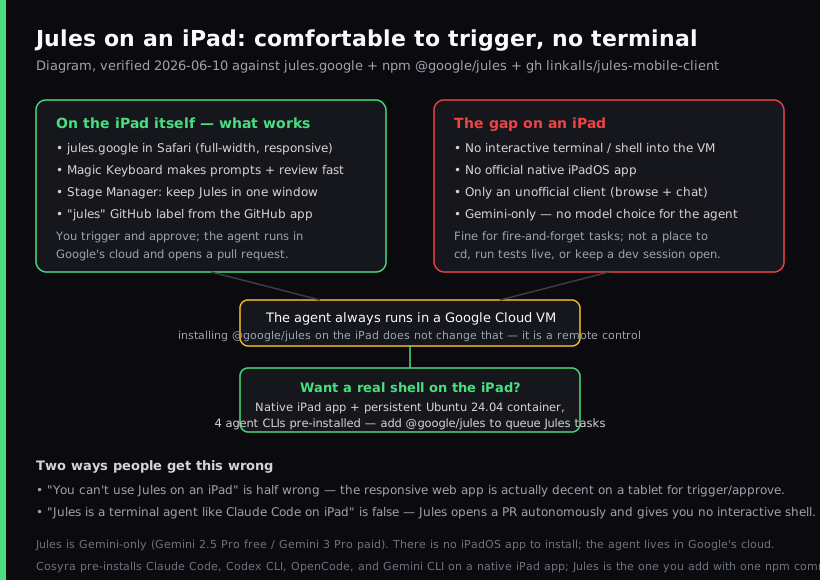
Jules on an iPad is a better experience than Jules on a phone, and still only half the thing most people picture. Because Google's Jules agent runs in a Google Cloud VM rather than on your device, you can trigger and approve coding tasks from Safari on an iPad, and the wider screen plus a Magic Keyboard make that comfortable in a way the phone never quite is. What you cannot get is an interactive terminal into that VM, and there is no native iPadOS app to install (as of 2026-06-10). So if your goal is "use my iPad Pro as a real coding machine," Jules covers the assign-and-review half but not the hands-on-the-repo half. For that second half you want a native app talking to a persistent cloud Linux box, which is what we build at Cosyra.
We tested this the way an iPad owner would: a 13-inch iPad Pro with a Magic Keyboard on a kitchen table, jules.google open in Safari in one Stage Manager window. The honest summary is that the responsive web app holds up well on a tablet for writing a prompt, reading the plan, and approving a pull request. It falls down the moment you want to do the thing a terminal person actually wants on a bigger screen: open a shell, run the tests yourself, poke at a file, iterate live. This guide separates those two jobs, because conflating them is where most "Jules on iPad" write-ups go wrong. For the phone-sized version of the same question, see Jules on your phone; for the interactive Google agent that is a different shape entirely, see Gemini CLI on a phone.
What is Jules, and why does the iPad matter?
Jules is Google's asynchronous, autonomous coding agent. You give it a task against a GitHub repository, it clones the code into a secure Google Cloud VM, plans the work, writes the code and tests, and opens a pull request for you to approve. The official tagline, read first-hand on 2026-06-10, is "Jules does coding tasks you don't want to do." It is async by design: you are not meant to sit and watch it; you assign and come back.
The iPad is interesting precisely because Jules runs in the cloud. A tablet that struggles to run a desktop IDE has no trouble driving a web app, and the parts of the Jules workflow that happen in a browser, writing a prompt and reviewing a diff, are exactly the parts an iPad with a keyboard does well. The catch is that "drive a web app" is the whole ceiling. There is no iPadOS build, and the agent gives you no shell, so the tablet never becomes a development machine. It stays a remote control.
What works on an iPad today?
Three surfaces work from an iPad, and they are all about triggering and reviewing rather than running:
- The jules.google web app in Safari. Sign in, pick a repo and branch, write a prompt, approve the plan, and read the resulting pull request. On a tablet the layout is roomy and the keyboard makes this feel close to a laptop for this narrow task.
- The "jules" GitHub label. If the Jules GitHub app is installed
on the repo, add the
juleslabel to an issue from the GitHub iPad app and Jules picks it up, works in its cloud VM, and opens a PR. Zero extra setup. - Stage Manager multitasking. On an M-series iPad you can keep jules.google in one window and your GitHub diff in another, which is a real workflow improvement over a phone's single-app view.
That is a legitimately useful slice. If your whole intent is "assign a bug-fix task from the couch and merge the PR after dinner," an iPad does it well, and the free tier (15 tasks per day) covers a lot of that.
Where the iPad story breaks down
The gap is the same one Jules has on every device, just felt more sharply on a tablet you bought to replace a laptop:
- No interactive terminal. Jules edits and opens a PR autonomously.
It never hands you a shell into its VM, so you cannot
cdinto the repo, run the test suite yourself, or keep a live session open while you think. On an iPad, where you might genuinely want to sit and work for an hour, that absence is the whole problem. - No official native iPadOS app. The only mobile client is linkalls/jules-mobile-client, an unofficial third-party React Native project (24 stars, BSD-2-Clause, last pushed 2026-07-08). Its own description says it lets you "browse sessions and chat." It is not affiliated with Google and it does not give you a shell either.
- The CLI does not change this. The @google/jules CLI (latest 0.1.42, published 2025-12-16) is a remote control of cloud sessions. iPadOS has no general Node.js terminal to install it into, and even where you can run it, the agent still executes in Google's cloud.
- Gemini-only. The agent runs Gemini 2.5 Pro on the free tier and Gemini 3 Pro on paid tiers. There is no option to point it at Claude or GPT.
Here is an opinion the Jules team would push back on, and we will hold it anyway: an async PR bot is not a substitute for a terminal on a device you are trying to make your primary machine. Fire-and-forget is great for chores you can describe in a sentence. It is the wrong shape for the hour you spend on the couch actually building something, reading errors as they scroll, changing your mind mid-session. For that you need a shell, and an iPad can have one, just not from Jules.
How to get a real shell on the iPad instead
The pattern that turns an iPad into a coding machine is the one Jules is missing: a native app talking to a persistent cloud Linux environment. The iPad's job is to be a good client to a real Linux box, not to host the work itself. That is what we build. The Cosyra iOS app is a universal binary that runs natively on iPad with full iPadOS multitasking, including Split View, Slide Over, and Stage Manager on M-series iPads. You get a persistent Ubuntu 24.04 container with Claude Code, Codex CLI, OpenCode, and Gemini CLI already installed, and the same container is reachable from iPhone, iPad, and the web, so we start a task on an iPad at the kitchen table and pick it up on a phone in a waiting room without re-cloning anything.
Step 1: Install Cosyra from the App Store
Open the App Store on your iPad and install Cosyra. The same listing covers iPhone, iPad Pro, iPad Air, and iPad mini. Sign in with Apple, Google, or email, and the app provisions a fresh Ubuntu container on first launch.
Step 2: Add your model API key
Cosyra is bring-your-own-key, so you pay Anthropic, OpenAI, or Google directly rather than through us. In the terminal:
$ # Persists across sessions and device switches
$ echo 'export ANTHROPIC_API_KEY="sk-ant-your-key-here"' >> ~/.bashrc
$ source ~/.bashrc
$ claude --version
Claude Code (latest)
Step 3: Run an agent, and queue Jules too
Clone a repo and start a hands-on session. Because this is a real Ubuntu box, you can also install the Jules CLI here to queue async tasks from the same tablet, getting both shapes in one place:
$ git clone https://github.com/your-org/your-project.git
Cloning into 'your-project'...
$ cd your-project
$ claude
Claude Code (latest)
Type your prompt, or type "/" for commands.
$ # Async side: queue a Jules cloud task from the same shell
$ npm install -g @google/jules
$ jules remote new --repo your-org/your-project
Try it on your iPad. Sign up, 1 hour free, no credit card. Extend with a 10-hour, 7-day trial when you want more. App Store / Google Play / Pricing details
How the iPad coding options compare
Lined up against what matters on a tablet, a native app, a real shell, and whether the tool even ships for iPadOS, the options sort out clearly. The table covers the realistic paths as of 2026-06-10.
| Capability | Jules (Safari web app) | Cosyra (iPad app) |
|---|---|---|
| Native iPadOS app | No (web only; unofficial 3rd-party client) | Yes |
| Interactive terminal / shell | No (async PR only) | Yes (Ubuntu 24.04) |
| Trigger from the iPad | Yes (Safari or GitHub label) | Yes (drive the agent yourself) |
| Agent shape | Async fire-and-forget, opens a PR | Hands-on, synchronous |
| AI models | Gemini-only (2.5 Pro / 3 Pro) | 4 CLIs, BYO provider |
| Persistent environment | Cloud VM per task | Always-on container, 30 GB |
| Pricing | Free 15 tasks/day, then Pro/Ultra tiers | 1 hr free, then $29.99/mo |
Jules is one agent in a crowded field. To see how every other coding tool, editors, CLIs, and cloud terminals, fares on the same tablet, read our coding on iPad guide.
Where Jules wins
A fair comparison names what the other tool does better, so here it is with no hedging. If these describe you, use Jules:
- Zero setup and a free tier. Trigger from a browser or a GitHub label with no app to install and 15 tasks per day for free. On pure cost to start, it wins.
- Background autonomy. Assign and walk away; the PR is waiting later. That is genuinely useful for chores you can describe in a sentence, and Cosyra is hands-on by design.
- GitHub-native review flow and big concurrency. Label an issue, get a PR, and run up to 60 parallel cloud tasks on Ultra. For fleet-style refactors that fits an existing team process cleanly.
Who should pick which?
Here is the decision framework we would give a friend with an iPad in hand.
- Pick Jules if you want fire-and-forget background tasks that return a pull request, you live in a GitHub review flow, you are happy on Gemini, and you do not need an interactive shell. Triggering from an iPad browser is comfortable and free to start.
- Pick Cosyra if the device in your hands is an iPad you want to actually code on: a real terminal, agent CLIs you drive yourself with provider choice, and a persistent box that follows you across devices.
- Try Jules first if your tasks are well-specified chores you can hand off and review later, you want to spend nothing to start, or your workflow is already issue-label driven. In those cases its async shape is the right fit, and you can always add a shell later.
Frequently asked questions
Is there a Jules iPad app?
No. As of 2026-06-10 Google ships no native iPadOS app for Jules. You use the responsive jules.google web app in Safari, the GitHub app for label-driven tasks, the REST API, or the @google/jules CLI. The only mobile client is unofficial third-party, linkalls/jules-mobile-client (24 stars, BSD-2-Clause), and it only browses sessions and chats. It does not give you a terminal.
[source: linkalls/jules-mobile-client, the unofficial mobile client]
Can you use Jules on an iPad at all?
Yes, for triggering and reviewing. Because the agent runs in a Google Cloud VM rather than on the device, you can open jules.google in Safari, pick a repo and branch, write a prompt, approve the plan, and merge the pull request, all from an iPad. A Magic Keyboard makes this genuinely comfortable. What you cannot get is an interactive terminal into the VM.
[source: jules.google, official site]
Does the @google/jules CLI run Jules on the iPad?
No. The @google/jules CLI (latest 0.1.42, published 2025-12-16) is a remote control of cloud sessions, not a local agent runtime. Installing it does not run the agent on your hardware; the work still happens in Google's cloud VM. iPadOS also has no general Node.js shell to install it into, so in practice you run it inside a cloud Linux container, not on the iPad directly.
[source: @google/jules on the npm registry]
What model does Jules use, and can I bring my own?
Jules is Gemini-only. The free tier uses Gemini 2.5 Pro; the Pro and Ultra tiers use Gemini 3 Pro. There is no option to point the agent at Claude or GPT. If model choice matters, an interactive cloud terminal with several agent CLIs pre-installed lets you switch providers per task.
[source: jules.google, pricing tiers]
How is Jules on an iPad different from Gemini CLI on an iPad?
Jules is asynchronous: you assign a task, walk away, and review a pull request later, and it gives you no shell. Gemini CLI is an interactive terminal agent you drive command by command, but it needs a real terminal to run in, which iPadOS does not provide natively. Both point at Google models, but one is a fire-and-forget PR bot and the other is a hands-on REPL. See Gemini CLI on a phone for the interactive side.
[source: jules.google, "An Autonomous Coding Agent"]
How much does Jules cost?
Jules has a free tier with 15 tasks per day and 3 concurrent tasks on Gemini 2.5 Pro. Pro raises that to 100 tasks per day and 15 concurrent on Gemini 3 Pro; Ultra goes to 300 tasks per day and 60 concurrent. These are task-metered tiers tied to Google AI subscriptions, not a flat machine rental.
tl;dr
Jules on an iPad works for the half it was built for: open jules.google in Safari (or use the GitHub label), assign a task, and review the pull request, comfortably, with a keyboard. It has no interactive terminal, no native iPadOS app (only an unofficial browse-and-chat client), and runs Gemini-only. To actually code on an iPad, use a native app on a persistent cloud Linux box. That is Cosyra, with four AI CLIs pre-installed, where you can also queue Jules tasks with one npm command.
App Store / Google Play. Sign up, 1 hour free, no credit card. Extend with a 10-hour, 7-day trial when you want more. See pricing.
For the wider picture, our guide to AI coding agents on mobile maps every agent across phone and tablet, and the mobile coding terminal pillar covers the terminal-on-a-device decision end to end. For the Apple-specific interactive-agent story, see Claude Code on iPad, and for the phone-shaped version of this same Jules question, see Jules on your phone.
Get a real dev environment on your iPad in 3 minutes. Install Cosyra, add your API key, run an agent in a persistent Ubuntu container.