Using Jules on a phone works in one direction and not the other. Jules is
Google's asynchronous coding agent, and it runs in a Google Cloud VM, not on
your phone. So you can trigger and approve a task from a mobile browser
at jules.google or by adding the
jules label to a GitHub issue, and Jules opens a pull request you
review. What you cannot get is an interactive terminal into that VM.
If you want a real shell on the phone, install
Cosyra for iOS or
Cosyra for Android and drive an agent in a cloud
container. You can even run @google/jules inside it. 1 hour free
on signup, no credit card.
This guide was written by the Cosyra team. We triggered Jules tasks from a
phone browser and from a GitHub issue label, installed the
@google/jules CLI in a container, and cross-checked every claim against
jules.google, the
@google/jules npm registry listing, and the
unofficial jules-mobile-client repo, all re-verified 2026-07-25.
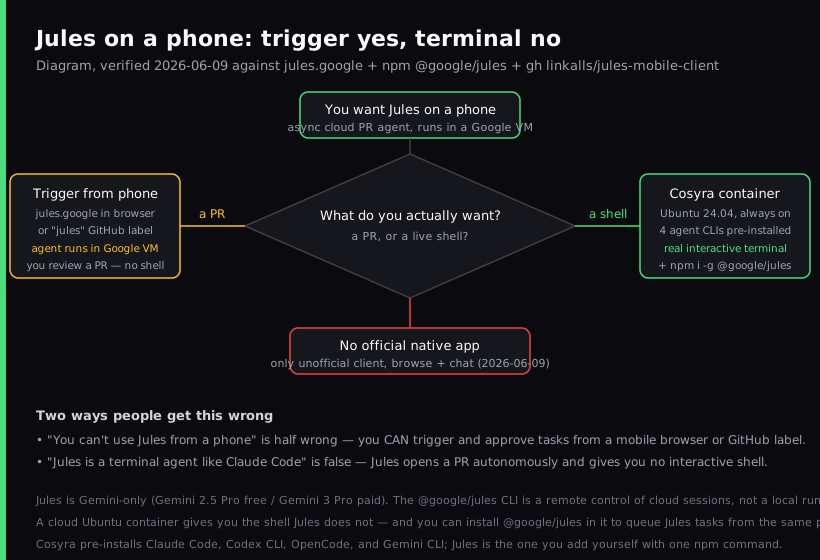
The one thing people get wrong about Jules on a phone: both "you can't use Jules from a phone" and "Jules is a terminal agent you drive from your phone like Claude Code" are wrong, in opposite directions. Because the agent runs in Google's cloud, you can assign and approve tasks from a phone with zero local setup. But Jules gives you no interactive shell. It plans, edits, and opens a PR autonomously. The real question is not "is there an app" but "do you want a PR or a live terminal," and those are two different tools.
What is Jules?
Jules is Google's autonomous coding agent. You give it a task against a GitHub repo, and it clones your codebase into a secure Google Cloud VM, understands the project, then writes tests, builds a feature, fixes a bug, or bumps a dependency and opens a pull request for you to approve. It went generally available on 2025-08-06 after a public beta at Google I/O. The homepage tagline, read first-hand on 2026-06-09, is "Jules does coding tasks you don't want to do."
The detail that defines Jules, and the reason "Jules on a phone" needs care, is that it is asynchronous. Claude Code, Codex CLI, and Gemini CLI are interactive: you sit in a shell and watch the agent work, step in, run a command, change direction. Jules is fire-and-forget: you describe a goal, walk away, and come back to a PR. That shape is great for "fix this while I'm on the train" and wrong for "let me poke around the repo with my hands on it."
The opinion we hold that the Jules-is-all-you-need crowd will push back on: an async PR bot is not a substitute for a terminal, and pretending it is leaves you stuck the moment a task needs a human in the loop. Jules is genuinely good at self-contained chores. But when you need to read a stack trace live, run an ad-hoc query, or drive an agent interactively from the couch, you want a shell. And Jules does not have one. The honest setup is to use both: Jules for the walk-away tasks, a real terminal for everything else.
How can you use Jules from a phone?
You can reach Jules from a phone three ways, and the deciding factor is what you want back: a pull request, or a live terminal. All current as of 2026-07-25.
1. jules.google in a mobile browser
The web app is responsive and works in a phone browser. Sign in with Google, pick a connected repo and branch, type a task, review the plan, and approve. Jules runs the work in its cloud VM and opens a PR. This is the zero-setup path: nothing to install, device-agnostic.
- Works when: you have a self-contained task and you want it done in the background while you do something else.
- Breaks when: you need to inspect the repo interactively or run an arbitrary command. The web app gives you a task queue and a PR, not a shell.
- Cost: free tier is 15 tasks/day, 3 concurrent, on Gemini 2.5 Pro. Paid tiers are tied to a Google AI subscription.
2. The "jules" GitHub label from the GitHub mobile app
Install the Jules GitHub app on a repo, then add the jules label
to an issue from the GitHub mobile app. Jules picks up the issue, works it in
the cloud, and opens a PR. This is the most phone-native trigger because it lives
inside a flow you already use, with no separate tool to open.
- Works when: your team already triages work as GitHub issues and you want to fan tasks out to an agent without leaving the issue tracker.
- Breaks when: the task is exploratory or needs back-and-forth. A label assigns one autonomous run; it is not a conversation.
- Cost: same Jules tiers; the GitHub app is free to install.
3. A cloud container for the shell Jules doesn't give you
This is what we built: a native iOS and Android terminal connected to a
persistent Ubuntu 24.04 container. Claude Code, Codex CLI, OpenCode, and
Gemini CLI are pre-installed, so you get an interactive agent on the phone
today. And because it is a real shell, you can run
npm install -g @google/jules inside it to queue and watch Jules tasks
from the same terminal, the interactive and the async, side by side.
- Works when: you want a real terminal on the phone, run commands, inspect files, drive an agent live, on both iOS and Android, with no home server.
- Breaks when: you are offline. The container lives in the cloud, so no internet means no terminal. Full trade-off list in Cosyra vs Termux, or the head-to-head Cosyra vs Jules for the async-agent-versus-live-shell call.
- Cost: 1 hour free on signup, no credit card. Extend with a 10-hour, 7-day trial when you want more. After that, $29.99/month or $300/year. Your model tokens are billed by your provider. See pricing.
How do you trigger and approve Jules from your phone?
You drive Jules from a phone in about five minutes: trigger a task from the web app or a GitHub label, let it run in Google's cloud, review the PR, and keep a real terminal alongside for the hands-on work. Here is each step.
Step 1: Trigger a task from a mobile browser
Open jules.google in your phone's browser and sign in with Google. Pick a connected GitHub repo and branch, type the task in plain English, and review the plan. The agent runs in a Google Cloud VM, so the work happens server-side while you put the phone down.
jules.google: signed in as you@gmail.com
repo: your-org/your-project branch: main
task: add retry with backoff to the fetch in src/api/client.py
Jules: cloning into Google Cloud VM...
Jules: plan ready, review and approve
Step 2: Or assign a task with the GitHub label
Install the Jules GitHub app, then add the jules label to an issue
from the GitHub mobile app. Jules works the task in the cloud and opens a PR against
your branch. Nothing runs on the phone; the label is the trigger.
Issue #214: flaky test in tests/test_invoice.py
+ label: jules
Jules: picked up #214, running in cloud VM
Jules: opened PR #215, review the diff
Step 3: Review and approve the pull request
When Jules finishes it opens a PR. Read the diff in the GitHub mobile app or a browser, request changes if you need them, and merge when it looks right. You approve an outcome, not a live session. That is the async shape of Jules.
Step 4: Add an interactive shell with a container
For the live terminal Jules does not give you, open a Cosyra container.
Claude Code, Codex CLI, OpenCode, and Gemini CLI are already there, and you
can install the @google/jules CLI to queue Jules tasks from the same
prompt. We ran this in a fresh container and
jules --version reported 0.1.42.
$ npm install -g @google/jules
added 1 package, jules 0.1.42
$ jules --version
0.1.42
# remote control of cloud sessions, not a local agent
Try it free. 1 hour on signup, no credit card. Extend with a 10-hour, 7-day trial when you want more. Claude Code, Codex CLI, OpenCode, and Gemini CLI come pre-installed; add the Jules CLI with one install command. App Store / Google Play / Pricing details
What can you actually do with Jules from a phone?
The honest pitch for Jules on a phone is an autonomous agent that finishes a self-contained chore while you are not looking. Three sessions we run from a phone.
Fan out a chore from the train
You have a bounded task: bump a dependency and fix what breaks. On the train, open jules.google or label the issue, describe it, and put the phone away. Jules works it in the cloud and the PR is waiting when you check back at the next stop. This is the workflow Jules is built for.
Triage a failing test from the couch
Saturday morning, CI is red. Add the jules label to the issue: "the
test in tests/test_invoice.py is failing, find out why and fix it." Jules reads
the traceback, edits the code, and opens a PR. You review the diff on the phone
and decide whether to merge. No machine to keep on, no shell to babysit.
Drive an interactive agent when the task needs your hands
Some work is not fire-and-forget: you want to read files, run a one-off query, or steer an agent turn by turn from the kitchen table. That is where a real terminal earns its place. Open a Cosyra container, run Gemini CLI or another pre-installed agent, and keep Jules for the walk-away tasks. If you like that walk-away model, OpenHands is the other big open-source (MIT at its core) async agent with the same phone tradeoff, no on-device install, but you can drive OpenHands Cloud from a browser; our how to run OpenHands on your phone guide covers all three paths. For the cross-agent view, see the AI coding agents on mobile pillar. On a tablet the trigger-and-review side of Jules is roomier with a keyboard. Our Jules on iPad guide covers what Stage Manager and Safari add, and where the same no-terminal gap remains.
What are the real limits of Jules on a phone?
Knowing where this stops helps you match Jules to the right job instead of fighting it.
- No interactive terminal. Jules edits and opens a PR autonomously; it gives you no Linux prompt and no long-lived dev shell. If you need a shell on the phone, that is a cloud container's job, not Jules's.
- No official native app. Web app, GitHub app, REST API, and
the
@google/julesCLI only. The single mobile client, linkalls/jules-mobile-client, is unofficial third-party and only browses sessions and chats. - Gemini-only. Free tier is Gemini 2.5 Pro, paid is Gemini 3 Pro. No Claude or GPT for the agent. For provider choice, a Claude Code or Gemini CLI session in a container is BYOK.
- The CLI is a remote control. Installing
@google/julesdoes not run the agent on the phone; it queues and watches cloud sessions. It needs Node.js. - Async-first. Optimized for bounded tasks that return a PR, not for hands-on synchronous pair-programming.
Who should use Jules, and who should add a terminal?
Use Jules from a phone if your tasks are self-contained, you like a GitHub-label-driven flow, you are happy on Gemini, and a PR is the outcome you want. Add a cloud terminal if you want to inspect a repo live, run arbitrary commands, choose your own model across four pre-installed agent CLIs, or drive an agent turn by turn, the things Jules deliberately does not do. Most days we want both: Jules for the walk-away chores, a real shell for everything hands-on.
For the same walkthrough with interactive agents that run in the container, see Gemini CLI on phone and Codex CLI on phone.
Frequently asked questions
Can you use Jules on a phone?
Yes for triggering and approving, no for an interactive terminal. Jules is
Google's asynchronous coding agent: it runs in a Google Cloud VM, not on
your phone. You can open jules.google in a mobile browser or add the
jules label to a GitHub issue from the GitHub mobile app, and Jules
works the task and opens a pull request you review. What you cannot do is get
a shell into that VM. For a real terminal on the phone, run a cloud Ubuntu container
and drive an agent there instead.
[source: jules.google, web app, GitHub integration, no shell]
Is there a Jules iOS or Android app?
No official native app, as of 2026-07-25. The jules.google page lists only
the web app, the GitHub integration, a REST API, and the
@google/jules CLI. The single mobile client is unofficial and third-party:
linkalls/jules-mobile-client (24 stars, BSD-2-Clause, last pushed 2026-07-08),
and its own description says it only browses sessions and chats on iOS, Android,
and web. It does not give you a shell either.
[source: GitHub, linkalls/jules-mobile-client, unofficial, browse + chat only]
Does installing the @google/jules CLI run Jules on my phone?
No. The @google/jules CLI (latest 0.1.42, published 2025-12-16)
is a remote control of cloud sessions, not a local runtime. Its docs describe
the remote command as the primary way to interact with Jules sessions
running in the cloud. Installing it in a container or in Termux lets you queue
and watch tasks, but the agent always executes in a Google Cloud VM. It needs
Node.js to run.
[source: npm registry, @google/jules, version 0.1.42, remote control of cloud sessions]
What model does Jules use, and can I bring my own?
Jules is Gemini-only. The free tier runs Gemini 2.5 Pro; the paid Google AI Pro tier gets higher access to the latest model (Gemini 3 Pro) and Google AI Ultra gets priority access to it, as of 2026-07-25. There is no option to point the agent at Claude or GPT. If you want provider choice, an interactive agent like Gemini CLI, Claude Code, Codex CLI, or OpenCode in a cloud container is BYOK and lets you pick your model.
[source: jules.google, pricing, Gemini 2.5 Pro free / Gemini 3 Pro paid]
How much does Jules cost?
Jules has a free tier of 15 tasks per day with 3 concurrent tasks on Gemini 2.5 Pro. Jules in Google AI Pro raises that to 100 tasks per day and 15 concurrent on Gemini 3 Pro; Jules in Google AI Ultra is 300 tasks per day and 60 concurrent, verified 2026-07-25 on jules.google. These are task-metered tiers tied to a Google AI subscription, which is a different shape from an always-on machine you rent by the month.
[source: jules.google, tiers 15 / 100 / 300 tasks per day]
How is Jules different from Gemini CLI on a phone?
Gemini CLI is an interactive terminal agent: you run it in a shell, watch it work step by step, and steer it live. Jules is asynchronous: you assign a task, it runs autonomously in a cloud VM, and it returns a pull request. Gemini CLI is one of the four agents we pre-install in Cosyra, so you get a live Gemini agent on the phone today; Jules is the fire-and-forget version that hands you a PR instead of a session. See Gemini CLI on phone for the interactive path.
[source: jules.google, async PR agent, distinct from interactive Gemini CLI]
tl;dr
Jules is Google's asynchronous coding agent. It runs in a Google Cloud VM
and opens a pull request for you to approve. From a phone you can trigger
and approve tasks at jules.google or by adding the jules label
to a GitHub issue, but Jules gives you no interactive terminal, and there is
no official iOS or Android app (2026-07-25; the one mobile client is unofficial
and browse-only). Jules is Gemini-only. For a real shell on the phone, run a
Cosyra container with four agent CLIs pre-installed. And install @google/jules inside it to queue Jules tasks from the same terminal.
App Store / Google Play. Sign up for 1 hour free, no credit card. Extend with a 10-hour, 7-day trial when you want more.
Get the terminal Jules doesn't give you. Install Cosyra, open
a container, drive a pre-installed agent, and run
npm install -g @google/jules to queue Jules tasks alongside.