Short answer. Cosyra vs Jules is not agent-vs-agent; it's two different shapes. Jules is Google's asynchronous coding agent: it clones your repo into a Google Cloud VM, works on its own, and opens a pull request for you to approve. It has no official iOS, iPadOS, or Android app and no interactive shell into that VM (verified 2026-07-13). Cosyra is a paid mobile cloud terminal: a per-user Ubuntu 24.04 container with Claude Code, Codex CLI, OpenCode, and Antigravity CLI pre-installed, reached from native iOS and Android apps. Pick Jules if you want fire-and-forget background tasks that return a PR. Pick Cosyra if you want a real terminal you drive from a phone.
We wrote this after doing the thing the comparison is actually about: we
installed the Jules CLI itself inside a Cosyra container with npm i -g @google/jules
and queued a task from the phone, on the train, with no laptop open at home. That
works because the Jules agent runs in Google's cloud and the CLI just talks to
it, which is exactly the distinction this page is about. Jules is a place you
send work to; Cosyra is a place you do work in. They can sit side by side, and
we'll show that.
This post was written by the Cosyra team. We compared Cosyra against Jules based on hands-on testing of both, installing the @google/jules CLI inside our container, reading jules.google and its docs first-hand, checking the npm package and the unofficial mobile client via the registry and the GitHub API, plus our internal Jules factsheet. Pricing, versions, and the mobile-app status were verified 2026-07-13.
tl;dr
Use Jules if you want an async agent you assign work to and walk away from, a generous free tier (15 tasks/day), a GitHub-label-driven flow, Gemini 3 Pro on paid tiers, and a PR waiting when you get back. Use Cosyra if you want to actually code from a phone: a real interactive terminal and four agent CLIs on iOS or Android, with no machine to supply. They solve different problems, and you can run the Jules CLI inside Cosyra.
App Store · Google Play. Sign up and pick a plan. Eligible new users can start a 7-day free trial in the App Store app.
Want a real terminal to go with Jules?
Our container is an always-on Linux machine you reach from a phone, drive Claude
Code, Codex CLI, OpenCode, and Antigravity CLI by hand, and npm i -g @google/jules to queue Jules tasks from the same prompt.
App Store · Google Play · Pricing. Sign up and pick a plan, from $20/month.
How do Cosyra and Jules compare feature by feature?
Cosyra is a cloud Ubuntu container reached from native iOS and Android apps with agents pre-installed; Jules is an async agent that runs in a Google Cloud VM and opens a pull request, with no interactive shell and no official mobile app. Cosyra's $20/month is the always-on machine; Jules is free to start but gives you a PR, not a prompt. The table below lines them up on twelve attributes, verified 2026-07-13.
| Feature | Cosyra | Jules |
|---|---|---|
| Pricing | $20 / month Core or $30 / month Pro | Free tier; Pro/Ultra via Google AI subscriptions |
| Free tier | None. 7-day free trial for eligible new users in the App Store app | 15 tasks/day, 3 concurrent, Gemini 2.5 Pro |
| OS support | iOS, Android, web | Web + CLI + REST API + GitHub app; no native mobile app |
| AI agents pre-installed | Claude Code, Codex CLI, OpenCode, Antigravity CLI (BYOK) | Jules is the agent; Gemini-only (2.5 Pro / 3 Pro) |
| Interactive shell | Yes: a real Ubuntu terminal you drive | No: async PR agent, no shell into the VM |
| Persistent storage | 30 GB cloud, survives device loss | Per-task VM; no persistent workspace you own |
| Offline capability | No (cloud-only) | No (cloud VM-only) |
| Container sandboxing | Per-user Ubuntu container on Azure AKS | Per-task secure Google Cloud VM |
| Port forwarding | Yes: preview a dev server from the app | No: you get a PR, not a running machine |
| File sync across devices | Same container from any device | State lives in GitHub PRs, not a workspace |
| Max session length | Hibernates on idle, resumes on reopen | Per-task; no long-lived interactive session |
| API key model | BYOK (you pay Anthropic / OpenAI / Google) | Hosted Gemini via your Google AI tier; no BYOK |
| Open-source status | Client app closed, orchestration proprietary | Closed; Google-hosted service |
Want the interactive side of this comparison?
We ship a persistent Ubuntu container with four agents pre-installed, plus you
can npm i -g @google/jules to queue Jules tasks too, on iOS and
Android, in about two minutes.
App Store · Google Play · Pricing. Sign up and pick a plan. Eligible new users can start a 7-day free trial in the App Store app.
Why "vs" is the wrong frame for these two
The honest way to read this pair is async cloud PR agent versus interactive mobile terminal. Jules is built to take a well-scoped task, "bump these dependencies and fix the breakage," "fix this bug", run it in a cloud VM while you do something else, and hand you a pull request to review. You don't sit with it. Cosyra is the opposite by design: you open the app, you land in a shell, and you drive the agent in real time, watching files change and running tests as you go. One is fire-and-forget; one is hands-on.
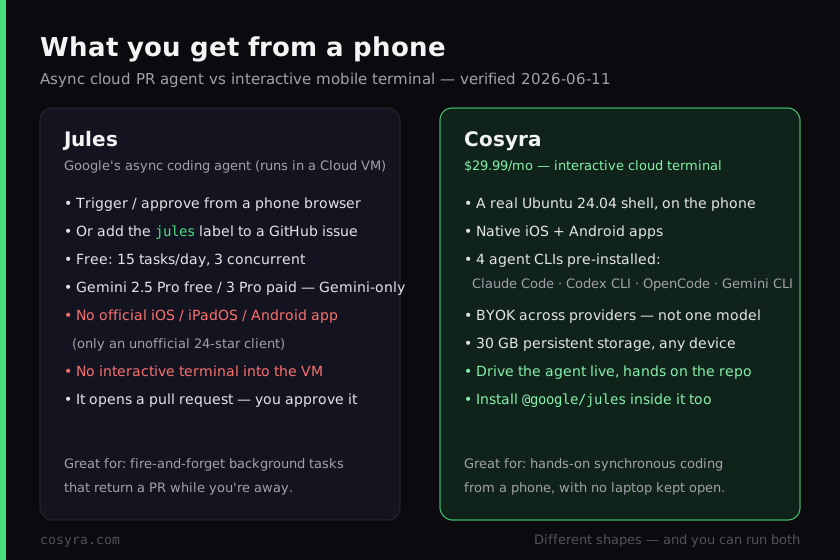
Mind the easy mistake in both directions. "You can't use Jules from a phone"
is wrong, because the agent runs in Google's cloud, you can trigger and
approve a task from a phone browser or the GitHub mobile app with zero local
setup. But "Jules is a terminal agent you drive from your phone like Claude
Code" is also wrong, there is no shell, no cd, no live session.
Be precise: yes to trigger and approve, no to an interactive terminal. That
precision is the whole comparison.
What happened when we ran the Jules CLI inside Cosyra?
It installed like any npm package and let us queue a cloud task from the
phone, which is the useful version of "Jules on mobile." Jules is not one of
the four agents we pre-install, so we added its CLI ourselves. The
@google/jules package carries no os or cpu restriction (we checked
the registry on 2026-07-13), Node.js is already in the container, and the CLI
is a remote control of cloud sessions, so the agent still runs in Google's VM,
and we drove it from a terminal in our hand. Here's the session.
$ uname -m && node --version
x86_64
v22.14.0
$ # The Jules CLI is a plain npm package, no os/cpu restriction
$ npm i -g @google/jules
$ jules --version
0.1.42
$ jules remote # remote-control the cloud session, not a local agent
> queued task in Google Cloud VM · PR will open on completion
The contrast with Jules's own surfaces is the comparison in one screen. With Jules alone, your "mobile" experience is a browser tab or a GitHub label: you assign a task and wait for a PR. Inside Cosyra you have a full terminal in your hand: drive Claude Code or Antigravity CLI by hand, run tests, edit files, and also queue a Jules task from the same prompt when a job is better left to run in the background. We did this on the train, which is exactly the couch-and-commute context these tools are supposed to serve.
Where does Jules beat Cosyra?
Jules beats Cosyra on zero-setup triggering, a genuinely generous free tier, background autonomy, first-party Google integration, and massive async concurrency. We ship a hands-on product and we still think Jules is an excellent fit for a specific job. Here's where it's the better pick, with the receipts from jules.google, verified 2026-07-13.
- Zero setup and zero cost to start. No app to install, no container to pay for: open jules.google in a browser, point it at a repo, and you're running on the free tier, 15 tasks/day, 3 concurrent, Gemini 2.5 Pro. For "fix this one thing while I'm away," that's hard to beat.
- Background autonomy. Assign a task and close the tab; the agent works in a Google Cloud VM and the PR is waiting later. Cosyra is hands-on by design, you're in the session. If you specifically want to not babysit the agent, Jules is built for that and Cosyra isn't.
- GitHub-native review flow. Install the Jules GitHub app and
add the
juleslabel to an issue; Jules opens a PR with the changes, triggerable from the GitHub mobile app. If your team already lives in PR review, it slots in with no new tool to learn. - Gemini 3 Pro and async concurrency. Paid Pro and Ultra tiers run Gemini 3 Pro, and Ultra allows up to 60 concurrent cloud tasks, a fleet of background agents for big refactors, plus a documented REST API and CLI for wiring Jules into Slack, Linear, or CI.
Where does Cosyra beat Jules?
Cosyra beats Jules on giving you an actual interactive terminal on a phone, native apps, provider choice across four pre-installed agents, and a persistent workspace that follows you across devices. The trade-off for Jules's fire-and-forget convenience is that you never get a machine to drive , only a PR to approve. We'd rather hand you the machine.
It's a real terminal, and Jules gives you none
This is the load-bearing difference. Jules runs in a Google Cloud VM and
opens a pull request; it gives you no shell, no cd, no
long-lived session. There is no Jules prompt to type into. Our native
Google Play and
App Store apps put a real Ubuntu 24.04 terminal on
the phone in your hand, where you drive an agent, inspect files, and run tests
live. If you want to do the coding rather than approve it, that's the
gap.
Native apps, not a browser tab and an unofficial client
Jules has no official iOS, iPadOS, or Android app. Its "mobile" story is a responsive web page plus an unofficial third-party client (linkalls/jules-mobile-client, 24 stars, BSD-2-Clause, verified 2026-07-13), which only browses sessions and chats. We ship first-party native apps where the whole point is a terminal you can actually work in, not a viewer for work happening elsewhere.
Provider choice, and Jules itself runs inside
Jules is Gemini-only: Gemini 2.5 Pro free, Gemini 3 Pro paid, no BYO Claude
or GPT for the agent. On first boot our container already has Claude Code,
Codex CLI, OpenCode, and Antigravity CLI on the PATH, all BYOK, so you pick
the model per job. And because @google/jules is a plain npm package,
you can drop it into the same container with npm i -g @google/jules and queue Jules tasks too. The honest framing is that Cosyra can host the Jules
CLI alongside everything else, covered in our
Gemini CLI on your phone walkthrough,
which is the interactive Gemini agent Jules is easy to confuse with.
Persistent workspace across devices
A Cosyra container persists in the cloud and is the same container whether you reach it from an iPhone, an Android tablet, or a laptop browser. Drop your phone, buy a new one, log in, and your repo, your shell history, and your half-finished agent session are still there. Jules has no equivalent persistent workspace you own, its state is a series of per-task VMs and the PRs they produce. That's fine for fire-and-forget; it's not a place you live.
An opinion the Jules crowd will push back on
We think most "real" coding from a phone wants a terminal, not a PR queue. The async-agent crowd will disagree, they'll say the future is assigning work and reviewing diffs, and that typing in a shell is a relic. For a fleet of background refactors, they have a point, and Jules is genuinely good at that. But for someone on a couch who wants to open a session, steer an agent, and see the change happen, "we'll open a PR when it's done" isn't the same experience as a live terminal. That's the exact reason we built Cosyra as an interactive container with a native app instead of another cloud PR bot.
Who should pick Jules instead of Cosyra?
Pick Jules instead of Cosyra if you want background autonomy, a free task-metered tier, a GitHub-label workflow, or Google's first-party Gemini 3 Pro stack, and you don't need an interactive shell. For those profiles Jules is the better tool, and we'd tell you so. We use async agents like Jules for exactly the jobs we'd rather not sit and watch.
Try Jules first if you are one of these profiles
- You want fire-and-forget background tasks. You scope a job, assign it, and want a PR waiting later, not a session to drive. Jules's whole design is "do this while I'm away," and its free 15 tasks/day covers a lot of that. If you don't want to babysit the agent, that's the right answer.
- You live in GitHub PR review. Your team already reviews every change as a pull request. Jules's label-an-issue → PR flow drops into that process with no new surface to learn, and it's triggerable from the GitHub mobile app.
- You want Gemini 3 Pro and async concurrency. You're on Google's AI stack and want first-party Gemini 3 Pro plus up to 60 parallel cloud tasks for fleet-style refactors. That's a category Cosyra doesn't compete in, we're one interactive machine, not a swarm of background agents.
We reach for async agents like Jules when a job is well-scoped and boring, and for Cosyra when we want an agent on a phone with our hands on the repo. They aren't mutually exclusive, since you can install the Jules CLI inside a Cosyra container, the line between "send work out" and "do work here" is thinner than it looks.
How do you try Cosyra if you're coming from Jules?
You try Cosyra from a Jules background in about two minutes: install from
the App Store or Google Play, sign in, and you land in a fresh Ubuntu 24.04
x86_64 container instead of a browser tab waiting on a PR. Your four agents
are already on the PATH, and if you want Jules in the mix, it's one
npm i -g @google/jules away. The session below is what we run on
a fresh install.
$ # Install Cosyra, open the app, drop into the container.
$ cat /etc/os-release | head -1
PRETTY_NAME="Ubuntu 24.04 LTS"
$ which claude codex opencode agy
/usr/local/bin/claude
/usr/local/bin/codex
/usr/local/bin/opencode
/usr/local/bin/agy
$ # Want Jules too? One command, queues cloud tasks from here.
$ npm i -g @google/jules && jules remote
The big unlock for most people coming from Jules: you get a terminal back. The container is the always-on machine, it hibernates when idle and resumes where you left off, you reach it the same way from any device, and you can still send a background task to Jules from inside it when that's the better tool for the job. For the full mobile setup, see how to use Jules from your phone.
Frequently asked questions
Is there a Jules mobile app?
No official one. As of 2026-07-13 Google ships Jules as a web app, a CLI (npm i -g @google/jules), a REST API, and a GitHub app, with no native iOS, iPadOS, or Android
client. The only mobile app is the unofficial third-party linkalls/jules-mobile-client (24 stars, BSD-2-Clause, verified via the GitHub API on 2026-07-13), and it
only browses sessions and chats; it gives you no terminal.
Can I use Jules from my phone?
Yes, in the trigger-and-approve sense. Because the agent runs in a Google
Cloud VM, you can open jules.google in a phone browser, give it a prompt,
and approve the pull request it opens, or add the jules label to
a GitHub issue from the GitHub mobile app. What you can't get is an interactive
shell into that VM: Jules plans, edits, and opens a PR autonomously; you review,
you don't cd or run commands.
[source: jules.google, web app + GitHub-label workflow, no shell]
Does Jules give you a terminal like Claude Code does?
No. Jules is an asynchronous PR agent, not an interactive terminal agent. It clones your repo into a Google Cloud VM, works on its own, and opens a pull request; there's no live shell you drive. That's the core difference from a mobile cloud terminal like Cosyra, where you get a real Ubuntu prompt and drive Claude Code, Codex CLI, OpenCode, or Antigravity CLI with your hands on the repo.
[source: Jules API docs, async task → pull request model]
Is Jules free, and is Cosyra's $20 a fair comparison?
Jules has a free tier of 15 tasks/day, 3 concurrent, Gemini 2.5 Pro (verified 2026-07-13). Paid Pro and Ultra raise the limits and switch to Gemini 3 Pro. But it's not a like-for-like dollar comparison: Jules's free tier buys metered background tasks that return a PR, while Cosyra's $20/month is an always-on interactive Ubuntu container with native apps and four agent CLIs. They buy different things: a PR bot versus a machine you drive.
[source: jules.google pricing, free 15 tasks/day / Pro 100 / Ultra 300]
Does Jules work with Claude or GPT?
No. Jules is Gemini-only: the free tier runs Gemini 2.5 Pro and paid tiers run Gemini 3 Pro (verified 2026-07-13). There's no BYO Claude, OpenAI, or other model for the agent. If model choice matters, that's a reason to run a terminal where you pick the agent: Cosyra ships Claude Code, Codex CLI, OpenCode, and Antigravity CLI, all BYOK.
[source: jules.google, Gemini 2.5 Pro free / 3 Pro paid, no BYOK]
Can I run the Jules CLI inside Cosyra?
Yes. @google/jules is a plain npm package with no os or cpu restriction
(verified 2026-07-13), and Node.js is already in the container, so npm i -g @google/jules installs it like it would on any Linux laptop. We ran exactly this. Note what
it is, though: the CLI is a remote control of cloud sessions, not a local runtime,
and the Jules agent still executes in Google's VM. So you can queue and check
Jules tasks from the same phone terminal where you drive the interactive agents.
Four agents pre-installed, and the Jules CLI is one npm install away. We run them in a real x86_64 Ubuntu container, reached from a native iOS or Android app, with no laptop to keep open. Two-minute setup.
Jules from your phone · Gemini CLI on your phone · AI coding agents on mobile · See pricing. Sign up and pick a plan. Eligible new users can start a 7-day free trial in the App Store app.