Short answer. Cosyra vs Kilo Code is not agent-vs-agent; it's
two different shapes. Kilo Code is a free, open-source (MIT) agentic coding platform
that runs as a VS Code extension, a JetBrains plugin, and a CLI (@kilocode/cli), with no native iOS, iPadOS, or Android client (2026-07-04). Cosyra is a
paid mobile cloud terminal: a per-user Ubuntu 24.04 container with
Claude Code, Codex CLI, OpenCode, and Antigravity CLI pre-installed, reached from native iOS and Android apps. Pick Kilo if you're
at a desk and want one free agent across your editor, CLI, and cloud. Pick Cosyra
if you want an agent that runs on an actual phone, with no machine to supply.
There's a detail that makes this comparison closer than most: Kilo's own CLI
page says it is built on OpenCode, one of the four agents we already
pre-install and run in production. So the runtime under Kilo CLI is a shape
we know well. We wrote this after pulling the @kilocode/cli manifest
ourselves and installing it inside a Cosyra container, on the couch, with no laptop
open at home. Same OpenCode-based runtime, very different place for it to live.
This post was written by the Cosyra team. We compared Cosyra against Kilo Code based on hands-on testing of both, reading kilo.ai/cli and kilo.ai/pricing first-hand, pulling the @kilocode/cli manifest from the npm registry, checking the Kilo-Org/kilocode repo via the GitHub API, and installing the CLI inside our own container, plus our internal Kilo factsheet. Stars, versions, and pricing verified 2026-07-04.
tl;dr
Use Kilo Code if you're at a desk and want a free, open-source (MIT) agent that follows you across VS Code, JetBrains, a CLI, and a cloud offering, with 500+ models and a zero-markup Gateway. Use Cosyra if you want to actually code from a phone: a real Ubuntu terminal and agent CLIs on iOS or Android, with no machine to supply. They solve different problems, and since Kilo CLI is built on OpenCode, you can install it inside Cosyra with one command.
App Store · Google Play. Sign up and pick a plan. Eligible new users can start a 7-day free trial in the App Store app.
Want Kilo CLI running from your phone?
Our container is the always-on Linux machine Kilo CLI's npm package needs. Install
it with npm install -g @kilocode/cli, or use the four agents
we pre-install, all reached from a native iOS or Android app, with no
laptop kept open.
App Store · Google Play · Pricing. Sign up and pick a plan, from $20/month.
How do Cosyra and Kilo Code compare feature by feature?
Cosyra is a cloud Ubuntu container reached from native iOS and Android apps with AI agents pre-installed; Kilo Code is a free, open-source agent that runs inside a desktop editor or a CLI on a machine you supply, with no mobile client at all. Cosyra starts at $20/month, and that price is the always-on machine; Kilo's software is free but assumes you're at a laptop with an editor or terminal open. The table below lines them up on thirteen attributes, verified 2026-07-04.
| Feature | Cosyra | Kilo Code |
|---|---|---|
| Pricing | $20 / month Core or $30 / month Pro | Free software (MIT); you pay your own inference |
| Free tier | None. 7-day free trial for eligible new users in the App Store app | Free forever (open-source software); BYOK $0 or Gateway/Pass |
| OS support | iOS, Android, web | macOS, Linux, Windows (desktop); no mobile client |
| AI agents pre-installed | Claude Code, Codex CLI, OpenCode, Antigravity CLI | Kilo is the agent; 500+ models, BYOK or Gateway |
| Where the agent runs | In the cloud container; phone is a terminal | In your editor/CLI on a machine you keep open |
| Native phone app | Native iOS and Android apps | None: no iOS, iPadOS, or Android client |
| Persistent storage | 30 GB cloud, survives device loss | On your machine; tied to the workspace |
| Offline capability | No (cloud-only) | Yes, if your model is local (Ollama / LM Studio) |
| Surfaces | Terminal + agent CLIs in the container | One agent across VS Code, JetBrains, CLI, and Cloud |
| File sync across devices | Same container from any device | Tied to the machine you installed on; sync is on you |
| Max session length | Hibernates on idle, resumes on reopen | As long as your machine stays open |
| API key model | BYOK (you pay Anthropic / OpenAI / Google) | BYOK (no markup) or Kilo Gateway/Pass hosted inference |
| Open-source status | Client app closed, orchestration proprietary | Open source, MIT, github.com/Kilo-Org/kilocode |
Want the phone side of this comparison?
We ship a persistent Ubuntu container with four agents pre-installed, and because
Kilo CLI is built on OpenCode, you can npm install -g @kilocode/cli it in too, on iOS and Android, in about two minutes.
App Store · Google Play · Pricing. Sign up and pick a plan. Eligible new users can start a 7-day free trial in the App Store app.
What does each stack actually require?
The headline "$0 vs $20" is misleading until you write down what each side needs to get an agent answering prompts from your phone. Kilo's software is free and genuinely good, but it runs in an editor or a terminal, and that editor or terminal runs on a laptop or desktop you keep open. There is no Kilo app to open on a phone. Cosyra's $20/month is the always-on machine, plus the storage and the native apps, with an OpenCode-based runtime already on the PATH.
We pulled the Kilo CLI manifest: where does it actually install?
Here's the piece you can't copy-paste from another blog. Whether
npm install -g @kilocode/cli succeeds from a phone is decided by
one field in the package manifest, not by marketing. We pulled it from the npm
registry on 2026-07-04, and the diagram below traces what it means for three real
environments.
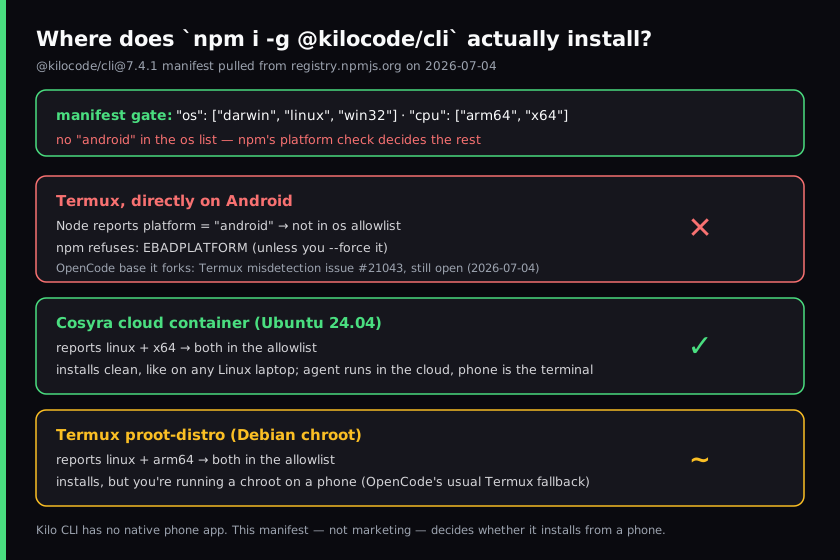
@kilocode/cli@7.4.1 install gate, pulled from the npm registry
on 2026-07-04. The os/cpu allowlist, not any phone
feature, decides where the CLI installs. Cross-checked against
kilo.ai/cli and the OpenCode base it forks.
The @kilocode/cli@7.4.1 manifest declares os: darwin, linux, win32 and cpu: arm64, x64. There is no android in that list.
Termux's Node reports the platform as android, so a default
install is rejected with EBADPLATFORM. A Cosyra container
reports
linux and x64, both allowed, so it installs the
way it would on any Linux laptop. This is the same manifest mechanism we hit
when we tested the OpenCode CLI on a phone, which makes sense: Kilo CLI is built on OpenCode.
$ npm view @kilocode/cli version os cpu
7.4.1
[ 'darwin', 'linux', 'win32' ]
[ 'arm64', 'x64' ]
$ uname -s -m && node --version
Linux x86_64
v22.14.0
$ # linux + x64 are both in the allowlist, so this installs clean
$ npm install -g @kilocode/cli
$ kilo --version
7.4.1
We ran this on a fresh container reached from the phone. The contrast with Kilo's normal path is the comparison in a sentence: in its usual setup that agent runs in VS Code, JetBrains, or a terminal on a machine you keep open, and there's no Kilo app to reach it from a phone. With Cosyra there is no laptop in the picture; the container is the machine, it hibernates when idle and resumes where it left off, and you reach it the same way from an iPhone, an Android tablet, or the web. We did this waiting for a train, which is exactly the case Kilo has no answer for today.
Where does Kilo Code beat Cosyra?
Kilo Code beats Cosyra on free open-source software, one agent across every surface you already use, model and inference flexibility, and not needing a hosted machine if you're already at a capable laptop. We ship a managed cloud product and we still think Kilo is an excellent agent for the right person. Here's where it's the better pick, with the receipts.
- Free and genuinely open-source (MIT). The extension, the JetBrains
plugin, and the CLI are all $0 and auditable: 25,521 GitHub stars and release
v7.4.1(2026-07-03) when we checked Kilo-Org/kilocode via the GitHub API on 2026-07-04. You pay only for inference. Cosyra's compute is a subscription from $20/month. On price of software, Kilo wins outright. - One agent across four surfaces. The same open-source agent and config run in VS Code, JetBrains, the CLI, and Kilo's Cloud. If you bounce between an editor at your desk and a terminal, that continuity is real, and it's a category we do not try to match; we are a terminal in a container.
- Model breadth and mid-task switching. Kilo advertises 500+ models across 60+ providers (Kilo's own figures), with a Gateway that charges exact provider rates at zero markup and a $19/month Pass option. Per kilo.ai/pricing, you can also go pure BYOK or run local models. We're BYOK too, but our agents call hosted providers; we don't ship a local-model story.
- Hosted inference or BYOK, your choice. Unlike a pure BYOK tool, Kilo also has a first-party inference layer (Gateway pay-as-you-go, Pass subscription) behind a Kilo account. If you don't want to manage provider keys, that's a genuinely nice on-ramp Cosyra doesn't offer.
- Huge editor install base. Kilo installs into editors millions of developers already keep open. If you live in VS Code or a JetBrains IDE at a desk, there's no new environment to learn and nothing hosted to pay for.
Where does Cosyra beat Kilo Code?
Cosyra beats Kilo on running on an actual phone, a real terminal with agent CLIs on iOS and Android, a persistent cloud workspace that follows you across devices, and not needing you to supply or keep a machine awake. The trade-off for "free editor software" is that the editor, and the laptop under it, has to be open. We'd rather be the machine for you.
It runs on a phone, and Kilo has no client that does
This is the load-bearing difference. Kilo Code has no native iOS, iPadOS, or Android app; kilo.ai/cli lists desktop install methods only. There is no Kilo you open on a phone. Our native Google Play and App Store apps put a real Ubuntu terminal in your hand, and that terminal can run Kilo's own CLI. If you want to code from a phone at all, that's the gap.
No laptop to keep open
Kilo-in-an-editor needs a laptop or desktop running VS Code, JetBrains, or a terminal, awake and reachable, for the agent to do anything. That machine is your responsibility to power and keep on. Our container is the always-on Linux machine, in the cloud, reached from a native app with nothing running at home. The agent keeps working whether your laptop is shut or in another city.
The agent runs in the cloud, and it can be Kilo itself
On first boot our container already has Claude Code, Codex CLI, OpenCode,
and Antigravity CLI on the PATH. And because Kilo CLI is built on OpenCode
with a plain npm package, you can drop Kilo's own agent into the same
container with
npm install -g @kilocode/cli, as we did above. So Cosyra can
host Kilo's agent, running in the cloud, driven from your phone.
Our full walkthrough is in
Run Kilo CLI on your phone.
Persistent workspace across devices, no machine to supply
A Cosyra container persists in the cloud and is the same container whether you reach it from an iPhone, an Android tablet, or a laptop browser. Drop your phone, buy a new one, log in, and your repo, your shell history, and your half-finished agent session are still there. With Kilo, state lives on whatever desktop you installed it on; move to another device and you're setting it up again; the four-surface continuity is within Kilo, not across your hardware.
An opinion Kilo's crowd will push back on
We think the phone terminal is a fine place to drive an agent, and that "you need a real editor for this" is a desk-bound habit more than a hard requirement once the agent is doing the multi-file edits itself. The Kilo crowd, and a lot of excellent engineers, will disagree, and at a desk with two monitors they're right that an editor with inline diffs beats a terminal pane. But for someone who wants to kick off and steer an agent from a phone on the couch between meetings, "free software that only runs in a desktop editor or terminal" isn't free if it means carrying a laptop. That's the exact reason we built Cosyra as a hosted container with a native app instead of another desktop surface.
Who should pick Kilo Code instead of Cosyra?
Pick Kilo Code instead of Cosyra if you're at a capable laptop, you want free open-source software, you want one agent across your editor and CLI and cloud, or you want maximum model flexibility including local models. For those profiles Kilo is the better tool, and we'd tell you so. We run OpenCode, which Kilo CLI is built on, in production ourselves, so we're not neutral bystanders about the runtime.
Try Kilo Code first if you are one of these profiles
- Desk-bound across an editor and a CLI. You code at a desk and you want the same agent in VS Code and in a terminal. Kilo's four-surface continuity is free and it's good, and a phone isn't your primary surface. That's the right answer for you.
- Open-source-first or local-model user. You want auditable MIT software and you run inference on your own hardware via Ollama or LM Studio. Kilo is model-agnostic with local-model support; our agents call hosted providers. If keeping inference local matters, Kilo is the honest pick.
- You want hosted inference without managing keys. Kilo's Gateway and Pass let you sign in and pay per token at provider rates. If you'd rather not wire up your own Anthropic or OpenAI key, that on-ramp is a real convenience we don't offer.
We use OpenCode-based tooling at our desks and we use Cosyra when we want an agent on a phone with no laptop to keep open. They aren't mutually exclusive, and since Kilo CLI installs inside a Cosyra container, the line between them is thinner than it looks.
How do you try Cosyra if you're coming from Kilo Code?
You try Cosyra from a Kilo background in about two minutes: install from the
App Store or Google Play, sign in, and you land in a fresh Ubuntu 24.04
x86_64 container instead of an editor on a laptop you keep open. Your four
agents are already on the PATH, and if you want Kilo specifically, it's one
npm install -g @kilocode/cli away, the same OpenCode-based runtime,
now in the cloud. The session below is what we run on a fresh install.
$ # Install Cosyra, open the app, drop into the container.
$ cat /etc/os-release | head -1
PRETTY_NAME="Ubuntu 24.04 LTS"
$ which claude codex opencode agy
/usr/local/bin/claude
/usr/local/bin/codex
/usr/local/bin/opencode
/usr/local/bin/agy
$ # Want Kilo too? One command, runs in this container.
$ npm install -g @kilocode/cli && kilo
The big unlock for most people coming from Kilo: there's no laptop to keep open anymore. The container is the always-on machine, it hibernates when idle and resumes where you left off, and you reach it the same way from any device, and Kilo runs inside it just like OpenCode does.
Frequently asked questions
Is there a Kilo Code mobile app?
No. As of 2026-07-04 there's no native iOS, iPadOS, or Android client.
Kilo Code ships as a VS Code extension, a JetBrains plugin, a CLI (@kilocode/cli), and a hosted Cloud offering on macOS, Windows, and Linux. To drive
Kilo CLI from a phone you run it inside a Linux environment you reach from
a native app, a cloud container or a Termux proot-distro chroot.
[source: kilo.ai/cli lists desktop install methods only, no mobile app]
Is Kilo Code free, or does it cost $19/month?
The agent software is free and open source (MIT). kilo.ai/pricing
lists BYOK/Local at $0, the Kilo Gateway at $0/mo plus usage with no markup,
and Kilo Pass starting at $19/month for inference. The $19 buys tokens, not
the agent. Team plans are $15/user/month; KiloClaw is a separate $55/month product.
Verified 2026-07-04.
[source: kilo.ai/pricing, free software + Gateway/Pass/Teams tiers]
Does Kilo CLI run on Termux on Android?
Untested by us end to end, and we won't claim a definite outcome. What we
can verify: the @kilocode/cli@7.4.1 manifest declares
os: darwin, linux, win32 and cpu: arm64, x64 (npm
registry, 2026-07-04). Termux's Node reports the platform as "android", not
in that list, so a default install is rejected with EBADPLATFORM
unless you --force it. Kilo CLI is built on OpenCode, whose Termux
misdetection issue is still open. The clean path is a cloud x86_64 container
or a Termux proot-distro chroot, both of which report
linux and pass the gate.
[source: Kilo-Org/kilocode repo; @kilocode/cli manifest os/cpu fields]
Can I run the Kilo CLI inside Cosyra?
Yes. Node.js is already in the container, and the container reports
linux + x64, which the @kilocode/cli
manifest allows, so npm install -g @kilocode/cli installs it like
it would on any Linux laptop. It's built on OpenCode, which we already pre-install
and run, so the runtime shape is familiar.
[see: Run Kilo CLI on your phone, the container setup]
Is Kilo CLI BYOK-only?
No. Kilo has two inference paths: bring your own provider keys (BYOK, you pay the provider directly, no markup), or sign in to a Kilo account and route through the Kilo Gateway (pay-as-you-go) or Kilo Pass ($19/mo). So it's not a pure BYOK tool. It also has a first-party hosted-inference layer. Cosyra, by contrast, is BYOK: you pay Anthropic, OpenAI, or Google directly.
[source: kilo.ai/pricing, BYOK $0 alongside Gateway and Pass]
Is Kilo CLI pre-installed in Cosyra like the other agents?
No. The four agents we pre-install are Claude Code, Codex CLI, OpenCode,
and Antigravity CLI. Kilo CLI is a one-command add: npm install -g @kilocode/cli. Because Kilo CLI is built on OpenCode, which we already run, it
installs and behaves the way OpenCode does in the container, on top of the
four agents already on the PATH.
Four agents pre-installed, and Kilo CLI is one npm install away. We run them in a real x86_64 Ubuntu container, reached from a native iOS or Android app, with no laptop to keep open. Two-minute setup.
Run Kilo CLI on your phone · OpenCode on your phone · AI coding agents on mobile · See pricing. Sign up and pick a plan. Eligible new users can start a 7-day free trial in the App Store app.