Kilo CLI runs on macOS, Linux, and Windows, with no iPhone or Android build.
So to run kilo from a phone you put it on a real Linux machine and
reach it. The fastest way: install
Cosyra for iOS or
Cosyra for Android, run
npm install -g @kilocode/cli in the container, sign in, and start
kilo in a repo. One useful thing to know first: Kilo CLI is built
on OpenCode, one of the four
agents we already pre-install, so the runtime is familiar. Here is each
path.
Quick decision: pick the path you came for.
- Cloud container (Cosyra): you want
kiloactually running somewhere your phone reaches, with no desktop left awake. Setup in ~5 minutes ↓ - What am I actually installing? You want the honest read on Kilo, its OpenCode base, and what it costs before you commit. What Kilo CLI is ↓
- Termux (Android): you want it on-device and need to know why we can't promise it works. The OpenCode-base caveat ↓
Not sure which fits? The side-by-side comparison ↓ lines the paths up on what runs where, and what each costs.
This guide was written by the Cosyra team. We checked every moving part against primary sources on 2026-07-02: the Kilo CLI page, the Kilo CLI docs, the pricing page, and the Kilo-Org/kilocode repo (license and latest release via the GitHub API). Versions, prices, and dates below carry that date. We also set the CLI up in a fresh Cosyra container to confirm the npm install and launch flow described in the steps.
What is Kilo CLI?
Kilo Code is a free, open-source agentic coding platform, and Kilo CLI is
its command-line client. The same agent also ships as a VS Code extension, a
JetBrains plugin, and a hosted Cloud offering, and one Kilo account works
across all four surfaces. The CLI installs as the kilo command and,
like every other coding CLI, it expects a real shell, which is exactly why the
phone is the wrong place to run the process directly.
- Repo: Kilo-Org/kilocode, a TypeScript monorepo, MIT-licensed, around 25,300 stars, latest release v7.3.54 (2026-06-23) per the GitHub API on 2026-07-02.
- Platforms: macOS, Linux, and Windows, distributed through npm
(
@kilocode/cli) plus curl, Homebrew, and the Arch AUR. No native mobile app. - Lineage: the Kilo extension started as a fork of Roo Code; the CLI is built on OpenCode. Two different lineages, worth keeping straight.
- Auth: sign in with a Kilo account, or add your own provider keys (BYOK). It is not BYOK-only. It also has a first-party hosted-inference path through the Kilo Gateway and Kilo Pass.
Here is an opinion Kilo's own positioning would push back on: for coding from a phone, the CLI is the surface that matters, not the editor extension. Kilo leads with its VS Code install base, and that is fair on a laptop. But on a train with a phone in your hand, a TUI-first CLI running in a cloud shell is the thing that actually works, and the extension is dead weight. The good news is the CLI is built on OpenCode, which we already run, so it slots into a workflow we know well.
How can you run Kilo CLI from a phone?
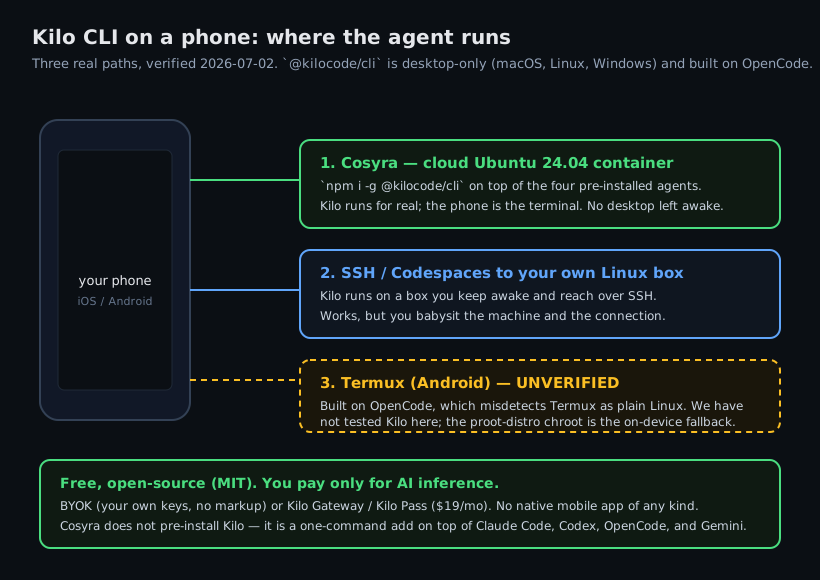
Three ways, in order of how well they work without a desktop: a cloud Ubuntu
container where kilo actually runs (Cosyra), SSH or Codespaces to
your own Linux box, and Termux on Android (which we can't promise works).
1. Cosyra: npm install Kilo CLI in a cloud container
Cosyra is a native iOS and Android terminal connected to a persistent Ubuntu
24.04 x86_64 container. Node.js is already installed, so
npm install -g @kilocode/cli works and kilo executes
in the container, so nothing of yours has to stay awake. We ship
four agent CLIs pre-installed
(Claude Code, Codex, OpenCode, Antigravity), and Kilo is a one-command add on
top, which is honest to say plainly: we do not pre-install Kilo, you add it yourself.
- Works when: you want
kilorunning on demand from either platform with no home machine to maintain. - Breaks when: you have no internet. The container is in the cloud, so there is no offline mode.
- Cost: Core is $20/month and Pro is $30/month. Eligible new users can start a 7-day free trial in the App Store app. See pricing. Your Kilo inference (BYOK, Gateway, or Pass) is separate.
2. SSH or Codespaces to your own Linux box
Install kilo on a Linux machine you own (a home server, a VPS, or
a GitHub Codespace) and
reach it from a phone SSH client. The CLI runs for real, but you keep that
box awake and manage the connection, which is the babysitting a cloud
container removes.
3. Termux on Android: why we won't promise it
Here is the honest version, because guessing here is how bad advice spreads.
Kilo CLI is built on OpenCode, and OpenCode's launcher has historically
misdetected Termux as a plain Linux environment, with the common fix being
to run inside a
proot-distro Debian chroot. It is plausible Kilo inherits those exact issues. But we have not run
@kilocode/cli in Termux on a device, so we will not tell you it works
or that it fails.
If you want to stay on-device, the credible route is a proot glibc distro inside Termux, the same pattern we walk through for a full Debian userland in running a Linux container on Android. Simpler and more reliable: a cloud x86_64 container, where the standard npm install just works.
How do you run Kilo CLI on iPhone or Android with Cosyra?
Four steps: install the app, install kilo, sign in, and run it
in a repo.
Step 1: Install Cosyra and sign in
Download from the App Store or Google Play. You land in a persistent Ubuntu 24.04 x86_64 container with Node.js already installed, which is what the npm install of Kilo CLI needs.
Step 2: Install Kilo CLI
Kilo is not one of the four agents we pre-install, but because the container ships Node.js it is a one-command add. Install it globally, then confirm the binary:
$ cat /etc/os-release | head -1
PRETTY_NAME="Ubuntu 24.04 LTS"
$ npm install -g @kilocode/cli
$ kilo --version
kilo 1.x (built on OpenCode)
Step 3: Sign in (Kilo account or BYOK)
Kilo CLI gives you two auth paths. Sign in with a Kilo account to route inference through the Kilo Gateway or Kilo Pass, or add your own provider API key so you pay Anthropic, OpenAI, or Google directly. If you already keep provider keys for the four pre-installed agents, BYOK is the least new setup.
$ kilo
? How do you want to sign in?
› Kilo account (Gateway / Pass)
Bring your own API key (BYOK)
✓ Ready
Step 4: Clone a repo and start Kilo
$ git clone https://github.com/your-org/your-app.git
$ cd your-app && kilo
Kilo · agentic coding. Type your request.
> Add input validation to the /signup handler
and a test for the empty-email case.
Kilo proposes edits and runs commands the same TUI-first way OpenCode does, so if you have used OpenCode on a phone this will feel identical. Because the container is persistent, you can start a change on the couch, close the app, and pick the same session back up on an iPad at your desk.
Try Cosyra. Plans start at $20/month. It is a real Ubuntu 24.04
box with Node.js, so
npm install -g @kilocode/cli works like it does on any Linux machine.
App Store /
Google Play /
Pricing details
What are the real limits of running Kilo CLI on a phone?
- No offline mode. The container is in the cloud; no internet, no terminal. A local Termux install would run offline if it worked, which is the honest trade-off.
- Two things to keep track of. Kilo has its own account and billing layer on top of whatever container you run it in. That is fine, but it is a second login to manage next to your Cosyra account.
- You add it yourself. Kilo is not pre-installed; the four agents we ship are Claude Code, Codex, OpenCode, and Antigravity. Adding Kilo is one npm command, but it is a step.
- Phone keyboards slow long prompts. Voice dictation and a Bluetooth keyboard help a lot. We think the phone keyboard is fine for agent-driven coding, where you write intent, not boilerplate. Most people who disagree haven't tried it for a full session.
Cosyra vs SSH vs Termux for Kilo CLI
Cosyra runs kilo for real with nothing left awake; SSH or Codespaces
works if you already keep a Linux box on; Termux on Android is unverified. The
table lines them up, checked 2026-07-02.
| Feature | Cosyra | SSH / Codespaces | Termux |
|---|---|---|---|
| Kilo CLI actually runs | In the cloud container | On your own Linux box | Unverified (OpenCode base) |
| Needs a machine you keep awake | No | Yes | n/a |
| Platforms | iOS + Android | Any phone SSH client | Android only |
| Full shell on the phone | Yes | Yes (over SSH) | Yes, but Kilo may not install |
| Setup time | ~5 min | Depends on your box | Uncertain |
| Cost (excl. AI inference) | From $20/mo | Your box + your time | Free |
Prefer one of the agents that is pre-installed? See Claude Code on phone, Codex CLI on phone, Antigravity on a phone, and OpenCode on phone (the CLI Kilo is built on), or the pillar on AI coding agents on mobile. Weighing the hosted-container trade-off against Kilo's free desktop software? See Cosyra vs Kilo Code.
Frequently asked questions
Can you run Kilo CLI on a phone?
Not as a native app. Kilo CLI (@kilocode/cli) is a desktop
terminal agent for macOS, Linux, and Windows, with no iOS or Android build
on kilo.ai/cli or in the docs. The working path from a phone is to install
it via npm in a cloud Linux container (Cosyra), where kilo genuinely
runs and your phone is the terminal, or to SSH from your phone to your own Linux
box that has it installed. The VS Code and JetBrains surfaces need a desktop
editor, so they do not help on a phone.
[source: Kilo CLI page, kilo.ai/cli]
Is Kilo Code free?
The agent software is free and open source under the MIT license. The CLI, the VS Code extension, and the JetBrains plugin cost nothing. You pay for AI inference, and there are three shapes as of 2026-07-02: BYOK (your own provider keys, no Kilo cut), the Kilo Gateway (pay-as-you-go at provider rates, zero markup), or Kilo Pass (a subscription from $19/month). So the tool is free; the tokens are not.
Is Kilo CLI the same as the Kilo VS Code extension?
They share the same open-source agent and config, but they are different
surfaces. Kilo ships as a VS Code extension, a JetBrains plugin, a CLI (@kilocode/cli), and a hosted Cloud offering, and one Kilo account works across all of
them. On a phone only the CLI path is realistic, because the editor
extensions need a desktop IDE. The extension started as a fork of Roo
Code; the CLI is built on OpenCode.
[source: Kilo CLI page, kilo.ai/cli]
Does Kilo CLI work in Termux on Android?
We do not know, and we will not claim either way without a hands-on test.
Kilo CLI is built on OpenCode, whose launcher has historically misdetected
Termux as a plain Linux environment, with the common fix being a
proot-distro Debian or Ubuntu chroot. It is plausible Kilo inherits those
issues, but we have not run @kilocode/cli in Termux ourselves.
The reliable Android path is a proot glibc distro inside Termux, or a cloud
x86_64 container where the standard npm install just works.
[source: Kilo CLI docs, supported platforms]
Is Kilo CLI built on OpenCode?
Yes. Kilo's own CLI page describes it as built on OpenCode, an MIT-licensed CLI for agentic coding, and says they kept everything that makes OpenCode great. OpenCode is one of the four CLIs we pre-install and run in production, so the runtime shape is familiar. Kilo is still its own product with its own Gateway and Pass billing and its own account layer, and its command surface can differ from OpenCode's, so check the docs before assuming a specific flag carries over.
tl;dr
Kilo CLI (@kilocode/cli) is desktop-only (macOS, Linux,
Windows, no mobile app), free and open source under MIT, and built on
OpenCode. To run kilo from a phone, install it via npm in a cloud
Ubuntu container (Cosyra), sign in with a Kilo account or your own provider
key, and run it in a repo. Termux on Android is unverified because Kilo inherits
OpenCode's Termux misdetection.
App Store / Google Play. Plans start at $20/month.
Run Kilo CLI from your phone.
Install Cosyra, npm install -g @kilocode/cli, sign in, and
go.