You can run goose on your phone today, iPhone or Android, but not by running
the agent on the phone. goose is an open-source command-line AI agent that
needs a real Linux shell. The fastest path: install
Cosyra for iOS or
Cosyra for Android, open the Ubuntu container,
install the goose CLI with
curl -fsSL .../download_cli.sh | bash, run
goose configure with your own provider key, then
goose session. goose is not one of the agents we pre-install,
so this is the guide where you add it yourself. Plans start at $20/month.
This guide was written by the Cosyra team. We installed and ran goose inside a Cosyra container from a phone, and we cross-checked every claim about goose against the official aaif-goose/goose repo, the goose installation docs, and the Goose AI App Store listing, verified 2026-07-11.
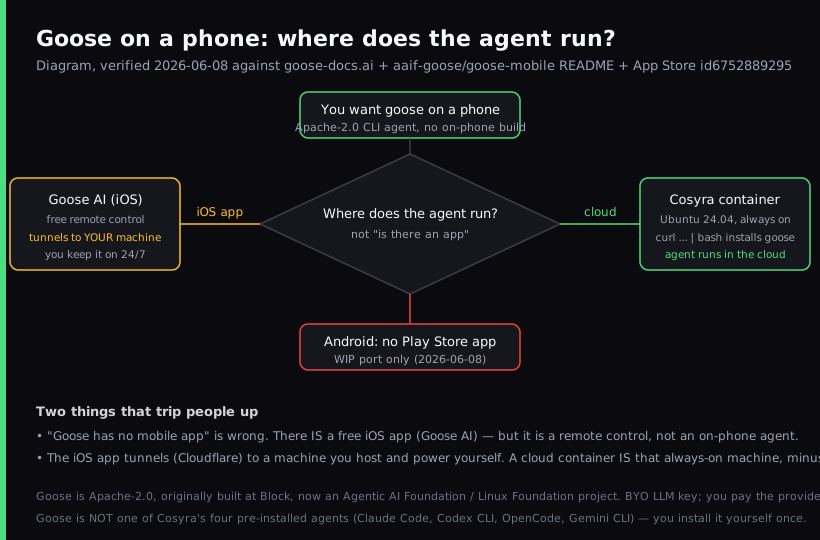
The one thing people get wrong about goose on a phone: "goose has no mobile app" is false, and "the goose app lets you code on your iPhone" is misleading. There is a free iOS app, Goose AI, but it is a remote control. It tunnels over HTTPS to a goose agent running on a machine you host and keep powered on around the clock. The agent never runs on the phone. So the real question is not "is there an app" but "where does the agent run", and a cloud container answers that without a home server.
What is goose?
goose is an open-source, extensible AI agent that runs on your machine and
goes beyond code suggestions: it can install, execute, edit, and test with
any LLM you bring. It started at Block, then moved to the Agentic AI
Foundation under the Linux Foundation, so the repo now lives at
aaif-goose/goose, about
51,100 GitHub stars, Apache-2.0, latest release
v1.41.0 (2026-07-03) as of 2026-07-11. It ships a desktop app and
a CLI for macOS, Linux, and Windows, and it is extensible over MCP.
The thing that defines goose, and the reason it is worth running from a phone at all, is that it is an autonomous agent rather than an autocomplete. You describe a goal, and it plans the steps, edits files, runs shell commands, and checks its own work. That loop wants a real shell with a package manager and network access. A phone keyboard is fine for kicking off that loop; what you actually need is somewhere for the loop to run.
The opinion we hold that the self-hosting crowd will push back on: the honest answer to "I want goose on my phone" is to stop running the agent on hardware you have to babysit. The "keep a beefy desktop on 24/7 and tunnel into it" setup is a real, free option, and for someone who already runs that machine it is genuinely nice. But we would rather not own, power, patch, and expose a home server just to check on an agent from the train. Put the agent on a cloud box that is already always on, and the phone becomes the only device you carry. The goose iOS app is one of a whole class of relay tools; our remote-control vs cloud coding guide weighs the relay shape against a cloud container across every option.
How can you run goose from a phone?
You can reach goose from a phone three ways, and the deciding factor is where the agent process lives: a cloud Ubuntu container reached from a native app (Cosyra), the Goose AI iOS app pointed at your own always-on machine, or an SSH client into a VPS you run. Comparison current as of 2026-07-11.
1. Cosyra: run the goose CLI in a cloud container
This is what we built: a native iOS and Android terminal connected to a persistent Ubuntu 24.04 container. Claude Code, Codex CLI, OpenCode, and Antigravity CLI are already installed; goose is the one you add with the official installer. The container is always on, so the agent has somewhere to run and keep running while your phone sleeps.
- Works when: you want goose running in the cloud, reachable from both iOS and Android, with no home server to keep powered and patched.
- Breaks when: you are offline. The container lives in the cloud, so no internet means no terminal. Full trade-off list in Cosyra vs Termux.
- Cost: Core is $20/month and Pro is $30/month. Eligible new users can start a 7-day free trial in the App Store app. Your model tokens are billed by your provider. See pricing.
2. Goose AI iOS app pointed at your own machine
The free Goose AI app is a remote control. You run the goose agent on a desktop or server you own, expose it through a tunnel, and the app connects back over HTTPS to watch and drive it. The goose-mobile README describes the iOS client as "an implementation of a remote protocol to access the goose agent" that "connects back to your goose agent from anywhere, via a tunnel."
- Works when: you already keep a powerful machine on around the clock and want a free way to check on long-running jobs from your phone.
- Breaks when: that machine sleeps, reboots, or loses its tunnel. The phone is only a window; the agent depends entirely on your host staying up.
- Cost: free app, free goose, plus the electricity and upkeep of an always-on machine and a tunnel you maintain.
3. SSH from an iOS client into your own VPS
On iPhone or iPad, an SSH client into a VPS works. Spin up a box, install
the goose CLI on it, SSH in inside a tmux session, and run
goose session. Most VPS images are x86_64, so the installer
pulls the same prebuilt binary it does on Cosyra; the difference is you are
now the sysadmin.
- Works when: you want a box that is yours and an iOS-native keyboard.
- Breaks when: you do not want to patch, harden, and back up a server. More in SSH from your phone.
- Cost: the SSH client plus the VPS (about $5 to $40/month). No Android equivalent for the iOS-only clients.
How do you set up goose on iPhone or Android?
You set up goose on iPhone or Android in about five minutes with Cosyra: install the app, open the container, install the goose CLI, configure your provider key, and run a session. The install is one command because the container is x86_64 and the installer ships a prebuilt binary.
Step 1: Install Cosyra and open a container
Download from the App Store or Google Play. Sign in with Apple, Google, or email. On first launch we provision a fresh Ubuntu 24.04 container with Node.js, Python, Git, and tmux already on it. This is the always-on machine goose runs on, so there is nothing to keep powered at home.
Welcome to Cosyra.
Ubuntu 24.04.1 LTS (x86_64)
Pre-installed: claude, codex, agy, opencode
(goose is not pre-installed, we add it below)
Step 2: Install the goose CLI
goose is not one of the four agents we pre-install, so you add it with the
official installer. On x86_64 this pulls a prebuilt binary, so it is a
download, not a build. We ran this in a fresh container and
goose --version reported 1.37.0.
$ curl -fsSL https://github.com/aaif-goose/goose/releases/download/stable/download_cli.sh | bash
Downloading goose (x86_64)...
goose installed to ~/.local/bin/goose
$ goose --version
goose 1.37.0
Step 3: Configure your LLM provider
goose is BYOK and model-agnostic. Run goose configure, choose a
provider, and paste your own key. The config lands in the container's home
volume, so it survives hibernation and is there on every device you sign in
from.
$ goose configure
? Provider: Anthropic
? API key: sk-ant-************
Saved to ~/.config/goose/config.yaml
# OpenAI, Gemini, OpenRouter also work
Step 4: Start a goose session
Clone your repository, cd into it, and start a session. Describe
the change; goose plans, edits, runs commands, and tests, then reports back. Because
the container is persistent, you can close the app mid-task and reopen later to
pick up where it left off.
$ git clone https://github.com/your-org/your-project.git && cd your-project
$ goose session
goose 1.37.0, provider: anthropic, working dir: your-project
> Add a retry with backoff to the fetch in src/api/client.py and run the tests
edited src/api/client.py · ran pytest · 14 passed
Try Cosyra. Eligible new users can start a 7-day free trial in the App Store app. Claude Code, Codex CLI, OpenCode, and Antigravity CLI come pre-installed; add goose with one install command. App Store / Google Play / Pricing details
What can you actually do with goose on your phone?
The honest pitch for goose on a phone is an autonomous agent that keeps working while you are not looking at it. Three sessions we run from a phone.
Kick off a task on the train and read the result later
You have a self-contained chore: bump a dependency and fix what breaks. On
the train, open Cosyra, cd into the repo, run
goose session, and describe it. goose works through the change
while you put the phone away. Because the container stays up, the diff and
test output are waiting when you check back at the next stop.
Triage a failing test from the couch
Saturday morning, phone in hand, CI is red. Point goose at the failure: "the test in tests/test_invoice.py is failing, find out why and fix it." It reads the traceback, edits the code, reruns the test, and tells you what it changed. You review the diff on the phone and decide whether to keep it.
Keep a private repo inside the container
Because goose is BYOK and the container is yours, a sensitive repo can stay inside the box. Point goose at the provider you trust, and the code never leaves the container for anything except the model calls you configured. For the cross-agent view of how this compares to the agents we pre-install, see the AI coding agents on mobile pillar.
What are the real limits of running goose on a phone?
Knowing where this setup stops helps you match it to the right job instead of fighting it.
- No offline mode on Cosyra. The container lives in the cloud, so no internet means no goose. If you code on planes with no wifi, an agent on local hardware is the only thing that runs there.
- Not pre-installed on Cosyra. Unlike Claude Code, Codex CLI, OpenCode, and Antigravity CLI, you install goose yourself. It is one command, but it is a command. See OpenCode on phone for the other open-source agent, which we do pre-install.
- The iOS remote-control app is a different thing. If you install Goose AI from the App Store expecting an on-phone agent, you will be confused. It needs a machine you host. Running the CLI in a container is the setup this guide covers instead. Jules carries the same trap: its only mobile client is an unofficial third-party app that browses sessions, not a shell into the agent.
- You pay your provider. goose is free, but the tokens are not. Budget for API spend the same way you would on a laptop.
- No Docker-in-Docker guarantee. If a task goose runs needs
docker, verify it works before committing to phone-only.
Who should pick each option?
Choose the Goose AI iOS app if you already keep a powerful machine on around the clock, you want a fully self-hosted agent, and you do not mind running a tunnel. Choose an SSH client plus a VPS if you are on iOS, you already run a box, and you want full control of the host. Choose Cosyra if you want goose running in the cloud on both iOS and Android without maintaining a machine, and you want Claude Code, Codex CLI, OpenCode, and Antigravity CLI sitting next to goose in the same container. We weigh that trade-off in full, a self-hosted local agent with an iOS remote against a hosted cloud container with native apps, in Cosyra vs goose, including what a "free" self-hosted stack actually costs once you price the always-on host.
For the same walkthrough with other user-installed CLIs, see Aider on phone and Qwen Code on phone.
Frequently asked questions
Can you run goose on a phone?
Yes, but not by running the agent on the phone itself. goose is a
command-line AI agent that needs a real Linux shell, and there is no build
that runs the agent on iOS or Android. The clean path is a cloud Ubuntu
container reached from a native app: install the goose CLI with the
official curl installer, run goose configure to set your provider
key, then goose session. The agent runs in the cloud and you
drive it from your phone.
[source: goose-docs.ai, installation docs, CLI install + providers]
Is there a Goose mobile app?
There is a free iOS app called Goose AI (App Store ID 6752889295), published by goose maintainer Michael Neale. Be precise about what it does: it is a remote control, not an on-phone agent. The app tunnels over HTTPS to a goose agent running on a machine you host and keep on around the clock. The model and the agent never run on the phone. If you do not already keep an always-on machine, running goose inside a cloud container skips that requirement.
[source: App Store, Goose AI, free, by Michael Neale, remote access]
Is there a Goose Android app?
No, not on the Play Store as of 2026-07-11. The goose-mobile repo has an early work-in-progress client port and a separate experimental on-device automation proof of concept, but neither is a shipped Play Store app. The README states an Android client is planned as a port of the iOS remote control and will land on Google Play eventually. To use goose from Android today, run it in a cloud Linux container and reach it from the app or a browser. We walk through that path step by step in Block Goose on Android: the no-Play-Store-app workaround.
[source: GitHub, aaif-goose/goose-mobile README, iOS client + Android planned]
Is goose free?
The goose CLI and desktop app are free and open-source under Apache-2.0, and the Goose AI iOS app is also free. You pay only your own LLM provider for tokens, because goose is BYOK and does not host or proxy any models. If you run goose on your own hardware you also pay to power and maintain that machine; in a cloud container, the container is the line item instead.
[source: GitHub, aaif-goose/goose, Apache-2.0 license + repo metadata]
Which LLM providers does goose support?
goose is model-agnostic. Its install docs list OpenAI, Google Gemini, OpenRouter, the Tetrate Agent Router, and a ChatGPT subscription path, among others, and the docs note goose currently works best with Claude 4 models. You bring your own key for whichever provider you choose. Inside a Cosyra container you can also point goose at a local model if you prefer to keep everything in the box.
[source: goose-docs.ai, installation docs, provider list + BYOK]
Is goose a Block product?
It started at Block, but it is no longer a Block product in the present tense. goose moved to the Agentic AI Foundation under the Linux Foundation, and the repo now lives at github.com/aaif-goose/goose with around 51,100 stars and an Apache-2.0 license as of 2026-07-11. The honest description is: originally built at Block, now a neutral Linux Foundation project.
[source: GitHub, aaif-goose/goose, org ownership + license + stars]
tl;dr
goose is an open-source (Apache-2.0) AI agent for the terminal, BYOK and
model-agnostic, now under the Linux Foundation. There is a free Goose AI
iOS app, but it is a remote control that tunnels to a machine you host,
and there is no Android app on the Play Store yet (2026-07-11). To
actually run goose from a phone without babysitting a home server, install
the goose CLI inside a Cosyra container,
curl -fsSL .../download_cli.sh | bash, then
goose configure and goose session, and the agent
runs in the cloud on iOS or Android. Bring your own provider key.
App Store / Google Play. Sign up and pick a plan. Eligible new users can start a 7-day free trial in the App Store app.
Run goose from your phone. Install Cosyra, install the goose
CLI, run goose configure, then goose session.