There is no Goose Android app on the Play Store as of 2026-07-11. If you
searched block goose android expecting Block's AI agent on Google
Play, here is the honest picture: goose left Block for the Linux Foundation, and
its only mobile client is an iOS remote control with no Android version shipped
yet. The way to actually run goose on Android today is to install the open-source
goose CLI inside a cloud Linux container and reach it from a native app: install
Cosyra for Android, run curl -fsSL .../download_cli.sh | bash, then
goose configure and goose session. Plans start at
$20/month.
This guide was written by the Cosyra team. We installed and ran goose inside a Cosyra container from an Android phone, and we cross-checked every claim against the official aaif-goose/goose repo, the goose-mobile README, and the work-in-progress Android port, verified 2026-07-11.
Two things people get wrong about goose on Android: first, "goose is a Block app" is stale; it moved to the Agentic AI Foundation at the Linux Foundation. Second, "there must be a Goose Android app by now" is false. The Play Store has no official build; what exists is an early port and an experimental device-automation proof of concept. The useful question is not "which app do I download" but "where does the agent run," and on Android the clean answer is a cloud container.
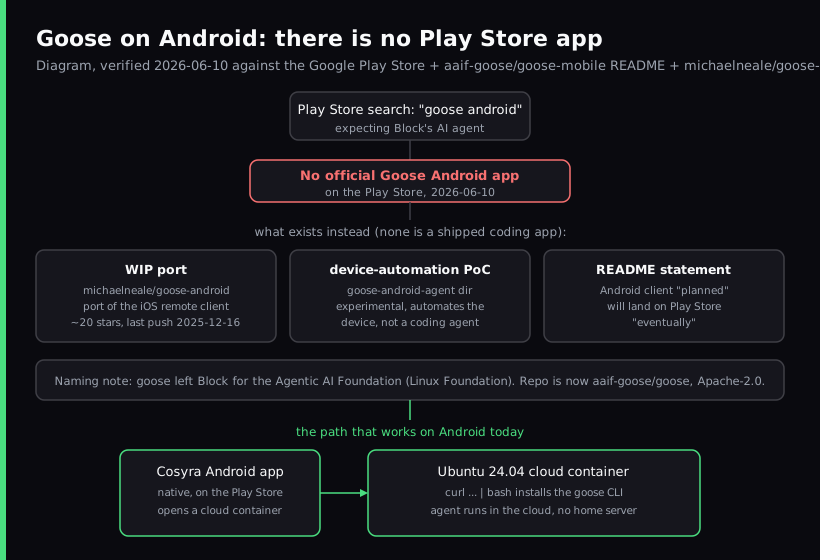
Is there a Goose Android app?
No official one. We searched the Play Store for goose on 2026-07-11 and found no shipped app from the goose project. Three things exist, and it helps to name each so you do not download the wrong one:
- A work-in-progress port. michaelneale/goose-android is an early Android client, described in its own repo as based on goose-ios. It had about 25 stars and was last pushed 2025-12-16 when we checked: not a Play Store release, and not actively shipping.
- A device-automation proof of concept. The
goose-android-agentdirectory in the goose-mobile repo is an experimental agent that automates your whole Android device. Its own README says it needs deep device access and is best considered experimental. It is not the goose coding agent. - An official "planned" note. The goose-mobile README says an Android client is planned as a port of the iOS remote control and "will be available on google play store eventually." Eventually is not today.
So if your plan was "download the Goose app on my Pixel and start coding on the bus," there is no app to download. That is not a knock on the project; goose is a serious open-source agent, and this is just the honest state of the Android client.
Wait, isn't goose a Block product?
It started at Block, which is exactly why "block goose android" is a common
search. The naming is now out of date. goose moved to the Agentic AI
Foundation under the Linux Foundation, and the repo lives at
aaif-goose/goose, about
51,100 stars, Apache-2.0, latest release v1.41.0 (2026-07-03) as
of 2026-07-11. The accurate phrasing is "originally built at Block, now a neutral
Linux Foundation project." If you were looking for a Block-published app on Google
Play under that old branding, it does not exist, and it would not be published
by Block today anyway.
Can you run goose on Android with Termux?
This is the first thing most Android developers try, and it is more friction
than it looks. The official installer pulls a prebuilt binary built against
glibc. Termux runs an Android bionic-libc userland, so that binary will not
just execute, so you would reach for proot-distro to put a real Linux
userland on top, then install goose inside that. It is doable, but it is a stack
of moving parts, and the agent stops the moment Android kills the background process
or the battery dies on a long task.
The opinion we hold that the self-host crowd will disagree with: for an autonomous agent that you want to keep working while your phone is in your pocket, a cloud x86_64 box beats a phone-local userland. The same one-line installer that fights Termux pulls a binary that runs immediately in a container, and the agent keeps going while the phone sleeps. If you genuinely need offline, Termux is the only thing that runs with no signal, and we say so plainly in Cosyra vs Termux. For the goose-specific version of this argument, self-hosted local agent plus iOS remote versus a hosted cloud container, and what the "free" stack really costs, see Cosyra vs goose.
How to run goose on Android via a cloud container
The setup is about five minutes. It is the same install whether you are on a phone or an Android tablet, because the work happens in the container, not on the device. For the cross-platform version of this walkthrough, including the iOS paths, see Run goose on your phone. goose is one of several agents you can drive from Android. Our Coding on Android pillar covers the full set alongside Termux, on-device Linux, and the cloud-container trade-offs.
Step 1: Install the Cosyra Android app
Install from Google Play and sign in with Google, email, or Apple. On first launch we provision a fresh Ubuntu 24.04 container with Node.js, Python, Git, and tmux already on it. This is the always-on machine goose runs on, the thing the iOS remote app makes you supply yourself.
Welcome to Cosyra.
Ubuntu 24.04.1 LTS (x86_64)
Pre-installed: claude, codex, agy, opencode
(goose is not pre-installed. We add it below)
Step 2: Install the goose CLI
One command. Because the container is x86_64, the installer pulls a prebuilt
binary, a download, not a build, and not the libc fight you get in Termux.
We ran this in a fresh container and goose --version reported
1.37.0.
$ curl -fsSL https://github.com/aaif-goose/goose/releases/download/stable/download_cli.sh | bash
Downloading goose (x86_64)...
goose installed to ~/.local/bin/goose
$ goose --version
goose 1.37.0
Step 3: Configure your LLM provider
goose is BYOK and model-agnostic. Run goose configure, pick a
provider, and paste your own key. The config lands in the container's home
volume, so it survives hibernation and is there the next time you open the
Android app.
$ goose configure
? Provider: Anthropic
? API key: sk-ant-************
Saved to ~/.config/goose/config.yaml
# OpenAI, Gemini, OpenRouter also work
Step 4: Start a goose session
Clone your repo, cd in, and start a session. Describe the change;
goose plans, edits, runs commands, and tests, then reports back. Lock the phone
mid-task and the work continues in the cloud.
$ git clone https://github.com/your-org/your-project.git && cd your-project
$ goose session
goose 1.37.0 — provider: anthropic, working dir: your-project
> Fix the failing test in tests/test_invoice.py and rerun
edited src/invoice.py · ran pytest · 14 passed
Try it on your Android phone. Plans start at $20/month. Claude Code, Codex CLI, OpenCode, and Antigravity CLI come pre-installed; add goose with one command. Google Play / App Store / Pricing details
Who should wait for the official app, and who should not?
Wait for the official Android client if you specifically want goose's own remote-control app and you already run a powerful machine at home around the clock to point it at. That is the shape the iOS app and the planned Android port are built for, and it is free. Use a cloud container now if you do not want to own, power, and patch a home server, if you want the agent to keep running while your phone is locked, or if you want goose sitting next to Claude Code, Codex CLI, OpenCode, and Antigravity CLI in one persistent Linux workspace.
The honest tie-breaker: a remote-control app, whenever the Android version ships, still needs a machine you keep on somewhere. The cloud container is that machine, already on, reachable from the native Android app with no tunnel to configure. For the broader map of agent CLIs on a phone, see the AI coding agents on mobile pillar.
Frequently asked questions
Is there a Goose Android app on the Play Store?
No. As of 2026-07-11 there is no official Goose Android app on Google Play. The goose-mobile repo has an early work-in-progress client port (michaelneale/goose-android, about 25 stars, last updated 2025-12-16) and a separate experimental on-device automation proof of concept, but neither is a shipped Play Store app. The README states an Android client is planned as a port of the iOS remote control and will land on Google Play eventually. To run goose from Android today, run the CLI in a cloud Linux container.
[source: GitHub, aaif-goose/goose-mobile README, iOS client + Android planned]
Is goose a Block product? Why do people search "block goose"?
goose started at Block, which is why many people still search for "block goose". It is no longer a Block product in the present tense: goose moved to the Agentic AI Foundation under the Linux Foundation, and the repo now lives at github.com/aaif-goose/goose with about 51,100 stars and an Apache-2.0 license as of 2026-07-11. The honest description is: originally built at Block, now a neutral Linux Foundation project.
[source: GitHub, aaif-goose/goose, org ownership + license + stars]
Can I run goose on Android with Termux?
Not cleanly. The official goose installer ships prebuilt x86_64 and arm64 binaries built against glibc, and Termux runs an Android bionic-libc userland, so the prebuilt binary will not just run. You would need proot-distro to put a real Linux userland on top, then install inside that. A cloud x86_64 container skips all of it: the same one-line installer pulls a binary that runs immediately, and the agent keeps running while your phone sleeps, which Termux on battery does not.
[source: goose-docs.ai, installation docs, prebuilt binary install]
What is goose-android-agent? Is it the coding agent?
No, and the names are easy to confuse. The goose-android-agent directory in the goose-mobile repo is an experimental proof of concept of an agent that automates your whole Android device, and the README warns it requires deep device access and is best considered experimental. It is not the goose coding agent and not a Play Store app. The coding agent is the goose CLI, which runs in a Linux shell. On Android, that means a cloud container.
[source: GitHub, aaif-goose/goose-mobile README, goose-android-agent PoC]
How do I run goose on Android without a home server?
Install the goose CLI inside a cloud Ubuntu container and reach it from the Cosyra Android app. The free Goose AI app is iOS-only and is a remote control that needs a machine you host and keep on around the clock; there is no Android equivalent, and either way it does not run the agent on the phone. A cloud container is the always-on machine instead, so nothing at home has to stay powered. Steps: install Cosyra, run the goose installer, run goose configure, then goose session.
[source: GitHub, aaif-goose/goose, Apache-2.0 CLI, official installer]
Does the goose iOS app have an Android version?
Not yet. The free Goose AI app (App Store ID 6752889295) is published for iOS only by goose maintainer Michael Neale, and it is a remote control that tunnels to a goose agent on a machine you host. The goose-mobile README describes the Android client as a planned port of that iOS app, not something shipped. Until it ships, an Android phone reaches goose through a cloud container reachable in a native app or browser.
tl;dr
There is no official Goose Android app on the Play Store as of 2026-07-11,
only a stale work-in-progress port and an experimental device-automation
PoC. goose also is not a Block product anymore; it moved to the Linux
Foundation (aaif-goose/goose, Apache-2.0). To run goose on Android today,
install the goose CLI inside a Cosyra cloud container,
curl -fsSL .../download_cli.sh | bash, then
goose configure and goose session, and the agent
runs in the cloud, reachable from the native Android app with no home
server. Bring your own provider key.
Google Play / App Store. Sign up and pick a plan, from $20/month.
Run goose on your Android phone. Install Cosyra, install the
goose CLI, run goose configure, then goose session.