You can run Cline on your phone today, iPhone or Android, but not with a
Cline app. There isn't one. Cline is an open-source AI coding agent that
lives inside a desktop IDE (a VS Code extension, a JetBrains plugin, a CLI,
and an SDK), with no native mobile build at all. The fastest path: install
Cosyra for iOS or
Cosyra for Android, open the Ubuntu container,
install the Cline CLI with npm i -g cline, run
cline auth with your own provider key, then cline.
Cline is not one of the agents we pre-install, so this is the guide where
you add it yourself. Plans start at $20/month.
This guide was written by the Cosyra team. We installed and ran the Cline CLI inside a Cosyra container from a phone, and we cross-checked every claim about Cline against the official cline/cline repo, the Cline CLI docs, and cline.bot/pricing, verified 2026-07-12.
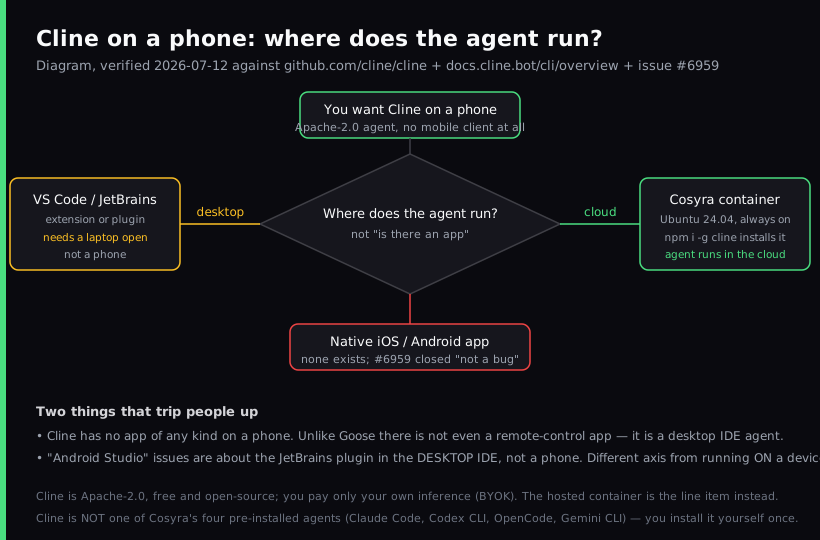
The one thing people get wrong about Cline on a phone: they go looking for a Cline app. There isn't one, not a native client, not even a remote-control app like some agents ship. Cline is an editor-embedded agent. So the real question is not "is there an app" but "where does the agent run", and a cloud container answers that, because the Cline CLI is the same Apache-2.0 agent as the extension, just driven from a terminal.
What is Cline?
Cline is an open-source autonomous coding agent that runs inside your
editor: it reads and edits files across a project, runs shell commands with
live output, and works through a Plan-and-Act loop with an approval
workflow. The repo at
cline/cline had 64,555 GitHub stars
when we checked on 2026-07-12, is Apache-2.0 licensed, and is one of the largest
AI coding agents by reach, with the homepage citing "8.0M+ installs." The IDE
release was v4.0.8 (2026-07-11, a major v3 → v4 bump); the standalone
npm CLI package cline was at 3.0.39.
Cline ships five ways, and all of them are desktop: a VS Code extension, a
JetBrains plugin, the cline CLI, an SDK, and a Kanban web board for
orchestrating tasks. It runs on macOS, Windows, and Linux, and it also works inside
Cursor and Windsurf, which are themselves VS Code forks. What it does not have
is any mobile surface, no native iOS, iPadOS, or Android app, verified 2026-07-12.
The Kanban board is a task view in a browser, not an editor or terminal you can
drive a session from.
The opinion we hold that Cline's core audience will push back on: if you want Cline "on your phone," the honest move is to stop tying the agent to a laptop you have to keep awake. The desktop extension is genuinely excellent at a desk. Multi-file diffs and the Plan/Act approval flow inside a real editor beat a phone terminal when you're sitting down. But the agent doesn't need the editor to run; it needs a shell, a package manager, and network access. Put the CLI on a cloud box that is already always on, and you can kick off a Cline session from the train without leaving VS Code open on a machine at home.
How can you run Cline from a phone?
There are three honest ways to reach Cline from a phone, and the deciding factor is where the agent process lives: the Cline CLI in a cloud Ubuntu container reached from a native app (Cosyra), the Cline CLI on a VPS you run yourself reached over SSH, or, if you're really at a desk, just the VS Code extension on a laptop. Comparison current as of 2026-07-12.
1. Cosyra: run the Cline CLI in a cloud container
This is what we built: a native iOS and Android terminal connected to a
persistent Ubuntu 24.04 container. Claude Code, Codex CLI, OpenCode, and
Antigravity CLI are already installed; Cline is the one you add with
npm i -g cline. The container is always on, so the agent has
somewhere to run and keep running while your phone sleeps.
- Works when: you want Cline running in the cloud, reachable from both iOS and Android, with no laptop to keep open and no machine to maintain.
- Breaks when: you are offline. The container lives in the cloud, so no internet means no terminal. Full trade-off list in Cosyra vs Termux.
- Cost: Core is $20/month and Pro is $30/month. Eligible new users can start a 7-day free trial in the App Store app. Cline's software is free; your model tokens are billed by your provider. See pricing.
2. Cline CLI on your own VPS over SSH
On iPhone or iPad, an SSH client into a VPS works. Spin up a box, run
npm i -g cline on it, SSH in inside a tmux session, and run
cline. Most VPS images are x86_64 Linux, so the CLI installs
the same way it does on Cosyra; the difference is you are now the sysadmin.
- Works when: you want a box that is yours and an iOS-native keyboard, and you already run server infrastructure.
- Breaks when: you do not want to patch, harden, and back up a server. More in SSH from your phone.
- Cost: the SSH client plus the VPS (about $5 to $40/month). No Android equivalent for the iOS-only SSH clients.
3. Stay on the VS Code extension at a desk
The honest third option: if you're actually sitting at a laptop, don't fight it. Use the Cline VS Code extension. Multi-file diffs, checkpoints, and the Plan/Act approval panel inside a real editor are a better editing experience than a phone terminal when you have a keyboard and a big screen. The phone setups above are for when the laptop is the thing you don't have with you. For the full head-to-head on where each one wins, see Cosyra vs Cline.
- Works when: you are desk-bound and want the richest editing UX, free, in the editor you already use.
- Breaks when: you are away from the machine. The extension needs the IDE open and the computer on. That's the gap the cloud container fills.
- Cost: free extension; you pay only inference (BYOK).
How do you set up Cline on iPhone or Android?
You set up Cline on iPhone or Android in about five minutes with Cosyra: install the app, open the container, install the Cline CLI, authenticate your provider, and run a session. The install is one npm command because Node.js is already in the container.
Step 1: Install Cosyra and open a container
Download from the App Store or Google Play. Sign in with Apple, Google, or email. On first launch we provision a fresh Ubuntu 24.04 container with Node.js, Python, Git, and tmux already on it. This is the always-on machine the Cline CLI runs on, so there is no laptop to keep open.
Welcome to Cosyra.
Ubuntu 24.04.1 LTS (x86_64)
Pre-installed: claude, codex, agy, opencode
(cline is not pre-installed; we add it below)
Step 2: Install the Cline CLI
Cline is not one of the four agents we pre-install, so you add it with npm.
Node.js is already present, so this is a normal global install with no extra
toolchain. We ran this in a fresh container and cline --version
reported 3.0.39.
$ npm i -g cline
added 1 package in 4s
$ cline --version
cline 3.0.39
Step 3: Authenticate your LLM provider
Cline is BYOK and model-agnostic. Run cline auth, choose a
provider, and authenticate with your own key. Anthropic, OpenAI, Google
Gemini, OpenRouter, AWS Bedrock, Ollama, and many OpenAI-compatible
endpoints are supported. The credentials land in the container's home
volume, so they survive hibernation and are there on every device you sign
in from. You can also override the provider and model per run with -P and
-m.
$ cline auth
? Provider: Anthropic
? API key: sk-ant-************
Authenticated. Saved to ~/.config/cline
# OpenAI, Gemini, OpenRouter, Bedrock also work
Step 4: Start a Cline session
Clone your repository, cd into it, and run cline for
an interactive session, or pass the task inline. Cline plans, edits files, runs
commands, and checks its own work in the Plan-and-Act loop, then reports back.
Because the container is persistent, you can close the app mid-task and reopen
later to pick up where it left off.
$ git clone https://github.com/your-org/your-project.git && cd your-project
$ cline "add a retry with backoff to the fetch in src/api/client.py and run the tests"
cline 3.0.39 · provider: anthropic, working dir: your-project
Plan: edit client.py, add backoff, run pytest
edited src/api/client.py · ran pytest · 14 passed
Try Cosyra. Eligible new users can start a 7-day free trial
in the App Store app. Claude Code, Codex CLI, OpenCode, and Antigravity CLI
come pre-installed; add Cline with one
npm i -g cline.
App Store /
Google Play /
Pricing details
What can you actually do with Cline on your phone?
The honest pitch for Cline on a phone is an autonomous agent that keeps working while you are not looking at it, in the cloud, without a laptop in the loop. Three sessions we run from a phone.
Kick off a refactor on the train and review the diff later
You have a self-contained chore: migrate a module to async/await. On the
train, open Cosyra, cd into the repo, and run
cline "refactor src/api/client.py to async/await and update callers". Cline works through the change while you put the phone away. Because the
container stays up, the diff and test output are waiting when you check back
at the next stop.
Triage a failing test from the couch
Saturday morning, phone in hand, CI is red. Point Cline at the failure:
cline "tests/test_invoice.py is failing, find out why and fix it". It reads the traceback, edits the code, reruns the test in the same
shell, and reports what it changed. You review the diff on the phone and
decide whether to keep it. The Plan/Act approval step means it shows you the
plan before it touches anything.
Keep a private repo inside the container
Because Cline is BYOK and the container is yours, a sensitive repo can stay inside the box. Point Cline at the provider you trust, and the code never leaves the container for anything except the model calls you configured. For the cross-agent view of how this compares to the agents we pre-install, see the AI coding agents on mobile pillar.
What are the real limits of running Cline on a phone?
Knowing where this setup stops helps you match it to the right job instead of fighting it.
- No offline mode on Cosyra. The container lives in the cloud, so no internet means no Cline. If you code on planes with no wifi, an agent on local hardware is the only thing that runs there.
- You lose the editor UI. The CLI is the same agent as the VS Code extension, but you give up the inline diff panel and the visual Plan/Act view. On a phone that's a fair trade; at a desk, the extension is nicer. See OpenCode on phone for an agent we do pre-install.
- Not pre-installed on Cosyra. Unlike Claude Code, Codex CLI, OpenCode, and Antigravity CLI, you install Cline yourself. It is one command, but it is a command.
- You pay your provider. Cline's software is free and open-source (Apache-2.0), but the tokens are not. Budget for API spend the same way you would on a laptop.
- No Docker-in-Docker guarantee. If a task Cline runs needs
docker, verify it works before committing to phone-only.
Who should pick each option?
Choose the VS Code extension if you are at a desk on a capable laptop and want the richest free editing UX in the editor you already use. Choose an SSH client plus a VPS if you are on iOS, you already run a box, and you want full control of the host. Choose Cosyra if you want Cline running in the cloud on both iOS and Android without keeping a laptop open, and you want Claude Code, Codex CLI, OpenCode, and Antigravity CLI sitting next to Cline in the same container.
For the same walkthrough with other user-installed CLIs, see Aider on phone and Qwen Code on phone. On a tablet instead of a phone, see Cline on an iPad, where the missing iPadOS build runs two walls deep. Cline is also the first name on our list of Continue.dev alternatives that still work now that Continue's own CLI has frozen.
Frequently asked questions
Can you run Cline on a phone?
Yes, but not with a Cline app. There isn't one. Cline ships only as a
desktop VS Code extension, a JetBrains plugin, a CLI, and an SDK, and
there is no native iOS, iPadOS, or Android build. The way to get Cline on
a phone is the CLI: install it with npm i -g cline inside a cloud
Ubuntu container reached from a native app, run cline auth to set
your provider key, then cline. The agent runs in the cloud
and you drive it from your phone.
[source: docs.cline.bot, CLI overview, npm i -g cline install + usage]
Is there a Cline mobile app?
No. As of 2026-07-12 there is no native iOS, iPadOS, or Android app for Cline, and there is no remote-control app either. Cline is an editor-embedded agent, not a hosted service with a phone client. The Android support request was closed on 2026-02-16 with the maintainer comment "Closing - Feature request not a bug," and an earlier "Android adaptation" request was closed 2025-07-26. To use Cline from a phone, run its CLI in a cloud Linux container.
[source: GitHub, cline/cline issue #6959, Android support, closed "not a bug"]
Does Cline have an Android app?
No native Android app exists. Be careful with two things that look like Android support but are not: the "Android Studio" issues are about Cline's JetBrains plugin running inside the desktop Android Studio IDE, not on an Android phone, and the mobile-development issue is about Cline helping you build mobile apps, not run on one. Distribution is desktop only. The practical Android path is to install the Cline CLI in a cloud x86_64 container and reach it from the Cosyra Android app or any browser.
[source: GitHub, cline/cline, VS Code / JetBrains / CLI / SDK, desktop distribution]
How do I install the Cline CLI?
The Cline CLI is an npm package. With Node.js present, run
npm i -g cline, then start it by running cline for
an interactive session or cline "your task" to pass a task directly.
Authenticate a provider once with cline auth. Inside a Cosyra
container Node.js is already installed, so this is one command with no
setup. The CLI is the same Apache-2.0 agent as the VS Code extension,
driven from a terminal instead of an editor panel.
[source: docs.cline.bot, CLI overview, install + run + auth]
Is Cline free?
The Cline software is free and open-source under Apache-2.0. The VS Code extension and the CLI both cost $0. You pay only for model inference, because Cline is BYOK: bring your own provider key, or use Cline's at-cost inference option. As of 2026-07-12, cline.bot/pricing lists only two tiers, Open Source (Free) and Enterprise (Custom); third-party listicles citing a "$20/mo Teams" plan are stale. If you run Cline in a cloud container, the container is a separate line item from the free software.
[source: cline.bot/pricing, Open Source (Free) + Enterprise (Custom)]
Is Cline pre-installed in Cosyra?
No. The four agents we pre-install are Claude Code, Codex CLI, OpenCode,
and Antigravity CLI. Cline is the one you add yourself with
npm i -g cline. Because Cline is Apache-2.0 and the container
is a normal Ubuntu machine, it installs and runs the same way it would on
any Linux box. You just don't have to supply or maintain that box.
[source: GitHub, cline/cline, Apache-2.0 license + repo metadata]
tl;dr
Cline is one of the largest open-source AI coding agents (64,555 stars,
Apache-2.0, as of 2026-07-12), and it has no mobile client of any kind. It
lives inside a desktop IDE as a VS Code extension, a JetBrains plugin, a
CLI, and an SDK. There is no native iOS, iPadOS, or Android app, and none
is planned (Android issue #6959 closed "not a bug," 2026-02-16). To
actually run Cline from a phone, install its CLI inside a Cosyra
container,
npm i -g cline, then cline auth and
cline, and the agent runs in the cloud on iOS or Android.
Bring your own provider key; the software is free.
App Store / Google Play. Sign up and pick a plan. Eligible new users can start a 7-day free trial in the App Store app.
Run Cline from your phone. Install Cosyra, run
npm i -g cline, then cline auth and
cline.