Short answer. Cosyra vs Happy Coder comes down to one line: Happy relays your phone to Claude Code or Codex running on a computer you own; Cosyra runs the agent in a cloud container so there is no computer to keep awake. Happy is free, open source (MIT), end-to-end encrypted, self-hostable, and has realtime voice control on a metered free tier (verified 2026-07-21). Cosyra starts at $20/month for a persistent Ubuntu 24.04 x86_64 box with Claude Code, Codex CLI, OpenCode, and Antigravity CLI pre-installed, reached from native iOS and Android apps. Pick Happy if you already own an always-on machine; pick Cosyra if you don't want to.
We wrote this from a phone on the couch with every laptop in the house shut, which is the whole test. Happy Coder is the first competitor we have covered that has a real, polished mobile app for our exact query, so this is a genuine head-to-head and not a strawman. But the moment you close the laptop, Happy's phone app has nothing to talk to, because the Claude Code session it drives runs on that laptop. On Cosyra the laptop never mattered. That contrast is the spine of this page.
This post was written by the Cosyra team. We compared Cosyra against Happy Coder based on hands-on testing of both: pairing Happy's CLI wrapper with a local Claude Code session and driving it from the phone, reading happy.engineering and its docs first-hand, and checking the slopus/happy GitHub repo and the App Store listing. License, version, ratings, and the relay architecture were verified 2026-07-21 against our internal Happy Coder factsheet.
tl;dr
Use Happy Coder if you already own an always-on machine and want $0, maximum privacy (end-to-end encryption plus a self-hostable relay), realtime voice control, and an open-source tool that drives your existing Claude or Codex session. Use Cosyra if you want the compute itself in the cloud with nothing to keep awake: a real Ubuntu container on a phone where the agent runs whether or not any laptop is on. Happy relays to your machine; Cosyra is the machine.
App Store · Google Play. Sign up and pick a plan. Eligible new users can start a 7-day free trial in the App Store app.
Want a phone that doesn't depend on a laptop being awake? Our container is an always-on x86_64 Linux machine in the cloud, with Claude Code, Codex CLI, OpenCode, and Antigravity CLI ready to drive from iOS or Android. Nothing at home to keep running.
App Store · Google Play · Pricing. Sign up and pick a plan, from $20/month.
How do Cosyra and Happy Coder compare feature by feature?
Both put Claude Code on your phone, but from opposite ends. Happy Coder is a free relay to an agent running on your own computer; Cosyra is a paid cloud container that runs the agent for you. Happy's $0 assumes you already have an always-on machine; Cosyra's $20/month is that machine. The table below lines them up on twelve attributes, verified 2026-07-21.
| Feature | Cosyra | Happy Coder |
|---|---|---|
| Pricing | $20 / month Core or $30 / month Pro | Free (MIT); you pay only your existing AI plan |
| Free tier | None. 7-day free trial for eligible new users in the App Store app | Entirely free; App Store lists in-app purchases |
| OS support | iOS, Android, web | iOS, iPadOS, Android, web (relay client) |
| AI agents pre-installed | Claude Code, Codex CLI, OpenCode, Antigravity CLI (BYOK) | None bundled; drives your local Claude Code or Codex |
| Where the agent runs | Cloud Ubuntu container; no home machine needed | Your own computer; relay only passes encrypted blobs |
| Persistent storage | 30 GB cloud, survives device loss | Local disk on your own machine |
| Offline capability | No (cloud-only) | No to start work; needs your machine awake + online |
| Container sandboxing | Per-user Ubuntu container on Azure AKS | None; runs on whatever machine you pair |
| Encryption model | Hosted container (code runs on Azure) | End-to-end encrypted, self-hostable relay |
| Voice control | No | Yes: realtime voice, not just dictation. 20 min free per 30 days, then a subscription (unlimited with your own ElevenLabs agent) |
| API key model | BYOK (you pay Anthropic / OpenAI / Google) | Uses your existing Claude / ChatGPT auth or key |
| Open-source status | Client app closed, orchestration proprietary | Open source, MIT (app + CLI) |
Want the agent to run without your laptop? We ship a persistent x86_64 Ubuntu container with four agents pre-installed, reached from native iOS and Android apps. The agent runs in the cloud, so a sleeping desktop never stops you mid-task.
App Store · Google Play · Pricing. Sign up and pick a plan. Eligible new users can start a 7-day free trial in the App Store app.
Relay vs hosted compute: the one distinction that matters
Happy Coder has three parts: a CLI wrapper on your computer that launches
Claude Code or Codex, the mobile and web app, and a relay server connecting
them. You type happy instead of claude, the agent
runs locally exactly as it always did, and the relay passes only
end-to-end-encrypted blobs to your phone (github.com/slopus/happy, verified
2026-07-21). It is a genuinely clever design, and for someone with a desktop
humming away at home it is close to free. The catch is structural: Happy
provides zero compute. The agent lives on a machine you have to own, power,
and keep online.
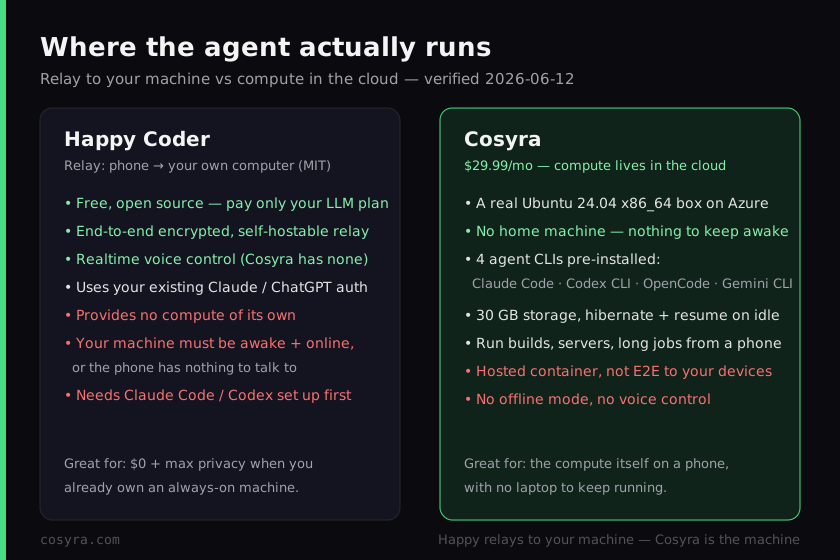
Cosyra inverts that. The agent runs in a per-user Ubuntu 24.04 x86_64 container on Azure, reached from native iOS and Android apps, and the four CLIs are already on the PATH. There is no second machine in the loop. We think that difference is the entire decision, and most "Claude Code on phone" posts skip it: Happy makes your phone a great window into a computer you must keep running, and Cosyra makes your phone a window into a computer that is always running for you. Be precise about it in both directions, because the easy mistakes are real.
Two of those mistakes to avoid. "Happy Coder runs Claude Code in the cloud" is wrong: it runs on your own machine and the relay only passes encrypted messages. And "Happy Coder is just a paid clone of Cosyra" is also wrong and unfair: it is free, MIT-licensed, and a fundamentally different architecture. The honest framing is relay versus hosted compute, and once you see it that way the right pick falls out of your own situation.
What happened when we paired Happy with a local session?
It worked exactly as advertised, and then it stopped exactly where the
design says it would. We installed the wrapper with npm install -g happy, ran happy in a repo on a laptop, scanned the pairing code with
the app, and drove a real Claude Code session from the phone. Smooth. Then we
shut the laptop lid, the thing you actually do when you leave the house, and the
phone had nothing to talk to until we opened the laptop again. Nothing broke;
that is simply what a relay is. Here is the wrapper side.
$ npm install -g happy
added 1 package in 3s
$ happy # launches Claude Code locally, relays to the app
> Happy relay connected · scan the pairing code in the app
> Claude Code session running on THIS machine · end-to-end encrypted
$ # close the laptop and the phone has nothing to drive
Now the Cosyra side of the same couch test. There is no laptop in it at all. We open the app, land in the container, and the agent is already there in the cloud. The point isn't that one session is faster; it's that one of them depends on a machine being awake somewhere and the other doesn't. On a train with a dead laptop in your bag, that is the whole ballgame.
$ cat /etc/os-release | head -1
PRETTY_NAME="Ubuntu 24.04 LTS"
$ which claude codex opencode agy
/usr/local/bin/claude
/usr/local/bin/codex
/usr/local/bin/opencode
/usr/local/bin/agy
$ claude # runs in the cloud container, no home machine
> Claude Code · /home/you/project · ready
Where does Happy Coder beat Cosyra?
Happy beats Cosyra on cost, privacy, voice, and using the subscription you already pay for. We ship a paid hosted product and we still think Happy is excellent and well-built; its 4.9-star rating from 941 reviews is earned. Here is where it is the better pick, with the receipts from happy.engineering and its GitHub repo, verified 2026-07-21.
- Free and open source (MIT). The app and CLI cost nothing and the source is public (github.com/slopus/happy). If you already own an always-on machine, your only spend is the Claude or ChatGPT plan you already have. Cosyra's $20/month cannot beat $0 for someone who already has the hardware.
- End-to-end encryption and a self-hostable relay. Encryption happens on-device and the relay sees only encrypted blobs, and you can host the relay yourself so code never touches a third-party box (happy.engineering). Cosyra runs your code in a hosted Azure container; for privacy-sensitive or air-gapped work that alone is disqualifying, and we'll say so plainly. Happy wins that profile outright.
- Realtime voice control. Happy lets you drive the agent by voice, not just dictation, which is a genuinely different interaction model for a phone. Cosyra has nothing like it. If you want to talk to your agent on a walk, Happy is the one that does it today. Know the meter before you lean on it: voice runs on ElevenLabs and you get 20 minutes free per 30 days, then it's a paid subscription, or unlimited if you point it at your own ElevenLabs agent (their own docs/paid-voice.md, verified 2026-07-21).
- Uses your existing auth. Happy drives vanilla Claude Code or Codex with the Claude Max or ChatGPT Pro subscription you already pay for, with no separate key-paste step and no extra infrastructure bill. If you live inside one provider's subscription, that is less friction than BYOK on a new machine.
Where does Cosyra beat Happy Coder?
Cosyra beats Happy on not needing a home machine at all, zero setup, a persistent workspace that follows you across devices, and being a real x86_64 box you can run builds and servers on. The trade-off for Happy's freedom and privacy is that it hands you no compute; you supply the machine. We'd rather hand you the machine.
No home machine to keep awake
This is the load-bearing difference. Happy's agent runs on a computer you own, so that computer has to be on, unlocked enough to keep the process alive, and on the network. Cosyra's agent runs in the cloud, so a sleeping desktop, a dead laptop battery, or a laptop you simply left at home never strands you. The same thing that makes Happy free if you have hardware makes it useless if you don't have it powered on. Cosyra removes the dependency entirely.
Zero setup, four agents already there
Happy needs Claude Code or Codex installed and maintained on your machine first, plus the wrapper and a pairing step. A Cosyra container boots with Claude Code, Codex CLI, OpenCode, and Antigravity CLI already on the PATH, all BYOK, so you pick the right tool per task without installing anything. For a phone-first workflow, the difference between "set up an agent on a machine, then pair it" and "open the app and type" is most of the experience.
A real machine, not just a window into one
Because Cosyra is an actual x86_64 Ubuntu box, you can run builds, start a dev server and preview it, run native binaries, and kick off long jobs that keep going while the container hibernates and resumes on reopen. Happy is bounded by whatever your home machine can do and whether it stays on. If you want to spin up work from scratch on the go, you want the machine, not a remote control for one.
An opinion the Happy crowd will push back on
We think, for most people coding from a phone, the home machine is the weak link, not the feature. The Happy crowd will disagree, and with conviction: they'll say the entire point is that your code stays on hardware you own, end to end, with nothing in a third-party cloud. For privacy-sensitive and air-gapped work they are right, and we'll say so without hedging. But "free" quietly assumes a machine that is always on, always patched, and always reachable, and most people on a train with a dead laptop in their bag don't have that. We'd rather put the machine in the cloud than ask you to babysit one at home. That is the exact reason we built Cosyra as hosted compute instead of a relay.
Who should pick Happy Coder instead of Cosyra?
Pick Happy Coder instead of Cosyra if you already own an always-on machine and you want $0, maximum privacy, voice control, or an open-source tool you can self-host. For those profiles Happy is the better pick, and we'd tell you so. The deciding question is simple: do you have a computer you're happy to leave running, and do you need your code to never leave hardware you control?
Try Happy Coder first if you are one of these profiles
- You already have an always-on machine and want $0. A desktop or a home server that stays on, plus the Claude or ChatGPT plan you already pay for, and Happy adds no compute bill at all. If the hardware is a sunk cost, free beats $20/month and we won't pretend otherwise.
- Privacy is non-negotiable. You need code to stay on devices you control, end to end, maybe behind a relay you host yourself. A hosted container is a non-starter for you on policy or principle. Happy is built for exactly that, and Cosyra is not.
- You want to talk to your agent. Realtime voice control is a real part of how you'd work from a phone, on a walk or in the car. Happy has it today; Cosyra doesn't. Budget for it if you'd use it daily. 20 minutes a month is free, past that it's a subscription or your own ElevenLabs key.
We reach for a relay like Happy when we have a machine we trust sitting at home and privacy is the priority, and for Cosyra when we want the agent to just be there on the phone with no laptop to keep alive. They're honestly different tools for different situations, and the home machine is the variable that decides it. If you're weighing Happy against other relay apps like AgentsRoom (which we put head to head in Cosyra vs AgentsRoom), RemoteCode (the lean Mac-to-iPhone relay we cover in Cosyra vs RemoteCode), Goose (which we compare in Cosyra vs Goose), and Omnara (the free remote-control app we put head to head in Cosyra vs Omnara), and VibeTunnel (the tunnel that turns your own Mac into the remote box, covered in Cosyra vs VibeTunnel), our remote-control vs cloud coding guide maps every relay option against the cloud-container shape in one place.
How do you try Cosyra if you're coming from Happy Coder?
You try Cosyra from a Happy background in about two minutes, and there is no pairing step because there is no second machine. Install from the App Store or Google Play, sign in, and you land in a fresh Ubuntu 24.04 x86_64 container with the four agents already on the PATH. Where Happy asks you to set up an agent on your computer and pair it, Cosyra just drops you into the machine. For the agent-by-agent tour, see running Claude Code on your phone.
The big unlock for most people coming from Happy: nothing at home has to stay awake. The container is the always-on machine, it hibernates when idle and resumes where you left off, and you reach the same container from an iPhone, an Android tablet, or a laptop browser with state intact. You trade Happy's $0-and-privacy for a hosted machine that is simply always there. Whether that trade is worth it is exactly the decision this page is about.
Frequently asked questions
Does Happy Coder run Claude Code in the cloud?
No. Happy Coder is a relay, not a computer. You install a CLI wrapper on
your own machine and run happy instead of claude or
codex; that starts a normal local Claude Code or Codex
session, and the phone app drives it over an end-to-end-encrypted relay.
The agent's compute, files, and tokens all live on the machine you own.
Happy provides no compute of its own (verified 2026-07-21). Cosyra is the
opposite shape: the agent runs in a cloud Ubuntu container, so there is no
home machine in the loop.
[source: github.com/slopus/happy, relay architecture, agent runs on your machine]
Do I need my own computer to use Happy Coder?
Yes. Happy needs Claude Code or Codex already installed and running on a
machine you own, plus the happy CLI wrapper and a pairing step.
The phone is a remote control for that machine. If the machine is off, asleep,
or off-network, the agent is not running and the app has nothing to talk to
(verified 2026-07-21). That is the one assumption Cosyra removes: the container
is the machine, so there is nothing at home to keep awake.
[source: happy.engineering, runs on your hardware, the relay carries it to your phone]
Is Happy Coder free?
The app and CLI are free and MIT-licensed (verified 2026-07-21). The iOS listing says "Free with In-App Purchases" but does not name a price for them, and the relay is self-hostable, so the core costs nothing. Your only spend is your existing Claude or ChatGPT plan, or API usage. Cosyra Pro is $30/month, which buys the always-on x86_64 machine the agent runs on rather than the agent itself.
[source: github.com/slopus/happy, MIT license, free app and CLI]
Is Happy Coder open source?
Yes. It all lives in one MIT-licensed TypeScript monorepo at
github.com/slopus/happy, 22,766 stars, last push 2026-07-21, with the app,
the CLI, and the relay server as separate packages. It is actively
maintained by a community project, not a company (verified 2026-07-21).
The standalone github.com/slopus/happy-cli repo is archived; CLI work
moved into packages/happy-cli in the monorepo. You can read the
relay code and self-host it. Cosyra's client app is closed and the orchestration
is proprietary, so if open source is a hard requirement, Happy wins that line
outright.
[source: github.com/slopus/happy, MIT-licensed monorepo, packages/happy-cli]
Can I use Happy Coder if my laptop is asleep?
Not to start new work. Happy queues messages while the machine is offline, and a task already in flight on your machine keeps running, but you cannot begin a fresh agent session unless the machine is awake and on the network, because that is where the agent actually runs (verified 2026-07-21). On Cosyra the agent runs in the cloud, so a sleeping desktop or a dead laptop battery never strands you.
[source: happy.engineering, the agent runs on your machine; the phone drives it]
What is the difference between Happy Coder and Cosyra?
Architecture. Happy relays your phone to Claude Code or Codex running on your own computer, end-to-end encrypted, with realtime voice control and a $0 core. Cosyra runs Claude Code, Codex CLI, OpenCode, and Antigravity CLI in a hosted Ubuntu 24.04 x86_64 container you reach from native iOS and Android apps, with nothing at home to keep awake but a $20/month bill and no offline mode. Pick Happy for $0 and privacy if you own an always-on machine; pick Cosyra for the compute itself in the cloud.
[source: App Store, "Codex & Claude Code on the go", Bulka, LLC, 4.9/5]
Four agents pre-installed, running in the cloud, with no laptop to keep awake. We run them in a real x86_64 Ubuntu container, reached from a native iOS or Android app. Two-minute setup, no pairing step, no machine at home to babysit.
Claude Code on your phone · AI coding agents on mobile · See pricing. Sign up and pick a plan. Eligible new users can start a 7-day free trial in the App Store app.