Short answer. Cosyra vs Onepilot comes down to one axis: who owns the server. Onepilot is a closed-source iPhone app that connects over direct SSH to a Linux box you already run, then deploys Claude Code or Codex onto it and babysits the session. Cosyra is the box: a per-user Ubuntu 24.04 container we run, with Claude Code, Codex CLI, OpenCode, and Antigravity CLI already installed, reached from native iOS and Android apps. Pick Onepilot if you already run a homelab or VPS and want it in your pocket. Pick Cosyra if you want an agent on a phone with no server to supply. Onepilot is one of a whole family of relay apps that put the compute on a box you own; our relay-vs-cloud pillar lines them all up against the cloud-container route.
This is the closest comparison we've written, and that's why we did it carefully. Onepilot is BYOK, runs on an iPhone, and drives the same terminal-native agents we pre-install. We read onepilotapp.com, its /about page, the Hermes agent page, and the App Store listing first-hand on 2026-07-04, and the difference never moves off a single line: Onepilot manages an agent on a machine you own; we are the machine. Everything below is downstream of that.
This post was written by the Cosyra team. We compared Cosyra against Onepilot based on hands-on testing of both, reading onepilotapp.com, its /about and /agents/hermes pages, and the App Store listing (id6759485908) first-hand, and running the same agents in our own container, plus our internal Onepilot factsheet. Platform, version, and pricing verified 2026-07-04.
tl;dr
Use Onepilot if you already run a Linux server and want a polished iPhone SSH client that deploys and supervises Claude Code or Codex on it, with Telegram/Discord/Slack control and no per-hour compute meter. Use Cosyra if you want to code from a phone with no machine to supply: a managed Ubuntu container with four agents pre-installed, on iOS or Android. Same agents, same BYOK. The fork is who owns the server.
App Store · Google Play. Sign up and pick a plan. Eligible new users can start a 7-day free trial in the App Store app.
Want Claude Code on your phone with no server to set up? Our container is the always-on Linux box Onepilot expects you to bring. Claude Code, Codex CLI, OpenCode, and Antigravity CLI are already on the PATH, reached from a native iOS or Android app.
App Store · Google Play · Pricing. Sign up and pick a plan, from $20/month.
How do Cosyra and Onepilot compare feature by feature?
Cosyra is a managed cloud container reached from native iOS and Android apps with agents pre-installed; Onepilot is an iPhone app that connects over SSH to a Linux box you provide and deploys an agent onto it. Both are BYOK, both run Claude Code and Codex, and both live on a phone. The table lines them up on thirteen attributes, verified 2026-07-04.
| Feature | Cosyra | Onepilot |
|---|---|---|
| Pricing | $20 / month Core or $30 / month Pro | Free to start; Pro $49.99 / year or $6.99 / month |
| Free tier | None. 7-day free trial for eligible new users in the App Store app | Free to start (you still supply and pay for the server) |
| OS support | iOS, Android, web | iOS only (iOS 18.6+); no Android, no web, no desktop |
| AI agents pre-installed | Claude Code, Codex CLI, OpenCode, Antigravity CLI | None on managed infra; wizard installs Claude Code / Codex on your box |
| Who owns the compute | We do (managed Ubuntu container on Azure AKS) | You do (a Linux server you run and maintain) |
| Persistent storage | 30 GB cloud, survives device loss | On your own server; you size and back it up |
| Offline capability | No (cloud-only) | No (needs an SSH connection to the remote box) |
| Container sandboxing | Per-user isolated container on Azure AKS | Your server, your setup; not sandboxed by Onepilot |
| Port forwarding | Inside your container | Over SSH to your box (you configure it) |
| File sync across devices | Same container from any device | File browser over SSH to your one box; iPhone only |
| Max session length | Hibernates on idle, resumes on reopen | No per-hour meter (you own the compute) |
| API key model | BYOK (you pay Anthropic / OpenAI / Google) | BYOK (25-provider picker, keys in iOS Keychain) |
| Open-source status | Client app closed, orchestration proprietary | Closed-source, solo-developer iOS app; no public repo |
Don't already run a server? That's the row that decides it. We ship a persistent Ubuntu container with four agents pre-installed, so there's no VPS to rent and no box to patch, reached from iOS and Android in about two minutes.
App Store · Google Play · Pricing. Sign up and pick a plan. Eligible new users can start a 7-day free trial in the App Store app.
The whole comparison in one diagram: who owns the server
Here's the piece you can't copy-paste from another blog, because it took reading both products' actual deployment models to draw. Onepilot and Cosyra look almost identical from the App Store screenshots: a phone, a terminal, Claude Code, BYOK. The difference is one box in an architecture diagram, and it changes everything downstream: cost, setup time, which phone you can use, and what happens when you don't already own a Linux machine.
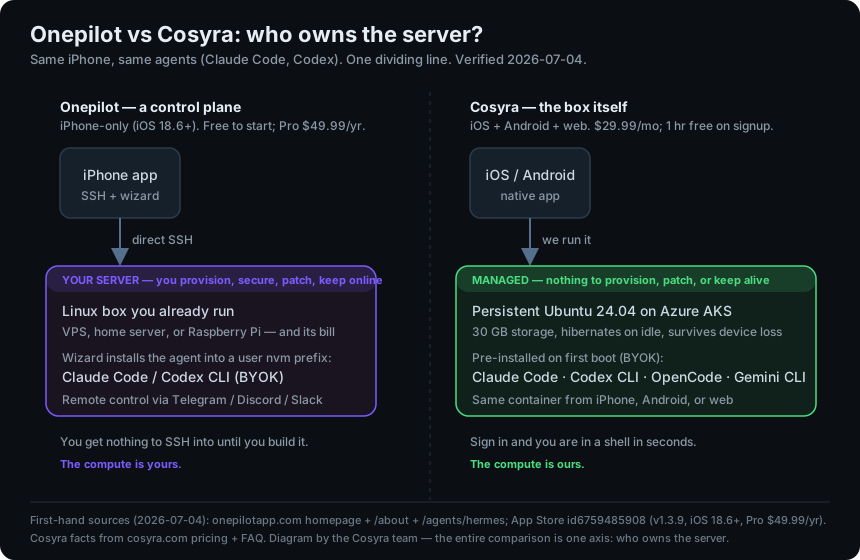
Onepilot solves the session half of running an agent from a phone. It keeps the agent alive, sends a native push when it needs your input, and lets you steer it from Telegram or Slack. It does not solve the server half. That box is yours to stand up, secure, patch, and keep online. Cosyra ships the server half: the container is the always-on machine, it hibernates when idle and resumes where you left off, and the four agents are already there. We ran the same agents in our own container on the couch while writing this, with nothing running at home to keep awake.
$ cat /etc/os-release | head -1
PRETTY_NAME="Ubuntu 24.04 LTS"
$ which claude codex opencode agy
/usr/local/bin/claude
/usr/local/bin/codex
/usr/local/bin/opencode
/usr/local/bin/agy
$ # no server to provision, no ssh key to generate, no os to patch
$ claude "summarise the diff on this branch"
With Onepilot the equivalent first session starts one step earlier: you point it at a server you've already got running, let the deploy wizard install the agent onto that box, and then you're driving it. If you have the box, that's a clean flow. If you don't, the box is the project before the project.
Where does Onepilot beat Cosyra?
Onepilot beats Cosyra on host control, agent-session supervision, provider breadth, and cost if you already run the compute. We ship a managed product and we still think Onepilot is a genuinely well-built app for the right person. Here's where it's the better pick, with the receipts.
- You keep full control of the host. Your own server, your own root, your own network. No third-party cloud to trust with your box. For someone who already runs a homelab or a VPS and wants strict control of where code executes, that's a real advantage we can't match, because our whole model is that we run the machine for you.
- Agent-session supervision done well. Onepilot keeps the agent's session alive and sends a native iOS push when the agent needs input, with control from Telegram, Discord, or Slack (onepilotapp.com/agents/hermes, 2026-07-04). That "get pinged when Claude Code wants approval" loop is a nice piece of UX, and it's the half of the problem Onepilot clearly set out to solve.
- Broad provider choice. Onepilot advertises a 25-provider LLM picker with every key stored only in the iOS Keychain and "no data collection." We're BYOK too, but our agents call the hosted providers they ship with; on raw provider breadth in one picker, Onepilot is wider.
- No per-hour compute meter. Because you own the server, Onepilot imposes no session-hour limit. Cosyra meters compute hours (120/month). If you run very long sessions on hardware you already pay for, that uncapped model can work out cheaper.
- Cheaper software if you already own a box. At $6.99/month, the Onepilot subscription undercuts our $20/month, because the server cost lives on your side of the ledger, not theirs. If that box already exists and is already paid for, the math favours Onepilot.
Where does Cosyra beat Onepilot?
Cosyra beats Onepilot on zero-server onboarding, cross-platform reach, agents that are genuinely pre-installed, and managed persistence you don't have to keep alive. The trade-off for "control your own host" is that you have to own, secure, and babysit a host. We'd rather be that host for you.
No server to provide, secure, or keep online
This is the load-bearing difference. Onepilot gives you nothing to SSH into; it assumes a Linux box is already running, reachable, patched, and firewalled. Standing that up (a VPS or a home server, plus SSH keys, plus keeping it online) is the actual work, and it's work Onepilot leaves to you. Our container is the machine. Sign in and you're in a shell in seconds, with no box to rent and nothing to maintain.
It runs on Android too, not just an iPhone
Onepilot is iOS-only, and it requires iOS 18.6 or later, a high floor that excludes older iPhones and every Android device outright. If you carry a Pixel or a Galaxy, Onepilot simply isn't available. Our native Google Play and App Store apps put the same container in your hand on either platform, and the web client covers everything else.
The agents are already installed, on managed infrastructure
On first boot our container already has Claude Code, Codex CLI, OpenCode, and Antigravity CLI on the PATH: no deploy wizard, no nvm install step, no server for the wizard to run against. Onepilot's wizard installs Claude Code or Codex, but it installs them onto your box; the pre-install only exists once you've supplied the machine. We did the supplying already.
Managed persistence you don't keep alive
A Cosyra container persists in the cloud and is the same container whether you reach it from an iPhone, an Android tablet, or a laptop browser. Drop your phone, buy a new one, log in, and your repo, your shell history, and your half-finished agent session are still there. With Onepilot, persistence lives on the server you run; if that box goes down, reboots, or gets reimaged, the state and the ops are your problem, not the app's.
An opinion Onepilot's crowd will push back on
We think "bring your own server" is the wrong default for coding from a phone, and the homelab crowd will disagree loudly. Their case is real: owning the box means owning the trust boundary, and for some workloads that's non-negotiable. But most people who want to kick off an agent from a train platform don't want to also be the sysadmin for a VPS that has to stay patched and reachable while they're away from a keyboard. The reason we run the container instead of handing you SSH to your own is that the server is exactly the part that turns "code from my phone" back into "carry a laptop, or babysit a box." Onepilot made the polished-SSH-client bet; we made the be-the-server bet.
Who should pick Onepilot instead of Cosyra?
Pick Onepilot instead of Cosyra if you already run a Linux server, you want strict control of where your code executes, or you carry an iPhone and want a polished agent-supervision app on top of a box you already own. For those profiles Onepilot is the better tool, and we'd tell you so.
Try Onepilot first if you are one of these profiles
- You already run a homelab or VPS. The server is a sunk cost you maintain anyway, and you'd rather keep code on hardware you control than on a managed cloud. Onepilot turns that box into a pocket-reachable agent host without changing where anything runs. That's the right answer for you.
- Host-control or data-residency is non-negotiable. If your code cannot execute on third-party managed infrastructure, compliance, air-gap habits, or plain preference, Onepilot's direct-SSH-to-your-box model keeps the trust boundary on your side. We're an Azure-hosted managed product; if that's a dealbreaker, we're honestly not your tool.
- You're iPhone-only and want agent supervision. If you carry an iPhone on iOS 18.6+ and the feature you most want is "ping me when the agent needs input, let me steer it from Slack," Onepilot built exactly that, and it's good at it.
We run managed infrastructure and we're not neutral about it, but if you already own the compute and want it in your pocket, Onepilot is a clean answer to a real problem, and it's the closest neighbour to what we build.
How do you try Cosyra if you're coming from Onepilot?
You try Cosyra from an Onepilot background in about two minutes, and you skip the server step entirely: install from the App Store or Google Play, sign in, and you land in a fresh Ubuntu 24.04 x86_64 container instead of pointing an app at a box you had to stand up. Your four agents are already on the PATH, the provider keys stay yours (BYOK), and there's no VPS bill underneath any of it. The session below is what we run on a fresh install.
$ # No server to point at. This container is the server.
$ whoami && uname -s -m
coder
Linux x86_64
$ which claude codex opencode agy
/usr/local/bin/claude
/usr/local/bin/codex
/usr/local/bin/opencode
/usr/local/bin/agy
$ # bring your key, start coding, nothing to provision
The big unlock for most people coming from Onepilot: there's no box to keep alive anymore. The container is the always-on machine, it hibernates when idle and resumes where you left off, and you reach it the same way from any device, including the Android phone Onepilot can't run on. If the homelab was the reason you liked Onepilot, keep it; if the homelab was the chore you tolerated to use Onepilot, this removes it.
Frequently asked questions
Does Onepilot give you a server, or do you need your own?
You need your own. Onepilot is a control plane, not a cloud environment. It provisions no compute. It connects over direct SSH to a Linux box you already run (a VPS, home server, or Raspberry Pi) and deploys an agent onto it. The homepage's "no hosting fees, no middlemen" means you supply the server; there is nothing to SSH into until you stand one up. Cosyra is the opposite: we run the container, so there is no server for you to provision.
[source: onepilotapp.com, BYO-server, direct SSH, "no hosting fees"]
Is Onepilot free?
Free to start, with a paid Pro tier. The App Store listing lists in-app purchases of $49.99/year or $6.99/month for Onepilot Pro as of 2026-07-04. The "free" framing on the homepage refers to server and middleman cost, you supply the compute, not the app subscription. Cosyra is a subscription: Core is $20/month and Pro is $30/month.
[source: App Store id6759485908, Pro $49.99/yr or $6.99/mo, 2026-07-04]
Does Onepilot work on Android?
No. Onepilot is iPhone-only and requires iOS 18.6 or later as of 2026-07-04. There is no Android build, no web client, and no desktop app. If you carry an Android phone, Onepilot is not an option. Cosyra ships native iOS and Android apps plus a web client, so the same container is reachable from any of the three.
[source: App Store id6759485908, iOS 18.6+, iPhone only]
Can Onepilot run Claude Code and Codex?
Yes, on your server. Onepilot's deploy wizard installs Claude Code or the OpenAI Codex CLI into a user-scoped nvm prefix on the box you connect to (no sudo required), wires it to your API key from the iOS Keychain, and can bind it to a Telegram, Discord, or Slack channel for remote control. It runs the same terminal-native agents Cosyra pre-installs. The difference is where they run, not which agents they are.
[source: onepilotapp.com/agents/hermes, deploy wizard, nvm prefix, channels]
Can I run Claude Code from my phone without setting up a server?
Yes: that is the whole point of a hosted container. In Cosyra you sign in and land in a persistent Ubuntu 24.04 container with Claude Code, Codex CLI, OpenCode, and Antigravity CLI already on the PATH, so there is no VPS to rent, no SSH key to generate, and no OS to patch. With Onepilot you would first have to provision and secure a Linux box, then run its deploy wizard against it.
[see: Claude Code on your phone, the no-server container setup]
Onepilot vs Cosyra: which is cheaper?
It depends on whether you already own a server. Onepilot Pro is $6.99/month, but that price assumes you already run (and pay for) a Linux box elsewhere. Add a VPS and the real total is higher. Cosyra starts at $20/month, and that price is the always-on machine, the 30 GB of storage, and the native apps combined. If you already run a homelab, Onepilot is cheaper; if you don't, Cosyra bundles the compute you would otherwise buy separately.
Same agents, same phone. No server to bring. We run Claude Code, Codex CLI, OpenCode, and Antigravity CLI in a real x86_64 Ubuntu container, reached from a native iOS or Android app, with no box to provision or keep alive. Two-minute setup.
Claude Code on your phone · AI coding agents on mobile · Mobile coding terminal · See pricing. Sign up and pick a plan. Eligible new users can start a 7-day free trial in the App Store app.