Short answer. Cosyra vs Claude Code on the web comes down to
one line: Claude Code on the web is an async agent. You delegate a task
from
claude.ai/code and it opens a pull request on an ephemeral Anthropic-managed
VM, monitored from the iOS app; Cosyra is a persistent interactive terminal
you live in, on native iOS and Android, with
Claude Code, Codex CLI, OpenCode, and Antigravity CLI pre-installed. Claude Code on the web needs a paid Claude plan and GitHub; Cosyra
starts at $20/month, BYOK, any git host. Pick the web runner to delegate a scoped
fix; pick Cosyra to sit down and code from a phone.
We wrote this on a phone in a waiting room, which is exactly the situation that separates the two. When we want a scoped bug fixed while we're doing something else, Anthropic's cloud runner is genuinely good: describe it, walk away, come back to a PR. But when we want to open a shell, poke at a failing test, tail a log, and change our mind three times, an async task-and-PR loop is the wrong tool. We want a terminal, not an outbox. That split is the spine of this page, and we'll be precise about it in both directions.
This post was written by the Cosyra team. We compared Cosyra against Claude Code on the web based on hands-on use of Cosyra and a first-hand read of Anthropic's official Claude Code on the web documentation (code.claude.com) and launch announcement (claude.com/blog). Plans, environment specs, the ephemeral-VM behavior, the iOS-only mobile surface, and the GitHub requirement were verified 2026-07-07 against our internal Claude Code on the web factsheet. Because it is a first-party Anthropic feature rather than a rival startup, we frame this as overlapping-but-different shapes, not "Cosyra beats Claude Code."
tl;dr
Use Claude Code on the web if you want zero setup and zero infra to delegate a well-scoped task and get a pull request: Anthropic runs the box, routes its own frontier models, runs tasks in parallel with Auto-fix and teleport, and folds it into the Pro, Max, Team, or Enterprise plan you may already pay for. Use Cosyra if you want a real interactive terminal on a phone, a persistent Ubuntu box on native iOS and Android, four agent CLIs under BYOK, any git host, 30 GB that survives sessions. One opens a PR; the other hands you a shell.
App Store · Google Play. Sign up and pick a plan. Eligible new users can start a 7-day free trial in the App Store app.
Want a terminal you can actually type in from a phone? Our container is a persistent Ubuntu 24.04 box with Claude Code, Codex CLI, OpenCode, and Antigravity CLI ready to drive from iOS or Android, a real shell, not an async outbox.
App Store · Google Play · Pricing. Sign up and pick a plan, from $20/month.
How do Cosyra and Claude Code on the web compare feature by feature?
Both put a coding agent in the cloud so a phone can reach it, but from opposite ends. Claude Code on the web is a hosted async runner that produces a PR; Cosyra is a hosted interactive terminal you type into. The table below lines them up on twelve attributes, verified 2026-07-07 against Anthropic's docs and our own pricing and FAQ pages.
| Feature | Cosyra | Claude Code on the web |
|---|---|---|
| Pricing | $20 / month Core or $30 / month Pro | Included with a paid Claude plan; no separate compute charge |
| Free tier | None. 7-day free trial for eligible new users in the App Store app | None; requires Pro, Max, Team, or Enterprise premium seats |
| OS support | Native iOS and Android apps, plus web | Web browser; iOS app for monitoring; no Android app |
| Interaction model | Real interactive shell. You type, you live in it | Async: delegate a task, monitor it, get a PR |
| AI agents available | Claude Code, Codex CLI, OpenCode, Antigravity CLI (BYOK) | Claude Code only, on Anthropic's models |
| Persistent storage | 30 GB, survives sessions and device loss | Ephemeral VM reclaimed on idle; ~7-day setup cache |
| Offline capability | No (cloud-only) | No (cloud-only) |
| Container sandboxing | Per-user Ubuntu 24.04 container on Azure AKS | Isolated Anthropic-managed VM per session, security proxy |
| Git host support | Any git host, or no git at all | GitHub for clone + PR; GitLab/Bitbucket via bundle, no pushback |
| Session persistence | Persistent container + hibernate/resume on idle | Box expires on inactivity; history restored on reopen |
| API key model | BYOK (you pay Anthropic / OpenAI / Google) | Claude subscription auth only; no API-key / BYOK path |
| Open-source status | Client app closed, orchestration proprietary | Proprietary, closed-source (first-party Claude Code feature) |
Want the shell, not the outbox? We ship a persistent Ubuntu container with four agents pre-installed, reached from native iOS and Android apps. You type commands and get a prompt back, no PR round-trip, no GitHub requirement.
App Store · Google Play · Pricing. Sign up and pick a plan. Eligible new users can start a 7-day free trial in the App Store app.
Async runner vs interactive terminal: the one distinction that matters
Claude Code on the web has a specific job: from claude.ai/code or
claude --cloud "…" you connect a GitHub repo and describe a task,
Claude Code works autonomously on a fresh Anthropic-managed Ubuntu 24.04 VM, and
it opens a pull request with a summary. Each --cloud call is its
own session, so you can fire several across repos and let them run (Anthropic
docs, verified 2026-07-07). It is a genuinely strong design for "delegate a bugfix,
get a PR." The structural catch is that it is not a shell: the mobile surface
is iOS-only and it monitors and steers the async task, and the VM is ephemeral.
It expires on inactivity and is reclaimed.
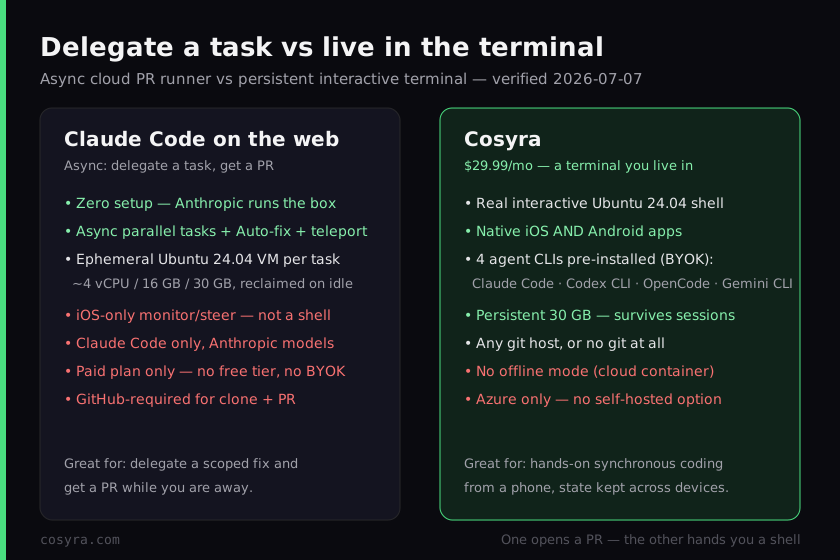
Cosyra inverts that. We run a per-user Ubuntu 24.04 container on Azure, reached from native iOS and Android apps, and the four CLIs are already on the PATH. You don't hand it a task and wait for a PR. You get a prompt and type. We think that difference is the whole decision, and most write-ups blur it: Claude Code on the web makes your phone a great window onto an agent that runs a job for you, and Cosyra makes your phone a window into a machine you operate yourself. Both are honest choices; they just answer different questions.
Two mistakes to avoid, because they're easy and we've seen both. "Claude
Code on the web is a terminal on your phone" is wrong: the mobile app
monitors and steers an async task, not a shell. And "Claude Code on the web
is the same as
Remote Control"
is also wrong. The web runs on Anthropic's own infrastructure with
--cloud, while Remote Control drives Claude Code on
your hardware with --remote-control. Keep the two
apart.
What each one looks like in practice
Here is the Claude Code on the web side, reconstructed from Anthropic's documented behavior rather than a live capture. You invoke a cloud session from the CLI, it runs async, and when the box has been idle you see the reclaim message verbatim from the docs. It is not a prompt you sit at.
$ claude --cloud "fix the failing auth test in api/"
> Created cloud session · running on Anthropic-managed VM
> Working autonomously · will open a PR on your GitHub branch
$ # reopen later, after the box has been idle:
> its environment has expired. Creating a fresh session instead.
Now the Cosyra side of the same waiting-room moment. There's no task to delegate and no PR to wait on. We open the app, land in the container, and the agents are already on the PATH. The point isn't that one is faster; it's that one hands you a prompt and the other hands you a pull request. When you want to poke at a repo interactively, you want the prompt.
$ cat /etc/os-release | head -1
PRETTY_NAME="Ubuntu 24.04 LTS"
$ which claude codex opencode agy
/usr/local/bin/claude
/usr/local/bin/codex
/usr/local/bin/opencode
/usr/local/bin/agy
$ claude # interactive, in the cloud container
> Claude Code · /home/you/project · ready
Where does Claude Code on the web beat Cosyra?
Claude Code on the web beats Cosyra on zero setup, the tightest Anthropic bundle, async parallelism, and enterprise governance. We ship a paid interactive product and we still think the web runner is excellent for the job it's built for. Here is where it's the better pick, with the receipts from Anthropic's own docs and launch post, verified 2026-07-07.
- Zero setup, zero infra. There is no container to provision and no keys to manage. Anthropic runs the box and routes its own frontier models. For "delegate a scoped fix and get a PR," that's hard to beat, and Cosyra's BYOK setup, however light, is still more than nothing.
- Tightest Claude Code bundle, no separate compute charge. It's folded into the Pro, Max, Team, or Enterprise subscription you may already pay for, with Anthropic's models included and no metered VM bill (code.claude.com). If you live inside a Claude plan already, that's one less line item than Cosyra's $20/month plus your own API usage.
- Async parallelism, Auto-fix, and teleport. Fire several tasks
across repos, let them run while you're away, have Claude auto-respond to CI
failures and review comments, then
--teleportany one into your local terminal. Cosyra has no equivalent to that fire-and-forget, many-tasks-at-once model. It's a single box you drive by hand. - Enterprise governance. Server-managed settings, an IP-allowlist story, GitHub Enterprise Server support, and Zero-Data-Retention handling are first-party controls that a small vendor can't match. For a regulated team, that alone can decide it.
Where does Cosyra beat Claude Code on the web?
Cosyra beats the web runner on being an actual interactive terminal, on native Android, on four agents instead of one, on a persistent workspace, and on working with any git host. The trade-off for Anthropic's zero-setup async model is that you never get a shell and you're inside one vendor's models and GitHub. We'd rather hand you the machine.
A real terminal you type in, on iOS and Android
This is the load-bearing difference. Claude Code on the web's mobile surface is iOS-only and it monitors and steers an async task; there is no Android app and no shell you type into on the phone (Anthropic docs, verified 2026-07-07). We give you a real interactive Ubuntu shell on both native iOS and Android, so on a train you can tail a log, rerun a test, edit a file by hand, and change your mind, none of which fits a delegate-and-wait loop.
Four agents, not one, and BYOK
Claude Code on the web runs Claude Code only, on Anthropic's models, with no provider choice. A Cosyra container boots with Claude Code, Codex CLI, OpenCode, and Antigravity CLI already installed, all BYOK, so you pick the right agent and the right provider per task. When one model is having a bad day on a problem, we switch to another in the same shell instead of being routed to a single vendor.
A persistent workspace, any git host
The web runner's VM is ephemeral. It expires on inactivity and is reclaimed, and its work is GitHub-repo-scoped PR tasks. Our container is persistent: 30 GB that survives sessions, hibernating when idle and resuming where you left off, reachable from an iPhone, an Android tablet, or a laptop browser with state intact. And because it's a plain shell, it works with any git host or no git at all, not just GitHub.
An opinion the async crowd will push back on
We think async delegation is the wrong default for coding from a phone. The async crowd will disagree, and with conviction: they'll say the entire point is that you shouldn't babysit an agent from a tiny screen. Hand it a task, put the phone away, review a PR later. For a well-scoped bug on a repo you know cold, they're right, and we'll say so without hedging. But most real mobile coding isn't one clean task handed off in one shot; it's poking, reading, changing your mind, running one more thing. That's a shell, not an outbox, and it's the exact reason we built Cosyra as an interactive terminal instead of a task runner.
Who should pick Claude Code on the web instead of Cosyra?
Pick Claude Code on the web instead of Cosyra if your work is delegatable, GitHub-centric, and already inside a paid Claude plan. For those profiles the web runner is the better pick, and we'd tell you so. The deciding question is simple: do you want to hand off a task and get a PR, or do you want to sit down and operate a terminal?
Try Claude Code on the web first if you are one of these profiles
- You already pay for Claude Pro, Max, Team, or Enterprise. The web runner is included with no separate compute charge, so if your work fits the delegate-a-task-get-a-PR model, it adds no new bill. Cosyra's $20/month plus your own API usage can't beat "already included."
- Your tasks are scoped, async, and GitHub-based. If you can describe a fix in a sentence, walk away, and review a PR later, across several repos in parallel, that's exactly what it's built for, and doing it by hand in a terminal would be slower.
- You need first-party enterprise controls. GitHub Enterprise Server, Zero-Data-Retention handling, and server-managed settings matter for your org. That's Anthropic's ground, not ours.
We reach for the web runner when we have a clean, self-contained task on a GitHub repo and we'd rather review a PR than watch a prompt. We reach for Cosyra when we want to actually be in the machine on a phone. They're honestly different tools, and "delegate vs operate" is the variable that decides it. If you also want an interactive Claude Code terminal without the comparison framing, our Claude Code on the web explainer walks through what it is and where the phone-terminal gap sits, and our remote-control vs cloud coding guide maps every "reach an agent from a phone" option against the cloud-container shape in one place.
How do you try Cosyra if you're coming from Claude Code on the web?
You try Cosyra from a Claude Code on the web background in about two minutes, and there's no repo to connect first because there's no PR workflow in the way. Install from the App Store or Google Play, sign in, and you land in a fresh Ubuntu 24.04 container with the four agents already on the PATH. Where the web runner asks you to pick a repo and describe a task, Cosyra just drops you into the shell. For the agent-by-agent tour, see running Claude Code on your phone.
The big unlock coming from the web runner: it's a terminal, not an outbox. The container is persistent, it hibernates when idle and resumes where you left off, and you reach the same container from an iPhone, an Android tablet, or a laptop browser with state intact. You trade the web runner's zero-setup async delegation for a machine you operate directly, and if a task really is a clean hand-off, nothing stops you from using both.
Frequently asked questions
Is Claude Code on the web an interactive terminal on my phone?
No. Claude Code on the web is an asynchronous task runner: from
claude.ai/code or claude --cloud you point it at a
GitHub repo, describe one task, and it works in the cloud and opens a pull request.
The mobile surface is iOS-only and it monitors and steers that async task. There
is no shell you type arbitrary commands into on the phone, and there is no Android
app as of 2026-07-07. Cosyra is the opposite shape: a real interactive Ubuntu
terminal you live in, on native iOS and Android.
[source: code.claude.com, async task runner, iOS monitoring, opens a PR]
Does Claude Code on the web have a free tier or support BYOK?
No on both. It is included with a paid Claude plan, Pro, Max, Team, or Enterprise premium seats, with no free tier, and there is no separate compute charge for the cloud VM; usage shares your account's rate limits. It routes Anthropic's own models with no API-key or bring-your-own-key path (verified 2026-07-07). Cosyra starts at $20/month and is BYOK: you bring your own Anthropic, OpenAI, or Google key and pick the provider per task.
[source: code.claude.com, paid Claude plan, no separate compute charge, subscription auth]
Does Claude Code on the web keep my files between sessions?
Not the machine. Each session runs on a fresh Anthropic-managed Ubuntu 24.04 VM (roughly 4 vCPU, 16 GB, 30 GB) that is ephemeral. It stops after inactivity and the environment is reclaimed, surfacing as "its environment has expired. Creating a fresh session instead." Conversation history is restored and a setup-script cache is kept about seven days, but the running box is not persistent (verified 2026-07-07). Cosyra gives you 30 GB of persistent storage in a per-user container that survives sessions and follows you across devices.
[source: code.claude.com, ephemeral VM, environment reclaimed on inactivity, ~7-day cache]
Can I run Codex CLI, Gemini CLI, or OpenCode on Claude Code on the web?
No. Claude Code on the web runs Claude Code only, on Anthropic's models. There is no provider choice and no other agent CLI (verified 2026-07-07). Cosyra ships Claude Code, Codex CLI, OpenCode, and Antigravity CLI pre-installed in the same container, all BYOK, so you switch agents per task without installing anything.
[source: claude.com/blog, the Claude Code agent, on Anthropic's models]
Does Claude Code on the web work with GitLab or Bitbucket?
Only in a limited way. Clone and PR creation require GitHub (GitHub Enterprise Server is supported on Team and Enterprise); GitLab, Bitbucket, or local repos work only via a local bundle and can't push results back (verified 2026-07-07). Cosyra is a plain Linux shell, so it works with any git host, or no git at all.
[source: code.claude.com, GitHub for clone and PR; bundle for other hosts, no pushback]
What is the difference between Claude Code on the web and Cosyra?
Shape. Claude Code on the web is Anthropic's hosted, async, GitHub-centric Claude Code agent (research preview since 2025-10-20): you delegate a task and it opens a PR on an ephemeral cloud VM, monitored from the iOS app. Cosyra is a persistent interactive Ubuntu 24.04 container you reach from native iOS and Android apps, with four agent CLIs pre-installed under BYOK, that you live in like any terminal. One opens a PR while you're away; the other hands you a shell on the train.
[source: claude.com/blog, launched 2025-10-20, research preview, iOS app, parallel tasks]
Four agents pre-installed, in a real interactive terminal, on iOS and Android. We run them in a persistent Ubuntu 24.04 container you reach from a native app. Two-minute setup, no repo to connect, no PR round-trip, just a prompt.
Claude Code on your phone · AI coding agents on mobile · See pricing. Sign up and pick a plan. Eligible new users can start a 7-day free trial in the App Store app.